FluxCD
审查基线:自管理的 Flux 2.9.5;在发布说明审查后更新至补丁版本 2.9.6(示例未重新运行) 最后更新:October 12, 2026
FluxCD 是一组面向 Kubernetes 的持续交付和渐进式交付解决方案,具有开放性和可扩展性。FluxCD 于 2022 年 11 月从 CNCF 毕业,使其成为云原生生态系统中最成熟的 GitOps 工具之一。
本章面向自管理的 Flux 2.9.6。CLI 预检要求至少 Kubernetes 1.33;还应检查发行版的实际支持窗口。从 2.6 或更早版本升级前,请审查 2.7+ API 迁移流程。下文的 OCIRepository/Bucket/image API 使用 v1;Notification Provider/Alert 仍使用 v1beta3。
示例使用由平台拥有且受信任的 flux-system 资源。重复出现的 Kustomization 是用于组合的替代方案/片段,而不是依次替换的顺序。请准备实际的仓库 URL、路径、namespace 和 Secret。租户使用要求使用专用 namespace、通过 spec.serviceAccountName 实现的 RBAC/模拟,以及跨 namespace 引用限制。
简介
FluxCD 通过将 Git 仓库作为定义 Kubernetes 集群期望状态的事实来源来实现 GitOps 原则。它会定期协调源变更和漂移。授权、可用性和健康检查失败可能会延迟或阻止收敛。
主要功能
- GitOps 原生:从底层构建以支持 GitOps 工作流
- 多租户:支持多个团队使用相互隔离的配置
- 多集群:从单个 Git 仓库管理多个集群
- 可扩展:采用具有专用 controller 的模块化架构
- Kubernetes 原生:使用 Custom Resource Definitions (CRD) 进行配置
架构概览
FluxCD 由一组协同工作的专用 controller 组成,用于实现 GitOps 工作流:
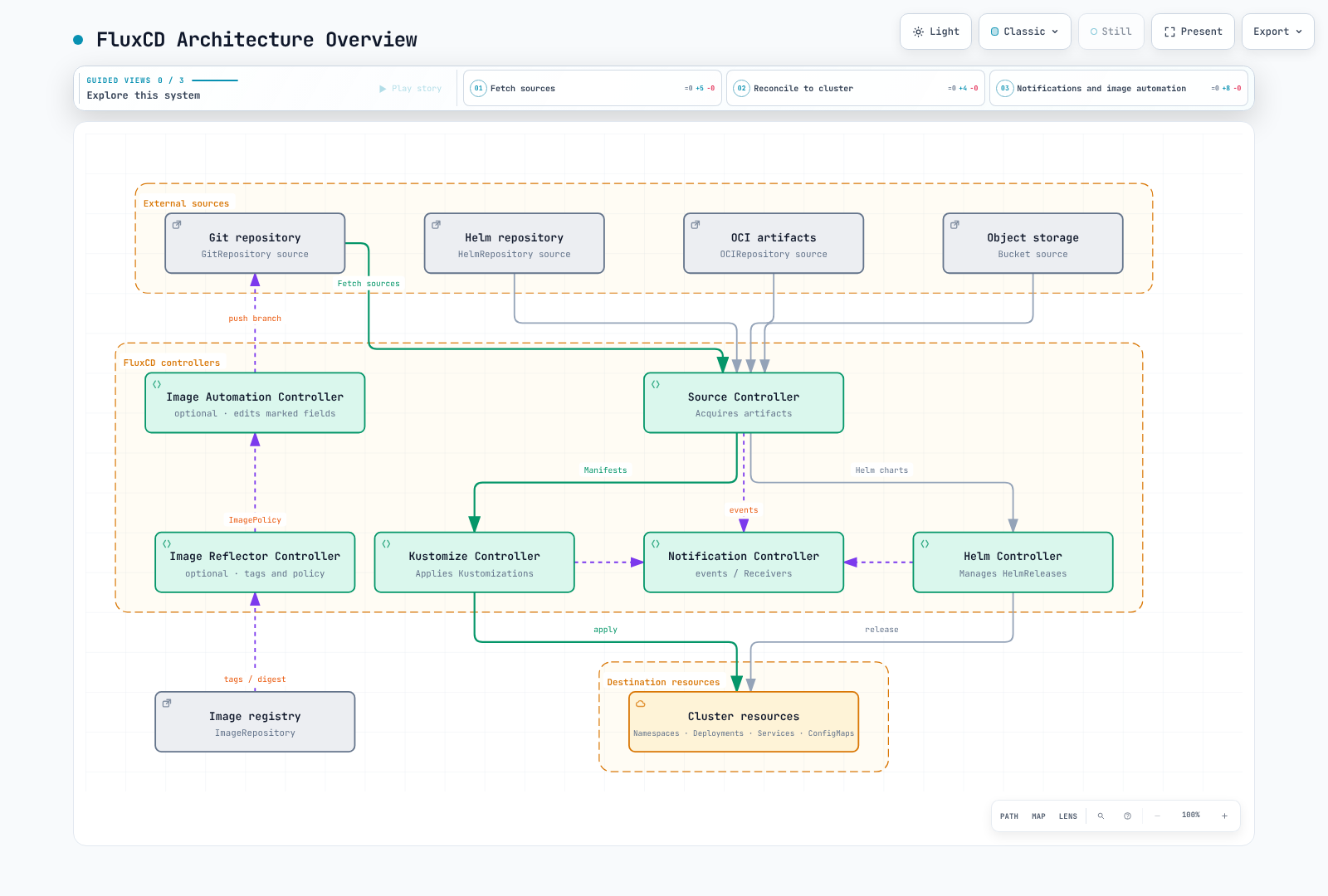
核心组件
默认安装包含 source/kustomize/helm/notification controller。Image automation 还需要 image-reflector-controller 和 image-automation-controller。可选的 source-watcher 通过 ArtifactGenerator 等 API 提供源组合。
| Secret | 所需内容 |
|---|---|
| git-credentials | HTTPS Git 用户名/密码或匹配的身份验证;image 更新还需要仓库写入权限 |
| registry-credentials | 用于私有 ImageRepository 的 kubernetes.io/dockerconfigjson Secret |
| slack-bot-token | token 键下的 Slack Bot OAuth token |
| github-webhook-token | 与 GitHub webhook 共享的 token |
在与 Flux 资源相同的 namespace 中准备被引用的 ConfigMap/Secret。通过受保护的 secret 管理提供实际值,而不是使用明文 Git 文件。
Source Controller
Source Controller 负责从外部源获取 artifact。它支持多种源类型:
GitRepository
跟踪 Git 仓库并使其可供其他 controller 使用:
apiVersion: source.toolkit.fluxcd.io/v1
kind: GitRepository
metadata:
  name: my-app
  namespace: flux-system
spec:
  interval: 1m
  url: https://github.com/my-org/my-app
  ref:
    branch: main
  secretRef:
    name: git-credentials
HelmRepository
跟踪 Helm chart 仓库:
apiVersion: source.toolkit.fluxcd.io/v1
kind: HelmRepository
metadata:
  name: podinfo
  namespace: flux-system
spec:
  interval: 1h
  url: https://stefanprodan.github.io/podinfo
OCIRepository
这描述的是一个包含供 Flux 使用的 manifest/Helm 内容的 OCI artifact,而非工作负载 container image。请先发布兼容的 artifact,并固定其 tag/digest。
跟踪存储在符合 OCI 标准的 registry(包括 container registry)中的 artifact:
apiVersion: source.toolkit.fluxcd.io/v1
kind: OCIRepository
metadata:
  name: my-artifacts
  namespace: flux-system
spec:
  interval: 5m
  url: oci://ghcr.io/my-org/my-artifacts
  ref:
    tag: v1.0.0
Bucket
AWS 示例假定已配置默认凭证链,例如 source-controller IRSA/Pod Identity。请准备下文所述的 EKS 身份验证和 bucket 权限。
跟踪存储在 S3 兼容存储中的 artifact:
apiVersion: source.toolkit.fluxcd.io/v1
kind: Bucket
metadata:
  name: my-bucket
  namespace: flux-system
spec:
  interval: 5m
  provider: aws
  bucketName: my-flux-bucket
  endpoint: s3.us-east-1.amazonaws.com
  region: us-east-1
Kustomize Controller
Kustomize Controller 从源应用 Kustomize overlay 和普通 Kubernetes manifest。
Kustomization CRD
targetNamespace 不会创建 namespace。请预先创建它,或在 Kustomization 中包含其 Namespace manifest。prune: true 可以删除已从源中移除、此前由其管理的资源;请审查源边界和删除策略。
apiVersion: kustomize.toolkit.fluxcd.io/v1
kind: Kustomization
metadata:
  name: my-app
  namespace: flux-system
spec:
  interval: 10m
  targetNamespace: production
  sourceRef:
    kind: GitRepository
    name: my-app
  path: ./deploy/production
  prune: true
  healthChecks:
  - apiVersion: apps/v1
    kind: Deployment
    name: my-app
    namespace: production
  timeout: 2m
变量替换
substituteFrom 条目会覆盖较早的条目;内联 substitute 具有更高优先级。Secret 替换值会进入渲染后的 manifest,因此请控制其输出和访问权限。Flux 2.9.6 随附的 kustomize-controller 1.9.6 默认启用 StrictPostBuildSubstitutions,在没有默认值时会因缺少变量而失败。请检查现有部署是否显式禁用了该 gate。数值字段仍必须渲染为 Kubernetes 数值。
FluxCD 支持通过 postBuild 进行变量替换:
apiVersion: kustomize.toolkit.fluxcd.io/v1
kind: Kustomization
metadata:
  name: my-app
  namespace: flux-system
spec:
  interval: 10m
  sourceRef:
    kind: GitRepository
    name: my-app
  path: ./deploy
  postBuild:
    substitute:
      ENVIRONMENT: production
      REPLICAS: '3'
    substituteFrom:
    - kind: ConfigMap
      name: cluster-config
    - kind: Secret
      name: cluster-secrets
  prune: true
  targetNamespace: production
健康检查
为已部署的资源定义自定义健康检查:
spec:
  healthChecks:
  - apiVersion: apps/v1
    kind: Deployment
    name: frontend
    namespace: production
  - apiVersion: apps/v1
    kind: StatefulSet
    name: database
    namespace: production
  timeout: 5m
Helm Controller
Helm Controller 以声明式方式管理 Helm chart release。
HelmRelease CRD
apiVersion: helm.toolkit.fluxcd.io/v2
kind: HelmRelease
metadata:
  name: podinfo
  namespace: flux-system
spec:
  interval: 5m
  chart:
    spec:
      chart: podinfo
      version: 6.15.0
      sourceRef:
        kind: HelmRepository
        name: podinfo
        namespace: flux-system
  targetNamespace: web
  install:
    createNamespace: true
    remediation:
      retries: 3
  upgrade:
    remediation:
      retries: 3
  values:
    replicaCount: 2
    service:
      type: ClusterIP
  releaseName: podinfo
Values 覆盖
较后的 valuesFrom 条目会覆盖较早的条目,随后是内联 values。targetPath 引用甚至可以覆盖内联 values,因此请明确处理该情形。
从多个源覆盖 Helm values:
spec:
  valuesFrom:
  - kind: ConfigMap
    name: podinfo-values
    valuesKey: values.yaml
  - kind: Secret
    name: podinfo-secrets
    valuesKey: credentials.yaml
  values:
    replicaCount: 3
漂移检测
仅当 HPA 等其他 controller 管理 replicas 时才忽略它们。非必要的忽略规则可能会隐藏手动漂移。
启用漂移检测,以确保已部署资源与期望状态一致:
spec:
  driftDetection:
    mode: enabled
    ignore:
    - paths:
      - /spec/replicas
      target:
        kind: Deployment
Notification Controller
Notification Controller 处理入站和出站事件。
Provider
示例使用 Slack Bot API。配置 chat:write,将 bot 邀请到目标 channel,并将 channel 替换为其实际 ID。Incoming Webhook URL 不是 Bot token。
为 alert 配置 notification provider:
apiVersion: notification.toolkit.fluxcd.io/v1beta3
kind: Provider
metadata:
  name: slack
  namespace: flux-system
spec:
  type: slack
  channel: C0123456789
  secretRef:
    name: slack-bot-token
  address: https://slack.com/api/chat.postMessage
支持的 provider 包括:
- Slack
- Microsoft Teams Workflows (
msteams) - Discord
- PagerDuty
- Opsgenie(现有客户;已宣布将于 2027-04-05 关闭)
- GitHub
- GitLab
- Grafana
- 通用 webhook
Alert
为 FluxCD 事件定义 alert:
apiVersion: notification.toolkit.fluxcd.io/v1beta3
kind: Alert
metadata:
  name: on-call
  namespace: flux-system
spec:
  providerRef:
    name: slack
  eventSeverity: error
  eventSources:
  - kind: GitRepository
    name: '*'
  - kind: Kustomization
    name: '*'
  - kind: HelmRelease
    name: '*'
  eventMetadata:
    summary: Cluster alerts
Receiver(Webhook)
创建 Receiver 不会暴露互联网端点。请将经审查、使用 TLS 的 webhook-receiver Service ingress 与 status.webhookPath 结合使用,在 GitHub 中配置相同 token,并为 type: github 保留签名验证。
为外部事件配置 webhook:
apiVersion: notification.toolkit.fluxcd.io/v1
kind: Receiver
metadata:
  name: github-receiver
  namespace: flux-system
spec:
  type: github
  events:
  - ping
  - push
  secretRef:
    name: github-webhook-token
  resources:
  - kind: GitRepository
    name: my-app
Image Automation
FluxCD 可以自动更新 Git 仓库中的 container image tag。
ImageRepository
image-reflector-controller 会扫描 tag 并评估 ImagePolicy。它不会构建 image、扫描漏洞或执行工作负载 image 拉取。
扫描 container registry 以发现新 tag:
apiVersion: image.toolkit.fluxcd.io/v1
kind: ImageRepository
metadata:
  name: my-app
  namespace: flux-system
spec:
  image: ghcr.io/my-org/my-app
  interval: 1m
  secretRef:
    name: registry-credentials
ImagePolicy
定义用于选择 image tag 的策略:
apiVersion: image.toolkit.fluxcd.io/v1
kind: ImagePolicy
metadata:
  name: my-app
  namespace: flux-system
  labels:
    app: my-app
spec:
  imageRepositoryRef:
    name: my-app
  policy:
    semver:
      range: '>=1.0.0 <2.0.0'
  digestReflectionPolicy: IfNotPresent
ImageUpdateAutomation
YAML 字段需要 policy marker 才能被更新。IfNotPresent 会反映所选 tag 的 digest;它不是签名/漏洞验证。此 automation 会推送到专用的 flux/image-updates 分支。向 main 创建/批准 PR 是独立的 CI/operator 工作流,并非 Flux 自动提供。请为 automation 保留该分支,并为其 Git 凭证授予写入权限。
# Deployment Pod-template fragment; the policy marker is required.
spec:
  template:
    spec:
      containers:
        - name: app
          image: ghcr.io/my-org/my-app:1.0.0 # {"$imagepolicy": "flux-system:my-app"}
在检测到新 image 时自动创建 Git commit:
apiVersion: image.toolkit.fluxcd.io/v1
kind: ImageUpdateAutomation
metadata:
  name: my-app
  namespace: flux-system
spec:
  interval: 30m
  sourceRef:
    kind: GitRepository
    name: my-app
  git:
    checkout:
      ref:
        branch: main
    commit:
      author:
        email: flux@my-org.com
        name: Flux
      messageTemplate: |
        Automated image update

        Automation: {{ .AutomationObject }}

        Files:
        {{ range $filename, $_ := .Changed.FileChanges -}}
        - {{ $filename }}
        {{ end -}}

        Objects:
        {{ range $resource, $changes := .Changed.Objects -}}
        - {{ $resource.Kind }} {{ $resource.Name }}
          {{- range $_, $change := $changes }}
          {{ $change.OldValue }} -> {{ $change.NewValue }}
          {{- end }}
        {{ end -}}
    push:
      branch: flux/image-updates
  update:
    path: ./deploy
    strategy: Setters
  policySelector:
    matchLabels:
      app: my-app
安装
使用 Flux CLI
已验证的 Linux amd64/arm64 release 的安装示例。对于其他操作系统,请遵循官方 CLI 安装指南,并验证已安装的版本。
set -euo pipefail
FLUX_VERSION=2.9.6
case "$(uname -m)" in
  x86_64)
    flux_arch=amd64
    flux_sha=b853df82adfd7736f580692f9f734473d571606307139f8fd20c2a80dd1ff473 ;;
  aarch64|arm64)
    flux_arch=arm64
    flux_sha=f3e159af616ec0b9bd0a405c2185cf09d06b74652c1de3c7f377e8166826651a ;;
  *) echo "Use the official installer for this architecture" >&2; exit 1 ;;
esac
flux_tmp="$(mktemp -d)"
trap 'rm -rf "$flux_tmp"' EXIT
curl -fsSL -o "$flux_tmp/flux.tar.gz" \
  "https://github.com/fluxcd/flux2/releases/download/v${FLUX_VERSION}/flux_${FLUX_VERSION}_linux_${flux_arch}.tar.gz"
printf '%s  %s\n' "$flux_sha" "$flux_tmp/flux.tar.gz" | sha256sum -c -
tar -xzf "$flux_tmp/flux.tar.gz" -C "$flux_tmp" flux
mkdir -p "$HOME/.local/bin"
install -m 0755 "$flux_tmp/flux" "$HOME/.local/bin/flux"
export PATH="$HOME/.local/bin:$PATH"
flux --version
Bootstrap
Bootstrap 会将配置写入 Git 并在集群中安装 controller。请验证 kubecontext 和仓库授权,并选择 GitHub 或 GitLab 之一。my-org 表示组织/组;仅对用户账户使用 --personal。请通过环境变量安全地提供 token。这些示例包含 image automation controller。如果要自动化 bootstrap 仓库本身,请另行启用其 deploy key 的写入权限。
kubectl config current-context
flux check --pre

# Alternative A: GitHub organization; provide authorized GITHUB_TOKEN securely.
flux bootstrap github \
  --owner=my-org \
  --repository=fleet-infra \
  --branch=main \
  --path=clusters/production \
  --version=v2.9.6 \
  --components-extra=image-reflector-controller,image-automation-controller

# Alternative B: GitLab group; provide authorized GITLAB_TOKEN securely.
flux bootstrap gitlab \
  --owner=my-org \
  --repository=fleet-infra \
  --branch=main \
  --path=clusters/production \
  --version=v2.9.6 \
  --components-extra=image-reflector-controller,image-automation-controller
验证安装
# Check Flux components
flux check --components-extra=image-reflector-controller,image-automation-controller

# Get all Flux resources
flux get all

# Watch for changes
flux get kustomizations --watch
使用 Flux 实现多集群
FluxCD 支持从单个仓库管理多个集群。
Fleet 仓库结构
fleet-infra/
├── clusters/
│   ├── production/
│   │   ├── flux-system/
│   │   │   ├── gotk-components.yaml
│   │   │   ├── gotk-sync.yaml
│   │   │   └── kustomization.yaml
│   │   └── apps.yaml
│   ├── staging/
│   │   ├── flux-system/
│   │   │   ├── gotk-components.yaml
│   │   │   ├── gotk-sync.yaml
│   │   │   └── kustomization.yaml
│   │   └── apps.yaml
│   └── development/
│       ├── flux-system/
│       │   └── gotk-sync.yaml
│       └── apps.yaml
├── infrastructure/
│   ├── base/
│   │   ├── cert-manager/
│   │   ├── envoy-gateway/
│   │   └── monitoring/
│   └── overlays/
│       ├── production/
│       └── staging/
└── apps/
    ├── base/
    │   ├── frontend/
    │   └── backend/
    └── overlays/
        ├── production/
        └── staging/
单个 Control Plane 中的 Kustomization 依赖关系
dependsOn 会等待此 Flux control plane 观察到的 Kustomization 对象达到 Ready 条件。这是一个集群中的两个对象,而非跨集群屏障。wait: true 会使基础设施就绪性包含工作负载健康状况。默认的 bootstrap GitRepository 名为 flux-system,本示例将其用作 sourceRef。
使用各自的 context/path bootstrap 每个独立集群,或者显式配置远程 kubeConfig 和授权。自 Flux 2.9.5 起,Secret kubeconfig 拒绝在 certificate-authority、tokenFile、client-certificate 和 client-key 中使用本地文件引用。请提供受保护的内联数据形式的所需凭证/证书,或使用受支持的 workload identity 配置。
apiVersion: kustomize.toolkit.fluxcd.io/v1
kind: Kustomization
metadata:
  name: infrastructure
  namespace: flux-system
spec:
  interval: 1h
  sourceRef:
    kind: GitRepository
    name: flux-system
  path: ./infrastructure/overlays/production
  prune: true
  wait: true
  timeout: 5m
---
apiVersion: kustomize.toolkit.fluxcd.io/v1
kind: Kustomization
metadata:
  name: apps
  namespace: flux-system
spec:
  dependsOn:
  - name: infrastructure
  interval: 10m
  sourceRef:
    kind: GitRepository
    name: flux-system
  path: ./apps/overlays/production
  prune: true
Amazon EKS 上的 FluxCD
每个 Controller 的 AWS 身份验证
本示例使用controller 级别的 IRSA。首先配置 EKS OIDC provider、针对精确 ServiceAccount subject 和 sts.amazonaws.com audience 的 role trust,以及资源权限。role-ARN annotation 不会创建 trust 或 policy。EKS Pod Identity 则需要其 association/agent 设置;IRSA annotation 不会配置它。
| Controller | AWS 访问目的 |
|---|---|
| source-controller | OCI/Helm artifact、S3 Bucket、CodeCommit Git 源 |
| image-reflector-controller | ECR 工作负载 image tag/digest 扫描 |
| image-automation-controller | 直接使用 CodeCommit 时的 Git clone/push 权限 |
| kustomize-controller | SOPS KMS 解密或远程 EKS 协调 |
| helm-controller | 在远程 EKS 上进行 Helm release 协调 |
为 source-controller 授予 role 不会对所有其他 controller 进行身份验证。对于多租户,请单独审查受支持的对象级 workload identity 及其 feature gate、ServiceAccount 和 RBAC 配置。
将此 patch 合并到 bootstrap 路径下的 flux-system/kustomization.yaml 中,并在 Git 中管理它,同时保留现有的 patch/resource。仅更改 ServiceAccount 不会将 IRSA 重新注入现有 Pod;协调后请滚动发布受影响的 controller。
apiVersion: kustomize.config.k8s.io/v1beta1
kind: Kustomization
resources:
- gotk-components.yaml
- gotk-sync.yaml
patches:
- target:
    kind: ServiceAccount
    name: source-controller
  patch: |
    apiVersion: v1
    kind: ServiceAccount
    metadata:
      name: source-controller
      annotations:
eks.amazonaws.com/role-arn: arn:aws:iam::123456789012:role/flux-source-controllerkubectl rollout restart deployment/source-controller -n flux-system
kubectl rollout status deployment/source-controller -n flux-system --timeout=180sECR 中的 GitOps Artifact
这些 source-controller 权限读取专用的 gitops-artifacts 仓库。GetAuthorizationToken 不支持 repository-ARN 范围限定,因此其 resource 为 *,并带有 requested-region 条件。内容读取操作的范围限定为仓库 ARN。请替换 account/region/repository 值。
{
  "Version": "2012-10-17",
  "Statement": [
    {
      "Effect": "Allow",
      "Action": "ecr:GetAuthorizationToken",
      "Resource": "*",
      "Condition": {
        "StringEquals": {
          "aws:RequestedRegion": "us-east-1"
        }
      }
    },
    {
      "Effect": "Allow",
      "Action": [
        "ecr:BatchCheckLayerAvailability",
        "ecr:GetDownloadUrlForLayer",
        "ecr:BatchGetImage"
      ],
      "Resource": "arn:aws:ecr:us-east-1:123456789012:repository/gitops-artifacts"
    }
  ]
}apiVersion: source.toolkit.fluxcd.io/v1
kind: OCIRepository
metadata:
name: gitops-artifacts
namespace: flux-system
spec:
interval: 5m
url: oci://123456789012.dkr.ecr.us-east-1.amazonaws.com/gitops-artifacts
ref:
tag: v1.0.0
provider: awsOCIRepository 为 Flux 读取 manifest/Helm artifact。它不会部署工作负载 container image,也不会授予 EKS node/Fargate image-pull 权限。ECR ImageRepository 扫描需要单独的 image-reflector-controller 身份验证和 registry-read 权限。
S3 Bucket 源
请使用专用 artifact bucket,并向 controller role 添加以下权限。客户管理的 KMS 加密还需要 key policy 和 kms:Decrypt;跨 account 访问还需要 bucket policy。
apiVersion: source.toolkit.fluxcd.io/v1
kind: Bucket
metadata:
  name: artifacts
  namespace: flux-system
spec:
  interval: 5m
  provider: aws
  bucketName: my-flux-artifacts
  endpoint: s3.us-east-1.amazonaws.com
region: us-east-1{
"Version": "2012-10-17",
"Statement": [
{
"Effect": "Allow",
"Action": "s3:ListBucket",
"Resource": "arn:aws:s3:::my-flux-artifacts"
},
{
"Effect": "Allow",
"Action": "s3:GetObject",
"Resource": "arn:aws:s3:::my-flux-artifacts/*"
}
]
}CodeCommit HTTPS 源
这是现有 Flux 安装的源集成,而非 bootstrap 或 IAM 凭证创建流程。source-controller 1.9.6(随 Flux 2.9.6 一起提供)支持配合 CodeCommit HTTPS endpoint 和 IRSA/Pod Identity 使用 provider: aws。请向其 role 添加读取权限,并从所需的 Kustomization 中引用此 GitRepository。
apiVersion: source.toolkit.fluxcd.io/v1
kind: GitRepository
metadata:
  name: codecommit-manifests
  namespace: flux-system
spec:
  interval: 1m
  provider: aws
  url: https://git-codecommit.us-east-1.amazonaws.com/v1/repos/fleet-infra
  ref:
branch: main{
"Version": "2012-10-17",
"Statement": [
{
"Effect": "Allow",
"Action": "codecommit:GitPull",
"Resource": "arn:aws:codecommit:us-east-1:123456789012:fleet-infra"
}
]
}如果 ImageUpdateAutomation 推送至 CodeCommit,其 controller/object identity 也需要 GitPull/GitPush 权限和专用分支/PR policy。SSH 需要将 IAM 注册的 SSH key ID 作为用户名,并使用匹配的 private key;ssh:// URL 或 CLI key-generation 选项不会注册 IAM key。
最佳实践
仓库结构
- 小型团队使用 monorepo
- 大型组织对基础设施和应用程序使用独立仓库
- 使用 Kustomize 实现特定环境的 overlay
安全性
- 使用 SOPS/Sealed Secrets 或 External Secrets Operator 管理 Secret/key 生命周期
- 配置租户 namespace、基于 spec.serviceAccountName 的 RBAC/模拟,以及跨 namespace 引用限制
- 为 receiver 启用 webhook 验证
监控
- 为协调失败配置 alert
- 将 metrics 导出到 Prometheus
- 为 Flux 组件设置 dashboard
性能
- 根据变更频率调优协调间隔
- 为 Helm 仓库使用缓存
- 使用适当的 timeout 实现健康检查
参考资料
- Flux 2.9.5 发布及 kubeconfig 加固通知
- Flux 2.9.6 发布说明
- Flux 安装
- AWS 集成
- GitRepository v1
- ImageUpdateAutomation v1
- Kustomization v1
- Notification provider
- Opsgenie 生命周期
测验
要检验所学内容,请尝试 FluxCD 测验。