OpenTelemetry
审校基线:Collector Contrib 0.160.0;Operator 0.158.0;语言版本见下文 最后更新:September 13, 2026
简介
OpenTelemetry(OTel)是面向云原生软件的可观测性框架。它为三类信号——Traces(链路追踪)、Metrics(指标)和 Logs(日志)——的生成、采集和管理提供了厂商中立的标准。CNCF 在 2026 年 7 月 24 日发布的回顾文章中称,其贡献活跃度仅次于 Kubernetes。项目整体成熟度与单个 SDK/组件的稳定性是两件不同的事情。
2026 年 7 月更新:CNCF 毕业
OpenTelemetry 于 2026 年 5 月达到 CNCF **毕业(graduated)**状态;7 月 24 日的文章是一篇回顾。这是该基金会的最高成熟度级别,Kubernetes 和 Prometheus 等项目也处于该级别。毕业意味着项目的治理、安全实践和采用情况已通过面向生产使用的审核。该回顾文章讨论了 GenAI 语义约定、浏览器/移动端可观测性、schema 治理与推广工具。背景与路线图参见 CNCF 博客文章 "OpenTelemetry has graduated… Now what?"。
什么是 OpenTelemetry?
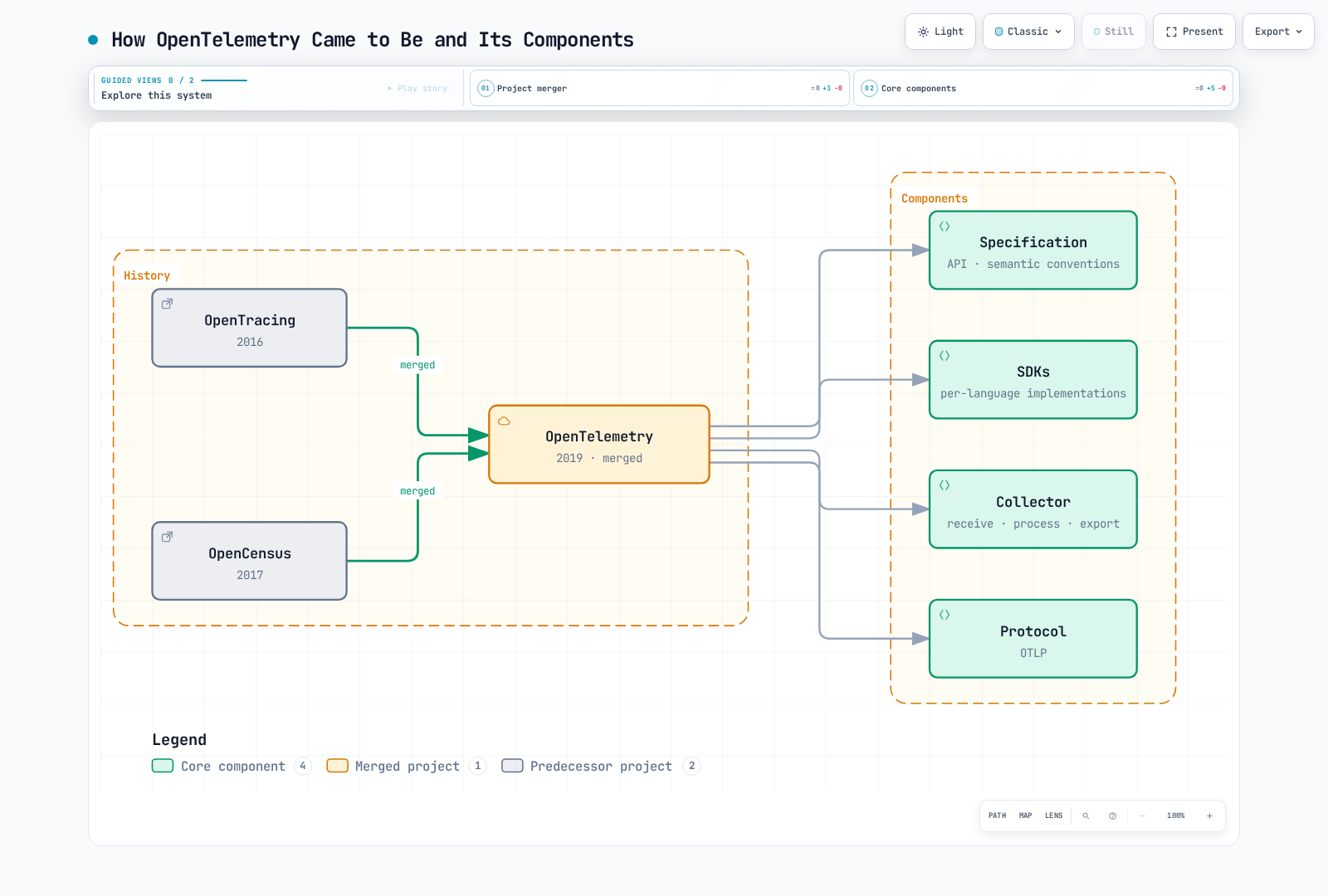
OpenTelemetry 诞生于 OpenTracing 与 OpenCensus 两个项目的合并:
核心概念
三类信号
本章聚焦 traces、metrics 和 logs。Profiling 是另一个仍在演进中的信号,其支持程度和稳定性因实现而异。Trace/log ID 以及 metric exemplar 需要相应的埋点(instrumentation)与后端配置。
| Signal | Description | Use Cases |
|---|---|---|
| Traces | 分布式请求追踪 | 延迟分析、依赖关系梳理 |
| Metrics | 数值型测量 | 资源使用率、SLI/SLO |
| Logs | 事件记录 | 调试、审计 |
核心组件
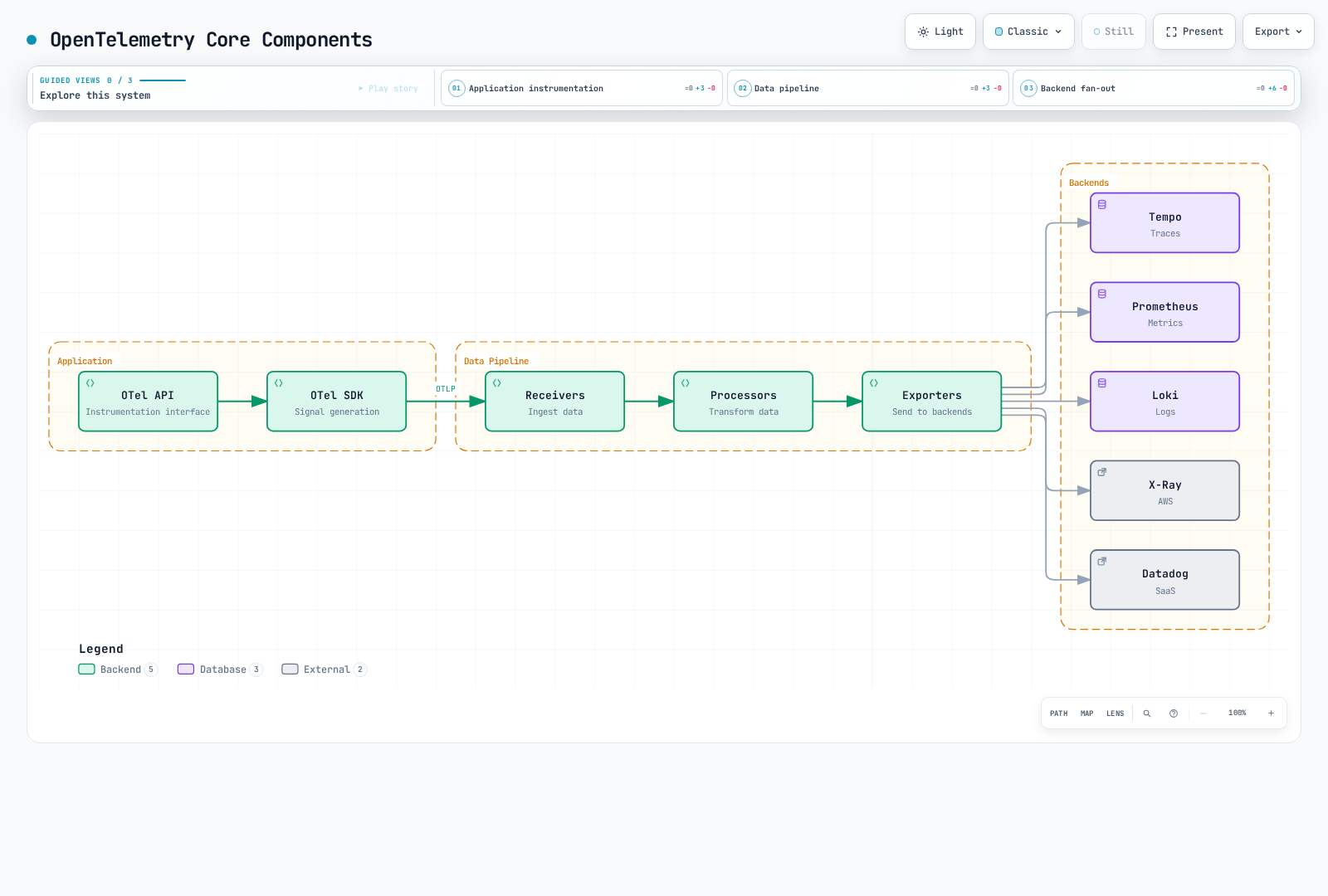
图中按信号列出了后端选项。只有已配置的 exporter 才处于启用状态;下文的基础示例并不会自动启用每一家厂商的后端。
OpenTelemetry SDK
Collector、Operator、Java agent 与各语言 SDK 拥有各自独立的版本号。下列 Linux 工作负载模板已针对 Kubernetes 1.35 的 schema 做过校验:应用镜像、namespace、证书和目标服务需由各自的负责人准备。Operator 更宽泛的兼容矩阵并不会消除具体方案特有的要求,例如原生 sidecar。本地校验并不等于已在 EKS 上部署了应用。
| Component | Baseline and boundary |
|---|---|
| Standalone Collector Contrib | 0.160.0;组件与 schema 使用其真实二进制文件校验 |
| Operator | 0.158.0;其兼容性表列出 Kubernetes 1.25–1.36 与 cert-manager v1 |
| Java agent | 2.31.1,面向 SDK 1.65.0;与 Operator 默认 Java 镜像的版本并不相同 |
| Python | SDK/exporter 1.44.0 与 instrumentation/distro 0.65b0;Python ≥3.10 |
| Node.js CommonJS example | SDK-node 0.220.0、auto-instrumentations-node 0.78.0、resources 2.9.0、API 1.9.1 |
Operator 默认使用 Collector 0.158.0。下文独立部署的 0.160.0 工作负载并不等于对 Operator 托管的 Collector 做了升级。请确认与受支持的 EKS 版本的交集;最新的 Kubernetes 发布版本并不会自动落入 Operator 的兼容矩阵。
自动埋点(Auto-instrumentation)
截至 2026 年 9 月 13 日,EKS 生命周期页面将 1.34、1.35 和 1.36 列入标准支持。1.35 的 schema 基线位于该列表以及 Operator 兼容矩阵之内;这仍然无法替代对实际平台/插件(add-on)的验收检查。
零代码埋点会挂接受支持的库;它不会自动发现任意的业务操作。对同一个进程,请二者择一:直接准备好的 agent/launcher,或由 Operator 注入。不要在已配置好的 provider 之上再初始化第二个 SDK。下列应用镜像只是你自有构建产物的占位符,其启动命令与依赖同样如此。
请准备好 ecommerce namespace,并在其中创建包含 ca.crt、tls.crt 和 tls.key 的 otel-client-tls Secret。客户端证书必须能被 Collector 接受,而 Collector 的证书必须匹配 otel-collector.otel.svc.cluster.local。Secret 文件以只读方式挂载;请根据镜像情况调整 UID/GID 访问权限。环境变量中只出现证书路径,不含密钥内容或 bearer token。这些模板在 TLS 端口 4318 上使用 OTLP HTTP/protobuf。
Java 自动埋点
将固定版本的 agent 下载到应用构建中,并校验发布产物的 checksum。2.31.1 的 JAR 为 25,107,554 字节,超过了 Kubernetes 的 1 MiB ConfigMap 限制。请将其包含在镜像中或使用 Operator 注入;ConfigMap 不是分发 agent 二进制文件的机制。
curl --fail --location --output opentelemetry-javaagent.jar \
  https://github.com/open-telemetry/opentelemetry-java-instrumentation/releases/download/v2.31.1/opentelemetry-javaagent.jar
printf '%s  %s\n' \
  bbf83c151b6400709e2f225bdd07a04f839d9d13b8b93464241333fd25d3e3ba \
opentelemetry-javaagent.jar | sha256sum --check -# Add to the application's existing Dockerfile; not a complete image build.
COPY opentelemetry-javaagent.jar /opt/otel/opentelemetry-javaagent.jar请将 agent 选项与已有的 JAVA_TOOL_OPTIONS 合并;不要丢弃应用原有的 JVM 选项。Deployment 的 selector 与 Pod 标签必须匹配。
apiVersion: apps/v1
kind: Deployment
metadata:
  name: order-service
  namespace: ecommerce
spec:
  replicas: 1
  selector:
    matchLabels:
      app: order-service
  template:
    metadata:
      labels:
        app: order-service
    spec:
      automountServiceAccountToken: false
      securityContext:
        fsGroup: 10001
      containers:
      - name: app
        image: registry.example.com/order-service:otel-demo
        env:
        - name: OTEL_SERVICE_NAME
          value: order-service
        - name: OTEL_RESOURCE_ATTRIBUTES
          value: service.namespace=ecommerce,deployment.environment.name=demo
        - name: OTEL_EXPORTER_OTLP_ENDPOINT
          value: https://otel-collector.otel.svc.cluster.local:4318
        - name: OTEL_EXPORTER_OTLP_PROTOCOL
          value: http/protobuf
        - name: OTEL_EXPORTER_OTLP_CERTIFICATE
          value: /var/run/otel-client/ca.crt
        - name: OTEL_EXPORTER_OTLP_CLIENT_CERTIFICATE
          value: /var/run/otel-client/tls.crt
        - name: OTEL_EXPORTER_OTLP_CLIENT_KEY
          value: /var/run/otel-client/tls.key
        - name: OTEL_TRACES_EXPORTER
          value: otlp
        - name: OTEL_METRICS_EXPORTER
          value: otlp
        - name: OTEL_LOGS_EXPORTER
          value: none
        - name: OTEL_TRACES_SAMPLER
          value: parentbased_always_on
        - name: OTEL_METRIC_EXPORT_INTERVAL
          value: '60000'
        - name: JAVA_TOOL_OPTIONS
          value: -javaagent:/opt/otel/opentelemetry-javaagent.jar
        volumeMounts:
        - name: otel-client-tls
          mountPath: /var/run/otel-client
          readOnly: true
      volumes:
      - name: otel-client-tls
        secret:
          secretName: otel-client-tls
          defaultMode: 288
Python 自动埋点
对于 Flask 应用,请在其构建环境中安装版本匹配的软件包,并锁定解析后的应用依赖。其他框架需要各自对应的 instrumentation 包。本示例显式选择了 HTTP exporter,而不是把 Python 的 HTTP 默认行为发送到 gRPC 端口 4317。
python -m pip install \
  opentelemetry-api==1.44.0 opentelemetry-sdk==1.44.0 \
  opentelemetry-distro==0.65b0 \
  opentelemetry-instrumentation-flask==0.65b0 \
opentelemetry-exporter-otlp-proto-http==1.44.0apiVersion: apps/v1
kind: Deployment
metadata:
name: payment-service
namespace: ecommerce
spec:
replicas: 1
selector:
matchLabels:
app: payment-service
template:
metadata:
labels:
app: payment-service
spec:
automountServiceAccountToken: false
securityContext:
fsGroup: 10001
containers:
- name: app
image: registry.example.com/payment-service:otel-demo
env:
- name: OTEL_SERVICE_NAME
value: payment-service
- name: OTEL_RESOURCE_ATTRIBUTES
value: service.namespace=ecommerce,deployment.environment.name=demo
- name: OTEL_EXPORTER_OTLP_ENDPOINT
value: https://otel-collector.otel.svc.cluster.local:4318
- name: OTEL_EXPORTER_OTLP_PROTOCOL
value: http/protobuf
- name: OTEL_EXPORTER_OTLP_CERTIFICATE
value: /var/run/otel-client/ca.crt
- name: OTEL_EXPORTER_OTLP_CLIENT_CERTIFICATE
value: /var/run/otel-client/tls.crt
- name: OTEL_EXPORTER_OTLP_CLIENT_KEY
value: /var/run/otel-client/tls.key
- name: OTEL_TRACES_EXPORTER
value: otlp
- name: OTEL_METRICS_EXPORTER
value: otlp
- name: OTEL_LOGS_EXPORTER
value: none
- name: OTEL_TRACES_SAMPLER
value: parentbased_always_on
- name: OTEL_METRIC_EXPORT_INTERVAL
value: '60000'
volumeMounts:
- name: otel-client-tls
mountPath: /var/run/otel-client
readOnly: true
command:
- opentelemetry-instrument
- python
- app.py
volumes:
- name: otel-client-tls
secret:
secretName: otel-client-tls
defaultMode: 288Node.js 自动埋点
npm install --save-exact \
  @opentelemetry/api@1.9.1 @opentelemetry/resources@2.9.0 \
  @opentelemetry/sdk-node@0.220.0 \
  @opentelemetry/auto-instrumentations-node@0.78.0
# Commit package-lock.json and use npm ci for subsequent application builds.
保存为 tracing.cjs,并在应用/框架模块之前加载。这是一个 CommonJS 示例;ESM 加载需要语言指南中另行说明的配置。SDK 会读取下文显式设置的 OTEL exporter/TLS 环境变量。若以编程方式配置 metric reader,当前配置使用 metricReaders,它取代了已废弃的单数形式选项。请在应用自身完成请求排空(draining)步骤之后再接入 shutdownTelemetry()。
// Load before application/framework modules in a CommonJS application.
const { NodeSDK } = require('@opentelemetry/sdk-node');
const { envDetector } = require('@opentelemetry/resources');
const { getNodeAutoInstrumentations } = require('@opentelemetry/auto-instrumentations-node');

const sdk = new NodeSDK({
  resourceDetectors: [envDetector],
  instrumentations: [
    getNodeAutoInstrumentations({
      '@opentelemetry/instrumentation-fs': { enabled: false },
      '@opentelemetry/instrumentation-http': {
        ignoreIncomingRequestHook: (request) =>
          String(request.url || '').split('?')[0] === '/health',
      },
    }),
  ],
});

// OTEL_* variables configure exporters, protocol, TLS and metric interval.
sdk.start();

// Call after the application's own request-draining step on shutdown.
module.exports = { shutdownTelemetry: () => sdk.shutdown() };apiVersion: apps/v1
kind: Deployment
metadata:
name: notification-service
namespace: ecommerce
spec:
replicas: 1
selector:
matchLabels:
app: notification-service
template:
metadata:
labels:
app: notification-service
spec:
automountServiceAccountToken: false
securityContext:
fsGroup: 10001
containers:
- name: app
image: registry.example.com/notification-service:otel-demo
env:
- name: OTEL_SERVICE_NAME
value: notification-service
- name: OTEL_RESOURCE_ATTRIBUTES
value: service.namespace=ecommerce,deployment.environment.name=demo
- name: OTEL_EXPORTER_OTLP_ENDPOINT
value: https://otel-collector.otel.svc.cluster.local:4318
- name: OTEL_EXPORTER_OTLP_PROTOCOL
value: http/protobuf
- name: OTEL_EXPORTER_OTLP_CERTIFICATE
value: /var/run/otel-client/ca.crt
- name: OTEL_EXPORTER_OTLP_CLIENT_CERTIFICATE
value: /var/run/otel-client/tls.crt
- name: OTEL_EXPORTER_OTLP_CLIENT_KEY
value: /var/run/otel-client/tls.key
- name: OTEL_TRACES_EXPORTER
value: otlp
- name: OTEL_METRICS_EXPORTER
value: otlp
- name: OTEL_LOGS_EXPORTER
value: none
- name: OTEL_TRACES_SAMPLER
value: parentbased_always_on
- name: OTEL_METRIC_EXPORT_INTERVAL
value: '60000'
volumeMounts:
- name: otel-client-tls
mountPath: /var/run/otel-client
readOnly: true
command:
- node
- --require
- ./tracing.cjs
- app.cjs
volumes:
- name: otel-client-tls
secret:
secretName: otel-client-tls
defaultMode: 288这些示例有意设置了 OTEL_LOGS_EXPORTER=none。启用日志 exporter 并不会去 tail 应用的 stdout:请安装合适的日志桥接器/handler 或日志采集器,并先评估负载内容的暴露风险。parentbased_always_on 采样器仍会遵循未被采样的父级。如果你改用 10% 的头部采样,尾部的 Collector 无法恢复已被丢弃的 span。
手动埋点(Manual Instrumentation)
请复用由 agent 或应用初始化的 OpenTelemetry 实例/provider。若没有 SDK provider,API 调用可能是空操作(no-op)。这些业务流程 span 属于 INTERNAL 类型:已埋点的 HTTP/数据库客户端会创建各自的 CLIENT span 并传播上下文。单独手动创建一个 CLIENT span 既不会发送请求,也不会注入 trace 上下文。
Java 手动埋点
库存/支付回调由应用自身提供。不记录任何订单/客户 ID、金额、交易 ID 或原始异常消息。这些只是应用层操作,并非某个 payment-service 的实现,也不是经过测试的 Spring 部署。
import io.opentelemetry.api.OpenTelemetry;
import io.opentelemetry.api.trace.Span;
import io.opentelemetry.api.trace.SpanKind;
import io.opentelemetry.api.trace.StatusCode;
import io.opentelemetry.api.trace.Tracer;
import io.opentelemetry.context.Scope;

public final class OrderTelemetry {
    private final Tracer tracer;

    public OrderTelemetry(OpenTelemetry telemetry) {
        this.tracer = telemetry.getTracer("example.order-workflow", "1.0.0");
    }

    public void processOrder(Runnable validateInventory, Runnable processPayment) {
        Span parent = tracer.spanBuilder("processOrder")
                .setSpanKind(SpanKind.INTERNAL).startSpan();
        try (Scope ignored = parent.makeCurrent()) {
            parent.addEvent("validation.started");
            child("checkInventory", validateInventory);
            child("processPayment", processPayment);
            parent.addEvent("processing.completed");
        } catch (RuntimeException error) {
            parent.setStatus(StatusCode.ERROR);
            parent.setAttribute("error.type", error.getClass().getName());
            throw error;
        } finally {
            parent.end();
        }
    }

    private void child(String name, Runnable operation) {
        Span span = tracer.spanBuilder(name).setSpanKind(SpanKind.INTERNAL).startSpan();
        try (Scope ignored = span.makeCurrent()) {
            operation.run();
        } catch (RuntimeException error) {
            span.setStatus(StatusCode.ERROR);
            span.setAttribute("error.type", error.getClass().getName());
            throw error;
        } finally {
            span.end();
        }
    }
}
Python 手动埋点
这个同步装饰器在结束嵌套 span 的同时保留返回结果和错误。它只记录错误类型,避免产生重复的原始异常事件。异步函数需要一个支持 async 的包装器。请自行提供参数化的数据库查询、校验、持久化和事件发布回调;本地验证使用的是合成回调与内存 exporter。
"""Manual spans for synchronous application callbacks; no database is created."""
from functools import wraps
from contextlib import contextmanager
from opentelemetry import trace
from opentelemetry.trace import SpanKind, Status, StatusCode

# Reuse the SDK provider initialized by auto-instrumentation or the application.
tracer = trace.get_tracer("example.user-workflow", "1.0.0")

@contextmanager
def operation(name):
    with tracer.start_as_current_span(
        name, kind=SpanKind.INTERNAL,
        record_exception=False, set_status_on_exception=False,
    ) as span:
        try:
            yield span
        except Exception as error:
            span.set_status(Status(StatusCode.ERROR))
            span.set_attribute("error.type", type(error).__name__)
            raise

def traced(name):
    def decorate(function):
        @wraps(function)
        def wrapped(*args, **kwargs):
            with operation(name):
                return function(*args, **kwargs)
        return wrapped
    return decorate

@traced("get_user")
def get_user(user_id, lookup):
    # lookup is supplied by the application, with parameterized queries.
    # The ID and SQL text are not added to telemetry.
    with operation("lookup_user"):
        result = lookup(user_id)
    trace.get_current_span().set_attribute("app.user.found", result is not None)
    return result

@traced("create_user")
def create_user(user_data, validate, save, publish):
    # These callbacks are the application's own implementations.
    with operation("validate_user_data"):
        validate(user_data)
    with operation("save_user"):
        result = save(user_data)
    with operation("publish_user_event"):
        publish(result)
    return result
对于真实的数据库/消息中间件埋点,请遵循所实现的语义约定版本,例如 db.system.name、db.operation.name 和 messaging.destination.name。不要把用户 ID 复制进 SQL 遥测字符串,也不要把原始查询语句用作指标标签。上文的业务回调并不能证明 PostgreSQL 或 Kafka 已实际执行。
OTEL Collector
架构
以上是下文配置的信号路径。trace 预处理方框概括了两条独立 trace 流水线中等价的处理步骤。span 指标在尾部采样之前分支;进入的 metrics 和 logs 各自使用独立的流水线。
Collector 配置
保存为 otel-collector-config.yaml。这是一个用于实验环境的单实例、有状态的采样/聚合实例,并非高可用(HA)或容量保证。一条独立的 trace 流水线在尾部采样之前派生指标。已被头部采样或过滤掉的 span 依然不会出现在这些指标中。这些计数器统计的是观测到的 span,而不是唯一的最终用户请求;请为请求类 SLI 选择合适的 span kind 和有界的维度。在 0.160.0 中,累积型 span 指标计数器最初会导出 0;在把首个数值解读为“无流量”之前,请先评估后续的 flush 结果。
请准备好启用了 OTLP 的 Tempo、一个 Prometheus 兼容的 remote-write 接收端以及 Loki 的原生 OTLP 摄取入口,并由运维方提供 TLS/认证网关。下文示例中的网关名称并非本指南创建的服务。Prometheus 需要启用其 remote-write 接收端(使用 Prometheus 本身时为 --web.enable-remote-write-receiver)。Loki 的 exporter 基础地址以 /otlp 结尾;HTTP exporter 会追加 /v1/logs。请按需配置 Loki 的结构化元数据以及可信租户映射;租户 header 并不构成认证。
环境变量用于指明已有的证书与端点。所有已配置的 receiver 都使用双向 TLS;没有启用通配符浏览器 CORS,也没有开放公共的 profiling 端点。列出的属性删除操作只是有限的控制手段,并不等于对日志正文、span 事件、resource 属性或任意负载做了完整的敏感数据清除。也请在 SDK 侧就尽量减少采集的数据。
# otel-collector-config.yaml
receivers:
  otlp:
    protocols:
      grpc:
        endpoint: 0.0.0.0:4317
        max_recv_msg_size_mib: 16
        tls:
          cert_file: ${env:OTEL_SERVER_CERT}
          key_file: ${env:OTEL_SERVER_KEY}
          client_ca_file: ${env:OTEL_CLIENT_CA}
      http:
        endpoint: 0.0.0.0:4318
        tls:
          cert_file: ${env:OTEL_SERVER_CERT}
          key_file: ${env:OTEL_SERVER_KEY}
          client_ca_file: ${env:OTEL_CLIENT_CA}

processors:
  memory_limiter:
    check_interval: 1s
    limit_mib: 384
    spike_limit_mib: 96
  resource/cluster:
    attributes:
      - key: k8s.cluster.name
        value: ${env:K8S_CLUSTER_NAME}
        action: insert
  attributes/redact:
    actions:
      - key: http.request.header.authorization
        action: delete
      - key: user.email
        action: delete
      - key: user.id
        action: delete
      - key: customer.id
        action: delete
      - key: db.statement
        action: delete
      - key: db.query.text
        action: delete
  filter/health:
    error_mode: propagate
    traces:
      span:
        - 'attributes["http.route"] == "/health"'
        - 'attributes["http.route"] == "/ready"'
        - 'attributes["http.route"] == "/metrics"'
  tail_sampling:
    decision_wait: 10s
    num_traces: 10000
    expected_new_traces_per_sec: 100
    policies:
      - name: errors
        type: status_code
        status_code:
          status_codes: [ERROR]
      - name: slow
        type: latency
        latency:
          threshold_ms: 1000
      - name: selected-services
        type: string_attribute
        string_attribute:
          key: service.name
          values: [payment-service, order-service]
      - name: baseline
        type: probabilistic
        probabilistic:
          sampling_percentage: 10
  batch:
    timeout: 5s
    send_batch_size: 512
    send_batch_max_size: 1024

connectors:
  span_metrics:
    histogram:
      unit: s
      explicit:
        buckets: [5ms, 10ms, 25ms, 50ms, 100ms, 250ms, 500ms, 1s, 2s, 5s]
    dimensions:
      - name: http.request.method
      - name: http.response.status_code
    aggregation_cardinality_limit: 1000
    metrics_flush_interval: 15s

exporters:
  otlp_grpc/tempo:
    endpoint: ${env:TEMPO_OTLP_GRPC_ENDPOINT}
    tls:
      ca_file: ${env:BACKEND_CA}
      cert_file: ${env:BACKEND_CLIENT_CERT}
      key_file: ${env:BACKEND_CLIENT_KEY}
  prometheus_remote_write:
    endpoint: ${env:PROMETHEUS_REMOTE_WRITE_ENDPOINT}
    tls:
      ca_file: ${env:BACKEND_CA}
      cert_file: ${env:BACKEND_CLIENT_CERT}
      key_file: ${env:BACKEND_CLIENT_KEY}
  otlp_http/loki:
    endpoint: ${env:LOKI_OTLP_HTTP_ENDPOINT}
    tls:
      ca_file: ${env:BACKEND_CA}
      cert_file: ${env:BACKEND_CLIENT_CERT}
      key_file: ${env:BACKEND_CLIENT_KEY}

extensions:
  health_check:
    endpoint: 0.0.0.0:13133
    path: /health

service:
  extensions: [health_check]
  pipelines:
    traces:
      receivers: [otlp]
      processors: [memory_limiter, resource/cluster, attributes/redact, filter/health, tail_sampling, batch]
      exporters: [otlp_grpc/tempo]
    traces/span-metrics:
      receivers: [otlp]
      processors: [memory_limiter, resource/cluster, attributes/redact, filter/health]
      exporters: [span_metrics]
    metrics:
      receivers: [otlp, span_metrics]
      processors: [memory_limiter, resource/cluster, batch]
      exporters: [prometheus_remote_write]
    logs:
      receivers: [otlp]
      processors: [memory_limiter, resource/cluster, attributes/redact, batch]
      exporters: [otlp_http/loki]
  telemetry:
    logs:
      level: info
      encoding: json
    metrics:
      readers:
        - pull:
            exporter:
              prometheus:
                host: 127.0.0.1
                port: 8888
这些正向采样策略之间是 OR 关系,而不是按顺序排列的优先级阶梯。被选中的服务可以独立于基线概率而保留下来。延迟使用严格的 >1000 ms 比较。基于定时器的判定并不能证明 trace 已完整;而且健康检查过滤器会有意移除匹配的 span,即使这些 span 含有错误;过滤单个 span 可能留下不完整的 trace。
内存硬限制为 384 MiB,软限制为 288 MiB,在模板中 512 MiB 的容器限制之下留出了余量。拒绝请求、重试、队列和突发流量仍需实测。这里的批处理/trace/基数限制只是演示设置,不是基准测试结果。
单实例工作负载与配置
请准备 otel namespace,以及包含 tls.crt、tls.key、ca.crt 的 otel-ingest-tls / otel-backend-tls Secret。证书 SAN 需匹配相关 Service/网关名称,并使用合适的信任包(trust bundle)以及具备正确 server/client 用途的证书。请调整 10001 UID/GID 的文件访问权限。ConfigMap 中只包含文本配置,不含私钥。对这个单实例采样器而言,Recreate 可以避免常规滚动更新时的实例重叠,代价是存在停机时间;它并不会在重启之间保留内存中的 trace。
: "${KUBE_CONTEXT:?Set the reviewed cluster context}"
kubectl --context "$KUBE_CONTEXT" -n otel create configmap otel-collector-config \
  --from-file=otel-collector-config.yaml --dry-run=client -o yaml > otel-collector-configmap.yaml
# Inspect the namespace, Secrets, endpoints and workloads before any real apply.apiVersion: v1
kind: ServiceAccount
metadata:
name: otel-collector
namespace: otel
automountServiceAccountToken: false
---
apiVersion: apps/v1
kind: Deployment
metadata:
name: otel-collector
namespace: otel
spec:
selector:
matchLabels:
app: otel-collector
template:
metadata:
labels:
app: otel-collector
spec:
serviceAccountName: otel-collector
automountServiceAccountToken: false
nodeSelector:
kubernetes.io/os: linux
securityContext:
runAsNonRoot: true
runAsUser: 10001
fsGroup: 10001
seccompProfile:
type: RuntimeDefault
containers:
- name: collector
image: otel/opentelemetry-collector-contrib:0.160.0
args:
- --config=/conf/otel-collector-config.yaml
env:
- name: GOMEMLIMIT
value: 384MiB
- name: OTEL_SERVER_CERT
value: /var/run/otel/ingest/tls.crt
- name: OTEL_SERVER_KEY
value: /var/run/otel/ingest/tls.key
- name: OTEL_CLIENT_CA
value: /var/run/otel/ingest/ca.crt
- name: BACKEND_CA
value: /var/run/otel/backend/ca.crt
- name: BACKEND_CLIENT_CERT
value: /var/run/otel/backend/tls.crt
- name: BACKEND_CLIENT_KEY
value: /var/run/otel/backend/tls.key
- name: OTEL_UPSTREAM_ENDPOINT
value: otel-collector.otel.svc.cluster.local:4317
- name: K8S_CLUSTER_NAME
value: REPLACE_WITH_CLUSTER_NAME
- name: TEMPO_OTLP_GRPC_ENDPOINT
value: tempo-gateway.tempo.svc.cluster.local:4317
- name: PROMETHEUS_REMOTE_WRITE_ENDPOINT
value: https://prometheus-gateway.monitoring.svc.cluster.local/api/v1/write
- name: LOKI_OTLP_HTTP_ENDPOINT
value: https://loki-gateway.loki.svc.cluster.local/otlp
ports:
- name: otlp-grpc
containerPort: 4317
- name: otlp-http
containerPort: 4318
resources:
requests:
cpu: 100m
memory: 256Mi
limits:
cpu: 500m
memory: 512Mi
securityContext:
allowPrivilegeEscalation: false
readOnlyRootFilesystem: true
capabilities:
drop:
- ALL
volumeMounts:
- name: config
mountPath: /conf
readOnly: true
- name: ingest-tls
mountPath: /var/run/otel/ingest
readOnly: true
- name: backend-tls
mountPath: /var/run/otel/backend
readOnly: true
readinessProbe:
httpGet:
path: /health
port: 13133
livenessProbe:
httpGet:
path: /health
port: 13133
initialDelaySeconds: 15
volumes:
- name: config
configMap:
name: otel-collector-config
- name: ingest-tls
secret:
secretName: otel-ingest-tls
defaultMode: 288
- name: backend-tls
secret:
secretName: otel-backend-tls
defaultMode: 288
replicas: 1
strategy:
type: Recreate
---
apiVersion: v1
kind: Service
metadata:
name: otel-collector
namespace: otel
spec:
type: ClusterIP
selector:
app: otel-collector
ports:
- name: otlp-grpc
port: 4317
targetPort: otlp-grpc
- name: otlp-http
port: 4318
targetPort: otlp-http可选的采集与富化
| Requirement | Separate configuration needed |
|---|---|
| 遗留的 Jaeger/Zipkin 客户端 | 相应的 receiver 组件仍然可用;只启用必需的协议/端口,并在流水线中匹配 receiver ID。请通过 OTLP 导出到 Jaeger,而不是使用已被移除的 Jaeger exporter。 |
| Collector 自身指标 | service.telemetry.metrics.readers 用于配置当前的 Prometheus reader。旧的 address 字段已被移除。请通过刻意设计的监控路径抓取 loopback 端点。 |
| Kubernetes 集群指标 | 只运行一个处于活动状态的 k8s_cluster receiver,或者配置其 leader-elector 扩展。请提供 API 凭据和经过审核的 RBAC,然后将其接入 metrics 流水线。上文默认不挂载 token 的工作负载并不提供这些前提条件。 |
| 节点/容器日志或主机指标 | 添加相应的 receiver、挂载和权限;仅仅使用 DaemonSet 并不会采集它们。 |
| EC2/EKS 资源检测 | 请刻意配置所需的 detector 及其元数据/API 访问权限;不要用 Collector 主机身份取代工作负载身份。 |
| 从 span 派生的指标 | 使用 span_metrics connector,并显式指定时长单位和有界维度。旧的 spanmetrics processor 已被移除。 |
参见collector 指南与 Kubernetes cluster receiver。不要声明一个未被使用的 receiver/processor 就认为它已经生效。
EKS 部署模式
以下是可供选择的部署模式,而不是一个可以不加区分地全部套用的技术栈。一个无状态中继(relay)会把三类信号全部转发给上文那个单一的采样层。请让尾部采样和 span 聚合远离任意负载均衡的 node/sidecar/HPA 层。多个采样实例需要感知 trace ID 的路由,并需要针对端点变更、传输中的 trace、重启和存储做出规划;仅靠一个 Service 或 HPA 无法提供这些能力。
保存 otel-relay-config.yaml,并按同样的客户端 ConfigMap 生成流程创建 otel-relay-config。OTEL_UPSTREAM_ENDPOINT 和客户端证书用于标识另行准备好的上游 Collector。就采样决策而言,relay 是无状态的;但它在内存中的批处理/导出队列仍然存在故障和关停方面的限制。
receivers:
  otlp:
    protocols:
      grpc:
        endpoint: 0.0.0.0:4317
        max_recv_msg_size_mib: 16
        tls:
          cert_file: ${env:OTEL_SERVER_CERT}
          key_file: ${env:OTEL_SERVER_KEY}
          client_ca_file: ${env:OTEL_CLIENT_CA}
      http:
        endpoint: 0.0.0.0:4318
        tls:
          cert_file: ${env:OTEL_SERVER_CERT}
          key_file: ${env:OTEL_SERVER_KEY}
          client_ca_file: ${env:OTEL_CLIENT_CA}
processors:
  memory_limiter:
    check_interval: 1s
    limit_mib: 384
    spike_limit_mib: 96
  batch:
    timeout: 5s
    send_batch_size: 512
    send_batch_max_size: 1024
exporters:
  otlp_grpc/upstream:
    endpoint: ${env:OTEL_UPSTREAM_ENDPOINT}
    tls:
      ca_file: ${env:BACKEND_CA}
      cert_file: ${env:BACKEND_CLIENT_CERT}
      key_file: ${env:BACKEND_CLIENT_KEY}
extensions:
  health_check:
    endpoint: 0.0.0.0:13133
    path: /health
service:
  extensions:
  - health_check
  pipelines:
    traces:
      receivers:
      - otlp
      processors:
      - memory_limiter
      - batch
      exporters:
      - otlp_grpc/upstream
    metrics:
      receivers:
      - otlp
      processors:
      - memory_limiter
      - batch
      exporters:
      - otlp_grpc/upstream
    logs:
      receivers:
      - otlp
      processors:
      - memory_limiter
      - batch
      exporters:
      - otlp_grpc/upstream
  telemetry:
    logs:
      level: info
      encoding: json
    metrics:
      readers:
      - pull:
          exporter:
            prometheus:
              host: 127.0.0.1
              port: 8888
DaemonSet 模式
DaemonSet 运行在符合条件的 Linux 节点上,而不是 EKS Fargate 上。请为已批准的节点配置 selector/toleration;这里没有全量 toleration 或 hostPort 占用。internalTrafficPolicy: Local 只会把该 Service 的流量路由到调用方所在节点上处于 ready 状态的端点,如果不存在这样的端点则丢弃流量。它不是面向 Fargate 客户端的回退机制。应用必须显式地把遥测数据发送到该端点。
apiVersion: apps/v1
kind: DaemonSet
metadata:
  name: otel-agent
  namespace: otel
spec:
  selector:
    matchLabels:
      app: otel-agent
  template:
    metadata:
      labels:
        app: otel-agent
    spec:
      serviceAccountName: otel-collector
      automountServiceAccountToken: false
      nodeSelector:
        kubernetes.io/os: linux
      securityContext:
        runAsNonRoot: true
        runAsUser: 10001
        fsGroup: 10001
        seccompProfile:
          type: RuntimeDefault
      containers:
      - name: collector
        image: otel/opentelemetry-collector-contrib:0.160.0
        args:
        - --config=/conf/otel-relay-config.yaml
        env:
        - name: GOMEMLIMIT
          value: 384MiB
        - name: OTEL_SERVER_CERT
          value: /var/run/otel/ingest/tls.crt
        - name: OTEL_SERVER_KEY
          value: /var/run/otel/ingest/tls.key
        - name: OTEL_CLIENT_CA
          value: /var/run/otel/ingest/ca.crt
        - name: BACKEND_CA
          value: /var/run/otel/backend/ca.crt
        - name: BACKEND_CLIENT_CERT
          value: /var/run/otel/backend/tls.crt
        - name: BACKEND_CLIENT_KEY
          value: /var/run/otel/backend/tls.key
        - name: OTEL_UPSTREAM_ENDPOINT
          value: otel-collector.otel.svc.cluster.local:4317
        ports:
        - name: otlp-grpc
          containerPort: 4317
        - name: otlp-http
          containerPort: 4318
        resources:
          requests:
            cpu: 100m
            memory: 256Mi
          limits:
            cpu: 500m
            memory: 512Mi
        securityContext:
          allowPrivilegeEscalation: false
          readOnlyRootFilesystem: true
          capabilities:
            drop:
            - ALL
        volumeMounts:
        - name: config
          mountPath: /conf
          readOnly: true
        - name: ingest-tls
          mountPath: /var/run/otel/ingest
          readOnly: true
        - name: backend-tls
          mountPath: /var/run/otel/backend
          readOnly: true
        readinessProbe:
          httpGet:
            path: /health
            port: 13133
        livenessProbe:
          httpGet:
            path: /health
            port: 13133
          initialDelaySeconds: 15
      volumes:
      - name: config
        configMap:
          name: otel-relay-config
      - name: ingest-tls
        secret:
          secretName: otel-ingest-tls
          defaultMode: 288
      - name: backend-tls
        secret:
          secretName: otel-backend-tls
          defaultMode: 288
---
apiVersion: v1
kind: Service
metadata:
  name: otel-agent
  namespace: otel
spec:
  type: ClusterIP
  selector:
    app: otel-agent
  ports:
  - name: otlp-grpc
    port: 4317
    targetPort: otlp-grpc
  - name: otlp-http
    port: 4318
    targetPort: otlp-http
  internalTrafficPolicy: Local
Sidecar 模式
请使用一个单独的 otel-sidecar-config ConfigMap 承载下面的配置。只有同一个 Pod 会使用其 loopback 明文 OTLP receiver;发往上游的流量使用双向 TLS。该配置为 256 MiB 的 sidecar 设定了 192 MiB 硬限制 / 144 MiB 软限制。应用镜像必须包含其选定的 SDK/agent;仅设置一个端点环境变量本身并不会添加埋点。这个 Kubernetes 1.35 schema 示例使用了原生 sidecar(带 restartPolicy: Always 的 initContainers,在 1.33 中 GA)。其 startup probe 先于应用启动完成,而正常关停时会先停止应用容器再停止 sidecar。后端投递以及突发故障后的恢复仍需单独验证。
receivers:
  otlp:
    protocols:
      grpc:
        endpoint: 127.0.0.1:4317
      http:
        endpoint: 127.0.0.1:4318
processors:
  memory_limiter:
    check_interval: 1s
    limit_mib: 192
    spike_limit_mib: 48
  batch:
    timeout: 5s
    send_batch_size: 512
    send_batch_max_size: 1024
exporters:
  otlp_grpc/upstream:
    endpoint: ${env:OTEL_UPSTREAM_ENDPOINT}
    tls:
      ca_file: ${env:BACKEND_CA}
      cert_file: ${env:BACKEND_CLIENT_CERT}
      key_file: ${env:BACKEND_CLIENT_KEY}
extensions:
  health_check:
    endpoint: 0.0.0.0:13133
    path: /health
service:
  extensions:
  - health_check
  pipelines:
    traces:
      receivers:
      - otlp
      processors:
      - memory_limiter
      - batch
      exporters:
      - otlp_grpc/upstream
    metrics:
      receivers:
      - otlp
      processors:
      - memory_limiter
      - batch
      exporters:
      - otlp_grpc/upstream
    logs:
      receivers:
      - otlp
      processors:
      - memory_limiter
      - batch
      exporters:
      - otlp_grpc/upstream
  telemetry:
    logs:
      level: info
      encoding: json
    metrics:
      readers:
      - pull:
          exporter:
            prometheus:
              host: 127.0.0.1
port: 8888apiVersion: apps/v1
kind: Deployment
metadata:
name: order-with-sidecar
namespace: otel
spec:
selector:
matchLabels:
app: order-with-sidecar
template:
metadata:
labels:
app: order-with-sidecar
spec:
serviceAccountName: otel-collector
automountServiceAccountToken: false
nodeSelector:
kubernetes.io/os: linux
securityContext:
runAsNonRoot: true
runAsUser: 10001
fsGroup: 10001
seccompProfile:
type: RuntimeDefault
containers:
- name: app
image: registry.example.com/order-service:otel-demo
env:
- name: OTEL_SERVICE_NAME
value: order-service
- name: OTEL_EXPORTER_OTLP_ENDPOINT
value: http://127.0.0.1:4318
- name: OTEL_EXPORTER_OTLP_PROTOCOL
value: http/protobuf
volumes:
- name: config
configMap:
name: otel-sidecar-config
- name: backend-tls
secret:
secretName: otel-backend-tls
defaultMode: 288
initContainers:
- name: collector
image: otel/opentelemetry-collector-contrib:0.160.0
args:
- --config=/conf/otel-sidecar-config.yaml
env:
- name: GOMEMLIMIT
value: 192MiB
- name: BACKEND_CA
value: /var/run/otel/backend/ca.crt
- name: BACKEND_CLIENT_CERT
value: /var/run/otel/backend/tls.crt
- name: BACKEND_CLIENT_KEY
value: /var/run/otel/backend/tls.key
- name: OTEL_UPSTREAM_ENDPOINT
value: otel-collector.otel.svc.cluster.local:4317
ports:
- name: otlp-grpc
containerPort: 4317
- name: otlp-http
containerPort: 4318
resources:
requests:
cpu: 100m
memory: 64Mi
limits:
cpu: 500m
memory: 256Mi
securityContext:
allowPrivilegeEscalation: false
readOnlyRootFilesystem: true
capabilities:
drop:
- ALL
volumeMounts:
- name: config
mountPath: /conf
readOnly: true
- name: backend-tls
mountPath: /var/run/otel/backend
readOnly: true
readinessProbe:
httpGet:
path: /health
port: 13133
livenessProbe:
httpGet:
path: /health
port: 13133
initialDelaySeconds: 15
restartPolicy: Always
startupProbe:
httpGet:
path: /health
port: 13133
periodSeconds: 2
failureThreshold: 30
replicas: 1Gateway 模式
此处的 HPA 伸缩的是无状态的relay,而不是有状态的采样器。Metrics Server 以及合适的 request/容量是前提条件。三个副本、preferred 反亲和性以及 3–10 的范围只是示意性选择,并不构成高可用或吞吐量的证明。只有在确认了执行方式、存储、网络和 receiver 需求之后,才可以考虑在 Fargate 或 Auto Mode 上使用基于 Deployment 的 collector。
apiVersion: apps/v1
kind: Deployment
metadata:
  name: otel-relay
  namespace: otel
spec:
  selector:
    matchLabels:
      app: otel-relay
  template:
    metadata:
      labels:
        app: otel-relay
    spec:
      serviceAccountName: otel-collector
      automountServiceAccountToken: false
      nodeSelector:
        kubernetes.io/os: linux
      securityContext:
        runAsNonRoot: true
        runAsUser: 10001
        fsGroup: 10001
        seccompProfile:
          type: RuntimeDefault
      containers:
      - name: collector
        image: otel/opentelemetry-collector-contrib:0.160.0
        args:
        - --config=/conf/otel-relay-config.yaml
        env:
        - name: GOMEMLIMIT
          value: 384MiB
        - name: OTEL_SERVER_CERT
          value: /var/run/otel/ingest/tls.crt
        - name: OTEL_SERVER_KEY
          value: /var/run/otel/ingest/tls.key
        - name: OTEL_CLIENT_CA
          value: /var/run/otel/ingest/ca.crt
        - name: BACKEND_CA
          value: /var/run/otel/backend/ca.crt
        - name: BACKEND_CLIENT_CERT
          value: /var/run/otel/backend/tls.crt
        - name: BACKEND_CLIENT_KEY
          value: /var/run/otel/backend/tls.key
        - name: OTEL_UPSTREAM_ENDPOINT
          value: otel-collector.otel.svc.cluster.local:4317
        ports:
        - name: otlp-grpc
          containerPort: 4317
        - name: otlp-http
          containerPort: 4318
        resources:
          requests:
            cpu: 100m
            memory: 256Mi
          limits:
            cpu: 500m
            memory: 512Mi
        securityContext:
          allowPrivilegeEscalation: false
          readOnlyRootFilesystem: true
          capabilities:
            drop:
            - ALL
        volumeMounts:
        - name: config
          mountPath: /conf
          readOnly: true
        - name: ingest-tls
          mountPath: /var/run/otel/ingest
          readOnly: true
        - name: backend-tls
          mountPath: /var/run/otel/backend
          readOnly: true
        readinessProbe:
          httpGet:
            path: /health
            port: 13133
        livenessProbe:
          httpGet:
            path: /health
            port: 13133
          initialDelaySeconds: 15
      volumes:
      - name: config
        configMap:
          name: otel-relay-config
      - name: ingest-tls
        secret:
          secretName: otel-ingest-tls
          defaultMode: 288
      - name: backend-tls
        secret:
          secretName: otel-backend-tls
          defaultMode: 288
      affinity:
        podAntiAffinity:
          preferredDuringSchedulingIgnoredDuringExecution:
          - weight: 100
            podAffinityTerm:
              labelSelector:
                matchLabels:
                  app: otel-relay
              topologyKey: kubernetes.io/hostname
  replicas: 3
---
apiVersion: v1
kind: Service
metadata:
  name: otel-relay
  namespace: otel
spec:
  type: ClusterIP
  selector:
    app: otel-relay
  ports:
  - name: otlp-grpc
    port: 4317
    targetPort: otlp-grpc
  - name: otlp-http
    port: 4318
    targetPort: otlp-http
---
apiVersion: autoscaling/v2
kind: HorizontalPodAutoscaler
metadata:
  name: otel-relay
  namespace: otel
spec:
  scaleTargetRef:
    apiVersion: apps/v1
    kind: Deployment
    name: otel-relay
  minReplicas: 3
  maxReplicas: 10
  metrics:
  - type: Resource
    resource:
      name: cpu
      target:
        type: Utilization
        averageUtilization: 70
  - type: Resource
    resource:
      name: memory
      target:
        type: Utilization
        averageUtilization: 80
Kubernetes Operator
Operator 0.158.0 有其单独的兼容性矩阵。其发布清单假定 cert-manager v1 已安装就绪;请从cert-manager 指南中选择一个仍在维护的兼容版本,而不要安装已过时的 1.13.3 示例。在升级现有的由负责人管理的安装之前,请先审阅 0.158.0 中的 CRD 变更与默认网络策略。
Operator 安装
curl --fail --location --output opentelemetry-operator.yaml \
  https://github.com/open-telemetry/opentelemetry-operator/releases/download/v0.158.0/opentelemetry-operator.yaml
printf '%s  %s\n' \
  3c258efb3d64834a857ce4ed5256af2883dc9c77a300eee465df833ab2354c8e \
  opentelemetry-operator.yaml | sha256sum --check -
# After prerequisites and ownership/upgrade review; this changes the cluster:
: "${KUBE_CONTEXT:?Set the reviewed cluster context}"
kubectl --context "$KUBE_CONTEXT" apply -f opentelemetry-operator.yaml
Instrumentation CR
该资源与示例应用都位于 ecommerce 中。固定版本的 Operator 会提供与其版本对应的默认埋点镜像;请检查被注入的镜像,不要把它们统统替换为 latest。它的 Java/Python 默认版本与上文直接安装的版本并不相同。每个进程只使用一种埋点方式。TLS Secret 的挂载仍由应用方负责。
apiVersion: opentelemetry.io/v1alpha1
kind: Instrumentation
metadata:
  name: otel-instrumentation
  namespace: ecommerce
spec:
  exporter:
    endpoint: https://otel-collector.otel.svc.cluster.local:4318
  propagators:
  - tracecontext
  - baggage
  sampler:
    type: parentbased_always_on
  env:
  - name: OTEL_RESOURCE_ATTRIBUTES
    value: service.namespace=ecommerce,deployment.environment.name=demo
  - name: OTEL_EXPORTER_OTLP_PROTOCOL
    value: http/protobuf
  - name: OTEL_EXPORTER_OTLP_CERTIFICATE
    value: /var/run/otel-client/ca.crt
  - name: OTEL_EXPORTER_OTLP_CLIENT_CERTIFICATE
    value: /var/run/otel-client/tls.crt
  - name: OTEL_EXPORTER_OTLP_CLIENT_KEY
    value: /var/run/otel-client/tls.key
  - name: OTEL_TRACES_EXPORTER
    value: otlp
  - name: OTEL_METRICS_EXPORTER
    value: otlp
  - name: OTEL_LOGS_EXPORTER
    value: none
  - name: OTEL_METRIC_EXPORT_INTERVAL
    value: '60000'
这里选择了 W3C Trace Context 与 baggage。只有当语言的 propagator 包及对端都支持时,B3 才是一个可选的互操作方案。不要把凭据或个人数据放入 baggage;传播过程可能跨越服务边界和信任边界。
自动埋点注入
该注解应写在 Pod 模板上,而不是只写在 Deployment 的 metadata 上。otel-instrumentation 会选择 Pod 所在 namespace 中的同名资源;namespace/name 可以显式选择另一个 namespace。虽然存在 namespace 级别的注解,但不要不加区分地为每个 Pod 都启用 Java、Python 和 Node.js。注入发生在新 Pod 被准入时,不会追溯性地作用于正在运行的 Pod。
apiVersion: apps/v1
kind: Deployment
metadata:
  name: order-injected
  namespace: ecommerce
spec:
  replicas: 1
  selector:
    matchLabels:
      app: order-injected
  template:
    metadata:
      labels:
        app: order-injected
      annotations:
        instrumentation.opentelemetry.io/inject-java: otel-instrumentation
    spec:
      automountServiceAccountToken: false
      securityContext:
        fsGroup: 10001
      containers:
      - name: app
        image: registry.example.com/order-injected:otel-demo
        env:
        - name: OTEL_SERVICE_NAME
          value: order-injected
        - name: OTEL_RESOURCE_ATTRIBUTES
          value: service.namespace=ecommerce,deployment.environment.name=demo
        - name: OTEL_EXPORTER_OTLP_ENDPOINT
          value: https://otel-collector.otel.svc.cluster.local:4318
        - name: OTEL_EXPORTER_OTLP_PROTOCOL
          value: http/protobuf
        - name: OTEL_EXPORTER_OTLP_CERTIFICATE
          value: /var/run/otel-client/ca.crt
        - name: OTEL_EXPORTER_OTLP_CLIENT_CERTIFICATE
          value: /var/run/otel-client/tls.crt
        - name: OTEL_EXPORTER_OTLP_CLIENT_KEY
          value: /var/run/otel-client/tls.key
        - name: OTEL_TRACES_EXPORTER
          value: otlp
        - name: OTEL_METRICS_EXPORTER
          value: otlp
        - name: OTEL_LOGS_EXPORTER
          value: none
        - name: OTEL_TRACES_SAMPLER
          value: parentbased_always_on
        - name: OTEL_METRIC_EXPORT_INTERVAL
          value: '60000'
        volumeMounts:
        - name: otel-client-tls
          mountPath: /var/run/otel-client
          readOnly: true
      volumes:
      - name: otel-client-tls
        secret:
          secretName: otel-client-tls
          defaultMode: 288
Java、Python、Node.js、.NET、Go、Apache HTTPD 和 Nginx 各有不同的前提条件。在该版本中,Go 自动埋点需要目标可执行文件路径,并会注入一个以 UID 0 运行的特权组件;它并不是通用的 Restricted-PSS/Fargate 方案。请确认 operator 的特性开关设置以及各语言的专门指南。在没有匹配协议配置的情况下,不能把 Python/.NET/Go 的 HTTP 默认设置指向 gRPC 端点。
多后端配置
请把这段片段合并进经过审核的基础配置;它不能单独使用。每个后端都需要各自的端点、信任关系和授权。AWS X-Ray 使用已配置的 Region 与工作负载身份;准确的 IAM 信任关系/权限请参考 X-Ray 指南。关闭属性索引并不等于敏感数据清除。Datadog 的 api 对象来自由 Secret 管理的 api.yaml,其中包含 key(带引号的字符串)和 site。请把该 Secret 以只读方式挂载到工作负载中;基础工作负载并未挂载它。任何密钥都不会写入环境变量。本次审查未执行任何 AWS/Datadog/Jaeger 服务调用。
exporters:
  awsxray:
    region: ap-northeast-2
    index_all_attributes: false
    telemetry:
      enabled: false
  datadog:
    api: ${file:/var/run/secrets/datadog/api.yaml}
  otlp_grpc/jaeger:
    endpoint: ${env:JAEGER_OTLP_GRPC_ENDPOINT}
    tls:
      ca_file: ${env:BACKEND_CA}
      cert_file: ${env:BACKEND_CLIENT_CERT}
      key_file: ${env:BACKEND_CLIENT_KEY}
service:
  pipelines:
    traces:
      exporters:
      - otlp_grpc/tempo
      - awsxray
      - datadog
      - otlp_grpc/jaeger
扇出(fan-out)并不提供原子投递,也不保证各后端拥有相同的保留策略。
2026 年 7 月更新:为 AI Agent 流量观测网络边界
7 月 8 日的 CNCF 文章介绍了一个使用 NGINX 和 OTel 的单节点原型。其边界依赖于阻断其他出站路径的网络规则,而不仅仅是设置一个代理环境变量。这些 span 描述的是所配置代理可见的流量;TLS 处理、采样、collector 保留策略以及代理自身的安全性同样重要。这只是网络控制的一个层面,并不能说明某个 agent 的决策是正确或安全的。
2026 年 8 月更新:把慢 SQL 查询提炼为可靠性指标
8 月 21 日的 CNCF 文章及其实验环境对比了查询耗时、按流量加权的影响以及从 span 派生的指标与异常基线。请把文中的历史示例仅当作示例看待,而不是你自己集群的容量测量结果。文章本身也提醒了指标标签中的原始 SQL、敏感参数、基数以及基线预热等问题。在采用某个实验配置之前,请先对维度做清洗和限界;延迟异常只是症状,不能证明根因。
最佳实践
1. 统一 Resource 属性
| Attribute | Example / source |
|---|---|
service.name、service.version、service.namespace | order-service、1.2.3、ecommerce;由应用配置提供 |
deployment.environment.name | demo;取代已废弃的 deployment.environment |
cloud.provider、cloud.region、cloud.availability_zone | 已核实的部署元数据,而不是从 Collector 主机推测得来 |
k8s.cluster.name、k8s.namespace.name、k8s.pod.name、k8s.deployment.name | 正确配置的 Kubernetes 富化或工作负载元数据 |
这是一份属性清单,不是 Collector processor 的 YAML。Resource 用于标识数据的产生方。避免把每一个 resource 属性都复制到指标标签中;Pod 名称、用户 ID 和原始查询文本都可能造成高基数。Profiles 是另一个仍在演进的信号;本指南聚焦 traces、metrics 和 logs,并不声称各 SDK 的稳定性一致。
2. 采样策略
对于一个进阶示例——错误、>2 秒延迟、50% 的关键服务条件以及 5% 基线——请把每条正向规则视为 OR 条件,而不是首次匹配优先级或预留配额。另一条规则也可能保留同一个 trace。如果需要互斥的分类或 span 速率预算,请显式设计并测试相应策略。头部采样、被丢弃的 span、分片变化和延迟到达仍是各自独立的限制。
# Replace the base policies list; positive rules are OR conditions, not priorities.
processors:
  tail_sampling:
    policies:
    - name: errors
      type: status_code
      status_code:
        status_codes:
        - ERROR
    - name: slow
      type: latency
      latency:
        threshold_ms: 2000
    - name: critical-services
      type: and
      and:
        and_sub_policy:
        - name: service-name
          type: string_attribute
          string_attribute:
            key: service.name
            values:
            - payment-service
            - order-service
        - name: probabilistic
          type: probabilistic
          probabilistic:
            sampling_percentage: 50
    - name: default
      type: probabilistic
      probabilistic:
        sampling_percentage: 5
3. 安全考量
没有 client_ca_file 的服务端 TLS 与要求客户端证书并不是一回事。请对双向都加以保护,校验证书名称与生命周期,并限制 Service/网络/后端的访问。sidecar 示例中同 Pod 内的 loopback 明文通信属于另一个信任边界。浏览器遥测需要自己的来源(origin)/认证/限流设计,而不是通配符 CORS。
attributes processor 的 hash 动作使用 SHA-1。对可预测的 ID 或 SQL 文本做哈希并不等于匿名化;字典还原和可关联性依然存在。首选做法是不采集敏感值,其次是在导出前显式删除已识别的字段。日志正文、span 事件和 resource 属性需要分别审查。详细的 debug exporter 或 profiling 端点可能暴露数据,应当作为临时且受控的诊断手段。
验证范围与局限
本地验证使用了真实的 Collector 0.160.0,配合合成 OTLP 流量和 mTLS loopback 端点,覆盖了 trace/log 处理以及尾部采样之前的 span 指标。remote-write 检查证明的是向测试接收端的 HTTPS 投递,而不是真实 Prometheus 的摄取结果。Python 手动 span 使用了 SDK 1.44.0 与内存 exporter。Kubernetes/Instrumentation schema 与 Node.js 语法已做检查;Java/Node 应用启动、零代码注入、真实后端产品、EKS、IAM 和自动伸缩均未实际执行。
官方参考资料
- Collector 0.160.0 components
- Operator 0.158.0 compatibility
- Operator auto-instrumentation
- Java agent 2.31.1
- OTLP exporter configuration
- Collector scaling
- Tail sampling
- Span metrics connector
- Memory limiter
- Loki native OTLP
- W3C Trace Context
- Kubernetes native sidecars
- EKS Kubernetes lifecycle
- OpenTracing CNCF milestones
- OpenCensus Go repository
测验
通过 OpenTelemetry 测验检验你的掌握程度。