ArgoCD 安装
审查基线:Argo CD 3.5.2 / Helm Chart 10.8.4;在审查发行说明后,manifest 和 CLI 固定版本已更新到补丁版本 3.5.4(示例未重新运行) 最后更新:October 12, 2026
目录
前提条件
这是一个自行管理的安装指南。EKS 托管的 Argo CD 使用独立的功能创建、授权和配置;请勿在其中叠加自行管理的安装。请查看概览兼容性表和 EKS 支持窗口。Chart 的最低 kubeVersion 并不保证经过测试或获得支持。
拥有创建 namespace 的权限并不表示拥有 CRD、ClusterRole 和绑定的权限。请检查实际的 context/授权。HA 软件包至少需要三个节点才能实现反亲和性。请根据应用程序、集群和仓库规模衡量 CPU/内存;固定的 10/50GB Redis PVC 并非普遍必需。
kubectl version --client
kubectl config current-context
kubectl cluster-info
kubectl auth can-i create customresourcedefinitions.apiextensions.k8s.io
kubectl auth can-i create clusterrolebindings.rbac.authorization.k8s.io
安装方法
选择一个安装所有者:manifest、Helm 或 Kustomize。下面的非 HA/HA 命令是替代方案,而不是连续步骤。自定义 namespace 还需要更新 ClusterRoleBinding 中的 ServiceAccount subject。
方法 1:纯 Manifest(建议用于入门)
使用官方 manifest 的最简单安装方法:
# Create namespace
kubectl create namespace argocd

# Install ArgoCD (non-HA)
kubectl apply --server-side -n argocd -f https://raw.githubusercontent.com/argoproj/argo-cd/v3.5.4/manifests/install.yaml
如需高可用性:
# Install HA manifests
kubectl apply --server-side -n argocd -f https://raw.githubusercontent.com/argoproj/argo-cd/v3.5.4/manifests/ha/install.yaml
方法 2:Helm Chart(建议用于生产环境)
Helm Chart 提供更多配置选项:
# Add Argo Helm repository
helm repo add argo https://argoproj.github.io/argo-helm
helm repo update

# Install with default values
helm install argocd argo/argo-cd --version 10.8.4 \
  --namespace argocd \
  --create-namespace

# Install with custom values
helm install argocd argo/argo-cd --version 10.8.4 \
  --namespace argocd \
  --create-namespace \
  --values values.yaml
Chart 10.8.4 部署的是 Argo CD v3.5.2(其 appVersion),而不是 manifest 示例固定的 3.5.4 补丁版本,因此不包含 3.5.4 的安全修复。Argo CD 3.5.4 首次随 chart 10.9.7 发布,这是本指南尚未审查的 chart 次要版本更新;移动固定版本前请阅读 chart 更新日志。
生产环境的 values.yaml 示例:
这些是需要在真实负载下调优的 HA 起始值。该 chart 配置 controller 分片数量和 ApplicationSet leader election;Dex 保持一个副本。请选择默认安装或自定义安装之一。先审查 helm template 输出;仅当已安装 Operator CRD 时才启用 ServiceMonitor。
fullnameOverride: argocd
global:
  domain: argocd.example.com
configs:
  params:
    server.insecure: false
  cm:
    url: https://argocd.example.com
    users.anonymous.enabled: 'false'
    exec.enabled: 'false'
controller:
  replicas: 2
  resources:
    requests:
      cpu: 250m
      memory: 512Mi
    limits:
      cpu: '1'
      memory: 2Gi
  pdb:
    enabled: true
    minAvailable: 1
server:
  replicas: 2
  service:
    type: ClusterIP
  ingress:
    enabled: false
  resources:
    requests:
      cpu: 100m
      memory: 128Mi
    limits:
      cpu: 500m
      memory: 512Mi
  pdb:
    enabled: true
    minAvailable: 1
repoServer:
  replicas: 2
  resources:
    requests:
      cpu: 100m
      memory: 256Mi
    limits:
      cpu: '1'
      memory: 1Gi
  pdb:
    enabled: true
    minAvailable: 1
applicationSet:
  replicas: 2
  pdb:
    enabled: true
    minAvailable: 1
notifications:
  enabled: true
redis:
  enabled: false
redis-ha:
  enabled: true
  replicas: 3
  persistentVolume:
    enabled: false
  haproxy:
    enabled: true
    replicas: 3
方法 3:Kustomize
用于 GitOps 管理的 ArgoCD 安装:
# kustomization.yaml
apiVersion: kustomize.config.k8s.io/v1beta1
kind: Kustomization

namespace: argocd

resources:
  - https://raw.githubusercontent.com/argoproj/argo-cd/v3.5.4/manifests/install.yaml

patches:
  - patch: |-
      - op: replace
        path: /spec/template/spec/containers/0/resources
        value:
          requests:
            cpu: 500m
            memory: 512Mi
          limits:
            cpu: 2000m
            memory: 2Gi
    target:
      kind: Deployment
      name: argocd-server

configMapGenerator:
  - name: argocd-cm
    behavior: merge
    literals:
      - url=https://argocd.example.com
使用以下命令应用:
kubectl apply --server-side -k .CLI 安装
Linux / macOS
将以下内容保存为脚本并运行。匹配 CPU 架构/服务器版本,并验证官方发行校验和。Homebrew 是 macOS 上的替代方案;请检查其安装的版本。
#!/usr/bin/env bash
set -euo pipefail
ARGOCD_VERSION=v3.5.4
case "$(uname -s)" in
  Linux) ARGOCD_OS=linux ;;
  Darwin) ARGOCD_OS=darwin ;;
  *) echo 'Select the release package for your OS' >&2; exit 1 ;;
esac
case "$(uname -m)" in
  x86_64) ARGOCD_ARCH=amd64 ;;
  arm64|aarch64) ARGOCD_ARCH=arm64 ;;
  *) echo 'Select a supported release architecture' >&2; exit 1 ;;
esac
ARGOCD_BINARY="argocd-${ARGOCD_OS}-${ARGOCD_ARCH}"
ARGOCD_INSTALL_TMP=$(mktemp -d)
trap 'rm -rf -- "$ARGOCD_INSTALL_TMP"' EXIT
cd "$ARGOCD_INSTALL_TMP"
curl --fail --location --remote-name \
  "https://github.com/argoproj/argo-cd/releases/download/${ARGOCD_VERSION}/${ARGOCD_BINARY}"
curl --fail --location --remote-name \
  "https://github.com/argoproj/argo-cd/releases/download/${ARGOCD_VERSION}/cli_checksums.txt"
EXPECTED=$(awk -v name="$ARGOCD_BINARY" '$2 == name || $2 == "*" name {print $1}' cli_checksums.txt)
[[ "$EXPECTED" =~ ^[a-f0-9]{64}$ ]]
if command -v sha256sum >/dev/null; then
  ACTUAL=$(sha256sum "$ARGOCD_BINARY" | awk '{print $1}')
else
  ACTUAL=$(shasum -a 256 "$ARGOCD_BINARY" | awk '{print $1}')
fi
[[ "$ACTUAL" == "$EXPECTED" ]]
sudo install -m 0755 "$ARGOCD_BINARY" /usr/local/bin/argocd
argocd version --client
Windows
从 v3.5.4 发行版下载 argocd-windows-amd64.exe 和 cli_checksums.txt。将 Get-FileHash -Algorithm SHA256 与匹配的校验和条目比较。请安装在用户拥有的目录中并将其添加到用户 PATH,而不要默认使用 System32。
自动补全
# Bash session
source <(argocd completion bash)
# Zsh alternative:
# source <(argocd completion zsh)
初始访问
选项 1:端口转发(开发环境)
# Forward API server port
kubectl port-forward svc/argocd-server -n argocd 8080:443

# Access at https://localhost:8080
Ingress 访问
使用持续维护的 controller、有效证书和经过审慎设计的访问边界。社区 ingress-nginx 已于 2026 年 3 月退役,因此此处不再将其作为新部署的默认选项。下方 EKS 部分提供了一致的内部 ALB/HTTPS 后端示例;对于 passthrough/gRPC,请遵循其他 controller 的文档。
获取初始密码
# Get the auto-generated admin password
kubectl -n argocd get secret argocd-initial-admin-secret \
  -o jsonpath="{.data.password}" | base64 -d && echo
登录
# CLI login
argocd login argocd.example.com

# Or with port-forwarding
argocd login localhost:8080

# Use the interactive password prompt
argocd login localhost:8080 --username admin
更改管理员密码
# Update password interactively
argocd account update-password

# Delete the initial secret after changing password
kubectl -n argocd delete secret argocd-initial-admin-secret
高可用性设置
HA 架构
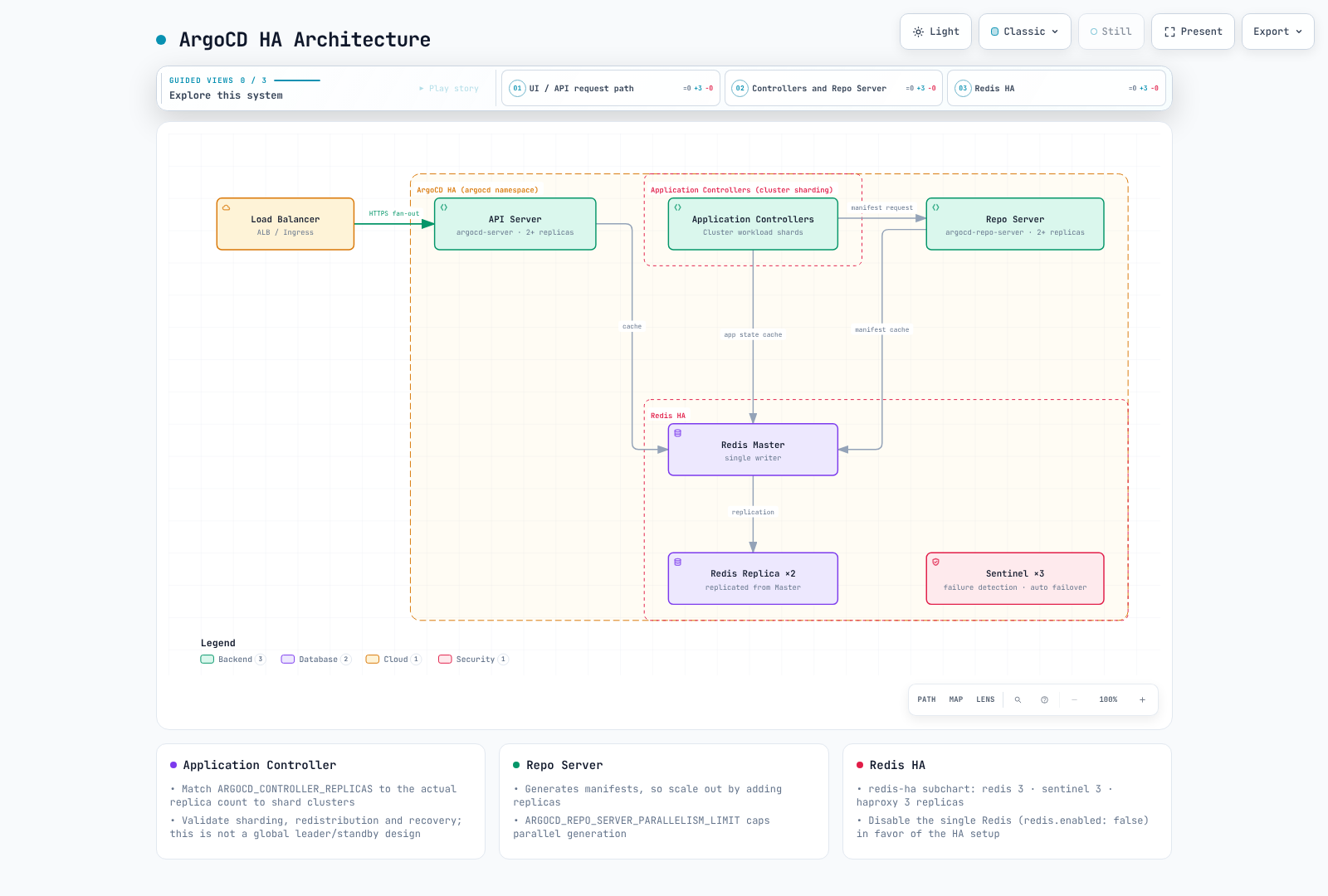
请在渲染后的 Helm 示例中检查以下内容。
- Application Controller 在分片之间分配集群,而非使用一个全局 leader 和备用实例。该 chart 使副本数与
ARGOCD_CONTROLLER_REPLICAS对齐。请验证算法、重新分配和恢复;动态分配是一项独立功能。 - ApplicationSet leader election 与 Application Controller 分片不同。该 chart 为多个 ApplicationSet 副本启用 leader election。
- 内置 Dex 使用内存存储;增加副本可能导致数据不一致。请保持其默认的单副本,并针对额外 HA 要求验证受支持的设计。
- Redis 是可丢弃的缓存;Kubernetes 对象会持久保存 Argo 配置。Redis HA 副本数为
redis-ha.replicas,而不是redis-ha.redis.replicas。该软件包使用三个 Redis/Sentinel 实例。 - PDB 限制自愿驱逐,而不限制节点故障或每次 rollout。请测试分布、就绪状态、依赖关系和协调恢复。
- 根据真实的 manifest 生成/内存负载调优 Repo Server 并发度、HPA 和 CPU 限制。不存在通用的“100 个应用意味着两个分片”阈值。
Amazon EKS 上的 ArgoCD
ALB 和 TLS
此示例使用内部 ALB。准备 AWS Load Balancer Controller、子网/标签/security group、DNS 和有效的同区域 ACM 证书。替换证书占位符/主机名,并向管理客户端提供对 ALB 的网络访问。
apiVersion: networking.k8s.io/v1
kind: Ingress
metadata:
  name: argocd-server
  namespace: argocd
  annotations:
    alb.ingress.kubernetes.io/scheme: internal
    alb.ingress.kubernetes.io/target-type: ip
    alb.ingress.kubernetes.io/backend-protocol: HTTPS
    alb.ingress.kubernetes.io/healthcheck-protocol: HTTPS
    alb.ingress.kubernetes.io/healthcheck-path: /healthz
    alb.ingress.kubernetes.io/listen-ports: '[{"HTTPS":443}]'
    alb.ingress.kubernetes.io/certificate-arn: REPLACE_WITH_ACM_CERTIFICATE_ARN
    alb.ingress.kubernetes.io/ssl-policy: ELBSecurityPolicy-TLS13-1-2-2021-06
spec:
  ingressClassName: alb
  rules:
  - host: argocd.example.com
    http:
      paths:
      - path: /
        pathType: Prefix
        backend:
          service:
            name: argocd-server
            port:
              number: 443
由于后端使用 HTTPS,请保持 server.insecure=false。通过此单一 HTTP target group 的 CLI 流量请使用 --grpc-web。原生 gRPC 需要独立的 gRPC target group 和上游文档中说明的路由条件。
argocd login argocd.example.com --grpc-webIRSA 和特定功能权限
仅有 IAM annotation 并不能配置 AWS 集成或令牌续订。请区分每个功能实际使用的身份。
| 功能 | 身份 |
|---|---|
| 部署到另一个 EKS API | Controller 和所需的 ApplicationSet/Server 管理角色 → 目标 AssumeRole → EKS Access Entry/RBAC |
| 读取 OCI/Helm 源 | 实际的 Repo Server registry 身份验证、凭证提供程序和令牌续订 |
| 发现镜像/更新 Git | 独立的 Image Updater |
| 读取 Secrets Manager | 实际 AWS 调用方的角色,例如 External Secrets |
| 拉取 Pod 镜像 | 节点角色或 Fargate 执行角色 |
IRSA 需要 OIDC provider 和受 aud/sub 限制的信任关系;Pod Identity 需要 agent、association 和受支持的 SDK。将目标信任和管理角色的 AssumeRole 权限限制为预期的 ARN。另行配置目标 EKS access entry、namespace 授权和 API 连通性。在需要时更改工作负载身份后重新创建受影响的 Pod。
声明式 EKS 集群注册
在建立角色和权限后,使用实际 endpoint 和 CA 进行注册。请明确选择管理集群的 kubeconfig context。
# IAM roles, trust relationships and target EKS access/RBAC must already exist.
set -euo pipefail
: "${ARGOCD_CONTEXT:?Set the management cluster kubeconfig context}"
: "${TARGET_EKS_NAME:?Set the target EKS cluster name}"
: "${TARGET_AWS_REGION:?Set the target region}"
: "${TARGET_ROLE_ARN:?Set the authorized target-cluster IAM role}"
umask 077
aws eks describe-cluster --name "$TARGET_EKS_NAME" --region "$TARGET_AWS_REGION" \
  --query 'cluster.{name:name,server:endpoint,ca:certificateAuthority.data}' \
  --output json > target-eks.json
jq --arg role "$TARGET_ROLE_ARN" '{
  apiVersion:"v1", kind:"Secret",
  metadata:{name:"target-eks",namespace:"argocd",
    labels:{"argocd.argoproj.io/secret-type":"cluster"}},
  type:"Opaque",
  data:{name:(.name|@base64),server:(.server|@base64),config:({
    awsAuthConfig:{clusterName:.name,roleARN:$role},
    tlsClientConfig:{insecure:false,caData:.ca}
  }|tojson|@base64)}
}' target-eks.json > target-cluster-secret.json
kubectl --context "$ARGOCD_CONTEXT" apply -f target-cluster-secret.json
argocd cluster list
命令式 argocd cluster add 接受 kubeconfig context 名称。EKS 默认 context 可以是 ARN,但这不是一个接受任意 ARN 的 AWS API。它可能会创建目标 ServiceAccount/RBAC 对象;请将它们的范围限定为所需的 namespace 和权限。
声明式设置
对于 Helm,请在 values 中管理 configs.cm/configs.params。对于 manifest,请将下面所需的键与现有设置合并。避免 Helm 和单独的 kubectl 所有者竞争同一字段。
apiVersion: v1
kind: ConfigMap
metadata:
  name: argocd-cm
  namespace: argocd
  labels:
    app.kubernetes.io/part-of: argocd
data:
  url: https://argocd.example.com
  users.anonymous.enabled: "false"
  exec.enabled: "false"
---
apiVersion: v1
kind: ConfigMap
metadata:
  name: argocd-cmd-params-cm
  namespace: argocd
  labels:
    app.kubernetes.io/part-of: argocd
data:
  server.insecure: "false"
仅在测试 SSO 授权和恢复访问后才设置 admin.enabled=false。请将任何 /argocd 子路径与 ingress 路由和 server.rootpath/basehref 一同设计;它不是默认要求。命令行/环境设置可能需要 component rollout。
对于 Rollouts 等受支持的资源,优先使用内置健康检查。自定义 Lua 即使在 status 缺失时也必须返回有效状态;不要将 unknown 等同于 Healthy。自定义 Kustomize 版本需要 kustomize.path.<version> 以及实际的可执行文件。请使用下面的 repository Secret,而非旧版 repositories/repository.credentials ConfigMap 字段。
仓库凭证
这些示例从受保护的文件引导创建 Secret。请提供实际的用户/仓库/App ID,并且仅授予所需的读取权限。不要将令牌、私钥或 base64 Secret 提交到 Git。为持续轮换指定一个所有者,例如 External Secrets。
HTTPS 凭证模板
set -euo pipefail
# Bootstrap one credential method; use an external secret manager for rotation.
# Credential files must contain only their value, without an accidental trailing newline.
kubectl -n argocd create secret generic github-repo-creds \
  --from-literal=url=https://github.com/myorg/ \
  --from-file=username=/secure/path/github-user \
  --from-file=password=/secure/path/github-token
kubectl -n argocd label secret github-repo-creds \
  argocd.argoproj.io/secret-type=repo-creds
repo-creds 是 URL 前缀凭证模板;repository 注册一个仓库。当 repository 已有显式凭证时,请检查优先级。
SSH
set -euo pipefail
kubectl -n argocd create secret generic private-repo-ssh \
  --from-literal=type=git \
  --from-literal=url=git@github.com:myorg/private-repo.git \
  --from-file=sshPrivateKey=/secure/path/id_ed25519
kubectl -n argocd label secret private-repo-ssh \
  argocd.argoproj.io/secret-type=repository
在将 SSH 服务器主机密钥添加到 known hosts 前,请通过可信通道验证它;不要信任未经验证的密钥扫描。
GitHub App
set -euo pipefail
kubectl -n argocd create secret generic github-app-creds \
  --from-literal=url=https://github.com/myorg/ \
  --from-literal=githubAppID=123456 \
  --from-literal=githubAppInstallationID=12345678 \
  --from-file=githubAppPrivateKey=/secure/path/github-app.pem
kubectl -n argocd label secret github-app-creds \
  argocd.argoproj.io/secret-type=repo-creds
升级 ArgoCD
升级前检查清单
审查从已安装版本到目标版本的每一份相关破坏性变更指南,并在预发布环境中测试。不要假定直接将版本从 2.x 替换为 3.5 即可。保持相同的安装所有者。加密 Secret 备份并限制访问;它们不能安全地提交到 Git。
- 审查发行说明以了解破坏性变更
- 备份当前安装:bash
umask 077 kubectl get applications,applicationsets -n argocd -o yaml > applications-backup.yaml kubectl get appprojects -n argocd -o yaml > projects-backup.yaml kubectl get secrets -n argocd -l argocd.argoproj.io/secret-type -o yaml > secrets-backup.yaml - 检查集群兼容性、chart values、目标集群权限以及回滚/恢复过程。配置备份不会备份应用程序数据库。
通过 Manifest 升级
# Apply new version manifests
kubectl apply --server-side -n argocd -f https://raw.githubusercontent.com/argoproj/argo-cd/v3.5.4/manifests/install.yaml

# Wait for rollout
kubectl rollout status deployment argocd-server -n argocd
kubectl rollout status deployment argocd-repo-server -n argocd
kubectl rollout status statefulset/argocd-application-controller -n argocd
通过 Helm 升级
# Update repo
helm repo update

# Check available versions
helm search repo argo/argo-cd --versions

# Upgrade
helm upgrade argocd argo/argo-cd \
  --namespace argocd \
  --values values.yaml \
  --version 10.8.4
升级后验证
# Verify versions
argocd version

# Check all applications sync status
argocd app list

# Verify component health
kubectl get pods -n argocd
安装故障排除
常见问题
Pod 未启动:
# Check pod events
kubectl describe pod -n argocd -l app.kubernetes.io/name=argocd-server

# Check logs
kubectl logs -n argocd -l app.kubernetes.io/name=argocd-server --tail=100
仓库连接失败:
# Test repository access
argocd repo list
argocd repo get https://github.com/myorg/myrepo.git
证书问题:
# Check TLS certificates
# Select the Secret actually used by the server (argocd-server-tls or its configured fallback).
: "${ARGOCD_TLS_SECRET:?Set the actual TLS Secret name}"
kubectl get secret -n argocd "$ARGOCD_TLS_SECRET" -o jsonpath='{.data.tls\.crt}' \
  | base64 -d | openssl x509 -noout -dates -subject -issuer
# An ALB frontend ACM certificate is a separate TLS layer.
测验
要测试所学内容,请尝试 ArgoCD 安装测验。