Amazon OpenSearch Service
最后更新: September 13, 2026 示例基线: 预置型 OpenSearch Service 3.5;Terraform 1.15.7/AWS provider 6.64.0;AWS for Fluent Bit 3.4.15(Fluent Bit 5.0.9)。仅进行了本地配置检查;未部署任何域、采集器、SAML 会话或数据投递测试。
Amazon OpenSearch Service 负责管理搜索集群,并支持特定的 OpenSearch 版本以及旧版 Elasticsearch OSS 版本。本章介绍 VPC 域以及传统的热存储/UltraWarm/冷存储分层。Serverless 集合(collection)以及较新的优化型实例存储选项具有各自不同的配置、API 与可用性要求。
概述
OpenSearch 是采用 Apache-2.0 许可的搜索项目。它源自 Elasticsearch 7.10 这一事实并不意味着它兼容当前所有的 Elasticsearch 客户端、插件或 API。Elastic 当前的源码许可选择包括对符合条件的源码部分采用 AGPLv3,同时并存 SSPL/Elastic License 2.0;请核对具体组件与分发形式,而不要把 Elasticsearch 当作单一、未变更的许可模型。
AWS 支持列表当前将 OpenSearch 3.5 列为受支持版本之一。此前的 2.11 示例在 2027 年 11 月 7 日之前仍处于标准支持范围内;并非因为出现了更新的版本就不再受支持。对于已有的域,在申请版本升级之前,请先检查受支持的升级路径、破坏性变更、快照以及客户端兼容性。
OpenSearch Service 可支持日志分析、全文检索、聚合以及安全分析类工作流。启用某项服务或保留审计日志本身并不等于满足了合规要求。
架构
OpenSearch 集群架构
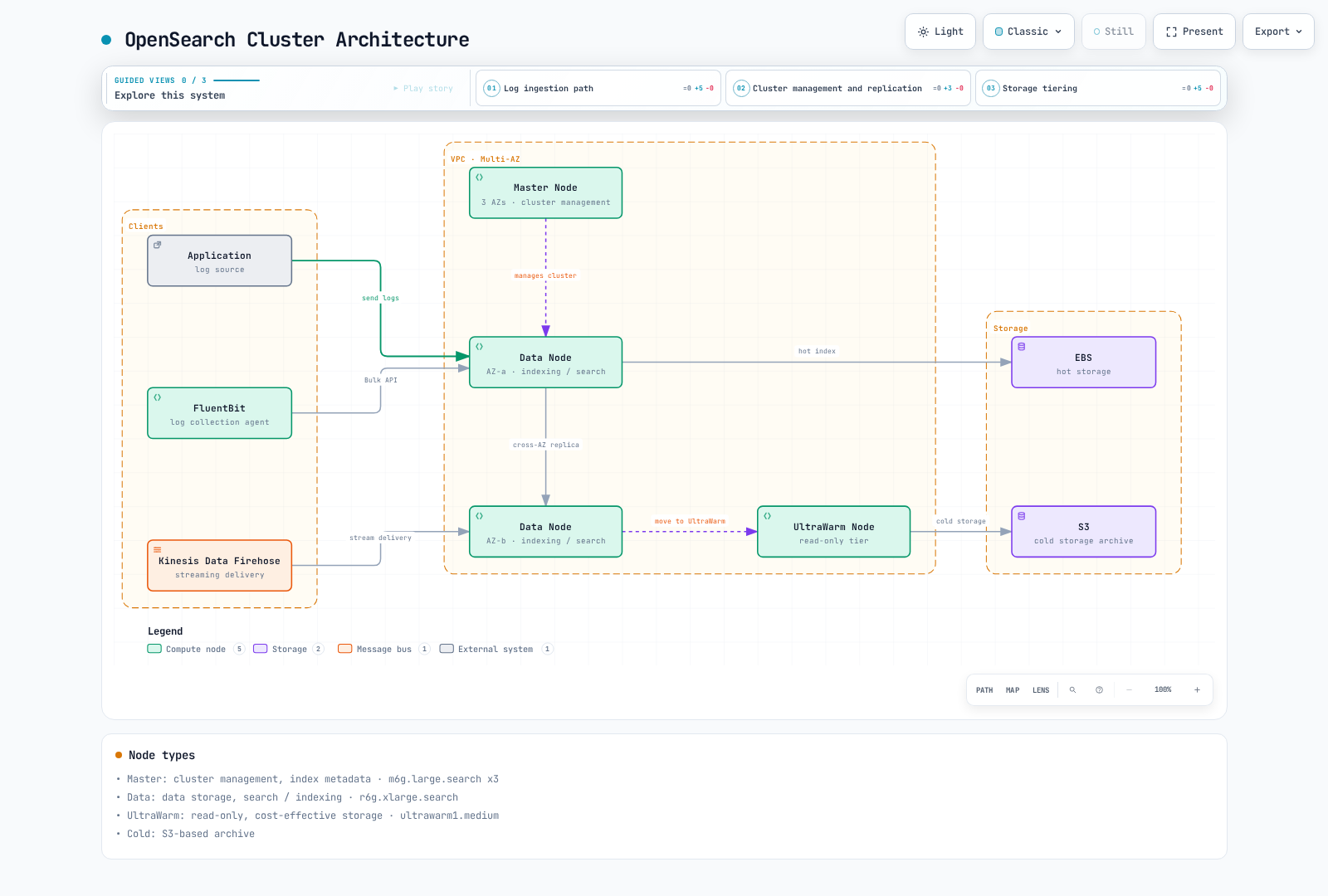
该图为示意性质,并非精确的副本/可用区(AZ)布局,也不是容量规划建议。图中的 “Master” 标签指专用集群管理角色;AWS 配置字段仍使用 dedicated_master_*。“Kinesis Data Firehose” 是 Amazon Data Firehose 的旧称。UltraWarm 与冷存储均使用基于 S3 的存储;冷数据必须先挂载到 UltraWarm 才能查询。
| 角色或层级 | 功能 |
|---|---|
| 专用集群管理器节点(cluster-manager) | 管理集群状态、元数据与分片分配。三个节点是惯用的专用管理器配置;它们不是数据副本。 |
| 数据节点 / 热存储 | 负责索引与查询。EBS 的可用性与限制取决于所选的实例系列。 |
| UltraWarm | 由 S3 支撑的只读索引,配合 warm 节点的缓存/计算能力。请核对引擎、实例与专用管理器方面的前置条件。 |
| 冷存储 | 生命周期独立的分离式索引存储。需将选定索引重新挂载到 UltraWarm 才能查询。 |
带备用(Standby)的多可用区部署有额外的拓扑与副本要求。仅启用可用区感知(zone awareness)并不会启用 Standby,也不会建立其可用性保证。请查看当前的实例限制,包括 VPC Encryption Controls 与存储兼容性。原示例中的 r6g/m6g 规格只是示例输入,不是基准测试结果。
补充资源:AWS Instance Benchmark。服务容量仍需通过具有代表性的 OpenSearch 工作负载测试来确认。
数据流
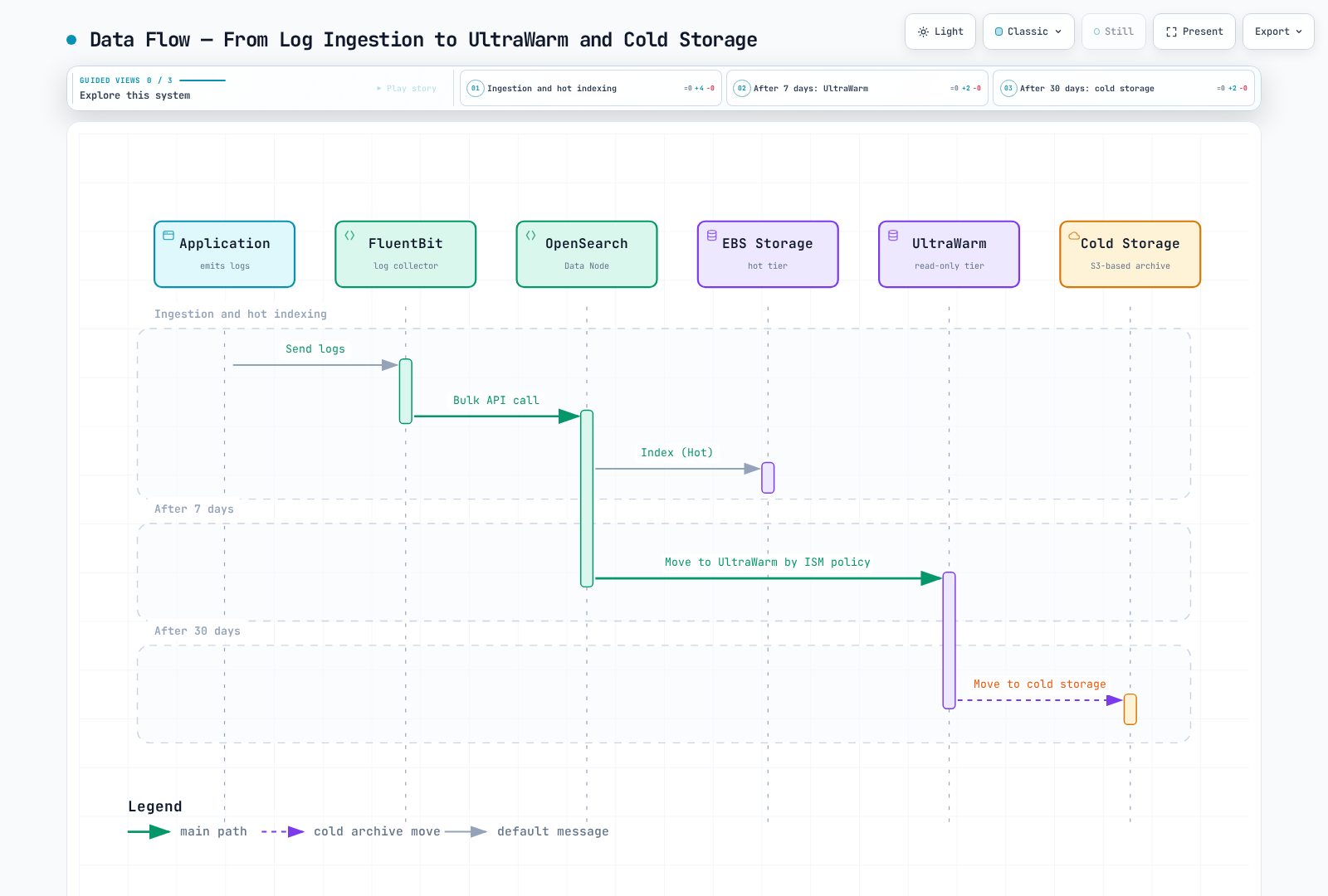
图中的 7 天/30 天标签是示例性的索引年龄条件,不是自动生效的默认值,也不代表按事件时间精确保留。ISM 周期性运行,迁移是异步的。在基于日期的索引策略下,迟到或重放的事件可能落到较旧的只读索引上;在启用迁移之前,请先确定如何路由或归档这类数据。
域的创建
前置条件
准备同一 VPC 中位于不同可用区的三个私有子网、可访问的客户端安全组、已存在的服务关联角色,以及经过审批的管理员/写入者/读取者 IAM 角色。示例会校验子网 ID 互不相同,但不会远程验证它们的可用区、路由、容量或归属。
该 Terraform 配置使用 IAM 签名的 API 请求和 IAM 主用户角色,避免在 Terraform state 中保存内部主用户密码。在发送日志之前,请先配置 FGAC 角色映射。浏览器 SSO 是下文讨论的另一种访问方案;基于 IAM 主体的域策略要求 SigV4,不会自动接受未签名的 SAML 浏览器请求。
通过 Terraform 创建
示例使用 AWS 商用分区和首尔区域。请一致地替换各项输入,并核对区域可用性。该配置在实际 apply 时会创建资源;本次审核仅执行了本地校验。
terraform {
  required_providers {
    aws = {
      source  = "hashicorp/aws"
      version = "6.64.0"
    }
  }
}

variable "region" {
  type    = string
  default = "ap-northeast-2"
}

variable "account_id" {
  type = string
  validation {
    condition     = can(regex("^[0-9]{12}$", var.account_id))
    error_message = "Use the owning AWS account ID."
  }
}

variable "vpc_id" {
  type = string
}

variable "subnet_ids" {
  type = list(string)
  validation {
    condition     = length(var.subnet_ids) == 3 && length(distinct(var.subnet_ids)) == 3
    error_message = "Provide three distinct subnet IDs, one in each intended AZ."
  }
}

variable "client_security_group_ids" {
  type = set(string)
}

variable "admin_role_arn" {
  type = string
}

variable "writer_role_arns" {
  type = set(string)
}

variable "reader_role_arns" {
  type    = set(string)
  default = []
}

provider "aws" {
  region = var.region
}

locals {
  domain_name = "logs-production"
  domain_arn  = "arn:aws:es:${var.region}:${var.account_id}:domain/${local.domain_name}"
  log_types   = toset(["INDEX_SLOW_LOGS", "SEARCH_SLOW_LOGS", "ES_APPLICATION_LOGS", "AUDIT_LOGS"])
  callers     = setunion(toset([var.admin_role_arn]), var.writer_role_arns, var.reader_role_arns)
}

resource "aws_security_group" "search" {
  name_prefix = "logs-search-"
  description = "OpenSearch HTTPS from approved client security groups"
  vpc_id      = var.vpc_id
}

resource "aws_vpc_security_group_ingress_rule" "clients" {
  for_each                     = var.client_security_group_ids
  security_group_id            = aws_security_group.search.id
  referenced_security_group_id = each.value
  from_port                    = 443
  to_port                      = 443
  ip_protocol                  = "tcp"
}

resource "aws_vpc_security_group_egress_rule" "outbound" {
  security_group_id = aws_security_group.search.id
  cidr_ipv4         = "0.0.0.0/0"
  ip_protocol       = "-1"
}

resource "aws_cloudwatch_log_group" "search" {
  for_each          = local.log_types
  name              = "/aws/opensearch/${local.domain_name}/${lower(each.value)}"
  retention_in_days = 30
}

resource "aws_cloudwatch_log_resource_policy" "search" {
  policy_name = "logs-production-opensearch"
  policy_document = jsonencode({
    Version = "2012-10-17"
    Statement = [{
      Effect    = "Allow"
      Principal = { Service = "es.amazonaws.com" }
      Action    = ["logs:CreateLogStream", "logs:PutLogEvents"]
      Resource  = [for group in aws_cloudwatch_log_group.search : "${group.arn}:*"]
      Condition = {
        StringEquals = { "aws:SourceAccount" = var.account_id }
        ArnEquals    = { "aws:SourceArn" = local.domain_arn }
      }
    }]
  })
}

resource "aws_opensearch_domain" "logs" {
  domain_name    = local.domain_name
  engine_version = "OpenSearch_3.5"

  cluster_config {
    instance_type                 = "r6g.xlarge.search"
    instance_count                = 3
    dedicated_master_enabled      = true
    dedicated_master_type         = "m6g.large.search"
    dedicated_master_count        = 3
    zone_awareness_enabled        = true
    multi_az_with_standby_enabled = false
    zone_awareness_config {
      availability_zone_count = 3
    }
    warm_enabled = true
    warm_type    = "ultrawarm1.medium.search"
    warm_count   = 2
    cold_storage_options {
      enabled = true
    }
  }

  ebs_options {
    ebs_enabled = true
    volume_type = "gp3"
    volume_size = 500
  }

  vpc_options {
    subnet_ids         = var.subnet_ids
    security_group_ids = [aws_security_group.search.id]
  }

  encrypt_at_rest {
    enabled = true
  }
  node_to_node_encryption {
    enabled = true
  }
  domain_endpoint_options {
    enforce_https       = true
    tls_security_policy = "Policy-Min-TLS-1-2-PFS-2023-10"
  }
  advanced_security_options {
    enabled                        = true
    internal_user_database_enabled = false
    master_user_options {
      master_user_arn = var.admin_role_arn
    }
  }

  access_policies = jsonencode({
    Version = "2012-10-17"
    Statement = [{
      Effect    = "Allow"
      Principal = { AWS = sort(tolist(local.callers)) }
      Action    = ["es:ESHttp*"]
      Resource  = "${local.domain_arn}/*"
    }]
  })

  dynamic "log_publishing_options" {
    for_each = aws_cloudwatch_log_group.search
    content {
      cloudwatch_log_group_arn = log_publishing_options.value.arn
      log_type                 = log_publishing_options.key
      enabled                  = true
    }
  }

  depends_on = [aws_cloudwatch_log_resource_policy.search]
}

output "domain_endpoint" {
  value = aws_opensearch_domain.logs.endpoint
}

output "dashboards_endpoint" {
  value = aws_opensearch_domain.logs.dashboard_endpoint
}
初始规格、500GiB 的 EBS 卷以及 30 天的 CloudWatch 保留期都只是示意。该配置明确采用不带 Standby 的多可用区部署。在这份参考配置中,安全组的出站访问仍较宽松;在投入生产之前,请针对实际需要支持的连接设计出站限制。
域访问策略允许指定的 IAM 角色执行 HTTP 操作;FGAC 必须进一步限制它们的索引/集群权限。仅靠基于 URI 的 IAM 权限无法约束批量请求体中内嵌的索引名称。请只为采集器角色授予预期的写入者映射。
平台的服务关联角色属于账户级依赖。请通过其归属的基础设施 state 复用或导入该角色,而不要在每次部署时都尝试创建同一个角色。
OpenSearch 域每小时接收一次自动快照,保留 14 天(最多 336 个)。旧的 automated_snapshot_start_hour 示例适用于更早的 Elasticsearch 版本,不适用于此 OpenSearch 配置。快照是恢复手段,不能替代经过测试的保留/恢复方案。集群状态为红色(red)时可能无法生成快照。
CloudWatch 日志发布需要先配置范围受限的资源策略,然后再配置域。发布慢日志目标并不等于启用了所有慢日志阈值,发布审计日志也不等于配置了每一类审计事件。请有意识地配置相应的引擎/审计设置;日志中的查询语句与文档内容同样需要访问控制与保留策略。
索引管理
下文的主采集器写入名为 logs-production-YYYY.MM.DD 的每日索引。模板、ISM 模式与查询示例都使用该命名模式。随后还有一个独立的 rollover 练习;请勿不加区分地混用这两种写入策略。
以下请求块使用 OpenSearch Dashboards Dev Tools 语法。它们不是独立的 JSON 文件,也不是本次审核实际执行的命令。请使用获得授权的数据平面客户端并指向目标域。
索引模板
PUT _index_template/logs-template
{
  "index_patterns": [
    "logs-production-*"
  ],
  "priority": 100,
  "template": {
    "settings": {
      "number_of_shards": 3,
      "number_of_replicas": 1,
      "refresh_interval": "5s",
      "index.codec": "best_compression",
      "index.translog.durability": "request"
    },
    "mappings": {
      "dynamic": false,
      "properties": {
        "@timestamp": {
          "type": "date"
        },
        "cluster_name": {
          "type": "keyword"
        },
        "environment": {
          "type": "keyword"
        },
        "stream": {
          "type": "keyword"
        },
        "log": {
          "type": "text",
          "index": false
        },
        "kubernetes": {
          "properties": {
            "namespace_name": {
              "type": "keyword"
            },
            "pod_name": {
              "type": "keyword"
            },
            "container_name": {
              "type": "keyword"
            },
            "host": {
              "type": "keyword"
            }
          }
        },
        "app": {
          "properties": {
            "level": {
              "type": "keyword"
            },
            "message": {
              "type": "text",
              "fields": {
                "keyword": {
                  "type": "keyword",
                  "ignore_above": 256
                }
              }
            },
            "error_type": {
              "type": "keyword"
            },
            "trace_id": {
              "type": "keyword"
            },
            "span_id": {
              "type": "keyword"
            },
            "request_id": {
              "type": "keyword"
            },
            "http": {
              "properties": {
                "method": {
                  "type": "keyword"
                },
                "status_code": {
                  "type": "integer"
                },
                "path": {
                  "type": "keyword"
                },
                "response_time_ms": {
                  "type": "float"
                }
              }
            }
          }
        }
      }
    }
  }
}
Kubernetes filter 生成的字段是 kubernetes.namespace_name,而不是 kubernetes.namespace。应用的 JSON 被嵌套在 app 之下,以便与采集器元数据区分开。应用必须按文档约定输出相应字段与单位;示例使用小写的 app.level,并在 app.http.response_time_ms 中使用毫秒。
采集器增强处理之前,一条示意性的单行应用记录如下:
{"level":"error","message":"request failed","error_type":"upstream_timeout","http":{"method":"GET","path":"/orders","status_code":503,"response_time_ms":1250}}message.keyword 子字段被显式定义为 app.message.keyword;仅有 text 映射并不会自动创建它。超过其 ignore_above 限制的值不会在该子字段中被索引。用于聚合时,建议使用范围有限的 error_type 分类体系,而不是任意的消息文本。
dynamic: false 限制新增映射字段,但不会把未知字段从 _source 中移除。原始的 log 字段被存储但不建立搜索索引。请评估数据重复、脱敏以及原始数据的访问控制。translog.durability: request 相比缺乏解释的 async/30s 持久性取舍是更安全的基线;但这两种设置都不能保证从任何存储或副本故障中恢复。
ISM(索引状态管理)策略
PUT _plugins/_ism/policies/logs-lifecycle
{
  "policy": {
    "description": "Illustrative daily-index hot/warm/cold retention; confirm ownership and late-arrival handling.",
    "schema_version": 1,
    "default_state": "hot",
    "states": [
      {
        "name": "hot",
        "actions": [],
        "transitions": [
          {
            "state_name": "warm",
            "conditions": {
              "min_index_age": "7d"
            }
          }
        ]
      },
      {
        "name": "warm",
        "actions": [
          {
            "warm_migration": {}
          }
        ],
        "transitions": [
          {
            "state_name": "cold",
            "conditions": {
              "min_index_age": "30d"
            }
          }
        ]
      },
      {
        "name": "cold",
        "actions": [
          {
            "cold_migration": {
              "timestamp_field": "@timestamp"
            }
          }
        ],
        "transitions": [
          {
            "state_name": "delete",
            "conditions": {
              "min_index_age": "90d"
            }
          }
        ]
      },
      {
        "name": "delete",
        "actions": [
          {
            "cold_delete": {}
          }
        ],
        "transitions": []
      }
    ],
    "ism_template": [
      {
        "index_patterns": [
          "logs-production-*"
        ],
        "priority": 100
      }
    ]
  }
}
该策略会附加到新创建的匹配索引上。已有索引需要显式执行策略附加操作;在变更之前,请检查 _plugins/_ism/explain/INDEX 与策略版本。
每个 action 对象只包含一个动作(以及它支持的重试/超时元数据)。托管的 warm_migration、cold_migration 和 cold_delete 与自管 ISM 操作不同。冷索引需要使用 cold_delete,而 ISM 冷迁移需要显式指定时间戳字段。请勿把 warm 迁移、副本数变更和 force merge 合并到同一个 action 对象中。
ISM 通常每 5–8 分钟评估一次作业,且在集群状态为红色时不会执行。索引年龄从索引创建时间开始计算。示例中的 90 天删除是组织自身的选择,不是普适的法律要求,也不代表按单条记录精确到期。在启用删除之前,请验证迟到数据的行为、快照与恢复能力。
索引别名与 Rollover
这个独立练习使用 rollover-logs-* 前缀和一个写入别名,不会改变前述每日采集器的配置。
PUT _index_template/rollover-logs
{
  "index_patterns": [
    "rollover-logs-*"
  ],
  "priority": 100,
  "template": {
    "settings": {
      "number_of_shards": 3,
      "number_of_replicas": 1,
      "plugins.index_state_management.rollover_alias": "rollover-logs-write"
    },
    "mappings": {
      "properties": {
        "@timestamp": {
          "type": "date"
        },
        "message": {
          "type": "text"
        }
      }
    }
  }
}

PUT _plugins/_ism/policies/rollover-logs
{
  "policy": {
    "description": "Independent rollover example; not attached to date-based collector indexes.",
    "schema_version": 1,
    "default_state": "write",
    "states": [
      {
        "name": "write",
        "actions": [
          {
            "rollover": {
              "min_index_age": "1d",
              "min_primary_shard_size": "30gb"
            }
          }
        ],
        "transitions": []
      }
    ],
    "ism_template": [
      {
        "index_patterns": [
          "rollover-logs-*"
        ],
        "priority": 100
      }
    ]
  }
}

PUT rollover-logs-000001
{
  "aliases": {
    "rollover-logs-write": {
      "is_write_index": true
    }
  }
}

POST rollover-logs-write/_doc
{
  "@timestamp": "2026-09-13T00:00:00Z",
  "message": "synthetic rollover example"
}

GET _plugins/_ism/explain/rollover-logs-000001

POST rollover-logs-write/_rollover
{
  "conditions": {
    "max_age": "1d",
    "max_size": "90gb"
  }
}
自动 ISM rollover 需要 rollover 别名设置、符合命名规则的带序号索引以及写入别名。仅仅因为存在别名,按日期命名的写入方并不会去使用该别名。
ISM 的 min_primary_shard_size: 30gb 针对单个主分片。OpenSearch 3.5 的 rollover REST 解析器接受 max_age、max_docs 和 max_size;其中 max_size 衡量的是主分片存储总量,不包含副本。因此 90GB 的 REST 示例与每个主分片 30GB 的阈值并不是同一个条件。Rollover 条件之间是“满足其一即可”的关系,并不要求同时满足所有阈值。
数据摄取
从 Fluent Bit 直接摄取
以下六个资源构成适用于符合条件的 Linux EC2 节点的参考采集器配置。Fargate 使用其平台自带的日志路由器;Windows 及其他节点平台需要各自的路径与部署模型。在部署节点日志读取器之前,请确认主机路径、准入策略例外以及资源需求。
请设置真实的域主机名、区域与 IRSA 角色。该角色的 OIDC 信任关系必须匹配 system:serviceaccount:logging:fluent-bit;同时还要授权其 IAM/数据平面访问权限和 FGAC 写入者角色。只有在节点/代理/SDK 支持的情况下,Pod Identity 才是可选替代方案。
apiVersion: v1
kind: Namespace
metadata:
  name: logging
---
apiVersion: v1
kind: ServiceAccount
metadata:
  name: fluent-bit
  namespace: logging
  annotations:
    eks.amazonaws.com/role-arn: arn:aws:iam::123456789012:role/FluentBitOpenSearchRole
---
apiVersion: rbac.authorization.k8s.io/v1
kind: ClusterRole
metadata:
  name: fluent-bit-metadata
rules:
- apiGroups:
  - ''
  resources:
  - namespaces
  - pods
  verbs:
  - get
  - list
  - watch
---
apiVersion: rbac.authorization.k8s.io/v1
kind: ClusterRoleBinding
metadata:
  name: fluent-bit-metadata
roleRef:
  apiGroup: rbac.authorization.k8s.io
  kind: ClusterRole
  name: fluent-bit-metadata
subjects:
- kind: ServiceAccount
  name: fluent-bit
  namespace: logging
---
apiVersion: v1
kind: ConfigMap
metadata:
  name: fluent-bit-config
  namespace: logging
data:
  fluent-bit.conf: |
    [SERVICE]
        Flush          5
        Log_Level      info
        HTTP_Server    Off
        storage.path   /buffers/storage
        storage.sync   normal

    [INPUT]
        Name               tail
        Tag                kube.*
        Path               /var/log/containers/*.log
        Exclude_Path       /var/log/containers/fluent-bit-*_logging_fluent-bit-*.log
        multiline.parser   docker, cri
        DB                 /buffers/tail.db
        Mem_Buf_Limit      50MB
        Skip_Long_Lines    On
        Refresh_Interval   10
        storage.type       filesystem

    [FILTER]
        Name                kubernetes
        Match               kube.*
        Kube_Tag_Prefix     kube.var.log.containers.
        Merge_Log           On
        Merge_Log_Key       app
        Keep_Log            On
        Labels              Off
        Annotations         Off
        K8S-Logging.Parser  Off
        K8S-Logging.Exclude Off

    [FILTER]
        Name    modify
        Match   kube.*
        Set     cluster_name example-eks
        Set     environment example

    [OUTPUT]
        Name                    opensearch
        Match                   kube.*
        Host                    REPLACE_WITH_DOMAIN_ENDPOINT
        Port                    443
        tls                     On
        tls.verify              On
        AWS_Auth                On
        AWS_Region              ap-northeast-2
        Suppress_Type_Name      On
        Logstash_Format         On
        Logstash_Prefix         logs-production
        Time_Key                @timestamp
        Generate_ID             On
        Retry_Limit             5
        Buffer_Size             5MB
        Compress                gzip
        storage.total_limit_size 1G
---
apiVersion: apps/v1
kind: DaemonSet
metadata:
  name: fluent-bit
  namespace: logging
spec:
  selector:
    matchLabels:
      app: fluent-bit
  template:
    metadata:
      labels:
        app: fluent-bit
    spec:
      serviceAccountName: fluent-bit
      nodeSelector:
        kubernetes.io/os: linux
      tolerations:
      - operator: Exists
        effect: NoSchedule
      containers:
      - name: fluent-bit
        image: public.ecr.aws/aws-observability/aws-for-fluent-bit:3.4.15@sha256:88e1b56cedb230486afeca6eeb26c5f6bd59c48879d0054d1674d5a58838c607
        args:
        - -c
        - /fluent-bit/custom/fluent-bit.conf
        securityContext:
          runAsUser: 0
          allowPrivilegeEscalation: false
          readOnlyRootFilesystem: true
          capabilities:
            drop:
            - ALL
          seccompProfile:
            type: RuntimeDefault
        resources:
          requests:
            cpu: 100m
            memory: 128Mi
          limits:
            memory: 512Mi
        volumeMounts:
        - name: logs
          mountPath: /var/log
          readOnly: true
        - name: buffers
          mountPath: /buffers
        - name: config
          mountPath: /fluent-bit/custom
          readOnly: true
        - name: tmp
          mountPath: /tmp
        command:
        - /fluent-bit/bin/fluent-bit
      volumes:
      - name: logs
        hostPath:
          path: /var/log
          type: Directory
      - name: buffers
        hostPath:
          path: /var/lib/fluent-bit-opensearch
          type: DirectoryOrCreate
      - name: config
        configMap:
          name: fluent-bit-config
      - name: tmp
        emptyDir: {}
镜像索引已固定(pin),并已检查其 Linux amd64/arm64 元数据。该镜像的默认 CMD 是一个入口脚本;示例显式调用 /fluent-bit/bin/fluent-bit 并使用原生 OpenSearch output。它不会加载旧版 Go 输出插件,也未在运行时测试该镜像。
重要的配置关联点:
multiline.parser docker, cri处理受支持的容器日志分帧格式;随后 Kubernetes filter 会把应用 JSON 合并到app之下。- 只读挂载的
/var/log用于日志输入。Tail DB 与文件系统缓冲使用独立的可写节点路径。它们只在该节点/路径存续期间能够跨 Pod 重启保留;它们不是跨节点的持久化存储。 - 元数据相关的 RBAC 仅限于对 Pod/namespace 的读取操作。代理本身会读取节点日志,因此要保护它的 namespace、角色与配置。
- 在本示例中,应用注解无法暗中覆盖解析行为或排除日志。采集器生成的 cluster/environment 值是显式设置的。请把采集器自身的日志从该管道中排除,以减少反馈回路。
- 对于无类型(typeless)的 OpenSearch 2.x/3.x API,必须设置
Suppress_Type_Name On。Type _doc不是兼容的替代方案。 Logstash_Format On会生成基于日期的索引名以及@timestamp字段。它不会写入可选的 rollover 别名。- 重试机制、
Generate_ID、内存缓冲以及 output 的存储上限都不构成精确一次(exactly-once)或无损投递的保证。请测试部分批量写入失败、超长行、重启后的偏移量、重试上限、磁盘压力与迟到记录。output 的上限也无法限制节点的全部磁盘用量。
被保留的原始日志可能包含同样存在于 app 之下的数据。请在存储前对禁止内容做脱敏,并监控被拒绝的记录。不要把请求体追踪(request-body tracing)作为长期开启的诊断设置。
通过 Amazon Data Firehose 摄取
Data Firehose 是另一种托管投递路径,具备缓冲、重试与备份控制;但它并不自动就是所有工作负载中最便宜或最简单的选择。其 Terraform 资源名称仍为 aws_kinesis_firehose_delivery_stream。
这个可选的资源文件使用上文的域,以及已有且经过审批的投递角色、子网、安全组和私有备份存储桶作为输入:
variable "firehose_role_arn" {
  type = string
}

variable "firehose_subnet_ids" {
  type = list(string)
}

variable "firehose_security_group_ids" {
  type = list(string)
}

variable "backup_bucket_arn" {
  type = string
}

resource "aws_cloudwatch_log_group" "firehose" {
  name              = "/aws/kinesisfirehose/logs-to-opensearch"
  retention_in_days = 30
}

resource "aws_cloudwatch_log_stream" "firehose" {
  name           = "opensearch-delivery"
  log_group_name = aws_cloudwatch_log_group.firehose.name
}

resource "aws_kinesis_firehose_delivery_stream" "logs" {
  name        = "logs-to-opensearch"
  destination = "opensearch"

  opensearch_configuration {
    domain_arn            = aws_opensearch_domain.logs.arn
    role_arn              = var.firehose_role_arn
    index_name            = "logs-production-firehose"
    index_rotation_period = "OneDay"
    buffering_interval    = 60
    buffering_size        = 5
    retry_duration        = 300
    s3_backup_mode        = "FailedDocumentsOnly"

    vpc_config {
      subnet_ids         = var.firehose_subnet_ids
      security_group_ids = var.firehose_security_group_ids
      role_arn           = var.firehose_role_arn
    }

    cloudwatch_logging_options {
      enabled         = true
      log_group_name  = aws_cloudwatch_log_group.firehose.name
      log_stream_name = aws_cloudwatch_log_stream.firehose.name
    }

    s3_configuration {
      role_arn           = var.firehose_role_arn
      bucket_arn         = var.backup_bucket_arn
      prefix             = "opensearch-failed/"
      buffering_size     = 10
      buffering_interval = 400
      compression_format = "GZIP"
    }
  }
}
投递角色需要相应的 OpenSearch/FGAC、S3、CloudWatch 与 VPC/ENI 权限,以及所需的 KMS 权限;它的信任策略与部署者的 iam:PassRole 权限是两回事。请把该投递角色加入域的调用方输入列表和写入者映射中,并允许其 VPC 连接访问 443 端口。
FailedDocumentsOnly 才是选择备份模式的方式;仅把 S3 前缀命名为 failed/ 并不能达到该效果。请测试失败场景以及从私有备份桶重放数据。Firehose 记录需要与索引映射兼容的 schema(包括时间戳);该服务不会自动生成这里展示的 Kubernetes 元数据/应用信息外层结构。
OpenSearch Dashboards
访问与索引模式
请使用经过批准的 VPC 连接方式,以及与域访问策略兼容的身份验证方法。单纯的 SSH 隧道本身无法保留原始的 TLS 主机名、SSO 重定向或 SigV4 签名。不要为了让 https://localhost:9200 看起来能用而关闭证书校验。ALB 并不是一套完整的原生域/Dashboards 集成方案。
在配置好经过认证的访问之后,为 logs-production-* 创建数据视图/索引模式,并选择 @timestamp。菜单名称会随 Dashboards 版本和启用的体验而不同。
搜索查询示例
GET logs-production-*/_search
{
  "query": {
    "bool": {
      "filter": [
        {
          "term": {
            "app.level": "error"
          }
        },
        {
          "range": {
            "@timestamp": {
              "gte": "now-1h"
            }
          }
        },
        {
          "term": {
            "kubernetes.namespace_name": "production"
          }
        }
      ]
    }
  },
  "sort": [
    {
      "@timestamp": {
        "order": "desc"
      }
    }
  ],
  "size": 100
}

GET logs-production-*/_search
{
  "size": 0,
  "query": {
    "bool": {
      "filter": [
        {
          "term": {
            "app.level": "error"
          }
        },
        {
          "range": {
            "@timestamp": {
              "gte": "now-24h"
            }
          }
        }
      ]
    }
  },
  "aggs": {
    "by_namespace": {
      "terms": {
        "field": "kubernetes.namespace_name",
        "size": 20
      },
      "aggs": {
        "by_type": {
          "terms": {
            "field": "app.error_type",
            "size": 10
          }
        }
      }
    }
  }
}

GET logs-production-*/_search
{
  "size": 0,
  "query": {
    "bool": {
      "filter": [
        {
          "exists": {
            "field": "app.http.response_time_ms"
          }
        },
        {
          "range": {
            "@timestamp": {
              "gte": "now-1h"
            }
          }
        }
      ]
    }
  },
  "aggs": {
    "response_time_percentiles": {
      "percentiles": {
        "field": "app.http.response_time_ms",
        "percents": [
          50,
          75,
          90,
          95,
          99
        ]
      }
    }
  }
}
这些示例对精确的 keyword/时间条件使用 filter 上下文。第二个查询确实会先过滤出错误再聚合 namespace。Terms 聚合返回的是选定的 top-N 结果集,可能存在分布式近似或被省略的桶;它不是对每个 namespace 的完整计数。百分位数是近似值,并使用已映射的毫秒字段。
做可视化时,可选择 app.level、基于 @timestamp 的时间直方图,或显式映射的 app.message.keyword/app.error_type 字段。在仪表板中提到某个字段名并不会自动创建它的映射。
安全配置
精细访问控制(Fine-Grained Access Control)
网络访问、域资源策略与 FGAC 是相互独立的层次。Terraform 中基于 IAM 主体的策略要求 SigV4。安全组规则或一次成功的 IAM 请求都不会自动授予索引访问权限。
管理员可以为采集器定义写入者角色,并定义受 namespace 限制的读取者:
PUT _plugins/_security/api/roles/logs-writer
{
  "cluster_permissions": [
    "cluster_composite_ops"
  ],
  "index_permissions": [
    {
      "index_patterns": [
        "logs-production-*"
      ],
      "allowed_actions": [
        "create_index",
        "write"
      ]
    }
  ]
}

PUT _plugins/_security/api/rolesmapping/logs-writer
{
  "backend_roles": [
    "arn:aws:iam::123456789012:role/FluentBitOpenSearchRole"
  ]
}

PUT _plugins/_security/api/roles/team-a-logs
{
  "cluster_permissions": [
    "cluster_composite_ops_ro"
  ],
  "index_permissions": [
    {
      "index_patterns": [
        "logs-production-*"
      ],
      "dls": "{\"term\":{\"kubernetes.namespace_name\":\"team-a\"}}",
      "allowed_actions": [
        "read"
      ]
    }
  ]
}

PUT _plugins/_security/api/rolesmapping/team-a-logs
{
  "backend_roles": [
    "arn:aws:iam::123456789012:role/TeamAReaderRole"
  ]
}
请把角色 ARN 替换为经过批准的身份。如果使用了 Firehose 路径,写入者映射还必须包含 Firehose 投递角色。不要向普通读取者授予 cluster_all 或主用户角色。IAM 后端角色映射与内部/SAML 用户名是不同的身份机制。
文档级安全与字段级安全
DLS 依据已存储的字段过滤文档。在本示例中,namespace 元数据必须来自可信的采集器;由应用自行提供的字符串不能作为租户身份的凭证。
对于权限更受限的读取者,下面这个组合式角色既保留了 namespace 限制,又只返回选定的字段:
PUT _plugins/_security/api/roles/team-a-limited
{
  "cluster_permissions": [
    "cluster_composite_ops_ro"
  ],
  "index_permissions": [
    {
      "index_patterns": [
        "logs-production-*"
      ],
      "fls": [
        "@timestamp",
        "kubernetes.namespace_name",
        "app.level",
        "app.message"
      ],
      "allowed_actions": [
        "read"
      ],
      "dls": "{\"term\":{\"kubernetes.namespace_name\":\"team-a\"}}"
    }
  ]
}
请使用预期的角色映射,而不要把受限角色附加到已经具备更大权限的身份上。请评估生效角色的完整集合。原始的 log 字段被有意排除在这份白名单之外,因为它可能重复包含那些本应被隐藏的 JSON 字段。
FLS 控制的是返回的字段,而不是允许返回的消息字符串的内容。它不会从 _source、快照或日志归档中删除信息。请测试 search、get、multi-search 与聚合的访问行为,并从源头上防止禁止的数据被写入日志。
SAML 身份验证配置
托管 OpenSearch Service 的 SAML 通过 AWS 域配置 API 进行配置,而不是上传自管的 opensearch-security/config.yml。
下面这个本地辅助脚本会把经过批准的 IdP XML 序列化,无需手工转义。请把示例中的管理组和角色属性键替换为你已审核过的 IdP 配置:
from pathlib import Path
import json
import xml.etree.ElementTree as ET

metadata = Path("idp-metadata.xml").read_text(encoding="utf-8")
root = ET.fromstring(metadata)
if root.tag.rsplit("}", 1)[-1] != "EntityDescriptor" or not root.get("entityID"):
    raise ValueError("Provide approved metadata for one IdP EntityDescriptor")
options = {
    "SAMLOptions": {
        "Enabled": True,
        "Idp": {"EntityId": root.get("entityID"), "MetadataContent": metadata},
        "MasterBackendRole": "opensearch-admin",
        "RolesKey": "Role",
        "SessionTimeoutMinutes": 60,
    }
}
Path("advanced-security-saml.json").write_text(json.dumps(options, indent=2) + "\n")aws opensearch update-domain-config \
--domain-name logs-production --region ap-northeast-2 \
--advanced-security-options file://advanced-security-saml.json这只是一个请求负载示例,不是端到端的 SSO 部署方案。请验证元数据信任关系、实体 ID、证书、ACS/Dashboards URL 以及各类映射。SAML 浏览器流量需要相匹配的域访问策略设计;启用 SAMLOptions 不会把这类流量变成上文仅支持 IAM 的策略所要求的 SigV4 请求。请遵循一套一致的身份验证方案,并在变更现有域之前测试管理员账号的恢复流程。
成本优化
存储与索引设置
请针对所选区域、节点系列/数量、副本、EBS、warm 节点的计算/存储、冷存储以及数据传输/摄取路径分别计价。此前按 100GB/天给出的总金额与固定节省百分比缺乏足够假设,无法复现;它们既不是当前预算,也不是实测对比结果。
索引压缩、刷新间隔、分片数量与字段映射是在存储/CPU、搜索新鲜度、查询能力与恢复成本之间的权衡。请在创建模板中设置诸如 index.codec 这类静态选项;不要盲目地对每个处于打开状态的生产索引下发静态设置变更。丢弃文本位置信息或禁用字段可能会破坏查询。
预留实例(Reserved Instance)的节省取决于符合条件的用量、区域、期限与付款方式。仅有一年的规划期并不足以证明购买的合理性,而节点折扣也不会让所有存储/投递费用消失。请使用当前价格与实测需求,而不是旧的 21/24/36% 固定数字。
大规模日志环境中的局限
OpenSearch 把倒排索引与面向列的 doc values 结合起来支撑许多聚合与排序操作,并不会在聚合时普遍重新读取每个完整的 _source 文档。映射、选择性、分片、缓存、段布局与并发负载都会影响性能。
原文中的 OpenSearch/ClickHouse 延迟与压缩数据没有可复现的硬件、版本、数据或查询信息。请不要把它们变成普适的 100GB 迁移门槛,或断言所有组织中 90% 的查询都属于同一种模式。
请在相同的数据、保留期、持久性与并发要求下,对具有代表性的全文检索、过滤、聚合与排查类查询进行比较。同时评估摄取/回填成本、schema 演进、权限、仪表板、运维技能与回滚方案。双写实验需要对账机制与成本控制;固定的两周或两个月排期并不构成保证。
与 Loki 的比较
| 方面 | OpenSearch | Loki |
|---|---|---|
| 索引/查询模型 | 映射字段、倒排索引与 doc values;Query DSL 以及受支持的 SQL/PPL 功能 | 流标签索引、chunk 扫描以及 LogQL 管道/指标 |
| 文本检索 | 分析器、相关性排序与全文查询能力 | 在选定的流与时间范围内进行文本过滤/检索 |
| 访问控制 | 网络/IAM/FGAC 以及已配置的文档/字段级控制 | 认证网关、租户授权以及策略/运维层面的控制 |
| 成本与运维 | 取决于预置/托管模型与工作负载 | 取决于部署模式、流数量、对象存储、缓存与查询 |
| 迁移 | 重建映射/查询并验证权限与数据正确性 | 重新设计标签/元数据/查询并验证权限与数据正确性 |
两款产品都不会自动成为合规之选、最省钱之选或运维上的简单之选。Loki 依然支持文本检索与派生指标;迁移改变的是语义与能力,而不是符合某个固定的 3–5 倍成本或 60–80% 节省的规律。
验证与参考资料
本地检查涵盖 Terraform 资源配置以及已发布的数据/配置约定。它们无法证明真实的 AWS 授权、某区域内受支持 SKU 的容量、采集器投递、ISM 状态转换/删除、SAML 身份验证或查询性能。镜像索引/配置元数据是在不拉取可执行层、不运行容器的情况下检查的。
- Service/version support
- Supported instance types and Multi-AZ
- VPC access, access policies and FGAC
- UltraWarm, cold storage, managed ISM and ISM policy reference
- Rollover API and doc values
- Snapshots, CloudWatch logs and SAML
- AWS for Fluent Bit release history and OpenSearch output configuration
- Data Firehose destination configuration
- Current service pricing
- Elastic licensing FAQ
测验
通过 OpenSearch 测验 检验这些区别。