VPC Lattice
Amazon VPC Lattice 可跨 VPC 和 AWS 账户连接应用程序。本章说明资源模型、EKS 集成、路由、IAM 授权、监控和故障排除。
最后更新: September 11, 2026,基于 AWS Gateway API Controller v2.1.3 和 Gateway API v1.5.0。示例说明配置和验证步骤;在本次审查中未将其部署到 AWS 账户。
目录
概述
什么是 VPC Lattice?
VPC Lattice 提供应用程序网络,无需在每个应用程序旁部署代理。服务网络将服务和资源配置分组,并将其连接到已获授权的使用方。服务提供监听器、路由规则、目标组和服务 DNS 名称。
当前产品还通过资源网关连接资源配置,包括使用 TCP 的 RDS 数据库等资源。此资源访问模型不同于由目标组支持的 HTTP 服务;服务网络/服务 IAM 身份验证策略不会对资源配置流量进行授权。由 PrivateLink 提供支持的服务网络 VPC 终端节点可让通过对等连接、Transit Gateway、Direct Connect 或 VPN 访问的客户端进行访问。单独的直接 VPC 关联不会将访问扩展至 Transit Gateway 或对等连接后面的客户端。
典型用途包括跨账户应用程序 API、EKS 与其他计算服务之间的通信以及共享数据资源访问。关联、路由、安全组、身份验证和应用程序授权仍需要配置。
与其他服务的比较
| 服务 | 主要职责 | 重要区别 |
|---|---|---|
| VPC Lattice | 私有应用程序和资源连接 | HTTP/HTTPS/gRPC 服务路由及独立的 TLS/TCP 资源能力;不是 Internet API 前门 |
| API Gateway | 托管 API 终端节点和 API 管理 | REST、HTTP 或 WebSocket API 具有不同功能;GraphQL 不是独立的 API Gateway API 类型 |
| AWS App Mesh | 基于 Envoy 的服务网格 | AWS 支持已于 2026-09-30 结束;控制台和资源不再可访问。迁移现有部署;不要用于新安装 |
| Transit Gateway | 使用 IP 路由的网络连接 | 连接网络;不能取代按服务的 HTTP 路由和授权 |
| Istio / Linkerd / Cilium | 通过各自的数据平面实现的网格能力 | 功能和运营成本不同。并非每种网格架构都必须使用 Sidecar |
VPC Lattice 消除了运营其托管数据平面的需求,但并不承诺降低总成本或提供完全相同的网格功能。请针对实际工作负载比较请求/数据/资源费用、控制器操作、身份要求、重试、路由功能和可观测性。请参阅 Istio–Lattice 对比。
架构
组件和流量流向
| 组件 | 职责 |
|---|---|
| 服务网络 | 逻辑分组和关联;可选的 IAM 授权边界 |
| 服务 | 具有自身 DNS 名称的应用程序终端节点 |
| 监听器和规则 | 属于服务;选择操作和目标组 |
| 目标组 | 已注册的实例、IP、Lambda 或 ALB 目标,具有特定于目标类型的行为 |
| VPC 关联 | 允许关联 VPC 中的客户端访问网络,但受安全控制约束 |
| 服务网络 VPC 终端节点 | 基于 PrivateLink 的访问,包括受支持的 Transit/本地部署路径 |
| 资源配置 / 资源网关 | 独立的资源访问模型,包括 TCP/数据库资源 |
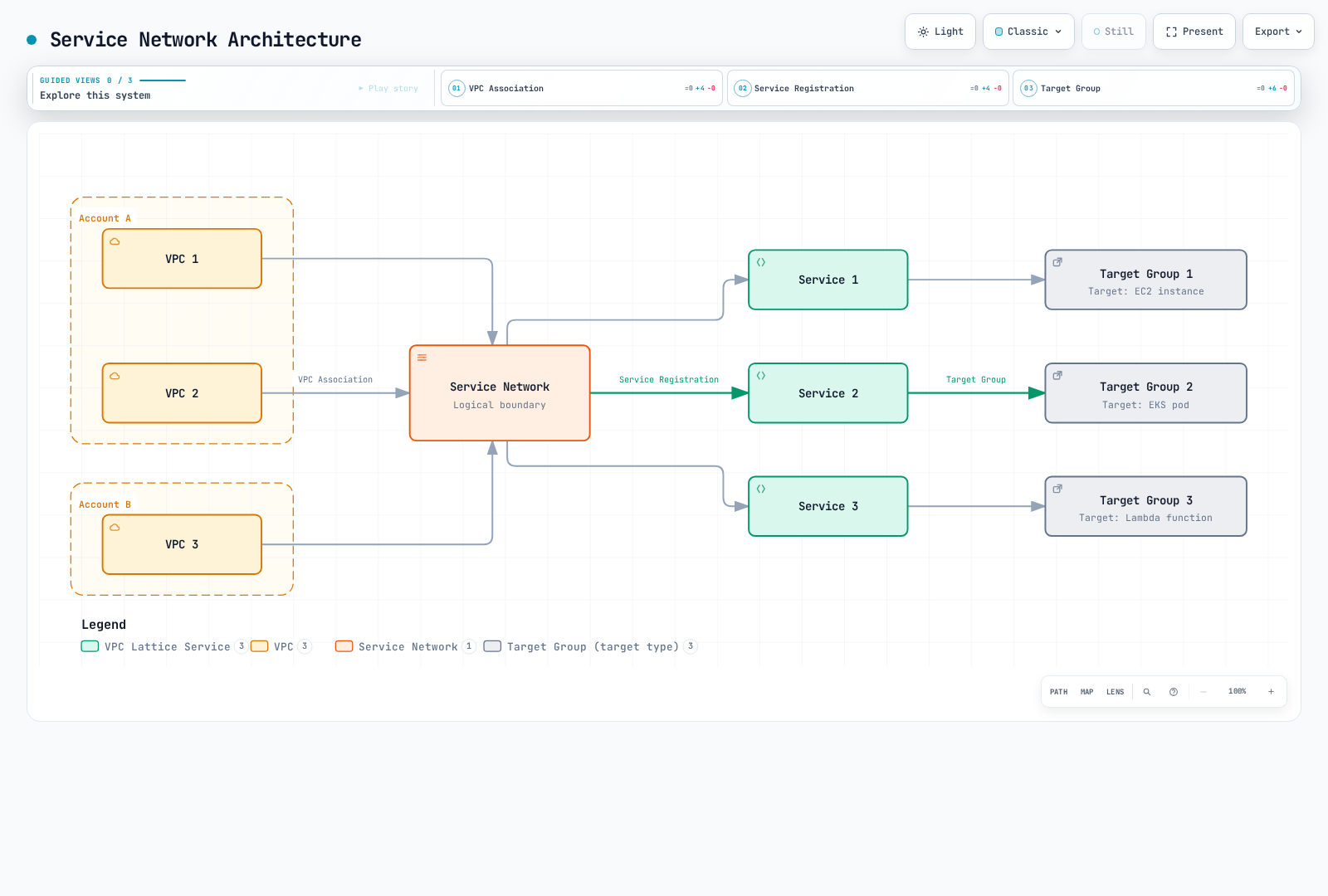
该图展示的是逻辑关联,而不是单个路由器进程。访问还取决于网络可达性和适用的策略。请求解析服务的 DNS 名称,到达其监听器,通过适用的授权检查,并根据监听器规则路由至目标。目标组描述目标位置;它不是另一个应用程序跃点。
使用 get-service --query dnsEntry 或控制器的路由注释来发现真实域名。不要根据服务名称和服务网络 ID 构造域名。分配的名称包含服务特定标识符;重新创建服务可能会改变它。
安全模型
网络访问、IAM 授权和加密是独立的控制措施。AWS_IAM 需要受支持的签名请求和适当的策略。NONE 会在该特定层禁用 IAM 身份验证;它不会绕过另一层的 IAM 策略、安全组或应用程序授权。HTTPS 保护客户端至 Lattice 的流量。除非明确配置后端 TLS,否则后端 HTTP 保持明文。
EKS 与 VPC Lattice 集成
AWS Gateway API Controller 将 Kubernetes 资源协调为 VPC Lattice 资源:
| Kubernetes 资源 | Lattice 解释 |
|---|---|
| GatewayClass | 选择 application-networking.k8s.aws/gateway-api-controller |
| Gateway | 通过Gateway 名称引用服务网络,不包含其命名空间 |
| HTTPRoute / GRPCRoute | 创建具有自身域名和监听器/路由配置的服务 |
| 后端 Service 及其端点 | 定义目标组和已注册的 Pod 端点 |
| TargetGroupPolicy | 配置目标组的协议和运行状况检查 |
| IAMAuthPolicy | 将身份验证策略附加到 Gateway 的网络或 Route 的服务 |
| AccessLogPolicy | 配置目标资源的访问日志目标 |
即使 Kubernetes 命名空间不同,具有相同名称的两个 Gateway 也可以引用同一个服务网络。单独一个 Gateway 不会创建网络或一个共享的 Ingress IP。可在外部管理网络,在简单场景中使用控制器的 defaultServiceNetwork 选项,或使用控制器的 ServiceNetwork CRD。为每个云资源选择一个所有者。
以下示例使用外部管理的网络和 VPC 关联。它们让 defaultServiceNetwork 保持未设置,也不会将 VpcAssociationPolicy 附加到该关联。如果采用基于 CRD 的模型,请将网络、VPC 关联和授权作为独立资源管理;不要也通过 CloudFormation 管理同一资源。
安装和配置
先决条件
控制器的 v2.1 升级指南要求 Kubernetes 1.31 或更高版本以及 Gateway API 1.5 或更高版本。此示例固定使用 v2.1 构建时所针对的版本 1.5.0。该最低要求不是 EKS 支持矩阵,也不能证明与每个更新的 Gateway API 版本兼容。在变更之前,请检查 EKS 版本生命周期以及共享 Gateway API CRD 的所有控制器。特别是,v2.0 控制器可能会在 Gateway API 1.5 引入的 TLSRoute 存储/API 转换后失败。
请使用受支持的 EKS 集群、匹配的 kubectl、Helm、AWS CLI v2,以及有权配置目标资源的操作员角色。示例后端假定 Linux Pod 的 IP 可被 VPC Lattice 访问。确认集群的 CNI、子网容量、端点就绪情况、DNS 和网络策略配置。
export AWS_REGION=us-west-2
export CLUSTER_NAME=my-cluster
export AWS_ACCOUNT_ID="$(aws sts get-caller-identity --query Account --output text)"
export VPC_ID="$(aws eks describe-cluster --name "$CLUSTER_NAME" \
  --query 'cluster.resourcesVpcConfig.vpcId' --output text)"
export NETWORK_NAME=my-network
export ASSOCIATION_SG_ID=sg-0123456789abcdef0
kubectl config current-context
kubectl version
替换示例安全组 ID。VPC 关联安全组必须允许经批准的客户端通过 TCP 443 访问。后端 Pod/节点安全组必须允许适用的 Lattice 托管前缀列表在实际后端/运行状况检查端口(此处为 TCP 8080)上的流量。检查附加到真实 Pod ENI 或节点 ENI 的安全组,而不要假设每个节点都使用 EKS 集群安全组。还要允许 EKS 控制平面通过其所需端口访问控制器 Webhook。不要向整个 Internet 开放所有端口。
IAM 角色设置
控制器角色管理云资源。调用方角色签署应用程序请求并需要 vpc-lattice-svcs:Invoke;它们是不同的角色。
在受支持的节点上使用 EKS Pod Identity 或 IRSA。以下 IRSA 示例假定集群的 IAM OIDC 提供程序已存在,并创建专用服务账户。对于 Pod Identity,请使用当前的 EKS 附加组件和为同一命名空间/服务账户创建的关联,并使用适当的信任策略;不要同时依赖同一示例的 IRSA 注释。
该版本推荐的控制器策略包括广泛的 vpc-lattice:* 以及日志记录/标记权限。将其视为上游起点,而不是最小权限策略。审查其资源范围和已启用的功能,保留受约束的服务关联角色条件,并在创建前保存已审查的策略。后续运行应复用现有的已审查策略 ARN,而不是创建重复策略。
curl --fail --location --output controller-policy-upstream.json \
  https://raw.githubusercontent.com/aws/aws-application-networking-k8s/v2.1.3/files/controller-installation/recommended-inline-policy.json

# Use the policy reviewed for this account and the enabled controller features.
export REVIEWED_POLICY_FILE=controller-policy-reviewed.json
test -s "$REVIEWED_POLICY_FILE"
export CONTROLLER_POLICY_ARN="$(aws iam create-policy \
  --policy-name VPCLatticeControllerPolicy \
  --policy-document "file://$REVIEWED_POLICY_FILE" \
  --query Policy.Arn --output text)"

# Prerequisite: this cluster's IAM OIDC provider already exists.
eksctl create iamserviceaccount \
  --cluster "$CLUSTER_NAME" --region "$AWS_REGION" \
  --namespace aws-application-networking-system \
  --name gateway-api-controller \
  --attach-policy-arn "$CONTROLLER_POLICY_ARN" \
  --approve
现有服务账户需要有意识地进行所有权/角色迁移;该示例不会自动覆盖它。
安装已发布的控制器
curl --fail --location --output gateway-api-v1.5.0.yaml \
  https://github.com/kubernetes-sigs/gateway-api/releases/download/v1.5.0/standard-install.yaml
# Inspect changes first if any Gateway API controller is already installed.
kubectl apply --server-side -f gateway-api-v1.5.0.yaml

helm pull oci://public.ecr.aws/aws-application-networking-k8s/aws-gateway-controller-chart \
  --version v2.1.3
helm show crds ./aws-gateway-controller-chart-v2.1.3.tgz > lattice-crds.yaml
kubectl apply --server-side -f lattice-crds.yaml

helm install gateway-api-controller ./aws-gateway-controller-chart-v2.1.3.tgz \
  --namespace aws-application-networking-system --create-namespace \
  --set serviceAccount.create=false \
  --set serviceAccount.name=gateway-api-controller \
  --set-string awsRegion="$AWS_REGION" \
  --set-string awsAccountId="$AWS_ACCOUNT_ID" \
  --set-string clusterVpcId="$VPC_ID" \
  --set-string clusterName="$CLUSTER_NAME" \
  --wait --timeout 5m

kubectl -n aws-application-networking-system get pods
kubectl -n aws-application-networking-system logs \
  -l control-plane=gateway-api-controller -c manager --tail=100
对于现有 Helm 版本,请使用已保存值的已审查 helm upgrade 计划。Helm 不会自动升级 crds/ 中的 CRD;请单独审查其变更。不要为了使升级通过而删除共享的 Gateway API CRD 或准入策略。
对于基于清单的交付,使用相同的值和服务账户选择,通过 helm template --include-crds 渲染这个同一个 chart,然后审查并应用生成的清单。这会保留已发布的 RBAC、EndpointSlice 监视、领导者选举权限和 Webhook 配置。不要使用已废弃的手写 v1.0 Deployment。除非显式提供或通过其 cert-manager 选项管理,否则 chart 会生成 Webhook 证书;升级期间应保持 Webhook Secret 和 CA bundle 一致,而不要单独重新生成其中一个。
创建服务网络
为同一个网络选择 CLI 或 CloudFormation,不要两者都用。CLI 示例创建一个 AWS_IAM 网络。在适用的 Allow 策略安装并传播之前,请求会被拒绝。
将以下内容保存为 api-auth-policy.json,替换账户和调用方角色。网络策略刻意只允许此演示的 /api 端点及其子路径。生产网络需要一项经审查的策略,涵盖其预期服务和调用方。
{
  "Version": "2012-10-17",
  "Statement": [
    {
      "Effect": "Allow",
      "Principal": {
        "AWS": "arn:aws:iam::123456789012:role/MyAppRole"
      },
      "Action": "vpc-lattice-svcs:Invoke",
      "Resource": "*",
      "Condition": {
        "StringLike": {
          "vpc-lattice-svcs:RequestPath": [
            "/api",
            "/api/*"
          ]
        }
      }
    }
  ]
}aws vpc-lattice create-service-network --name "$NETWORK_NAME" \
--auth-type AWS_IAM > service-network.json
export SERVICE_NETWORK_ID="$(python3 -c \
'import json; print(json.load(open("service-network.json"))["id"])')"
export SERVICE_NETWORK_ARN="$(python3 -c \
'import json; print(json.load(open("service-network.json"))["arn"])')"
aws vpc-lattice create-service-network-vpc-association \
--service-network-identifier "$SERVICE_NETWORK_ID" \
--vpc-identifier "$VPC_ID" --security-group-ids "$ASSOCIATION_SG_ID"
# Save the reviewed policy below as api-auth-policy.json, then compact it.
python3 -c 'import json; print(json.dumps(json.load(open("api-auth-policy.json")),separators=(",",":")))' \
> api-auth-policy.compact.json
aws vpc-lattice put-auth-policy --resource-identifier "$SERVICE_NETWORK_ID" \
--policy file://api-auth-policy.compact.json
aws vpc-lattice get-service-network --service-network-identifier "$SERVICE_NETWORK_ID"
aws vpc-lattice get-auth-policy --resource-identifier "$SERVICE_NETWORK_ID"
aws vpc-lattice list-service-network-vpc-associations \
--service-network-identifier "$SERVICE_NETWORK_ID"在公开路由之前,验证关联状态为 ACTIVE、网络仍有 authType: AWS_IAM,并且 get-auth-policy 返回预期策略。策略传播可能需要几分钟。
等效的网络和关联 CloudFormation 模板如下:
AWSTemplateFormatVersion: '2010-09-09'
Description: VPC Lattice service network and client VPC association
Parameters:
  NetworkName:
    Type: String
    Default: my-network
    MinLength: 3
    MaxLength: 63
    AllowedPattern: '^[a-z0-9]+(-[a-z0-9]+)*$'
    Description: Must match the Kubernetes Gateway name
  VpcId:
    Type: AWS::EC2::VPC::Id
    Description: VPC containing the intended clients
  AssociationSecurityGroupIds:
    Type: List<AWS::EC2::SecurityGroup::Id>
    Description: Existing security groups allowing approved clients on listener ports
Resources:
  ServiceNetwork:
    Type: AWS::VpcLattice::ServiceNetwork
    Properties:
      Name: {Ref: NetworkName}
      AuthType: AWS_IAM
  ClientAssociation:
    Type: AWS::VpcLattice::ServiceNetworkVpcAssociation
    Properties:
      ServiceNetworkIdentifier: {Ref: ServiceNetwork}
      VpcIdentifier: {Ref: VpcId}
      SecurityGroupIds: {Ref: AssociationSecurityGroupIds}
Outputs:
  ServiceNetworkArn:
    Description: ARN used for authorization and sharing
    Value: {Fn::GetAtt: [ServiceNetwork, Arn]}
  ServiceNetworkId:
    Description: ID used with VPC Lattice API operations
    Value: {Fn::GetAtt: [ServiceNetwork, Id]}
此模板不会附加身份验证策略。请在相同的所有权模型中添加身份验证策略资源,或者在测试请求前显式应用已审查的网络策略。从堆栈输出获取网络 ID/ARN。部署之前请验证模板并检查变更集;示例不会创建 VPC 或其安全组。
Gateway 和应用程序
将此内容保存并应用为 gateway.yaml。Gateway 名称必须与上面创建的 my-network 匹配。
apiVersion: v1
kind: Namespace
metadata:
  name: lattice-demo
---
apiVersion: gateway.networking.k8s.io/v1
kind: GatewayClass
metadata:
  name: amazon-vpc-lattice
spec:
  controllerName: application-networking.k8s.aws/gateway-api-controller
---
apiVersion: gateway.networking.k8s.io/v1
kind: Gateway
metadata:
  name: my-network
  namespace: lattice-demo
spec:
  gatewayClassName: amazon-vpc-lattice
  listeners:
  - name: https
    protocol: HTTPS
    port: 443
    tls:
      mode: Terminate
      certificateRefs:
      - name: unused
certificateRefs: [{name: unused}] 遵循此控制器记录的配置:它满足 Gateway API TLS 配置,但该控制器不会在此处读取 Kubernetes TLS Secret。没有自定义主机名时,Lattice 会为其生成的域名提供证书。这是控制器特定的,不是可移植的证书管理方案。
将以下内容保存为 stable.yaml。它将 NGINX 配置为实际监听 8080 并提供 /health;仅声明 containerPort 并不能实现这两项。
apiVersion: v1
kind: ConfigMap
metadata:
  name: service-stable
  namespace: lattice-demo
data:
  nginx.conf: |
    worker_processes 1;
    pid /tmp/nginx.pid;
    error_log stderr notice;
    events { worker_connections 1024; }
    http {
        access_log /dev/stdout;
        default_type application/json;
        client_body_temp_path /tmp/client_temp;
        proxy_temp_path /tmp/proxy_temp;
        fastcgi_temp_path /tmp/fastcgi_temp;
        uwsgi_temp_path /tmp/uwsgi_temp;
        scgi_temp_path /tmp/scgi_temp;
        server {
            listen 8080;
            location = /health { return 200 '{"status":"ok"}\n'; }
            location = /api { return 200 '{"version":"stable"}\n'; }
            location /api/ { return 200 '{"version":"stable"}\n'; }
            location / { return 404 '{"error":"not found"}\n'; }
        }
    }
---
apiVersion: apps/v1
kind: Deployment
metadata:
  name: service-stable
  namespace: lattice-demo
spec:
  replicas: 2
  selector:
    matchLabels: &id001
      app: lattice-demo
      version: stable
  template:
    metadata:
      labels: *id001
    spec:
      automountServiceAccountToken: false
      securityContext:
        runAsNonRoot: true
        runAsUser: 101
        runAsGroup: 101
        fsGroup: 101
        seccompProfile:
          type: RuntimeDefault
      containers:
      - name: app
        image: nginx:1.30.4-alpine@sha256:dc5069ad14f19660b141b21236140b91656bf89bbc3e2417c70ae650cd66104c
        command:
        - nginx
        args:
        - -c
        - /etc/lattice/nginx.conf
        - -g
        - daemon off;
        ports:
        - name: http
          containerPort: 8080
        readinessProbe:
          httpGet:
            path: /health
            port: http
          periodSeconds: 5
        resources:
          requests:
            cpu: 50m
            memory: 32Mi
          limits:
            cpu: 250m
            memory: 64Mi
        securityContext:
          allowPrivilegeEscalation: false
          readOnlyRootFilesystem: true
          capabilities:
            drop:
            - ALL
        volumeMounts:
        - name: config
          mountPath: /etc/lattice
          readOnly: true
        - name: tmp
          mountPath: /tmp
      volumes:
      - name: config
        configMap:
          name: service-stable
      - name: tmp
        emptyDir: {}
---
apiVersion: v1
kind: Service
metadata:
  name: service-stable
  namespace: lattice-demo
spec:
  selector:
    app: lattice-demo
    version: stable
  ports:
  - name: http
    port: 8080
    targetPort: http
从相同的三个对象创建 canary.yaml,将每个 service-stable 名称改为 service-canary,将两个 selector/template version: stable 标签改为 version: canary,并将 JSON 响应值 "stable" 改为 "canary"。保持 app: lattice-demo、端口和运行状况端点不变。在 lattice-demo 中应用这两个文件。固定的镜像具有 Linux AMD64 和 ARM64 变体。资源请求和副本计数是演示设置,不是经过测量的生产环境容量规划。
保存并应用以下 TargetGroupPolicy;创建一个以 service-canary 为目标的等效 canary-health 策略。
apiVersion: application-networking.k8s.aws/v1alpha1
kind: TargetGroupPolicy
metadata:
  name: stable-health
  namespace: lattice-demo
spec:
  targetRef:
    group: ''
    kind: Service
    name: service-stable
  protocol: HTTP
  protocolVersion: HTTP1
  healthCheck:
    enabled: true
    protocol: HTTP
    protocolVersion: HTTP1
    port: 8080
    path: /health
    intervalSeconds: 30
    timeoutSeconds: 5
    healthyThresholdCount: 2
    unhealthyThresholdCount: 2
    statusMatch: '200'
CRD 使用 intervalSeconds、timeoutSeconds 和 statusMatch。AWS CLI 使用不同的字段名称,后文会展示。更改协议/版本可能会替换目标组;删除策略会还原其设置,包括默认的 HTTP/HTTP1 行为。
服务管理
通过 HTTPRoute 创建服务
将此内容保存为 api-route.yaml。还请将下面的 IAMAuthPolicy 保存为 api-iam.yaml。应用程序和运行状况策略后,再应用路由和身份验证策略。在协调过程创建并保护路由的服务时,保持网络级别的 AWS_IAM 策略处于活动状态。
apiVersion: gateway.networking.k8s.io/v1
kind: HTTPRoute
metadata:
  name: api
  namespace: lattice-demo
spec:
  parentRefs:
  - name: my-network
    sectionName: https
  rules:
  - matches:
    - path:
        type: PathPrefix
        value: /api
    backendRefs:
    - name: service-stable
      port: 8080
      weight: 90
    - name: service-canary
      port: 8080
weight: 10apiVersion: application-networking.k8s.aws/v1alpha1
kind: IAMAuthPolicy
metadata:
name: api-caller
namespace: lattice-demo
spec:
targetRef:
group: gateway.networking.k8s.io
kind: HTTPRoute
name: api
policy: '{"Version":"2012-10-17","Statement":[{"Effect":"Allow","Principal":{"AWS":"arn:aws:iam::123456789012:role/MyAppRole"},"Action":"vpc-lattice-svcs:Invoke","Resource":"*","Condition":{"StringLike":{"vpc-lattice-svcs:RequestPath":["/api","/api/*"]}}}]}'spec.policy 是 JSON 字符串。此 CRD 会在目标服务上启用 AWS_IAM;包含策略的身份验证类型注释或 ConfigMap 不能取代它。以 Gateway 为目标的策略会改为管理网络策略,因此它不得在本示例中与外部管理的网络策略竞争。
检查 Accepted / ResolvedRefs 和策略状态、相关 AWS 资源状态以及后端就绪情况。成功的 kubectl apply 不能证明云协调或日志传输已成功。
kubectl -n lattice-demo get gateway my-network -o yaml
kubectl -n lattice-demo get httproute api -o yaml
kubectl -n lattice-demo get iamauthpolicy api-caller -o yaml
kubectl -n lattice-demo get endpointslices \
  -l kubernetes.io/service-name=service-stable
kubectl -n lattice-demo rollout status deployment/service-stable --timeout=120s
kubectl -n lattice-demo rollout status deployment/service-canary --timeout=120s

export SERVICE_DNS="$(kubectl -n lattice-demo get httproute api \
  -o jsonpath='{.metadata.annotations.application-networking\.k8s\.aws/lattice-assigned-domain-name}')"
test -n "$SERVICE_DNS"
# A caller inside the associated VPC, with MyAppRole credentials, runs:
lattice-client/bin/python lattice_get.py --region "$AWS_REGION" "https://${SERVICE_DNS}/api"运行最后一条命令前,请在下一节设置签名客户端。使用调用方角色凭证从已授权网络位置运行它。你的工作站除了 AWS 凭证外,还需要适当的网络路径。
已签名的 HTTPS 客户端
将此内容保存为 lattice_get.py。它使用默认 AWS 凭证提供程序链,为每个请求冻结凭证,为 vpc-lattice-svcs 签名,并按 VPC Lattice 要求设置 UNSIGNED-PAYLOAD。它验证 TLS,不会使用过期签名跟随重定向,也不会自动重试请求。
import argparse
import ssl
import sys
from urllib.error import HTTPError, URLError
from urllib.parse import urlsplit
from urllib.request import HTTPRedirectHandler, HTTPSHandler, Request, build_opener

from botocore.auth import SigV4Auth
from botocore.awsrequest import AWSRequest
from botocore.exceptions import BotoCoreError
from botocore.session import Session


class NoRedirect(HTTPRedirectHandler):
    def redirect_request(self, req, fp, code, msg, headers, newurl):
        return None


def signed_request(url: str, region: str, credentials) -> Request:
    parts = urlsplit(url)
    if (parts.scheme != "https" or not parts.hostname or parts.username
            or parts.password or parts.fragment):
        raise ValueError("Use an HTTPS URL without user info or a fragment")
    request = AWSRequest(method="GET", url=url, headers={
        "x-amz-content-sha256": "UNSIGNED-PAYLOAD",
    })
    request.context["payload_signing_enabled"] = False
    SigV4Auth(credentials, "vpc-lattice-svcs", region).add_auth(request)
    return Request(url, method="GET", headers=dict(request.headers.items()))


def main() -> int:
    parser = argparse.ArgumentParser()
    parser.add_argument("--region", required=True)
    parser.add_argument("url")
    args = parser.parse_args()
    try:
        provider = Session().get_credentials()
        if provider is None:
            raise ValueError("No AWS credentials available")
        request = signed_request(args.url, args.region, provider.get_frozen_credentials())
        opener = build_opener(NoRedirect(), HTTPSHandler(context=ssl.create_default_context()))
        with opener.open(request, timeout=10) as response:
            print(response.status)
            print(response.read(1048576).decode("utf-8", errors="replace"))
        return 0
    except HTTPError as exc:
        print(f"HTTP {exc.code}; check the policy and access logs", file=sys.stderr)
    except (URLError, BotoCoreError, ValueError) as exc:
        print(f"Request failed: {type(exc).__name__}", file=sys.stderr)
    return 1


if __name__ == "__main__":
sys.exit(main())python3.12 -m venv lattice-client
lattice-client/bin/python -m pip install 'botocore==1.43.93'
lattice-client/bin/python lattice_get.py --region "$AWS_REGION" "https://${SERVICE_DNS}/api"此仅支持 GET 的示例已使用 Python 3.12 和 botocore 1.43.93 进行检查。工作负载应使用其已配置的 Pod Identity 或 IRSA 凭证。不要将静态凭证或签名标头复制到清单、日志或支持工单中。VPC Lattice 也支持 SigV4A;此示例使用区域 SigV4。
直接 AWS API 管理
以下内容是独立管理资源的替代方案。使用可访问、稳定的后端 IP,在 8080 和 /health 上提供 HTTP;临时 Pod IP 需要控制器来跟踪替换。不要手动更改由 HTTPRoute 拥有的服务,并期望控制器保留该变更。
# Separate API-managed example; do not use for controller-managed resources.
export TARGET_IP=10.0.1.25
export TARGET_GROUP_ID="$(aws vpc-lattice create-target-group \
  --name api-manual --type IP \
  --config "{\"port\":8080,\"protocol\":\"HTTP\",\"protocolVersion\":\"HTTP1\",\"vpcIdentifier\":\"${VPC_ID}\"}" \
  --query id --output text)"
aws vpc-lattice register-targets --target-group-identifier "$TARGET_GROUP_ID" \
  --targets "id=$TARGET_IP,port=8080"
export SERVICE_ID="$(aws vpc-lattice create-service \
  --name api-manual --auth-type AWS_IAM --query id --output text)"
aws vpc-lattice put-auth-policy --resource-identifier "$SERVICE_ID" \
  --policy file://api-auth-policy.compact.json
export LISTENER_ID="$(aws vpc-lattice create-listener \
  --service-identifier "$SERVICE_ID" --name https --protocol HTTPS --port 443 \
  --default-action "{\"forward\":{\"targetGroups\":[{\"targetGroupIdentifier\":\"${TARGET_GROUP_ID}\",\"weight\":1}]}}" \
  --query id --output text)"
aws vpc-lattice create-service-network-service-association \
  --service-identifier "$SERVICE_ID" --service-network-identifier "$SERVICE_NETWORK_ID"
aws vpc-lattice list-targets --target-group-identifier "$TARGET_GROUP_ID"
aws vpc-lattice get-service --service-identifier "$SERVICE_ID" --query dnsEntry
调用发现的 HTTPS 域之前,等待目标变为健康且关联处于活动状态。此示例对生成的域使用 AWS 托管证书,而不是自定义域。
更新和删除服务
对于 Kubernetes 拥有的资源,请更改 Route、后端工作负载或策略清单,并验证协调结果。对于 API 拥有的资源,请使用相应的更新 API 并检查其最终状态。从响应中捕获资源 ID,而不是选择账户中的第一个服务。
移除前,请识别所有使用方、网络关联、监听器/规则、目标组引用和所有权。按依赖顺序移除特定路由/服务关联和服务资源,然后移除未使用的目标组。共享 Gateway/网络可能会影响其他命名空间或账户。保留控制器直至 Finalizer 和云清理完成;不要使用全局删除。
**删除 IAMAuthPolicy 会在分离策略之前禁用其目标上的 IAM 身份验证 (NONE)。**这不是拒绝访问或安全回滚授权的方式。移除服务时保留限制性策略,并验证剩余的网络/服务控制措施。
路由和流量管理
路径和标头匹配
上述路由匹配 /api 及其路径子树。要添加明确的基于标头的 Canary 规则,请将同一个 HTTPRoute 替换为:
apiVersion: gateway.networking.k8s.io/v1
kind: HTTPRoute
metadata:
  name: api
  namespace: lattice-demo
spec:
  parentRefs:
  - name: my-network
    sectionName: https
  rules:
  - matches:
    - path:
        type: PathPrefix
        value: /api
      headers:
      - name: x-version
        value: canary
    backendRefs:
    - name: service-canary
      port: 8080
      weight: 1
  - matches:
    - path:
        type: PathPrefix
        value: /api
    backendRefs:
    - name: service-stable
      port: 8080
      weight: 90
    - name: service-canary
      port: 8080
      weight: 10
控制器文档说明路径匹配不区分大小写、每条规则最多一个方法匹配、最多五个标头匹配,且不支持查询参数匹配。不要假设实现了每个 Gateway API 过滤器或匹配。单独的 HTTPRoute 会创建另一个 Lattice 服务/域,而不是自动向第一个服务添加规则。
加权路由
backendRefs.weight: 90 和 10 是原生 Gateway API 配置;无需加权路由注释。它们表达相对分布,而非十次请求的精确结果。在提高 Canary 权重之前,请在适当的样本量内验证两个版本的端点、运行状况、错误和延迟。
对于独立管理的 AWS 资源:
# TG_STABLE and TG_CANARY are existing target groups managed by this API workflow.
aws vpc-lattice create-rule --service-identifier "$SERVICE_ID" \
  --listener-identifier "$LISTENER_ID" --name api-canary --priority 10 \
  --match '{"httpMatch":{"pathMatch":{"match":{"prefix":"/api"},"caseSensitive":false}}}' \
  --action "{\"forward\":{\"targetGroups\":[{\"targetGroupIdentifier\":\"${TG_STABLE}\",\"weight\":90},{\"targetGroupIdentifier\":\"${TG_CANARY}\",\"weight\":10}]}}"
CLI 前缀匹配是词法前缀;请与 Kubernetes PathPrefix 语义分开审查边界行为。路由匹配不是授权边界。不要将路径路由测试作为 IAM 策略涵盖所有标准化或编码路径变体的证明。
运行状况检查
Kubernetes 示例使用 TargetGroupPolicy。等效的 API 更新为:
aws vpc-lattice update-target-group --target-group-identifier "$TARGET_GROUP_ID" \
  --health-check '{"enabled":true,"protocol":"HTTP","protocolVersion":"HTTP1","port":8080,"path":"/health","healthCheckIntervalSeconds":30,"healthCheckTimeoutSeconds":5,"healthyThresholdCount":2,"unhealthyThresholdCount":2,"matcher":{"httpCode":"200"}}'
运行状况检查根据阈值评估就绪情况;它们不保证可用性或零停机时间。HTTP1 目标组默认启用它们,而 HTTP2 需要显式考虑。gRPC 目标使用 HTTP1/HTTP2 运行状况检查,Lambda/ALB 目标类型具有不同的运行状况检查行为。请检查当前的目标类型文档,而不要将 Pod 示例应用于每个目标。
安全和身份验证
身份验证策略和调用方权限
put-auth-policy / get-auth-policy 管理调用授权。put-resource-policy 是不同的管理/共享 API。对调用方使用 vpc-lattice-svcs:Invoke 操作。
当网络和服务都使用 AWS_IAM 时,调用方的身份策略和两个适用的身份验证策略都必须允许访问。显式 Deny 优先。一个资源上的 NONE 不会取消另一个资源的 IAM 要求。到 Kubernetes ClusterIP/Pod IP 的直接流量会绕过 Lattice 身份验证;请使用适当的网络和应用程序控制措施保护这些路径。
StringEquals 不会将 /api/* 解释为通配符。该示例使用 StringLike,并同时包含 /api 和 /api/*。IAM 条件匹配和应用程序路径标准化可能不同于控制器路由。对于管理功能,优先使用仅限管理角色的专用服务并保留应用程序授权;不要添加宽泛的通用 Allow 并假定路径通配符可保护每个别名。
跨账户访问
RAM 共享允许与共享实体关联;它本身并不授予应用程序调用权限。网络/服务身份验证策略、调用方权限、关联安全组和网络路径仍必须允许该请求。
# Owner account: choose a verified account ID or the actual Organizations ARN.
export CONSUMER_ACCOUNT_ID=111122223333
aws ram create-resource-share --name lattice-network-share \
  --resource-arns "$SERVICE_NETWORK_ARN" --principals "$CONSUMER_ACCOUNT_ID"

# Consumer account: inspect invitations only when the sharing mode requires one.
aws ram get-resource-share-invitations
# After verifying the owner, resources, and intended permissions:
aws ram accept-resource-share-invitation \
  --resource-share-invitation-arn "$VERIFIED_INVITATION_ARN"

# Run with consumer credentials and that account's VPC/security group values.
aws vpc-lattice create-service-network-vpc-association \
  --service-network-identifier "$SERVICE_NETWORK_ARN" \
  --vpc-identifier "$CONSUMER_VPC_ID" \
  --security-group-ids "$CONSUMER_ASSOCIATION_SG_ID"
启用 Organizations 共享后,组织内的使用方无需邀请即可获得访问权限。其他受支持的共享安排需要接受邀请。要与组织或 OU 共享,请使用来自 Organizations 的实际 ARN(包括管理账户标识符),而不是根据成员账户 ID 拼凑一个。
所有者可以共享服务、网络和资源配置,但不能将单个 IAM 角色作为 RAM 使用方共享。停止共享会阻止新关联,但不会移除现有关联。撤销访问时请显式审查它们。
TLS 和自定义域
示例 Gateway 仅公开 HTTPS。对于自定义主机名,请使用该主机名创建服务,获取匹配的 ACM 证书,并将 DNS 配置为实际分配的域。每个服务仅支持一个自定义域,且服务创建后无法更改。
对于控制器,设置 HTTPRoute 的 spec.hostnames 和 Gateway 监听器的 tls.options["application-networking.k8s.aws/certificate-arn"],或使用其记录的 ACM 发现功能。不要在注释中放入私钥。ExternalDNS 自动化还需要其控制器、权限和 DNSEndpoint CRD;仅设置主机名不能证明 DNS 记录存在。
# For an API-managed service created with the required custom domain name:
aws vpc-lattice update-service --service-identifier "$SERVICE_ID" \
  --certificate-arn "$ACM_CERTIFICATE_ARN"
# Create an HTTPS listener separately if the service does not already have one.
# create-listener uses --protocol HTTPS; there is no --tls mode=STRICT option.
面向客户端的 HTTPS 与后端 TLS 是独立的。具有 protocol: HTTPS 的后端 TargetGroupPolicy 还需要实际使用 TLS 的后端和兼容的 HTTPS 运行状况检查。VPC Lattice 不会验证后端证书;这会加密连接,但不会验证后端证书的身份。若这是预期的设计,请使用独立的 TLSRoute/TLS 透传模型,并审查其功能限制。
监控和日志记录
CloudWatch 指标、控制面板和告警
服务指标使用 AWS/VpcLattice 命名空间:
| 指标 | 含义 / 统计信息 |
|---|---|
TotalRequestCount | 请求数;Sum |
HTTPCode_4XX_Count | 4xx 响应;Sum |
HTTPCode_5XX_Count | 5xx 响应;Sum |
RequestTime | 请求持续时间,单位为毫秒;平均值或合适的百分位数 |
服务指标使用 Service 维度,可选配合 AvailabilityZone;目标组指标使用 TargetGroup。诸如 ServiceName=my-service 的名称不能标识这些指标。发现实际维度值/集合:
aws cloudwatch list-metrics --namespace AWS/VpcLattice \
  --metric-name HTTPCode_5XX_Count --dimensions Name=Service > metrics.json
python3 - <<'PY'
import json
for metric in json.load(open("metrics.json"))["Metrics"]:
    print(json.dumps(metric["Dimensions"]))
PY流量产生指标后,选择预期服务的服务范围维度数组并保存为 service-dimensions.json。不要任意选择第一个结果,或将 AZ 指标与聚合混用。请根据被观测服务验证标识符。使用以下内容构建 dashboard.json:
import json
import os

dimensions = json.load(open("service-dimensions.json"))
if {d["Name"] for d in dimensions} != {"Service"}:
    raise ValueError("Select the service-wide metric, without AvailabilityZone")
pairs = [item for d in dimensions for item in (d["Name"], d["Value"])]
dashboard = {"widgets": [{
    "type": "metric", "width": 12, "height": 6,
    "properties": {
        "title": "VPC Lattice requests and errors",
        "region": os.environ["AWS_REGION"], "period": 60, "stat": "Sum",
        "metrics": [["AWS/VpcLattice", name, *pairs] for name in
                    ("TotalRequestCount", "HTTPCode_4XX_Count", "HTTPCode_5XX_Count")],
    },
}]}
with open("dashboard.json", "w") as output:
json.dump(dashboard, output)aws cloudwatch put-dashboard --dashboard-name VPCLattice \
--dashboard-body file://dashboard.json
aws cloudwatch put-metric-alarm --alarm-name LatticeApi5xx \
--namespace AWS/VpcLattice --metric-name HTTPCode_5XX_Count \
--dimensions file://service-dimensions.json \
--statistic Sum --period 60 --evaluation-periods 3 --datapoints-to-alarm 2 \
--threshold 5 --comparison-operator GreaterThanThreshold \
--treat-missing-data missing该告警表示三个周期中有两个周期每分钟超过五个 5xx 响应,而不是 5% 的错误率。如需通知,请单独配置已审查的告警操作。缺失数据选择是明确的:流量开始后才会发布指标,而 NoData 不能被默默视为运行正常的证明。控制面板和告警设置是示例,而不是工作负载特定的 SLO。
访问日志
对于 CloudWatch Logs,使用现有目标或创建具有保留策略的专用日志组:
export LOG_GROUP=/aws/vendedlogs/vpc-lattice/api
aws logs create-log-group --log-group-name "$LOG_GROUP"
aws logs put-retention-policy --log-group-name "$LOG_GROUP" --retention-in-days 30
export LOG_DESTINATION_ARN="arn:aws:logs:${AWS_REGION}:${AWS_ACCOUNT_ID}:log-group:${LOG_GROUP}:*"

# API-managed service only; for an HTTPRoute use AccessLogPolicy below instead.
aws vpc-lattice create-access-log-subscription \
  --resource-identifier "$SERVICE_ID" --destination-arn "$LOG_DESTINATION_ARN"
设置主体还需要文档中规定的日志传输权限。设置主体拥有必要权限时,AWS 可以创建/更新日志资源策略;否则请预先配置它。验证 delivery.logs.amazonaws.com 权限以及源账户/源 ARN 条件。
对于 Kubernetes 管理的路由,请使用此内容替代相互竞争的通过 CLI 创建的订阅:
apiVersion: application-networking.k8s.aws/v1alpha1
kind: AccessLogPolicy
metadata:
  name: api-logs
  namespace: lattice-demo
spec:
  targetRef:
    group: gateway.networking.k8s.io
    kind: HTTPRoute
    name: api
  destinationArn: arn:aws:logs:us-west-2:123456789012:log-group:/aws/vendedlogs/vpc-lattice/api:*
替换 ARN 并确认策略状态和实际传输的事件。策略可将 Gateway 作为网络日志目标,或将 Route 作为服务日志目标。每个目标的每种受支持目标类型只能有一个目标。
对于 S3,使用具有阻止公有访问、加密、保留/生命周期规则和适当传输权限的已审查目标存储桶:
# Existing reviewed destination bucket; no policy is overwritten by this snippet.
aws vpc-lattice create-access-log-subscription \
  --resource-identifier "$SERVICE_ID" --destination-arn "$LOG_BUCKET_ARN"
S3 传输需要为 delivery.logs.amazonaws.com 配置文档中规定的 s3:GetBucketAcl 和 s3:PutObject 权限、传输前缀、aws:SourceAccount 和 aws:SourceArn 条件。现有策略必须合并,而不是覆盖。SSE-KMS 需要受支持的客户自主管理密钥及其传输密钥策略。--destination-name 不是 access-log-subscription 参数。
日志分析和追踪
HTTP 服务访问日志包含 sourceIpPort、requestMethod、requestPath、responseCode、durationMS、callerPrincipal 和 authDeniedReason 等字段。资源/TCP 日志具有不同的架构。
END_TIME="$(python3 -c 'import time; print(int(time.time()))')"
START_TIME="$((END_TIME - 3600))"
QUERY_ID="$(aws logs start-query --log-group-name "$LOG_GROUP" \
  --start-time "$START_TIME" --end-time "$END_TIME" \
  --query-string 'fields @timestamp, sourceIpPort, requestMethod, requestPath, responseCode, durationMS, callerPrincipal, authDeniedReason | filter responseCode >= 400 | sort @timestamp desc | limit 100' \
  --query queryId --output text)"
aws logs get-query-results --query-id "$QUERY_ID"
# Repeat get-query-results until Complete; Failed/Cancelled/Timeout are errors.
VPC Lattice 没有 update-service --tracing-config 选项,也没有能自动为应用程序插桩 X-Ray 的控制器注释。使用 OpenTelemetry/ADOT 或适当的追踪 SDK 为应用程序插桩,传播追踪上下文,并配置导出/采样。将应用程序追踪与访问日志和请求 ID 关联;客户端提供的请求 ID 不是经身份验证的身份。
最佳实践
- **设计和所有权:**使用清晰的网络/服务命名和环境边界。考虑跨命名空间的同名 Gateway、共享网络使用方、配额以及每个策略和关联的所有权。
- **部署:**使稳定和 Canary 后端可独立选择。转移权重前检查端点、目标运行状况和授权。记录回滚条件并保留最后已知配置。
- **性能:**使用有界超时和适当的连接复用。使运行状况端点轻量且有意义。仅在应用程序语义允许时进行缓存或批处理。私有 Lattice 服务不会仅因启用缓存就成为 CDN 源站。
- **安全性:**分离管理和调用方角色;让凭证远离清单。测试允许和拒绝的角色、根路径和子路径、直接后端访问以及 TLS 行为。不要通过删除 IAM 策略 CRD 来拒绝流量。
- **可观测性:**分别监控请求数、错误数/率、延迟、目标运行状况和缺失遥测数据。按要求的期限保留访问日志,并显式为应用程序追踪插桩。
- **成本:**审查所选模型当前区域的服务/资源、请求、数据处理、终端节点和日志记录费用。使用标签,仅移除已确认未使用的资源,并将后端自动扩缩容与托管 Lattice 数据平面分开调整规模。
故障排除
使用控制器注释/状态和 AWS 清单中的标识符。不要假定直接 API 示例的 $SERVICE_ID 是 Kubernetes 路由的服务。
aws vpc-lattice list-service-network-vpc-associations \
  --service-network-identifier "$SERVICE_NETWORK_ID"
aws vpc-lattice list-service-network-service-associations \
  --service-network-identifier "$SERVICE_NETWORK_ID"
aws vpc-lattice get-service --service-identifier "$SERVICE_ID"
aws vpc-lattice get-auth-policy --resource-identifier "$SERVICE_NETWORK_ID"
aws vpc-lattice get-auth-policy --resource-identifier "$SERVICE_ID"
aws vpc-lattice list-listeners --service-identifier "$SERVICE_ID"
aws vpc-lattice list-rules --service-identifier "$SERVICE_ID" \
  --listener-identifier "$LISTENER_ID"
aws vpc-lattice get-target-group --target-group-identifier "$TARGET_GROUP_ID"
aws vpc-lattice list-targets --target-group-identifier "$TARGET_GROUP_ID"| 症状 | 检查项 |
|---|---|
| DNS/连接失败 | 实际分配的 DNS、客户端 VPC 关联或终端节点路径、关联状态、SG、NACL、Pod 可达性 |
| 403/身份验证失败 | 调用方角色、凭证过期和签名区域/服务、UNSIGNED-PAYLOAD、两个身份验证层、传播、拒绝原因日志字段 |
| 错误的路由或版本 | 路由条件、监听器/规则优先级和匹配、目标组成员资格、权重、不同的 Route 域 |
| 目标不健康 | 实际监听端口、/health、HTTP 与 HTTPS、就绪状态、SG、目标类型和运行状况检查阈值 |
| 没有日志/指标 | 目标权限和传输状态、正确的指标维度、初始流量、保留时间、查询状态 |
| 控制器协调失败 | manager 日志、IAM 角色、EndpointSlices、CRD 版本兼容性、Webhook 和领导者选举状态 |
使用有界指标时间间隔,而不依赖仅 GNU 支持的 date -d:
export METRIC_END="$(python3 -c 'from datetime import datetime,timezone; print(datetime.now(timezone.utc).isoformat())')"
export METRIC_START="$(python3 -c 'from datetime import datetime,timedelta,timezone; print((datetime.now(timezone.utc)-timedelta(hours=1)).isoformat())')"
aws cloudwatch get-metric-statistics --namespace AWS/VpcLattice \
  --metric-name HTTPCode_5XX_Count --dimensions file://service-dimensions.json \
  --start-time "$METRIC_START" --end-time "$METRIC_END" \
  --period 60 --statistics Sum
对于 AWS 服务事件,请查阅 AWS Health 和相关账户事件。特定账户的 API 访问和支持操作取决于适用的计划和终端节点。支持案例应包含已审查的资源 ID、时间范围、故障症状和已移除敏感数据的日志。为账户选择当前服务/类别/严重性选项;不要粘贴硬编码的 urgent 创建案例命令。
参考资料
- VPC Lattice 概述
- 服务网络关联
- Controller v2.1.3 安装
- Controller v2.1 升级要求
- Controller API 参考
- Controller HTTPS 和后端 TLS
- VPC Lattice 身份验证策略
- 签署请求
- 共享实体
- CloudWatch 指标
- 访问日志
- CloudWatch Logs 传输权限
- S3 传输权限
测验
通过 VPC Lattice 测验 测试你的理解。