安全测验
最后更新: October 12, 2026
版本: Istio 1.31,支持 Kubernetes 1.32–1.37(EKS 标准支持:1.34–1.37)。 参见安装矩阵。
本测验通过 sidecar 示例测试 Istio 安全性。每道题都是独立场景;请勿将所有 ALLOW policy 合并到同一个 workload 上。Ambient 对 HTTP/JWT policy 需要使用 waypoint targetRefs,并且不支持 PeerAuthentication DISABLE。命名的 workload、ServiceAccount、端口和身份必须与实际 Deployment 匹配。
选择题(1-5)
问题 1:PeerAuthentication 模式
以下哪项正确描述了 PeerAuthentication 中的 PERMISSIVE mTLS 模式?
A. 它同时允许 mTLS 和明文流量
B. 它只允许 mTLS 并拒绝明文流量
C. 它拒绝所有流量
D. 它禁用 mTLS
显示答案
答案:A
PERMISSIVE 模式同时允许 mTLS 和明文流量,以支持逐步迁移。
说明:
PeerAuthentication mTLS 模式:
| 模式 | 描述 | 使用场景 |
|---|---|---|
| PERMISSIVE | 同时允许 mTLS + 明文 | 逐步迁移、混合环境 |
| STRICT | 只允许 mTLS | 生产环境安全加固 |
| DISABLE | 在所选接收端禁用 mesh mTLS | 明确的遗留系统例外 |
PERMISSIVE 模式示例:
apiVersion: security.istio.io/v1
kind: PeerAuthentication
metadata:
  name: default
  namespace: istio-system
spec:
  mtls:
    mode: PERMISSIVE  # Allows both mTLS + plaintext
行为:
Client A (Istio Sidecar) -> [mTLS] -> Server (PERMISSIVE)  Allowed
Client B (No Sidecar)    -> [Plaintext] -> Server (PERMISSIVE)  Allowed
与 STRICT 模式的比较:
apiVersion: security.istio.io/v1
kind: PeerAuthentication
metadata:
  name: strict-mtls
  namespace: production
spec:
  mtls:
    mode: STRICT  # Only allows mTLS
Client A (Istio Sidecar) -> [mTLS] -> Server (STRICT) Allowed
Client B (No Sidecar) -> [Plaintext] -> Server (STRICT) Rejected迁移策略:
Step 1: PERMISSIVE (Allow mixed traffic)
  |
Step 2: Inject Sidecars to all services
  |
Step 3: STRICT (Enforce mTLS)
参考:
问题 2:AuthorizationPolicy 操作
如果这是选择其 namespace 中 workload 的唯一 AuthorizationPolicy,它表示什么?
apiVersion: security.istio.io/v1
kind: AuthorizationPolicy
metadata:
  name: deny-all
spec:
  {}
A. 它允许所有请求
B. 它拒绝所有请求
C. 它不应用任何 policy
D. 它只允许 mTLS
显示答案
答案:B
空 spec 默认为没有匹配规则的 ALLOW,因此仅此一个 policy 会拒绝所有请求。其他匹配的 ALLOW policy 可以提供例外;显式的 DENY-all 无法由 ALLOW 覆盖。
说明:
AuthorizationPolicy 的默认行为:
- 不存在 policy:允许所有请求
- 空 spec(如示例所示):拒绝所有请求
- 有规则:根据规则允许/拒绝
默认拒绝模式:
# Step 1: Deny all requests
apiVersion: security.istio.io/v1
kind: AuthorizationPolicy
metadata:
  name: deny-all
  namespace: default
spec: {}  # Empty spec = deny all requests

---
# Step 2: Selectively allow only what's needed
apiVersion: security.istio.io/v1
kind: AuthorizationPolicy
metadata:
  name: allow-frontend
  namespace: default
spec:
  selector:
    matchLabels:
      app: backend
  action: ALLOW
  rules:
  - from:
    - source:
        principals: ["cluster.local/ns/default/sa/frontend"]
    to:
    - operation:
        methods: ["GET", "POST"]
**评估:**CUSTOM → DENY → ALLOW。匹配的 CUSTOM provider 必须允许该请求;随后任何匹配的 DENY 都会拒绝它。如果存在适用的 ALLOW policy,至少必须有一条规则匹配。如果没有适用的 ALLOW policy,此阶段会允许该请求。规则和 ALLOW policy 构成并集,而不是额外限制条件的有序列表。AUDIT 会标记匹配的请求以供已配置的 audit plugin 使用;它不是第四个强制执行阶段,并且本身不会记录日志。
实际示例:
# Scenario: Restrict HTTP methods
---
# DENY: Prohibit DELETE
apiVersion: security.istio.io/v1
kind: AuthorizationPolicy
metadata:
  name: deny-delete
spec:
  selector:
    matchLabels:
      app: backend
  action: DENY
  rules:
  - to:
    - operation:
        methods: ["DELETE"]

---
# ALLOW: Only allow GET, POST
apiVersion: security.istio.io/v1
kind: AuthorizationPolicy
metadata:
  name: allow-read-write
spec:
  selector:
    matchLabels:
      app: backend
  action: ALLOW
  rules:
  - from:
    - source:
        principals: ["cluster.local/ns/default/sa/frontend"]
    to:
    - operation:
        methods: ["GET", "POST"]
**测试:**从已加入 mesh 的 frontend workload 中使用 ServiceAccount frontend 运行;配置 backend HTTP protocol/port detection。
# GET request -> Matches ALLOW policy -> Allowed
curl http://backend/api

# POST request -> Matches ALLOW policy -> Allowed
curl -X POST http://backend/api

# DELETE request -> Matches DENY policy -> Rejected
curl -X DELETE http://backend/api

# PUT request -> No ALLOW policy match -> Rejected
curl -X PUT http://backend/api
参考:
问题 3:JWT 身份验证
RequestAuthentication 使用哪些字段来验证 JWT token?
A. issuer 和 audiences
B. principals 和 namespaces
C. methods 和 paths
D. hosts 和 ports
显示答案
答案:A
RequestAuthentication 使用 issuer 和 audiences 字段来验证 JWT token。
说明:
存在 token 时,它必须通过签名、issuer、audience 和时间检查。仅使用 RequestAuthentication 会接受缺失的 token;AuthorizationPolicy 必须要求 requestPrincipals。以下时间戳值是已过期的历史示例,不能作为可用 token。
JWT Token 结构:
Header.Payload.Signature

Payload example:
{
  "iss": "https://auth.example.com",        # issuer
  "sub": "user@example.com",                # subject
  "aud": ["api.example.com"],               # audiences
  "exp": 1735689600,                        # expiration
  "iat": 1735686000                         # issued at
}
RequestAuthentication 配置:
apiVersion: security.istio.io/v1
kind: RequestAuthentication
metadata:
  name: jwt-auth
  namespace: default
spec:
  selector:
    matchLabels:
      app: backend
  jwtRules:
  - issuer: "https://auth.example.com"      # Validate iss field
    jwksUri: "https://auth.example.com/.well-known/jwks.json"
    audiences:
    - "api.example.com"                     # Validate aud field
    forwardOriginalToken: true
JWT 验证过程:
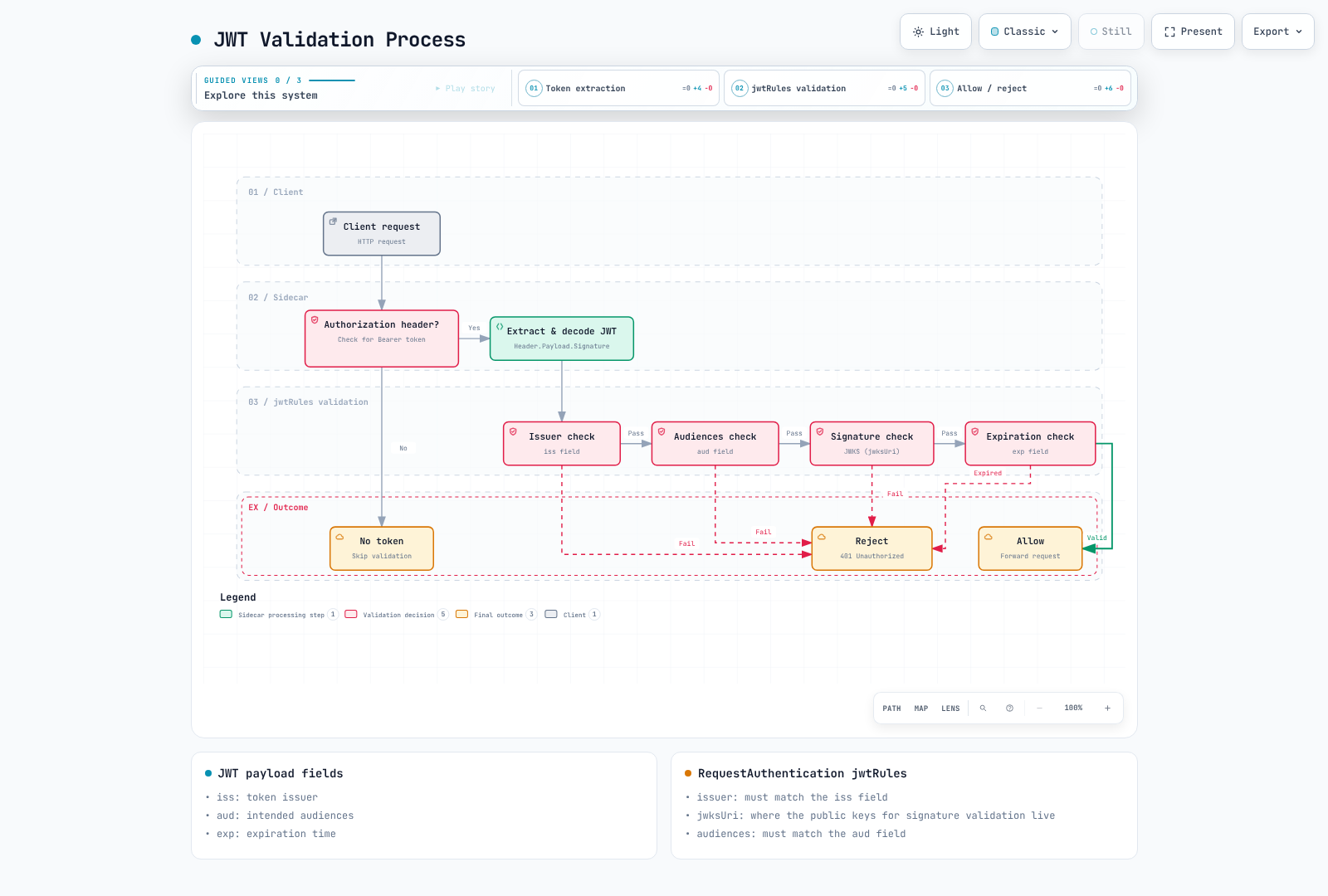
该图描述的是对存在 token 的验证,而不是授权或缺失 token 的处理。下面的 provider 示例是替代方案;请配置应用程序所期望的 token 类型和 audience。
与 OIDC Provider 集成:
# Google OAuth2 example
apiVersion: security.istio.io/v1
kind: RequestAuthentication
metadata:
  name: google-jwt
spec:
  jwtRules:
  - issuer: "https://accounts.google.com"
    jwksUri: "https://www.googleapis.com/oauth2/v3/certs"
    audiences:
    - "123456789-abcdefg.apps.googleusercontent.com"

---
# Keycloak example
apiVersion: security.istio.io/v1
kind: RequestAuthentication
metadata:
  name: keycloak-jwt
spec:
  jwtRules:
  - issuer: "https://keycloak.example.com/realms/myrealm"
    jwksUri: "https://keycloak.example.com/realms/myrealm/protocol/openid-connect/certs"
    audiences:
    - "myapp"
与 AuthorizationPolicy 结合使用:
# 1. RequestAuthentication: Validate JWT
apiVersion: security.istio.io/v1
kind: RequestAuthentication
metadata:
  name: jwt-auth
spec:
  selector:
    matchLabels:
      app: backend
  jwtRules:
  - issuer: "https://auth.example.com"
    jwksUri: "https://auth.example.com/.well-known/jwks.json"
    audiences: ["api.example.com"]

---
# 2. AuthorizationPolicy: Only allow authenticated requests
apiVersion: security.istio.io/v1
kind: AuthorizationPolicy
metadata:
  name: require-jwt
spec:
  selector:
    matchLabels:
      app: backend
  action: ALLOW
  rules:
  - from:
    - source:
        requestPrincipals: ["https://auth.example.com/*"]  # Verified issuer + method in the same rule
    to:
    - operation:
        methods: ["GET", "POST"]
测试:
# Request without JWT -> Passes RequestAuthentication, denied by AuthorizationPolicy
curl http://backend/api
# 403 Forbidden

# Request with valid JWT
read -rsp "Test access token: " TOKEN; echo
curl -H "Authorization: Bearer $TOKEN" http://backend/api
unset TOKEN
# 200 OK
参考:
问题 4:mTLS 证书管理
Istio 中 mTLS 证书的默认有效期是多长?
A. 1 小时
B. 24 小时
C. 7 天
D. 90 天
显示答案
答案:B
Istio 中 mTLS 证书的默认有效期是 24 小时,并会自动续订。
说明:
agent 默认请求 24 小时的 leaf 证书,并在其有效期约过半时续订,同时具有抖动(SECRET_GRACE_PERIOD_RATIO=0.5)。Istiod 或选定的外部 CA 对请求进行签名;agent 通过 SDS 将结果交付给 Envoy。根/中间证书的有效期是独立的。默认的自签名根证书直接签发 workload leaf 证书;中间层级是管理员的选择。
检查公有证书时,不要假设存在磁盘上的 /etc/certs 文件或固定的 SDS 数组顺序:
istioctl proxy-config secret <pod-name> -n <namespace> -o json | \
  jq -r '.dynamicActiveSecrets[] | select(.secret.name == "default") | .secret.tlsCertificate.certificateChain.inlineBytes' | \
  base64 -d | openssl x509 -noout -dates -issuer -ext subjectAltName
自定义有效期:
apiVersion: install.istio.io/v1alpha1
kind: IstioOperator
spec:
  meshConfig:
    # Change certificate validity period
    defaultConfig:
      proxyMetadata:
        SECRET_TTL: "48h"  # Extend to 48 hours
这是 istioctl install -f 输入片段,而不是集群内 operator resource。签发者可能会限制请求的 48 小时 TTL;更改 bootstrap 设置时,应验证已签发的证书并轮换所选 proxy。
续订失败时,在重启 workload 之前检查 agent 和 istiod 日志、CA 连通性、token 身份验证、时钟同步和 trust bundle。仅重启无法修复已过期的 CA。cert-manager 集成需要 istio-csr 及其安装前提条件;仅使用 EXTERNAL_CA=ISTIOD_RA_KUBERNETES_API 并不是 cert-manager 设置。参见证书生命周期指南。
问题 5:基于 Service Account 的身份验证
Istio 中用于服务间身份验证的身份是什么?
A. Pod 名称
B. Service 名称
C. Service Account
D. Namespace 名称
显示答案
答案:C
Istio 根据 Service Account 管理服务间身份。
说明:
基于 Service Account 的身份:
# 1. Create Service Account
apiVersion: v1
kind: ServiceAccount
metadata:
  name: frontend
  namespace: default

---
# 2. Use Service Account in Deployment
apiVersion: apps/v1
kind: Deployment
metadata:
  name: frontend
  namespace: default
spec:
  selector:
    matchLabels:
      app: frontend
  template:
    metadata:
      labels:
        app: frontend
    spec:
      serviceAccountName: frontend  # Used as identity
      containers:
      - name: frontend
        image: registry.example.com/team/frontend:REPLACE_WITH_TESTED_TAG
SPIFFE ID 格式:
spiffe://<trust-domain>/ns/<namespace>/sa/<service-account>

Examples:
spiffe://cluster.local/ns/default/sa/frontend
spiffe://cluster.local/ns/production/sa/backend
在 AuthorizationPolicy 中使用 Service Account:
apiVersion: security.istio.io/v1
kind: AuthorizationPolicy
metadata:
  name: backend-policy
  namespace: default
spec:
  selector:
    matchLabels:
      app: backend
  action: ALLOW
  rules:
  # Only allow frontend Service Account
  - from:
    - source:
        principals:
        - "cluster.local/ns/default/sa/frontend"
    to:
    - operation:
        methods: ["GET", "POST"]
        paths: ["/api/*"]

  # admin Service Account allowed for all operations
  - from:
    - source:
        principals:
        - "cluster.local/ns/default/sa/admin"
上面的 image 是应用程序占位符。Kubernetes RBAC 控制对 Kubernetes API 的访问;它不会自动授予 mesh 流量权限。Istio authorization 单独使用经过身份验证的 ServiceAccount identity。principal 还包括 namespace 和 trust domain。
Service Account 与 Pod/Service 名称对比:
| 项目 | Service Account | Pod 名称 | Service 名称 |
|---|---|---|---|
| 稳定性 | 稳定 | 动态变化 | 稳定 |
| 安全性 | 基于证书 | 不可信 | 不可信 |
| RBAC 集成 | Kubernetes RBAC | 不可能 | 不可能 |
| mTLS | 包含在证书中 | 不包含 | 不包含 |
实际示例:三层应用程序:
# Frontend -> Backend only allowed
---
apiVersion: v1
kind: ServiceAccount
metadata:
  name: frontend
  namespace: app

---
apiVersion: v1
kind: ServiceAccount
metadata:
  name: backend
  namespace: app

---
apiVersion: v1
kind: ServiceAccount
metadata:
  name: database
  namespace: app

---
# Backend policy: Only allow Frontend access
apiVersion: security.istio.io/v1
kind: AuthorizationPolicy
metadata:
  name: backend-policy
  namespace: app
spec:
  selector:
    matchLabels:
      app: backend
  action: ALLOW
  rules:
  - from:
    - source:
        principals: ["cluster.local/ns/app/sa/frontend"]

---
# Database policy: Only allow Backend access
apiVersion: security.istio.io/v1
kind: AuthorizationPolicy
metadata:
  name: database-policy
  namespace: app
spec:
  selector:
    matchLabels:
      app: database
  action: ALLOW
  rules:
  - from:
    - source:
        principals: ["cluster.local/ns/app/sa/backend"]
检查 Service Account:
# Check pod's Service Account
kubectl get pod <pod-name> -o jsonpath='{.spec.serviceAccountName}'

# Check SPIFFE ID in mTLS certificate
istioctl proxy-config secret <pod-name> -o json | \
  jq -r '.dynamicActiveSecrets[] | select(.secret.name == "default") | .secret.tlsCertificate.certificateChain.inlineBytes' | \
  base64 -d | openssl x509 -text -noout | grep URI

# Output:
# URI:spiffe://cluster.local/ns/default/sa/frontend
跨 Namespace 通信:
# Allow production namespace's frontend -> staging namespace's backend access
apiVersion: security.istio.io/v1
kind: AuthorizationPolicy
metadata:
  name: backend-policy
  namespace: staging
spec:
  selector:
    matchLabels:
      app: backend
  action: ALLOW
  rules:
  - from:
    - source:
        principals:
        - "cluster.local/ns/production/sa/frontend"
        namespaces:
        - "production"
参考:
简答题(6-10)
问题 6:实施默认拒绝安全 policy
逐步说明如何使用 Istio 在 Kubernetes cluster 中实施默认拒绝安全 policy。包括必需 resource(PeerAuthentication、AuthorizationPolicy)以及例外处理方法。
显示答案
- 清查实际调用方、ServiceAccount、workload 端口和应用程序协议。将 workload 加入 mesh,然后在检查兼容性后对 namespace 强制执行
STRICT。PeerAuthentication 本身不授权调用方。 - 将空的 ALLOW policy 应用为 namespace 基线;为所需调用图添加显式规则。预期需要例外时,不要使用带有
rules: [{}]的DENY。 - 示例假定 namespace 为
app,具有标签匹配app的已加入 mesh 的 frontend/backend/database workload 及 ServiceAccount、HTTP 端口 8080、PostgreSQL 端口 5432,以及istio-system中的 gateway ServiceAccountistio-ingressgateway。请从实际 gateway Pod 验证该 identity。gateway Service 将 HTTPS 443 映射到workload 端口 8443,后者是 AuthorizationPolicy 端口。单独为myapp.example.com/api/*配置 TLS termination 和 VirtualService。
apiVersion: security.istio.io/v1
kind: PeerAuthentication
metadata:
  name: default
  namespace: app
spec:
  mtls:
    mode: STRICT
---
apiVersion: security.istio.io/v1
kind: AuthorizationPolicy
metadata:
  name: default-deny
  namespace: app
spec: {}
---
apiVersion: security.istio.io/v1
kind: AuthorizationPolicy
metadata:
  name: ingress-public-api
  namespace: istio-system
spec:
  selector:
    matchLabels:
      istio: ingressgateway
  action: ALLOW
  rules:
  - to:
    - operation:
        ports:
        - '8443'
        hosts:
        - myapp.example.com
        paths:
        - /api/*
        methods:
        - GET
        - POST
---
apiVersion: security.istio.io/v1
kind: AuthorizationPolicy
metadata:
  name: frontend-policy
  namespace: app
spec:
  selector:
    matchLabels:
      app: frontend
  action: ALLOW
  rules:
  - from:
    - source:
        principals:
        - cluster.local/ns/istio-system/sa/istio-ingressgateway
    to:
    - operation:
        ports:
        - '8080'
        paths:
        - /api/*
        methods:
        - GET
        - POST
---
apiVersion: security.istio.io/v1
kind: AuthorizationPolicy
metadata:
  name: backend-policy
  namespace: app
spec:
  selector:
    matchLabels:
      app: backend
  action: ALLOW
  rules:
  - from:
    - source:
        principals:
        - cluster.local/ns/app/sa/frontend
    to:
    - operation:
        ports:
        - '8080'
        paths:
        - /api/*
        methods:
        - GET
        - POST
---
apiVersion: security.istio.io/v1
kind: AuthorizationPolicy
metadata:
  name: database-policy
  namespace: app
spec:
  selector:
    matchLabels:
      app: database
  action: ALLOW
  rules:
  - from:
    - source:
        principals:
        - cluster.local/ns/app/sa/backend
    to:
    - operation:
        ports:
- '5432'- 对 sidecar 保留 Istio 的默认 probe rewrite:kubelet HTTP/TCP/gRPC probe 通过 agent(通常为 15020)定向。HTTP ALLOW path 不会让明文通过 STRICT。如果遗留 health endpoint 需要明文例外,
portLevelMtls需要 workload selector 和 workload 端口;authorization/network 限制仍必须约束该 endpoint。不要将应用程序端口的 mTLS 禁用作为通用 health 修复方法。 - Agent/Envoy metrics 端口(15020/15090)不同于被拦截的应用程序 metrics endpoint。对于受保护的应用程序 metrics endpoint,将 ALLOW policy 限定为 workload、实际端口/path 和经 mTLS 身份验证的 Prometheus principal。对于 agent metrics,配置 scraping 和网络访问;应用程序入站流量上的 AuthorizationPolicy 并不足够。
- 验证生效配置以及允许/拒绝的流量:
istioctl analyze -n app
istioctl proxy-config secret <backend-pod> -n app
istioctl proxy-config clusters <frontend-pod> -n app -o json
istioctl x authz check <backend-pod>.app
# Run from the indicated application containers with the test clients installed.
kubectl exec <frontend-pod> -n app -c frontend -- curl -i http://backend:8080/api/users
kubectl exec <frontend-pod> -n app -c frontend -- pg_isready -h database -p 5432
kubectl exec <backend-pod> -n app -c backend -- pg_isready -h database -p 5432
Frontend → backend 应到达应用程序;frontend → database 应在 TCP 层失败,而不是返回 HTTP 403。Backend → database 应到达 PostgreSQL(数据库凭据是单独检查)。在授权测试到达预期 backend 之前,缺少 routing 可能会产生 404。使用 namespace 限定的 Pod、应用程序 container 和真实测试 client。参见授权和健康检查。
问题 7:JWT + mTLS 双重身份验证
实施一个在 Istio 中同时使用**终端用户身份验证(JWT)和服务间身份验证(mTLS)**的场景。包括如何与 OAuth2/OIDC provider(例如 Keycloak)集成。
显示答案
配置 Keycloak realm myrealm、OIDC client 和显式 API audience myapp。使用带 PKCE 的 authorization code flow 和精确的 HTTPS redirect URI。client 类型/身份验证取决于应用程序能否保管 secret。Keycloak role 通常位于 realm_access.roles;使用 audience mapper/client scope,以便 API token 具有预期的 aud。
每个评估 requestPrincipals 或 request.auth.claims 的 proxy 都需要自己的 RequestAuthentication。gateway 上已验证的 JWT 不会在 frontend 或 backend 上建立请求 identity。forwardOriginalToken 会在该转发请求上保留 token,并且frontend 应用程序必须在其新建的 backend 请求中传播 Authorization。
以下内容替换问题 6 中相关的 policy。不要在受 role 限制的 backend 规则旁保留更宽泛的 ALLOW policy:ALLOW policy 构成并集。Deployment 和 HTTPS gateway 前提条件与问题 6 相同。
apiVersion: security.istio.io/v1
kind: PeerAuthentication
metadata:
  name: default
  namespace: app
spec:
  mtls:
    mode: STRICT
---
apiVersion: security.istio.io/v1
kind: AuthorizationPolicy
metadata:
  name: default-deny
  namespace: app
spec: {}
---
apiVersion: security.istio.io/v1
kind: RequestAuthentication
metadata:
  name: jwt-ingress
  namespace: istio-system
spec:
  selector:
    matchLabels:
      istio: ingressgateway
  jwtRules:
  - issuer: https://keycloak.example.com/realms/myrealm
    jwksUri: https://keycloak.example.com/realms/myrealm/protocol/openid-connect/certs
    audiences:
    - myapp
    forwardOriginalToken: true
---
apiVersion: security.istio.io/v1
kind: AuthorizationPolicy
metadata:
  name: ingress-public-api
  namespace: istio-system
spec:
  selector:
    matchLabels:
      istio: ingressgateway
  action: ALLOW
  rules:
  - to:
    - operation:
        ports:
        - '8443'
        hosts:
        - myapp.example.com
        paths:
        - /api/*
        methods:
        - GET
        - POST
        - DELETE
    from:
    - source:
        requestPrincipals:
        - https://keycloak.example.com/realms/myrealm/*
---
apiVersion: security.istio.io/v1
kind: RequestAuthentication
metadata:
  name: jwt-frontend
  namespace: app
spec:
  selector:
    matchLabels:
      app: frontend
  jwtRules:
  - issuer: https://keycloak.example.com/realms/myrealm
    jwksUri: https://keycloak.example.com/realms/myrealm/protocol/openid-connect/certs
    audiences:
    - myapp
    forwardOriginalToken: true
---
apiVersion: security.istio.io/v1
kind: AuthorizationPolicy
metadata:
  name: frontend-policy
  namespace: app
spec:
  selector:
    matchLabels:
      app: frontend
  action: ALLOW
  rules:
  - from:
    - source:
        principals:
        - cluster.local/ns/istio-system/sa/istio-ingressgateway
        requestPrincipals:
        - https://keycloak.example.com/realms/myrealm/*
    to:
    - operation:
        ports:
        - '8080'
        paths:
        - /api/*
        methods:
        - GET
        - POST
        - DELETE
---
apiVersion: security.istio.io/v1
kind: RequestAuthentication
metadata:
  name: jwt-backend
  namespace: app
spec:
  selector:
    matchLabels:
      app: backend
  jwtRules:
  - issuer: https://keycloak.example.com/realms/myrealm
    jwksUri: https://keycloak.example.com/realms/myrealm/protocol/openid-connect/certs
    audiences:
    - myapp
    forwardOriginalToken: true
---
apiVersion: security.istio.io/v1
kind: AuthorizationPolicy
metadata:
  name: backend-policy
  namespace: app
spec:
  selector:
    matchLabels:
      app: backend
  action: ALLOW
  rules:
  - from:
    - source:
        principals:
        - cluster.local/ns/app/sa/frontend
        requestPrincipals:
        - https://keycloak.example.com/realms/myrealm/*
    to:
    - operation:
        ports:
        - '8080'
        paths:
        - /api/users/*
        methods:
        - GET
        - POST
    when:
    - key: request.auth.claims[realm_access][roles]
      values:
      - user
      - admin
  - from:
    - source:
        principals:
        - cluster.local/ns/app/sa/frontend
        requestPrincipals:
        - https://keycloak.example.com/realms/myrealm/*
    to:
    - operation:
        ports:
        - '8080'
        methods:
        - DELETE
        paths:
        - /api/admin/*
    when:
    - key: request.auth.claims[realm_access][roles]
      values:
      - admin
对于需要将标量 claim 作为 header 的应用程序,RequestAuthentication 支持实验性的 outputClaimToHeaders 字段,例如使用 header: x-user-id 和 claim: sub。使用已验证的 JWT claim 进行 authorization;不要信任调用方提供的 identity header。outputPayloadToHeader 包含编码后的 payload,而 Envoy 的 Lua runtime 不包含任意的 require("json") module。应将 role 数组作为 claim 匹配,而不是盲目地将其连接到 header 中。
通过已配置的登录流程获取测试 token,然后测试 HTTPS。不要在测验命令中嵌入密码/client secret:
read -rsp "Test access token: " TOKEN; echo
curl -i -H "Authorization: Bearer $TOKEN" https://myapp.example.com/api/users/test
unset TOKEN
curl -i https://myapp.example.com/api/users/test
# No JWT: 403 from AuthorizationPolicy.
curl -i -H "Authorization: Bearer invalid-token" https://myapp.example.com/api/users/test
# Invalid JWT: 401 from RequestAuthentication.
还应测试来自错误 ServiceAccount、错误 audience 及 role 不足的有效 token。JWT role 的更改并不会立即撤销已签发的 token;token 生命周期和签发者/应用程序撤销机制很重要。参见身份验证和Keycloak grant types。
问题 8:外部 Service 访问控制
说明如何控制 Istio 中的 Egress 流量,以便只允许访问特定的外部 Service。包括使用 ServiceEntry、VirtualService 和 AuthorizationPolicy 的完整示例。
显示答案
ALLOW_ANY 会转发未知 destination;REGISTRY_ONLY 会拒绝 proxy registry 中未知的 destination。registry 包括 Kubernetes service 和 ServiceEntry。两种模式都不是 firewall,并且在没有独立网络限制时,应用程序可以绕过 proxy。通过已有安装 values 应用 mesh 设置;不要用只有一个字段的片段替换整个 istio ConfigMap。
AuthorizationPolicy 会评估其所选 proxy 接收到的流量。client sidecar 上的 namespace policy 不是出站 ACL。对于 identity/method/path 控制,通过终止 mesh mTLS 的 egress gateway 路由,在那里进行 authorization,然后向外部 server 发起 TLS。应用程序向 sidecar 发送 HTTP;HTTPS passthrough 会隐藏 HTTP path 和 method。
前提条件:namespace app 中已加入 mesh 的 client、带有标签 istio: egressgateway 的专用 egress gateway、将 443 映射到 workload 8443 的 Service istio-egressgateway.istio-system.svc.cluster.local,以及没有其他宽泛的 gateway ALLOW policy。已安装 proxy 的公有 CA trust 必须验证 GitHub 的证书。
apiVersion: networking.istio.io/v1
kind: ServiceEntry
metadata:
  name: github-api
  namespace: app
spec:
  hosts:
  - api.github.com
  location: MESH_EXTERNAL
  resolution: DNS
  ports:
  - number: 80
    targetPort: 443
    name: http
    protocol: HTTP
---
apiVersion: networking.istio.io/v1
kind: Gateway
metadata:
  name: github-egress
  namespace: istio-system
spec:
  selector:
    istio: egressgateway
  servers:
  - port:
      number: 443
      name: https
      protocol: HTTPS
    hosts:
    - api.github.com
    tls:
      mode: ISTIO_MUTUAL
---
apiVersion: networking.istio.io/v1
kind: DestinationRule
metadata:
  name: to-egress
  namespace: app
spec:
  host: istio-egressgateway.istio-system.svc.cluster.local
  trafficPolicy:
    tls:
      mode: ISTIO_MUTUAL
      sni: api.github.com
---
apiVersion: networking.istio.io/v1
kind: VirtualService
metadata:
  name: github-through-egress
  namespace: app
spec:
  hosts:
  - api.github.com
  gateways:
  - mesh
  - istio-system/github-egress
  http:
  - match:
    - gateways:
      - mesh
      port: 80
    route:
    - destination:
        host: istio-egressgateway.istio-system.svc.cluster.local
        port:
          number: 443
  - match:
    - gateways:
      - istio-system/github-egress
      port: 443
    timeout: 10s
    retries:
      attempts: 2
      perTryTimeout: 3s
      retryOn: connect-failure,reset
    route:
    - destination:
        host: api.github.com
        port:
          number: 80
---
apiVersion: networking.istio.io/v1
kind: DestinationRule
metadata:
  name: github-origin-tls
  namespace: istio-system
spec:
  host: api.github.com
  workloadSelector:
    matchLabels:
      istio: egressgateway
  trafficPolicy:
    tls:
      mode: SIMPLE
      sni: api.github.com
      subjectAltNames:
      - api.github.com
---
apiVersion: security.istio.io/v1
kind: AuthorizationPolicy
metadata:
  name: github-egress-allow
  namespace: istio-system
spec:
  selector:
    matchLabels:
      istio: egressgateway
  action: ALLOW
  rules:
  - from:
    - source:
        principals:
        - cluster.local/ns/app/sa/backend
    to:
    - operation:
        hosts:
        - api.github.com
        methods:
        - GET
        paths:
        - /users/*
        ports:
        - '8443'
mesh client 调用 http://api.github.com/users/octocat。其 sidecar 使用 ISTIO_MUTUAL 连接 gateway。gateway 的 HTTP listener 可以强制执行 backend ServiceAccount 和 GET /users/*,然后使用端口 80 → targetPort 443 向 GitHub 发送 HTTPS。所示 retry 用于此幂等 GET 用例,而不是任意具有副作用的 API。
kubectl exec <backend-pod> -n app -c backend -- curl -i http://api.github.com/users/octocat
kubectl exec <frontend-pod> -n app -c frontend -- curl -i http://api.github.com/users/octocat
# Gateway should reject the second caller with HTTP 403.
istioctl proxy-config clusters <egress-pod> -n istio-system --fqdn api.github.com -o json
istioctl x authz check <egress-pod>.istio-system
对于私有外部 database,使用具有显式 endpoint/address 和 TCP 端口 5432 的 STATIC ServiceEntry;必须为该协议设计 TLS/database authentication。仅 HTTP 的 service 可以使用 HTTP ServiceEntry,但敏感数据需要加密。将 API credential 存储在应用程序或受支持的、由 secret 支持的 signing/authentication component 中;VirtualService header literal 是可读配置,而不是 secret storage。
最后,通过 CNI NetworkPolicy/firewall control 强制执行此路径:client 可以访问所需 mesh service、DNS、istiod 和 egress gateway,但不能访问任意互联网 IP;gateway 获得所需的外部访问权限。考虑 IPv4/IPv6、bypass/excluded port 和 privileged workload。标准 NetworkPolicy 不会过滤 DNS 名称;必要时使用受支持的 FQDN-aware control。除了经批准的路径外,也要测试直接 IP/HTTPS bypass。参见egress control和TLS origination。
问题 9:安全审计和日志记录
说明如何在 Istio 中审计和记录安全相关事件。包括 AuthorizationPolicy 的 AUDIT 操作和 Access Log 配置。
显示答案
AUDIT 会标记匹配的请求以供已安装的 audit plugin使用。没有该 plugin 时,policy 没有日志记录效果,也不会允许或拒绝流量。此示例审计的是一个合取条件(DELETE 和 admin path),而不是两个有序条件:
apiVersion: security.istio.io/v1
kind: AuthorizationPolicy
metadata:
  name: audit-sensitive
  namespace: app
spec:
  selector:
    matchLabels:
      app: backend
  action: AUDIT
  rules:
  - to:
    - operation:
        methods:
        - DELETE
        paths:
        - /api/admin/*
Access logging 是独立的。将此 custom provider 合并到现有 Istio 安装配置中,并使用 istioctl install -f(保留其他 provider/settings),然后仅为所选 backend 启用它。格式中刻意排除了 query string、bearer token 和完整 JWT payload。
apiVersion: install.istio.io/v1alpha1
kind: IstioOperator
spec:
  meshConfig:
    extensionProviders:
    - name: security-json
      envoyFileAccessLog:
        path: /dev/stdout
        logFormat:
          labels:
            start_time: '%START_TIME%'
            method: '%REQ(:METHOD)%'
            path: '%REQ_WITHOUT_QUERY(:PATH)%'
            response_code: '%RESPONSE_CODE%'
            response_code_details: '%RESPONSE_CODE_DETAILS%'
            response_flags: '%RESPONSE_FLAGS%'
            peer: '%DOWNSTREAM_PEER_URI_SAN%'
request_id: '%REQ(X-REQUEST-ID)%'apiVersion: telemetry.istio.io/v1
kind: Telemetry
metadata:
name: backend-security
namespace: app
spec:
selector:
matchLabels:
app: backend
accessLogging:
- providers:
- name: security-json
filter:
expression: response.code >= 400 || request.method == "DELETE" || request.url_path.startsWith("/api/admin/")
metrics:
- providers:
- name: prometheus
overrides:
- match:
metric: REQUEST_COUNT
mode: SERVER
tagOverrides:
security_operation:
value: 'request.url_path.startsWith("/api/admin/") ? "admin" : "other"'Telemetry resource 还会向请求计数添加有界的 security_operation 维度(admin/other)。request_method 和原始 URL path 不是默认 Istio metric label。避免使用完整 URL label,因为会产生高基数和敏感数据。即使未安装 AUDIT plugin,也会记录 error、DELETE 请求和 admin access。要启用所有请求,请省略 filter;要覆盖一个 namespace,请省略 selector;无 selector 的 root-namespace policy 覆盖整个 mesh。
对于 CloudWatch,部署/配置受支持的 EKS logging agent 或 Fluent Bit DaemonSet,并配备 node log mount、CRI/containerd parsing、log 字段的 JSON parsing、IAM credential 和 CloudWatch output。单独的 ConfigMap 不会启动 agent。对于 Elasticsearch/OpenSearch,使用为该 destination 配置了 output 的 collector;使用 provider envoy 的 Telemetry 会写入 stdout,而不会配置 Elasticsearch。Fargate 需要其受支持的 logging mechanism,而不是 node DaemonSet。
摄取结构化 JSON 字段后,分别运行每个 CloudWatch Logs Insights query:
fields @timestamp, method, path, response_code, peer
| filter method = "DELETE"
| sort @timestamp desc
| limit 100fields @timestamp, path, response_code, response_code_details
| filter path like /^\/api\/admin\//
| filter response_code = "403"
| stats count() by bin(5m), response_code_details403 可能来自应用程序、JWT authorization 或 external provider。在将其归因于 Istio 之前,应检查 response_code_details、proxy RBAC log 和生效的 policy。不要假定 envoy_http_rbac_logged_total 是内置 AUDIT counter。实际的 RBAC/实验性 dry-run statistic 取决于 proxy 配置和命名;请检查已导出的 series。
Grafana 可以绘制标准 destination-reported 403 rate 和自定义 admin dimension。由已安装 Prometheus Operator 选择的 PrometheusRule 可以针对后者发出告警:
apiVersion: monitoring.coreos.com/v1
kind: PrometheusRule
metadata:
  name: istio-security-alerts
  namespace: monitoring
spec:
  groups:
  - name: istio-security
    rules:
    - alert: AdminHTTP403Responses
      expr: sum(rate(istio_requests_total{reporter="destination",security_operation="admin",response_code="403"}[5m]))
        > 0
      for: 5m
      labels:
        severity: warning
      annotations:
        summary: Admin API returned HTTP 403; inspect response_code_details to identify
          the cause
在强制执行新 policy 之前,ALLOW/DENY 上实验性的 istio.io/dry-run: "true" annotation 可以报告 shadow decision;它不同于 AUDIT,且其诊断输出不是稳定 API。根据实际组织/法律要求设置保留期、访问控制和敏感数据删除;不存在通用的 90 天/一年保留期规定。参见access logging和authorization dry-run。
问题 10:实施零信任网络
说明如何使用 Istio 实施零信任网络原则。包括应用 mTLS STRICT、默认拒绝和最小权限原则的完整示例。
显示答案
零信任结合经过身份验证的 identity、明确的最小权限 authorization,以及在 workload 被攻陷时仍然有效的 control。Istio 保护由其 data plane 捕获的流量;它不能替代 Kubernetes RBAC、admission policy、network isolation 或 application authorization。
- 为 frontend/backend/database 分配不同的 ServiceAccount,并阻止 workload 自由冒用彼此的 account。将 workload 加入 mesh;验证 trust domain、证书签发和续订。
- 将 STRICT 应用于目标 namespace,并在那里使用空的 ALLOW baseline。
default中的 policy 不会自动覆盖app;root-namespace baseline 具有更广泛的影响,需要明确的 gateway/operational exception。 - 只允许 gateway → frontend → backend → database。对于与问题 6 相同的 Deployment 前提条件,完整的 traffic-policy 集合为:
apiVersion: security.istio.io/v1
kind: PeerAuthentication
metadata:
  name: default
  namespace: app
spec:
  mtls:
    mode: STRICT
---
apiVersion: security.istio.io/v1
kind: AuthorizationPolicy
metadata:
  name: default-deny
  namespace: app
spec: {}
---
apiVersion: security.istio.io/v1
kind: AuthorizationPolicy
metadata:
  name: ingress-public-api
  namespace: istio-system
spec:
  selector:
    matchLabels:
      istio: ingressgateway
  action: ALLOW
  rules:
  - to:
    - operation:
        ports:
        - '8443'
        hosts:
        - myapp.example.com
        paths:
        - /api/*
        methods:
        - GET
        - POST
---
apiVersion: security.istio.io/v1
kind: AuthorizationPolicy
metadata:
  name: frontend-policy
  namespace: app
spec:
  selector:
    matchLabels:
      app: frontend
  action: ALLOW
  rules:
  - from:
    - source:
        principals:
        - cluster.local/ns/istio-system/sa/istio-ingressgateway
    to:
    - operation:
        ports:
        - '8080'
        paths:
        - /api/*
        methods:
        - GET
        - POST
---
apiVersion: security.istio.io/v1
kind: AuthorizationPolicy
metadata:
  name: backend-policy
  namespace: app
spec:
  selector:
    matchLabels:
      app: backend
  action: ALLOW
  rules:
  - from:
    - source:
        principals:
        - cluster.local/ns/app/sa/frontend
    to:
    - operation:
        ports:
        - '8080'
        paths:
        - /api/*
        methods:
        - GET
        - POST
---
apiVersion: security.istio.io/v1
kind: AuthorizationPolicy
metadata:
  name: database-policy
  namespace: app
spec:
  selector:
    matchLabels:
      app: database
  action: ALLOW
  rules:
  - from:
    - source:
        principals:
        - cluster.local/ns/app/sa/backend
    to:
    - operation:
        ports:
- '5432'- 在需要 namespace isolation 的地方,匹配经过身份验证的 namespace/principal。选择
production且具有notNamespaces: [production, istio-system]的 DENY 会阻止其他调用方进入 production,而不是 production → staging。考虑 gateway 和 operator;DENY 覆盖 ALLOW。 - 如果访问取决于营业时间,请使用 application authorization 或已配置的 CUSTOM external authorization provider,并指定明确的 timezone、clock source 和 failure policy。插入点/timezone 未指定的 Lua
os.date()检查并不是完整的 authorization design。CUSTOM permission 仍必须通过 DENY/ALLOW。 - 通过问题 8 中的 gateway pattern 加 network control 强制执行 egress;
REGISTRY_ONLY和名为deny-all-egress的 sidecar policy 都不是 firewall。匹配每个 host 的入站 DENY 反而会阻止应用程序流量,且无法由 ALLOW 撤销。 - 保留 probe rewrite,为正确的 port 设计 scraping,并且仅按问题 6 中的说明添加必要例外。对于终端用户 authorization,使用问题 7 中的 JWT validation 和逐跳 token propagation。使用问题 9 中的方式记录日志和告警,并监控 mTLS 章节中的证书过期。
- 每次更改后检查实际 policy,并测试预期的 allow/deny matrix、TCP database access 和 egress bypass:
istioctl analyze -n app
istioctl proxy-config secret <backend-pod> -n app
istioctl proxy-config clusters <frontend-pod> -n app -o json
istioctl x authz check <backend-pod>.app
# Run from the indicated application containers with the test clients installed.
kubectl exec <frontend-pod> -n app -c frontend -- curl -i http://backend:8080/api/users
kubectl exec <frontend-pod> -n app -c frontend -- pg_isready -h database -p 5432
kubectl exec <backend-pod> -n app -c backend -- pg_isready -h database -p 5432
测验分数并不能证明生产就绪。针对真实环境,请审查 workload identity 分配、network bypass path、issuer trust、最小权限规则、observability、rollback 以及应用程序自身的 permission。参见安全概念和授权。
分数计算
- 选择题 1-5:每题 10 分(共 50 分)
- 简答题 6-10:每题 10 分(共 50 分)
- 总分:100 分
评估标准:
- 90-100 分:对这些测验主题有出色的理解
- 80-89 分:理解良好;应单独验证真实 Deployment
- 70-79 分:一般(建议进一步学习)
- 60-69 分:低于平均水平(需要复习基本概念)
- 0-59 分:需要重新学习