Kubernetes/EKS 故障排查手册:症状 → 诊断 → 原因 → 修复
支持的版本:Kubernetes 1.33+(输出已在 Amazon EKS 1.36 上验证 — 控制平面 v1.36.2-eks-bca9cf6,平台版本 eks.9)、Karpenter 1.4、VPC CNI v1.21、CoreDNS v1.14 最后更新:September 2, 2026
< Previous: Zonal Cluster Operations | Table of Contents >
当凌晨 3 点寻呼器响起、你打开终端时,你需要的不是概念讲解,而是**“根据我此刻看到的情况,下一条该输入什么命令。”本文从症状**而非概念出发。针对每个症状,它将“你看到什么 → 运行什么 → 输出看起来如何 → 最常见的原因及修复方法”整合到一个区块中。
此处展示的事件消息和示例输出,于 September 2, 2026 通过 kubectl get/describe/events 在本仓库的验证 EKS 集群中采集(EKS 1.36 — 控制平面 v1.36.2-eks-bca9cf6,平台版本 eks.9 — 使用 Karpenter 1.4.0、VPC CNI v1.21.1、CoreDNS v1.14.2),或者是引用自 References 中列出的 Kubernetes/AWS 官方文档的字符串。只有资源名称经过了泛化。
深入的根因分析(控制平面日志、CloudWatch Logs Insights 查询、节点加入失败的八种原因等)已包含在 EKS Troubleshooting 和 EKS Advanced Debugging 中。本页位于这些文档之前:它的职责是在 30 秒内决定该打开哪一页,因此会链接到它们,而不会重复其内容。
目录
30 秒摘要:症状 → 首条命令 → 最常见原因
每个症状单元格均链接至下面对应的手册章节。
症状(kubectl get pods/nodes 显示的内容) | 首条命令 | 最常见原因 |
|---|---|---|
Pending (English) | kubectl describe pod <pod> → Events 中的 FailedScheduling 消息 | 资源不足(Insufficient cpu/memory)、缺少 toleration、nodeSelector 不匹配、PVC 未绑定 |
ImagePullBackOff / ErrImagePull | kubectl describe pod <pod> → Failed to pull image 行 | tag 拼写错误、私有 registry 认证(imagePullSecrets/node IAM)、ECR 区域/账户不匹配 |
CrashLoopBackOff (English) | kubectl logs <pod> --previous + 检查 lastState.terminated | 应用启动失败(exit 1)、OOMKilled(exit 137)、liveness probe 失败、缺少 ConfigMap/Secret |
Running 但 READY 为 0/1 (English) | kubectl describe pod <pod> → Readiness probe failed | readiness 路径/端口错误、正在等待依赖项、sidecar 未就绪 |
| 请求始终无法到达 Service | kubectl get endpointslices -l kubernetes.io/service-name=<svc> | selector 标签不匹配、targetPort 错误、NetworkPolicy 阻断、CoreDNS 故障 |
节点 NotReady (English) | kubectl describe node <node> → Conditions | kubelet 停止/网络分区、DiskPressure、MemoryPressure、PIDPressure |
PVC Pending (English) | kubectl describe pvc <pvc> → Events | WaitForFirstConsumer(正常等待)、StorageClass 缺失/拼写错误、AZ 不匹配 |
应用日志中出现 AccessDenied(AWS API) (English) | kubectl get sa <sa> -o yaml + Pod env | grep AWS | IRSA(IAM Roles for Service Accounts)annotation/trust policy 错误、缺少 Pod Identity association、Pod 未重启 |
卡在 ContainerCreating + failed to assign an IP address (English) | kubectl describe pod <pod> → FailedCreatePodSandBox | 子网 IP 耗尽、节点 max-pods 已达到、aws-node 不健康 |
| Karpenter 不启动节点 (English) | kubectl get events -A --field-selector reason=FailedScheduling | NodePool limits 已达到、requirements/taint 不匹配、实例类型限制 |
创建 Service 因 failed calling webhook 被拒绝 (English) | kubectl -n kube-system get endpointslices -l kubernetes.io/service-name=aws-load-balancer-webhook-service | 匹配所有 namespace 且使用 failurePolicy: Fail 的 webhook 后端 Webhook Deployment 不健康(CrashLoop) |
诊断决策树
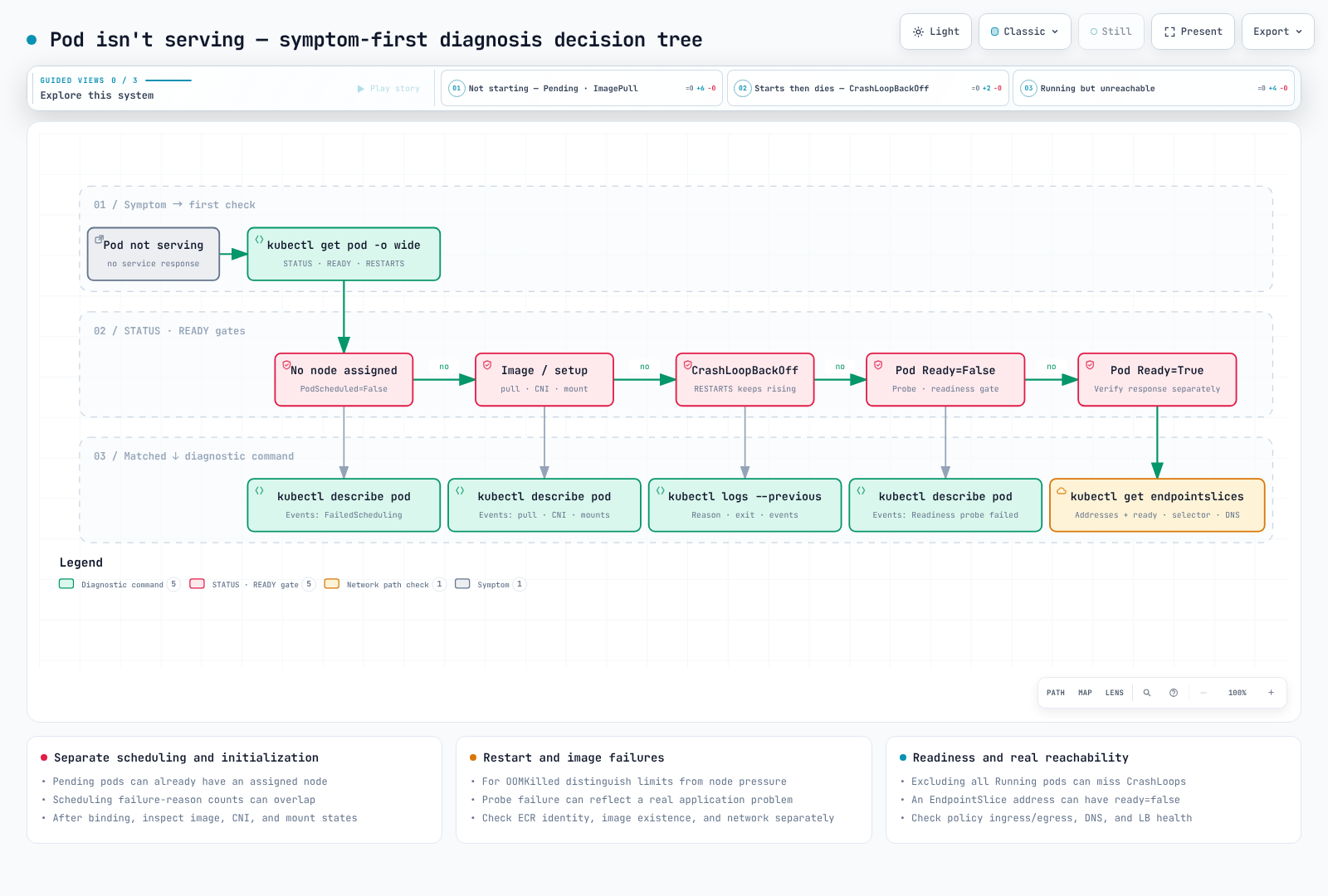
决策树的入口始终相同:筛选所有 namespace 中不健康的 Pod,然后按时间顺序读取 Warning 事件。
# Pods that are neither Running nor Succeeded
kubectl get pods -A --field-selector=status.phase!=Running,status.phase!=Succeeded

# Recent Warning events (cluster-wide, chronological)
kubectl get events -A --field-selector type=Warning --sort-by=.lastTimestamp | tail -30
按症状分类的手册
1. Pod 卡在 Pending
症状:kubectl get pods 中的 STATUS 为 Pending,READY 为 0/1。尚未分配节点,因此 kubectl logs 不显示任何内容。
诊断:答案始终位于 describe 最后的 FailedScheduling 事件中。scheduler 会按节点汇总每个节点被拒绝的原因。
kubectl describe pod <pod> -n <ns> | sed -n '/^Events:/,$p'Warning FailedScheduling default-scheduler 0/15 nodes are available: 1 Insufficient cpu, 1 Insufficient memory,
6 node(s) didn't match Pod's node affinity/selector, 8 node(s) had untolerated taint(s).
no new claims to deallocate, preemption: 0/15 nodes are available:
1 No preemption victims found for incoming pod, 14 Preemption is not helpful for scheduling.解读方法:15 个节点中,8 个因 taint 被拒绝,6 个因 nodeSelector/affinity 被拒绝,剩余的 1 个节点缺少 CPU 和内存。换言之,只有一个节点符合此 Pod 的条件,而且它已满载。no new claims to deallocate 由 DRA(Dynamic Resource Allocation)插件附加;对于不使用 ResourceClaims 的 Pod,请忽略它。
原因和修复:
| 消息片段 | 原因 | 修复 |
|---|---|---|
Insufficient cpu / Insufficient memory | requests 超过剩余节点容量 | 合理调整 requests,检查 autoscaler(→ 10. Karpenter (English)),在 kubectl describe node 中检查 Allocated resources |
Too many pods | 节点 max-pods 已达到(VPC CNI ENI 限制) | → 9. ENI/IP 耗尽 (English) |
node(s) had untolerated taint(s) | 没有匹配节点 taint 的 toleration | 使用 kubectl get nodes -o custom-columns=NAME:.metadata.name,TAINTS:.spec.taints[*].key 列出 taint,然后添加 toleration 或调整 NodePool |
node(s) didn't match Pod's node affinity/selector | 没有节点携带 nodeSelector/affinity 标签 | 检查 kubectl get nodes --show-labels。使用 Karpenter 时,该 key 必须出现在 NodePool requirements 中,否则不会创建节点 |
pod has unbound immediate PersistentVolumeClaims | PVC 为 Pending | → 7. PVC Pending (English) |
node(s) had volume node affinity conflict | PV(EBS)所在 AZ 中没有可调度的节点 | 读取 PV 的 nodeAffinity zone,并在该 AZ 提供容量 |
node(s) didn't match pod topology spread constraints / pod anti-affinity rules | 没有节点满足 spread constraint | 使用 whenUnsatisfiable: ScheduleAnyway 放宽限制,或添加节点 |
| 完全没有事件 | scheduler 问题,或 schedulerName 拼写错误 | 检查 kubectl get pod <pod> -o jsonpath='{.spec.schedulerName}' |
2. ImagePullBackOff / ErrImagePull
症状:STATUS 起初为 ErrImagePull,数次重试后变为 ImagePullBackOff。kubelet 的 pull back-off 会增长至最长 5 分钟。
诊断:
kubectl describe pod <pod> -n <ns> | grep -A2 -E "Failed to pull|Back-off pulling"
kubectl get pod <pod> -n <ns> -o jsonpath='{range .spec.containers[*]}{.name}{"\t"}{.image}{"\n"}{end}'
kubectl get pod <pod> -n <ns> -o jsonpath='{.spec.imagePullSecrets}'
Warning Failed kubelet Failed to pull image "123456789012.dkr.ecr.ap-northeast-2.amazonaws.com/app:v1.2.3": ... not found
Warning Failed kubelet Error: ErrImagePull
Normal BackOff kubelet Back-off pulling image "123456789012.dkr.ecr.ap-northeast-2.amazonaws.com/app:v1.2.3"
Warning Failed kubelet Error: ImagePullBackOff成功拉取会留下 Pulling image "..." → Successfully pulled image "..." in 4.501s ... 这一对事件,而已缓存的镜像会记录 Container image "..." already present on machine。如果看到这些健康事件而 Pod 仍未启动,问题不在镜像。
原因和修复:
Failed to pull image 后的内容 | 原因 | 修复 |
|---|---|---|
not found / manifest unknown | tag 拼写错误、tag 尚未推送、repository 错误 | 使用 aws ecr describe-images --repository-name <repo> --image-ids imageTag=<tag> 验证 |
401 Unauthorized / no basic auth credentials | 私有 registry 认证失败 | 对于 ECR,节点 IAM role 需要 AmazonEC2ContainerRegistryPullOnly(或 ReadOnly);对于外部 registry,请检查 imagePullSecrets |
| ECR URL 的区域/账户与集群不同 | 没有跨账户拉取权限 | 将拉取 principal 添加到 ECR repository policy |
dial tcp ... i/o timeout | 私有子网没有 NAT/VPC endpoints | 检查 com.amazonaws.<region>.ecr.api、ecr.dkr 和 S3 gateway endpoint |
toomanyrequests | Docker Hub rate limit | 通过 ECR pull-through cache 镜像 |
如需从节点本身复现,执行 kubectl debug node/<node> -it --image=busybox --profile=sysadmin,然后执行 chroot /host crictl pull <image>,它会经过 kubelet 使用的相同路径拉取(--profile=sysadmin 会赋予 debug container 运行 crictl 所需的权限;参见速查表)。
3. CrashLoopBackOff(exit 137 OOMKilled、probe 失败、配置错误)
症状:STATUS 为 CrashLoopBackOff,RESTARTS 持续增加。重启延迟从 10 秒开始并加倍至最长 5 分钟,因此 Pod 会暂时显示为 Running,随后再次终止。
诊断:按顺序查看三件事 — 终止原因与 exit code、前一个 container 的日志、Events。
# (1) Why did it die: lastState.terminated
kubectl get pod <pod> -n <ns> -o jsonpath='{range .status.containerStatuses[*]}{.name}{"\t"}restarts={.restartCount}{"\t"}reason={.lastState.terminated.reason}{"\t"}exit={.lastState.terminated.exitCode}{"\n"}{end}'

# (2) Logs right before death (the previous container, not the current one)
kubectl logs <pod> -n <ns> -c <container> --previous --tail=100

# (3) Probe/kill events
kubectl describe pod <pod> -n <ns> | sed -n '/^Events:/,$p'
实际输出 — 一个内存限制为 128Mi 的 container 被 OOM 终止:
    Last State:     Terminated
      Reason:       OOMKilled
      Exit Code:    137
      Started:      Mon, 31 Aug 2026 08:55:27 +0000
      Finished:     Tue, 01 Sep 2026 21:13:37 +0000
    Restart Count:  3
对照 Started 和 Finished:该 container 在被终止前运行了约 36 小时,这指向缓慢的内存泄漏或逐渐增长的 working set,而不是启动问题。启动 crash loop 的表现不同 — Finished 会在 Started 后数秒出现,RESTARTS 会在数分钟内攀升。
解读 exit code:
| Exit Code | Reason | 含义 | 修复 |
|---|---|---|---|
0 | Completed | 进程正常退出 — 在 Deployment 中这意味着应用没有保持在前台运行 | 以 daemon/foreground 模式运行 entrypoint,或改用 Job |
1 | Error | 应用自行退出(配置错误、依赖连接失败) | stack trace 位于 logs --previous |
126 | Error | 在 shell entrypoint 下已找到命令但无法执行 — 缺少 execute bit,或 shell 报告 cannot execute binary file: Exec format error(架构不匹配) | 在 Dockerfile 中执行 chmod +x;使用 kubectl get nodes -L kubernetes.io/arch 检查 arm64/amd64,并使用 multi-arch 镜像 |
127 | Error | 在 shell entrypoint 下找不到命令 — 路径拼写错误,或 binary 从未复制到最终镜像 stage | 将 command/args 与镜像中实际内容比较(kubectl debug ... -- ls <path>) |
137 | OOMKilled | 超出内存限制后 Kernel SIGKILL | 提高 limit 或修复泄漏。对于 JVM,检查 -XX:MaxRAMPercentage → Resource Optimization |
137 | Error | 因其他原因 SIGKILL — liveness 失败且 container 未在 terminationGracePeriodSeconds 内退出 | 检查 preStop/graceful shutdown |
143 | Error | 收到 SIGTERM 后退出(可能是正常 rollout/eviction) | 如果反复发生,在 Events 中找出谁正在终止它 |
- 如果镜像直接 exec binary(中间没有 shell),架构不匹配完全不会产生 exit 126 — container 从未启动,且
lastState.terminated显示 ReasonStartError,消息中含有exec format error。修复方法相同:使用 multi-arch 镜像,或在kubernetes.io/arch上使用 nodeSelector。
Probe 失败:当 Events 中以下两行成对出现时,问题通常在 probe 配置而非应用代码。
Warning  Unhealthy  kubelet  Liveness probe failed: HTTP probe failed with statuscode: 503
Normal Killing kubelet Container app failed liveness probe, will be restarted- 如果应用启动较慢,请添加
startupProbe,而不是增大 livenessinitialDelaySeconds(liveness 直到 startup probe 成功后才开始)。 - 如
Readiness probe failed: dial tcp 10.0.2.45:8080: connect: connection refused这样的 TCP 拒绝,首先检查 container port 和 probe port 是否不同。
配置引用错误 — 严格来说不是 crash loop;Pod 会在 CreateContainerConfigError 停止:
Warning  Failed  kubelet  Error: configmap "app-config" not found
Warning  Failed  kubelet  Error: secret "db-credentials" not found
使用 kubectl get cm,secret -n <ns> 比较名称和 namespace 即可。如果引用的是 volume mount,则会显示为 FailedMount 事件(MountVolume.SetUp failed for volume "cfg" : configmap "app-config" not found)。
4. Running 但未 Ready / Endpoints 为空
症状:STATUS 为 Running,但 READY 为 0/1(有 sidecar 时为 1/2)。Service 不会向该 Pod 发送流量,因此从用户角度看是“已部署,但 503”。
诊断:
kubectl describe pod <pod> -n <ns> | grep -E "Ready|Readiness probe"
kubectl get endpointslices -n <ns> -l kubernetes.io/service-name=<svc>
后端没有 Ready Pod 的 Service — 即你要寻找的症状 — 会在 ENDPOINTS 列中打印 <unset>(PORTS 也会如此:当没有 endpoint 可承载端口时,EndpointSlice controller 会丢弃 port list)。在本集群中,从 selector 不匹配任何运行中 Pod 的 Service 采集:
NAME            ADDRESSTYPE   PORTS     ENDPOINTS   AGE
api-svc-xd28r   IPv4          <unset>   <unset>     145d
作为对比,健康的 Service(同一集群上的 kube-dns)为每个 Ready Pod 列出一个 IP:
NAME             ADDRESSTYPE   PORTS        ENDPOINTS              AGE
kube-dns-xc4bb IPv4 53,53,9153 10.0.2.106,10.0.3.14 145d<unset>(或空的)ENDPOINTS 列表示没有 Ready Pod 位于该 Service 后端。在 Kubernetes 1.33+ 上,kubectl get endpoints 会打印 Warning: v1 Endpoints is deprecated in v1.33+; use discovery.k8s.io/v1 EndpointSlice,因此请习惯阅读 EndpointSlices。
原因和修复:
| 观察结果 | 原因 | 修复 |
|---|---|---|
Events 中反复出现 Readiness probe failed | probe 路径/端口错误,或应用仍在等待依赖项(DB 等) | 将 probe 指向应用实际的健康检查 endpoint。将依赖等待留在 readiness 中,不要放入 liveness |
Condition Ready False,reason 为 ReadinessGatesNotReady | 正在等待 Pod readiness gate — 通常是 AWS Load Balancer Controller 的 target-health.elbv2.k8s.aws/* gate | 找出 Target Group 健康检查失败的原因 → AWS Load Balancer Controller |
1/2 Running,只有应用 container Ready | sidecar(istio-proxy 等)未就绪,或 sidecar 在应用后启动且初始连接失败 | 检查 sidecar 日志;将 sidecar 转为 native sidecar(initContainers + restartPolicy: Always) |
| Ready,但 EndpointSlice 为空 | Service selector 与 Pod 标签不匹配 | → 5. Service 不可达 |
5. Service 不可达
症状:每个 Pod 都是 1/1 Running,但 curl http://<svc>.<ns>.svc.cluster.local 超时/被拒绝,或者名称解析失败。
将诊断分为三个层级:(a) Service → Pod 映射,(b) network policy,(c) DNS。
# (a) Compare the selector with actual labels
kubectl get svc <svc> -n <ns> -o jsonpath='{.spec.selector}{"\n"}{.spec.ports}{"\n"}'
kubectl get pods -n <ns> -l <key>=<value> -o wide
kubectl get endpointslices -n <ns> -l kubernetes.io/service-name=<svc>

# (b) NetworkPolicies applied to the namespace
kubectl get networkpolicies -n <ns>
kubectl describe networkpolicy <policy> -n <ns>

# (c) CoreDNS status and logs
kubectl get pods -n kube-system -l k8s-app=kube-dns
kubectl logs -n kube-system -l k8s-app=kube-dns --tail=50
kubectl get cm -n kube-system coredns -o jsonpath='{.data.Corefile}'原因和修复:
| 观察结果 | 原因 | 修复 |
|---|---|---|
selector 为 {"app":"api"},但 Pod 标记为 app=api-server | 标签不匹配 → EndpointSlice 为空 | 统一标签/selector。在 Helm chart 中,selectorLabels 和 podLabels 漂移是常见原因 |
EndpointSlice 有 IP,但出现 connection refused | targetPort 与 container 实际监听的端口不同 | 使用 kubectl get pod -o jsonpath='{.spec.containers[*].ports}' 比较。应用只绑定到 127.0.0.1 时也会出现同样症状 |
| 仅从某个特定 namespace 失败 | 存在 default-deny NetworkPolicy,且缺少 ingress allow rule | 检查 podSelector/namespaceSelector。使用 VPC CNI network policy 时,kubectl get policyendpoints -n <ns> 会显示实际强制执行的内容 → Network Policies |
nslookup <svc> 返回 NXDOMAIN | 从另一个 namespace 使用短名称,或者 CoreDNS 故障 | 使用 FQDN(<svc>.<ns>.svc.cluster.local)。确认 CoreDNS Pod 为 Running,且 /etc/resolv.conf 的 nameserver 是 kube-dns ClusterIP(本集群为 172.20.0.10) |
| 外部域名解析缓慢 | 使用默认 ndots:5 时,少于 5 个点的任何名称都会先针对每个 search domain(<ns>.svc.cluster.local、svc.cluster.local、cluster.local、节点的 VPC domain)尝试,然后才作为绝对名称查询 | 在外部名称后附加一个尾随 .,或在 dnsConfig.options 中设置 ndots: 2 |
| NodePort/LB 仅通过部分节点可用 | externalTrafficPolicy: Local,且该节点上没有 Pod | 这是预期行为。切换为 Cluster 以在所有节点上接受请求 |
如需从 Pod 视角复现 DNS,启动一个临时 Pod:kubectl run -it --rm dns-test --image=busybox:1.36 --restart=Never -- nslookup kubernetes.default.svc.cluster.local。CoreDNS 概念和 Corefile 在 Services and Networking 中介绍。
6. 节点 NotReady / kubelet 压力(DiskPressure、MemoryPressure、PIDPressure)
症状:kubectl get nodes 显示 NotReady,或者节点为 Ready,但 Pod 被 Evicted 或新 Pod 因 node(s) had untolerated taint(s) 而避开它。
诊断:
# One-line summary of node conditions
kubectl get nodes -o custom-columns='NAME:.metadata.name,READY:.status.conditions[?(@.type=="Ready")].status,MEM:.status.conditions[?(@.type=="MemoryPressure")].status,DISK:.status.conditions[?(@.type=="DiskPressure")].status,PID:.status.conditions[?(@.type=="PIDPressure")].status'

# Conditions with their reason
kubectl get node <node> -o jsonpath='{range .status.conditions[*]}{.type}{"="}{.status}{" ("}{.reason}{")\n"}{end}'

# Taints the node picked up automatically
kubectl get node <node> -o jsonpath='{.spec.taints}'
健康节点输出(安装 EKS Node Monitoring Agent 后,还会看到 ContainerRuntimeReady/NetworkingReady/KernelReady/StorageReady Conditions):
MemoryPressure=False (KubeletHasSufficientMemory)
DiskPressure=False (KubeletHasNoDiskPressure)
PIDPressure=False (KubeletHasSufficientPID)
Ready=True (KubeletReady)
ContainerRuntimeReady=True (ContainerRuntimeIsReady)
NetworkingReady=True (NetworkingIsReady)
KernelReady=True (KernelIsReady)
StorageReady=True (DiskIsReady)原因和修复:
| Condition / reason | 自动 taint | 原因 | 修复 |
|---|---|---|---|
Ready=Unknown(NodeStatusUnknown,“Kubelet stopped posting node status.”) | node.kubernetes.io/unreachable | kubelet 进程终止、实例停止/网络分区、API server 认证失败 | 检查 EC2 实例状态 → SSM/kubectl debug node 以及 journalctl -u kubelet |
Ready=False | node.kubernetes.io/not-ready | Container runtime 停止、CNI 未初始化(aws-node 不健康) | 针对该节点的 aws-node,执行 kubectl get pods -n kube-system -l k8s-app=aws-node -o wide |
DiskPressure=True(KubeletHasDiskPressure) | node.kubernetes.io/disk-pressure | 镜像缓存/container 日志填满 root volume | crictl rmi --prune、日志轮换、扩容 root EBS。Pod 会因 The node was low on resource: ephemeral-storage 被 Evicted |
MemoryPressure=True(KubeletHasInsufficientMemory) | node.kubernetes.io/memory-pressure | 具有大 limit 但没有 request 的 Pod 堆积、system reservation 不足 | 强制 requests(LimitRange),检查 kube-reserved/system-reserved |
PIDPressure=True(KubeletHasInsufficientPID) | node.kubernetes.io/pid-pressure | fork storm(线程泄漏) | 找到并重启问题 Pod,设置 podPidsLimit |
需要查看节点内部时,请使用以下方式而不是 SSH:
kubectl debug node/<node> -it --image=busybox --profile=sysadmin -- chroot /host
# once inside
journalctl -u kubelet --since "10 min ago" | tail -50
df -h /var/lib/containerd
crictl ps -a | head
从未出现在 kubectl get nodes 中的节点(加入失败:IAM role/access entry、子网路由、security group、AMI 不匹配)是另一个主题 → EKS Advanced Debugging — Node Join Failure Diagnosis (English)、EKS Troubleshooting — Node and Pod Issues。对于 Karpenter 节点,请从第 10 节 (English)的 NodeClaim 检查开始。
7. PVC 卡在 Pending
症状:kubectl get pvc 显示 Pending,使用它的 Pod 也为 Pending,并显示 pod has unbound immediate PersistentVolumeClaims。
诊断:
kubectl get pvc -n <ns>
kubectl describe pvc <pvc> -n <ns> | sed -n '/^Events:/,$p'
kubectl get storageclass
kubectl get pods -n kube-system -l app=ebs-csi-node -o wide     # is the CSI node plugin on that node?
NAME PROVISIONER RECLAIMPOLICY VOLUMEBINDINGMODE ALLOWVOLUMEEXPANSION AGE
gp2 kubernetes.io/aws-ebs Delete WaitForFirstConsumer false 145d
gp3 ebs.csi.aws.com Delete WaitForFirstConsumer true 76d原因和修复:describe pvc 中的 Events 消息就是诊断结果。
| Events 消息 | 原因 | 修复 |
|---|---|---|
WaitForFirstConsumer: waiting for first consumer to be created before binding | 正常。volumeBindingMode: WaitForFirstConsumer 会推迟 volume 创建,直到 Pod 被调度 | 如果它是因为尚无 Pod 使用而 Pending,请保持不动。如果 Pod 也为 Pending,请阅读 Pod 的 FailedScheduling |
FailedBinding: no persistent volumes available for this claim and no storage class is set | 没有 storageClassName,且没有默认 StorageClass | 在 PVC 上设置 storageClassName: gp3,或使用 storageclass.kubernetes.io/is-default-class: "true" 为一个 SC 添加 annotation |
ProvisioningFailed: storageclass.storage.k8s.io "<name>" not found | StorageClass 拼写错误,manifest 从其他集群复制而来 | 使用 kubectl get sc 中的真实名称 |
ProvisioningFailed: error generating accessibility requirements: no topology key found for node <node> | EBS CSI node plugin 尚未在 Pod 落到的节点上注册(CSINode 中没有 driver) | 检查 kubectl get csinode <node> 的 DRIVERS 列;确认 ebs-csi-node DaemonSet 在该节点上运行 |
ProvisioningFailed + UnauthorizedOperation/AccessDenied | EBS CSI controller 的 IRSA/Pod Identity 缺少权限 | → 8. IRSA/Pod Identity (English) — subject 是 ebs-csi-controller-sa |
Pod 端 node(s) had volume node affinity conflict | 现有 PV(EBS)位于 AZ ap-northeast-2a,但可调度节点在另一个 AZ | EBS 无法跨 AZ。使用 kubectl get pv <pv> -o jsonpath='{.spec.nodeAffinity}' 读取 zone,并在那里提供容量(NodePool zone requirement 或 nodeSelector) |
Pod 端 FailedAttachVolume: Multi-Attach error for volume | RWO volume 仍附加于之前的节点(节点失败后 StatefulSet 被重新调度) | 使用 kubectl get volumeattachments 检查陈旧 attachment。如果节点已消失,等待数分钟以清理 |
WaitForFirstConsumer、StorageClass 和 dynamic provisioning 概念在 Storage 中;EBS/EFS CSI 错误模式在 EKS Advanced Debugging — Storage Troubleshooting 中。
8. EKS:IRSA / Pod Identity AccessDenied
症状:Pod 正常 Running,但应用日志出现 AWS SDK 错误。
An error occurred (AccessDenied) when calling the AssumeRoleWithWebIdentity operation:
  Not authorized to perform sts:AssumeRoleWithWebIdentity
或者 S3/DynamoDB 调用本身因 ... is not authorized to perform: s3:GetObject 被拒绝,其中被拒绝的 principal 不是 service account role,而是节点 IAM role(assumed-role/<node-role>/i-0abc...)。后者表示 credential injection 从未发生,SDK 回退到了节点 role。
诊断 — 首先确定正在使用哪种机制。Pod 的环境变量会告诉你。
# Service account annotation (IRSA)
kubectl get sa <sa> -n <ns> -o jsonpath='{.metadata.annotations.eks\.amazonaws\.com/role-arn}{"\n"}'

# Credential-related env injected into the pod
kubectl get pod <pod> -n <ns> -o jsonpath='{range .spec.containers[0].env[*]}{.name}={.value}{"\n"}{end}' | grep ^AWS_| 注入的 env | 机制 | 含义 |
|---|---|---|
AWS_ROLE_ARN=arn:aws:iam::...:role/<role> + AWS_WEB_IDENTITY_TOKEN_FILE=/var/run/secrets/eks.amazonaws.com/serviceaccount/token | IRSA | 由 pod-identity-webhook 注入。如果缺失,说明 SA annotation 是在 Pod 创建之后添加的,或者 SA 名称不同 |
AWS_CONTAINER_CREDENTIALS_FULL_URI + AWS_CONTAINER_AUTHORIZATION_TOKEN_FILE | EKS Pod Identity | eks-pod-identity-agent 在 169.254.170.23 提供 credentials。仅在 association 存在时注入 |
| 两者皆无 | 无 → 节点 role 回退 | 参见下表 |
# Pod Identity: agent and association
kubectl get pods -n kube-system -l app.kubernetes.io/name=eks-pod-identity-agent
aws eks list-pod-identity-associations --cluster-name <cluster> --namespace <ns> --service-account <sa>

# IRSA: OIDC condition in the trust policy
aws eks describe-cluster --name <cluster> --query 'cluster.identity.oidc.issuer' --output text
aws iam get-role --role-name <role> --query 'Role.AssumeRolePolicyDocument'原因和修复:
| 观察结果 | 原因 | 修复 |
|---|---|---|
| 没有 env,但 SA annotation 存在 | Pod 在 annotation 之前创建(webhook 仅在创建时注入) | kubectl rollout restart deploy/<name> |
| 没有 env 且没有 association | Pod Identity association 未创建,或为不同的 SA/namespace 创建 | aws eks create-pod-identity-association ...,然后重启 Pod |
Not authorized to perform sts:AssumeRoleWithWebIdentity | IRSA trust policy:Federated OIDC provider ARN 错误,或 sub(system:serviceaccount:<ns>:<sa>)/aud(sts.amazonaws.com)condition 不匹配 | 修复 trust policy。如果集群被重新创建,OIDC issuer 会改变,因此也必须重新创建 provider |
Pod Identity,但 AssumeRole 被拒绝 | trust policy principal 不是 pods.eks.amazonaws.com,或缺少 sts:TagSession | 在 trust policy 中同时允许 sts:AssumeRole 和 sts:TagSession |
env 正常,仅特定 API 出现 AccessDenied | role 的 permission policy 不足(不是 trust policy) | 在 CloudTrail 中查找 errorCode: AccessDenied 事件的 eventName,然后扩展 policy |
Pod Identity env 存在,但 SDK 显示 Unable to locate credentials | SDK 太旧,不支持 container credential provider(FULL_URI) | 升级 SDK — EKS 文档列出了最低支持版本 |
IRSA 和 Pod Identity 的工作原理及设置方法在 EKS Security Best Practices 和 EKS Security 中;token expiry 和 webhook 问题在 EKS Advanced Debugging — Control Plane Debugging 中。
9. EKS:ENI/VPC CNI IP 耗尽
症状:Pod 在 Events 中出现 FailedCreatePodSandBox,并卡在 ContainerCreating:
Warning  FailedCreatePodSandBox  kubelet  Failed to create pod sandbox: rpc error: code = Unknown desc =
  failed to setup network for sandbox "...": plugin type="aws-cni" name="aws-cni" failed (add):
  add cmd: failed to assign an IP address to container
或者它们在调度时因 Too many pods 保持 Pending。两个症状具有同一个根因:节点没有可分配给 Pod 的 IP。
诊断:
# Node max-pods (ENIs × (IPs per ENI − 1) + 2). An m6g.large is 29
kubectl get node <node> -o jsonpath='{.status.allocatable.pods}{"\n"}'
kubectl get pods -A --field-selector spec.nodeName=<node> --no-headers | wc -l

# aws-node status and IPAM settings
kubectl get pods -n kube-system -l k8s-app=aws-node -o wide
kubectl get ds -n kube-system aws-node -o jsonpath='{range .spec.template.spec.containers[?(@.name=="aws-node")].env[*]}{.name}={.value}{"\n"}{end}' | grep -E "PREFIX|WARM|MINIMUM|CUSTOM_NETWORK"

# Free IPs in the subnet
aws ec2 describe-subnets --subnet-ids <subnet-id> --query 'Subnets[].{id:SubnetId,az:AvailabilityZone,free:AvailableIpAddressCount}' --output table
VPC CNI 的默认值仅为 WARM_ENI_TARGET=1(WARM_IP_TARGET/MINIMUM_IP_TARGET 未设置)。在该状态下,每个节点保持附加一个完整的备用 ENI(m5.xlarge 每个 ENI 15 个 IP),因此在小子网中,IP 耗尽的速度会远快于 Pod 数量所暗示的速度。相比之下,本集群的 aws-node 设置(ENABLE_PREFIX_DELEGATION=false、WARM_ENI_TARGET=1、WARM_IP_TARGET=3、MINIMUM_IP_TARGET=6)是已缩小 warm pool 的示例 — 一旦设置 WARM_IP_TARGET/MINIMUM_IP_TARGET,它们优先于 warm-ENI 规则,因此节点仅保留超过其 Pod 用量的 3 个备用 IP,并且总共分配的 IP 永远不少于 6 个(MINIMUM_IP_TARGET 是总数 — 已使用加备用 — 的下限,而不是备用数量的下限)。
原因和修复:
| 观察结果 | 原因 | 修复 |
|---|---|---|
子网 AvailableIpAddressCount 为个位数 | 子网本身已耗尽;warm pool 预先占用了 IP | 使用 WARM_IP_TARGET/MINIMUM_IP_TARGET(如上面的设置)缩小 warm pool,通过 custom networking(ENIConfig)添加 secondary CIDR(例如 100.64.0.0/16),长期则使用 IPv6 |
| 节点上的 Pod 数 = allocatable pods | 实例类型的 ENI/IP 限制 | Prefix delegation(ENABLE_PREFIX_DELEGATION=true,分配 /28 prefixes,需要 Nitro 实例)加上 max-pods 重新计算,或使用更大的实例 |
该节点上的 aws-node 为 CrashLoopBackOff | CNI 本身故障(缺少 AmazonEKS_CNI_Policy、版本不匹配) | kubectl logs -n kube-system <aws-node-pod> -c aws-node,以及节点上的 /var/log/aws-routed-eni/ipamd.log |
使用 Security Groups for Pods 且缺少 vpc.amazonaws.com/pod-eni | Branch ENI 限制 | 迁移到支持 trunk ENI 的实例;确认 ENABLE_POD_ENI=true |
IPAM 行为(warm pool、prefix delegation、custom networking)在 VPC CNI — IP Address Management 中;分步处理 IP 耗尽的方法在 EKS Advanced Debugging — Networking Diagnostics 和 EKS Troubleshooting — VPC CNI Issues 中。
10. EKS:Karpenter 不启动节点
症状:Pod 为 Pending,且 kubectl get nodeclaims 中没有新的 NodeClaim 出现。与 default scheduler 的 FailedScheduling 分开,Karpenter 会在同一个 Pod 上以 events 记录自己的原因。
诊断:
# Events emitted by Karpenter (source is karpenter)
kubectl get events -n <ns> --field-selector involvedObject.name=<pod> -o custom-columns=REASON:.reason,SRC:.source.component,MSG:.message

# NodePool limits vs current usage
kubectl get nodepool -o custom-columns='NAME:.metadata.name,CPU_LIMIT:.spec.limits.cpu,CPU_USED:.status.resources.cpu,MEM_LIMIT:.spec.limits.memory,MEM_USED:.status.resources.memory,READY:.status.conditions[?(@.type=="Ready")].status'

# NodeClaim progress
kubectl get nodeclaims -o custom-columns='NAME:.metadata.name,TYPE:.metadata.labels.node\.kubernetes\.io/instance-type,LAUNCHED:.status.conditions[?(@.type=="Launched")].status,REGISTERED:.status.conditions[?(@.type=="Registered")].status,READY:.status.conditions[?(@.type=="Ready")].status'

kubectl logs -n kube-system -l app.kubernetes.io/name=karpenter --tail=100
一个真实的 Karpenter event(它针对一个 Pod 遍历每个 NodePool,并列出每个 NodePool 被拒绝的原因):
FailedScheduling  karpenter  Failed to schedule pod, incompatible with nodepool "system",
  daemonset overhead={"cpu":"821m","memory":"1350Mi","pods":"10"}, incompatible requirements,
  label "nvidia.com/device-plugin.config" does not have known values;
  incompatible with nodepool "runner-arm", ..., did not tolerate workload-type=ci-runner:NoSchedule;
  all available instance types exceed limits for nodepool "graviton";
  incompatible with nodepool "gpu-ner", ..., incompatible requirements, key node.kubernetes.io/instance-type,
  node.kubernetes.io/instance-type In [g6e.4xlarge] not in node.kubernetes.io/instance-type In [g6.2xlarge g6.4xlarge g6.xlarge]
同一时刻的 NodePool 状态显示 graviton 为 CPU_LIMIT 8 / CPU_USED 8 — 恰好达到其限制 — 这正是 exceed limits 的含义。相反,Nominated karpenter Pod should schedule on: nodeclaim/system-tm4gv 表示 Karpenter 已完成其工作,正在等待节点启动。
原因和修复:
| 消息片段 | 原因 | 修复 |
|---|---|---|
all available instance types exceed limits for nodepool "<np>" | NodePool spec.limits(cpu/memory)已达到 | 提高限制,或检查 consolidation 是否正在回收空闲节点 |
label "<key>" does not have known values | Pod 的 nodeSelector/affinity key 不在 NodePool requirements 中 | 将该 key(及其 value list)添加到 NodePool 的 spec.template.spec.requirements |
did not tolerate <key>=<value>:NoSchedule | 没有匹配 NodePool taints 的 toleration | 如果隔离是有意的,请使用另一个 NodePool;否则添加 toleration |
key node.kubernetes.io/instance-type, ... In [X] not in ... In [Y Z] | Pod 要求的实例类型不被 NodePool 允许 | 对齐任一侧。通常 Pod 侧的 requirement 过窄 |
大量 daemonset overhead={...} 和 Insufficient | 减去 DaemonSet reservations 后剩余容量不足 | 在 requirements 中包含更大的实例 |
NodeClaim LAUNCHED=True, REGISTERED=False 持续数分钟 | EC2 已启动但节点无法加入(EC2NodeClass subnet/SG selectors、节点 IAM role access entry、AMI) | kubectl describe nodeclaim <name> 中的 Conditions/Events,EC2 console system log |
Karpenter 日志中出现 InsufficientInstanceCapacity | 该 AZ/实例类型没有 EC2 容量(ICE — Insufficient Capacity Error) | 扩大实例类型、AZ 和 capacity-type(spot/on-demand)范围 |
| 没有 events,Karpenter 日志安静 | Pod 不是 Karpenter candidate(nodeSelector 指向 MNG 标签,或调度 constraint 与 Karpenter 无关) | 重新检查 Pod spec 中每一项与节点相关的 constraint |
NodePool/EC2NodeClass 结构和详细故障排查在 Karpenter — Troubleshooting 和 EKS Advanced Debugging — Karpenter Provisioning Issues (English) 中。
11. 无法创建任何 Service:failed calling webhook
症状:任何对 Service 的 kubectl apply/create — 在任意 namespace,甚至与 load balancer 无关的 namespace — 都被 API server 拒绝。附带 Service 的 Deployment、Helm install 和 ArgoCD sync 都在此处停滞,而现有 Service 继续工作,因此在 Pod 层面看起来没有问题。
Internal error occurred: failed calling webhook "mservice.elbv2.k8s.aws": failed to call webhook:
... no endpoints available for service "aws-load-balancer-webhook-service"诊断:消息已经指出 webhook 及其后端的 Service。沿着 webhook configuration → webhook Service 的 endpoints → 其后端 Deployment 向下排查。
# (1) Which webhooks are registered, and what each does on failure (rules, namespaceSelector, objectSelector, failurePolicy)
kubectl get mutatingwebhookconfigurations,validatingwebhookconfigurations
kubectl get mutatingwebhookconfiguration aws-load-balancer-webhook -o jsonpath='{range .webhooks[*]}{.name}{"\t"}failurePolicy={.failurePolicy}{"\t"}ns={.namespaceSelector}{"\t"}obj={.objectSelector}{"\t"}{.rules[*].operations}{" "}{.rules[*].resources}{"\n"}{end}'

# (2) Is there a Ready pod behind the webhook Service?
kubectl -n kube-system get endpointslices -l kubernetes.io/service-name=aws-load-balancer-webhook-service

# (3) Why does that Deployment keep dying?
kubectl -n kube-system get pods -l app.kubernetes.io/name=aws-load-balancer-controller
kubectl -n kube-system logs deploy/aws-load-balancer-controller --previous
本集群在 September 2, 2026 的实际情况:aws-load-balancer-controller v3.2.1(2 个 replica)已处于 CrashLoopBackOff 达 48 天,重启 9,250 次。每一条 --previous 日志都显示相同模式(除时间戳外的部分字段已删减):
{"ts":"2026-09-02T07:54:42Z","logger":"setup","msg":"Disabling NLBGatewayAPI: missing required Gateway API CRDs","missing":["TLSRoute","TCPRoute","UDPRoute"]}
{"level":"error","logger":"controller-runtime.source.Kind","msg":"if kind is a CRD, it should be installed before calling Start","kind":"ListenerSet.gateway.networking.k8s.io","error":"no matches for kind \"ListenerSet\" in version \"gateway.networking.k8s.io/v1\""}
{"ts":"2026-09-02T07:57:00Z","level":"error","logger":"setup","msg":"problem running manager","error":"failed to wait for gateway.k8s.aws/alb caches to sync kind source: *v1.ListenerSet: timed out waiting for cache to be synced for Kind *v1.ListenerSet"}
解读方法:controller 的 ALB Gateway API controller 期望存在 ListenerSet CRD(Gateway API experimental channel),但集群没有它。NLB 一端在 CRD 缺失时会自行禁用(第一行,info),但 ALB 一端等待其 cache 同步,约 2 分 18 秒后进程退出 — 因此 Pod 短暂显示 Running 后再次终止,webhook Service 的 endpoints 大多数时候为空。与此同时,mservice.elbv2.k8s.aws webhook 使用 failurePolicy: Fail、namespaceSelector: {}(每个 namespace)、objectSelector: app.kubernetes.io/name NotIn [aws-load-balancer-controller],并有一条针对 Service CREATE 的规则。换言之,该 webhook Deployment 的可用性就是整个集群创建 Service 的可用性,一旦它的 endpoints 为零,API server 就会拒绝每个匹配请求。Pod 创建不受影响 — 在此状态下 Pod 正常创建。
原因和修复:
| 观察结果 | 原因 | 修复 |
|---|---|---|
no endpoints available for service "aws-load-balancer-webhook-service" | webhook Deployment 中零个 Ready Pod(CrashLoop、不可调度、replica 为 0) | 先使 controller 恢复健康(下一行)。通过 get endpointslices 在其 ENDPOINTS 列显示地址确认恢复 |
日志中 no matches for kind "ListenerSet" → timed out waiting for cache to be synced | 未安装此 controller 版本所需的 Gateway API CRD | (a) 安装该 controller 版本所需的 Gateway API CRD — ListenerSet 位于 experimental channel,(b) 在 CRD 出现之前,通过其 Helm feature-gate values 禁用 controller 的 Gateway API feature(在该版本的 values.yaml 中检查确切 gate 名称),(c) 固定使用与已安装 CRD 匹配的 controller 版本 |
endpoints 存在,但出现 connection refused / context deadline exceeded / x509 | 通往 webhook port 的路径被阻断(NetworkPolicy/security group),certificate 已过期或不匹配 | 检查 API server → Pod webhook-port 路径、clientConfig.caBundle 和 certificate renewal |
| 你现在必须创建 Service | — | 仅作为已了解影响范围的紧急措施:将 mservice.elbv2.k8s.aws 的 failurePolicy patch 为 Ignore。期间创建的 Service 不会获得 controller mutation(不会注入默认 loadBalancerClass),因此恢复后还原为 Fail,并检查期间创建的 Service |
不要做的事:使用 app.kubernetes.io/name=aws-load-balancer-controller 标记一个 Service 来绕过 objectSelector。它会通过 webhook,但该 Service 会悄然退出 controller 管理(不会应用 mutation),且标签变成谎言。该 selector 仅用于创建 controller 自己的 Service。
预防:(1) 当 webhook Service 没有 ready address 时告警 — 使用 kube-state-metrics (sum(kube_endpoint_address{namespace="kube-system", endpoint="aws-load-balancer-webhook-service", ready="true"}) or vector(0)) == 0(or vector(0) 很重要:零个 address 时序列会消失而非显示为 0)— 或在 controller 的 CrashLoopBackOff 时告警 — 本集群运行 2 个 replica,两者因相同原因终止,因此 replica 数量无法防范此类故障。(2) 定期审查匹配每个 namespace 的 failurePolicy: Fail webhook:kubectl get mutatingwebhookconfigurations -o json | jq '.items[].webhooks[] | select(.failurePolicy=="Fail") | {name, namespaceSelector, rules}'。(3) 在跨 AZ 分布的至少 2 个 replica 加 PDB 上运行 webhook Deployment — 这可防范节点/AZ 丢失;对于配置错误,答案是 (1)。
该故障阻止了 Pod Network Benchmark 中的 ClusterIP(kube-proxy)测量 — webhook 并未被绕过;benchmark 仅使用 Pod IP。
kubectl 诊断速查表
按用途分组列出本文中使用的每一条命令。它们全部是只读操作。
# ── Status scan ────────────────────────────────────────────────────────
# Unhealthy pods only
kubectl get pods -A --field-selector=status.phase!=Running,status.phase!=Succeeded
# Restart counts ascending, so the 15 worst pods come LAST (after tail) + last termination reason.
# Reads the first container only ([0]); for multi-container pods check the others separately.
kubectl get pods -A --sort-by='.status.containerStatuses[0].restartCount' \
  -o custom-columns='NS:.metadata.namespace,NAME:.metadata.name,RESTARTS:.status.containerStatuses[0].restartCount,REASON:.status.containerStatuses[0].lastState.terminated.reason' | tail -15
# Pods on a given node
kubectl get pods -A --field-selector spec.nodeName=<node> -o wide
# Node conditions + zone + instance type
kubectl get nodes -o custom-columns='NAME:.metadata.name,READY:.status.conditions[?(@.type=="Ready")].status,DISK:.status.conditions[?(@.type=="DiskPressure")].status,MEM:.status.conditions[?(@.type=="MemoryPressure")].status,ZONE:.metadata.labels.topology\.kubernetes\.io/zone,TYPE:.metadata.labels.node\.kubernetes\.io/instance-type'

# ── Events ─────────────────────────────────────────────────────────────
kubectl get events -A --field-selector type=Warning --sort-by=.lastTimestamp | tail -30
kubectl get events -n <ns> --field-selector involvedObject.name=<pod>,reason=FailedScheduling
kubectl events -n <ns> --for pod/<pod> --watch          # follow one object live
kubectl events -A --types=Warning                       # kubectl events subcommand (1.26+)

# ── jsonpath for exactly the fields you need ──────────────────────────
kubectl get pod <pod> -o jsonpath='{.status.containerStatuses[*].lastState.terminated}'
kubectl get pod <pod> -o jsonpath='{range .spec.containers[*]}{.name}{": "}{.resources}{"\n"}{end}'
kubectl get svc <svc> -o jsonpath='{.spec.selector}'
kubectl get sa <sa> -o jsonpath='{.metadata.annotations.eks\.amazonaws\.com/role-arn}'
kubectl get pv <pv> -o jsonpath='{.spec.nodeAffinity.required.nodeSelectorTerms[0].matchExpressions}'

# ── Logs ───────────────────────────────────────────────────────────────
kubectl logs <pod> -c <container> --previous --tail=100   # logs of the dead container
kubectl logs -n kube-system -l k8s-app=kube-dns --tail=50  # several pods by label
kubectl logs deploy/<name> --all-containers --since=10m

# ── Debug containers ───────────────────────────────────────────────────
# Attach an ephemeral container to a distroless pod (shares the process namespace)
kubectl debug -it <pod> --image=nicolaka/netshoot --target=<container>
# Copy of the pod with a different image/command
kubectl debug <pod> -it --copy-to=<pod>-debug --container=<container> -- sh
# Node shell without SSH. --profile=sysadmin is a privileged container
kubectl debug node/<node> -it --image=busybox --profile=sysadmin -- chroot /host

# ── Resource usage (requires metrics-server) ───────────────────────────
kubectl top nodes
kubectl top pods -n <ns> --sort-by=memory
# Without metrics-server: "error: Metrics API not available"

# ── Schema lookup ──────────────────────────────────────────────────────
kubectl explain pod.status.containerStatuses.lastState.terminated
kubectl explain nodepool.spec.limits        # works for CRDs too
kubectl api-resources | grep -E "karpenter|k8s.aws"

# ── Rollouts ───────────────────────────────────────────────────────────
kubectl rollout status deploy/<name> -n <ns>
kubectl rollout history deploy/<name> -n <ns>
kubectl debug 有效的 --profile 值为 legacy、general、baseline、restricted、netadmin 和 sysadmin(默认值根据 kubectl 版本是 legacy 或 general — 请通过 kubectl debug --help 检查);在强制 Pod Security Standards 的 namespace 中,使用 restricted 以通过 admission。
深入了解:相关文档
本手册是决定“接下来去哪里”的入口。缩小原因范围后,请转到下面的文档。
| 缩小后的领域 | 概念文档 | 深度故障排查 |
|---|---|---|
| Pod lifecycle、probes、restart policy | Pods and Workloads | EKS Advanced Debugging — Workload Debugging |
| Service、EndpointSlice、CoreDNS、NetworkPolicy | Services and Networking, Network Policies | EKS Troubleshooting — Networking Issues |
| PV/PVC/StorageClass、EBS CSI | Storage | EKS Troubleshooting — Storage Issues |
| 节点加入、kubelet、资源压力 | Cluster Architecture | EKS Troubleshooting — Node and Pod Issues |
| Karpenter NodePool/NodeClaim | Karpenter | Scaling Strategies |
| VPC CNI IPAM、prefix delegation、custom networking | VPC CNI | EKS Networking Part 3: Troubleshooting |
| IRSA、Pod Identity、RBAC | EKS Security Best Practices, Kubernetes Authentication and Authorization | EKS Troubleshooting — IAM and Authentication Issues |
| 日志位置及查找方法 | Logging Overview | Observability Analysis |
| requests/limits、OOM、JVM 内存 | Resource Optimization | EKS Troubleshooting — Performance Issues |
| 事件响应流程、严重性、最初 5 分钟检查清单 | — | EKS Advanced Debugging — Incident Response Framework |
参考资料
支撑本页引用字符串和经验法则的官方文档。
Kubernetes
- Taints and Tolerations — node controller 自动添加的
node.kubernetes.io/*taint(第 6 节) - Debugging Kubernetes Nodes with kubectl 和
kubectl debugreference — 节点 debug Pod 和--profile值(第 2、6 节,速查表) - Debug Running Pods — ephemeral containers、
--copy-to、--target(速查表) - EndpointSlices — 为什么从 1.33 起废弃
v1 Endpoints(第 4 节) - Debug Services 和 Debugging DNS Resolution — selector/port/DNS 检查和
ndots(第 5 节)
Amazon EKS / AWS
- Amazon VPC CNI plugin README —
WARM_ENI_TARGET、WARM_IP_TARGET、MINIMUM_IP_TARGET、ENABLE_PREFIX_DELEGATION的语义和优先级(第 9 节) - Assign more IP addresses to Amazon EKS nodes with prefixes — prefix delegation 和 max-pods 重新计算(第 9 节)
- EKS Pod Identity 和 IAM roles for service accounts — trust policy 形式和注入的环境变量(第 8 节)
- Detect node health issues and enable automatic node repair — 第 6 节展示的 Node Monitoring Agent Conditions
- Troubleshoot problems with Amazon EKS clusters and nodes — 节点加入失败、
AccessDenied、CNI 错误 - Karpenter — Troubleshooting — NodePool limits、requirement 不匹配、NodeClaim 启动/注册失败(第 10 节)