Pod 安全标准 (PSS)
验证基线:Kubernetes PSA 库
k8s.io/pod-security-admissionv0.36.2;示例 PSS 策略 v1.35 最后更新:October 12, 2026
Pod 安全标准(PSS)是 Kubernetes 中用于 Pod 安全的标准化策略框架。本文档涵盖 PSS 概念、配置方法以及在 EKS 环境中的实现。
PSS 定义策略;PSA 是应用这些策略的内置准入实现。除非另有说明,本指南假定使用不带用户命名空间的常规 Linux Pod。本地上游策略评估以及 schema/命令检查与部署不同:未测试实时集群、EKS 或容器执行。示例 v1.35 是固定的策略定义,并非关于最新 Kubernetes/EKS 支持版本的声明。API server 升级时,latest 的含义会改变。
目录
- 从 PSP 演进到 PSS
- Pod 安全准入(PSA)Controller
- 安全级别
- 强制模式
- Namespace 级配置
- 从 PSP 迁移到 PSS
- EKS 默认设置与配置
- 安全配置文件详情
- 豁免配置
- 逐步采用的最佳实践
从 PSP 演进到 PSS
PodSecurityPolicy (PSP) 的历史
PodSecurityPolicy(PSP)最早在 Kubernetes 1.3 中作为 Pod 安全机制引入。但是,由于以下问题,它在 Kubernetes 1.21 中被弃用,并在 1.25 中完全移除:
┌─────────────────────────────────────────────────────────────────┐
│                    Key Issues with PSP                           │
├─────────────────────────────────────────────────────────────────┤
│ 1. Complex RBAC binding requirements                             │
│ 2. Implicit policy application (unclear which policy applies)    │
│ 3. User vs workload permission confusion                         │
│ 4. No warn/audit rollout modes                                               │
│ 5. Limited audit capabilities                                    │
└─────────────────────────────────────────────────────────────────┘
PSS 的引入
Pod 安全标准(PSS)和 Pod 安全准入(PSA)在 Kubernetes 1.22 中以 alpha 版本引入,在 1.23 中进入 beta,并在 1.25 达到 GA(正式可用)。
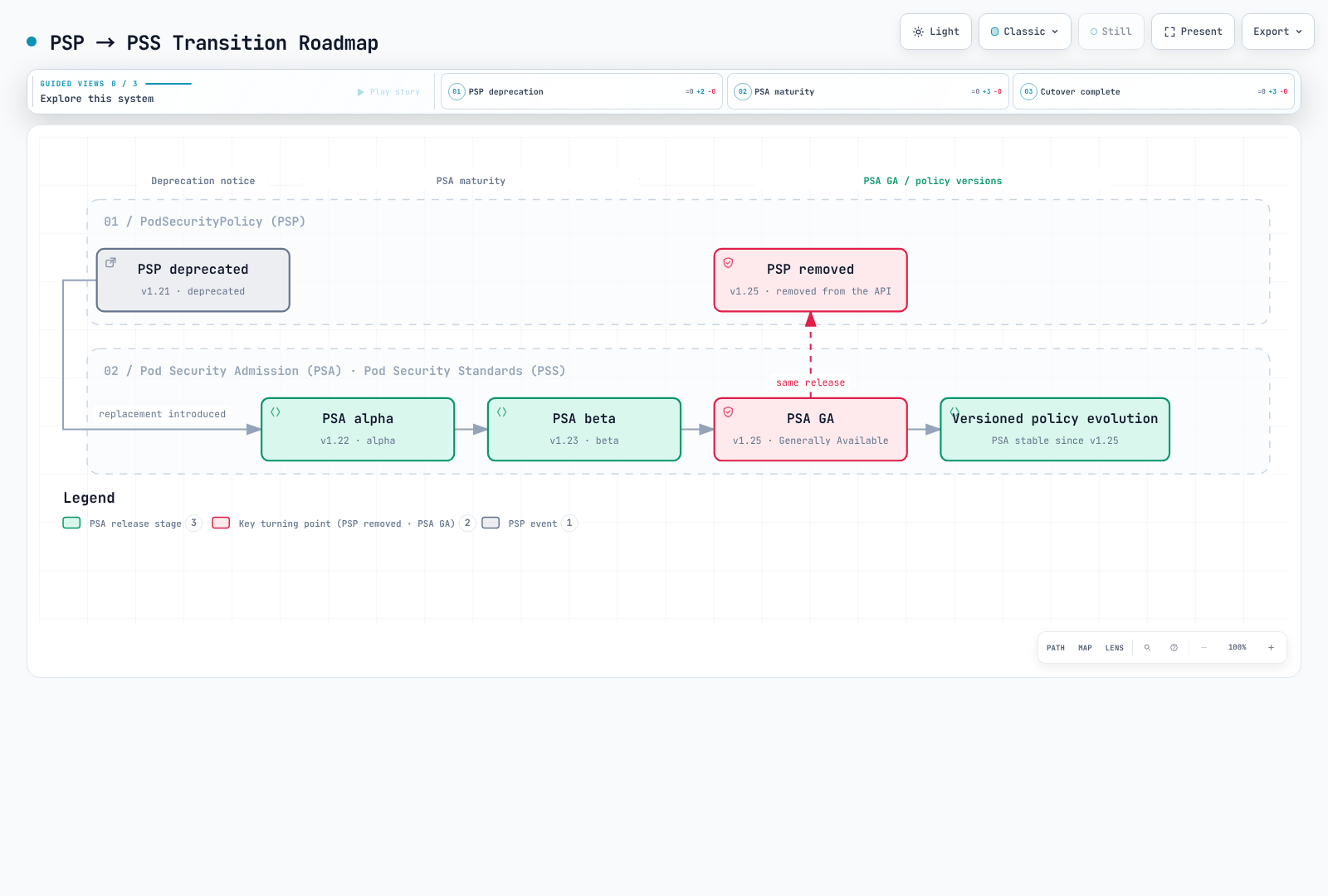
图表解读:PSA 在 1.25 达到 GA;1.28 并不是单独的稳定化里程碑。
PSP 与 PSS 对比
| 特性 | PodSecurityPolicy (PSP) | Pod 安全标准 (PSS) |
|---|---|---|
| 启用方式 | 旧的准入插件 | 由内置 PSA 插件强制执行的 PSS 定义 |
| 策略定义 | 自定义 PSP 资源 | 三个预定义配置文件 |
| 策略绑定 | 复杂的 RBAC 绑定 | 简单的 Namespace 标签 |
| 范围 | 集群范围或 Namespace | Namespace 级别 |
| 策略预览 | 没有 PSA 风格的 warn/audit 模式;API dry-run 独立存在 | warn/audit 模式加 API dry-run |
| 审计 | 有限 | 内置审计支持 |
| 灵活性 | 高(细粒度控制) | 中(标准化配置文件) |
| 复杂性 | 高 | 低 |
Pod 安全准入(PSA)Controller
PSA 架构
PSA 在变更准入之后、验证准入期间在 API server 内部运行。身份验证、授权、schema 验证和其他准入检查同样适用。这不是外部 webhook,图表也不应暗示 PSA 与其他每个验证器之间存在通用顺序。
Request → authentication / authorization → mutating admission
        → validating admission (PSA + other checks) → persistence if accepted
PSA 的工作原理
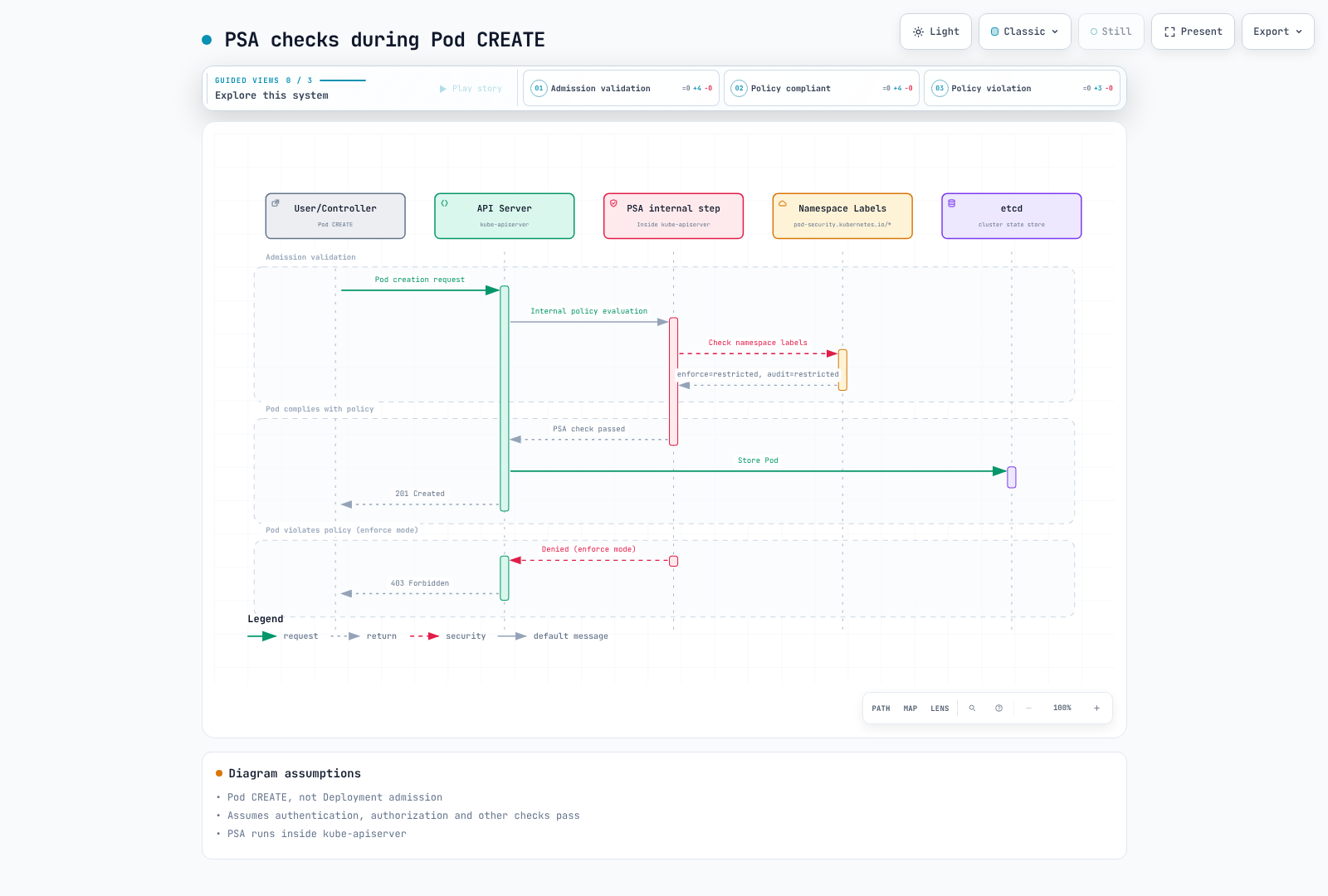
图表范围:PSA 位于 API server 内部。只有所有适用检查都通过后,成功的 Pod CREATE 才会持久化;仅 PSA 批准并不保证 201 Created。
验证 PSA 状态
PSA 在 Kubernetes 1.23 变为 beta 且默认启用,随后在 1.25 达到 GA。缺少显式的 --enable-admission-plugins=PodSecurity 标志并不表示它被禁用。检查自管理 API server 配置中是否显式禁用;EKS 不公开该配置。指标显示的是评估而不是 feature-gate 设置。访问 /metrics 需要授权,未使用的序列可能不存在。
kubectl --context "$PSS_CONTEXT" get namespace "$PSS_NAMESPACE" -o yaml
kubectl --context "$PSS_CONTEXT" get --raw /metrics
使用下面的正向/负向 Pod dry-run 控制项测试实际准入路径。切勿仅从成功的 Deployment dry-run 推断合规性。
安全级别
PSS 定义了三个安全级别(配置文件)。每个级别逐步应用更严格的安全约束。
1. Privileged
此配置文件不增加 PSS 限制。它既不会自动启用容器特权,也不会绕过 RBAC、API 验证或其他准入策略。
# Privileged profile: PSS imposes no controls; API/RBAC/other policies still apply
# Use cases: System daemons, CNI plugins, monitoring agents

apiVersion: v1
kind: Pod
metadata:
  name: privileged-pod
  namespace: pss-privileged-lab
spec:
  hostNetwork: true      # Allowed
  hostPID: true          # Allowed
  hostIPC: true          # Allowed
  containers:
  - name: privileged-container
    image: nginx
    securityContext:
      privileged: true   # Allowed
      runAsUser: 0    # Allowed
Privileged 级别允许:
- 主机网络、PID、IPC 命名空间
- 特权容器
- 所有 capability
- HostPath 挂载
- 任意用户/组 ID
2. Baseline
应用最低限制以防止已知的特权提升。适用于大多数通用工作负载。
# Baseline level: Prevents known privilege escalations
# Use cases: General applications, web servers, API servers

apiVersion: v1
kind: Pod
metadata:
  name: baseline-pod
spec:
  containers:
  - name: app
    image: nginx
    securityContext:
      # The following are prohibited in Baseline:
      # privileged: true        ❌
      # allowPrivilegeEscalation is not constrained by Baseline

      # The following are allowed in Baseline:
      runAsNonRoot: false      # ✓ (allowed but not recommended)
      readOnlyRootFilesystem: false  # ✓ (allowed)
    ports:
    - containerPort: 80
Baseline 级别限制:
| 字段 | 限制 |
|---|---|
| HostProcess | 禁止 Windows HostProcess 容器 |
| 主机命名空间 | 禁止 hostNetwork、hostPID、hostIPC |
| 特权容器 | 禁止 privileged: true |
| Capabilities | 显式添加仅限于列出的 Baseline 允许列表;NET_RAW 不在其中 |
| HostPath Volumes | 禁止 hostPath volume |
| 主机端口 | 内置 PSA 允许未设置/0;没有自定义端口允许列表 |
| AppArmor | 未设置或 RuntimeDefault/Localhost;旧 annotation 使用 runtime/default 或 localhost/* |
| SELinux | 仅允许受限 type 值,禁止设置 user/role |
| /proc 挂载类型 | 仅允许默认值 |
| Seccomp | 允许未设置;如已指定,则为 RuntimeDefault 或 Localhost(不能为 Unconfined) |
| Sysctls | 仅 PSS 版本显式的 sysctl 允许列表;不是所有 kubelet-safe sysctl |
3. Restricted
最严格的策略,应用 Pod 安全强化最佳实践。适用于安全敏感的工作负载。
apiVersion: v1
kind: Pod
metadata:
  name: restricted-pod
spec:
  automountServiceAccountToken: false
  securityContext:
    runAsNonRoot: true
    runAsUser: 101
    runAsGroup: 101
    fsGroup: 101
    seccompProfile:
      type: RuntimeDefault
  containers:
  - name: app
    image: ghcr.io/nginx/nginx-unprivileged@sha256:442753882674b49ae2c1de83ed67896131c0777f56df5005e356e62bc3f7e7ce
    securityContext:
      allowPrivilegeEscalation: false
      readOnlyRootFilesystem: true
      capabilities:
        drop: [ALL]
    ports:
    - containerPort: 8080
    resources:
      requests:
        cpu: 50m
        memory: 64Mi
      limits:
        cpu: 500m
        memory: 128Mi
    volumeMounts:
    - name: tmp
      mountPath: /tmp
  volumes:
  - name: tmp
    emptyDir: {}
Restricted 级别的额外限制:
| 字段 | 限制 |
|---|---|
| Volume 类型 | 仅允许 configMap、csi、downwardAPI、emptyDir、ephemeral、persistentVolumeClaim、projected、secret |
| 特权提升 | 必须设置 allowPrivilegeEscalation: false |
| 以非 root 运行 | 必须设置 runAsNonRoot: true |
| 以非 root 用户运行 | 禁止显式 runAsUser: 0(v1.23+);可省略该字段 |
| Seccomp | 必须为 RuntimeDefault 或 Localhost |
| Capabilities | 必须删除所有 capability,仅可添加 NET_BIND_SERVICE |
这些控制应用于适用的常规、init 和 ephemeral 容器。Pod 级别的非 root/seccomp 值可以继承;冲突的容器覆盖不合规。策略 v1.34+ 还禁止 HTTP/TCP probe 与 lifecycle hook 中非空的 host。在 v1.35 中,hostUsers: false 放宽非 root 检查;Baseline 也放宽 procMount,但 Restricted 仍禁止 Unmasked。这需要实际的用户命名空间支持,而不只是一个标签。针对特权提升、seccomp 和 Linux capability 的 Windows 特定放宽与此 Linux 示例相互独立。
安全级别对比图
┌──────────────────────────────────────────────────────────────────────────┐
│                     Security Level Comparison                             │
├──────────────────────────────────────────────────────────────────────────┤
│                                                                          │
│  Restriction  ━━━━━━━━━━━━━━━━━━━━━━━━━━━━━━━━━━━━━━━━━━━━━━━━━━━▶       │
│               Low                                           High          │
│                                                                          │
│  ┌──────────────┐    ┌──────────────┐    ┌──────────────┐               │
│  │  Privileged  │    │   Baseline   │    │  Restricted  │               │
│  │              │    │              │    │              │               │
│  │ No           │    │ Prevent      │    │ Security     │               │
│  │ restrictions │    │ known        │    │ best         │               │
│  │              │    │ escalations  │    │ practices    │               │
│  │              │    │              │    │              │               │
│  │ Use cases:   │    │ Use cases:   │    │ Use cases:   │               │
│  │ - CNI        │    │ - General    │    │ - Financial  │               │
│  │ - CSI        │    │   apps       │    │   apps       │               │
│  │ - Monitoring │    │ - Web        │    │ - Healthcare │               │
│  │              │    │   servers    │    │ - Multi-     │               │
│  │              │    │ - API        │    │   tenant     │               │
│  └──────────────┘    └──────────────┘    └──────────────┘               │
│                                                                          │
└──────────────────────────────────────────────────────────────────────────┘
强制模式
PSA 提供三种强制模式。这些模式可单独使用,也可组合使用。
1. enforce
拒绝违反策略的 Pod 创建和相关 Pod 更新。工作负载模板会收到 warn/audit 检查;强制发生在生成的 Pod 上。重新标记 Namespace 不会驱逐已运行的 Pod。
# enforce mode: Block Pod creation on violation
apiVersion: v1
kind: Namespace
metadata:
  name: production
  labels:
    pod-security.kubernetes.io/enforce: restricted
    pod-security.kubernetes.io/enforce-version: v1.35
说明性响应摘录(非记录的集群执行):
# Attempting to create a policy-violating Pod
$ kubectl apply --dry-run=server -f privileged-pod.yaml -n production
Error from server (Forbidden): error when creating "privileged-pod.yaml":
pods "privileged-pod" is forbidden: violates PodSecurity "restricted:v1.35":
privileged (container "app" must not set securityContext.privileged=true),
allowPrivilegeEscalation != false (container "app" must set
securityContext.allowPrivilegeEscalation=false)
2. audit
将违反策略的 annotation 添加到 audit event;此模式本身不会拒绝请求。audit-policy/log-delivery 配置决定是否保留这些 event。其他模式和准入检查仍可能拒绝请求。
# audit mode: Record violations in audit logs
apiVersion: v1
kind: Namespace
metadata:
  name: staging
  labels:
    pod-security.kubernetes.io/audit: restricted
    pod-security.kubernetes.io/audit-version: v1.35
合成 audit-event 摘录(不是完整捕获的 event):
{
  "kind": "Event",
  "apiVersion": "audit.k8s.io/v1",
  "level": "Metadata",
  "auditID": "00000000-0000-4000-8000-000000000001",
  "stage": "ResponseComplete",
  "requestURI": "/api/v1/namespaces/staging/pods",
  "verb": "create",
  "user": {
    "username": "developer@example.com"
  },
  "objectRef": {
    "resource": "pods",
    "namespace": "staging",
    "name": "my-pod"
  },
  "annotations": {
    "pod-security.kubernetes.io/audit-violations": "privileged (container \"app\" must not set securityContext.privileged=true)"
  }
}
3. warn
返回对客户端可见的警告,但本身不会拒绝请求;enforce 或其他准入检查仍可能拒绝。
# warn mode: Display warning messages on violation
apiVersion: v1
kind: Namespace
metadata:
  name: development
  labels:
    pod-security.kubernetes.io/warn: restricted
    pod-security.kubernetes.io/warn-version: v1.35
说明性警告摘录(非记录的执行):
$ kubectl apply --dry-run=server -f non-compliant-pod.yaml -n development
Warning: would violate PodSecurity "restricted:v1.35":
allowPrivilegeEscalation != false (container "app" must set
securityContext.allowPrivilegeEscalation=false),
unrestricted capabilities (container "app" must set
securityContext.capabilities.drop=["ALL"])
pod/my-pod created (server dry run)
模式组合策略
初始 Privileged 阶段仅适用于没有更强现有策略的 Namespace。切勿为了遵循此图表而降低 Baseline/Restricted 强制级别。
在生产环境中,建议组合多个模式:
# Recommended configuration: Use mode combinations
apiVersion: v1
kind: Namespace
metadata:
  name: app-namespace
  labels:
    # Current enforcement level
    pod-security.kubernetes.io/enforce: baseline
    pod-security.kubernetes.io/enforce-version: v1.35
    # Audit next level
    pod-security.kubernetes.io/audit: restricted
    pod-security.kubernetes.io/audit-version: v1.35
    # Warn next level
    pod-security.kubernetes.io/warn: restricted
    pod-security.kubernetes.io/warn-version: v1.35
┌─────────────────────────────────────────────────────────────────┐
│ Mode Combination Strategy │
├─────────────────────────────────────────────────────────────────┤
│ │
│ Phase 1: Assess Current State │
│ ┌─────────────────────────────────────────────────────────┐ │
│ │ enforce: privileged │ │
│ │ audit: baseline │ │
│ │ warn: baseline │ │
│ └─────────────────────────────────────────────────────────┘ │
│ │ │
│ ▼ │
│ Phase 2: Gradual Hardening │
│ ┌─────────────────────────────────────────────────────────┐ │
│ │ enforce: baseline │ │
│ │ audit: restricted │ │
│ │ warn: restricted │ │
│ └─────────────────────────────────────────────────────────┘ │
│ │ │
│ ▼ │
│ Phase 3: Final Goal │
│ ┌─────────────────────────────────────────────────────────┐ │
│ │ enforce: restricted │ │
│ │ audit: restricted │ │
│ │ warn: restricted │ │
│ └─────────────────────────────────────────────────────────┘ │
│ │
└─────────────────────────────────────────────────────────────────┘Namespace 级配置
基本标签配置
通过 Namespace 标签配置 PSS:
apiVersion: v1
kind: Namespace
metadata:
  name: secure-namespace
  labels:
    # Format: pod-security.kubernetes.io/<MODE>: <LEVEL>
    pod-security.kubernetes.io/enforce: restricted
    pod-security.kubernetes.io/enforce-version: v1.35
    pod-security.kubernetes.io/audit: restricted
    pod-security.kubernetes.io/audit-version: v1.35
    pod-security.kubernetes.io/warn: restricted
    pod-security.kubernetes.io/warn-version: v1.35
版本指定
可以使用特定 Kubernetes 版本中的 PSS 定义:
apiVersion: v1
kind: Namespace
metadata:
  name: versioned-namespace
  labels:
    # Use PSS definitions from a specific version
    pod-security.kubernetes.io/enforce: restricted
    pod-security.kubernetes.io/enforce-version: v1.35  # Specific version

    # Using 'latest' applies PSS from current cluster version
    # pod-security.kubernetes.io/enforce-version: latest
特定环境配置示例
---
# Development environment: Relaxed policy
apiVersion: v1
kind: Namespace
metadata:
  name: development
  labels:
    environment: development
    pod-security.kubernetes.io/enforce: baseline
    pod-security.kubernetes.io/warn: restricted
---
# Staging environment: Intermediate policy
apiVersion: v1
kind: Namespace
metadata:
  name: staging
  labels:
    environment: staging
    pod-security.kubernetes.io/enforce: baseline
    pod-security.kubernetes.io/audit: restricted
    pod-security.kubernetes.io/warn: restricted
---
# Production environment: Strict policy
apiVersion: v1
kind: Namespace
metadata:
  name: production
  labels:
    environment: production
    pod-security.kubernetes.io/enforce: restricted
    pod-security.kubernetes.io/audit: restricted
    pod-security.kubernetes.io/warn: restricted
向现有 Namespace 添加标签
# Add labels using kubectl
kubectl label namespace my-namespace \
  pod-security.kubernetes.io/enforce=restricted \
  pod-security.kubernetes.io/enforce-version=v1.35 \
  pod-security.kubernetes.io/audit=restricted \
  pod-security.kubernetes.io/warn=restricted

# Verify labels
kubectl get namespace my-namespace -o yaml | grep pod-security
从 PSP 迁移到 PSS
迁移概览
应谨慎规划从 PSP 到 PSS 的迁移,并分阶段执行。
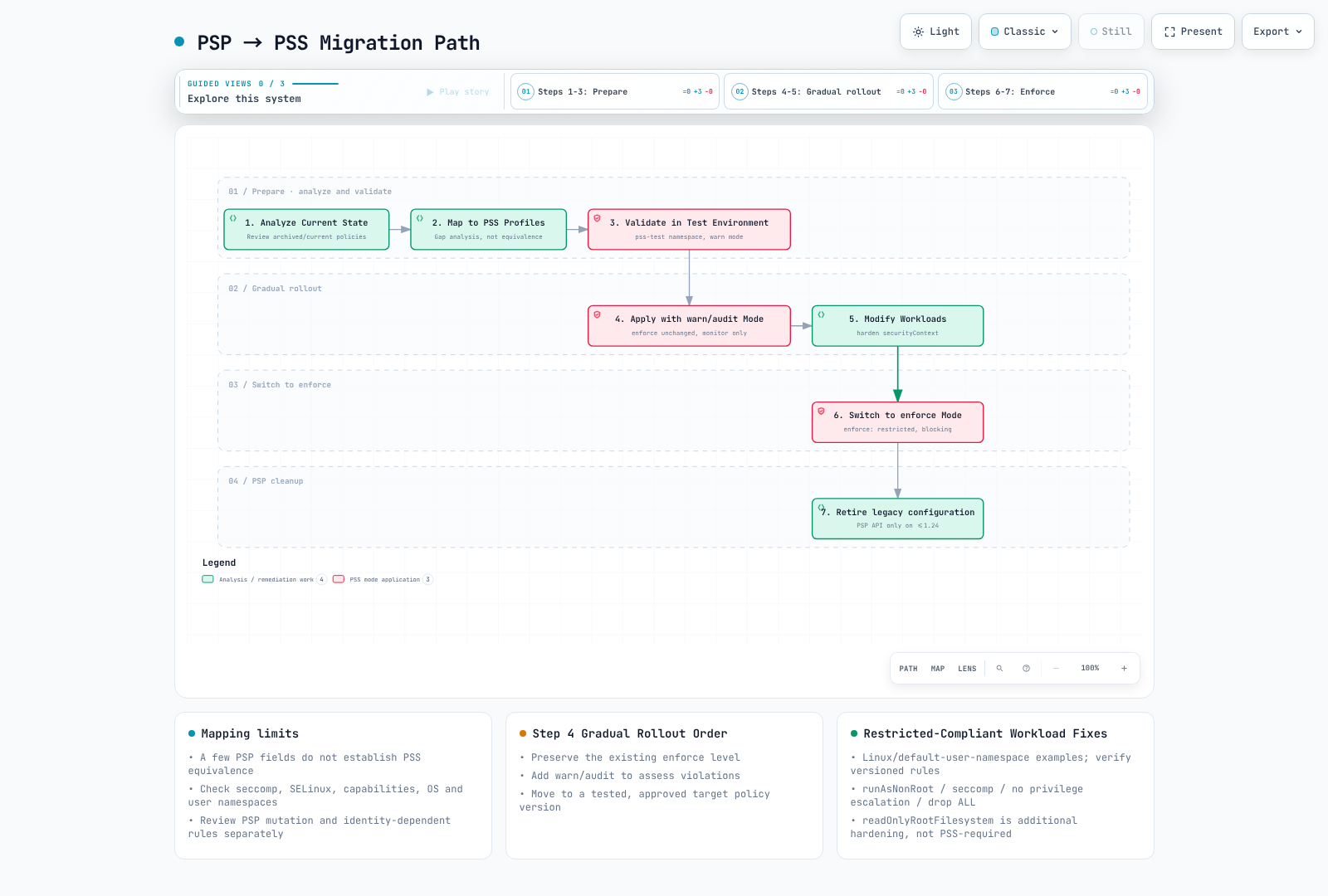
图表范围:PSP 分析/移除是历史内容。切勿为了观察而降低现有更强的 enforce 策略;readOnlyRootFilesystem 是建议项,而非 Restricted 的要求。
步骤 1:分析当前 PSP
**仅限历史流程:**以下 PSP 命令/资源适用于仍提供 policy/v1beta1 服务的旧集群(最高 Kubernetes 1.24),或保存的 manifest。不要将此 PSP 应用于当前集群。同时盘点之前由 PSP 默认设置/变更的字段;PSA 不会填充它们。
# List current PSPs
kubectl get psp

# Get PSP details
kubectl get psp <psp-name> -o yaml

# Check Pods with PSP applied
kubectl get pods --all-namespaces -o jsonpath='{range .items[*]}{.metadata.namespace}/{.metadata.name}: {.metadata.annotations.kubernetes\.io/psp}{"\n"}{end}'
步骤 2:将 PSP 映射到 PSS 配置文件
# Example: Existing PSP
apiVersion: policy/v1beta1
kind: PodSecurityPolicy
metadata:
  name: restricted-psp
spec:
  privileged: false
  allowPrivilegeEscalation: false
  requiredDropCapabilities:
    - ALL
  volumes:
    - 'configMap'
    - 'emptyDir'
    - 'projected'
    - 'secret'
    - 'downwardAPI'
    - 'persistentVolumeClaim'
  hostNetwork: false
  hostIPC: false
  hostPID: false
  runAsUser:
    rule: MustRunAsNonRoot
  seLinux:
    rule: RunAsAny
  fsGroup:
    rule: RunAsAny
  supplementalGroups:
    rule: RunAsAny
**映射结果:**Restricted 是候选目标,而不是等效策略。此 PSP 缺少必需的 seccomp 控制,并允许 PSS 可能拒绝的 SELinux 设置。比较每项控制和每个生成的 Pod;三个选定字段无法确定等效性。
PSP 到 PSS 映射表
| 工作负载要求 | 候选 PSS 配置文件 | 必需审查 |
|---|---|---|
| 主机命名空间、特权容器或 hostPath | Privileged | 隔离例外并应用额外控制 |
| 不访问主机但需要 root 进程 | Baseline | 检查每项 Baseline 控制,包括 capability 和 seccomp |
| 非 root、无特权提升、删除 ALL | Restricted | 还要检查 volume、seccomp、覆盖和版本特定控制 |
步骤 3:在测试环境中验证
# Create test namespace
kubectl create namespace pss-test

# Apply restricted in warn mode
kubectl label namespace pss-test \
  pod-security.kubernetes.io/warn=restricted \
  pod-security.kubernetes.io/warn-version=v1.35

# Test existing workload deployment
kubectl apply -f my-deployment.yaml -n pss-test

# Check warnings and modify workloads
步骤 4:逐步应用
# Staged migration namespace configuration
apiVersion: v1
kind: Namespace
metadata:
  name: migrating-namespace
  labels:
    # Phase 1: New namespace without a previous stronger enforce policy
    pod-security.kubernetes.io/enforce: privileged
    pod-security.kubernetes.io/audit: baseline
    pod-security.kubernetes.io/warn: baseline

    # Phase 2: Apply baseline, monitor restricted
    # pod-security.kubernetes.io/enforce: baseline
    # pod-security.kubernetes.io/audit: restricted
    # pod-security.kubernetes.io/warn: restricted

    # Phase 3: Final restricted enforcement
    # pod-security.kubernetes.io/enforce: restricted
步骤 5:修改工作负载
之前:没有 security context 的普通 nginx Pod 无法通过 Restricted 检查。仅添加 runAsNonRoot 不足以解决问题:image 用户、listener 和可写路径也必须兼容。已修正的 Pod 使用上游 unprivileged image(UID/GID 101)、端口 8080,以及带只读 root filesystem 的可写 /tmp。
apiVersion: v1
kind: Pod
metadata:
  name: new-pod
spec:
  automountServiceAccountToken: false
  securityContext:
    runAsNonRoot: true
    runAsUser: 101
    runAsGroup: 101
    fsGroup: 101
    seccompProfile:
      type: RuntimeDefault
  containers:
  - name: app
    image: ghcr.io/nginx/nginx-unprivileged@sha256:442753882674b49ae2c1de83ed67896131c0777f56df5005e356e62bc3f7e7ce
    securityContext:
      allowPrivilegeEscalation: false
      readOnlyRootFilesystem: true
      capabilities:
        drop: [ALL]
    ports:
    - containerPort: 8080
    resources:
      requests:
        cpu: 50m
        memory: 64Mi
      limits:
        cpu: 500m
        memory: 128Mi
    volumeMounts:
    - name: tmp
      mountPath: /tmp
  volumes:
  - name: tmp
    emptyDir: {}
迁移自动化脚本
此脚本刻意针对一个已审查的 Namespace,仅添加此前不存在的 warn/audit 标签,保留 enforce,并使用观察到的 resource version 拒绝并发编辑。运行时它会实际变更 Namespace;请先检查目标。现有标签会导致失败,以便手动比较而不是自动降级。警告将在后续请求中出现,而不是对所有运行中 Pod 进行追溯扫描。
#!/usr/bin/env python3
# add-pss-observation.py CONTEXT NAMESPACE
import json, subprocess, sys

if len(sys.argv) != 3:
    raise SystemExit("Usage: add-pss-observation.py CONTEXT NAMESPACE")
context, namespace = sys.argv[1:]
if namespace in {"kube-system", "kube-public", "kube-node-lease"}:
    raise SystemExit("Refusing system namespace; review its workload requirements separately")
base = ["kubectl", "--context", context, "--request-timeout=30s"]
obj = json.loads(subprocess.run(
    base + ["get", "namespace", namespace, "-o", "json"],
    check=True, text=True, capture_output=True).stdout)
labels = obj["metadata"].get("labels", {})
new = {
    "pod-security.kubernetes.io/warn": "restricted",
    "pod-security.kubernetes.io/warn-version": "v1.35",
    "pod-security.kubernetes.io/audit": "restricted",
    "pod-security.kubernetes.io/audit-version": "v1.35",
}
if any(key in labels for key in new):
    raise SystemExit("Existing observation policy: review it; do not overwrite automatically")
subprocess.run(base + [
    "label", "namespace", namespace,
    "--resource-version=" + obj["metadata"]["resourceVersion"],
] + [key + "=" + value for key, value in new.items()], check=True)
EKS 默认设置与配置
EKS 中的 PSA 默认设置
AWS 文档说明,PSA 从 EKS 1.23 起默认启用,集群对所有模式的默认设置为 privileged/latest,且没有静态豁免。这些宽松默认设置并非工作负载强化策略。平台工具或管理员创建的 Namespace 标签可以覆盖默认设置;请检查实际 Namespace,而不是假设每个 Namespace 都没有标签。
kubectl --context "$PSS_CONTEXT" get namespace "$PSS_NAMESPACE" -o yaml在 EKS 中配置 PSS
# Apply PSS to EKS namespace
apiVersion: v1
kind: Namespace
metadata:
  name: eks-app-namespace
  labels:
    # Example rollout choice, not a universal AWS requirement
    pod-security.kubernetes.io/enforce: baseline
    pod-security.kubernetes.io/enforce-version: v1.35
    pod-security.kubernetes.io/audit: restricted
    pod-security.kubernetes.io/warn: restricted

    # EKS-related labels
    app.kubernetes.io/managed-by: eks
EKS 系统 Namespace 注意事项
主机访问 agent 无法满足 Baseline,但这并不意味着 kube-system 中每个 Pod 都需要完整 Privileged。审查确切的 add-on 版本和渲染后的 Pod spec。避免对整个系统 Namespace 进行全面覆盖,从而禁用 warn/audit。尽可能将获准主机 agent 与普通应用隔离,并限制可在其中部署的人员。以下是专用示例 Namespace,并非重新标记现有系统 Namespace 的指令。
apiVersion: v1
kind: Namespace
metadata:
  name: host-agents
  labels:
    pod-security.kubernetes.io/enforce: privileged
    pod-security.kubernetes.io/audit: restricted
    pod-security.kubernetes.io/audit-version: v1.35
    pod-security.kubernetes.io/warn: restricted
    pod-security.kubernetes.io/warn-version: v1.35
EKS Add-on 与 PSS 兼容性
| 组件 / 典型部署 | PSS 审查点 |
|---|---|
VPC CNI aws-node、kube-proxy | 主机网络或特权节点操作可能超出 Baseline |
| EBS/EFS CSI node DaemonSet | 主机挂载可能超出 Baseline;controller Pod 有不同需求 |
| 节点级 CloudWatch Agent / Fluent Bit | 主机日志/文件系统访问取决于实际配置 |
| CoreDNS、AWS Load Balancer Controller、Cluster Autoscaler | 根据 Baseline/Restricted 评估渲染后的 spec;仅组件名称不足以证明合规 |
EKS Auto Mode 内置节点组件与自管理 add-on 不同。此表是审查辅助工具,而非经过测试的兼容性矩阵,也不是安装列出所有 add-on 的要求。
EKS Terraform 示例
此片段管理一个应用 Namespace。单独配置并审查 Kubernetes provider 及其目标 context;未运行 provider initialization、plan 或 apply。请通过其所有者采用/import 现有 Namespace,而不要创建竞争性的 Terraform/GitOps 所有权。策略刻意固定,且不更改系统 Namespace 标签。
# Provider authentication/context and ownership must be configured separately.
resource "kubernetes_namespace_v1" "app" {
  metadata {
    name = "my-app"
    labels = {
      "pod-security.kubernetes.io/enforce"         = "restricted"
      "pod-security.kubernetes.io/enforce-version" = "v1.35"
      "pod-security.kubernetes.io/audit"           = "restricted"
      "pod-security.kubernetes.io/audit-version"   = "v1.35"
      "pod-security.kubernetes.io/warn"            = "restricted"
      "pod-security.kubernetes.io/warn-version"    = "v1.35"
      "environment"                              = "production"
    }
  }
}
安全配置文件详情
Privileged 配置文件详情
Privileged 配置文件不施加 PSS 限制;API 验证、RBAC 及其他准入检查仍有效。以下主机 root 示例仅用于策略分析,并非建议部署的工作负载。
# All options allowed in Privileged profile
apiVersion: v1
kind: Pod
metadata:
  name: privileged-example
spec:
  hostNetwork: true
  hostPID: true
  hostIPC: true
  containers:
  - name: privileged-container
    image: nginx
    securityContext:
      privileged: true
      allowPrivilegeEscalation: true
      runAsUser: 0
      capabilities:
        add:
          - ALL
    volumeMounts:
    - name: host-root
      mountPath: /host
  volumes:
  - name: host-root
    hostPath:
      path: /
      type: Directory
Baseline 配置文件详情
# Baseline profile restrictions (v1.35)
#
# Prohibited fields and values:
#
# spec.hostNetwork: true prohibited
# spec.hostPID: true prohibited
# spec.hostIPC: true prohibited
#
# spec.containers[*].securityContext.privileged: true prohibited
# spec.initContainers[*].securityContext.privileged: true prohibited
# spec.ephemeralContainers[*].securityContext.privileged: true prohibited
#
# spec.containers[*].securityContext.capabilities.add restricted
#   - Allowed: NET_BIND_SERVICE (only this in Restricted)
#   - Additionally allowed in Baseline: AUDIT_WRITE, CHOWN, DAC_OVERRIDE,
#     FOWNER, FSETID, KILL, MKNOD, NET_BIND_SERVICE,
#     SETFCAP, SETGID, SETPCAP, SETUID, SYS_CHROOT
#
# spec.volumes[*].hostPath prohibited
#
# spec.containers[*].ports[*].hostPort prohibited (except 0)
#
# spec.securityContext.appArmorProfile.type restricted
#   - Allowed: profile omitted, or type RuntimeDefault/Localhost
#   - Prohibited: Unconfined
#
# spec.securityContext.seLinuxOptions.type restricted
#   - Prohibited: Custom types (container_t etc. allowed)
#
# spec.securityContext.seccompProfile.type restricted
#   - Prohibited: Unconfined
#
# spec.securityContext.sysctls restricted
#   - Only the explicit versioned PSS sysctl allowlist

apiVersion: v1
kind: Pod
metadata:
  name: baseline-compliant
spec:
  automountServiceAccountToken: false
  containers:
  - name: app
    image: ghcr.io/nginx/nginx-unprivileged@sha256:442753882674b49ae2c1de83ed67896131c0777f56df5005e356e62bc3f7e7ce
    ports:
    - containerPort: 8080
    securityContext:
      capabilities:
        drop: [ALL]
Restricted 配置文件详情
Restricted 在 Baseline 基础上增加其 volume 允许列表、非 root 执行、显式 seccomp、禁止特权提升和删除所有 capability。NET_BIND_SERVICE 是唯一允许添加的 capability,但此 8080 listener 不需要它。readOnlyRootFilesystem 是推荐的强化措施,而非 PSS 要求。设置 containerPort 是 metadata;它不会重新配置 Nginx。
apiVersion: v1
kind: Pod
metadata:
  name: restricted-compliant
spec:
  automountServiceAccountToken: false
  securityContext:
    runAsNonRoot: true
    runAsUser: 101
    runAsGroup: 101
    fsGroup: 101
    seccompProfile:
      type: RuntimeDefault
  containers:
  - name: app
    image: ghcr.io/nginx/nginx-unprivileged@sha256:442753882674b49ae2c1de83ed67896131c0777f56df5005e356e62bc3f7e7ce
    securityContext:
      allowPrivilegeEscalation: false
      readOnlyRootFilesystem: true
      capabilities:
        drop: [ALL]
    ports:
    - containerPort: 8080
    resources:
      requests:
        cpu: 50m
        memory: 64Mi
      limits:
        cpu: 500m
        memory: 128Mi
    volumeMounts:
    - name: tmp
      mountPath: /tmp
  volumes:
  - name: tmp
    emptyDir: {}
完整的 Restricted 合规 Nginx 示例
已根据上游 OCI metadata 检查该 digest 对 Linux amd64/arm64(Nginx 1.30.4,用户 101)的适用性;未拉取 image layer,也未执行容器。上游文档说明端口 8080、/tmp/nginx.pid 和 /tmp 下的临时路径。以下 ConfigMap 提供匹配的 listener 和 health endpoint。请在 Deployment 之前在同一 Namespace 创建它。在 rollout 前,于获批环境中验证 startup/readiness。
apiVersion: apps/v1
kind: Deployment
metadata:
  name: nginx-restricted
  namespace: production
spec:
  replicas: 3
  selector:
    matchLabels:
      app: nginx
  template:
    metadata:
      labels:
        app: nginx
    spec:
      automountServiceAccountToken: false
      securityContext:
        runAsNonRoot: true
        runAsUser: 101  # nginx user
        runAsGroup: 101
        fsGroup: 101
        seccompProfile:
          type: RuntimeDefault
      containers:
      - name: nginx
        image: ghcr.io/nginx/nginx-unprivileged@sha256:442753882674b49ae2c1de83ed67896131c0777f56df5005e356e62bc3f7e7ce
        securityContext:
          allowPrivilegeEscalation: false
          readOnlyRootFilesystem: true
          runAsNonRoot: true
          runAsUser: 101
          capabilities:
            drop:
              - ALL
        ports:
        - containerPort: 8080
        resources:
          limits:
            cpu: 100m
            memory: 128Mi
          requests:
            cpu: 50m
            memory: 64Mi
        volumeMounts:
        - name: tmp
          mountPath: /tmp
        - name: config
          mountPath: /etc/nginx/conf.d
          readOnly: true
        livenessProbe:
          httpGet:
            path: /healthz
            port: 8080
          initialDelaySeconds: 5
          periodSeconds: 10
        readinessProbe:
          httpGet:
            path: /healthz
            port: 8080
          initialDelaySeconds: 5
          periodSeconds: 5
      volumes:
      - name: tmp
        emptyDir: {}
      - name: config
        configMap:
          name: nginx-config
---
apiVersion: v1
kind: ConfigMap
metadata:
  name: nginx-config
  namespace: production
data:
  default.conf: |
    server {
        listen 8080;
        server_name localhost;

        location / {
            root /usr/share/nginx/html;
            index index.html;
        }

        location /healthz {
            return 200 'OK';
            add_header Content-Type text/plain;
        }
    }
豁免配置
集群级豁免配置
自管理 API server 可通过 --admission-control-config-file 加载此配置。该示例保持每个豁免列表为空。豁免会跳过所有 PSA 模式。usernames 匹配确切的已认证请求 username,而不是 group、wildcard 或未来 Pod 的 ServiceAccount。豁免 controller account 会绕过其代表许多用户创建的 Pod 检查。Namespace 和 RuntimeClass 名称同样精确匹配。仅在另外限制了谁可以使用该例外后,才配置例外。
# Self-managed API server configuration; not an EKS control-plane setting
apiVersion: apiserver.config.k8s.io/v1
kind: AdmissionConfiguration
plugins:
- name: PodSecurity
  configuration:
    apiVersion: pod-security.admission.config.k8s.io/v1
    kind: PodSecurityConfiguration
    defaults:
      enforce: baseline
      enforce-version: v1.35
      audit: restricted
      audit-version: v1.35
      warn: restricted
      warn-version: v1.35
    exemptions:
      usernames: []
      runtimeClasses: []
      namespaces: []
EKS 中的豁免配置
EKS 不允许编辑托管 API server 的 AdmissionConfiguration。Namespace enforce: privileged 是宽松配置文件,不是静态豁免:warn/audit 仍可以评估请求。限制 Namespace 写入/部署权限,并将主机 agent 与普通应用分离。例如,使用 hostNetwork/hostPID/hostPath 配置的 node-exporter 无法通过 Baseline;设置 Baseline 不会使这些主机访问变得安全或被允许。
apiVersion: v1
kind: Namespace
metadata:
  name: host-agents
  labels:
    pod-security.kubernetes.io/enforce: privileged
    pod-security.kubernetes.io/audit: restricted
    pod-security.kubernetes.io/audit-version: v1.35
    pod-security.kubernetes.io/warn: restricted
    pod-security.kubernetes.io/warn-version: v1.35
基于 RuntimeClass 的豁免
RuntimeClass 选择配置的 CRI runtime handler。创建资源不会安装 gVisor/Kata,也不会授予 PSA 例外。所有目标节点必须支持该 handler(或使用适当的调度约束)。仅此定义仍完全适用 PSA:
apiVersion: node.k8s.io/v1
kind: RuntimeClass
metadata:
  name: gvisor
handler: runsc
仅自管理 API server 上单独配置的 runtimeClasses: ["gvisor"] 豁免会跳过 PSA。允许选择该 class 的任何请求都可能绕过 PSA;runtime 隔离不能替代准入授权。此托管 control plane 配置在 EKS 中不可用。
使用 Kyverno 进行细粒度豁免
Kyverno 无法将 PSA 拒绝变为允许。如果主机 agent 需要例外,请先设计 Namespace 的 PSA 配置文件和部署权限,再添加具有狭窄范围例外的独立强制策略。仅 HostPath 排除并不排除 hostNetwork/hostPID 检查;仅匹配 image tag 或可变 Pod 标签不是授权。
有关已审查的 policy API 及版本/弃用限制,请参阅 Kyverno 策略管理。不要复制带小写 validationFailureAction: enforce 的旧版 ClusterPolicy;这不是有效值,且 ClusterPolicy 已在 Kyverno 1.19 中弃用。替代方案必须针对普通和例外工作负载进行测试。
逐步采用的最佳实践
步骤 1:分析当前状态
预览对 enforce 的更改,而不是 warn:只有 enforce 级别/版本更改才会触发现有 Pod 检查。此 server dry-run 不会保存标签或驱逐 Pod。如果有效 enforce 策略未改变,不会触发新的扫描。扫描尽力而为,可能限制/去重警告;没有警告并不代表完成了工作负载审计。命令/身份验证失败仍然是失败。
#!/usr/bin/env bash
# preview-pss.sh: no namespace mutation
set -euo pipefail
: "${PSS_CONTEXT:?Set the approved test context}"
: "${PSS_NAMESPACE:?Set one namespace to inspect}"
kubectl --context "$PSS_CONTEXT" --request-timeout=30s \
  get namespace "$PSS_NAMESPACE" -o yaml
kubectl --context "$PSS_CONTEXT" --request-timeout=30s \
  label namespace "$PSS_NAMESPACE" \
  pod-security.kubernetes.io/enforce=restricted \
  pod-security.kubernetes.io/enforce-version=v1.35 \
  --overwrite --dry-run=server
步骤 2:逐步 rollout 策略
日期范围是说明性的规划计划,而不是测得的迁移持续时间。使用明确的 Namespace 清单,绝不降低现有更强策略,并且仅在测试替代 Pod 和回滚能力后推进。
# Gradual rollout using GitOps

# Phase 1: Monitoring (Day 1-7)
# - Apply warn: baseline to all namespaces
# - Collect and analyze violations

# Phase 2: Development Environment (Day 8-14)
# - Apply enforce: baseline to development namespaces
# - Apply warn: baseline to staging namespaces

# Phase 3: Staging Environment (Day 15-21)
# - Apply enforce: baseline to staging namespaces
# - Apply warn: baseline to production namespaces

# Phase 4: Production Environment (Day 22-28)
# - Apply enforce: baseline to production namespaces
# - Apply warn: restricted to all environments

# Phase 5: Restricted Hardening (Day 29+)
# - Apply enforce: restricted as default for new namespaces
# - Gradually migrate existing namespaces
步骤 3:设置监控和告警
这些规则需要 Prometheus Operator CRD、包含此 PrometheusRule 的 selector,以及公开 pod_security_evaluations_total 的已授权 API-server scrape。内置 PSA 不是名为 pod-security-webhook 的 webhook。评估标签包括 decision、policy_level、policy_version、mode、request_operation、resource 和 subresource;没有 namespace 标签。关联保留的 audit event 以获得 Namespace/请求详情。缺少 metric 不是零违规的证据;audit-mode denial 表示发生了违规评估,不一定表示 API 请求被拒绝。
apiVersion: monitoring.coreos.com/v1
kind: PrometheusRule
metadata:
  name: pss-violations
  namespace: monitoring
spec:
  groups:
  - name: pod-security-standards
    rules:
    - alert: PSSViolationDetected
      expr: |
        sum by (policy_level, policy_version, mode) (
          increase(pod_security_evaluations_total{mode="enforce",decision="deny"}[5m])
        ) > 0
      labels:
        severity: warning
      annotations:
        summary: "PSA denied a Pod request"
        description: "Policy {{ $labels.policy_level }}:{{ $labels.policy_version }}. Correlate audit logs for namespace and request identity."
    - alert: PSSAuditViolation
      expr: |
        sum by (policy_level, policy_version, mode) (
          increase(pod_security_evaluations_total{mode="audit",decision="deny"}[5m])
        ) > 10
      for: 5m
      labels:
        severity: info
      annotations:
        summary: "PSA audit violations increasing"
        description: "{{ $value }} violating evaluations over five minutes; not a count of unique Pods."
步骤 4:自动化合规检查
将其保存为拥有工作负载的项目中的 check-pss.py。先决条件:带 PyYAML 的 Python 3、兼容的 kubectl、获批集群凭据、支持策略 v1.35 的 Kubernetes API server,以及显式强制 restricted:v1.35 的现有测试 Namespace。调用方即使进行 server dry-run,也需要 Namespace 读取和 Pod 创建授权。不要将集群凭据暴露给不受信任的 pull-request 代码。
#!/usr/bin/env python3
# check-pss.py CONTEXT NAMESPACE pod.yaml [pod2.yaml ...]
# Requires Python 3 + PyYAML and a preconfigured, authorized kubectl.
import copy, json, subprocess, sys
from pathlib import Path
import yaml

if len(sys.argv) < 4:
    raise SystemExit("Usage: check-pss.py CONTEXT NAMESPACE pod.yaml [...]")
context, namespace, *files = sys.argv[1:]
pods = []
for filename in files:
    docs = list(yaml.safe_load_all(Path(filename).read_text()))
    if not docs or any(not isinstance(p, dict) for p in docs):
        raise SystemExit(f"{filename}: empty/non-object YAML")
    for pod in docs:
        if (pod.get("apiVersion"), pod.get("kind")) != ("v1", "Pod"):
            raise SystemExit(f"{filename}: only explicit v1 Pod test inputs are supported")
        meta = pod.setdefault("metadata", {})
        if meta.get("namespace", namespace) != namespace:
            raise SystemExit(f"{filename}: namespace mismatch")
        meta["namespace"] = namespace
        pods.append(pod)
base = ["kubectl", "--context", context, "--request-timeout=30s"]
ns = json.loads(subprocess.run(
    base + ["get", "namespace", namespace, "-o", "json"],
    check=True, text=True, capture_output=True).stdout)
labels = ns["metadata"].get("labels", {})
if (labels.get("pod-security.kubernetes.io/enforce"),
    labels.get("pod-security.kubernetes.io/enforce-version")) != ("restricted", "v1.35"):
    raise SystemExit("Test namespace must explicitly enforce restricted:v1.35")

def dry_run(pod):
    return subprocess.run(
        base + ["create", "--dry-run=server", "--validate=strict",
                "--namespace", namespace, "-f", "-"],
        input=json.dumps(pod), text=True, capture_output=True)

control = {
    "apiVersion": "v1", "kind": "Pod",
    "metadata": {"generateName": "pss-control-", "namespace": namespace},
    "spec": {
        "automountServiceAccountToken": False,
        "securityContext": {"runAsNonRoot": True, "runAsUser": 65532,
                            "seccompProfile": {"type": "RuntimeDefault"}},
        "containers": [{"name": "probe", "image": "registry.k8s.io/pause:3.10",
                        "securityContext": {"allowPrivilegeEscalation": False,
                                            "capabilities": {"drop": ["ALL"]}}}],
    },
}
good = dry_run(control)
if good.returncode:
    raise SystemExit("Positive control failed; no compliance result:\n" + good.stderr)
bad = copy.deepcopy(control)
bad["spec"]["hostPID"] = True
denied = dry_run(bad)
if denied.returncode == 0 or 'violates PodSecurity "restricted:v1.35"' not in denied.stderr:
    raise SystemExit("Negative control did not confirm PSA rejection:\n" + denied.stderr)
for pod in pods:
    result = dry_run(pod)
    if result.returncode:
        raise SystemExit("Pod dry-run failed:\n" + result.stderr)
print(f"{len(pods)} explicit Pod inputs passed server dry-run in {namespace}")python3 check-pss.py "$PSS_CONTEXT" "$PSS_NAMESPACE" ./pss-inputs/web-pod.yaml显式输入列表必须涵盖每个工作负载的 Pod template,包括 init container。此示例会拒绝 Deployment、空文件、错误 Namespace、查询失败、缺少强制以及豁免/非活动的负向控制路径。template 提取、mutating webhook、调度、image 启动和未来 runtime 行为需要单独检查。负向控制必须由 PSA 拒绝;任何其他错误均不确定,并会使检查失败。候选 Pod 选择的不同豁免(例如豁免的 RuntimeClass)也必须由测试集群所有者禁止或单独测试。
步骤 5:文档与培训
# Pod Security Standards Guidelines

## Checklist for Developers

### When Writing Restricted-Level Pods:

- [ ] Set `spec.securityContext.runAsNonRoot: true`
- [ ] Set `spec.securityContext.seccompProfile.type: RuntimeDefault`
- [ ] Set `allowPrivilegeEscalation: false` on all containers
- [ ] Set `capabilities.drop: ["ALL"]` on all containers
- [ ] Set `readOnlyRootFilesystem: true` (recommended)
- [ ] Use unprivileged images (e.g., nginxinc/nginx-unprivileged)
- [ ] Mount emptyDir for writable paths

### Common Problem Solutions:

1. **nginx fails to bind port 80**
   → Add `NET_BIND_SERVICE` capability or use port 8080

2. **File write failures**
   → Mount emptyDir volumes to required paths

3. **Process runs as root**
   → Use unprivileged base image or add USER directive in Dockerfile
故障排除
常见错误和解决方案
1. “allowPrivilegeEscalation != false” 错误
说明性错误摘录;YAML 是部分 Pod-spec 修正,不是独立 manifest。保留现有 container image/configuration。也要将相关的每容器控制应用于 init 和 ephemeral container。
allowPrivilegeEscalation != falsespec:
containers:
- name: app
securityContext:
allowPrivilegeEscalation: false2. “unrestricted capabilities” 错误
说明性错误摘录;YAML 是部分 Pod-spec 修正,不是独立 manifest。保留现有 container image/configuration。也要将相关的每容器控制应用于 init 和 ephemeral container。
unrestricted capabilitiesspec:
containers:
- name: app
securityContext:
capabilities:
drop: [ALL]3. “runAsNonRoot != true” 错误
说明性错误摘录;YAML 是部分 Pod-spec 修正,不是独立 manifest。保留现有 container image/configuration。也要将相关的每容器控制应用于 init 和 ephemeral container。
runAsNonRoot != truespec:
securityContext:
runAsNonRoot: true
runAsUser: 1014. “seccompProfile” 错误
说明性错误摘录;YAML 是部分 Pod-spec 修正,不是独立 manifest。保留现有 container image/configuration。也要将相关的每容器控制应用于 init 和 ephemeral container。
seccompProfile must be RuntimeDefault or Localhostspec:
securityContext:
seccompProfile:
type: RuntimeDefaultPSS 违规检查工具
Polaris、kube-score 和 Trivy 提供额外的静态检查,但不能精确替代集群版本化 PSA 策略、豁免和变更。安装经过审查的版本并查阅其 CLI help。成功的 server dry-run 仅限于该请求、身份、Namespace 和时刻;请使用上面显式的 Pod 控制项。
# Dry-run check with kubectl
kubectl apply -f my-pod.yaml --dry-run=server

# Check with Polaris
polaris audit --audit-path ./k8s/ --format pretty

# Check with kube-score
kube-score score my-deployment.yaml

# Configuration check with Trivy
trivy config ./k8s/
总结
Pod 安全标准(PSS)提供了一种在 Kubernetes 中管理 Pod 安全的标准化方法:
- 三个安全级别:Privileged(所有权限)、Baseline(防止已知提升)、Restricted(最小权限)
- 三种强制模式:enforce(阻止)、audit(记录)、warn(警告)
- Namespace 标签:没有 PSP 风格的使用绑定;RBAC 仍必须限制 Namespace 标签和工作负载创建
- 逐步采用支持:通过 warn/audit 模式安全迁移
建议
- 从一开始就在新集群中启用 PSS
- 对现有集群从 warn 模式开始并逐步强化
- 在生产环境中至少应用 Baseline 级别
- 对敏感工作负载应用 Restricted 级别