ArgoCD 流量管理
依据版本审阅:Argo CD 3.5.2、Argo Rollouts 1.10.0、Helm chart 2.43.1;在审阅发布说明后更新至 Argo CD 3.5.4 和 chart 2.43.6(Rollouts 仍为 1.10.0;示例未重新运行) 最后更新:October 12, 2026
目录
Argo Rollouts 概述
Argo Rollouts 是一个 Kubernetes controller,提供包括蓝绿部署、金丝雀部署和渐进式交付功能在内的高级部署能力。
为什么选择 Argo Rollouts?
Kubernetes Deployment 支持 RollingUpdate 和 Recreate,以及暂停/恢复。下表比较原生 controller 的行为;其他模式可通过额外的 controller 或多个 Deployment 实现:
| 功能 | K8s Deployment | Argo Rollouts |
|---|---|---|
| 滚动更新 | 是 | 是 |
| 蓝绿 | 否 | 是 |
| 金丝雀 | 否 | 是 |
| 流量拆分 | 否 | 是 |
| 自动回滚 | 否 | 是 |
| 分析/验证 | 否 | 是 |
| 暂停/恢复 | 是 | 是 |
| 实验 | 否 | 是 |
架构
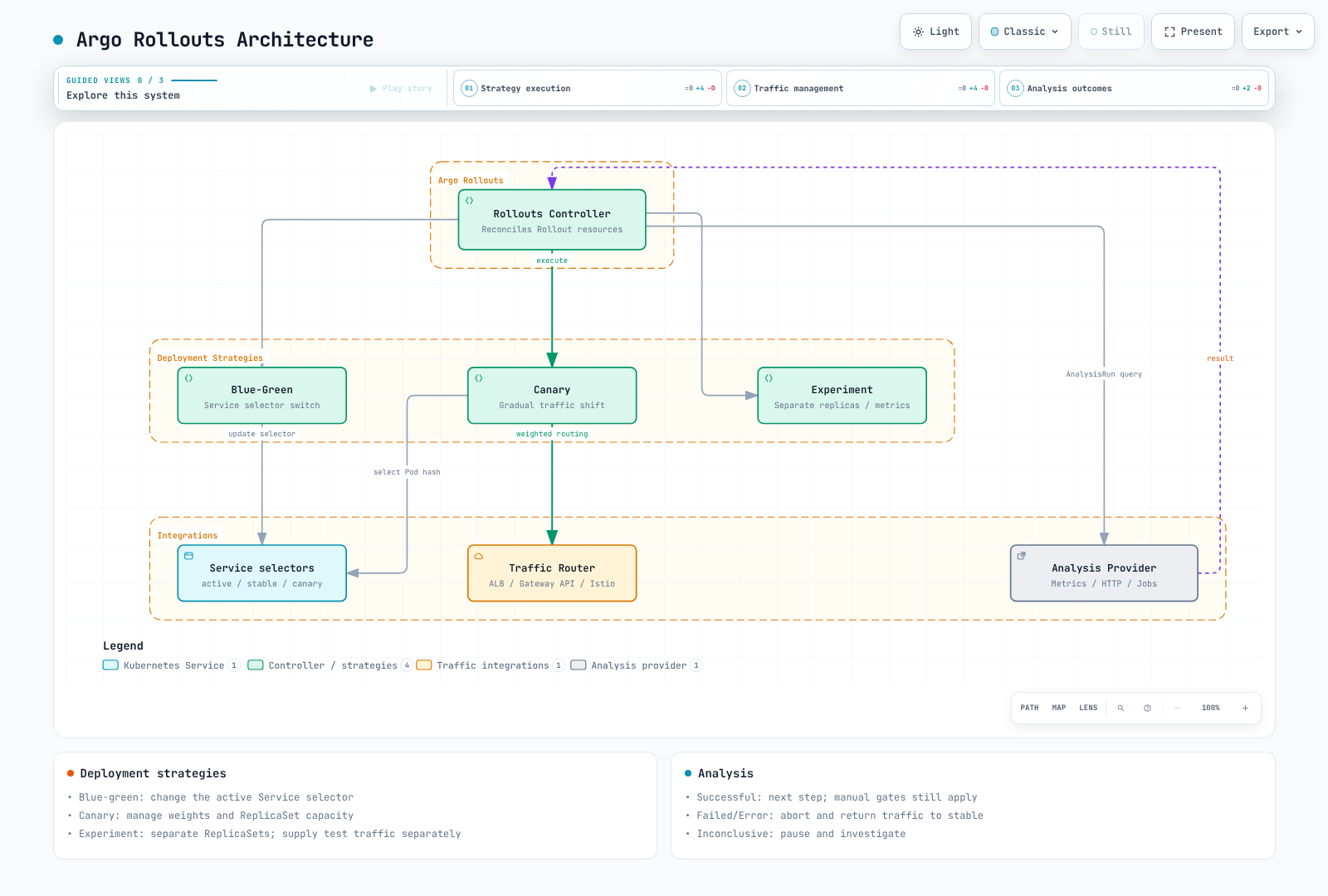
安装
安装 Argo Rollouts Controller
set -euo pipefail
ROLLOUTS_VERSION=v1.10.0
kubectl create namespace argo-rollouts --dry-run=client -o yaml | kubectl apply -f -
kubectl apply --server-side -n argo-rollouts \
  -f "https://github.com/argoproj/argo-rollouts/releases/download/${ROLLOUTS_VERSION}/install.yaml"
kubectl rollout status deployment/argo-rollouts -n argo-rollouts --timeout=180s
安装 kubectl 插件
set -euo pipefail
ROLLOUTS_VERSION=v1.10.0
case "$(uname -s)" in
  Linux) plugin_os=linux ;;
  Darwin) plugin_os=darwin ;;
  *) echo "Use the Windows release asset for Windows" >&2; exit 1 ;;
esac
case "$(uname -m)" in
  x86_64) plugin_arch=amd64 ;;
  aarch64|arm64) plugin_arch=arm64 ;;
  *) echo "Unsupported architecture" >&2; exit 1 ;;
esac
plugin_asset="kubectl-argo-rollouts-${plugin_os}-${plugin_arch}"
plugin_dir="$(mktemp -d)"
trap 'rm -rf "$plugin_dir"' EXIT
plugin_base="https://github.com/argoproj/argo-rollouts/releases/download/${ROLLOUTS_VERSION}"
curl --fail --location --retry 3 "$plugin_base/$plugin_asset" -o "$plugin_dir/$plugin_asset"
curl --fail --location --retry 3 "$plugin_base/argo-rollouts-checksums.txt" -o "$plugin_dir/checksums.txt"
awk -v artifact="$plugin_asset" '$2 == artifact { print }' "$plugin_dir/checksums.txt" > "$plugin_dir/selected.sha256"
test -s "$plugin_dir/selected.sha256"
(
  cd "$plugin_dir"
  if [ "$plugin_os" = darwin ]; then
    shasum -a 256 -c selected.sha256
  else
    sha256sum -c selected.sha256
  fi
)
install -d "$HOME/.local/bin"
install -m 0755 "$plugin_dir/$plugin_asset" "$HOME/.local/bin/kubectl-argo-rollouts"
export PATH="$HOME/.local/bin:$PATH"
kubectl argo rollouts version
通过 Helm 安装
选择上述 manifest 安装或 Helm 其中之一来管理 controller 所有权。将这些设置保存为 rollouts-values.yaml。AWS_REGION 属于查询 CloudWatch 的 Rollouts controller,未使用该 provider 时可以省略。
controller:
  replicas: 2
  metrics:
    enabled: true
    serviceMonitor:
      enabled: false  # Enable after installing/configuring Prometheus Operator
  pdb:
    enabled: true
    minAvailable: 1
  extraEnv:
    - name: AWS_REGION
      value: ap-northeast-2

dashboard:
enabled: falsehelm repo add argo https://argoproj.github.io/argo-helm
helm repo update argo
helm upgrade --install argo-rollouts argo/argo-rollouts \
--version 2.43.6 --namespace argo-rollouts --create-namespace \
--values rollouts-values.yaml --wait --timeout 5m仅在配置其 CRD 和 Prometheus selector 后启用 ServiceMonitor。共享 Dashboard 需要单独的身份验证/授权层。1.10.0 CLI 的 dashboard 命令绑定所有接口并使用你的 kubeconfig 权限;其打印出的 localhost URL 不会限制访问。
Dashboard 访问(Helm 安装)
对于 Helm 安装,启用只读 ClusterIP Dashboard 并将端口转发到 loopback 地址:
helm upgrade --install argo-rollouts argo/argo-rollouts \
  --version 2.43.6 --namespace argo-rollouts --create-namespace \
  --values rollouts-values.yaml \
  --set dashboard.enabled=true --set dashboard.readonly=true \
  --set dashboard.service.type=ClusterIP --set dashboard.ingress.enabled=false \
  --wait --timeout 5m
kubectl port-forward --address 127.0.0.1 -n argo-rollouts \
  service/argo-rollouts-dashboard 3100:3100
打开 http://127.0.0.1:3100/rollouts。共享访问需要独立的、经过身份验证和授权的 proxy。
蓝绿部署
请将示例 myapp/registry 镜像、ECR 账户/tag 和指标名称替换为应用程序的配置。准备 namespace、镜像访问、readiness 响应、指标收集和 AnalysisTemplate;分别独立运行每个场景。初始部署没有先前稳定的 ReplicaSet。先成功部署 v1,然后在 Git 中将镜像改为 v2 以观察 rollout。
Argo CD 从 Git 应用 Rollout spec;独立的 Rollouts controller 管理 ReplicaSet 和流量。中止并将流量返回稳定版本不会还原 Git commit 或数据库迁移。
蓝绿部署会保留 Rollout 的前一个和新的 ReplicaSet,然后更改活跃 Service selector。它不会复制整个集群环境。数据平面传播和连接排空需要时间。
基本蓝绿 Rollout
apiVersion: argoproj.io/v1alpha1
kind: Rollout
metadata:
  name: myapp
  namespace: myapp
spec:
  replicas: 5
  revisionHistoryLimit: 3
  selector:
    matchLabels:
      app: myapp
  template:
    metadata:
      labels:
        app: myapp
    spec:
      containers:
      - name: myapp
        image: myregistry/myapp:v1.0.0
        ports:
        - containerPort: 8080
        readinessProbe:
          httpGet:
            path: /health
            port: 8080
          initialDelaySeconds: 5
          periodSeconds: 10
        resources:
          requests:
            cpu: 100m
            memory: 128Mi
          limits:
            cpu: 500m
            memory: 512Mi
  strategy:
    blueGreen:
      activeService: myapp-active
      previewService: myapp-preview
      autoPromotionEnabled: false
      previewReplicaCount: 2
      prePromotionAnalysis:
        templates:
        - templateName: smoke-tests
        args:
        - name: service-name
          value: myapp-preview
      postPromotionAnalysis:
        templates:
        - templateName: success-rate
        args:
        - name: service-name
          value: myapp-active
---
apiVersion: v1
kind: Service
metadata:
  name: myapp-active
  namespace: myapp
spec:
  selector:
    app: myapp
  ports:
  - port: 80
    targetPort: 8080
---
apiVersion: v1
kind: Service
metadata:
  name: myapp-preview
  namespace: myapp
spec:
  selector:
    app: myapp
  ports:
  - port: 80
    targetPort: 8080
previewReplicaCount 限制预览容量;新的 ReplicaSet 会在晋级前扩容至 spec.replicas。当 autoPromotionEnabled 为 false 时,会忽略 autoPromotionSeconds。所需的晋级前分析示例也省略了 autoPromotionSeconds,使其与基于时间的自动晋级示例分开。此示例省略 scaleDownDelaySeconds,以免固定的缩容截止时间取消晋级后分析。ALB target 注册/注销和连接排空仍可能导致中断;请验证实际数据平面。
蓝绿流程
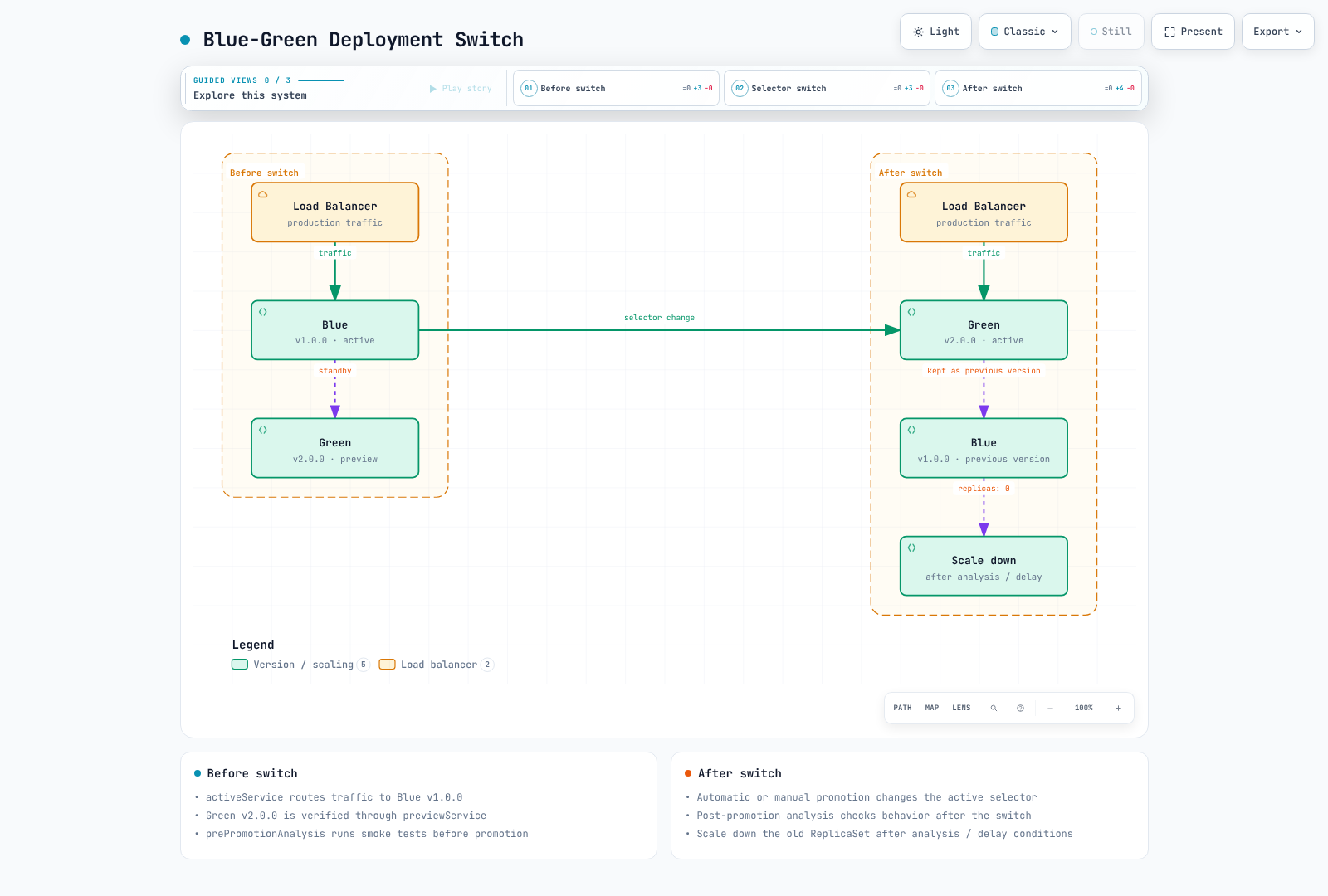
启用自动晋级的蓝绿部署
strategy:
  blueGreen:
    activeService: myapp-active
    previewService: myapp-preview
    autoPromotionEnabled: true
    autoPromotionSeconds: 60  # Wait 60s before auto-promoting
    previewReplicaCount: 3
金丝雀部署
配置 trafficRouting 时,setWeight 会更改相对路由器权重。未使用路由器时,它通过 ReplicaSet 数量近似该比例;无法保证精确的请求百分比。使用路由器时,稳定副本容量独立于流量权重。
金丝雀部署会逐步将流量转移到新版本。
默认情况下,流量路由金丝雀会保留 100% 的稳定容量,因此请同时规划稳定和金丝雀容量。maxSurge 控制不带 trafficRouting 的基本金丝雀的期望副本计算;在流量路由模式下,它不是总 Pod 上限。maxUnavailable 仍可能限制旧 ReplicaSet 的缩容。
基本金丝雀 Rollout
此示例需要 Gateway API plugin 0.17.0、myapp-route HTTPRoute、就绪的 Gateway 以及后文所示的匹配稳定/金丝雀 Service。请检查 HTTPRoute 的 Accepted/ResolvedRefs 和数据平面就绪情况。
apiVersion: argoproj.io/v1alpha1
kind: Rollout
metadata:
  name: myapp-canary
  namespace: myapp
spec:
  replicas: 10
  selector:
    matchLabels:
      app: myapp
  template:
    metadata:
      labels:
        app: myapp
    spec:
      containers:
      - name: myapp
        image: myregistry/myapp:v1.0.0
        ports:
        - containerPort: 8080
        readinessProbe:
          httpGet:
            path: /health
            port: 8080
  strategy:
    canary:
      canaryService: myapp-canary
      stableService: myapp-stable
      trafficRouting:
        plugins:
          argoproj-labs/gatewayAPI:
            httpRoute: myapp-route
            namespace: myapp
      steps:
      - setWeight: 5
      - pause:
          duration: 2m
      - setWeight: 10
      - analysis:
          templates:
          - templateName: success-rate
          args:
          - name: service-name
            value: myapp-canary
      - setWeight: 25
      - pause:
          duration: 5m
      - setWeight: 50
      - pause:
          duration: 5m
      - setWeight: 75
      - analysis:
          templates:
          - templateName: success-rate
          - templateName: latency-check
          args:
          - name: service-name
            value: myapp-canary
      - setWeight: 100
---
apiVersion: v1
kind: Service
metadata:
  name: myapp-stable
  namespace: myapp
spec:
  selector:
    app: myapp
  ports:
  - port: 80
    targetPort: 8080
---
apiVersion: v1
kind: Service
metadata:
  name: myapp-canary
  namespace: myapp
spec:
  selector:
    app: myapp
  ports:
  - port: 80
    targetPort: 8080
金丝雀步骤说明
| 步骤类型 | 说明 |
|---|---|
setWeight | 将流量百分比设为金丝雀 |
pause | 等待一段时间或手动批准 |
analysis | 运行 AnalysisTemplate |
setCanaryScale | 设置金丝雀副本数量 |
setHeaderRoute | 按 header 路由(适用于流量路由器) |
带手动关卡的金丝雀部署
strategy:
  canary:
    steps:
      - setWeight: 10
      - pause: {}  # Indefinite pause - requires manual promotion

      - setWeight: 50
      - pause: {duration: 10m}

      - setWeight: 100
手动晋级:
# Promote to next step
kubectl argo rollouts promote myapp-canary -n myapp

# Promote fully (skip remaining steps)
# Deliberate override only: skips remaining steps and analysis gates
# kubectl argo rollouts promote myapp-canary -n myapp --full
金丝雀流量流程
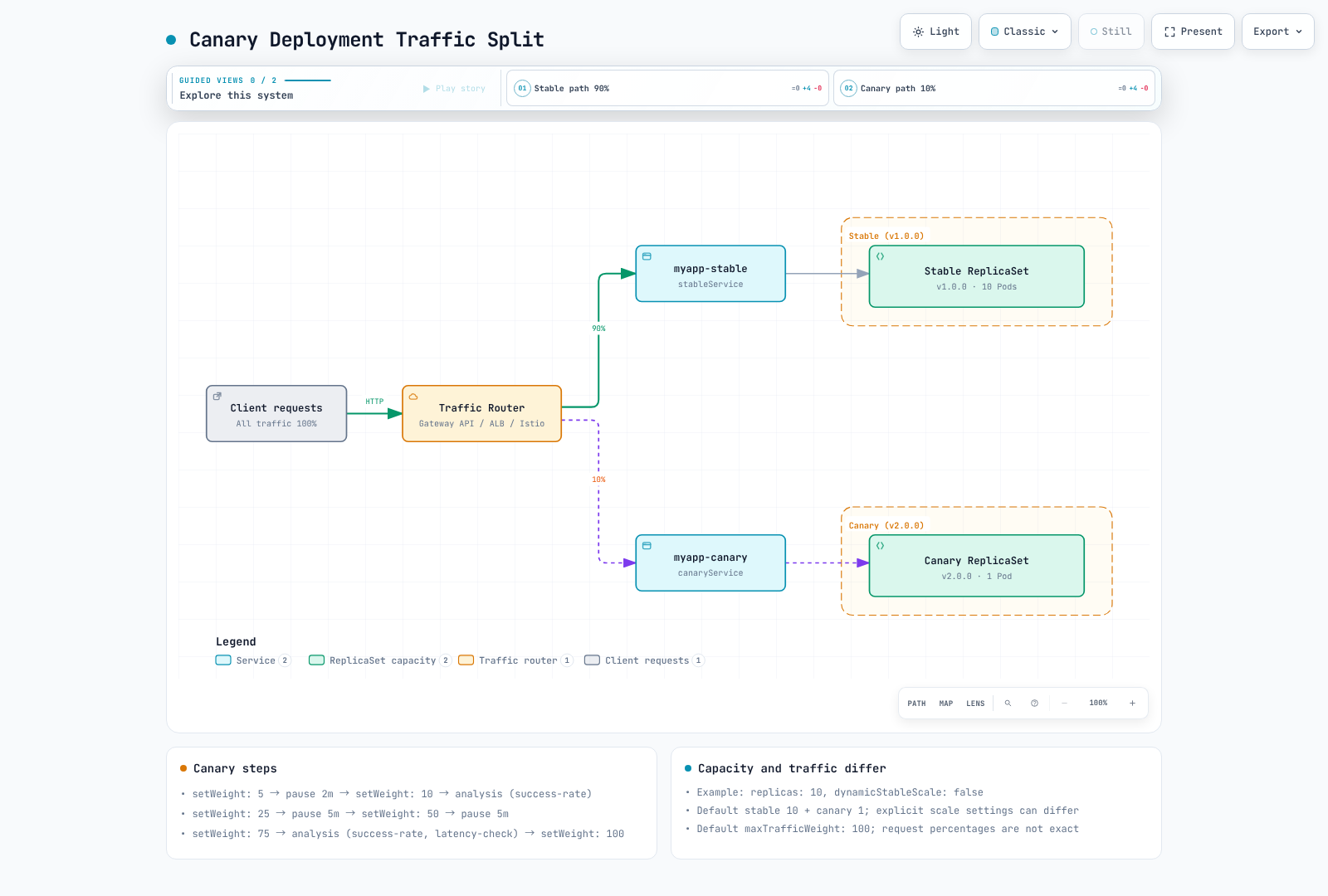
分析与验证
AnalysisTemplate 定义如何验证部署健康状况。
http_requests_total/http_request_duration_seconds_bucket 指标以及 service/version label 需要应用程序埋点和 scrape 配置。请将 prometheus.monitoring.svc.cluster.local:9090 替换为实际 Service。阈值/窗口仅作说明;还应定义最小流量和 SLO 要求。
failureLimit 计数允许的失败测量:值为 3 时,第 4 次失败测量将超出限制。provider 错误使用 consecutiveErrorLimit,不确定结果使用 inconclusiveLimit。以下条件可避免缺失值、空向量、NaN 和 Infinity 通过关卡。count 是测量次数,而不是 HTTP 请求数;重叠的查询窗口不是独立样本。
Prometheus 分析
apiVersion: argoproj.io/v1alpha1
kind: AnalysisTemplate
metadata:
  name: success-rate
  namespace: myapp
spec:
  args:
  - name: service-name
  metrics:
  - name: success-rate
    interval: 1m
    count: 5
    successCondition: result != nil && len(result) == 1 && !isNaN(result[0]) && !isInf(result[0]) && result[0] >=
      0 && result[0] <= 1 && result[0] >= 0.95
    failureLimit: 3
    provider:
      prometheus:
        address: http://prometheus.monitoring.svc.cluster.local:9090
        query: |
          (sum(rate(
            http_requests_total{
              service="{{args.service-name}}",
              status=~"2.."
            }[5m]
          )) or vector(0)) /
          sum(rate(
            http_requests_total{
              service="{{args.service-name}}"
            }[5m]
          ))
    failureCondition: result != nil && len(result) == 1 && !isNaN(result[0]) && !isInf(result[0]) && result[0] >=
      0 && result[0] <= 1 && result[0] < 0.95
    inconclusiveLimit: 0
延迟分析
apiVersion: argoproj.io/v1alpha1
kind: AnalysisTemplate
metadata:
  name: latency-check
  namespace: myapp
spec:
  args:
  - name: service-name
  metrics:
  - name: p99-latency
    interval: 2m
    count: 3
    successCondition: result != nil && len(result) == 1 && !isNaN(result[0]) && !isInf(result[0]) && result[0] <
      500
    failureLimit: 2
    provider:
      prometheus:
        address: http://prometheus.monitoring.svc.cluster.local:9090
        query: |
          histogram_quantile(0.99,
            sum(rate(
              http_request_duration_seconds_bucket{
                service="{{args.service-name}}"
              }[5m]
            )) by (le)
          ) * 1000
    failureCondition: result != nil && len(result) == 1 && !isNaN(result[0]) && !isInf(result[0]) && result[0] >=
      500
    inconclusiveLimit: 0
Web 分析(HTTP Endpoint)
Service 必须以 JSON {"status":"OK"} 返回成功的 HTTP 响应。jsonPath 会提取状态字符串,因此请比较 result 本身,而非 result.status。请根据实际响应契约调整条件。
apiVersion: argoproj.io/v1alpha1
kind: AnalysisTemplate
metadata:
  name: smoke-tests
  namespace: myapp
spec:
  args:
  - name: service-name
  metrics:
  - name: smoke-test
    interval: 30s
    count: 3
    successCondition: result == "OK"
    failureLimit: 1
    provider:
      web:
        url: http://{{ args.service-name }}.myapp.svc.cluster.local/health
        jsonPath: '{$.status}'
        timeoutSeconds: 10
    failureCondition: result != nil && result != "OK"
Datadog 分析
Datadog v2 formula 使用独立的 query 和 formula field。请通过你的 secret 管理流程,在此 AnalysisTemplate namespace 中为 datadog Secret 配置 address/api-key/app-key。asFloat(default(result, -1)) 将缺失数据与有效的零错误率区分开来,并避免将 nil 传入类型化函数。
apiVersion: argoproj.io/v1alpha1
kind: AnalysisTemplate
metadata:
  name: datadog-success-rate
  namespace: myapp
spec:
  args:
  - name: service-name
  metrics:
  - name: error-rate
    interval: 5m
    count: 3
    successCondition: |
      let rate = asFloat(default(result, -1));
      !isNaN(rate) && !isInf(rate) && rate >= 0 && rate <= 1 && rate < 0.05
    failureLimit: 2
    provider:
      datadog:
        apiVersion: v2
        interval: 5m
        aggregator: sum
        secretRef:
          name: datadog
          namespaced: true
        queries:
          a: sum:http.requests{service:{{args.service-name}},status:5xx}.as_count()
          b: sum:http.requests{service:{{args.service-name}}}.as_count()
        formula: a / b
    failureCondition: |
      let rate = asFloat(default(result, -1));
      !isNaN(rate) && !isInf(rate) && rate >= 0 && rate <= 1 && rate >= 0.05
    inconclusiveLimit: 0
基于 Job 的分析
apiVersion: argoproj.io/v1alpha1
kind: AnalysisTemplate
metadata:
  name: integration-tests
  namespace: myapp
spec:
  args:
  - name: service-url
  metrics:
  - name: integration-tests
    provider:
      job:
        spec:
          backoffLimit: 1
          template:
            spec:
              restartPolicy: Never
              containers:
              - name: test-runner
                image: myregistry/integration-tests:v1.0.0
                env:
                - name: TARGET_URL
                  value: '{{args.service-url}}'
                command:
                - /bin/sh
                - -ec
                - exec npm run test:integration
              automountServiceAccountToken: false
          activeDeadlineSeconds: 300
ClusterAnalysisTemplate
跨 namespace 共享分析模板:
apiVersion: argoproj.io/v1alpha1
kind: ClusterAnalysisTemplate
metadata:
  name: global-success-rate
spec:
  args:
  - name: service-name
  - name: namespace
  metrics:
  - name: success-rate
    interval: 1m
    count: 5
    successCondition: result != nil && len(result) == 1 && !isNaN(result[0]) && !isInf(result[0]) && result[0] >=
      0 && result[0] <= 1 && result[0] >= 0.95
    provider:
      prometheus:
        address: http://prometheus.monitoring.svc.cluster.local:9090
        query: |
          (sum(rate(
            http_requests_total{
              namespace="{{args.namespace}}",
              service="{{args.service-name}}",
              status=~"2.."
            }[5m]
          )) or vector(0)) /
          sum(rate(
            http_requests_total{
              namespace="{{args.namespace}}",
              service="{{args.service-name}}"
            }[5m]
          ))
    failureCondition: result != nil && len(result) == 1 && !isNaN(result[0]) && !isInf(result[0]) && result[0] >=
      0 && result[0] <= 1 && result[0] < 0.95
    inconclusiveLimit: 0
Ingress 集成
Argo Rollouts 支持原生流量 provider 和 plugin extension。没有原生集成的 provider,例如 Kong,则改为通过 Gateway API plugin 支持。
| Provider | 集成 | 说明 |
|---|---|---|
| NGINX Ingress | 原生(trafficRouting.nginx) | 直接操作 canary-weight annotation |
| AWS ALB | 原生(trafficRouting.alb) | Ingress backend port 必须为 use-annotation — 请参阅验证结果 |
| Istio | 原生(trafficRouting.istio) | 直接操作 VirtualService/DestinationRule |
| SMI | 原生(trafficRouting.smi) | SMI 项目本身实际上已无人维护 — 不建议新采用 |
| Ambassador、Apache APISIX、Traefik | 原生 | 本文档未涵盖 — 请参阅官方文档 |
| Kong 和其他符合 Gateway API 的实现(kgateway 等) | Gateway API plugin(trafficRouting.plugins) | 没有原生的 trafficRouting.kong field |
NGINX Ingress(现有安装)
社区 ingress-nginx 已于 2026 年 3 月停止维护;这是面向现有安装的迁移参考。新示例使用 Gateway API 路径。每个路由示例都需要其 namespace 中匹配的稳定/金丝雀 Service。
apiVersion: argoproj.io/v1alpha1
kind: Rollout
metadata:
  name: myapp
  namespace: myapp
spec:
  strategy:
    canary:
      stableService: myapp-stable
      canaryService: myapp-canary
      trafficRouting:
        nginx:
          stableIngress: myapp-ingress
          additionalIngressAnnotations:
            canary-by-header: X-Canary
            canary-by-header-value: 'true'
      steps:
      - setWeight: 10
      - pause:
          duration: 5m
      - setWeight: 50
      - pause:
          duration: 5m
      - setWeight: 100
  replicas: 5
  selector:
    matchLabels:
      app: myapp
  template:
    metadata:
      labels:
        app: myapp
    spec:
      containers:
      - name: app
        image: myregistry/myapp:v2.0.0
        ports:
        - containerPort: 8080
        readinessProbe:
          httpGet:
            path: /health
            port: 8080
        resources:
          requests:
            cpu: 100m
            memory: 128Mi
          limits:
            cpu: 500m
            memory: 512Mi
---
apiVersion: networking.k8s.io/v1
kind: Ingress
metadata:
  name: myapp-ingress
  namespace: myapp
  annotations:
    nginx.ingress.kubernetes.io/rewrite-target: /
spec:
  ingressClassName: nginx
  rules:
  - host: myapp.example.com
    http:
      paths:
      - path: /
        pathType: Prefix
        backend:
          service:
            name: myapp-stable
            port:
              number: 80
AWS ALB Ingress
apiVersion: argoproj.io/v1alpha1
kind: Rollout
metadata:
  name: myapp
  namespace: myapp
spec:
  strategy:
    canary:
      stableService: myapp-stable
      canaryService: myapp-canary
      trafficRouting:
        alb:
          ingress: myapp-ingress
          rootService: myapp-root
          servicePort: 80
      steps:
      - setWeight: 10
      - pause:
          duration: 5m
      - setWeight: 50
      - pause:
          duration: 5m
      - setWeight: 100
  replicas: 5
  selector:
    matchLabels:
      app: myapp
  template:
    metadata:
      labels:
        app: myapp
    spec:
      containers:
      - name: app
        image: myregistry/myapp:v2.0.0
        ports:
        - containerPort: 8080
        readinessProbe:
          httpGet:
            path: /health
            port: 8080
        resources:
          requests:
            cpu: 100m
            memory: 128Mi
          limits:
            cpu: 500m
            memory: 512Mi
---
apiVersion: networking.k8s.io/v1
kind: Ingress
metadata:
  name: myapp-ingress
  namespace: myapp
  annotations:
    alb.ingress.kubernetes.io/scheme: internal
    alb.ingress.kubernetes.io/target-type: ip
    alb.ingress.kubernetes.io/actions.myapp-root: |
      {
        "type": "forward",
        "forwardConfig": {
          "targetGroups": [
            {
              "serviceName": "myapp-stable",
              "servicePort": 80,
              "weight": 100
            },
            {
              "serviceName": "myapp-canary",
              "servicePort": 80,
              "weight": 0
            }
          ]
        }
      }
spec:
  rules:
  - host: myapp.example.com
    http:
      paths:
      - path: /
        pathType: Prefix
        backend:
          service:
            name: myapp-root
            port:
              name: use-annotation
  ingressClassName: alb
ALB 配置检查:Rollout rootService(或省略时的 stableService)、action annotation 名称和 Ingress backend 名称必须匹配。backend port
name: use-annotation会选择加权 action。数字端口会改为选择普通 Service backend;取决于该 Service,reconciliation 可能失败或产生不同的路由。请使用aws elbv2 describe-rules检查 controller event 和实际的 ForwardConfig。
Istio 流量拆分
apiVersion: argoproj.io/v1alpha1
kind: Rollout
metadata:
  name: myapp
  namespace: myapp
spec:
  strategy:
    canary:
      stableService: myapp-stable
      canaryService: myapp-canary
      trafficRouting:
        istio:
          virtualService:
            name: myapp-vsvc
            routes:
            - primary
      steps:
      - setWeight: 10
      - pause:
          duration: 5m
      - setWeight: 50
      - pause:
          duration: 5m
      - setWeight: 100
  replicas: 5
  selector:
    matchLabels:
      app: myapp
  template:
    metadata:
      labels:
        app: myapp
    spec:
      containers:
      - name: app
        image: myregistry/myapp:v2.0.0
        ports:
        - containerPort: 8080
        readinessProbe:
          httpGet:
            path: /health
            port: 8080
        resources:
          requests:
            cpu: 100m
            memory: 128Mi
          limits:
            cpu: 500m
            memory: 512Mi
---
apiVersion: networking.istio.io/v1
kind: VirtualService
metadata:
  name: myapp-vsvc
  namespace: myapp
spec:
  hosts:
  - myapp.example.com
  gateways:
  - myapp-gateway
  http:
  - name: primary
    route:
    - destination:
        host: myapp-stable
        port:
          number: 80
      weight: 100
    - destination:
        host: myapp-canary
        port:
          number: 80
      weight: 0
Gateway API Plugin(HTTPRoute)
Kong、kgateway 和其他兼容实现的 Gateway API 路径使用由 argoproj-labs 维护的 Gateway API plugin。Traefik 也具有原生 TraefikService 集成;其 Gateway API 路径可以使用此 plugin。本章使用于 2026-09-01 发布的 plugin 0.17.0。它会更新 HTTPRoute backend weight。其他 Route 类型和 header 路由取决于已安装的 CRD 和实现能力;请验证 route status 和实际请求分布。
下方二进制文件面向运行 controller Pod 的 Linux amd64 node。在 arm64 上,请使用 gatewayapi-plugin-linux-arm64 和 SHA256 5221279f7bf2c9b2c0ff6ed7ff12718ecce1d4892f1ff5e5224bb723cfd0fd92。对于 Helm,请在 controller.trafficRouterPlugins 下管理相同条目。对于 manifest 安装,请合并到现有 ConfigMap data 并重启 controller。所示 Role 将 HTTPRoute weight 更新限定在一个 namespace;其他 Route 类型/header-route 创建需要额外的权限审查。
通过在 argo-rollouts-config ConfigMap 中注册 plugin 来安装它,使 controller 在启动时下载二进制文件:
apiVersion: v1
kind: ConfigMap
metadata:
  name: argo-rollouts-config
  namespace: argo-rollouts
data:
  trafficRouterPlugins: |
    - name: argoproj-labs/gatewayAPI
      location: https://github.com/argoproj-labs/rollouts-plugin-trafficrouter-gatewayapi/releases/download/v0.17.0/gatewayapi-plugin-linux-amd64
      sha256: 1904ca787d33107c140521899d61fff030ee75d99908bd175fca5a4647759061
---
apiVersion: rbac.authorization.k8s.io/v1
kind: Role
metadata:
  name: argo-rollouts-gateway-api-plugin
  namespace: myapp
rules:
- apiGroups:
  - ''
  resources:
  - services
  verbs:
  - get
- apiGroups:
  - gateway.networking.k8s.io
  resources:
  - httproutes
  verbs:
  - get
  - list
  - update
  - patch
---
apiVersion: rbac.authorization.k8s.io/v1
kind: RoleBinding
metadata:
  name: argo-rollouts-gateway-api-plugin
  namespace: myapp
roleRef:
  apiGroup: rbac.authorization.k8s.io
  kind: Role
  name: argo-rollouts-gateway-api-plugin
subjects:
- kind: ServiceAccount
  name: argo-rollouts
  namespace: argo-rollouts
Rollout 通过 trafficRouting.plugins 引用 HTTPRoute:
apiVersion: argoproj.io/v1alpha1
kind: Rollout
metadata:
  name: myapp
  namespace: myapp
spec:
  replicas: 5
  selector:
    matchLabels:
      app: myapp
  template:
    metadata:
      labels:
        app: myapp
    spec:
      containers:
      - name: app
        image: myapp:v2.0.0
        ports:
        - containerPort: 8080
  strategy:
    canary:
      stableService: myapp-stable
      canaryService: myapp-canary
      trafficRouting:
        plugins:
          argoproj-labs/gatewayAPI:
            httpRoute: myapp-route
            namespace: myapp
      steps:
      - setWeight: 20
      - pause:
          duration: 1m
      - setWeight: 50
      - pause:
          duration: 1m
      - setWeight: 100
---
apiVersion: gateway.networking.k8s.io/v1
kind: HTTPRoute
metadata:
  name: myapp-route
  namespace: myapp
spec:
  parentRefs:
  - name: myapp-gateway
  rules:
  - backendRefs:
    - name: myapp-stable
      kind: Service
      port: 80
      weight: 100
    - name: myapp-canary
      kind: Service
      port: 80
      weight: 0
在每个 setWeight 步骤,plugin 都会直接更新这两个 backendRefs[].weight 值。
Kong(通过 Gateway API Plugin)
Kong Ingress Controller (KIC) 没有原生的 Argo Rollouts 集成——它使用上方的 Gateway API plugin。下方配置适用于独立 KIC,用于管理没有 Kong Operator 的现有 Kong Gateway 数据平面。该设置使用 unmanaged annotation;由 Kong Operator 管理的 Gateway 具有不同的生命周期:
apiVersion: gateway.networking.k8s.io/v1
kind: GatewayClass
metadata:
  name: kong
  annotations:
    konghq.com/gatewayclass-unmanaged: "true"   # required — without it the Gateway stays stuck on "Waiting for controller"
spec:
  controllerName: konghq.com/kic-gateway-controller   # note: different from KIC's IngressClass controller string
从这里开始,应用与上方相同的 Gateway API plugin 配置——Rollout 和 HTTPRoute YAML 完全相同。
EKS 上的验证结果
上一版文档报告了在 EKS 1.36、Rollouts 1.9.0、AWS Load Balancer Controller 3.2.1、Istio 1.30、KIC 3.5 和 plugin0.16.0 下的这些结果。未附上原始日志、请求数、测量时长和执行的 manifest,因此此静态审阅无法复现该报告。这些是历史观察结果,而不是最新的 1.10.0/0.17.0 结果,也不保证即时、零停机的过渡。
| Provider | 检查内容 | 结果 |
|---|---|---|
| NGINX | canary-weight annotation 从 20→50→100% 的过渡 | ✅ 已确认 — 实时 curl 流量比例与 annotation 值一致 |
| Istio | VirtualService weight 从 20→50→100% 的过渡,以及在 abort 时立即恢复为 0% | ✅ 已确认 — curl 比例与 weight 一致,且在中止后流量立即切回先前的稳定版本 |
| AWS ALB | Listener rule forward weight 过渡,并使用 aws elbv2 describe-rules 与实时 AWS 状态交叉核对 | ✅ 已确认(但需要注意上述 use-annotation 注意事项) |
| Kong (Gateway API plugin) | HTTPRoute.backendRefs[].weight 过渡,以及通过 Kong 数据平面的真实流量 | ✅ 已确认 — 但 gatewayclass-unmanaged annotation 和准确的 controllerName 很容易配置错误(见上文) |
当 Argo CD 管理路由资源时,请审阅针对由 Rollouts 所拥有字段的精细 diff exclusion:相关 ALB action annotation、Istio route weight、HTTPRoute backend weight 和 Service rollouts-pod-template-hash selector。避免忽略整个 spec/manager。要在 sync 期间保留值,还需要 RespectIgnoreDifferences=true 及其现有资源限制。
回滚策略
分析失败时自动回滚
strategy:
  canary:
    steps:
      - setWeight: 10
      - analysis:
          templates:
            - templateName: success-rate
          args:
            - name: service-name
              value: myapp-canary
    # Analysis failure automatically triggers rollback
手动回滚
# Abort current rollout and rollback
kubectl argo rollouts abort myapp -n myapp

# Undo to previous version
kubectl argo rollouts undo myapp -n myapp

# Undo to specific revision
kubectl argo rollouts undo myapp -n myapp --to-revision=2
Abort 会将流量返回稳定版本,但保持所需 Pod template 不变。undo 会更改实时 Pod template;由 Argo CD 管理的 workload 还需要经审阅的 Git 更改,以免 self-heal 恢复有问题的 revision。这两个操作都不会回滚数据库影响。不确定的分析会暂停以供调查;它不同于 Failed/Error。
回滚配置
这是具有 trafficRouting 的现有 Rollout 的 spec 片段。dynamicStableScale 会降低稳定容量,并可能要求在 abort 时将其扩容;它以恢复容量换取资源使用量。inline analysis 仅阻塞此步骤,而 background analysis 在 strategy.canary.analysis 下配置。
spec:
  strategy:
    canary:
      abortScaleDownDelaySeconds: 30
      dynamicStableScale: true
      steps:
      - setWeight: 10
      - analysis:
          templates:
          - templateName: success-rate
          args:
          - name: service-name
            value: myapp-canary
实验
在 1.10.0 中,所有 requiredForCompletion: true 分析成功后,Experiment 可以在 duration 前完成。不要将 duration 视为最短验证窗口。请明确验证 experiment 流量隔离的 Service/router selector。有关状态转换和清理延迟,请参阅深入解析。
同时使用多个版本运行 A/B 测试。
有关详细行为——资源创建链、命名规则、流量隔离和 AnalysisRun 判定——请参阅 Rollouts Experiments 深入解析。
**前提条件:**Experiment 不会生成用户流量。请提供测试流量和 scrape,并将 Pod 的 rollouts-pod-template-hash 公开为指标 label rollouts_pod_template_hash。下方比较使用示例性的一个百分点错误率增幅;它不能替代显著性检验或最小样本验证。缺失数据保持为 Inconclusive。progressDeadlineSeconds 限制 ReplicaSet 可用性,而不是分析前的延迟。
在同一 namespace 中创建被引用的 AnalysisTemplate:
apiVersion: argoproj.io/v1alpha1
kind: AnalysisTemplate
metadata:
  name: compare-analysis
  namespace: myapp
spec:
  args:
  - name: baseline-hash
  - name: canary-hash
  metrics:
  - name: canary-error-rate-increase
    interval: 30s
    count: 5
    failureLimit: 0
    inconclusiveLimit: 0
    successCondition: result != nil && len(result) == 1 && !isNaN(result[0]) && !isInf(result[0]) && result[0] <=
      0.01
    failureCondition: result != nil && len(result) == 1 && !isNaN(result[0]) && !isInf(result[0]) && result[0] >
      0.01
    provider:
      prometheus:
        address: http://prometheus.monitoring.svc.cluster.local:9090
        query: |
          (
            sum(rate(http_requests_total{rollouts_pod_template_hash="{{ args.canary-hash }}",status=~"5.."}[5m]))
            or vector(0)
          ) / sum(rate(http_requests_total{rollouts_pod_template_hash="{{ args.canary-hash }}"}[5m]))
          -
          (
            sum(rate(http_requests_total{rollouts_pod_template_hash="{{ args.baseline-hash }}",status=~"5.."}[5m]))
            or vector(0)
          ) / sum(rate(http_requests_total{rollouts_pod_template_hash="{{ args.baseline-hash }}"}[5m]))
  - name: canary-absolute-error-rate
    interval: 30s
    count: 5
    failureLimit: 0
    inconclusiveLimit: 0
    successCondition: result != nil && len(result) == 1 && !isNaN(result[0]) && !isInf(result[0]) && result[0] >=
      0 && result[0] < 0.05
    failureCondition: result != nil && len(result) == 1 && !isNaN(result[0]) && !isInf(result[0]) && result[0] >=
      0.05
    provider:
      prometheus:
        address: http://prometheus.monitoring.svc.cluster.local:9090
        query: |
          (
            sum(rate(http_requests_total{rollouts_pod_template_hash="{{ args.canary-hash }}",status=~"5.."}[5m]))
            or vector(0)
) / sum(rate(http_requests_total{rollouts_pod_template_hash="{{ args.canary-hash }}"}[5m]))apiVersion: argoproj.io/v1alpha1
kind: Experiment
metadata:
name: myapp-experiment
namespace: myapp
spec:
duration: 1h
progressDeadlineSeconds: 300
templates:
- name: baseline
replicas: 2
selector:
matchLabels:
app: myapp-experiment
variant: baseline
template:
metadata:
labels:
app: myapp-experiment
variant: baseline
spec:
containers:
- name: myapp
image: myregistry/myapp:v1.0.0
ports:
- containerPort: 8080
- name: canary
replicas: 2
selector:
matchLabels:
app: myapp-experiment
variant: canary
template:
metadata:
labels:
app: myapp-experiment
variant: canary
spec:
containers:
- name: myapp
image: myregistry/myapp:v2.0.0
ports:
- containerPort: 8080
analyses:
- name: compare-metrics
templateName: compare-analysis
args:
- name: baseline-hash
value: '{{templates.baseline.podTemplateHash}}'
- name: canary-hash
value: '{{templates.canary.podTemplateHash}}'
requiredForCompletion: true通知
将 rollout event 与通知系统集成。
在现有 Rollout 中配置通知
以下是要合并到现有 Rollout 中的 metadata 片段,而不是完整的资源 manifest。
metadata:
  annotations:
    notifications.argoproj.io/subscribe.on-rollout-completed.slack: deployments
    notifications.argoproj.io/subscribe.on-rollout-aborted.slack: deployments
    notifications.argoproj.io/subscribe.on-analysis-run-failed.slack: alerts
通知触发器和模板
通过 secret 管理流程在 controller namespace 中为 argo-rollouts-notification-secret 配置 slack-token。内置 Rollout event 会选择这些 trigger 名称;仅 Degraded 并不能证明 rollout 已被中止。请配置所有引用的 trigger/template,包括分析失败。
apiVersion: v1
kind: ConfigMap
metadata:
  name: argo-rollouts-notification-configmap
  namespace: argo-rollouts
data:
  service.slack: |
    token: $slack-token
  trigger.on-rollout-completed: |
    - send: [rollout-completed]
  trigger.on-rollout-aborted: |
    - send: [rollout-aborted]
  template.rollout-completed: |
    message: |
      Rollout {{.rollout.metadata.name}} completed successfully!
      Revision: {{.rollout.status.currentPodHash}}
      Image: {{(index .rollout.spec.template.spec.containers 0).image}}
  template.rollout-aborted: |
    message: |
      Rollout {{.rollout.metadata.name}} was aborted!
      Reason: {{.rollout.status.message}}
  trigger.on-analysis-run-failed: |
    - send: [analysis-run-failed]
  template.analysis-run-failed: |
    message: |
      Analysis failed for Rollout {{.rollout.metadata.name}}. Inspect its AnalysisRun.
参考资料
测验
要测试你的所学内容,请尝试 ArgoCD 流量管理测验。