ArgoCD トラフィック管理
確認対象: Argo CD 3.5.2、Argo Rollouts 1.10.0、Helm chart 2.43.1。リリースノートの確認後、Argo CD 3.5.4 および chart 2.43.6(Rollouts は引き続き 1.10.0)に更新(例は再実行していません) 最終更新: October 12, 2026
目次
Argo Rollouts の概要
Argo Rollouts は、blue-green デプロイメント、canary デプロイメント、プログレッシブデリバリー機能などの高度なデプロイメント機能を提供する Kubernetes コントローラーです。
Argo Rollouts を使用する理由
Kubernetes Deployment は RollingUpdate と Recreate、および一時停止/再開をサポートします。この表はネイティブコントローラーの動作を比較しています。追加のコントローラーまたは複数の Deployment により、ほかのパターンを実装できます。
| 機能 | K8s Deployment | Argo Rollouts |
|---|---|---|
| Rolling Update | はい | はい |
| Blue-Green | いいえ | はい |
| Canary | いいえ | はい |
| トラフィック分割 | いいえ | はい |
| 自動ロールバック | いいえ | はい |
| 分析/検証 | いいえ | はい |
| 一時停止/再開 | はい | はい |
| Experiment | いいえ | はい |
アーキテクチャ
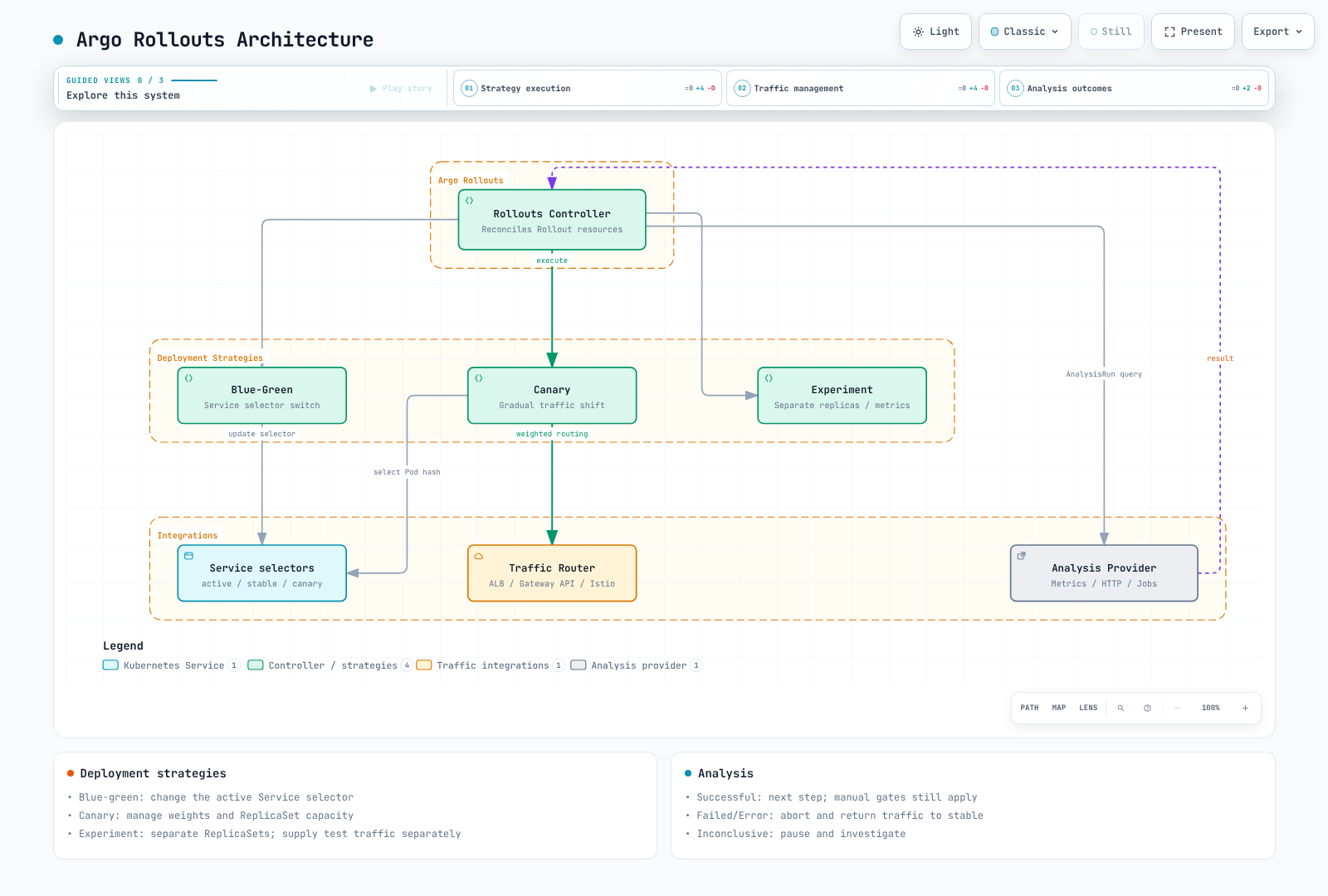
インストール
Argo Rollouts Controller をインストール
set -euo pipefail
ROLLOUTS_VERSION=v1.10.0
kubectl create namespace argo-rollouts --dry-run=client -o yaml | kubectl apply -f -
kubectl apply --server-side -n argo-rollouts \
  -f "https://github.com/argoproj/argo-rollouts/releases/download/${ROLLOUTS_VERSION}/install.yaml"
kubectl rollout status deployment/argo-rollouts -n argo-rollouts --timeout=180s
kubectl Plugin をインストール
set -euo pipefail
ROLLOUTS_VERSION=v1.10.0
case "$(uname -s)" in
  Linux) plugin_os=linux ;;
  Darwin) plugin_os=darwin ;;
  *) echo "Use the Windows release asset for Windows" >&2; exit 1 ;;
esac
case "$(uname -m)" in
  x86_64) plugin_arch=amd64 ;;
  aarch64|arm64) plugin_arch=arm64 ;;
  *) echo "Unsupported architecture" >&2; exit 1 ;;
esac
plugin_asset="kubectl-argo-rollouts-${plugin_os}-${plugin_arch}"
plugin_dir="$(mktemp -d)"
trap 'rm -rf "$plugin_dir"' EXIT
plugin_base="https://github.com/argoproj/argo-rollouts/releases/download/${ROLLOUTS_VERSION}"
curl --fail --location --retry 3 "$plugin_base/$plugin_asset" -o "$plugin_dir/$plugin_asset"
curl --fail --location --retry 3 "$plugin_base/argo-rollouts-checksums.txt" -o "$plugin_dir/checksums.txt"
awk -v artifact="$plugin_asset" '$2 == artifact { print }' "$plugin_dir/checksums.txt" > "$plugin_dir/selected.sha256"
test -s "$plugin_dir/selected.sha256"
(
  cd "$plugin_dir"
  if [ "$plugin_os" = darwin ]; then
    shasum -a 256 -c selected.sha256
  else
    sha256sum -c selected.sha256
  fi
)
install -d "$HOME/.local/bin"
install -m 0755 "$plugin_dir/$plugin_asset" "$HOME/.local/bin/kubectl-argo-rollouts"
export PATH="$HOME/.local/bin:$PATH"
kubectl argo rollouts version
Helm 経由でインストール
コントローラーの所有権を管理するには、上記のマニフェストによるインストールまたは Helm のいずれかを選択してください。これらの設定を rollouts-values.yaml として保存します。AWS_REGION は CloudWatch をクエリするRollouts controller用であり、このプロバイダーを使用しない場合は省略できます。
controller:
  replicas: 2
  metrics:
    enabled: true
    serviceMonitor:
      enabled: false  # Enable after installing/configuring Prometheus Operator
  pdb:
    enabled: true
    minAvailable: 1
  extraEnv:
    - name: AWS_REGION
      value: ap-northeast-2

dashboard:
enabled: falsehelm repo add argo https://argoproj.github.io/argo-helm
helm repo update argo
helm upgrade --install argo-rollouts argo/argo-rollouts \
--version 2.43.6 --namespace argo-rollouts --create-namespace \
--values rollouts-values.yaml --wait --timeout 5mServiceMonitor は、その CRD と Prometheus selector の設定後にのみ有効化してください。共有 Dashboard には、別の認証/認可レイヤーが必要です。1.10.0 CLI の dashboard コマンドはすべてのインターフェイスにバインドされ、kubeconfig の権限を使用します。出力される localhost URL によってアクセスが制限されるわけではありません。
Dashboard へのアクセス(Helm インストール)
Helm インストールでは、読み取り専用の ClusterIP Dashboard を有効にし、loopback アドレスへ port-forward します。
helm upgrade --install argo-rollouts argo/argo-rollouts \
  --version 2.43.6 --namespace argo-rollouts --create-namespace \
  --values rollouts-values.yaml \
  --set dashboard.enabled=true --set dashboard.readonly=true \
  --set dashboard.service.type=ClusterIP --set dashboard.ingress.enabled=false \
  --wait --timeout 5m
kubectl port-forward --address 127.0.0.1 -n argo-rollouts \
  service/argo-rollouts-dashboard 3100:3100
http://127.0.0.1:3100/rollouts を開きます。共有アクセスには、別の認証済みかつ認可済みの proxy が必要です。
Blue-Green デプロイメント
例の myapp/registry イメージ、ECR アカウント/タグ、およびメトリクス名を、アプリケーションの設定に置き換えてください。namespace、イメージアクセス、readiness 応答、メトリクス収集、AnalysisTemplate を準備し、各シナリオを個別に実行します。初回デプロイメントには以前の安定した ReplicaSet はありません。v1 を正常にデプロイした後、Git 内のイメージを v2 に変更して rollout を確認します。
Argo CD は Git の Rollout spec を適用し、別の Rollouts controller が ReplicaSet とトラフィックを管理します。中止してトラフィックを stable に戻しても、Git commit や database migration は元に戻りません。
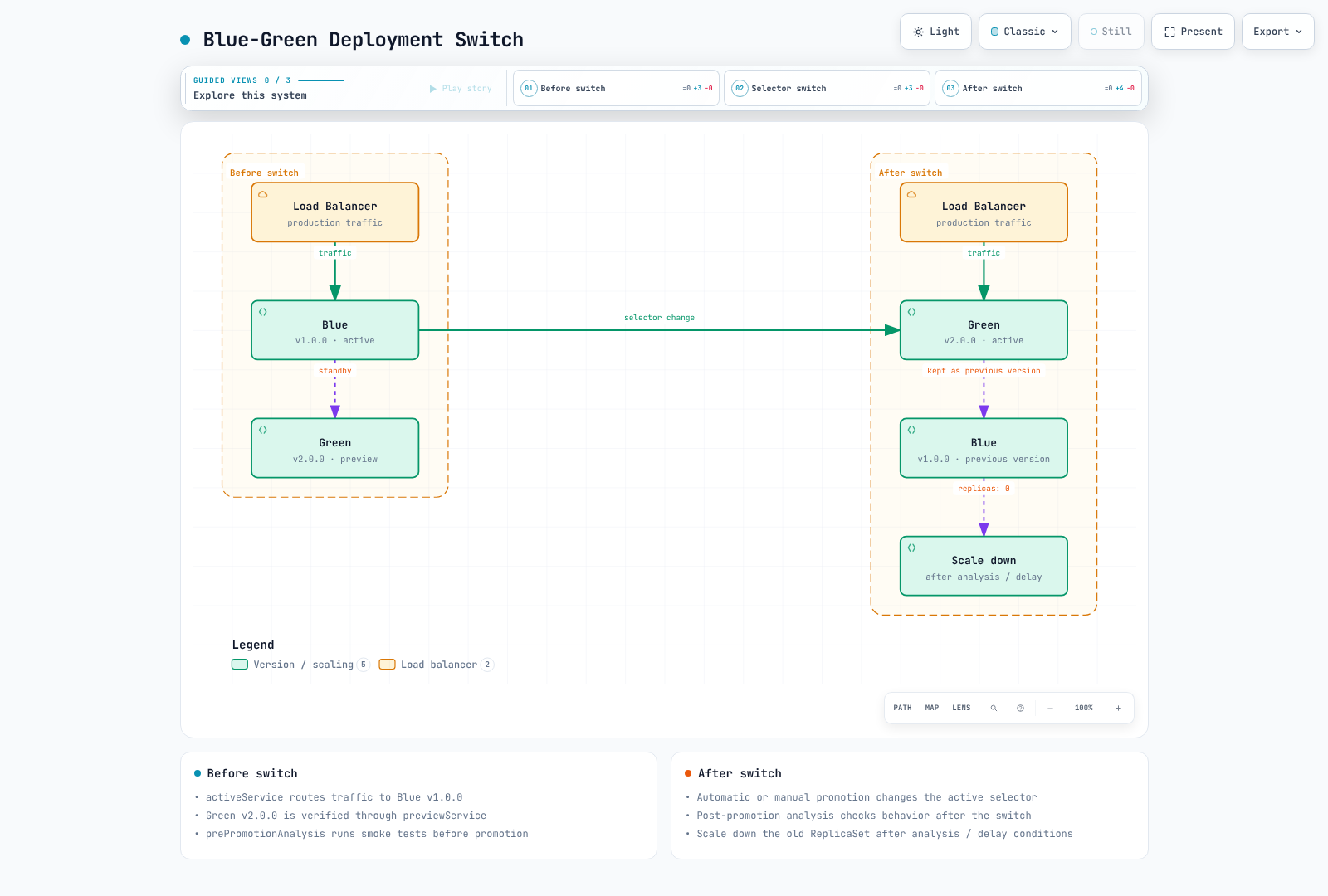
Blue-green は Rollout の以前および新しい ReplicaSet を保持してから、active Service selector を変更します。クラスター環境全体を複製するものではありません。データプレーンの伝播と接続のドレインには時間がかかります。
基本的な Blue-Green Rollout
apiVersion: argoproj.io/v1alpha1
kind: Rollout
metadata:
  name: myapp
  namespace: myapp
spec:
  replicas: 5
  revisionHistoryLimit: 3
  selector:
    matchLabels:
      app: myapp
  template:
    metadata:
      labels:
        app: myapp
    spec:
      containers:
      - name: myapp
        image: myregistry/myapp:v1.0.0
        ports:
        - containerPort: 8080
        readinessProbe:
          httpGet:
            path: /health
            port: 8080
          initialDelaySeconds: 5
          periodSeconds: 10
        resources:
          requests:
            cpu: 100m
            memory: 128Mi
          limits:
            cpu: 500m
            memory: 512Mi
  strategy:
    blueGreen:
      activeService: myapp-active
      previewService: myapp-preview
      autoPromotionEnabled: false
      previewReplicaCount: 2
      prePromotionAnalysis:
        templates:
        - templateName: smoke-tests
        args:
        - name: service-name
          value: myapp-preview
      postPromotionAnalysis:
        templates:
        - templateName: success-rate
        args:
        - name: service-name
          value: myapp-active
---
apiVersion: v1
kind: Service
metadata:
  name: myapp-active
  namespace: myapp
spec:
  selector:
    app: myapp
  ports:
  - port: 80
    targetPort: 8080
---
apiVersion: v1
kind: Service
metadata:
  name: myapp-preview
  namespace: myapp
spec:
  selector:
    app: myapp
  ports:
  - port: 80
    targetPort: 8080
previewReplicaCount は preview 容量を制限します。新しい ReplicaSet は promotion 前に spec.replicas までスケールします。autoPromotionEnabled が false の場合、autoPromotionSeconds は無視されます。必須の promotion 前分析の例でも autoPromotionSeconds を省略し、時間ベースの自動 promotion の例と分けています。この例では、固定のスケールダウン期限によって promotion 後分析がキャンセルされないよう、scaleDownDelaySeconds を省略しています。ALB の target 登録/登録解除と接続ドレインによって、なお中断が発生する可能性があります。実際のデータプレーンを検証してください。
Blue-Green フロー
自動 Promotion を使用する Blue-Green
strategy:
  blueGreen:
    activeService: myapp-active
    previewService: myapp-preview
    autoPromotionEnabled: true
    autoPromotionSeconds: 60  # Wait 60s before auto-promoting
    previewReplicaCount: 3
Canary デプロイメント
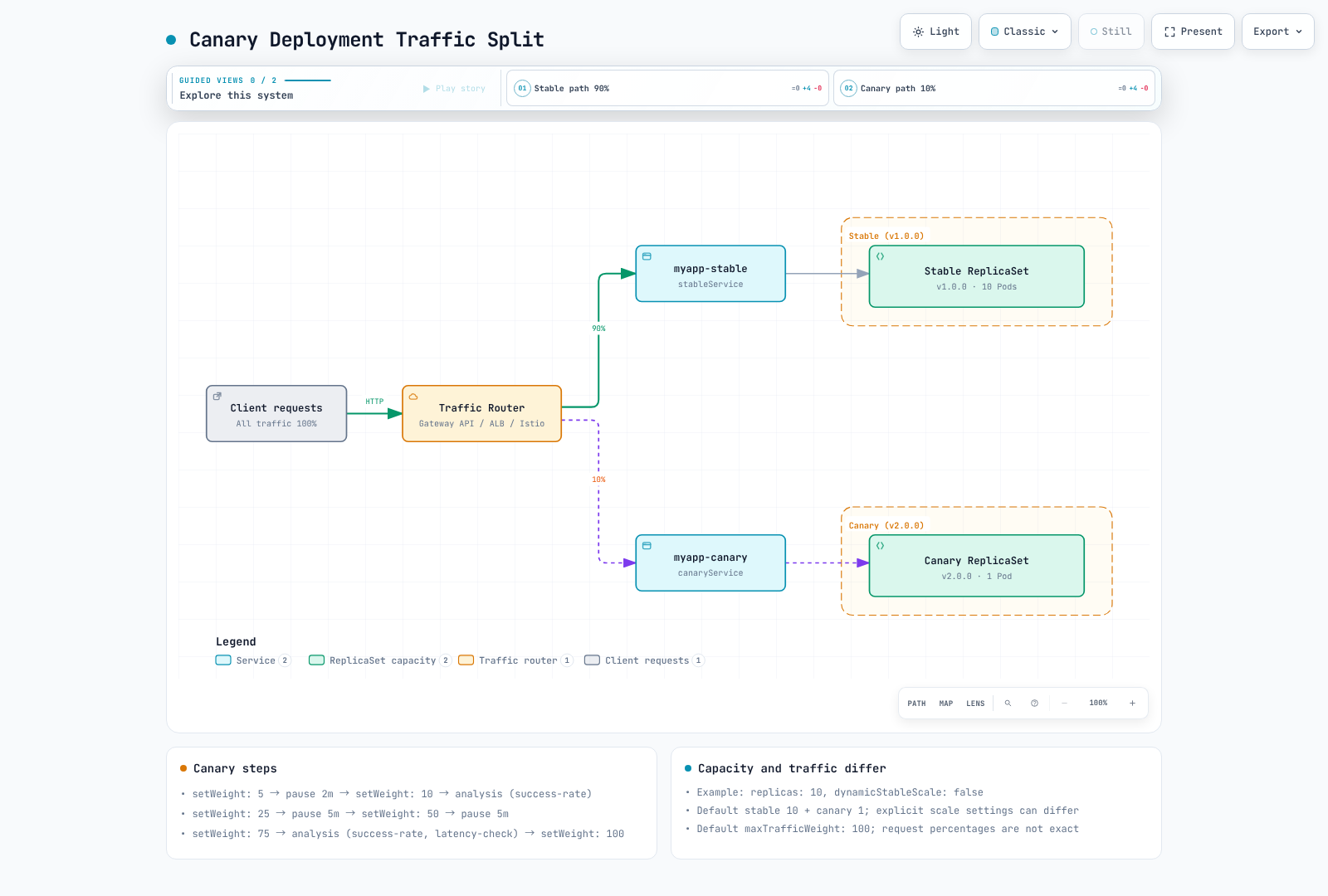
setWeight は、trafficRouting が設定されている場合に相対的な router weight を変更します。router がない場合は ReplicaSet 数によって比率を近似しますが、正確なリクエスト割合は保証されません。router がある場合、stable replica の容量はトラフィック weight から独立しています。
Canary デプロイメントは、新しいバージョンへトラフィックを段階的に移行します。
トラフィックルーティングされた canary はデフォルトで stable 容量を 100% 維持するため、stable と canary の容量を合わせて計画してください。maxSurge は trafficRouting なしの基本 canary における希望 replica 数の計算を制御します。トラフィックルーティングモードでは Pod 総数の上限ではありません。maxUnavailable は依然として古い ReplicaSet のスケールダウンを抑制できます。
基本的な Canary Rollout
この例には Gateway API plugin 0.17.0、myapp-route HTTPRoute、準備済みの Gateway、および後述の対応する stable/canary Service が必要です。HTTPRoute の Accepted/ResolvedRefs とデータプレーンの準備状態を確認してください。
apiVersion: argoproj.io/v1alpha1
kind: Rollout
metadata:
  name: myapp-canary
  namespace: myapp
spec:
  replicas: 10
  selector:
    matchLabels:
      app: myapp
  template:
    metadata:
      labels:
        app: myapp
    spec:
      containers:
      - name: myapp
        image: myregistry/myapp:v1.0.0
        ports:
        - containerPort: 8080
        readinessProbe:
          httpGet:
            path: /health
            port: 8080
  strategy:
    canary:
      canaryService: myapp-canary
      stableService: myapp-stable
      trafficRouting:
        plugins:
          argoproj-labs/gatewayAPI:
            httpRoute: myapp-route
            namespace: myapp
      steps:
      - setWeight: 5
      - pause:
          duration: 2m
      - setWeight: 10
      - analysis:
          templates:
          - templateName: success-rate
          args:
          - name: service-name
            value: myapp-canary
      - setWeight: 25
      - pause:
          duration: 5m
      - setWeight: 50
      - pause:
          duration: 5m
      - setWeight: 75
      - analysis:
          templates:
          - templateName: success-rate
          - templateName: latency-check
          args:
          - name: service-name
            value: myapp-canary
      - setWeight: 100
---
apiVersion: v1
kind: Service
metadata:
  name: myapp-stable
  namespace: myapp
spec:
  selector:
    app: myapp
  ports:
  - port: 80
    targetPort: 8080
---
apiVersion: v1
kind: Service
metadata:
  name: myapp-canary
  namespace: myapp
spec:
  selector:
    app: myapp
  ports:
  - port: 80
    targetPort: 8080
Canary ステップの説明
| ステップタイプ | 説明 |
|---|---|
setWeight | canary にトラフィック割合を設定 |
pause | 指定時間または手動承認まで待機 |
analysis | AnalysisTemplate を実行 |
setCanaryScale | canary replica 数を設定 |
setHeaderRoute | header でルーティング(トラフィック router 用) |
手動ゲートを使用する Canary
strategy:
  canary:
    steps:
      - setWeight: 10
      - pause: {}  # Indefinite pause - requires manual promotion

      - setWeight: 50
      - pause: {duration: 10m}

      - setWeight: 100
手動で promotion します。
# Promote to next step
kubectl argo rollouts promote myapp-canary -n myapp

# Promote fully (skip remaining steps)
# Deliberate override only: skips remaining steps and analysis gates
# kubectl argo rollouts promote myapp-canary -n myapp --full
Canary トラフィックフロー
分析と検証
AnalysisTemplate はデプロイメントの健全性を検証する方法を定義します。
http_requests_total/http_request_duration_seconds_bucket メトリクスおよび service/version label には、アプリケーションの instrumentation と scrape 設定が必要です。prometheus.monitoring.svc.cluster.local:9090 は実際の Service に置き換えてください。threshold/window は例示です。最小トラフィックおよび SLO 要件も定義してください。
failureLimit は許容される失敗した測定数を数えます。値 3 は、4 回目の失敗した測定で超過します。プロバイダーエラーには consecutiveErrorLimit が使用され、不確定な結果には inconclusiveLimit が使用されます。以下の条件により、欠損値、空 vector、NaN、Infinity がゲートを通過しないようにしています。count は HTTP リクエスト数ではなく測定回数です。重複するクエリ window は独立したサンプルではありません。
Prometheus 分析
apiVersion: argoproj.io/v1alpha1
kind: AnalysisTemplate
metadata:
  name: success-rate
  namespace: myapp
spec:
  args:
  - name: service-name
  metrics:
  - name: success-rate
    interval: 1m
    count: 5
    successCondition: result != nil && len(result) == 1 && !isNaN(result[0]) && !isInf(result[0]) && result[0] >=
      0 && result[0] <= 1 && result[0] >= 0.95
    failureLimit: 3
    provider:
      prometheus:
        address: http://prometheus.monitoring.svc.cluster.local:9090
        query: |
          (sum(rate(
            http_requests_total{
              service="{{args.service-name}}",
              status=~"2.."
            }[5m]
          )) or vector(0)) /
          sum(rate(
            http_requests_total{
              service="{{args.service-name}}"
            }[5m]
          ))
    failureCondition: result != nil && len(result) == 1 && !isNaN(result[0]) && !isInf(result[0]) && result[0] >=
      0 && result[0] <= 1 && result[0] < 0.95
    inconclusiveLimit: 0
レイテンシ分析
apiVersion: argoproj.io/v1alpha1
kind: AnalysisTemplate
metadata:
  name: latency-check
  namespace: myapp
spec:
  args:
  - name: service-name
  metrics:
  - name: p99-latency
    interval: 2m
    count: 3
    successCondition: result != nil && len(result) == 1 && !isNaN(result[0]) && !isInf(result[0]) && result[0] <
      500
    failureLimit: 2
    provider:
      prometheus:
        address: http://prometheus.monitoring.svc.cluster.local:9090
        query: |
          histogram_quantile(0.99,
            sum(rate(
              http_request_duration_seconds_bucket{
                service="{{args.service-name}}"
              }[5m]
            )) by (le)
          ) * 1000
    failureCondition: result != nil && len(result) == 1 && !isNaN(result[0]) && !isInf(result[0]) && result[0] >=
      500
    inconclusiveLimit: 0
Web 分析(HTTP Endpoint)
Service は JSON {"status":"OK"} を含む成功 HTTP response を返す必要があります。jsonPath は status string を抽出するため、result.status ではなく result 自体を比較します。条件を実際の response contract に合わせて調整してください。
apiVersion: argoproj.io/v1alpha1
kind: AnalysisTemplate
metadata:
  name: smoke-tests
  namespace: myapp
spec:
  args:
  - name: service-name
  metrics:
  - name: smoke-test
    interval: 30s
    count: 3
    successCondition: result == "OK"
    failureLimit: 1
    provider:
      web:
        url: http://{{ args.service-name }}.myapp.svc.cluster.local/health
        jsonPath: '{$.status}'
        timeoutSeconds: 10
    failureCondition: result != nil && result != "OK"
Datadog 分析
Datadog v2 formula は、個別の query および formula field を使用します。この AnalysisTemplate namespace に address/api-key/app-key を含む datadog Secret をプロビジョニングしてください。asFloat(default(result, -1)) は欠損データを有効なゼロ error rate と区別し、nil が型指定関数に渡されることを防ぎます。
apiVersion: argoproj.io/v1alpha1
kind: AnalysisTemplate
metadata:
  name: datadog-success-rate
  namespace: myapp
spec:
  args:
  - name: service-name
  metrics:
  - name: error-rate
    interval: 5m
    count: 3
    successCondition: |
      let rate = asFloat(default(result, -1));
      !isNaN(rate) && !isInf(rate) && rate >= 0 && rate <= 1 && rate < 0.05
    failureLimit: 2
    provider:
      datadog:
        apiVersion: v2
        interval: 5m
        aggregator: sum
        secretRef:
          name: datadog
          namespaced: true
        queries:
          a: sum:http.requests{service:{{args.service-name}},status:5xx}.as_count()
          b: sum:http.requests{service:{{args.service-name}}}.as_count()
        formula: a / b
    failureCondition: |
      let rate = asFloat(default(result, -1));
      !isNaN(rate) && !isInf(rate) && rate >= 0 && rate <= 1 && rate >= 0.05
    inconclusiveLimit: 0
Job ベースの分析
apiVersion: argoproj.io/v1alpha1
kind: AnalysisTemplate
metadata:
  name: integration-tests
  namespace: myapp
spec:
  args:
  - name: service-url
  metrics:
  - name: integration-tests
    provider:
      job:
        spec:
          backoffLimit: 1
          template:
            spec:
              restartPolicy: Never
              containers:
              - name: test-runner
                image: myregistry/integration-tests:v1.0.0
                env:
                - name: TARGET_URL
                  value: '{{args.service-url}}'
                command:
                - /bin/sh
                - -ec
                - exec npm run test:integration
              automountServiceAccountToken: false
          activeDeadlineSeconds: 300
ClusterAnalysisTemplate
namespace 間で分析 template を共有します。
apiVersion: argoproj.io/v1alpha1
kind: ClusterAnalysisTemplate
metadata:
  name: global-success-rate
spec:
  args:
  - name: service-name
  - name: namespace
  metrics:
  - name: success-rate
    interval: 1m
    count: 5
    successCondition: result != nil && len(result) == 1 && !isNaN(result[0]) && !isInf(result[0]) && result[0] >=
      0 && result[0] <= 1 && result[0] >= 0.95
    provider:
      prometheus:
        address: http://prometheus.monitoring.svc.cluster.local:9090
        query: |
          (sum(rate(
            http_requests_total{
              namespace="{{args.namespace}}",
              service="{{args.service-name}}",
              status=~"2.."
            }[5m]
          )) or vector(0)) /
          sum(rate(
            http_requests_total{
              namespace="{{args.namespace}}",
              service="{{args.service-name}}"
            }[5m]
          ))
    failureCondition: result != nil && len(result) == 1 && !isNaN(result[0]) && !isInf(result[0]) && result[0] >=
      0 && result[0] <= 1 && result[0] < 0.95
    inconclusiveLimit: 0
Ingress 統合
Argo Rollouts はネイティブのトラフィックプロバイダーと plugin 拡張をサポートします。Kong など、ネイティブ統合を持たないプロバイダーは、代わりに Gateway API plugin を通じてサポートされます。
| プロバイダー | 統合 | 注記 |
|---|---|---|
| NGINX Ingress | ネイティブ(trafficRouting.nginx) | canary-weight annotation を直接操作 |
| AWS ALB | ネイティブ(trafficRouting.alb) | Ingress backend port は use-annotation でなければなりません。 検証結果を参照 |
| Istio | ネイティブ(trafficRouting.istio) | VirtualService/DestinationRule を直接操作 |
| SMI | ネイティブ(trafficRouting.smi) | SMI project 自体は実質的に保守されていません。新規採用には推奨しません |
| Ambassador、Apache APISIX、Traefik | ネイティブ | このドキュメントでは扱いません。公式ドキュメントを参照 |
| Kong およびその他の Gateway API 準拠実装(kgateway など) | Gateway API plugin(trafficRouting.plugins) | ネイティブの trafficRouting.kong field はありません |
NGINX Ingress(既存インストール)
Community ingress-nginx は 2026 年 3 月に廃止されました。これは既存インストール向けの移行リファレンスです。新しい例では Gateway API パスを使用します。各ルーティング例には、その namespace 内の対応する stable/canary Service が必要です。
apiVersion: argoproj.io/v1alpha1
kind: Rollout
metadata:
  name: myapp
  namespace: myapp
spec:
  strategy:
    canary:
      stableService: myapp-stable
      canaryService: myapp-canary
      trafficRouting:
        nginx:
          stableIngress: myapp-ingress
          additionalIngressAnnotations:
            canary-by-header: X-Canary
            canary-by-header-value: 'true'
      steps:
      - setWeight: 10
      - pause:
          duration: 5m
      - setWeight: 50
      - pause:
          duration: 5m
      - setWeight: 100
  replicas: 5
  selector:
    matchLabels:
      app: myapp
  template:
    metadata:
      labels:
        app: myapp
    spec:
      containers:
      - name: app
        image: myregistry/myapp:v2.0.0
        ports:
        - containerPort: 8080
        readinessProbe:
          httpGet:
            path: /health
            port: 8080
        resources:
          requests:
            cpu: 100m
            memory: 128Mi
          limits:
            cpu: 500m
            memory: 512Mi
---
apiVersion: networking.k8s.io/v1
kind: Ingress
metadata:
  name: myapp-ingress
  namespace: myapp
  annotations:
    nginx.ingress.kubernetes.io/rewrite-target: /
spec:
  ingressClassName: nginx
  rules:
  - host: myapp.example.com
    http:
      paths:
      - path: /
        pathType: Prefix
        backend:
          service:
            name: myapp-stable
            port:
              number: 80
AWS ALB Ingress
apiVersion: argoproj.io/v1alpha1
kind: Rollout
metadata:
  name: myapp
  namespace: myapp
spec:
  strategy:
    canary:
      stableService: myapp-stable
      canaryService: myapp-canary
      trafficRouting:
        alb:
          ingress: myapp-ingress
          rootService: myapp-root
          servicePort: 80
      steps:
      - setWeight: 10
      - pause:
          duration: 5m
      - setWeight: 50
      - pause:
          duration: 5m
      - setWeight: 100
  replicas: 5
  selector:
    matchLabels:
      app: myapp
  template:
    metadata:
      labels:
        app: myapp
    spec:
      containers:
      - name: app
        image: myregistry/myapp:v2.0.0
        ports:
        - containerPort: 8080
        readinessProbe:
          httpGet:
            path: /health
            port: 8080
        resources:
          requests:
            cpu: 100m
            memory: 128Mi
          limits:
            cpu: 500m
            memory: 512Mi
---
apiVersion: networking.k8s.io/v1
kind: Ingress
metadata:
  name: myapp-ingress
  namespace: myapp
  annotations:
    alb.ingress.kubernetes.io/scheme: internal
    alb.ingress.kubernetes.io/target-type: ip
    alb.ingress.kubernetes.io/actions.myapp-root: |
      {
        "type": "forward",
        "forwardConfig": {
          "targetGroups": [
            {
              "serviceName": "myapp-stable",
              "servicePort": 80,
              "weight": 100
            },
            {
              "serviceName": "myapp-canary",
              "servicePort": 80,
              "weight": 0
            }
          ]
        }
      }
spec:
  rules:
  - host: myapp.example.com
    http:
      paths:
      - path: /
        pathType: Prefix
        backend:
          service:
            name: myapp-root
            port:
              name: use-annotation
  ingressClassName: alb
ALB 設定の確認: Rollout の rootService(省略時は stableService)、action annotation 名、Ingress backend 名は一致している必要があります。backend port の
name: use-annotationは weighted action を選択します。数値 port は代わりに通常の Service backend を選択します。その Service に応じて、reconciliation が失敗するか異なるルーティングを生成する場合があります。controller event とaws elbv2 describe-rulesによる実際の ForwardConfig を確認してください。
Istio トラフィック分割
apiVersion: argoproj.io/v1alpha1
kind: Rollout
metadata:
  name: myapp
  namespace: myapp
spec:
  strategy:
    canary:
      stableService: myapp-stable
      canaryService: myapp-canary
      trafficRouting:
        istio:
          virtualService:
            name: myapp-vsvc
            routes:
            - primary
      steps:
      - setWeight: 10
      - pause:
          duration: 5m
      - setWeight: 50
      - pause:
          duration: 5m
      - setWeight: 100
  replicas: 5
  selector:
    matchLabels:
      app: myapp
  template:
    metadata:
      labels:
        app: myapp
    spec:
      containers:
      - name: app
        image: myregistry/myapp:v2.0.0
        ports:
        - containerPort: 8080
        readinessProbe:
          httpGet:
            path: /health
            port: 8080
        resources:
          requests:
            cpu: 100m
            memory: 128Mi
          limits:
            cpu: 500m
            memory: 512Mi
---
apiVersion: networking.istio.io/v1
kind: VirtualService
metadata:
  name: myapp-vsvc
  namespace: myapp
spec:
  hosts:
  - myapp.example.com
  gateways:
  - myapp-gateway
  http:
  - name: primary
    route:
    - destination:
        host: myapp-stable
        port:
          number: 80
      weight: 100
    - destination:
        host: myapp-canary
        port:
          number: 80
      weight: 0
Gateway API Plugin(HTTPRoute)
Kong、kgateway、その他の互換実装用の Gateway API パスでは、argoproj-labs により保守される Gateway API plugin を使用します。Traefik にもネイティブの TraefikService 統合があります。その Gateway API パスではこの plugin を使用できます。この章では、2026-09-01 リリースの plugin 0.17.0 を使用します。これは HTTPRoute backend weight を更新します。その他の Route type および header routing は、インストール済み CRD と実装機能に依存します。route status と実際のリクエスト分散を検証してください。
以下の binary は、controller Pod を実行する Linux amd64 node を対象としています。arm64 では gatewayapi-plugin-linux-arm64 と SHA256 5221279f7bf2c9b2c0ff6ed7ff12718ecce1d4892f1ff5e5224bb723cfd0fd92 を使用してください。Helm では、controller.trafficRouterPlugins 配下で同じエントリを管理します。manifest インストールでは、既存の ConfigMap data にマージして controller を再起動します。表示されている Role は HTTPRoute weight の更新を 1 つの namespace にスコープします。ほかの Route type/header-route の作成には追加の権限レビューが必要です。
controller が起動時に binary をダウンロードできるよう、argo-rollouts-config ConfigMap に plugin を登録してインストールします。
apiVersion: v1
kind: ConfigMap
metadata:
  name: argo-rollouts-config
  namespace: argo-rollouts
data:
  trafficRouterPlugins: |
    - name: argoproj-labs/gatewayAPI
      location: https://github.com/argoproj-labs/rollouts-plugin-trafficrouter-gatewayapi/releases/download/v0.17.0/gatewayapi-plugin-linux-amd64
      sha256: 1904ca787d33107c140521899d61fff030ee75d99908bd175fca5a4647759061
---
apiVersion: rbac.authorization.k8s.io/v1
kind: Role
metadata:
  name: argo-rollouts-gateway-api-plugin
  namespace: myapp
rules:
- apiGroups:
  - ''
  resources:
  - services
  verbs:
  - get
- apiGroups:
  - gateway.networking.k8s.io
  resources:
  - httproutes
  verbs:
  - get
  - list
  - update
  - patch
---
apiVersion: rbac.authorization.k8s.io/v1
kind: RoleBinding
metadata:
  name: argo-rollouts-gateway-api-plugin
  namespace: myapp
roleRef:
  apiGroup: rbac.authorization.k8s.io
  kind: Role
  name: argo-rollouts-gateway-api-plugin
subjects:
- kind: ServiceAccount
  name: argo-rollouts
  namespace: argo-rollouts
Rollout は trafficRouting.plugins を通じて HTTPRoute を参照します。
apiVersion: argoproj.io/v1alpha1
kind: Rollout
metadata:
  name: myapp
  namespace: myapp
spec:
  replicas: 5
  selector:
    matchLabels:
      app: myapp
  template:
    metadata:
      labels:
        app: myapp
    spec:
      containers:
      - name: app
        image: myapp:v2.0.0
        ports:
        - containerPort: 8080
  strategy:
    canary:
      stableService: myapp-stable
      canaryService: myapp-canary
      trafficRouting:
        plugins:
          argoproj-labs/gatewayAPI:
            httpRoute: myapp-route
            namespace: myapp
      steps:
      - setWeight: 20
      - pause:
          duration: 1m
      - setWeight: 50
      - pause:
          duration: 1m
      - setWeight: 100
---
apiVersion: gateway.networking.k8s.io/v1
kind: HTTPRoute
metadata:
  name: myapp-route
  namespace: myapp
spec:
  parentRefs:
  - name: myapp-gateway
  rules:
  - backendRefs:
    - name: myapp-stable
      kind: Service
      port: 80
      weight: 100
    - name: myapp-canary
      kind: Service
      port: 80
      weight: 0
各 setWeight ステップで、plugin はこの 2 つの backendRefs[].weight 値を直接更新します。
Kong(Gateway API Plugin 経由)
Kong Ingress Controller(KIC)にはネイティブの Argo Rollouts 統合がありません。上記の Gateway API plugin を使用します。以下の設定は、Kong Operator を使用せず、既存の Kong Gateway データプレーンを管理する standalone KIC 向けです。そのセットアップでは unmanaged annotation を使用します。Kong Operator 管理の Gateway には異なるライフサイクルがあります。
apiVersion: gateway.networking.k8s.io/v1
kind: GatewayClass
metadata:
  name: kong
  annotations:
    konghq.com/gatewayclass-unmanaged: "true"   # required — without it the Gateway stays stuck on "Waiting for controller"
spec:
  controllerName: konghq.com/kic-gateway-controller   # note: different from KIC's IngressClass controller string
ここからは、上記と同じ Gateway API plugin 設定を適用してください。Rollout と HTTPRoute YAML は同一です。
EKS での検証結果
以前のドキュメントは、EKS 1.36、Rollouts 1.9.0、AWS Load Balancer Controller 3.2.1、Istio 1.30、KIC 3.5、および plugin0.16.0 で以下の結果を報告していました。raw log、request count、measurement duration、実行済み manifest は添付されていないため、この静的レビューではレポートを再現できませんでした。これらは過去の観測であり、新しい 1.10.0/0.17.0 の結果でも、即時かつダウンタイムゼロの移行を保証するものでもありません。
| プロバイダー | 確認内容 | 結果 |
|---|---|---|
| NGINX | canary-weight annotation が 20→50→100% に遷移 | ✅ 確認済み — live curl のトラフィック比率は annotation 値と一致 |
| Istio | VirtualService weight が 20→50→100% に遷移し、abort 時に即座に 0% に戻ること | ✅ 確認済み — curl 比率は weight と一致し、中止直後にトラフィックは以前の stable version に戻りました |
| AWS ALB | Listener rule の forward weight 遷移。aws elbv2 describe-rules による live AWS state とのクロスチェック | ✅ 確認済み(ただし上記の use-annotation 注意事項が必要) |
| Kong(Gateway API plugin) | HTTPRoute.backendRefs[].weight の遷移、および Kong のデータプレーンを通る実トラフィック | ✅ 確認済み — ただし gatewayclass-unmanaged annotation と正確な controllerName は間違えやすい(上記参照) |
Argo CD がルーティングリソースを管理する場合、Rollouts が所有する field(該当の ALB action annotation、Istio route weight、HTTPRoute backend weight、Service の rollouts-pod-template-hash selector)に対する狭い diff exclusion をレビューしてください。spec/manager 全体を無視しないでください。sync 中に値を維持するには、RespectIgnoreDifferences=true と既存リソースに関するその制限も必要です。
ロールバック戦略
分析失敗時の自動ロールバック
strategy:
  canary:
    steps:
      - setWeight: 10
      - analysis:
          templates:
            - templateName: success-rate
          args:
            - name: service-name
              value: myapp-canary
    # Analysis failure automatically triggers rollback
手動ロールバック
# Abort current rollout and rollback
kubectl argo rollouts abort myapp -n myapp

# Undo to previous version
kubectl argo rollouts undo myapp -n myapp

# Undo to specific revision
kubectl argo rollouts undo myapp -n myapp --to-revision=2
Abort はトラフィックを stable に戻しますが、希望する Pod template は変更しません。undo は live Pod template を変更します。Argo CD 管理の workload では、self-heal が問題のある revision を復元しないよう、レビュー済みの Git 変更も必要です。どちらの操作も database effect をロールバックしません。Inconclusive 分析は調査のために一時停止します。Failed/Error と同じではありません。
ロールバック設定
これは trafficRouting を持つ既存 Rollout の spec fragment です。dynamicStableScale は stable 容量を削減し、中止時にスケールを戻す必要がある場合があります。これは復旧容量とリソース使用量のトレードオフです。inline analysis はこのステップのみをブロックします。一方、background analysis は strategy.canary.analysis 配下で設定します。
spec:
  strategy:
    canary:
      abortScaleDownDelaySeconds: 30
      dynamicStableScale: true
      steps:
      - setWeight: 10
      - analysis:
          templates:
          - templateName: success-rate
          args:
          - name: service-name
            value: myapp-canary
Experiment
1.10.0 では、すべての requiredForCompletion: true 分析が成功すると、duration より前に Experiment を完了できます。duration を最小検証 window とみなさないでください。experiment トラフィック隔離のため、Service/router selector を明示的に検証してください。状態遷移と cleanup delay については、詳細解説を参照してください。
複数のバージョンを同時に使用して A/B test を実行します。
詳細な動作(リソース作成チェーン、命名規則、トラフィック隔離、AnalysisRun verdict)については、Rollouts Experiment の詳細解説を参照してください。
前提条件: Experiment はユーザートラフィックを生成しません。テストトラフィックと scraping を提供し、Pod の rollouts-pod-template-hash をメトリクス label rollouts_pod_template_hash として公開してください。以下の比較では、例示的な 1 パーセントポイントの error-rate 増加を使用します。これは有意性検定や最小サンプル検証の代替にはなりません。欠損データは Inconclusive のままです。progressDeadlineSeconds は ReplicaSet の可用性を制限するものであり、分析前の遅延ではありません。
参照する AnalysisTemplate を同じ namespace に作成します。
apiVersion: argoproj.io/v1alpha1
kind: AnalysisTemplate
metadata:
  name: compare-analysis
  namespace: myapp
spec:
  args:
  - name: baseline-hash
  - name: canary-hash
  metrics:
  - name: canary-error-rate-increase
    interval: 30s
    count: 5
    failureLimit: 0
    inconclusiveLimit: 0
    successCondition: result != nil && len(result) == 1 && !isNaN(result[0]) && !isInf(result[0]) && result[0] <=
      0.01
    failureCondition: result != nil && len(result) == 1 && !isNaN(result[0]) && !isInf(result[0]) && result[0] >
      0.01
    provider:
      prometheus:
        address: http://prometheus.monitoring.svc.cluster.local:9090
        query: |
          (
            sum(rate(http_requests_total{rollouts_pod_template_hash="{{ args.canary-hash }}",status=~"5.."}[5m]))
            or vector(0)
          ) / sum(rate(http_requests_total{rollouts_pod_template_hash="{{ args.canary-hash }}"}[5m]))
          -
          (
            sum(rate(http_requests_total{rollouts_pod_template_hash="{{ args.baseline-hash }}",status=~"5.."}[5m]))
            or vector(0)
          ) / sum(rate(http_requests_total{rollouts_pod_template_hash="{{ args.baseline-hash }}"}[5m]))
  - name: canary-absolute-error-rate
    interval: 30s
    count: 5
    failureLimit: 0
    inconclusiveLimit: 0
    successCondition: result != nil && len(result) == 1 && !isNaN(result[0]) && !isInf(result[0]) && result[0] >=
      0 && result[0] < 0.05
    failureCondition: result != nil && len(result) == 1 && !isNaN(result[0]) && !isInf(result[0]) && result[0] >=
      0.05
    provider:
      prometheus:
        address: http://prometheus.monitoring.svc.cluster.local:9090
        query: |
          (
            sum(rate(http_requests_total{rollouts_pod_template_hash="{{ args.canary-hash }}",status=~"5.."}[5m]))
            or vector(0)
) / sum(rate(http_requests_total{rollouts_pod_template_hash="{{ args.canary-hash }}"}[5m]))apiVersion: argoproj.io/v1alpha1
kind: Experiment
metadata:
name: myapp-experiment
namespace: myapp
spec:
duration: 1h
progressDeadlineSeconds: 300
templates:
- name: baseline
replicas: 2
selector:
matchLabels:
app: myapp-experiment
variant: baseline
template:
metadata:
labels:
app: myapp-experiment
variant: baseline
spec:
containers:
- name: myapp
image: myregistry/myapp:v1.0.0
ports:
- containerPort: 8080
- name: canary
replicas: 2
selector:
matchLabels:
app: myapp-experiment
variant: canary
template:
metadata:
labels:
app: myapp-experiment
variant: canary
spec:
containers:
- name: myapp
image: myregistry/myapp:v2.0.0
ports:
- containerPort: 8080
analyses:
- name: compare-metrics
templateName: compare-analysis
args:
- name: baseline-hash
value: '{{templates.baseline.podTemplateHash}}'
- name: canary-hash
value: '{{templates.canary.podTemplateHash}}'
requiredForCompletion: true通知
rollout event を通知システムと統合します。
既存 Rollout で通知を設定
以下は、既存の Rollout にマージする metadata fragment であり、完全なリソース manifest ではありません。
metadata:
  annotations:
    notifications.argoproj.io/subscribe.on-rollout-completed.slack: deployments
    notifications.argoproj.io/subscribe.on-rollout-aborted.slack: deployments
    notifications.argoproj.io/subscribe.on-analysis-run-failed.slack: alerts
通知 Trigger と Template
secret management process を通じて、controller namespace の argo-rollouts-notification-secret に slack-token を設定してください。組み込みの Rollout event はこれらの trigger 名を選択します。Degraded のみでは rollout が中止された証明にはなりません。分析失敗を含め、参照されるすべての trigger/template を設定してください。
apiVersion: v1
kind: ConfigMap
metadata:
  name: argo-rollouts-notification-configmap
  namespace: argo-rollouts
data:
  service.slack: |
    token: $slack-token
  trigger.on-rollout-completed: |
    - send: [rollout-completed]
  trigger.on-rollout-aborted: |
    - send: [rollout-aborted]
  template.rollout-completed: |
    message: |
      Rollout {{.rollout.metadata.name}} completed successfully!
      Revision: {{.rollout.status.currentPodHash}}
      Image: {{(index .rollout.spec.template.spec.containers 0).image}}
  template.rollout-aborted: |
    message: |
      Rollout {{.rollout.metadata.name}} was aborted!
      Reason: {{.rollout.status.message}}
  trigger.on-analysis-run-failed: |
    - send: [analysis-run-failed]
  template.analysis-run-failed: |
    message: |
      Analysis failed for Rollout {{.rollout.metadata.name}}. Inspect its AnalysisRun.
参照
- Argo Rollouts 1.10.0
- 分析のセマンティクス
- Analysis controller のしきい値
- CloudWatch provider 実装
- Gateway API plugin 0.17.0
クイズ
学習内容を確認するには、ArgoCD トラフィック管理クイズを試してください。