EKS 上の AI Infrastructure
最終更新: September 12, 2026 Baselines: GPU Operator26.7.0 / NVIDIA DRA0.5.0 / Argo Workflows4.1.3 / JupyterHub chart4.4.2 / Mountpoint CSI2.8.0
AI Infrastructure は、notebook、pipeline、分散 runtime、device/node、storage/networking、認可を組み合わせます。ツールの一覧や成功した Helm release だけでは、platform の security、availability、または model execution は確立されません。
レイヤーと責任範囲
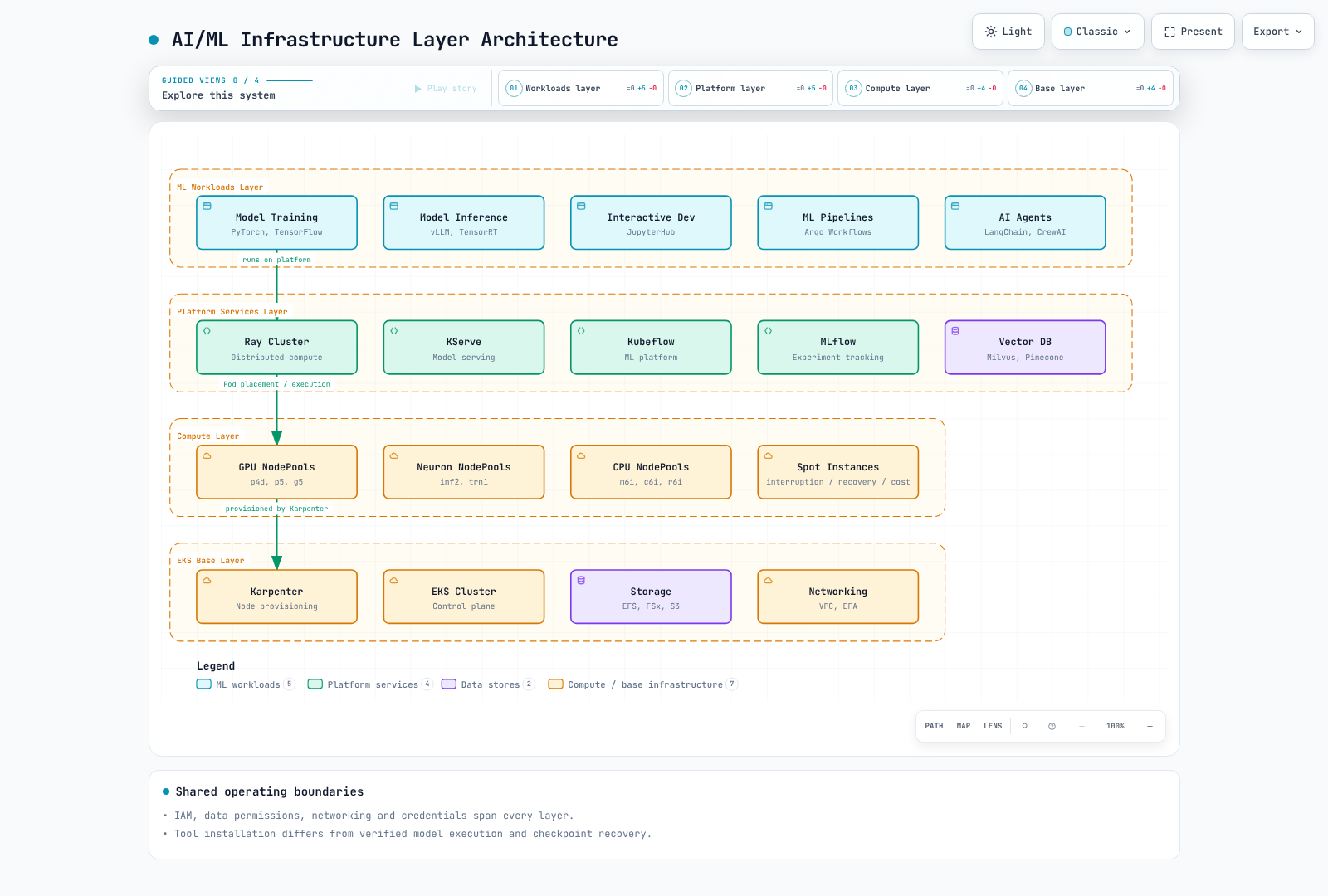
workload は model/data/execution code を担当し、platform は workflow、runtime、registry を担当し、compute は実際の device、Pod、node capacity を担当します。IAM、networking、storage identity はこれらのレイヤーをまたがります。Spot 対応の NodePool は、capacity も recovery/savings も保証しません。
JARK Stack
JARK は JupyterHub、Argo Workflows、Ray、Karpenter を組み合わせます。これは自動的に接続される 1 つの product ではなく、integration pattern です。notebook authorization、workflow submission、Ray job、Kubernetes scheduling、node provisioning を明示的に接続してください。
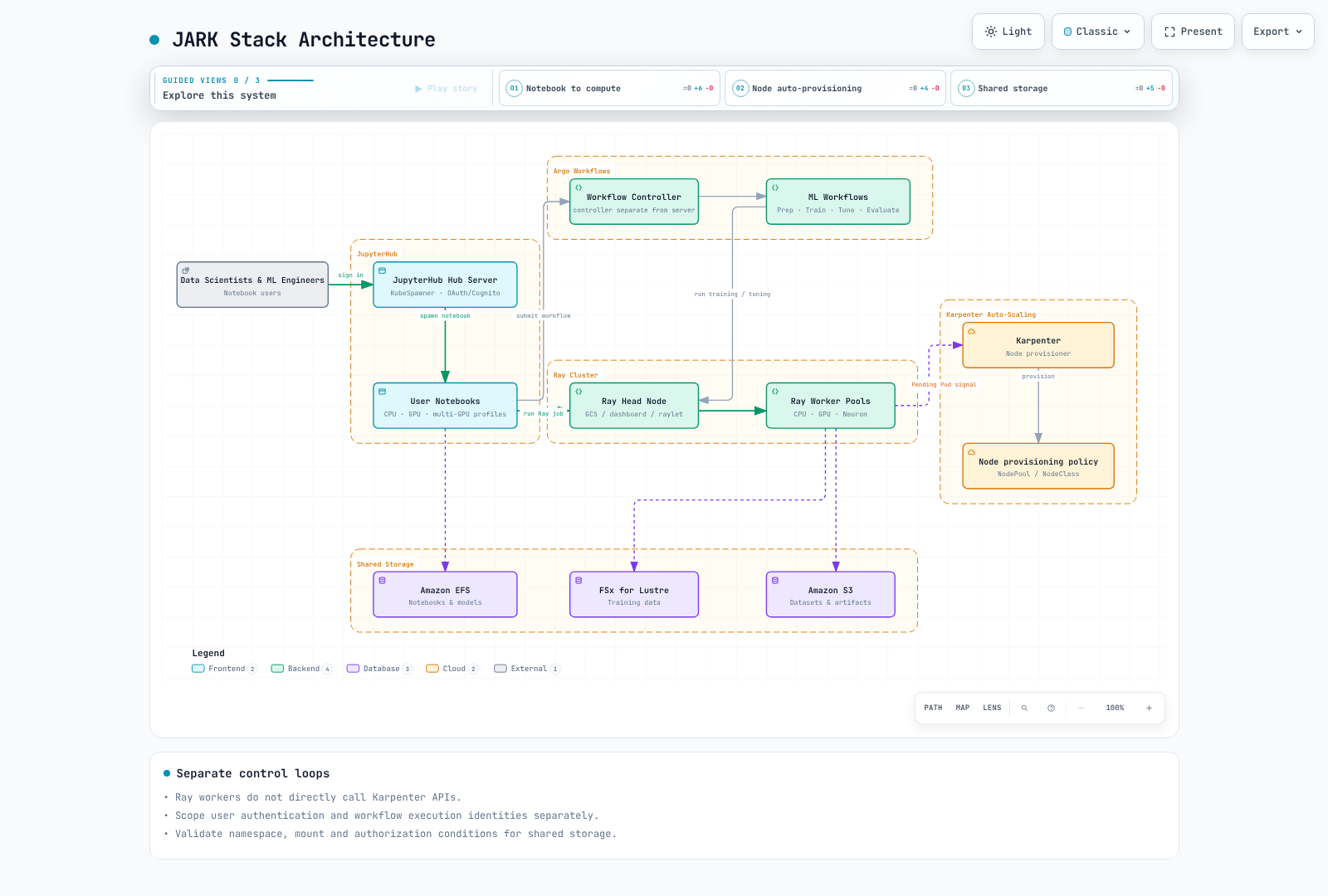
JupyterHub Authentication と Notebook Profile
Chart4.4.2 は appVersion5.5.2 を宣言しており、確認した最新の PyPI Hub6.0.0 とは異なります。ローカル API check では Hub6.0.0/OAuthenticator17.4.0/KubeSpawner7.1.0 を使用しました。運用中の chart image 内の実際の package combination を確認してください。
Cognito は OIDC provider の選択肢の 1 つです。callback URL、token/userInfo endpoint、scope、安定した username claim を一致させ、明示的な allow policy を設定してください。MFA/corporate federation は provider 側で設定する必要があります。GenericOAuthenticator が自動的に有効化するものではありません。
この Hub configuration は、/run/secrets/oidc に mount された既存の Secret volume を前提としています。実際の secret を ConfigMap、source、environment variable に保存しないでください。この Python file を Hub の実際の configuration path に接続し、環境に合わせて URI/approved sub value を置き換えてください。
from pathlib import Path

c.JupyterHub.authenticator_class = "oauthenticator.generic.GenericOAuthenticator"
c.GenericOAuthenticator.client_id = "prepared-client-id"
c.GenericOAuthenticator.client_secret = Path("/run/secrets/oidc/client-secret").read_text().strip()
c.GenericOAuthenticator.oauth_callback_url = "https://jupyter.example.com/hub/oauth_callback"
c.GenericOAuthenticator.authorize_url = "https://prepared-domain.auth.us-west-2.amazoncognito.com/oauth2/authorize"
c.GenericOAuthenticator.token_url = "https://prepared-domain.auth.us-west-2.amazoncognito.com/oauth2/token"
c.GenericOAuthenticator.userdata_url = "https://prepared-domain.auth.us-west-2.amazoncognito.com/oauth2/userInfo"
c.GenericOAuthenticator.scope = ["openid", "profile", "email"]
c.GenericOAuthenticator.username_claim = "sub"
c.GenericOAuthenticator.allow_all = False
c.GenericOAuthenticator.allow_existing_users = False
c.GenericOAuthenticator.allowed_users = {"replace-with-approved-cognito-sub"}
この例では allow_all=False、明示的な allowed_users、allow_existing_users=False を設定しています。ローカル check では、承認済み identity を 1 つ許可し、未承認/過去の user を拒否しました。実際の OAuth login/token exchange は実行していません。
notebook の CPU/RAM guarantee と limit を区別し、実際の GPU image、label、toleration、driver に合わせてください。古い jupyter/*:gpu tag が CUDA を提供すると仮定しないでください。PVC は利用する Pod と namespace を共有する必要があります。jupyterhub Pod が ml-platform PVC を名前だけで参照することはできません。user ごとの access point、UID/GID、quota、shared-model write permission を確認してください。EFS storage_capacity は物理的な capacity limit ではありません。
Argo Workflows Data Flow
以前の workflow は、存在しない template、artifact、script を参照していました。この小さな dataflow fixtureは 6 つの stage で構成されます。Python source に値を注入するのではなく、environment variable と JSON を介して parameter を渡します。2 つの coefficient から選択しますが、実際の image-classification training、Ray-cluster、external-registry pipeline ではありません。
Argo4.1.3 の offline lint と 6 つすべての Python script body をローカルで検証しました。運用前に、least privilege で prepared-workflow-runner を準備し、image digest、quota、artifact storage を別途設定してください。
apiVersion: argoproj.io/v1alpha1
kind: Workflow
metadata:
  generateName: toy-dataflow-
  namespace: argo
spec:
  entrypoint: pipeline
  serviceAccountName: prepared-workflow-runner
  parallelism: 1
  activeDeadlineSeconds: 600
  arguments:
    parameters:
    - name: data
      value: '[[1,2],[2,4],[3,6],[4,8]]'
  templates:
  - name: pipeline
    dag:
      tasks:
      - name: validate
        template: validate
        arguments:
          parameters:
          - name: data
            value: '{{workflow.parameters.data}}'
      - name: prepare
        template: prepare
        arguments:
          parameters:
          - name: data
            value: '{{tasks.validate.outputs.result}}'
        dependencies:
        - validate
      - name: tune
        template: tune
        arguments:
          parameters:
          - name: data
            value: '{{tasks.prepare.outputs.result}}'
        dependencies:
        - prepare
      - name: train
        template: train
        arguments:
          parameters:
          - name: scale
            value: '{{tasks.tune.outputs.result}}'
        dependencies:
        - tune
      - name: evaluate
        template: evaluate
        arguments:
          parameters:
          - name: model
            value: '{{tasks.train.outputs.result}}'
          - name: data
            value: '{{tasks.prepare.outputs.result}}'
        dependencies:
        - train
      - name: register
        template: register
        arguments:
          parameters:
          - name: model
            value: '{{tasks.train.outputs.result}}'
        dependencies:
        - evaluate
        when: '{{tasks.evaluate.outputs.result}} == 0'
  - name: validate
    inputs:
      parameters:
      - name: data
    script:
      image: python:3.12.14-slim-trixie
      command:
      - python
      env:
      - name: DATA
        value: '{{inputs.parameters.data}}'
      resources:
        requests:
          cpu: 100m
          memory: 64Mi
        limits:
          cpu: 500m
          memory: 128Mi
      source: 'import json, os

        rows = json.loads(os.environ["DATA"])

        assert rows and all(len(row) == 2 for row in rows)

        assert all(isinstance(v, (int, float)) for row in rows for v in row)

        print(json.dumps(rows))

        '
  - name: prepare
    inputs:
      parameters:
      - name: data
    script:
      image: python:3.12.14-slim-trixie
      command:
      - python
      env:
      - name: DATA
        value: '{{inputs.parameters.data}}'
      resources:
        requests:
          cpu: 100m
          memory: 64Mi
        limits:
          cpu: 500m
          memory: 128Mi
      source: 'import json, os

        rows = json.loads(os.environ["DATA"])

        print(json.dumps({"train": rows[:2], "test": rows[2:]}))

        '
  - name: tune
    inputs:
      parameters:
      - name: data
    script:
      image: python:3.12.14-slim-trixie
      command:
      - python
      env:
      - name: DATA
        value: '{{inputs.parameters.data}}'
      resources:
        requests:
          cpu: 100m
          memory: 64Mi
        limits:
          cpu: 500m
          memory: 128Mi
      source: 'import json, os

        data = json.loads(os.environ["DATA"])

        candidates = [1.0, 2.0]

        loss = lambda scale: sum((scale*x-y)**2 for x,y in data["train"]) / len(data["train"])

        print(min(candidates, key=loss))

        '
  - name: train
    inputs:
      parameters:
      - name: scale
    script:
      image: python:3.12.14-slim-trixie
      command:
      - python
      env:
      - name: SCALE
        value: '{{inputs.parameters.scale}}'
      resources:
        requests:
          cpu: 100m
          memory: 64Mi
        limits:
          cpu: 500m
          memory: 128Mi
      source: 'import json, os

        print(json.dumps({"scale": float(os.environ["SCALE"]), "fixture": True}))

        '
  - name: evaluate
    inputs:
      parameters:
      - name: model
      - name: data
    script:
      image: python:3.12.14-slim-trixie
      command:
      - python
      env:
      - name: MODEL
        value: '{{inputs.parameters.model}}'
      - name: DATA
        value: '{{inputs.parameters.data}}'
      resources:
        requests:
          cpu: 100m
          memory: 64Mi
        limits:
          cpu: 500m
          memory: 128Mi
      source: 'import json, os

        model = json.loads(os.environ["MODEL"])

        held_out = json.loads(os.environ["DATA"])["test"]

        print(sum((model["scale"]*x-y)**2 for x,y in held_out) / len(held_out))

        '
  - name: register
    inputs:
      parameters:
      - name: model
    script:
      image: python:3.12.14-slim-trixie
      command:
      - python
      env:
      - name: MODEL
        value: '{{inputs.parameters.model}}'
      resources:
        requests:
          cpu: 100m
          memory: 64Mi
        limits:
          cpu: 500m
          memory: 128Mi
      source: 'import json, os

        model = json.loads(os.environ["MODEL"])

        print(json.dumps({"candidate": model, "note": "fixture output only; no registry write"}))

        '
fixture MSE0 は 4 つの synthetic sample によるものであり、実際の model-quality measurement ではありません。本番 workflow には、train/test separation、data/model revision、failure/retry/idempotency rule、実際の artifact handoff が必要です。artifactRepositoryRef は boto3 を install せず、application download permission も付与しません。
Ray と Karpenter
監査済みの Ray2.58/KubeRay1.7 path は Ray guide を使用してください。GCS は Global Control Service を意味し、scheduling は raylet と相互作用します。head は CPU を advertise している場合、work を実行する可能性があります。CPU/GPU/Neuron worker 間で未検証の Ray/Python combination を避けてください。Neuron image にも Ray と互換性のある framework が必要です。
Ray autoscaling は worker-Pod demand を表現し、Kubernetes scheduler が Pod を配置し、Karpenter がサポートされる node capacity を提供します。Ray worker が Karpenter API を直接呼び出すことはありません。memory/GPU product label を実際の node に一致させてください。80GB label で 40GB の p4d A100 を選択しないでください。
AL2023 NVIDIA AMI 上で driver を重複させたり、containerd configuration 全体を上書きしたりしないでください。Karpenter limit は絶対的な admission/cost cap ではなく、consolidation は DCGM20% utilization threshold を直接使用しません。request、scheduling feasibility、price、disruption constraint を確認してください。
DRA API と Support Boundary
DRA は DeviceClass、ResourceSlice、ResourceClaim/Template を通じて device attribute、request、allocation を表現します。driver が slice を公開し、scheduler/driver component が claim を allocation と prepare します。手書きの ResourceSlice は実際の GPU を作成しません。Kubernetes API maturity と NVIDIA-driver feature maturity は別のものです。
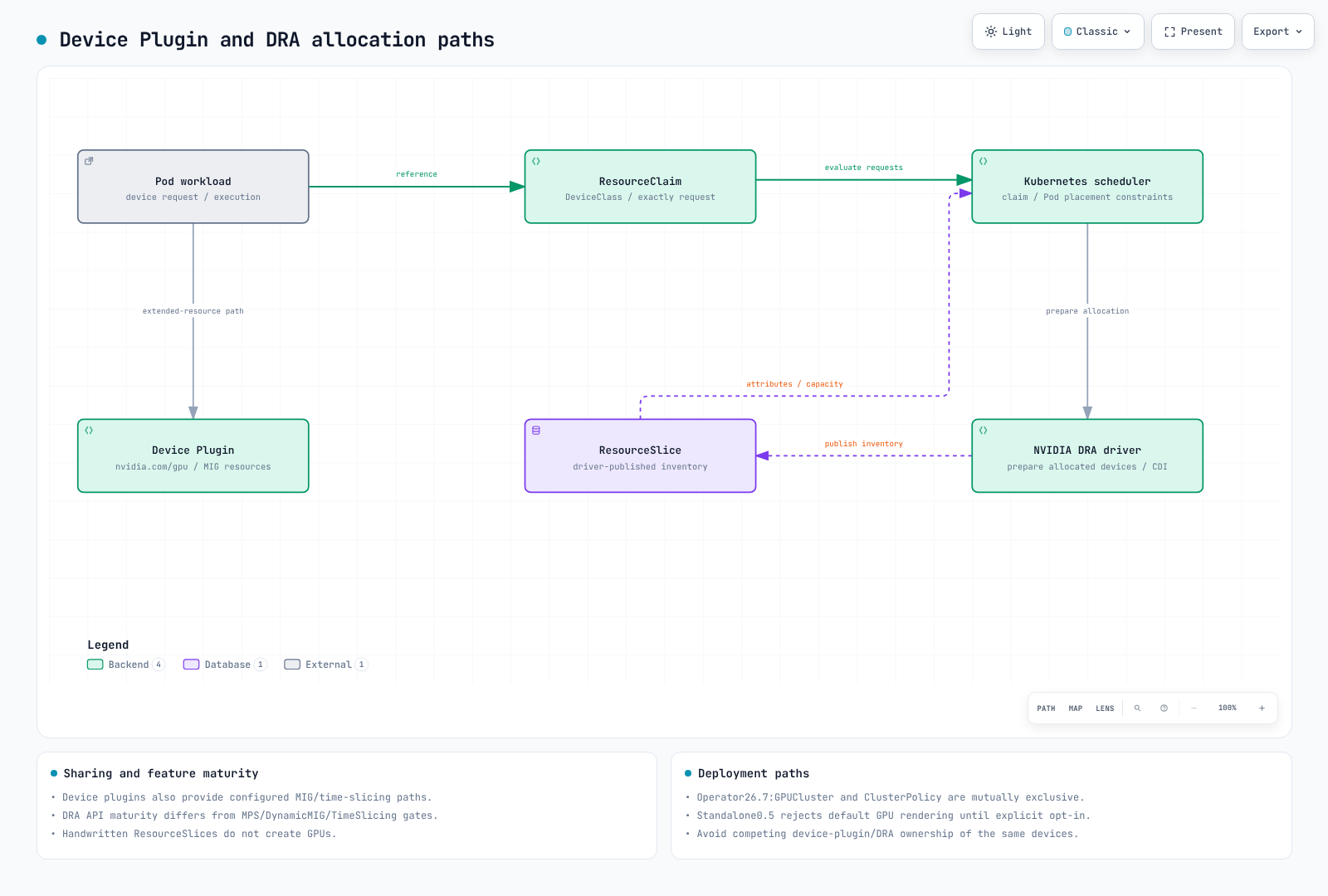
現在の Claim Example
確認した Kubernetes1.36.2 resource.k8s.io/v1 schema では requests.exactly を使用します。NVIDIA driver0.5 prerequisite は、GPU allocation(1.34.2+) と ComputeDomains(1.32+) を区別します。EKS が実際に提供する API と patch/platform version を確認してください。「1.31+ ですべての DRA feature」は不正確です。
このschema exampleは、1 つの GPU claim と inventory-command Pod を定義します。ml-workloads namespace、gpu.nvidia.com DeviceClass、driver/CDI、node、permission は別途準備してください。この audit では GPU execution は実行していません。
apiVersion: resource.k8s.io/v1
kind: ResourceClaimTemplate
metadata:
  namespace: ml-workloads
  name: single-gpu
spec:
  spec:
    devices:
      requests:
      - name: gpu
        exactly:
          deviceClassName: gpu.nvidia.com
          count: 1
---
apiVersion: v1
kind: Pod
metadata:
  name: gpu-inventory-demo
  namespace: ml-workloads
spec:
  restartPolicy: Never
  automountServiceAccountToken: false
  containers:
  - name: inspect
    image: ubuntu:24.04
    command:
    - nvidia-smi
    - -L
    resources:
      claims:
      - name: gpu
      requests:
        cpu: 100m
        memory: 64Mi
      limits:
        cpu: 500m
        memory: 128Mi
  resourceClaims:
  - name: gpu
    resourceClaimTemplateName: single-gpu
  tolerations:
  - key: nvidia.com/gpu
    operator: Exists
    effect: NoSchedule
CEL は、実際に公開された typed attribute/domain structure を使用する必要があります。以前の device.topology.node==device.topology.node は same-node placement を表現せず、API にも一致しません。matchAttribute には実際の qualified attribute が必要です。通常の単一 Pod GPU claim は、NVL72 rack 全体で 72GPU を自動的に allocation しません。
NVIDIA0.5 と GPU Operator26.7
0.5 README は GPU allocation を experimental/default-disabled と説明していますが、installation/chart と Operator26.7 documentation とは矛盾しています。実際の standalone chart は resources.gpus.enabled=true を default としていますが、device-plugin collision を避けるため、明示的な opt-in がない場合はrendering を拒否します。default installation が GPU を暗黙に無効化して成功するとは説明しないでください。
Operator26.7 の managed path は gpu-cluster という名前の GPUCluster singleton を使用し、ClusterPolicy とは相互排他的です。preinstalled-driver path は clusterPolicy.deployCR=false、gpuCluster.deployCR=true、driver.enabled=false を設定します。GPUCluster はすべての driver/toolkit preparation を置き換えるものではありません。driver/CDI prerequisite を提供してください。重複する standalone DRA release を install しないでください。ローカル rendering は提供済みの DeviceClass API を simulation したものであり、実際の cluster feature を有効化したものではありません。
full-GPU/existing-MIG と ComputeDomain support を、alpha の DynamicMIG、MPS、TimeSlicingSettings と区別してください。確認した 0.5 feature-gate code では、後者 3 つを false/Alpha と宣言しています。一部の documentation の GA label も source の Beta label と異なります。正確な release の support matrix、code、configuration をまとめて記録してください。GPU Operator25.3 だけでは、すべての support を確立できません。
device plugin も existing MIG、time-slicing、experimental MPS path を support します。GPU sharing は DRA 専用ではありません。3g.20gb は 1 つの instance profile を表し、20GB instance が 3 つあることを表しません。MIG/exclusive allocation は host、driver、privilege、すべての side channel を自動的に isolate しません。MPS/time-slicing は security boundary ではありません。
Multi-Node NVLink と ComputeDomains
GB200 は Grace Hopper ではなく Grace Blackwell です。ComputeDomains は Pod/node 間の MNNVL/IMEX resource を coordination します。rack、EC2 instance、Kubernetes node、Pod を区別し、実際の clique/fabric/device/driver support を確認してください。架空の nvswitchEnabled/graceHopperMode field や scheduling gate は topology を configuration しません。削除する controller のない scheduling gate は Pod を待機状態のままにします。
Agent Platform と MCP
最新の Kagent/LangGraph/Langfuse/Milvus API は Agentic AI guide を使用してください。GitLab は任意の source/CI platform です。privileged runner と public ingress は baseline requirement ではありません。job identity、networking、secret、image-build permission を分離し、provider credential delivery を検証してください。
MCP は tool listing/calling などの protocol operation を定義します。standard Kubernetes auto-discovery controller や gateway distribution ではありません。以前の ghcr.io/anthropics/mcp-gateway:latest image と mcp.anthropic.com/tool label/config は未検証の implementation であり、削除されました。実際の server/gateway release を選択し、transport、authentication、authorization、timeout、tool input schema を検証してください。URL environment variable だけでは、これらの operation を実装しません。
Milvus に GPU resource を request しても、GPU indexing は有効になりません。embedding dimension/model revision、index parameter、deletion/update lifecycle、tenant filter を一致させてください。Langfuse2.x Deployment を最新の 4.x platform installation として使用しないでください。backend dependency、file credential、instrumentation API、sensitive-data retention を確認してください。
Storage と Networking
EFS access-point IAM/UID/GID、directory permission、同一 namespace の PVC consumption を確認してください。IAM mount option だけでは controller/mount-identity credential は configuration されません。
サポートされる FSx CSI parameter と capacity unit を使用してください。PERSISTENT_2 に対して、架空の s3ImportPath/s3ExportPath setting や無効な 10Ti capacity をコピーしないでください。existing/static と新規 provision された filesystem、DRA、backup compatibility を storage guide で区別してください。
Mountpoint CSI2.8.0 は既存の S3 bucket に対するstatic PVを support します。StorageClass/PVC のみの dynamic-bucket example は削除されました。Mountpoint は完全な POSIX ではありません。rename、random-write、locking、checkpoint behavior を確認してください。2.8 support table は AL2/Ubuntu22.04 を削除し、repository branch ではなく EKS add-on または official chart による installation を案内しています。
すでに aggregate された instance bandwidth に interface count を掛けないでください。以前の p4d「4×400Gbps」と trn1n「16×1600Gbps」の数値は誤りでした。同一 AZ placement、実際の interface、driver/libfabric/NCCL、device/Pod allocation、security group については、training networking guide を使用してください。RAID0 と efa-enabled tag だけでは EFA は有効になりません。
subnet は isolation の一部にすぎません。実際の SG/IAM resource を通じて workload ingress/egress と EFA self-reference requirement を configuration してください。ConfigMap に保存した Terraform 風の YAML は network rule を適用しません。VPC CIDR 全体からの default access を避けてください。
GPU Observability と Alert
DCGM Exporter4.6.0-4.8.3 は XID_ERRORS を最後の error code gaugeとして定義しています。increase(XID_ERRORS) は error count ではなく、31→13 の code change を reset と誤読する可能性があります。現在の code を observe するか、XID_ERRORS_TOTAL counter を別途有効にしてください。すべての XID が hardware failure を示すわけではありません。
FB_USED/FB_FREE は MiB gauge です。以下の ratio は 0–1 の範囲です。reserved VRAM が高いことは、必ずしも OOM を意味しません。allocation failure、workload behavior、model cache、available memory を合わせて確認してください。固定の 85C/20% threshold は、普遍的な failure/reclamation standard ではありません。PCIe throughput や NVLink bandwidth gauge に rate() を適用する前に、実際の metric type/unit を確認してください。
これらの rule は Prometheus ごとに 1 つの cluster を前提としています。cluster を統合する場合は、aggregation/join に cluster label を含めてください。実際の node/UUID/MIG label と kube-state-metrics resource-label normalization を確認してください。
groups:
- name: gpu-observations
  rules:
  - record: gpu:framebuffer_used_ratio
    expr: DCGM_FI_DEV_FB_USED / (DCGM_FI_DEV_FB_USED + DCGM_FI_DEV_FB_FREE)
  - alert: GPUReportedXIDCode
    expr: DCGM_FI_DEV_XID_ERRORS > 0
    for: 1m
    labels:
      severity: warning
    annotations:
      summary: "Inspect the reported XID code and workload context"
  - record: namespace:pending_gpu_requesting_pods:count
    expr: |
      count by (namespace) (
        max by (namespace, pod) (kube_pod_status_phase{phase="Pending"} == 1)
        and on (namespace, pod)
        max by (namespace, pod) (kube_pod_container_resource_requests{resource="nvidia_com_gpu"} > 0)
      )
pending rule は、GPU を request している待機中の Pod を数えます。GPU shortage が待機の原因であることを証明するものではありません。複数の GPU-requesting container は Pod ごとに 1 回として数えられます。event、PVC、affinity、taint、quota、claim、image pull を確認してください。すべての alert に node label が存在すると仮定しないでください。
DCGM、Ray、Karpenter に対する実際の Prometheus rule selection と正しい Service/port scraping を設定してください。Grafana file provisioning は HTTP dashboard wrapper とは異なります。label だけでは datasource は接続されません。Neuron monitor output と exporter endpoint は別途準備が必要です。
検証範囲
元の guide/quiz prose と 58 個の一意な code block をすべて確認しました。check は DRA/Pod schema、official Helm、OAuthenticator allow policy、Argo offline lint/script body、Prometheus fixture を対象としています。実際の OAuth/cluster/GPU/DRA allocation、model、S3 mount、MCP server は実行していません。cloud resource や有料 call は作成していません。
参考資料
- GPU Operator26.7 DRA installation
- NVIDIA DRA0.5 source
- DRA0.5 prerequisites
- DRA0.5 feature gates
- OAuthenticator17.4
- JupyterHub chart4.4.2
- Argo Workflows4.1.3
- Mountpoint CSI2.8.0
- DCGM Exporter counter definitions
- MCP tools specification