Linkerdセキュリティ
最終更新: September 11, 2026 · Linkerd edge-26.9.1 · cert-manager例は1.21.1で確認
Linkerdはproxyが扱う通信にworkload認証、転送暗号化、受信認可を提供します。参加、policy、証明書ライフサイクル、アプリsecurityは明示設計が必要です。導入ガイドの対応Kubernetes/Gateway API構成を使います。以下はその導入と既存workloadを前提とします。
セキュリティアーキテクチャ
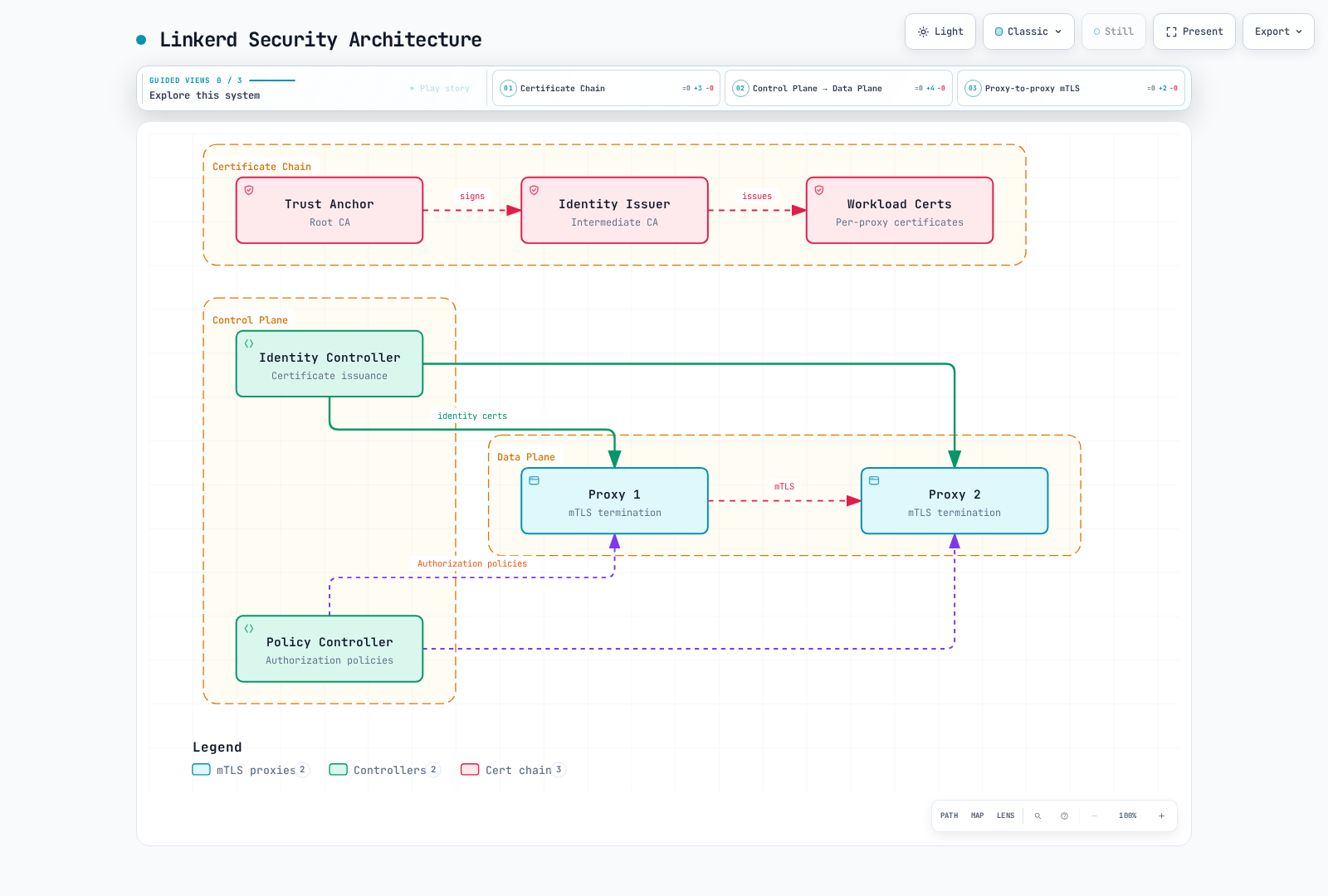
自動mTLS
LinkerdはメッシュPod間の適格TCPに自動mTLSを使います。両proxyが参加しchainを信頼して通信を受ける必要があります。skip portは迂回し、UDPは対象外です。片端にproxyがあるだけで未参加endpointとの通信がmTLSになるわけではありません。
平文HTTPアプリでは送信proxyが宛先proxyを認証しネットワークホップを暗号化、受信proxyがcallerを認証しローカルアプリへHTTPを渡します。アプリ開始TLSはメッシュ内でも暗号化を維持できます。Linkerdは全外部/不透明TLSを自動復号しません。
| 特性 | 意味と境界 |
|---|---|
| 透過暗号化 | 適格proxy間ホップでアプリTLS実装は不要 |
| 相互認証 | Workload IDを認証し、エンドユーザーではない |
| TLS 1.3 | 選択releaseのメッシュTLS |
| 自動leaf更新 | Proxyが通常短命workload証明書を更新 |
| Root/issuerライフサイクル | 別認証情報でrotationと監視が必要 |
デフォルトは未参加sourceの平文も受け、認可policyで拒否できます。「mTLS有効」と「全受信に認証済みID必須」は異なります。proxy迂回/不在経路はNetworkPolicyとadmissionでも制御する必要があります。
暗号化とIDの観測
linkerd check --proxy
linkerd viz edges deploy -n production
linkerd viz tap deploy/api -n production --method GET
linkerd identity -n production -l app=api
kubectl -n production get pods -l app=api \
  -o custom-columns=NAME:.metadata.name,SERVICEACCOUNT:.spec.serviceAccountName
viz edgesは観測resource edgeとsecurity状態で、全可能/idle接続一覧ではありません。tapは対応観測通信で、完全なpacket/security監査ではありません。表示はPrometheus TLSラベル値と同じインターフェースではありません。意図client IDから許可と意図的拒否の両通信を確認します。
linkerd identityはport-forwardで選択Podの公開証明書を取得します。SAN、issuer、期限を確認します。proxy内の固定pathにleafがあると想定せずに済みます。
ワークロードID
標準Kubernetes経路ではDNS形式IDを使います。
<service-account>.<namespace>.serviceaccount.identity.<control-plane-namespace>.<trust-domain>

web.production.serviceaccount.identity.linkerd.cluster.local
api.production.serviceaccount.identity.linkerd.cluster.local例はcontrol-plane名前空間linkerdとtrust domain cluster.localです。root証明書のcommon name自体はworkload trust-domain設定ではありません。以前のIstio型spiffe://.../ns/.../sa/... URIではありません。同ServiceAccountのPodは認可IDを共有しますが、鍵/証明書は別々です。
proxyは鍵とCSRを生成し、投影ServiceAccount tokenとCSRをIdentityへ送ります。IdentityはTokenReviewで検証し、要求IDを確認してissuerの鍵で署名します。rootはissuerへ署名し、全proxy要求には署名しません。秘密鍵はServiceAccount tokenから導出されません。
既定workload証明書は約24時間で期限前更新されます。証明書要求は新ServiceAccountを作らず、更新も毎回全鍵rotationの証明ではありません。アーキテクチャガイドを参照します。
認可ポリシー
これらはLinkerdのpolicy.linkerd.io APIです。AuthorizationPolicyはGateway API resourceではなくLinkerd 2.12導入で、Gateway API定義のrouteを対象にできます。
| リソース | 役割 |
|---|---|
| Server | 名前空間内の一致Podの宣言受信portを選択 |
| Server接続HTTPRoute/GRPCRoute | 受信要求の部分集合を選択 |
| MeshTLSAuthentication | 許可メッシュIDを記述 |
| NetworkAuthentication | 許可client IP networkを記述。mTLSは提供しない |
| AuthorizationPolicy | 認証要件一致時にtargetアクセスを許可 |
| ServerAuthorization | 旧Server専用許可。選択CRDでv1beta1対応 |
ServerAuthorizationとAuthorizationPolicyは代替許可で順次pipelineではありません。複数許可は範囲を広げ得ますが、1 policy内の複数requiredAuthenticationRefsはすべて一致が必要です。namespace対象policyはそこで定義されたpolicy targetを対象とし、全未宣言portへの自動policyではありません。
ServerはPod/port対を重複選択してはいけません。Pod specにアプリportを宣言します。namespace既定が許容的でもServerは未一致を既定拒否します。accessPolicy: auditは準備中の未一致観察に有用ですが、その通信を許可し強制ではありません。
デフォルトポリシー
参加名前空間の新規proxyへ次を設定します。
apiVersion: v1
kind: Namespace
metadata:
  name: production
  annotations:
    linkerd.io/inject: enabled
    config.linkerd.io/default-inbound-policy: deny
namespaceアノテーション変更は既存proxyの初期化済みdefaultへ遡及しません。workload別rolloutとreadinessを調整します。動的policy CRDは別機構で、全Podを置換せず更新できます。
全体Helm値はpolicyController.defaultPolicyでなくproxy.defaultInboundPolicyです。CAとrelease所有権を保ち、完全valuesへマージします。
proxy:
defaultInboundPolicy: deny| デフォルト | 意味 |
|---|---|
| all-unauthenticated | メッシュ認証なしを許可。導入時既定 |
| all-authenticated | 適切に信頼されたmulticlusterも含む認証済みclient必須 |
| cluster-authenticated | 同clusterの認証済みclient必須 |
| cluster-unauthenticated | 設定cluster network範囲でメッシュ認証なしを許可 |
| deny | 明示policyと文書化probe処理に従い未一致を拒否 |
| audit | 未一致を許可し監査証拠を記録 |
cluster範囲はエンドユーザーIDやアプリ認可境界ではありません。設定networkとproxyから見えるsourceを確認します。
マイクロサービス例
独立例用にproductionへapp: frontend/api/postgres、下の宣言portと対応ServiceAccountを持つメッシュfrontend/API/PostgreSQLを準備します。ingressにはServiceAccount edge-gatewayのメッシュIngress workloadを用意します。名前だけでGateway導入/認証はされません。
apiVersion: policy.linkerd.io/v1beta3
kind: Server
metadata:
  name: frontend-http
  namespace: production
spec:
  podSelector:
    matchLabels:
      app: frontend
  port: 8080
  proxyProtocol: HTTP/1
  accessPolicy: deny
---
apiVersion: policy.linkerd.io/v1alpha1
kind: AuthorizationPolicy
metadata:
  name: frontend-from-gateway
  namespace: production
spec:
  targetRef:
    group: policy.linkerd.io
    kind: Server
    name: frontend-http
  requiredAuthenticationRefs:
  - kind: ServiceAccount
    name: edge-gateway
    namespace: ingress
---
apiVersion: policy.linkerd.io/v1beta3
kind: Server
metadata:
  name: api-http
  namespace: production
spec:
  podSelector:
    matchLabels:
      app: api
  port: 8080
  proxyProtocol: HTTP/1
  accessPolicy: deny
---
apiVersion: policy.linkerd.io/v1alpha1
kind: AuthorizationPolicy
metadata:
  name: api-from-frontend
  namespace: production
spec:
  targetRef:
    group: policy.linkerd.io
    kind: Server
    name: api-http
  requiredAuthenticationRefs:
  - kind: ServiceAccount
    name: frontend
    namespace: production
---
apiVersion: policy.linkerd.io/v1beta3
kind: Server
metadata:
  name: database-tcp
  namespace: production
spec:
  podSelector:
    matchLabels:
      app: postgres
  port: 5432
  proxyProtocol: opaque
  accessPolicy: deny
---
apiVersion: policy.linkerd.io/v1alpha1
kind: AuthorizationPolicy
metadata:
  name: database-from-api
  namespace: production
spec:
  targetRef:
    group: policy.linkerd.io
    kind: Server
    name: database-tcp
  requiredAuthenticationRefs:
  - kind: ServiceAccount
    name: api
    namespace: production
意図chainはgateway → frontend → API → DBです。YAMLのServiceAccount名だけでは足りず、callerが認証済みIDを提示する必要があります。広いnamespace/Server許可が不要callerを許していないか確認します。
Serverに明示routeがない場合、通常Linkerdは宣言HTTP health/readiness probeの認可を追加します。HTTPRoute/GRPCRouteを接続すると既定probe許可は作られません。必要probe routeと限定アクセスを明示します。1 probe成功のため業務port全体を未認証許可しないでください。
参考として、この旧方式の代替許可はAPIのfrontend-client許可と同等で、上のAuthorizationPolicyとの併用は不要です。
apiVersion: policy.linkerd.io/v1beta1
kind: ServerAuthorization
metadata:
  name: api-from-frontend-legacy
  namespace: production
spec:
  server:
    name: api-http
  client:
    meshTLS:
      serviceAccounts:
      - name: frontend
namespace: production選択版はServerAuthorization/v1beta2を提供しません。Server版から他resource版を推測しないでください。client.unauthenticated:trueは未認証を許し、meshTLS.identities:["*"]はメッシュIDを要求しつつ非常に広く許可します。
メトリクスポートと検証
API Podの明示宣言アプリメトリクスポート9091への許可例:
apiVersion: policy.linkerd.io/v1beta3
kind: Server
metadata:
  name: api-app-metrics
  namespace: production
spec:
  podSelector:
    matchLabels:
      app: api
  port: 9091
  proxyProtocol: HTTP/1
  accessPolicy: deny
---
apiVersion: policy.linkerd.io/v1alpha1
kind: AuthorizationPolicy
metadata:
  name: metrics-from-prometheus
  namespace: production
spec:
  targetRef:
    group: policy.linkerd.io
    kind: Server
    name: api-app-metrics
  requiredAuthenticationRefs:
  - kind: ServiceAccount
    name: prometheus
namespace: monitoringproxy自身の通常4191 adminとは別です。proxy-initはadmin/control portを通常受信捕捉から除外します。4191のServerを作ってもmTLS保護アプリportにはなりません。管理endpointには実cluster/network制御と限定経路を使います。
kubectl -n production get servers,authorizationpolicies,serverauthorizations
kubectl -n production get server api-http -o yaml
# Set this to an actual selected API Pod.
api_pod=api-example-pod
linkerd diagnostics policy -n production "pod/$api_pod" 8080 -o json
linkerd viz authz deploy/api -n production
既知HTTP policy拒否は通常403、opaque/TCPは接続レベルで拒否され得ます。変更で既存接続が中断する場合があります。Kubernetes Forbiddenイベントはproxy認可拒否の自動要求別記録ではありません。policy診断と適切なHTTP/TCP認可メトリクスを使います。
証明書管理
| 認証情報 | 目的 | 既定/手動所有権の考慮 |
|---|---|---|
| Trust anchor bundle | メッシュが受け入れる公開root | 通常ConfigMap linkerd-identity-trust-roots、キーca-bundle.crt |
| Identity issuer証明書/鍵 | Identityがworkload leafへ署名する中間CA | Secret linkerd-identity-issuer。キー名はscheme依存 |
| Workload証明書/鍵 | Proxy別TLS認証情報 | Proxyが自動更新する短命leaf |
既定CLI生成root/issuerは1年、workload leafは通常24時間です。手動10年rootは可能ですが普遍的推奨や導入defaultではありません。CA方針と復旧から寿命/更新余裕を選び、chainの全証明書を追跡します。
Linkerdのroot/issuerにはECDSA P-256が必要です。導入ガイドに明示生成パラメーターとローカル秘密鍵処理があります。root署名鍵は公開trust bundleと分離し、公開ConfigMapへ決して含めません。
実効公開認証情報を読む
set -euo pipefail
umask 077
# Public trust bundle: ConfigMap data is not base64-encoded.
kubectl -n linkerd get configmap linkerd-identity-trust-roots -o json \
  | jq -er '.data["ca-bundle.crt"] | select(length > 0)' > current-trust.pem
# Select only public certificate data from the issuer Secret, never its key.
kubectl -n linkerd get secret linkerd-identity-issuer -o json \
  | jq -er '(.data["tls.crt"] // .data["crt.pem"]) | select(length > 0)' \
  | base64 -d > current-issuer.pem

# Show every certificate in a multi-root bundle, not only its first entry.
openssl crl2pkcs7 -nocrl -certfile current-trust.pem \
  | openssl pkcs7 -print_certs -text -noout
openssl x509 -in current-issuer.pem -noout -subject -issuer -dates
# Nonzero exit means expiration is within this window or parsing failed.
openssl x509 -in current-issuer.pem -noout -checkend 86400既定linkerd.io/tlsはcrt.pem/key.pem、kubernetes.io/tlsはtls.crt/tls.keyです。コマンドは公開証明書だけを選びます。変更前にschemeと所有者を確認します。
bundle内の全rootを調べます。openssl x509だけでは最初しか調べず、完全な複数root期限監査ではありません。日付に加え意図trust anchorに対するissuer chainを検証し、必要なら中間証明書を供給します。解析/API読取失敗は「正常」でなく失敗と報告します。
Trust anchorを変えないissuer更新
所有者経由で更新します。Linkerd所有Secretは完全Helm/CLI証明書values、管理Secretは証明書controllerを使います。Identityはマウントissuerを監視し、置換を検証して有効issuerを再読込します。全Identity Deployment再起動が毎回必須ではありません。
kubectl -n linkerd get events --field-selector reason=IssuerUpdated
kubectl -n linkerd get events --field-selector reason=IssuerUpdateSkipped
kubectl -n linkerd logs deployment/linkerd-identity -c identity --tail=100
linkerd check --proxy
linkerd identity -n production -l app=apiIssuerUpdatedはIdentityが更新を受理したことです。IssuerUpdateSkippedや検証エラーを調査します。既存proxy leafは通常更新まで旧issuer署名のままでよく、両chainが有効な間は想定どおりです。全leaf即時置換は別の協調workload操作です。
Trust anchorローテーション
root置換には段階移行が必要です。有効root手順は期限切れrootの復旧保証ではありません。
- 現bundle、issuer chain、管理resource、control-plane proxy、workload、外部workload、リンクclusterなど全consumerを棚卸し。rollout容量/readinessを確認。
- 新rootを生成し、公開の旧+新bundleを保持。実所有者経由で更新。
- issuer切り替え前に重複bundleを全consumerへ配布。proxyは導入/注入設定で信頼を受け、ConfigMap書込だけでは既存process再読込の証明にならない。
linkerd check --proxyとworkload/cluster間チェックで配布確認後、新root署名issuerを発行・読込。- leafの通常更新を待つか意図的に調整し、全関連client/serverの新chainを確認。固定sleepやcontroller rollout成功だけでは不十分。
- 所有者経由で旧rootを除き、最終bundleを全consumerへ伝播、接続/信頼を再確認。
rollback素材を保持し各段階を監視します。reviewしたメッシュworkload controllerだけを適切なreadiness/中断処理で再起動します。全namespace Deploymentループは他workloadを見逃し無関係なものを中断し得ます。未検証rotationの無停止をこの文書は主張しません。
外部証明書管理
cert-managerによるissuer更新
linkerdのSecret linkerd-trust-anchorに既存の検証済みCA証明書とECDSA P-256署名鍵がある前提です。cert-manager CA Issuerは鍵をcluster内に置くため、信頼モデルに合わなければ別CA統合を選びます。cert-manager版はKubernetes対応が必要です。
apiVersion: cert-manager.io/v1
kind: Issuer
metadata:
  name: linkerd-trust-anchor
  namespace: linkerd
spec:
  ca:
    secretName: linkerd-trust-anchor
---
apiVersion: cert-manager.io/v1
kind: Certificate
metadata:
  name: linkerd-identity-issuer
  namespace: linkerd
spec:
  secretName: linkerd-identity-issuer
  duration: 8760h
  renewBefore: 720h
  issuerRef:
    name: linkerd-trust-anchor
    kind: Issuer
    group: cert-manager.io
  commonName: identity.linkerd.cluster.local
  isCA: true
  privateKey:
    algorithm: ECDSA
    size: 256
    rotationPolicy: Always
  usages:
  - cert sign
  - crl sign
  - server auth
  - client auth
workload leafへ署名するためissuerはCAです。rotationPolicy: Alwaysで鍵rotationを明示します。8760hは365日、renewBefore:720hは30日ごとでなく期限30日前の更新です。親CAに十分な残存期間が必要です。CA Issuerは全chain寿命/path-length制約を自動強制せず、CA Secret更新で全依存証明書を自動再発行しません。
kubectl -n linkerd get issuer linkerd-trust-anchor
kubectl -n linkerd get certificate linkerd-identity-issuer
kubectl -n linkerd describe certificate linkerd-identity-issuer
# Inspect public certificate contents and effective issuer loading as above.
CertificateがReady、Secretが期待キー/chainを持ち、Identityが受理して初めて動作する統合です。
Trust bundle所有権を明示選択
選択肢A: cert-managerがissuer、Helmが公開trust bundleを所有。 managed-issuer-values.yamlとして保存し、完全なレビュー済みvaluesでroot bundleを供給します。
identity:
  externalCA: false
  issuer:
scheme: kubernetes.io/tls# Merge into the complete reviewed values from the installation guide.
# In this option, Helm owns the public trust bundle; cert-manager owns the issuer.
helm template linkerd-control-plane linkerd-edge/linkerd-control-plane \
--version 2026.9.1 -n linkerd \
-f reviewed-values.yaml -f managed-issuer-values.yaml \
--set-file identityTrustAnchorsPEM=ca.crt > reviewed-control-plane.yamlkubernetes.io/tlsではチャートはLinkerd形式Secretを作らず既存issuerを期待します。externalCA:falseでは公開trust ConfigMapをHelmが作ります。導入前にrenderと既存所有権を確認します。
選択肢B: 外部controllerがtrust ConfigMapも所有。 その別モデルでは次のようにします。
identity:
  externalCA: true
  issuer:
scheme: kubernetes.io/tlsidentity.externalCA:trueではチャートはlinkerd-identity-trust-rootsを作成しません。trust-managerなど外部controllerがcontrol-plane名前空間へca-bundle.crt付きConfigMapを供給する必要があります。外部ConfigMapなしでidentityTrustAnchorsPEMを渡すだけでは完了しません。
管理root rotationでは旧公開証明書を重複bundleに残し、issuer更新とconsumer rolloutを調整してから廃止します。公開証明書保持だけのためCA Secret全体をコピーしないでください。cert-manager/trust-managerは全workload再起動/信頼移行を自動にしません。
Vault統合の境界
VaultはCA設計に参加できますが、通常PKI sign/<role> leaf署名手順は完全Linkerd issuer手順ではありません。実中間CAが必要で、CertificateのisCA:trueだけではVault endpointがその能力を許す証明になりません。
選択統合の署名endpointとrequest/response対応を確認します。Vaultには特権root/sign-intermediateとissuer別中間署名endpointがあり、利用権限はCA発行能力を与えるため意図的に限定したrole/policyが必要です。ECDSA P-256、返却chain、issuer寿命、Vault信頼、更新も確認します。
cert-manager認証は適切なら文書化された短命ServiceAccount tokenフローを優先し、必要TokenRequest RBAC、Vault Kubernetes/JWT認証、audienceを設定します。vault-tokenというSecretだけでは不十分です。旧YAMLはこれらと検証済み中間CA発行経路を欠くため、テスト済みデプロイ手順としては示しません。
アプリセキュリティと監視
| 責務 | Linkerdの貢献 | 追加制御 |
|---|---|---|
| ネットワークホップ | 適格proxy間mTLS | 他ホップTLS、ネットワーク制限、endpoint公開 |
| Workload認証 | ServiceAccount由来メッシュID | エンドユーザー/API-client認証、token検証 |
| Serviceアクセス | 受信認可policy | アプリrole、tenant、object認可 |
| データ処理 | 業務入力を検証しない | 入力検証、出力処理、データ保護 |
許可されたfrontend IDは、そのcallerが管理者という証明ではありません。アプリは入力に加えuser認証情報と業務権限を検証します。
意味のあるセキュリティアラート
以下にはPrometheus Operator、このPrometheusRuleを選ぶPrometheus、示すnamespace/deploymentとproxy TLS IDラベルを保持する収集が必要です。共有backendはtarget/cluster範囲を確認します。
apiVersion: monitoring.coreos.com/v1
kind: PrometheusRule
metadata:
  name: linkerd-security-alerts
  namespace: monitoring
spec:
  groups:
  - name: linkerd-security
    rules:
    - alert: LinkerdWorkloadCertificateExpiring
      expr: identity_cert_expiration_timestamp_seconds{namespace="production"} - time() < 3600
      for: 10m
      labels:
        severity: warning
      annotations:
        summary: Proxy workload certificate has less than one hour remaining
    - alert: LinkerdIssuerCertificateExpiring
      expr: issuer_cert_ttl_seconds{job="linkerd-controller",component="identity"} < 86400
      for: 10m
      labels:
        severity: warning
      annotations:
        summary: Identity issuer has less than one day remaining
    - alert: LinkerdInboundHTTPWithoutMeshIdentity
      expr: |-
        ((sum(rate(response_total{namespace="production",deployment="api",direction="inbound"}[5m])) - (sum(rate(response_total{namespace="production",deployment="api",direction="inbound",tls="true",client_id!=""}[5m])) or vector(0))) / sum(rate(response_total{namespace="production",deployment="api",direction="inbound"}[5m])) > 0.10)
        and on() (sum(rate(response_total{namespace="production",deployment="api",direction="inbound"}[5m])) > 0)
      for: 5m
      labels:
        severity: warning
      annotations:
        summary: More than 10% of observed API HTTP responses lack authenticated mesh client identity
    - alert: LinkerdInboundHTTPAuthorizationDenied
      expr: sum(rate(inbound_http_authz_deny_total{namespace="production",deployment="api"}[5m])) > 0
      for: 5m
      labels:
        severity: warning
      annotations:
summary: API inbound HTTP authorization denials observedidentity_cert_expiration_timestamp_secondsはproxy leafの絶対期限です。7日前警告は正常な既定24時間leafに常に一致します。controllerのissuer_cert_ttl_secondsは残り期間なのでtime()を引きません。selectorは既定Viz controller job/componentラベルで、そのscrapeにnamespaceラベルは付きません。custom collectorで変わるなら合わせます。寿命と期待更新間隔でしきい値を決め、公開rootとscrape可用性は別監視します。
選択proxyのTLSラベルにはtrue、no_identity、disabled、opaqueがあり、旧tls="false"は意図系列に一致しません。tls="true"だけではclient IDがない場合もあります。例は受信API HTTP完了応答と、TLSおよび空でない認証済みclient_id付き応答を、rateと正の通信ガードで比較します。
この比率は全ネットワークバイトや全平文通信の割合ではありません。迂回経路/opaque TCPを含まず、IDラベル保持に依存します。想定probeや意図した未認証routeは独自範囲/基準が必要です。全認証済みで未認証系列がなければ元の比率は0で、このアラートは鳴りません。無通信/欠損は安全証明ではありません。
HTTP認可拒否カウンターとアプリログイン失敗は別です。opaque接続はTCP認可counterを使い、scrape欠損から「拒否なし」と推測しません。auditのログ/メトリクスは許可した未一致通信を記録し、強制拒否ではありません。