Istio と VPC Lattice
最終更新: September 11, 2026 Istio API ベースライン: 1.31.0; Kubernetes 互換性は別途確認が必要です
アプリケーションの通信、identity、protocol、および運用要件を比較します。Istio と VPC Lattice は deployment と security の境界が異なります。機能比較表やサポートされない「overhead ゼロ」の主張だけでは、正しい architecture を選択できません。
設定例は、既存で認可済みの resource と実際の application endpoint を前提としています。これらは適切な環境向けの代替案であり、1 つに組み合わせた production deployment ではありません。identifier、role、namespace、identity-provider URL は意図して置き換える必要があります。監査では、AWS または cluster resource を deployment せずに、ローカルの設定/input 形式と計算を検証しました。
目次
アーキテクチャとプラットフォーム
Istio
Istio は、Kubernetes と文書化された VM 統合を備えた deployment 可能な control/data plane を提供します。sidecar mode では、enroll 済み workload Pod 内の Envoy proxy を使用します。ambient では、node ごとの ztunnel に加え、サポートされる L7 処理用に別途 enroll された waypoint を使用します。sidecar を追加しても、別の application Pod ではなく container が追加されます。
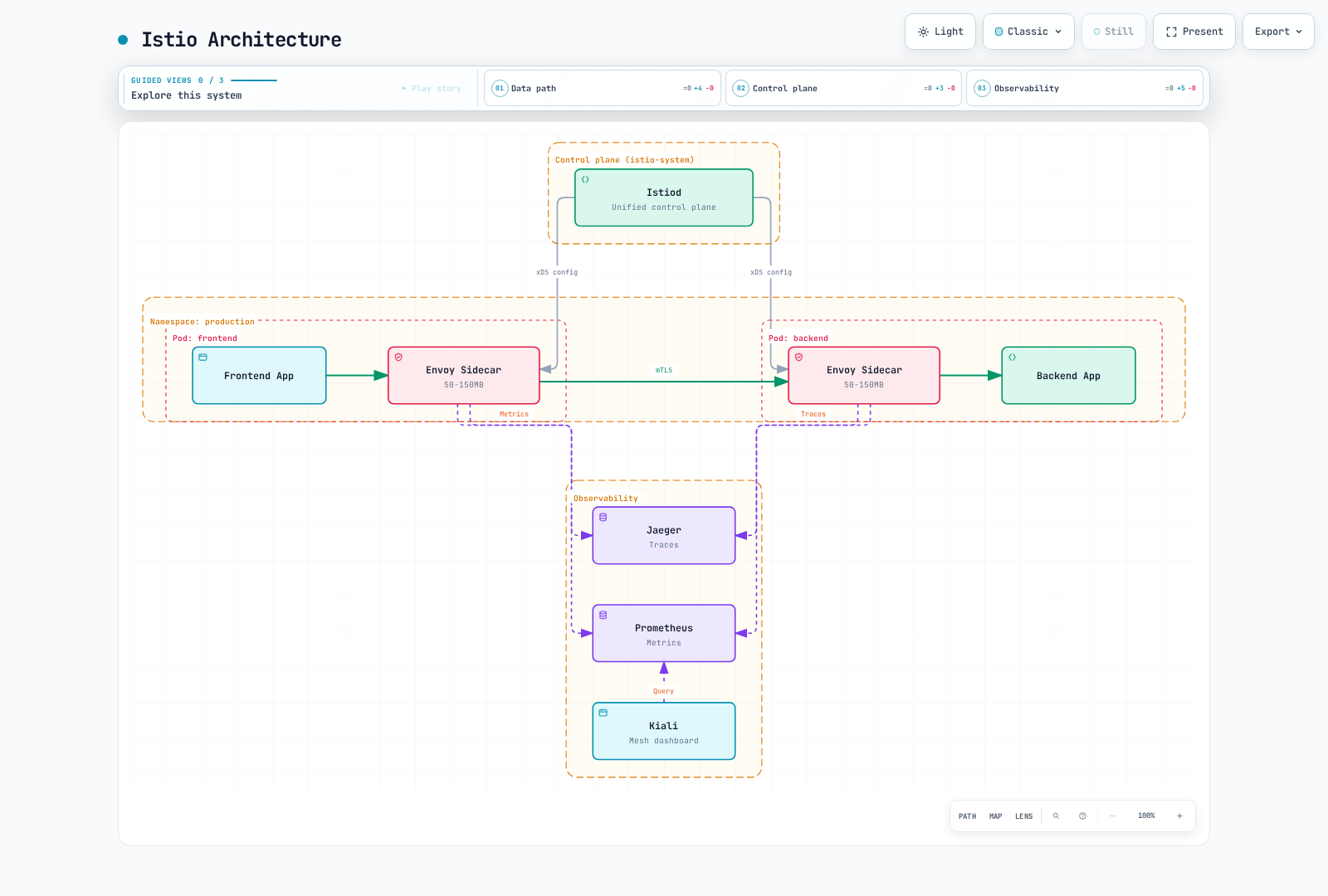
保持されている図は sidecar mode を示しています。その resource annotation は古い説明用の見積もりであり、計測済みの default や現在の capacity 推奨ではありません。Kiali は telemetry/backend を照会しますが、trace collector 自体ではありません。
ambient capture は、eBPF capture layer ではなく、文書化された Linux network-namespace/iptables の仕組みを使用します。ambient の core 機能は 1.24 で GA になりましたが、個々の機能と multicluster topology には別個の status があります。sidecar の削除、workload の enroll、waypoint 通過の必須化は別の操作です。namespace label だけでは、すべての workload を安全に移行したり、97–98% の節約を保証したりできません。
VPC Lattice
VPC Lattice は、service と resource 向けの AWS-managed application networking です。その service model には、サポートされる IP/instance、Lambda、ALB target 向けの listener、rule、target group が含まれます。ECS/EKS integration は該当する target を管理します。resource configuration/resource gateway は、TCP connectivity を含む別の private resource-access model を提供します。
service network は論理的な association/access boundary であり、sidecar や Pod-level identity ではありません。client は service-network VPC association または service-network VPC endpoint を使用できます。endpoint path は PrivateLink によって提供されます。すべての Lattice data path や data plane 全体を単に「AWS PrivateLink」と表現するのは不正確です。
VPC association と endpoint association は address/connectivity の動作が異なります。service-network endpoint は、AWS 外の client を含め、peering、Transit Gateway、Direct Connect、VPN 経由で到着するサポート対象 traffic を受け入れられます。AWS service 自体は AWS で運用されます。これは Lattice を別の cloud に deployment することではありません。
| 観点 | Istio | VPC Lattice |
|---|---|---|
| Data plane | Sidecar または ambient component と、選択した gateway | Managed service/resource networking と設定済み target/endpoint |
| Identity | Workload mesh identity と設定済み application/JWT policy | 有効化時の Service IAM/SigV4 authorization。resource access には別個の control |
| 運用 | Control/proxy lifecycle、certificate、capacity、policy、telemetry | AWS が service を運用。ただし user は IAM、DNS、association、target、controller、quota、application を引き続き管理 |
| プラットフォーム | サポート対象 Kubernetes/VM deployment、mode 固有の要件 | サポート対象 AWS target type と文書化された client/network path |
| コスト | 実際の infrastructure、telemetry、support、engineering | 適用される service/resource/traffic charge と application infrastructure、log、engineering |
「required sidecar なし」は deployment の特性であり、latency、CPU、signing/controller 作業、または infrastructure 総コストがゼロである根拠ではありません。
トラフィック管理
重み付きおよび条件付きルーティング
Istio は HTTP request property に一致させ、label 付き subset に route できます。backend Service と一致する v1/v2 workload は、mesh-demo にすでに存在している必要があります。
apiVersion: networking.istio.io/v1
kind: VirtualService
metadata:
  name: backend-canary
  namespace: mesh-demo
spec:
  hosts:
  - backend
  http:
  - match:
    - headers:
        x-release:
          exact: canary
    route:
    - destination:
        host: backend
        port:
          number: 8080
        subset: v2
      weight: 100
    retries:
      attempts: 0
  - route:
    - destination:
        host: backend
        port:
          number: 8080
        subset: v1
      weight: 90
    - destination:
        host: backend
        port:
          number: 8080
        subset: v2
      weight: 10
    retries:
      attempts: 0
---
apiVersion: networking.istio.io/v1
kind: DestinationRule
metadata:
  name: backend
  namespace: mesh-demo
spec:
  host: backend
  trafficPolicy:
    loadBalancer:
      simple: LEAST_REQUEST
    connectionPool:
      tcp:
        maxConnections: 100
      http:
        http1MaxPendingRequests: 50
        http2MaxRequests: 100
        maxRequestsPerConnection: 2
    outlierDetection:
      consecutive5xxErrors: 5
      interval: 30s
      baseEjectionTime: 60s
      maxEjectionPercent: 50
      minHealthPercent: 50
  subsets:
  - name: v1
    labels:
      version: v1
  - name: v2
    labels:
      version: v2
route は mesh retry を明示的に無効にします。resource limit は説明用です。maxRequestsPerConnection: 2 は意図して reuse を制限しており、一般的な performance 推奨ではありません。outlier detection は proxy が自身の upstream endpoint に対して評価します。minHealthPercent は panic/fail-open threshold であり、少なくともその割合が healthy のままである保証ではありません。
Lattice の HTTP/HTTPS listener rule は method、header、path matching をサポートします。この完全な CreateRule input は、以前の不足していた service/name と不正な pathMatch の例を置き換えます。
{
  "serviceIdentifier": "svc-0123456789abcdef0",
  "listenerIdentifier": "listener-0123456789abcdef0",
  "name": "api-canary",
  "priority": 10,
  "match": {
    "httpMatch": {
      "method": "GET",
      "pathMatch": {
        "caseSensitive": true,
        "match": {
          "prefix": "/api/v1/"
        }
      }
    }
  },
  "action": {
    "forward": {
      "targetGroups": [
        {
          "targetGroupIdentifier": "tg-0123456789abcdef0",
          "weight": 90
        },
        {
          "targetGroupIdentifier": "tg-0123456789abcdef1",
          "weight": 10
        }
      ]
    }
  }
}
rule.json として保存し、identifier を既存の service/listener と 2 つの eligible target group に置き換え、作成前に rule 名と priority が未使用であることを確認します。
AWS_REGION=us-east-1
aws vpc-lattice create-rule --region "$AWS_REGION" --cli-input-json file://rule.json
数値 priority が小さいほど先に評価されます。ネストされた pathMatch.match.prefix 形式が必要です。表示した rule は /api/v1/ 配下の GET に一致します。これはすべての Istio match や authentication policy の完全な同等物ではありません。weight は version を deployment または scale しません。AWS controller とこの CLI 例に、同じ rule/target の競合する ownership を持たせないでください。
Lattice は round-robin target selection を文書化しています。これは target group 間の weight とは別です。API は、この例で以前主張された「least connections」の選択を公開していません。
ミラーリングと障害
隔離された read-only mirror 実験では、別の VirtualService を使用します。
apiVersion: networking.istio.io/v1
kind: VirtualService
metadata:
  name: backend-mirror
  namespace: mesh-demo
spec:
  hosts:
  - backend
  http:
  - match:
    - method:
        exact: GET
      uri:
        prefix: /api/v1/
    route:
    - destination:
        host: backend
        port:
          number: 8080
        subset: v1
      weight: 100
    mirror:
      host: backend
      port:
        number: 8080
      subset: v2
    mirrorPercentage:
      value: 10
    retries:
      attempts: 0
  - route:
    - destination:
        host: backend
        port:
          number: 8080
        subset: v1
      weight: 100
    retries:
      attempts: 0
一致する GET request だけが mirror され、他の request は mirror なしで v1 に送られます。shadow response は primary client response ではありません。また endpoint が真に read-only でなければ、重複 request が side effect を作る可能性があります。destination version と capacity は存在している必要があります。
隔離された fault 実験では、意図的な request marker を使用できます。
apiVersion: networking.istio.io/v1
kind: VirtualService
metadata:
  name: backend-fault-lab
  namespace: mesh-demo
spec:
  hosts:
  - backend
  http:
  - match:
    - method:
        exact: GET
      headers:
        x-fault-lab:
          exact: enabled
    fault:
      delay:
        percentage:
          value: 10
        fixedDelay: 5s
      abort:
        percentage:
          value: 5
        httpStatus: 503
    route:
    - destination:
        host: backend
        port:
          number: 8080
        subset: v1
      weight: 100
  - route:
    - destination:
        host: backend
        port:
          number: 8080
        subset: v1
      weight: 100
    retries:
      attempts: 0
marker は authorization ではありません。test workload と caller の scope を限定してください。同じ route の fault injection と retry/timeout の動作は互換な test ではありません。どの proxy が error を生成するかを観察し、生の outcome と retry 後の outcome を個別に測定します。
確認済みの Lattice RuleAction API は forwarding または fixed response を提供しますが、Istio 同等の mirror や割合 delay/abort action はありません。fixed response rule は割合 fault injection と同じではありません。application/proxy test mechanism またはサポートされる AWS FIS action には、それぞれ明示的な設計が必要です。「ALB + Lambda@Edge」は有効な built-in mirror 機能ではありません。Lambda@Edge は CloudFront event で実行されます。
ヘルスチェックと障害処理
この CreateTargetGroup input は、既存の非 mesh HTTP backend と、指定 VPC 内の実際の /health endpoint を前提とします。security の例にある STRICT Istio backend ではありません。
{
  "name": "backend-v1",
  "type": "IP",
  "config": {
    "port": 8080,
    "protocol": "HTTP",
    "protocolVersion": "HTTP1",
    "vpcIdentifier": "vpc-0123456789abcdef0",
    "ipAddressType": "IPV4",
    "healthCheck": {
      "enabled": true,
      "protocol": "HTTP",
      "protocolVersion": "HTTP1",
      "port": 8080,
      "path": "/health",
      "healthCheckIntervalSeconds": 30,
      "healthCheckTimeoutSeconds": 5,
      "healthyThresholdCount": 2,
      "unhealthyThresholdCount": 3,
      "matcher": {
        "httpCode": "200"
      }
    }
  }
}aws vpc-lattice create-target-group --region "$AWS_REGION" --cli-input-json file://target-group.jsonfile には、実際の値を含む表示済みの完全な input が必要です。health check は healthCheckIntervalSeconds と healthCheckTimeoutSeconds を伴い config 内に置きます。この operation に top-level の --health-check flag はありません。作成後に実際のサポート対象 target を register します。EKS Pod IP lifecycle は、恒久的な手書き Pod IP ではなく、通常は適切な AWS Gateway API Controller により管理されるべきです。
Lattice は自動的に healthy target を使用します。group 内のすべての target が unhealthy である場合、fail open してそれらに route します。単に手動削除を待つわけではありません。health check は application を修復しません。Lattice health routing は Istio の per-proxy connection-pool および outlier control とは異なります。
Service idleTimeoutSeconds は 60~600 秒で設定可能です。これは per-route request timeout や retry budget と同じ control ではありません。一般的な勝者を決めつけるのではなく、選択した HTTP、gRPC、TLS path の connection/request limit と failure behavior を test してください。
セキュリティと Identity
Istio: 意図する条件をまとめて要求する
apiVersion: security.istio.io/v1
kind: PeerAuthentication
metadata:
  name: backend-strict
  namespace: mesh-demo
spec:
  selector:
    matchLabels:
      app: backend
  mtls:
    mode: STRICT
---
apiVersion: security.istio.io/v1
kind: RequestAuthentication
metadata:
  name: backend-jwt
  namespace: mesh-demo
spec:
  selector:
    matchLabels:
      app: backend
  jwtRules:
  - issuer: https://issuer.example.com
    jwksUri: https://issuer.example.com/.well-known/jwks.json
    audiences:
    - api.example.com
---
apiVersion: security.istio.io/v1
kind: AuthorizationPolicy
metadata:
  name: backend-access
  namespace: mesh-demo
spec:
  selector:
    matchLabels:
      app: backend
  action: ALLOW
  rules:
  - from:
    - source:
        principals:
        - cluster.local/ns/mesh-demo/sa/frontend
        requestPrincipals:
        - https://issuer.example.com/*
    to:
    - operation:
        methods:
        - GET
        - POST
        paths:
        - /api/v1/*
        ports:
        - '8080'
    when:
    - key: request.auth.claims[role]
      values:
      - admin
issuer/JWKS/audience は明示的な identity-provider placeholder であり、caller は実際の frontend ServiceAccount identity を持つ必要があります。同一の ALLOW rule は、mesh principal、その issuer の JWT principal、許可された method/path/port、admin claim をすべて要求します。個別の ALLOW policy は OR で結合されるため、両方の check をまとめて要求しません。RequestAuthentication 単独では JWT を要求せず、生の user-role header は認証済み identity ではありません。workload を対象とする他の ALLOW policy も確認してください。別の一致する grant が access を追加できるためです。
certificate rotation は issuer lifetime と proxy/CA 設定に従います。共通の 15 分 renewal interval はありません。external CA integration には、実際にサポートされる issuer path が必要です。port-level mTLS setting は workload port を参照し、proxy mode によって異なります。main application port 8080 を plaintext の「metrics exception」と label 付けすると、この security contract を壊す可能性があります。
Lattice: TLS 境界と Service Authorization
この CreateListener input は、既存で ready な service と target group 向けに HTTPS termination を作成します。
{
  "serviceIdentifier": "svc-0123456789abcdef0",
  "name": "https-main",
  "protocol": "HTTPS",
  "port": 443,
  "defaultAction": {
    "forward": {
      "targetGroups": [
        {
          "targetGroupIdentifier": "tg-0123456789abcdef0",
          "weight": 100
        }
      ]
    }
  }
}aws vpc-lattice create-listener --region "$AWS_REGION" --cli-input-json file://listener.json生成された service DNS name には AWS-managed certificate があります。custom domain には文書化された certificate/domain setup が必要です。front-end HTTPS は backend HTTPS や Istio SPIFFE mTLS を意味しません。target-group protocol は別の選択です。Lattice が target への HTTPS を確立する場合、文書化された動作では target certificate を検証しません。これを application-level peer-certificate authentication と表現しないでください。
TLS_PASSTHROUGH は、Lattice で termination せずに application 独自の TLS/mTLS を運べます。custom-domain/SNI と TCP-target 設定が必要で、default forwarding rule のみが許可され、connection は 10 分に制限され、anonymous auth-policy principal のみをサポートします。Lambda target はこの path でサポートされません。暗号化された stream に対する HTTP IAM/header policy inspection は提供しません。
正しい IAM Auth Policy
vpc-lattice-svcs:Invoke、service ARN と path、明示的に選択した role を使用します。service/network auth policy の例は次のとおりです。
{
  "Version": "2012-10-17",
  "Statement": [
    {
      "Effect": "Allow",
      "Principal": {
        "AWS": "arn:aws:iam::123456789012:role/LatticeClient"
      },
      "Action": "vpc-lattice-svcs:Invoke",
      "Resource": "arn:aws:vpc-lattice:us-east-1:123456789012:service/svc-0123456789abcdef0/api/v1/*",
      "Condition": {
        "StringEquals": {
          "vpc-lattice-svcs:RequestMethod": [
            "GET",
            "POST"
          ]
        }
      }
    }
  ]
}
例の ARN を置き換えた後、auth policy を auth-policy.json として保存します。caller role には別途、対応する identity-based permission が必要です。
{
  "Version": "2012-10-17",
  "Statement": [
    {
      "Effect": "Allow",
      "Action": "vpc-lattice-svcs:Invoke",
      "Resource": "arn:aws:vpc-lattice:us-east-1:123456789012:service/svc-0123456789abcdef0/api/v1/*",
      "Condition": {
        "StringEquals": {
          "vpc-lattice-svcs:RequestMethod": [
            "GET",
            "POST"
          ]
        }
      }
    }
  ]
}
例の ARN を置き換え、有効化されたすべての service-network および service auth policy が request を許可することを確認してください。どこかの explicit deny が優先されます。AWS_IAM は評価を有効化します。authType が NONE の間に attachment された policy は inactive です。Wildcard Principal と SourceVpc だけでは anonymous traffic を許可できるため、IAM authentication の証明にはなりません。
API operation は PutAuthPolicy です。埋め込み改行なしで complete CLI input 内の compact policy string を保持するには、次を使用します。
: "${SERVICE_ID:?Set the actual service ID}"
jq -n --arg resource "$SERVICE_ID" --slurpfile policy auth-policy.json   '{resourceIdentifier:$resource, policy:($policy[0] | tojson)}' > put-auth-policy.json
aws vpc-lattice put-auth-policy --region "$AWS_REGION"   --cli-input-json file://put-auth-policy.json
これは存在しない create-auth-policy/allowedPrincipals syntax を置き換えます。設定を適用する management role は、service を invoke する workload role とは異なります。application またはサポート対象 signing component は、文書化された SigV4 path と workload credential を使って実際の request に署名する必要があります。TLS setting だけでは signature は生成されません。署名済み request component への forwarding change は署名を無効にする可能性があります。保持するか、意図した transformation の後で署名してください。
Lattice authorization は L4/service name に限定されません。文書化された condition には、principal/VPC/service context に加えて method、path、header、query string が含まれます。protocol と anonymous caller の可用性は異なります。これらの service auth policy は、service network 内の resource configuration を対象にしません。
現在の WAF AssociateWebACL resource list には Lattice service/network は含まれません。サポート対象 WAF component は別途設計された path の一部になり得ますが、古い図の直接的な「Lattice WAF integration」という主張は正当化されません。IAM、WAF、network isolation、application authorization は別々の control のままです。
オブザーバビリティ
Istio Metrics と Trace
実際の metric family、label、1 つの reporter を使用します。example backend では、total RPS、5xx/zero-status fraction、ミリ秒単位の p95 latency を個別に query できます。
sum(rate(istio_requests_total{reporter="source",destination_service_name="backend",destination_service_namespace="mesh-demo"}[5m]))

(sum(rate(istio_requests_total{reporter="source",destination_service_name="backend",destination_service_namespace="mesh-demo",response_code=~"5..|0"}[5m])) or vector(0))
/
sum(rate(istio_requests_total{reporter="source",destination_service_name="backend",destination_service_namespace="mesh-demo"}[5m]))

histogram_quantile(0.95, sum by (le) (rate(istio_request_duration_milliseconds_bucket{reporter="source",destination_service_name="backend",destination_service_namespace="mesh-demo"}[5m])))
numerator fallback は、実際の traffic が存在する場合の 5xx series 不在を処理します。denominator がない場合は不在のままであり、idle traffic は health の根拠になりません。metric label と scrape scope を確認してください。proxy connection/outlier gauge と counter は別の Envoy family です。固定の「50 default metrics」数や共通の cache/retry 解釈を作り出さないでください。
現在の Telemetry configuration は metric override/tagOverrides と宣言済み tracing provider を使用します。
apiVersion: install.istio.io/v1alpha1
kind: IstioOperator
spec:
  meshConfig:
    enableTracing: true
    extensionProviders:
    - name: otel-tracing
      opentelemetry:
        service: otel-collector.observability.svc.cluster.local
        port: 4317
---
apiVersion: telemetry.istio.io/v1
kind: Telemetry
metadata:
  name: backend-observability
  namespace: mesh-demo
spec:
  selector:
    matchLabels:
      app: backend
  metrics:
  - providers:
    - name: prometheus
    overrides:
    - match:
        metric: REQUEST_COUNT
      tagOverrides:
        request_method:
          value: request.method
  tracing:
  - providers:
    - name: otel-tracing
    randomSamplingPercentage: 10
    customTags:
      environment:
        literal:
          value: lab
IstioOperator object は、レビュー済みの既存 installation setting と merge する istioctl への input です。live Istio ConfigMap を上書きしたり、他の extension provider を破棄したりしないでください。Collector Service は 4317 で実際に OTLP gRPC を受け入れ、動作する backend/exporter pipeline を持つ必要があります。これらの object により install されるわけではありません。Telemetry の provider name は MeshConfig と一致する必要があります。
metric dimension の追加は、任意の business metric の作成と同じではありません。cardinality を制限し、必要に応じて application metric を収集し、互換性のある exemplar/tracing support を設定してください。end-to-end trace には application context propagation、sampling、collector/backend delivery が必要です。Istio の installation により「すべての backend」や automatic baggage propagation が保証されるわけではありません。
VPC Lattice Metrics
文書化された CloudWatch namespace は、大文字小文字も含めて AWS/VpcLattice です。service dimension には Service と AvailabilityZone が、target-group dimension には TargetGroup と AvailabilityZone が含まれます。実際に発行された metric/dimension の組み合わせを discovery してください。
aws cloudwatch list-metrics --region "$AWS_REGION" --namespace AWS/VpcLattice --metric-name TotalRequestCount| 文書化された signal | 解釈 |
|---|---|
| TotalRequestCount | Request count。Sum が有用 |
| RequestTime | ミリ秒。文書化された service/target-group measurement boundary を伴う Average または percentile |
| HTTPCode_2XX_Count through HTTPCode_5XX_Count | 集計された HTTP response |
| HTTPCode_VpcLattice_403_Count and other documented granular codes | Lattice 生成 response。access-log reason と併せて有用 |
| Target-group connection metrics | Protocol 固有の connection count/error/byte。application request metric とは別 |
これらの metric は、resource が traffic を受け取った後に 1 分ごとに発行されます。5 分 query period は集計の選択です。この namespace に HealthyTargetCount や TargetResponseTime のような ALB metric name があると想定せず、target health には list-targets と health-check information を使用してください。
現在の 1 時間 query では、UTC timestamp を一度だけ生成します。この Bash/Python snippet は AWS を呼び出しません。
read -r START_TIME END_TIME START_EPOCH END_EPOCH < <(python3 - <<'PYTIME'
from datetime import datetime, timedelta, timezone
end = datetime.now(timezone.utc).replace(microsecond=0)
start = end - timedelta(hours=1)
print(start.strftime('%Y-%m-%dT%H:%M:%SZ'),
      end.strftime('%Y-%m-%dT%H:%M:%SZ'),
      int(start.timestamp()), int(end.timestamp()))
PYTIME
)
list-metrics から Service-only metric を選択し、その正確な Service dimension value を copy します。AZ 固有 metric を選択する場合は、AZ を落とすのではなく、返された完全な dimension set を含めます。
: "${SERVICE_DIMENSION:?Copy the exact Service dimension value from list-metrics}"
aws cloudwatch get-metric-statistics --region "$AWS_REGION"   --namespace AWS/VpcLattice --metric-name TotalRequestCount   --dimensions "Name=Service,Value=$SERVICE_DIMENSION"   --start-time "$START_TIME" --end-time "$END_TIME"   --period 60 --statistics Sum
missing metric は自動的に zero traffic や healthy service を意味しません。Lattice の AWS namespace には発行済み service metric が含まれます。application は別途 custom metric を発行したり、log metric を導出したりできます。したがって「custom metric は不可能」は有用な一般的主張ではありません。
Access Log と Request Correlation
Lattice は access log を CloudWatch Logs、S3、Data Firehose に配信できます。delivery permission、destination policy、retention、charge を設定する必要があり、delivery latency は best effort です。これは文書化された field の例示であり、取得した production log ではありません。
{
  "startTime": "2025-01-15T12:34:56Z",
  "serviceArn": "arn:aws:vpc-lattice:us-east-1:123456789012:service/svc-0123456789abcdef0",
  "requestMethod": "GET",
  "requestPath": "/api/v1/items",
  "protocol": "HTTP/1.1",
  "responseCode": 200,
  "duration": 12,
  "requestId": "example-request-001"
}
その他の文書化された field には authDeniedReason、failureReason、callerPrincipal/resolvedUser、target/source information があります。実際の log type を使用してください。resource-access log は別の TCP/resource path を示します。一般的な timestamp/requestProtocol/responseCodeDetails/requestHeaders/traceparent field を想定しないでください。
requestId は client が指定できる x-amzn-requestid と相関します。認証済み identity ではありません。application により propagate された W3C trace header は、保証された native log field や自動生成された distributed trace とは別です。application instrumentation は適切な tracing backend を使用でき、X-Ray に制限されません。
設定済み log group では、両方の time bound を使用し、query status/result を検査します。
: "${LATTICE_LOG_GROUP:?Set the configured CloudWatch log group}"
QUERY_ID=$(aws logs start-query --region "$AWS_REGION"   --log-group-name "$LATTICE_LOG_GROUP"   --start-time "$START_EPOCH" --end-time "$END_EPOCH"   --query-string 'fields @timestamp, requestId, requestMethod, requestPath, responseCode, authDeniedReason, failureReason | filter responseCode >= 500 | sort @timestamp desc | limit 20'   --query queryId --output text)
aws logs get-query-results --region "$AWS_REGION" --query-id "$QUERY_ID"
query は Scheduled または Running の可能性があります。直後の空の result は error が発生しなかった証明ではありません。調査対象に合わせて access と time range を絞ります。Kiali/Grafana または CloudWatch dashboard には、実際の data source と access configuration が必要です。dashboard 名は同等の可視性を証明しません。
インストールと運用
プラットフォームを選択して検証する
Istio 1.31 は Kubernetes 1.32–1.37 をサポートします。実際の managed platform と必要な proxy mode の共通部分を使用してください。built-in production profile はなく、古い istio.io/injection label は sidecar injection を有効にしません。現在の artifact、revision label、prerequisite については installation guide に従ってください。demo addon は production monitoring/HA stack ではありません。
Lattice では、service/resource model、実際の client association または endpoint path、target lifecycle、listener protocol、authentication boundary を定義します。service は Lambda function である必要はなく、mesh 化された EKS application は別途サポートされる integration を通じて Lambda を呼び出せます。Lambda 自体は Istio sidecar を host できません。これは EKS-plus-Lambda architecture すべてが Istio と互換性がないと宣言することとは異なります。
完全な service setup には、owner に適した順序で次が必要です。
- 既存の network connectivity、DNS、security group、および認可済み management/client role。
- service network と、意図した client VPC association または service-network endpoint。
- service と network/service association、および意図した authentication mode。
- target group、サポート対象 target registration、検証済み health behavior。
- listener/rule と domain/certificate configuration。
- 必要なすべての auth policy と caller identity permission、および authenticated request 用の動作する signer。
- log/metric、実際の request/denial test、および resource lifecycle/cleanup plan。
上記の operation input はこの workflow の一部をカバーします。prerequisite を作成したり readiness を証明したりはしません。後続 operation の前に、asynchronous resource status と既存 ownership を確認してください。Kubernetes では、古い Pod-IP registration を維持する代わりに適切な controller を使用します。managed service update によって、controller、SDK、IAM、DNS、application compatibility の責任がなくなるわけではありません。
Istio Upgrade と Ambient Enrollment
install 済み release からのサポート対象 upgrade path を使用し、レビュー済みの完全な values、trust、policy configuration を保持してください。古い 1.23→1.24 図は履歴上のものであり、現在の target ではありません。revision handoff は任意の minor version を飛ばす根拠にはなりません。
authoritative installation/GitOps configuration と関連 custom resource を backup します。kubectl get all はすべての object を含まず、完全に復元可能な backup ではありません。実際の namespace/revision/Pod override を調べ、workload cohort を段階的に導入し、readiness、traffic、certificate、telemetry を確認し、transition が受け入れられるまで rollback capacity を維持します。
すべての workload を force-restart したり、certificate error ごとに CA を再発行したり、routine cleanup として hard-coded shared webhook name を手動削除したりしないでください。すべての依存 proxy/gateway が移動したことを確認した後にのみ、release のサポート対象 retirement procedure を使用してください。control plane の削除は recovery option を変更します。rollback が永久に不可能であることの普遍的な証明ではありません。
ambient enrollment は application restart なしで sidecar-free workload を追加できますが、既存 sidecar の削除には workload replacement が必要です。ambient/CNI/ztunnel prerequisite と waypoint enrollment/security control は引き続き適用されます。Pod Ready count は常に 2/2 ではなく、native sidecar は initContainers の下に表現されることがあります。
実際の障害境界を診断する
| Layer | 選択した設計に関連する確認項目 |
|---|---|
| Application/target | Listening protocol/port、readiness、replica/endpoint、dependency、error |
| Mesh または Lattice routing | 実効 route、subset/target group、health/fail-open、timeout、resource status |
| Identity と policy | Certificate lifetime/trust、JWT または SigV4、適用されるすべての auth policy と IAM denial |
| Network/DNS | 正しい association/endpoint、route、security group/NetworkPolicy、実際の resolver path |
| Control/telemetry | Revision/controller state、API/config propagation、実際の metric、配信済み log |
Istio では proxy-status/config command と実際の workload log が有用です。proxy image に curl、tcpdump、shell が含まれると想定しないでください。必要な permission を持つサポート対象 debugging method を使用します。diagnostic archive を保護し、一時的な debug setting を復元してください。zero-replica backend は Deployment/endpoint の事実であり、Service.spec.replicas field ではありません。
Lattice では、次の read operation が実際の resource を調べます。
: "${SERVICE_NETWORK_ID:?Set the actual service-network ID}"
: "${TG_ID:?Set the actual target-group ID}"
aws vpc-lattice get-service --region "$AWS_REGION" --service-identifier "$SERVICE_ID"
aws vpc-lattice list-service-network-service-associations --region "$AWS_REGION"   --service-network-identifier "$SERVICE_NETWORK_ID"
aws vpc-lattice get-target-group --region "$AWS_REGION" --target-group-identifier "$TG_ID"
aws vpc-lattice list-targets --region "$AWS_REGION" --target-group-identifier "$TG_ID"
list-services は service-network filter を受け取りません。network analysis tool はサポート対象 network resource を調べます。Lattice service ID を EC2 network-insights destination として渡しても、完全な application/IAM diagnostic にはなりません。固定の 3-layer process、5 分 repair time、managed な「auto healing」の保証は、これらの command からは導かれません。
コストと履歴上の根拠
同じコスト境界を比較する
同じ application、availability requirement、network traffic、logging/metrics retention、engineering scope を両側に含めます。Lattice は application の EC2/EKS/ECS/Lambda compute の料金を支払ったり除去したりしません。managed networking bill だけを、Istio application fleet 全体と staff を含むものと比較することはできません。
以前の例には、複数の異なる問題がありました。
- 合計 24.5 vCPU をモデル化していました: application 10 + sidecar 10 + Istiod 1 + Prometheus 2 + Jaeger 1 + Kiali 0.5。4 vCPU の m5.xlarge node 5 台では reservation 前に 20 vCPU しか提供されません。他の制約を考慮する前でも、理想的な CPU 下限は 7 node です。
- 英語の line item 合計は $850 compute + $15 storage = $865 でしたが、韓国語テキストはサポートされない $10 の「latency/network」charge を加えて $875 としました。latency 自体は AWS billing unit ではありません。
- 元の Lattice の算術は $209 ×12 + $300 ×12 + $1,000 = $7,108 であり、$7,608 ではありません。setup-plus-operations 額は $5,100 ではなく $4,600 でした。
- それらの古い仮定だけを使うと、$209/month の infrastructure と $300/month の operations を 5 年、setup を一度だけ含めた額は、setup を含む年額を 5 回繰り返すのではなく $31,540 です。
- 韓国語の Istio 5 年数値は、その側だけに $50,000 の contingency を追加し、initial setup を繰り返し計上していました。これは一貫しない comparison boundary であり、製品固有の価格差の根拠ではありません。
古い $140/node-month、resource quantity、staffing estimate は、実証された quote や workload measurement のない仮説 input でした。Mi と MB も混同されていました。100 × 128 Mi は 12,800 Mi = 12.5 Gi であり、12.8 decimal GB ではありません。sidecar は Pod count を 2 倍にせず、解放された resource headroom が自動的に請求対象 node を削除するわけでもありません。
現在の日付付き Service Pricing 例
September 11, 2026 に確認した公式の US East (N. Virginia) service-pricing 例では、service-hour あたり $0.025、処理 GB あたり $0.025、文書化された per-service hourly allowance 後の request/connection charge が使用されています。service-network VPC association と service-network endpoint は追加料金なしと記載されています。resource configuration/resource endpoint には異なる pricing model があり、その $0.01/GB tier は service data-processing rate ではありません。この service-pricing model に古い別の service-network-hour charge を加えないでください。
明示的に仮説上の HTTP/HTTPS service workload については、次のとおりです。
| Input | 計算 | 月間 networking charge |
|---|---|---|
| Five services, 730 hours each | 5 ×730 ×$0.025 | $91.25 |
| これらの service における request/response を含む 10,000 billable GB | 10,000 ×$0.025 | $250.00 |
| 各 service が各時間で 300,000 request 以内に収まる | No requests above the hourly allowance | $0.00 |
| 記載 input の合計 | $91.25 +$250.00 | $341.25 |
その allowance を超える場合は、公開済みの $0.10/million rate を使用して service ごと、時間ごとに request charge を計算します。monthly-average RPS を使って burst-hour charge を消去しないでください。TLS-passthrough connection billing は別の counter です。すべての請求対象 service hop、実際の Region、application infrastructure、log、その他の関連 charge を含めます。これらは日付付きの説明用 input であり、quote、将来の価格保証、未計測の Istio fleet に対する節約の主張ではありません。
one-time setup/migration は recurring operation と分けてモデル化します。discounting、purchase commitment、予想 growth、不確実性、同等の HA/support requirement は multi-year comparison で重要です。以前の表から一般的な $42,000/year または $260,000/five-year の節約は確立されません。
履歴上の測定を正直に保持する
以前の performance section は Istio 1.24 context で two-node EKS、m5.xlarge、1,000-RPS test を主張しましたが、harness、raw sample、正確な EKS/patch/proxy version、対応する configuration は提供されませんでした。
| 元の未検証 result | Baseline | Istio 合計 | Lattice 合計 |
|---|---|---|---|
| p50 | 1.0 ms | 2.0 ms | 1.5 ms |
| p95 | 2.5 ms | 5.0 ms | 3.7 ms |
| p99 | 5.0 ms | 8.5 ms | 7.0 ms |
| Maximum RPS | 10,000 | 8,500 | 9,200 |
| CPU claim | 100% | 115% | 102% |
| Memory claim | 1 GB | 1.5 GB | 1.05 GB |
これらの値は、新しい 1.31 measurement ではなく、履歴上の未検証な主張です。sidecar の削除が latency/throughput 差全体を引き起こすことを証明しません。意味のある test は protocol、payload、TLS/authorization、placement、load、telemetry、failure behavior を一致させ、生の failure と retry で隠れた outcome を分離します。
元の匿名 customer story と、主張された re:Invent satisfaction survey には追跡可能な publication や methodology がありませんでした。migration、staffing、hybrid ownership に関する疑問を示唆することはできますが、測定済み success rate を示すことはできません。特定された CNCF 2024 Annual Survey は container challenge、project usage、service-mesh usage について尋ねています。主張された「40% Istio adoption failure」や列挙された failure-cause percentage を実証するものではありません。survey を引用する場合は、実際の question、sample、meaning を使用してください。
ハイブリッドおよびマルチクラウド設計
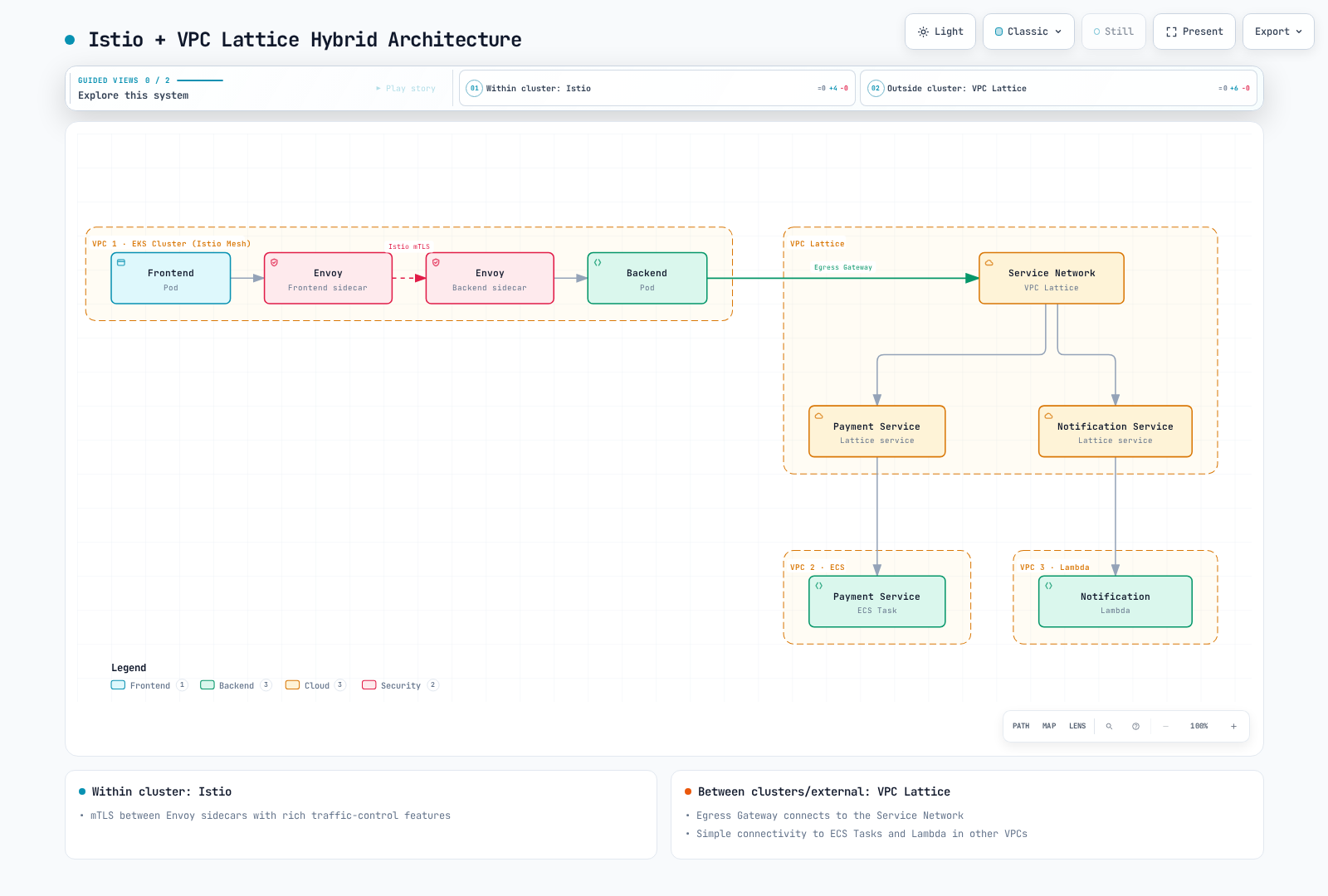
この図は高水準の option であり、完全な egress configuration ではありません。traffic が direct sidecar path を使うか、明示的に設定した egress gateway を使うかを決め、すべての TLS/identity boundary を定義してください。Lattice が STRICT backend への Istio SPIFFE mTLS を自動的に originate することはありません。意図的な ingress boundary は、意図した external path を authenticate し、downstream で mesh mTLS を使用できます。この場合 backend には元の IAM caller ではなく gateway identity が見えることがあります。
署名して HTTPS を開始する application では、payment.vpclattice.aws を作り出すのではなく、実際の Lattice service DNS name を discovery します。
aws vpc-lattice get-service --region "$AWS_REGION"   --service-identifier "$SERVICE_ID" > lattice-service.json
LATTICE_HOST=$(jq -er '.dnsEntry.domainName | select(type == "string" and length > 0)' lattice-service.json) || exit 1
jq -n --arg host "$LATTICE_HOST" '{
  apiVersion:"networking.istio.io/v1",kind:"ServiceEntry",
  metadata:{name:"payment-lattice",namespace:"mesh-demo"},
  spec:{hosts:[$host],location:"MESH_EXTERNAL",resolution:"DNS",
        ports:[{number:443,name:"https",protocol:"HTTPS"}]}
}' > lattice-service-entry.json
これは、workload の通常の configuration owner を通して review/apply する registry entry だけを作成します。Lattice を provision したり、egress-gateway traversal を強制したり、request に署名したり、IAM を bypass したりはしません。application HTTPS は sidecar には opaque であるため、HTTP VirtualService は以前の不完全な egress 例のように path を inspect できません。すでに暗号化された application stream の周囲に、別の SIMPLE TLS layer を追加しないでください。
service-network endpoint は、on-premises または他の接続済み network からサポート対象の entry path を提供できます。routing、DNS、security group、適用される service authorization が必要です。「AWS-operated」は AWS 外の client が分類上不可能であることを意味しません。また、global service network を作成したり、Region/cloud 間で application data を replicate したりするものでもありません。
migration では、API、identity、certificate trust、route、telemetry、recovery ownership を map します。namespace label の移動は、Lattice IAM から mesh identity への完全な変更ではありません。各固有の contract については、VPC Lattice guide、AWS integration、multicluster guide を参照してください。
選定基準
| 要件 | 判断の根拠 |
|---|---|
| Kubernetes/VM workload mesh | 必要な sidecar/ambient 機能、platform support、identity lifecycle、計測済みの operating capacity |
| AWS service/resource connectivity | サポート対象 target/resource type、実際の client path、auth/TLS model、owner responsibility |
| Fine-grained traffic behavior | feature-star score ではなく、正確な rule/filter API、protocol limit、retry、health、failure behavior |
| Strong security | bypass path を含むすべての termination point にわたる end-to-end identity/encryption と application authorization |
| Small team または迅速な delivery | 作り出された最小 staffing や固定 install-time threshold ではなく、実際の team の反復可能な workflow と support plan |
| Cost と performance | 同等 scope の bill、再現可能な load/failure measurement、明示的に日付付けされた仮定 |
| Hybrid/multicloud | product 名だけでなく、test 済み network/identity boundary と application/data recovery |
実際の workload で、範囲を限定した proof of concept を評価し、根拠を保持してください。「Istio は常に高価/複雑」も「Lattice は常に安価/安全」も、architecture だけからは導かれません。
公式リファレンス
- Istio supported releases、ambient、security、Telemetry API
- VPC Lattice components and responsibilities と network associations/endpoints
- CreateRule、RuleAction、CreateListener、CreateTargetGroup
- Target groups と health checks
- HTTPS listeners と TLS passthrough
- Auth policies、PutAuthPolicy、SigV4 requests
- Lattice metrics と access logs
- Lattice pricing、WAF association API、Lambda@Edge
- CNCF 2024 survey と original report、特に questions 22、32、47(pages 12、16、22)
- Service-mesh comparison、Istio architecture、ambient guide