Istio 用語集
レビュー済みバージョン: Istio 1.31.0 最終更新: October 12, 2026
この用語集では、Istio と Service Mesh に関連する主要な用語を、グループ化した参照セクションで整理しています。
参照言語: 以下の Architecture および DestinationRule セクションのリンクでは、メンテナンスされている英語ガイドを使用しています。ロケール翻訳がまだ同期されていない場合、これらのリンクから最新の参照情報を確認できます。
目次
A-C
AuthorizationPolicy
選択した workload または対象リソースに対し、ALLOW、DENY、CUSTOM、または AUDIT の動作を定義する Istio のセキュリティポリシーです。Authentication と authorization は別個のものであり、waypoint のポリシーでは targetRefs を使用します。
Control Plane
istiod により実装される、設定、検出、アイデンティティ管理のレイヤーです。アプリケーションのペイロードは istiod ではなく Data Plane の proxy を通過します。
Ambient Mode
Sidecar Proxy を使用せずに Service Mesh 機能を提供する Data Plane モードです。Istio 1.18 で alpha として初めて導入され、Istio 1.24 以降は一般提供されています。
機能:
- Sidecar container は不要
- node レベルで ztunnel を使用
- リソース効率の向上
- L4 と L7 機能の分離
関連ドキュメント: Ambient Mode
Certificate Authority (CA)
サービス間の mTLS 通信のために証明書を発行および管理する認証局です。
Istio での役割:
- Istiod の Citadel 機能が CA の役割を果たす
- SPIFFE ID に基づいて証明書を発行
- 証明書の自動更新(デフォルト TTL: 24 時間)
Circuit Breaker
システム全体への障害伝播を防ぐため、障害が発生したサービスへのリクエストを遮断するパターンです。
仕組み:
- Closed: 通常動作
- Open: 連続した障害の後にリクエストを遮断
- Half-Open: 一定時間後に一部のリクエストを許可
Istio 実装: Connection Pool の Circuit Breaker と endpoint ごとの outlier ejection では、この文字どおりの 3 状態マシンは公開されません。
apiVersion: networking.istio.io/v1
kind: DestinationRule
metadata:
  name: glossary-example-1
spec:
  host: reviews
  trafficPolicy:
    outlierDetection:
      consecutive5xxErrors: 5
      interval: 30s
baseEjectionTime: 30s関連ドキュメント: Circuit Breaker
Citadel
Istio 1.4 まで独立して存在していたセキュリティコンポーネントです。現在は Istiod に統合されています。
主な機能:
- Certificate Authority (CA) の管理
- SPIFFE ID の発行と管理
- X.509 証明書の生成と更新
現在の状態: Istio 1.5+ では Istiod 内の内部機能として存在
関連用語: Istiod, Certificate Authority
CDS (Cluster Discovery Service)
Envoy が upstream service(cluster)の設定を動的に受け取れるようにする xDS API の 1 つです。
提供される情報:
- Cluster 名とタイプ
- Load Balancing ポリシー
- Health Check 設定
- Circuit Breaker 設定
- TLS 設定
D-F
Data Plane
Service Mesh 内で実際のトラフィックを処理するレイヤーです。
Istio の Data Plane:
- Envoy Sidecar、または ambient の ztunnel と任意の L7 waypoint
- mesh に登録されたトラフィックを処理します。除外対象およびプロトコル上の制限が適用されます
- mTLS の暗号化/復号
- metric の収集
関連用語: Control Plane, Envoy
DestinationRule
VirtualService によってルーティングされるトラフィックのポリシーを定義する Istio CRD です。
主な機能:
- Subset の定義(version、region など)
- Load Balancing ポリシー
- Connection Pool 設定
- Circuit Breaker 設定
- TLS 設定
apiVersion: networking.istio.io/v1
kind: DestinationRule
metadata:
  name: reviews
spec:
  host: reviews
  subsets:
  - name: v1
    labels:
      version: v1
  - name: v2
    labels:
version: v2関連ドキュメント: DestinationRule
eBPF (Extended Berkeley Packet Filter)
Linux kernel 内でプログラムを安全に実行できるようにする技術です。
Istio は、Cilium などの eBPF ベースの primary CNI と共存できます。Istio CNI はリダイレクトを設定する別個の chained plugin/node agent です。ambient は eBPF を必要とせず、primary CNI を置き換えません。
利点:
- 低オーバーヘッド
- kernel レベルの処理
- 動的なプログラミング機能
関連用語: Ambient Mode, iptables
EDS (Endpoint Discovery Service)
cluster 内の実際の endpoint(Pod IP)を動的に提供する xDS API の 1 つです。
提供される情報:
- Endpoint IP アドレスと port
- Health Status
- Load Balancing の weight
- locality 情報
例:
{
  "cluster_name": "outbound|9080||reviews",
  "endpoints": [
    {
      "lb_endpoints": [
        {"endpoint": {"address": {"socket_address": {"address": "10.244.1.5", "port_value": 9080}}}},
        {"endpoint": {"address": {"socket_address": {"address": "10.244.2.8", "port_value": 9080}}}}
      ]
    }
  ]
}Envoy Proxy
Istio の Data Plane を構成する高性能な L7 proxy です。
沿革:
- 2016 年に Lyft の Matt Klein が開発
- 2017 年に CNCF Incubating project へ
- 2018 年に CNCF Graduated project へ
主な機能:
- C++ で書かれた高性能 proxy
- xDS API による動的設定
- HTTP/1.1、HTTP/2、gRPC のサポート
- 豊富な observability
コンポーネント:
- Listener: Port の listen
- Filter: request/response の処理
- Router: routing の決定
- Cluster: upstream service
関連ドキュメント: Architecture - Envoy Proxy
G-I
Galley
Istio 1.4 まで独立して存在していた設定検証コンポーネントです。現在は Istiod に統合されています。
主な機能:
- Istio 設定の検証
- Kubernetes resource の処理
- 設定デプロイ前のエラーチェック
現在の状態: Istio 1.5+ では Istiod 内の内部機能として存在
関連用語: Istiod
Gateway
Service Mesh に流入する外部トラフィックの entry point を定義する Istio CRD です。
種類:
- Ingress Gateway: 外部から内部へのトラフィック
- Egress Gateway: 内部から外部へのトラフィック
apiVersion: networking.istio.io/v1
kind: Gateway
metadata:
  name: my-gateway
spec:
  selector:
    istio: ingressgateway
  servers:
  - port:
      number: 80
      name: http
      protocol: HTTP
    hosts:
- "example.com"関連ドキュメント: Gateway and VirtualService
gRPC
Google が開発した高性能 RPC(Remote Procedure Call)framework です。
Istio との関係:
- xDS API は gRPC ベース
- Istiod から Envoy への通信に使用
- HTTP/2 ベース(multiplexing をサポート)
利点:
- 双方向 streaming
- 低レイテンシ
- Protocol Buffers を使用
関連用語: xDS
Identity
Service Mesh 内における workload のアイデンティティを表します。
Istio の Identity:
- SPIFFE ID 形式を使用
- Kubernetes ServiceAccount に基づく
- X.509 証明書によって証明
例:
spiffe://cluster.local/ns/default/sa/reviewsiptables
Linux でネットワークトラフィックを制御する firewall tool です。
Istio での役割:
- istio-init または Istio CNI node agent がトラフィックのリダイレクトを設定
- すべての Pod トラフィックを Envoy にリダイレクト
- NAT table(PREROUTING、OUTPUT chain)を使用
簡略化したルール(説明用であり、インストールスクリプトではありません):
# Outbound: All traffic except Envoy -> 15001
iptables -t nat -A OUTPUT -p tcp -m owner ! --uid-owner 1337 -j REDIRECT --to-port 15001

# Inbound: All traffic -> 15006
iptables -t nat -A PREROUTING -p tcp -j REDIRECT --to-port 15006セットアップの代替手段: Istio CNI は node レベルで特権的なネットワークセットアップを実行します。
関連ドキュメント: Architecture - iptables
Istiod
Istio 1.5+ における統合された Control Plane コンポーネントです。
統合された機能:
- Pilot: Service Discovery、Traffic Management
- Citadel: Certificate Authority、Identity
- Galley: Configuration Validation
実行方法:
- 単一の Go binary:
pilot-discovery - すべての機能が単一 process 内で実行
- デフォルト port: 15012(xDS)、15017(Webhook)
利点:
- 複雑さの削減
- 運用の簡素化
- リソース効率
関連ドキュメント: Architecture - Istiod
J-L
LDS (Listener Discovery Service)
Envoy が listen する port と filter chain を動的に受け取れるようにする xDS API の 1 つです。
提供される情報:
- Listener の address と port
- Protocol(HTTP、TCP)
- Filter chain 設定
- TLS 設定
Istio のデフォルト Listener:
0.0.0.0:15001: outbound TCP0.0.0.0:15006: inbound TCP0.0.0.0:15021: Health Check0.0.0.0:15090: Prometheus metric
Locality-aware Load Balancing
locality(Region、Zone)情報を考慮する Load Balancing 手法です。
優先順位:
- 同じ Zone 内の endpoint
- 同じ Region 内の異なる Zone
- 異なる Region
設定例:
apiVersion: networking.istio.io/v1
kind: DestinationRule
metadata:
  name: glossary-example-2
spec:
  host: reviews
  trafficPolicy:
    loadBalancer:
      localityLbSetting:
        enabled: true
        distribute:
        - from: us-west/zone-1a/*
          to:
            "us-west/zone-1a/*": 80
"us-west/zone-1b/*": 20関連ドキュメント: Zone Aware Routing
M-O
Mixer
Istio 1.4 まで存在していた policy および telemetry コンポーネントです。
主な機能:
- policy enforcement(Rate Limiting、Access Control)
- telemetry の収集
削除された理由:
- パフォーマンスのオーバーヘッド(リクエストごとに Mixer 呼び出し)
- 複雑な architecture
現在の状態: 1.5 への移行中に非推奨となり、残っていた Mixer 機能は 1.8 で削除
関連用語: Istiod
mTLS (Mutual TLS)
client と server が相互に認証する双方向 TLS 通信方式です。
Istio の mTLS:
- 証明書の自動発行と更新
- SPIFFE ID ベースの authentication
- TLS cipher はネゴシエートされ、AES-256-GCM に固定されません
モード:
- STRICT: mTLS のみ許可
- PERMISSIVE: mTLS + plaintext を許可(移行用)
- DISABLE: sidecar mode で Istio transport mTLS を無効化。ambient では未サポート
apiVersion: security.istio.io/v1
kind: PeerAuthentication
metadata:
  name: default
spec:
  mtls:
mode: STRICT関連ドキュメント: mTLS
Outlier Detection
異常な動作を示す endpoint を自動的に除外する機能です。
検出条件:
- 連続エラー数
- エラー率
- 接続障害/timeout。latency 単独は outlier ejection のしきい値ではありません
apiVersion: networking.istio.io/v1
kind: DestinationRule
metadata:
  name: glossary-example-3
spec:
  host: reviews
  trafficPolicy:
    outlierDetection:
      consecutive5xxErrors: 5
      interval: 30s
      baseEjectionTime: 30s
maxEjectionPercent: 50関連ドキュメント: Outlier Detection
P-R
Downstream
Envoy の観点では、リクエストを送信する側を指します。つまり、Envoy への接続を開始する client です。
Envoy の Downstream:
- Envoy に入ってくる connection(inbound)
- リクエストを送信する client
- Listener が受信する connection
トラフィックフロー:
Downstream (Client) -> Envoy Proxy -> Upstream (Backend)シナリオ例:
1. Sidecar Mode - Outbound Request
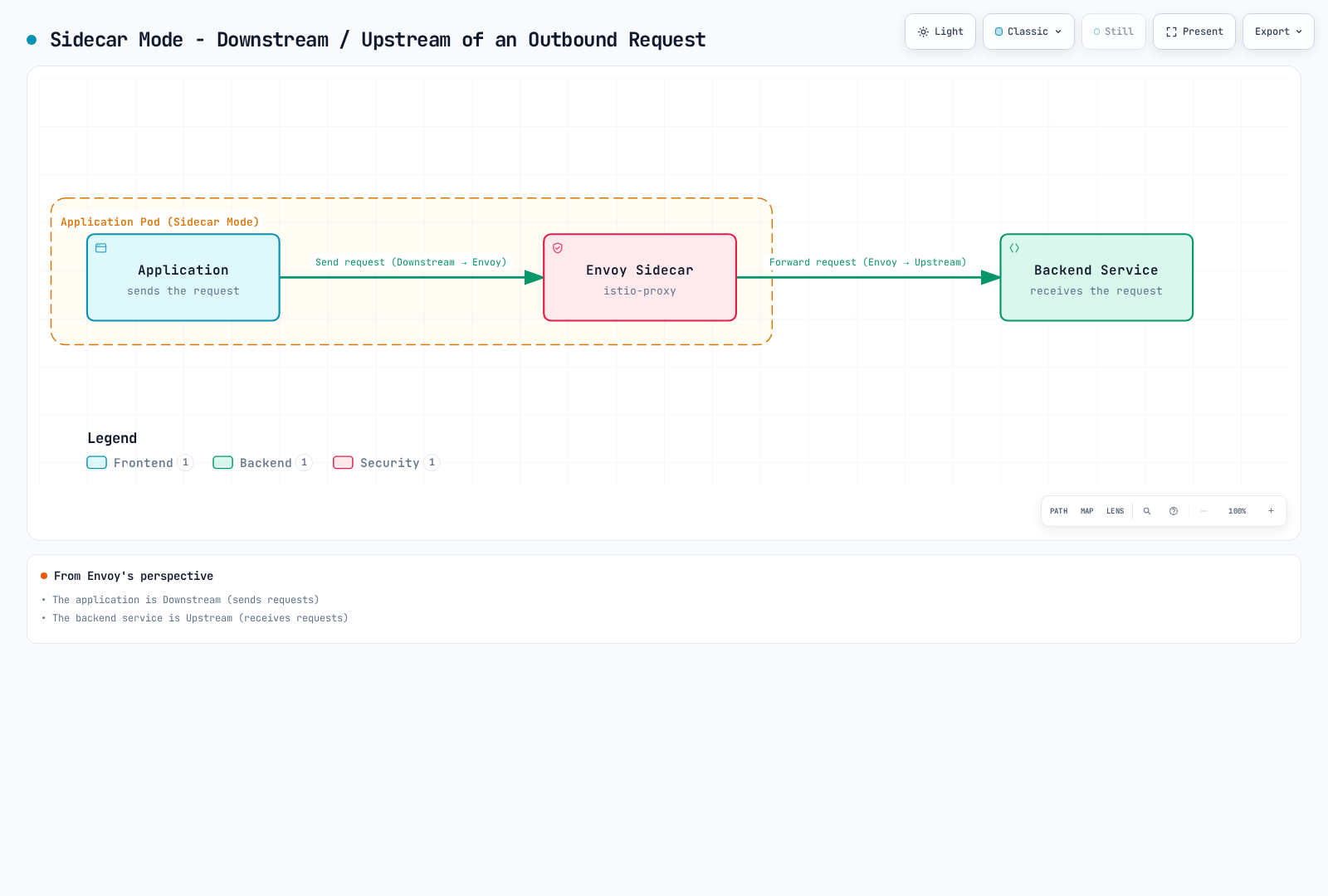
観点:
- Envoy の観点: アプリケーションは Downstream(リクエストを送信)
- Envoy の観点: backend service は Upstream(リクエストを受信)
2. Ingress Gateway - External Request
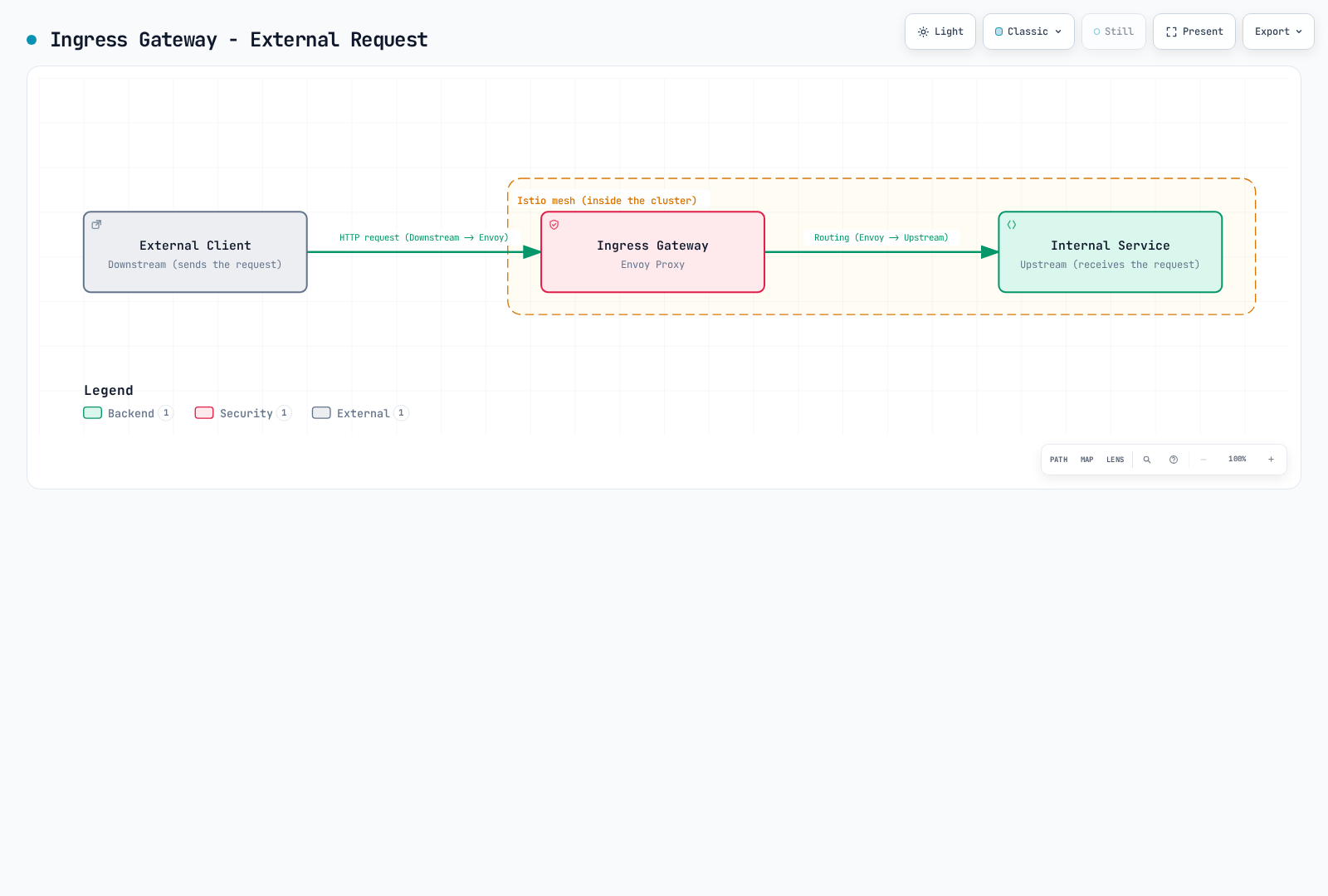
Downstream 関連の Envoy 設定:
# Listener - Receive Downstream connections
apiVersion: networking.istio.io/v1alpha3
kind: EnvoyFilter
metadata:
  name: downstream-config
  namespace: default
spec:
  workloadSelector:
    labels:
      app: reviews
  configPatches:
  - applyTo: LISTENER
    match:
      context: SIDECAR_INBOUND
    patch:
      operation: MERGE
      value:
        per_connection_buffer_limit_bytes: 32768  # Downstream buffer
Downstream Metrics:
# Downstream connection count
envoy_listener_downstream_cx_active

# Downstream request count
envoy_http_downstream_rq_total

# Downstream response time
envoy_http_downstream_rq_time関連用語: Upstream, Envoy, Listener
Upstream
Envoy の観点では、リクエストを受信する側を指します。つまり、Envoy が接続を開始する backend service です。
Envoy の Upstream:
- Envoy から出ていく connection(outbound)
- リクエストを処理する backend service
- Cluster によって管理される endpoint
トラフィックフロー:
Downstream (Client) -> Envoy Proxy -> Upstream (Backend)Upstream コンポーネント:
1. Cluster (Upstream Group)
# Define Upstream Cluster with DestinationRule
apiVersion: networking.istio.io/v1
kind: DestinationRule
metadata:
  name: reviews
spec:
  host: reviews  # Upstream service
  trafficPolicy:
    loadBalancer:
      simple: ROUND_ROBIN
    connectionPool:
      tcp:
        maxConnections: 100      # Upstream connection limit
      http:
        http1MaxPendingRequests: 50
        http2MaxRequests: 100
    outlierDetection:
      consecutive5xxErrors: 5        # Upstream failure detection
      interval: 30s
2. Endpoint (Actual Upstream Instance)
# Check upstream endpoints
istioctl proxy-config endpoints <pod-name> | grep reviews

# Example output:
# ENDPOINT              STATUS      CLUSTER
# 10.244.1.5:9080       HEALTHY     outbound|9080||reviews.default.svc.cluster.local
# 10.244.2.8:9080       HEALTHY     outbound|9080||reviews.default.svc.cluster.local
# 10.244.3.12:9080      UNHEALTHY   outbound|9080||reviews.default.svc.cluster.local
Upstream Traffic Policy:
apiVersion: networking.istio.io/v1
kind: DestinationRule
metadata:
  name: glossary-example-4
spec:
  host: reviews
  trafficPolicy:
    # Upstream load balancing
    loadBalancer:
      consistentHash:
        httpHeaderName: "x-user-id"

    # Upstream connection pool
    connectionPool:
      tcp:
        maxConnections: 100
        connectTimeout: 30s
      http:
        h2UpgradePolicy: UPGRADE

    # Upstream TLS
    tls:
      mode: ISTIO_MUTUAL

    # Upstream Circuit Breaker
    outlierDetection:
      consecutive5xxErrors: 5
      interval: 10s
      baseEjectionTime: 30s
Upstream と Downstream の比較:
| 項目 | Downstream | Upstream |
|---|---|---|
| 方向 | Envoy に入る(Inbound) | Envoy から出る(Outbound) |
| 役割 | リクエストを送信(Client) | リクエストを受信(Server) |
| Envoy 設定 | Listener、Filter Chain | Cluster、Endpoint |
| 例 | 外部ユーザー、他の service | Backend API、Database |
| Metrics | downstream_cx_*, downstream_rq_* | upstream_cx_*, upstream_rq_* |
実際の使用例:
シナリオ 1: Service A -> Service B Call
+---------------------------------------------------------+
| Service A Pod                                           |
|                                                         |
|  App --> Envoy Sidecar                                 |
|          |                                              |
|          | Downstream: App                              |
|          | Upstream: Service B                          |
+----------|-------------------------------------------------+
           |
           v
+---------------------------------------------------------+
| Service B Pod                                           |
|                                                         |
|          Envoy Sidecar --> App                          |
|          |                                              |
|          | Downstream: Service A Envoy                  |
|          | Upstream: Local App (Service B)              |
+---------------------------------------------------------+
Service A の Envoy 観点:
- Downstream: Service A の application
- Upstream: Service B
Service B の Envoy 観点:
- Downstream: Service A の Envoy
- Upstream: Service B の application(local)
シナリオ 2: Ingress Gateway
External Client (Downstream)
        |
Ingress Gateway (Envoy)
        |
Internal Service (Upstream)
Upstream Metrics:
# Upstream connection count
envoy_cluster_upstream_cx_active

# Upstream request counter; derive success/error rates from response-class counters
envoy_cluster_upstream_rq_total

# Upstream response time
envoy_cluster_upstream_rq_time

# Upstream health check
envoy_cluster_health_check_success

# Upstream Circuit Breaker
envoy_cluster_circuit_breakers_default_remaining_rq
Passive Upstream Health Detection: active Health Check の統計情報には別途設定が必要です。
apiVersion: networking.istio.io/v1
kind: DestinationRule
metadata:
  name: glossary-example-5
spec:
  host: reviews
  trafficPolicy:
    outlierDetection:
      # Upstream health detection
      consecutiveGatewayErrors: 5
      consecutive5xxErrors: 5
      interval: 10s
      baseEjectionTime: 30s
maxEjectionPercent: 50デバッグ:
# 1. Check upstream cluster
istioctl proxy-config clusters <pod-name> --fqdn reviews.default.svc.cluster.local

# 2. Check upstream endpoint status
istioctl proxy-config endpoints <pod-name> --cluster "outbound|9080||reviews.default.svc.cluster.local"

# 3. Check upstream metrics
kubectl exec <pod-name> -c istio-proxy -- \
  curl -s localhost:15000/stats/prometheus | grep upstream

# 4. Check upstream connections
istioctl proxy-config all <pod-name> -o json | \
jq '.configs[] | select(.["@type"] | contains("ClustersConfigDump"))'関連用語: Downstream, Envoy, Cluster, Endpoint
Pilot
Istio 1.4 まで独立して存在していた traffic management コンポーネントです。現在は Istiod に統合されています。
主な機能:
- Service Discovery
- Traffic Management(VirtualService、DestinationRule の処理)
- xDS Server
現在の状態: Istio 1.5+ では Istiod 内の内部機能として存在
RDS (Route Discovery Service)
HTTP routing rule を動的に提供する xDS API の 1 つです。
提供される情報:
- Route の matching rule(path、header など)
- weight ベースの routing
- redirect および rewrite rule
- timeout および Retry 設定
VirtualService との関係:
- VirtualService -> Istiod により変換 -> RDS 設定
関連用語: xDS, VirtualService
Rate Limiting
単位時間あたりに許可するリクエスト数を制限する機能です。
実装方法:
- Local Rate Limiting: Envoy がローカルで処理
- Global Rate Limiting: 外部の Rate Limit service を使用
apiVersion: networking.istio.io/v1alpha3
kind: EnvoyFilter
metadata:
  name: filter-local-ratelimit
  namespace: default
spec:
  workloadSelector:
    labels:
      app: reviews
  configPatches:
  - applyTo: HTTP_FILTER
    match:
      context: SIDECAR_INBOUND
      listener:
        filterChain:
          filter:
            name: envoy.filters.network.http_connection_manager
            subFilter:
              name: envoy.filters.http.router
    patch:
      operation: INSERT_BEFORE
      value:
        name: envoy.filters.http.local_ratelimit
        typed_config:
          "@type": type.googleapis.com/envoy.extensions.filters.http.local_ratelimit.v3.LocalRateLimit
          stat_prefix: http_local_rate_limiter
          token_bucket:
            max_tokens: 100
            tokens_per_fill: 100
            fill_interval: 1s
          filter_enabled:
            default_value:
              numerator: 100
              denominator: HUNDRED
          filter_enforced:
            default_value:
              numerator: 100
denominator: HUNDRED関連ドキュメント: Rate Limiting
S-U
SDS (Secret Discovery Service)
TLS 証明書と key を動的に提供する xDS API の 1 つです。
提供される情報:
- X.509 証明書
- Private Key
- CA Root Certificate
利点:
- file system が不要
- 証明書の自動更新
- ダウンタイムなしの更新
Service Entry
Service Mesh の外部にある service を mesh に登録する Istio CRD です。
ユースケース:
- 外部 API の access control
- 外部 service への Istio 機能の適用(Retry、Timeout など)
- Egress Gateway との統合
apiVersion: networking.istio.io/v1
kind: ServiceEntry
metadata:
  name: external-api
spec:
  hosts:
  - api.external.com
  ports:
  - number: 443
    name: https
    protocol: HTTPS
  location: MESH_EXTERNAL
resolution: DNS関連ドキュメント: ServiceEntry
Service Mesh
microservice 間の通信を管理する infrastructure layer です。
コア機能:
- Traffic Management(routing、Load Balancing)
- Security(mTLS、authentication/authorization)
- Observability(metric、log、tracing)
- Resilience(Retry、Circuit Breaker)
主な実装:
- Istio
- Linkerd
- Consul Connect
- AWS App Mesh(サポート終了: 2026 年 9 月 30 日)
SigV4 (AWS Signature Version 4)
AWS API request を認証するための signature protocol です。
仕組み:
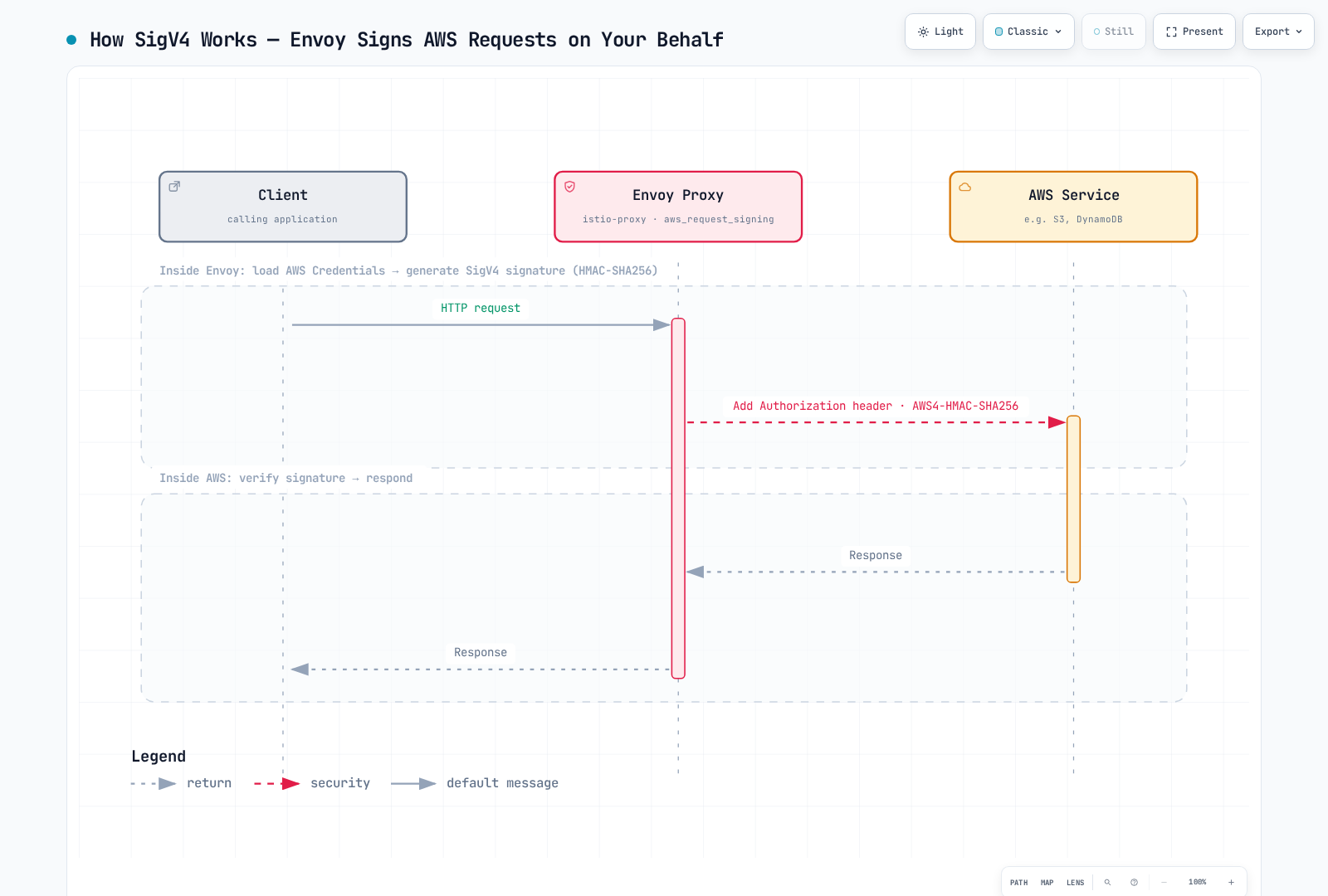
署名コンポーネント:
Canonical Request: request の標準化された形式
- HTTP method
- URI path
- Query string
- Header
- Payload hash
String to Sign: 署名対象の文字列
- Algorithm:
AWS4-HMAC-SHA256 - Timestamp
- Credential Scope
- Canonical Request hash
- Algorithm:
Signing Key: signing key の計算
HMAC(HMAC(HMAC(HMAC("AWS4" + SecretKey, Date), Region), Service), "aws4_request")Signature: 最終的な署名
HMAC(SigningKey, StringToSign)
Istio との統合:
AWS SDK と AWS CLI は、IRSA または EKS Pod Identity により供給される一時 credential を使用して HTTPS request に署名します。これにより、署名は workload の AWS permission と関連付けられた状態に維持されます。Istio mTLS identity と AWS IAM identity は別個です。
Envoy の aws_request_signing HTTP filter は高度な代替手段です。この filter には extension を含む Envoy build、proxy container から利用可能な credential、正しい AWS service/region、および意図した AWS destination に限定された filter match が必要です。署名に影響する header/path rewrite の後、router の前に挿入してください。application が生成した HTTPS はこの HTTP filter では暗号化された TLS 内部に署名を追加できないため、不透明です。proxy による署名の設計では、signing proxy に HTTP を提示し、upstream では検証済み TLS を開始する必要があります。二重の TLS origination や、意図した local proxy path を超えて署名されていない HTTP を公開することは避けてください。
上の図は、この明示的に設定された signing-proxy path を説明しており、デフォルトの Istio 機能ではありません。application ServiceAccount の IRSA annotation だけでは、gateway や sidecar に必要な credential environment と token mount があることは証明されません。
Authentication は JWT validation ではありません:
SigV4 は JWT ではなく HMAC request signature です。https://sts.amazonaws.com/.well-known/jwks は AWS API signature を検証する JWT issuer endpoint ではありません。Istio RequestAuthentication は実際の OIDC issuer が発行する JWT を検証します。CUSTOM AuthorizationPolicy には、external authorization を実装する設定済みの extensionProviders service が追加で必要です。その実装なしに SigV4 を検証することはできません。AWS API access には IAM authentication 済みの AWS endpoint または AWS SDK を優先してください。
読み取り専用の検証例(workload 内に AWS CLI がインストールされ、意図した IAM role が設定されている場合):
aws sts get-caller-identity
aws s3api head-object --bucket my-bucket --key object.txt --region us-west-2運用上の考慮事項:
- workload には必要な AWS action と resource のみを付与します。共有 node instance role への依存は避けてください。
- 選択した credential provider が temporary credential と refresh をサポートすることを確認します。session duration は設定可能であり、一律に 1 時間ではありません。
- CloudTrail management event と data event では coverage が異なります。S3 object access には適切な data-event 設定が必要です。
- proxy 設定を検査して filter の配置を確認します。config dump には個々の live request の Authorization header は表示されず、HTTPS 経由の署名なし curl は SigV4 test ではありません。
- 実際の request size に対する signing/buffering/credential-fetch のオーバーヘッドを測定します。固定のミリ秒単位のオーバーヘッドは保証されません。
関連用語: AuthorizationPolicy, ServiceEntry, EnvoyFilter
参考資料:
Sidecar
application container と並行してデプロイされる helper container のパターンです。
Istio の Sidecar:
- Container 名:
istio-proxy - Image:
istio/proxyv2 - Envoy Proxy を実行
- init-container または Istio CNI のリダイレクトを通じて設定済みトラフィックを intercept
Injection 方法:
- 自動: Namespace label
- 手動:
istioctl kube-inject
apiVersion: v1
kind: Namespace
metadata:
  name: example-mesh
  labels:
istio-injection: enabled # Automatic injection関連ドキュメント: Sidecar Injection
Sidecar Resource
Envoy が受け取る service 情報を制限する Istio CRD です。
目的:
- memory 使用量の削減
- 設定 push 時間の短縮
- 設定のスコープ制限。network security boundary ではありません
apiVersion: networking.istio.io/v1
kind: Sidecar
metadata:
  name: default
  namespace: default
spec:
  egress:
  - hosts:
    - "./*"  # Same namespace only
- "istio-system/*"効果:
- import する service を減らすと memory 使用量と設定処理を削減できる場合があります。実際の削減量を測定してください。
関連ドキュメント: Architecture - Sidecar Resource
SPIFFE (Secure Production Identity Framework for Everyone)
cloud-native 環境で workload identity を証明するための標準です。
SPIFFE ID 形式:
spiffe://trust-domain/pathIstio の例:
spiffe://cluster.local/ns/default/sa/reviews
  |         |           |     |      |    |
  |         |           |     |      |    +- ServiceAccount name
  |         |           |     |      +----- "sa" (ServiceAccount)
  |         |           |     +------------ Namespace name
  |         |           +------------------ "ns" (Namespace)
  |         +------------------------------ Trust Domain
+---------------------------------------- Protocolコンポーネント:
- SPIFFE ID: workload identifier
- SVID (SPIFFE Verifiable Identity Document): X.509-SVID または JWT-SVID。Istio mTLS は X.509-SVID を使用
Subset
DestinationRule で定義する service の論理グループです。
一般的な用途:
- version 別:
v1、v2、v3 - deployment stage 別:
stable、canary、test - region 別:
us-west、us-east、eu-central
apiVersion: networking.istio.io/v1
kind: DestinationRule
metadata:
  name: glossary-example-6
spec:
  host: reviews
  subsets:
  - name: v1
    labels:
      version: v1
  - name: v2
    labels:
version: v2関連ドキュメント: DestinationRule - Subset Concept
V-Z
Waypoint Proxy
Ambient Mode で L7 機能を提供する任意の proxy です。
役割:
- Namespace、Service、または Pod label で選択され、ServiceAccount ごとに自動選択されるわけではありません
- Envoy Proxy に基づく
- L7 traffic management 機能専用
- ztunnel と連携
提供される機能:
- L7 routing(Path、Header ベース)
- Retry および Timeout
- Circuit Breaker
- Fault Injection
- Header manipulation
デプロイ例:
apiVersion: gateway.networking.k8s.io/v1
kind: Gateway
metadata:
  name: reviews-waypoint
  namespace: default
spec:
  gatewayClassName: istio-waypoint
  listeners:
  - name: mesh
    port: 15008
protocol: HBONE機能:
- ztunnel は L4 のみを処理し、waypoint は L7 を処理
- 必要な service に対してのみ選択的に使用
- Sidecar よりリソース効率が高い(共有アプローチ)
- Namespace、Service、または Pod label で選択され、ServiceAccount ごとに自動選択されるわけではありません
関連用語: Ambient Mode, ztunnel
waypoint の作成後、対象の service を登録します。例: kubectl label service reviews istio.io/use-waypoint=reviews-waypoint --overwrite。Gateway をデプロイするだけでは、トラフィックはそこを通ってルーティングされません。
VirtualService
Service Mesh 内でトラフィックをどのようにルーティングするかを定義する Istio CRD です。
主な機能:
- URI、header、query parameter に基づく routing
- weight ベースのトラフィック分散
- Retry および Timeout 設定
- Fault Injection
apiVersion: networking.istio.io/v1
kind: VirtualService
metadata:
  name: reviews
spec:
  hosts:
  - reviews
  http:
  - match:
    - uri:
        prefix: "/v2"
    route:
    - destination:
        host: reviews
        subset: v2
  - route:
    - destination:
        host: reviews
subset: v1関連ドキュメント: Gateway and VirtualService
WASM (WebAssembly)
web browser で実行するために設計された binary instruction format です。Istio では、Envoy proxy の機能を拡張するために使用されます。
Istio での使用:
- Envoy Filter として custom logic を追加
- 再デプロイなしで機能を動的に拡張
- さまざまな言語(Rust、C++、Go など)で記述可能
- sandbox 環境で安全に実行
主なユースケース:
- Custom Authentication/Authorization: 複雑な business logic を実装
- Request/Response Transformation: Header manipulation、payload transformation
- Advanced Routing: custom routing logic
- Metric Collection: 特殊な telemetry
以下の registry URL、digest、credential、pluginConfig field は、独自に build した plugin 用の placeholder です。Istio はこれらの例の image を提供せず、plugin 固有の option を解釈しません。file:// module は proxy container 内に存在する必要があります。
WASM Plugin の例:
apiVersion: extensions.istio.io/v1alpha1
kind: WasmPlugin
metadata:
  name: custom-auth
  namespace: istio-system
spec:
  selector:
    matchLabels:
      istio: ingressgateway
  url: oci://ghcr.io/my-org/custom-auth:v1.0.0
  phase: AUTHN
  pluginConfig:
    api_key_header: "X-API-Key"
validate_endpoint: "https://auth.example.com/validate"デプロイ方法:
1. OCI Registry によるデプロイ(推奨)
apiVersion: extensions.istio.io/v1alpha1
kind: WasmPlugin
metadata:
  name: rate-limiter
spec:
  url: oci://ghcr.io/my-org/rate-limit:v1.0.0
  imagePullPolicy: Always
  imagePullSecret: registry-credential
2. HTTP URL によるデプロイ
apiVersion: extensions.istio.io/v1alpha1
kind: WasmPlugin
metadata:
  name: custom-filter
spec:
  url: https://example.com/filters/custom-filter.wasm
  # Add sha256: with the actual 64-character module digest before deployment
3. Local File のデプロイ
apiVersion: extensions.istio.io/v1alpha1
kind: WasmPlugin
metadata:
  name: local-filter
spec:
  url: file:///etc/istio/filters/custom.wasm
WASM 開発例(Rust):
use proxy_wasm::traits::*;
use proxy_wasm::types::*;

proxy_wasm::main! {{
    proxy_wasm::set_http_context(|_, _| -> Box<dyn HttpContext> {
        Box::new(CustomFilter)
    });
}}

struct CustomFilter;
impl Context for CustomFilter {}

impl HttpContext for CustomFilter {
    fn on_http_request_headers(&mut self, _: usize, _: bool) -> Action {
        // Demonstrate header mutation, not production API-key authentication.
        self.set_http_request_header("x-mesh-demo", Some("wasm"));
        Action::Continue
    }
}
build とデプロイの前提条件:
互換性のある proxy-wasm dependency と固定された dependency version を使う Rust cdylib crate を使用してください。上の callback は公式 Rust SDK の例に従っています。wasm32-unknown-unknown target をインストールし、module を build して、生成された .wasm をサポート対象の OCI Wasm image に package してから WasmPlugin で参照します。Dockerfile を指定しない汎用的な docker build では、その package は実行されません。
rustup target add wasm32-unknown-unknown
cargo build --target wasm32-unknown-unknown --release
特定の plugin について、startup time、memory、request ごとのオーバーヘッドを測定してください。Wasm は proxy process 内の runtime sandbox で実行されます。別 process ではなく、無条件の security/performance 保証でもありません。
Ambient Mode のサポート:
apiVersion: extensions.istio.io/v1alpha1
kind: WasmPlugin
metadata:
  name: waypoint-filter
spec:
  targetRefs:
  - group: gateway.networking.k8s.io
    kind: Gateway
    name: reviews-waypoint
  url: oci://ghcr.io/filters/custom:latest
phase: AUTHNデバッグ:
# Check WASM plugin status
kubectl get wasmplugin -A

# Check WASM-related logs in Envoy logs
kubectl logs <pod-name> -c istio-proxy | grep wasm

# Check WASM module load
istioctl proxy-config all <pod-name> -o json | jq '.. | objects | select(has("@type")) | select(.["@type"] | test("wasm"; "i"))'セキュリティ上の考慮事項:
- Sandbox Isolation: Envoy 内の runtime sandbox。plugin の信頼性と resource 使用量をレビュー
- Resource Limits: CPU と memory の limit を設定可能
- Integrity Verification: SHA256 は content を検査しますが、publisher を認証するものではありません
- Least Privilege: 必要な permission のみを付与
利点:
- 高性能(native code レベル)
- 安全な sandbox 実行
- 再デプロイなしで更新可能
- 複数言語のサポート
- 標準 OCI image format
制限事項:
- 一部の system call が制限される
- file I/O が限定的
- network call は Envoy API 経由のみ
関連用語: Envoy, Waypoint Proxy, Ambient Mode
参考資料:
xDS (Discovery Service)
Envoy Proxy を動的に設定するための API 群です。
「xDS」の意味:
x: さまざまな種類を表す変数DS: Discovery Service
xDS API の種類:
| API | 名前 | 役割 |
|---|---|---|
| LDS | Listener Discovery Service | listen する port と filter chain |
| RDS | Route Discovery Service | HTTP routing rule |
| CDS | Cluster Discovery Service | upstream service 設定 |
| EDS | Endpoint Discovery Service | 実際の Pod IP 一覧 |
| SDS | Secret Discovery Service | TLS 証明書と key |
通信方法:
- Protocol: gRPC
- Port: 15012(Istiod)
- 双方向 streaming
順序:
Agent bootstraps identity -> Envoy subscribes to ADS resources
Istiod pushes LDS/CDS/EDS/RDS updates; local agent serves SDS certificates関連ドキュメント: Architecture - xDS API Communication
Zone
Kubernetes Availability Zone を表します。
label 形式:
topology.kubernetes.io/zone: us-west-1aIstio での使用:
- Locality-aware Load Balancing
- Zone Aware Routing
- 同一 Zone 優先 routing
関連用語: Locality-aware Load Balancing
ztunnel (Zero Trust Tunnel)
Ambient Mode の中核コンポーネントであり、node レベルで実行される軽量な L4 proxy です。
役割:
- 各 node に DaemonSet としてデプロイ
- すべての Pod の L4 トラフィックを処理
- Sidecar なしで Service Mesh 機能を提供
- CNI plugin と統合
提供される機能:
- mTLS: 自動暗号化/復号
- L4 Telemetry: metric の収集
- Identity: Service Account ベースの authentication
- L4 Load Balancing: 基本的な Load Balancing
技術的特徴:
- Rust で記述(高性能)
- Istio CNI 管理のトラフィックリダイレクト
- Init Container は不要
- 共有 L4 proxy resource。サイズは測定した node workload に基づいて決定
デプロイ例:
# Use the reviewed istioctl version and the complete ambient installation profile
istioctl install --set profile=ambient
kubectl rollout status daemonset/ztunnel -n istio-system
既存の sidecar workload では、ambient 登録前に injection/revision label を削除して Pod を再起動し、sidecar を削除します。新しい sidecar のない workload は再起動不要です。
Namespace の有効化:
# Enable Ambient Mode
kubectl label namespace default istio-injection- istio.io/rev-
kubectl label namespace default istio.io/dataplane-mode=ambient --overwrite利点:
- memory 削減の可能性は node/workload と waypoint capacity に依存
- Pod の再起動は不要
- application の透過性
- 初期 latency の最小化
制限事項:
- L7 機能には Waypoint Proxy が必要
- サポートされる Linux Kubernetes platform、primary CNI、および Istio CNI の前提条件が必要
関連用語: Ambient Mode, Waypoint Proxy, eBPF
参考資料
公式ドキュメント
関連ドキュメント
最終更新: September 13, 2026