Istio ベストプラクティス
このドキュメントでは、本番環境で Istio を適切に運用するためのベストプラクティスと推奨事項を説明します。
目次
2026 年 9 月 11 日時点で Istio 1.31 向けにレビュー済みです。IstioOperator の抜粋は istioctl install -f への入力であり、kubectl で適用する Kubernetes リソースではありません。既存のインストール設定にマージし、Helm では同等の chart values を使用してください。ほとんどの例は Sidecar を対象としています。ambient では waypoint/Gateway API ポリシーを使用してください。リソース設定とロールアウト期間は、負荷をかけて検証するための出発点です。
パフォーマンス最適化
1. Control Plane リソースの最適化
apiVersion: install.istio.io/v1alpha1
kind: IstioOperator
spec:
  components:
    pilot:
      k8s:
        resources:
          requests:
            cpu: 500m
            memory: 2Gi
          limits:
            cpu: 1000m
            memory: 4Gi
        hpaSpec:
          minReplicas: 2
          maxReplicas: 5
          metrics:
          - type: Resource
            resource:
              name: cpu
              target:
                type: Utilization
averageUtilization: 80推奨事項:
- Istiod には少なくとも 2 つのレプリカを配置する
- CPU: クラスター規模に応じて調整する
- メモリ: Service/Proxy 数、設定サイズ、更新レートを測定する。Service ごとの固定式はない
2. Data Plane リソースの最適化
apiVersion: v1
kind: Pod
metadata:
  name: myapp
  labels:
    sidecar.istio.io/inject: "true"
  annotations:
    # Sidecar resource optimization
    sidecar.istio.io/proxyCPU: "100m"
    sidecar.istio.io/proxyMemory: "128Mi"
    sidecar.istio.io/proxyCPULimit: "200m"
    sidecar.istio.io/proxyMemoryLimit: "256Mi"
spec:
  containers:
  - name: myapp
image: myapp:latest推奨事項:
- 通常のワークロード: CPU 100m、メモリ 128Mi
- 高トラフィックのワークロード: CPU 500m、メモリ 512Mi
- Sidecar の並行性: 通常は未設定のままにし、Istio が CPU requests/limits から worker thread を導出できるようにする
3. Connection Pool の最適化
apiVersion: networking.istio.io/v1
kind: DestinationRule
metadata:
  name: optimized-pool
spec:
  host: myapp
  trafficPolicy:
    connectionPool:
      tcp:
        maxConnections: 100
        connectTimeout: 30ms
      http:
        http1MaxPendingRequests: 50
        http2MaxRequests: 100
        maxRequestsPerConnection: 0
idleTimeout: 300s推奨事項:
maxConnections: ワークロードの同時接続数を考慮するmaxRequestsPerConnection: 0 は無制限を意味します。小さい値では接続の入れ替わりと TLS handshake が増加しますidleTimeout: 長時間接続が必要な場合は増やす
4. Locality Load Balancing
apiVersion: networking.istio.io/v1
kind: DestinationRule
metadata:
  name: locality-lb
spec:
  host: myapp
  trafficPolicy:
    loadBalancer:
      localityLbSetting:
        enabled: true
        distribute:
        - from: us-east-1/us-east-1a/*
          to:
            "us-east-1/us-east-1a/*": 80  # Same AZ priority
            "us-east-1/us-east-1b/*": 20
    outlierDetection:
      consecutive5xxErrors: 5
      interval: 5s
baseEjectionTime: 30s利点:
- AZ 間トラフィックを削減できる可能性があります。削減額はトラフィック分布と課金に依存します
- ネットワーク遅延の低減
- outlier detection と他の zone の健全な容量を使用してフェイルオーバーを検証する
5. Sidecar スコープの制限
apiVersion: networking.istio.io/v1
kind: Sidecar
metadata:
  name: default
  namespace: default
spec:
  egress:
  - hosts:
    - "default/*"
- "istio-system/*"利点:
- Envoy 設定サイズの削減
- メモリ使用量の削減
- 設定プッシュの高速化
セキュリティ強化
1. 厳格な mTLS の適用
apiVersion: security.istio.io/v1
kind: PeerAuthentication
metadata:
  name: default
  namespace: istio-system
spec:
  mtls:
mode: STRICT # STRICT recommended for productionチェックリスト:
- すべての Service に STRICT mTLS を適用する
- PERMISSIVE は移行期間中にのみ使用する
- PeerAuthentication は受信ワークロードの mTLS を制御します。外部 HTTPS/TLS は ServiceEntry で、必要に応じて DestinationRule で設定してください。mesh mTLS をグローバルに無効化しないでください。
2. Authorization Policy
# Deny by default
apiVersion: security.istio.io/v1
kind: AuthorizationPolicy
metadata:
  name: deny-all
  namespace: default
spec: {}  # Deny all requests
---
# Allow specific
apiVersion: security.istio.io/v1
kind: AuthorizationPolicy
metadata:
  name: allow-frontend
  namespace: default
spec:
  selector:
    matchLabels:
      app: backend
  action: ALLOW
  rules:
  - from:
    - source:
principals: ["cluster.local/ns/default/sa/frontend"]ベストプラクティス:
- デフォルト拒否ポリシーを使用する
- 最小権限の原則を適用する
- Service Account ベースの認証
- Namespace の分離
3. Egress トラフィック制御
# Detect unregistered destinations; not an egress firewall
apiVersion: install.istio.io/v1alpha1
kind: IstioOperator
spec:
  meshConfig:
    outboundTrafficPolicy:
      mode: REGISTRY_ONLY  # Known Kubernetes services and ServiceEntries
この個別の ServiceEntry は kubectl で適用してください。ネットワーク制御で Egress 分離を強制してください。REGISTRY_ONLY はセキュリティ境界ではありません。
# Allowed external services
apiVersion: networking.istio.io/v1
kind: ServiceEntry
metadata:
  name: external-api
spec:
  hosts:
  - api.external.com
  ports:
  - number: 443
    name: https
    protocol: HTTPS
  location: MESH_EXTERNAL
  resolution: DNS
4. JWT 認証
apiVersion: security.istio.io/v1
kind: RequestAuthentication
metadata:
  name: jwt-auth
spec:
  selector:
    matchLabels:
      app: api-service
  jwtRules:
  - issuer: "https://auth.example.com"
    jwksUri: "https://auth.example.com/.well-known/jwks.json"
---
apiVersion: security.istio.io/v1
kind: AuthorizationPolicy
metadata:
  name: require-jwt
spec:
  selector:
    matchLabels:
      app: api-service
  action: ALLOW
  rules:
  - when:
    - key: request.auth.claims[iss]
      values: ["https://auth.example.com"]
運用ガイド
1. Deployment 戦略
Istio の段階的導入
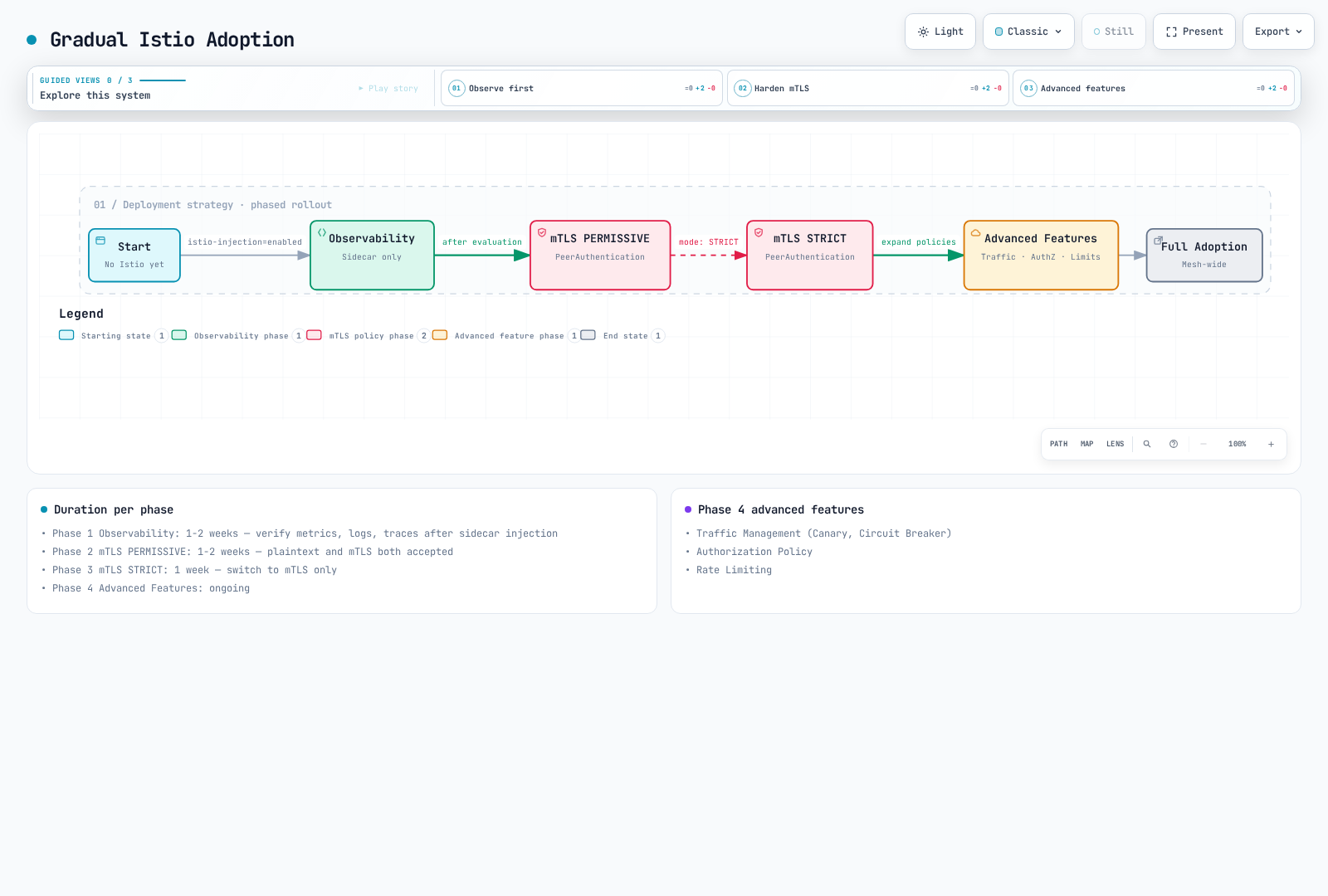
フェーズ 1: 可観測性(1~2 週間)
# Enable sidecar injection only
kubectl label namespace default istio-injection=enabled --overwrite
kubectl rollout restart deployment -n default

# Verify metrics, logs, traces
# Evaluate performance impact
フェーズ 2: mTLS PERMISSIVE(1~2 週間)
# Enable PERMISSIVE mode
apiVersion: security.istio.io/v1
kind: PeerAuthentication
metadata:
  name: default
spec:
  mtls:
    mode: PERMISSIVE
フェーズ 3: mTLS STRICT(1 週間)
# Switch to STRICT mode
apiVersion: security.istio.io/v1
kind: PeerAuthentication
metadata:
  name: default
spec:
  mtls:
    mode: STRICT
フェーズ 4: 高度な機能(継続的)
- Traffic Management(Canary、Circuit Breaker)
- Authorization Policy
- Rate Limiting
2. アップグレード戦略
Canary アップグレード
インストールガイドの対象となる 1.31.0 の istioctl バイナリを使用してください。revision 名を設定しても image version は選択されません。この例では 1.30.4 からアップグレードし、既存のインストール設定を維持します。すべてのステージの検証が必要です。Gateway はデフォルト profile でインプレースアップグレードできます。ロールアウトを明示的に計画してください。Helm 管理のインストールでは、Helm アップグレードワークフローを使用する必要があります。
# 1. Install new version Control Plane
istioctl install --set revision=1-31-0 -f existing-install.yaml

# 2. Move test namespace
kubectl label namespace test istio-injection- istio.io/rev=1-31-0 --overwrite
kubectl rollout restart deployment -n test

# 3. Move production after verification
kubectl label namespace prod istio-injection- istio.io/rev=1-31-0 --overwrite
kubectl rollout restart deployment -n prod

# 4. Remove previous version
istioctl proxy-status
# Only after every proxy/gateway has migrated; substitute the actual old revision
istioctl uninstall --revision=1-30-4
3. 高可用性
# Control Plane HA
apiVersion: install.istio.io/v1alpha1
kind: IstioOperator
spec:
  components:
    pilot:
      k8s:
        hpaSpec:
          minReplicas: 3
          maxReplicas: 5
        affinity:
          podAntiAffinity:
            preferredDuringSchedulingIgnoredDuringExecution:
            - weight: 100
              podAffinityTerm:
                labelSelector:
                  matchLabels:
                    app: istiod
topologyKey: topology.kubernetes.io/zone推奨事項:
- Istiod: 最小 3 レプリカ
- AZ 全体に均等に分散する
- PodDisruptionBudget を設定する
4. バックアップとリカバリ
# Preserve the versioned installation input in source control
cp existing-install.yaml istio-install-backup.yaml
# Snapshot mesh configuration; this does not include Secrets or Gateway API resources
kubectl get virtualservices.networking.istio.io,destinationrules.networking.istio.io,gateways.networking.istio.io,serviceentries.networking.istio.io,sidecars.networking.istio.io,workloadentries.networking.istio.io,workloadgroups.networking.istio.io,peerauthentications.security.istio.io,requestauthentications.security.istio.io,authorizationpolicies.security.istio.io,telemetries.telemetry.istio.io -A -o yaml > istio-config-backup.yaml

# Restore the matching Istio version and CRDs first, then declarative resources
istioctl install -f istio-install-backup.yaml
kubectl apply -f istio-config-backup.yaml
Helm インストールでは、代わりに chart version と helm get values <release> -n <namespace> -o yaml を保持してください。CA/TLS Secrets は安全にバックアップし、使用中の Gateway API、EnvoyFilter、WasmPlugin リソースも含めてください。必要な Namespace を再作成し、復元前に生成された snapshot をレビューしてください。
モニタリングと可観測性
1. Golden Signals
# 1. Latency (P50, P95, P99)
histogram_quantile(0.95,
  sum(rate(istio_request_duration_milliseconds_bucket{reporter="destination"}[5m])) by (le)
)

# 2. Traffic (Request count)
sum(rate(istio_requests_total{reporter="destination"}[5m]))

# 3. Errors (Error rate)
sum(rate(istio_requests_total{reporter="destination",response_code=~"5.."}[5m]))
/
sum(rate(istio_requests_total{reporter="destination"}[5m]))

# 4. Saturation (Resource utilization)
sum(rate(container_cpu_usage_seconds_total{container="istio-proxy"}[5m]))
2. Control Plane のモニタリング
# Pilot configuration push time
histogram_quantile(0.95, sum(rate(pilot_proxy_convergence_time_bucket[5m])) by (le))

# xDS connection count
pilot_xds

# Memory usage
process_resident_memory_bytes{job="istiod"}
3. Data Plane のモニタリング
これらの Envoy 統計が Proxy stats matcher で有効になっていることを確認してください。scrape job label は設定に依存します。例では job="istiod" を想定しています。up alert は scrape の可用性を検出しますが、すべての readiness failure を検出するわけではありません。
# Envoy connection count
envoy_cluster_upstream_cx_active

# Circuit Breaker open
envoy_cluster_circuit_breakers_default_rq_open

# Outlier Detection
envoy_cluster_outlier_detection_ejections_active
4. Alerting Rules
groups:
- name: istio
  rules:
  # High error rate
  - alert: HighErrorRate
    expr: |
      (sum(rate(istio_requests_total{reporter="destination",response_code=~"5.."}[5m]))
      /
      sum(rate(istio_requests_total{reporter="destination"}[5m]))) > 0.05
    for: 5m
    labels:
      severity: warning
    annotations:
      summary: "High error rate detected"

  # High latency
  - alert: HighLatency
    expr: |
      histogram_quantile(0.95,
        sum(rate(istio_request_duration_milliseconds_bucket{reporter="destination"}[5m])) by (le)
      ) > 1000
    for: 5m
    labels:
      severity: warning
    annotations:
      summary: "High latency detected (P95 > 1s)"

  # Pilot not ready
  - alert: IstiodScrapeUnavailable
    expr: up{job="istiod"} == 0 or absent(up{job="istiod"})
    for: 5m
    labels:
      severity: critical
    annotations:
      summary: "Istiod scrape target is unavailable"
本番環境チェックリスト
インストール前
- [ ] Istio/Kubernetes/EKS のサポート重複を確認する(1.31 の例: EKS 1.34~1.37)
- [ ] Istio version を選択する(stable version 推奨)
- [ ] リソース要件を計算する
- [ ] ネットワークポリシーをレビューする
- [ ] バックアップおよびリカバリ計画を策定する
インストール
- [ ] 本番 profile を使用する
- [ ] Control Plane HA を設定する(replica >= 3)
- [ ] リソース制限を設定する
- [ ] PodDisruptionBudget を設定する
- [ ] モニタリングスタックを準備する
セキュリティ
- [ ] mTLS STRICT mode を有効にする
- [ ] Authorization Policy を適用する
- [ ] Egress トラフィックを制御する
- [ ] JWT 認証を設定する(必要な場合)
- [ ] Network Policy を統合する
Traffic Management
- [ ] VirtualService を設定する
- [ ] DestinationRule を設定する
- [ ] Circuit Breaker を設定する
- [ ] Retry/Timeout を設定する
- [ ] Rate Limiting を設定する
可観測性
- [ ] Prometheus を統合する
- [ ] Grafana dashboard を設定する
- [ ] Jaeger/Zipkin tracing を設定する
- [ ] Kiali をインストールする
- [ ] alerting rule を設定する
運用
- [ ] アップグレード計画を策定する
- [ ] バックアップを自動化する
- [ ] ドキュメントを作成する
- [ ] オンコールガイドを作成する
- [ ] runbook を準備する
パフォーマンス
- [ ] Sidecar リソースを最適化する
- [ ] Connection Pool を調整する
- [ ] Locality Load Balancing を設定する
- [ ] Sidecar Scope を制限する
- [ ] パフォーマンステストを実施する
テスト
- [ ] 機能テスト
- [ ] パフォーマンステスト
- [ ] 災害復旧テスト
- [ ] Chaos engineering
- [ ] アップグレードシナリオテスト
一般的なアンチパターン
避けるべきこと
一度にすべてを導入する
Don't enable all Istio features on Day 1
Do add features gradually (Observability -> Security -> Traffic Management)
リソース制限なし
yamlDon't leave Sidecar without resource limits Do set appropriate requests/limitsPERMISSIVE mode の長期使用
Don't keep using PERMISSIVE
Do transition to STRICT quickly
ワイルドカードマッチの乱用
yamlDon't: hosts: ["*"] # All services Do: hosts: ["myapp.default.svc.cluster.local"] # Explicitモニタリングなしでのデプロイ
Don't deploy to production without checking metrics
Do require Golden Signals monitoring
コスト最適化
- 測定済みの Sidecar リソース requests を、ztunnel および必要な waypoint 容量と比較してください。Pod 数だけでは固定の削減率を定められません。
- AZ 間のバイト数を測定し、実際のパスに対する最新の AWS リージョン料金を使用してください。locality weight は、普遍的な課金削減に直接変換されるものではありません。
- 不要な Proxy 設定のスコープを限定し、代表的な負荷下でメモリ/push-time の変化を測定してください。