パート1: EKS 上の Kubeflow アーキテクチャとインストール
レビュー基準: Community Distribution 26.03.1; Dashboard 2.0.0; KFP 2.16.1 最終レビュー日: September 12, 2026 検証: Profile overlay は kubectl 1.36.2 / Kustomize 5.8.1 を使用してローカルでレンダリングしました。EKS インストールおよび AWS identity flow は実行していません。
環境の準備
コマンドを選択する前に distribution release を選択します。EKS/Kubernetes version、node architecture、CNI、storage classes、identity provider、必要な components を記録します。Kubernetes 1.34+ は無制限のサポート保証ではありません。
26.03.1 release は Kubernetes 1.36 の CI coverage と Kind 0.32+ の使用を報告しています。これはすべての EKS add-on の組み合わせを認定するものではありません。README は一部の image が ARM64 をサポートしない可能性を警告しています。レンダリングには Kustomize を含む kubectl、または distribution が指定する standalone Kustomize が必要です。resources の適用には、さらに target cluster、permissions、dependency readiness が必要です。
Kubeflow とは?
Kubeflow は独立してリリースされる ML components で構成されます。Community Distribution はそれらの revisions と shared services を組み立てます。一部の workloads は CRDs を使用し、他の operations は application APIs、databases、object storage を使用します。dashboard は UI entry point であり、scheduler や universal dispatcher ではありません。
CNCF Graduation — August 17, 2026
CNCF announcement は、graduation、独立した security audit、正式な governance を記録しています。これはプロジェクト成熟度の評価を支えます。threat modeling、tenant isolation tests、deployment 固有の compliance assessment に取って代わるものではありません。
Release Model と現在の基準
この distribution は YY.MM.patch を使用し、年におよそ 2 回の base release を計画しており、community support を約 6 か月間の best effort と説明しています。これは vendor support SLA ではありません。
June 15, 2026 に公開された 26.03.1 release と、その tagged inventory は、次の基準を提供します。
| Component | Bundled revision |
|---|---|
| Dashboard / Profile Controller / access management | 2.0.0 |
| Pipelines | 2.16.1 |
| Notebooks v1 | 1.11.0 |
| Trainer v2 / legacy Training Operator | 2.2.0 / 1.9.2 |
| Katib | 0.19.0 |
| KServe / Models Web Application | 0.18.0 / 0.18.0 |
| Hub / Spark Operator | 0.3.9 / 2.5.0 |
| Istio / Knative | 1.30.1 / 1.22.0 |
| cert-manager / Dex / oauth2-proxy | 1.20.2 / 2.45.1 / 7.15.2 |
release は Workspaces (Notebooks v2) を beta と説明しています。これは stable な Notebooks v1 行に取って代わるものではありません。Legacy Training Operator と Trainer v2 は異なる APIs で共存します。training jobs を作成する前に、インストール済みの CRDs と runtime definitions を確認してください。
Component アーキテクチャ
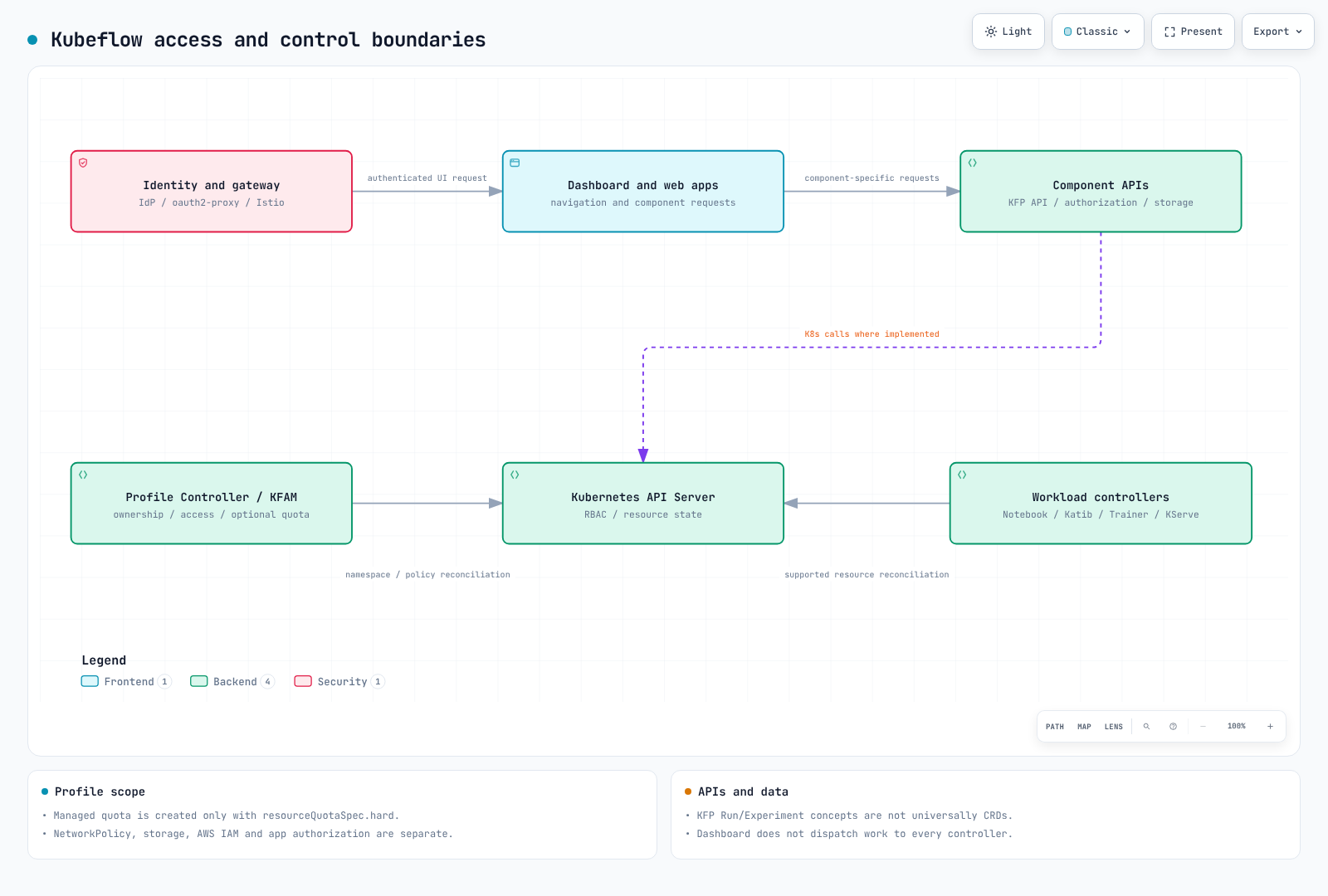
| Boundary | 提供するもの | 追加で設定が必要なもの |
|---|---|---|
| Identity provider, oauth2-proxy, gateway | Browser authentication と信頼された identity forwarding | OIDC clients、TLS、trusted headers、machine-to-machine authentication |
| Dashboard と component web apps | Navigation と application interfaces | 各 API の authorization と service identity |
| Profile Controller と access management (KFAM) | Namespace ownership、owner/contributor access、生成される RBAC と Istio policies | Quotas、network isolation、workload privileges、storage と AWS permissions |
| Component controllers | サポートされる Kubernetes resources の reconciliation | Admission、scheduling、dependencies、state |
| KFP APIs と persistence | Pipeline/run/experiment operations、metadata、artifacts | Database/object-store availability、authorization、backup |
cluster-scoped の Profile には owner があり、namespace を管理します。contributors は access management を通じて処理されます。Dashboard 2.0.0 は、spec.resourceQuotaSpec.hard が空でない場合にのみ ResourceQuota を作成します。quota を省略しても default resource cap は生成されません。この field を空にすると、この controller が管理する quota は削除されます。
Profile が生成する RBAC と Istio AuthorizationPolicy は、完全な tenant isolation を提供しません。NetworkPolicy enforcement、Pod permissions、storage access、AWS IAM、application authorization はそれぞれ別途必要です。Profile overlay にバンドルされた NetworkPolicy は、その controller/access-management service を保護するものであり、すべての user namespace を保護するものではありません。
KFP の Pipeline、Run、Experiment の概念は、すべてが CRDs ではありません。任意の Kubernetes Native API mode は、Pipeline と PipelineVersion CRDs を追加します。KFP Experiment と Katib Experiment は異なる resources です。
Profile の例
これは owner と明示的な quota を宣言します。インストールコマンドや完全な isolation policy ではありません。
apiVersion: kubeflow.org/v1
kind: Profile
metadata:
  name: team-a
spec:
  owner:
    kind: User
    name: owner@example.com
  resourceQuotaSpec:
    hard:
      requests.cpu: "8"
      requests.memory: 32Gi
      requests.nvidia.com/gpu: "2"
      persistentvolumeclaims: "10"
controller は ownership が一致しない既存 namespace の takeover を拒否します。namespace owner reference により削除も重大になります。Profile を削除すると、所有する namespace とその resources が削除される可能性があります。Dashboard v2 migration の際は、古い controller resources に対する release 固有の removal steps に従ってください。Profile CRD、Profile objects、user namespaces は保持してください。
EKS でのインストールパス
| Path | 根拠と制限事項 |
|---|---|
| Community Distribution 26.03.1 | レビュー済み community bundle。この release 用に EKS networking、storage、ingress、identity を設定 |
awslabs/kubeflow-manifests | 確認した最新の published release: v1.7.0-aws-b1.0.3 (September 1, 2023)。release page では、古い OIDC image が削除されたため新規インストールが失敗すると記載 |
| Vendor-supported distribution | 独自の version matrix、support、integrations、migration path を評価 |
AWS release warning は、古い manifest/Terraform walkthrough が検証済みの 26.03.1 installation recipe ではないことを意味します。repository activity だけでは、その release の compatibility は変わりません。
過去の AWS overlays は Cognito、RDS、S3 integrations を説明しています。これらは self-hosted identity、database、object-store services の運用を軽減できますが、互換性のあるデフォルトではありません。issuer/claim mapping、database compatibility、networking、IAM、costs、migration は依然として重要です。新しい release と組み合わせる前に、古い overlays を検証してください。
適用前にレンダリングする
これらのコマンドはレビュー済み release を取得し、その Profile controller overlay のみをレンダリングします。Kubernetes には接続せず、ローカル files を作成します。
git clone --depth 1 --branch 26.03.1 \
  https://github.com/kubeflow/community-distribution.git kubeflow-26.03.1
cd kubeflow-26.03.1
kubectl kustomize \
  applications/dashboard/upstream/profile-controller/overlays/kubeflow \
  > profile-controller.rendered.yaml
レビュー済み overlay は、Profile CRD、RBAC、Service、kubeflow 内の profiles-deployment を含む 14 resources を生成しました。その containers は Dashboard 2.0.0 の Profile Controller と access-management images を使用します。この overlay は kubeflow namespace を作成せず、Istio/network-policy dependencies を必要とします。
インストールでは、固定した release の individual-component order に従ってください。レンダリング済み resources を確認し、必要な CRDs を確立し、controllers/webhooks を待機してから custom resources を適用します。conflicts を繰り返し強制するのではなく、admission または field-ownership errors を診断してください。レンダリングの成功は API admission も正常に動作する EKS deployment も証明しません。
IAM Access Patterns: IRSA、KFPv2、Pod Identity
現在の KFP object-store guide は、S3 での IRSA と launcher credentials.fromEnv: true を文書化しています。古い AWS distribution の「KFPv1 only」という IRSA に関する記述は、現在の KFPv2 に対する普遍的な制限ではありません。
KFP 2.16.1 では、fromEnv は Go Cloud の bucket opener に委譲します。固定された gocloud.dev 0.40.0 は、SDK override が指定されていない限り AWS SDK v2 credential chain をデフォルトで使用します。これは static access-key environment variables の読み取りより広範です。
pipeline execution ServiceAccount と、object-store configuration により必要になる場合は API server を含む、artifact に access する各 component を設定してください。実際の container SDK/provider support、bucket prefixes、KMS permissions を確認します。IRSA には annotation だけでなく、一致する role trust と projected credentials が必要です。Pod Identity にも、サポートされる EKS environment、agent、association、SDK support が必要です。このレビューではその integration は実行していません。
Dashboard の AwsIamForServiceAccount Profile plugin は Pod Identity switch ではありません。これは default-editor に annotation を追加し、IAM role の trust policy を更新できます。controller permissions と trust changes を考慮してください。上記の例ではこの plugin を有効にしていません。新しい deployment に過去の IAM-user/static-key workaround をコピーするのではなく、scoped access を持つ workload identity を使用してください。
Managed Alternative ではなく EKS で実行する理由
EKS は、shared tooling、custom training runtimes、または特定の scheduling と serving behavior を必要とする Kubernetes 運用能力を持つチームに適しています。チームが controllers、CRDs、tenant boundaries、recovery、capacity、upgrades を所有します。
SageMaker AI は infrastructure operation を軽減できますが、application、data、IAM、model-quality の責任をなくすものではありません。実際に必要な services と deployment modes を比較してください。
Sources と検証
このレビューでは、tagged distribution manifests、Dashboard 2.0.0 Profile code、KFP 2.16.1 object-store code を確認しました。Profile overlay はローカルでレンダリングし、example はその CRD schema に対して確認しました。これは end-to-end authentication、isolation、artifact access を証明するものではありません。
次のステップ
パート2: Pipelines に進んでください。
クイズ
トピッククイズに挑戦してください。