アーキテクチャ
対応バージョン: Istio 1.28+ API バージョン:
networking.istio.io/v1,security.istio.io/v1最終更新: February 19, 2026
このドキュメントでは、Istio の内部アーキテクチャとネットワーキングの仕組みを詳しく解説します。
背景と歴史については、基本概念のドキュメントを参照してください。
重要な変更点(Istio 1.5+):
- Pilot、Citadel、Galley は、もはや独立したコンポーネントではありません
- これらは Istiod(
pilot-discovery)という単一バイナリに統合されています - Pilot/Citadel/Galley という用語は、機能を説明する歴史的な名称を指します
目次
- Istio アーキテクチャの概要
- Control Plane: Istiod
- Data Plane: Envoy Proxy
- Sidecar インジェクションの仕組み
- iptables とトラフィックのインターセプト
- DNS 処理の仕組み
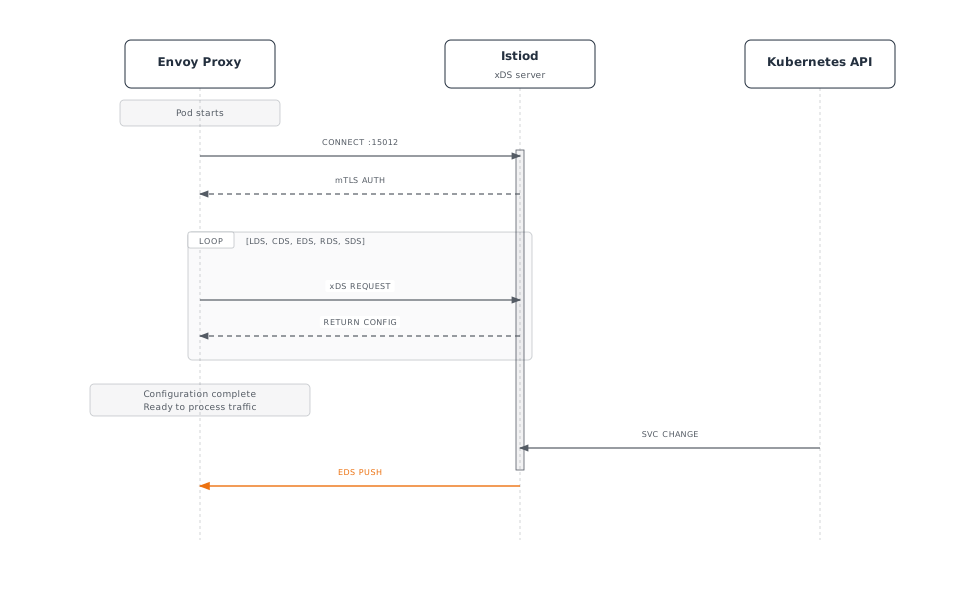
- xDS API 通信
- Sidecar リソースによる最適化
Istio アーキテクチャの概要
全体構造
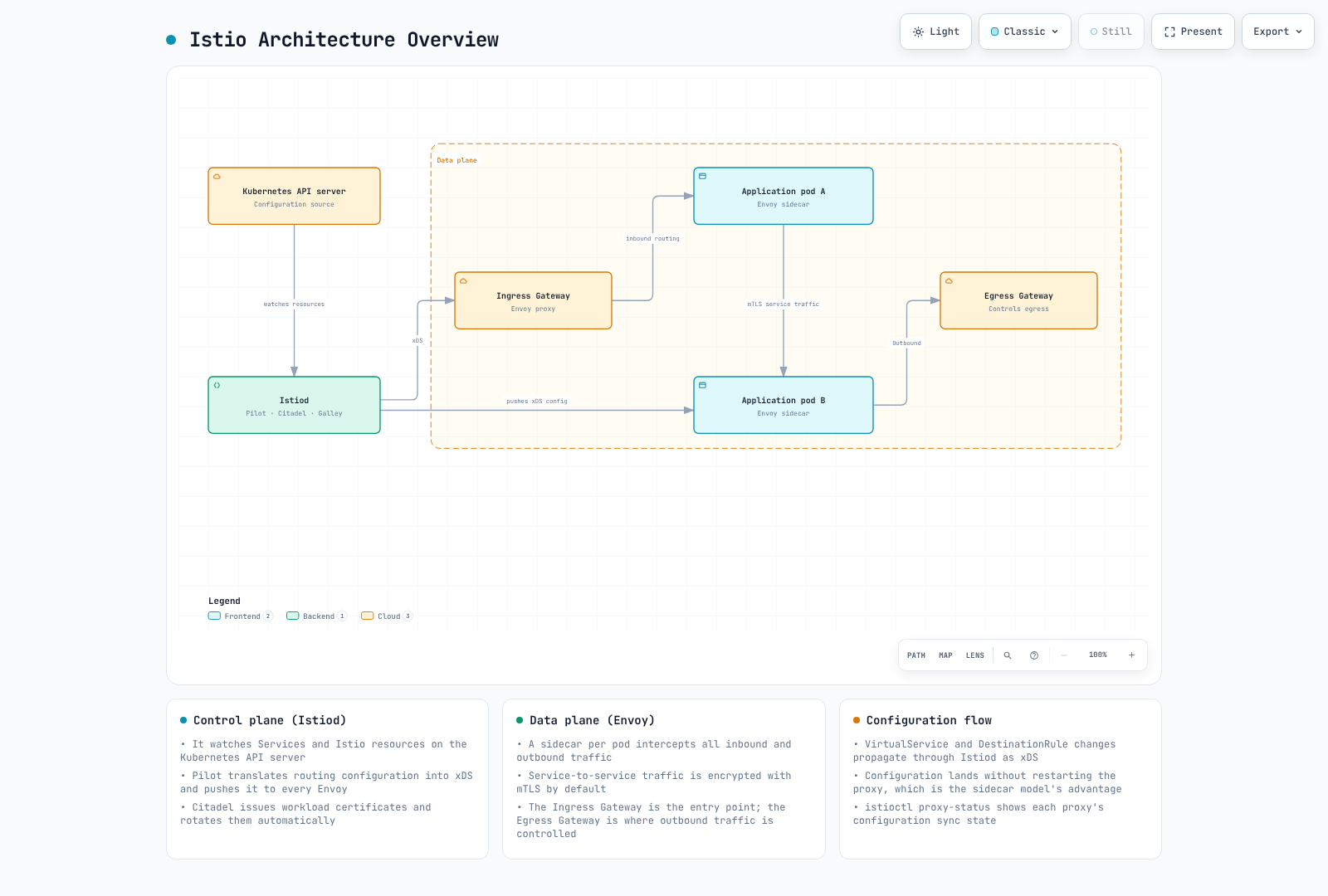
Control Plane と Data Plane
| カテゴリ | Control Plane (Istiod) | Data Plane (Envoy) |
|---|---|---|
| 役割 | ポリシー管理、設定配信 | 実際のトラフィック処理 |
| 配置場所 | 分離された Pod(通常 1~3 個) | すべてのアプリケーション Pod |
| 言語 | Go | C++ |
| 負荷 | 低 | 高(すべてのトラフィック) |
| スケーラビリティ | 水平スケーリング(HA) | 自動(Pod ごとに 1 個) |
Control Plane: Istiod
Istiod の内部構造
重要: Istio 1.5 以降、Pilot、Citadel、Galley は独立したコンポーネントではなく、Istiod の内部機能です。
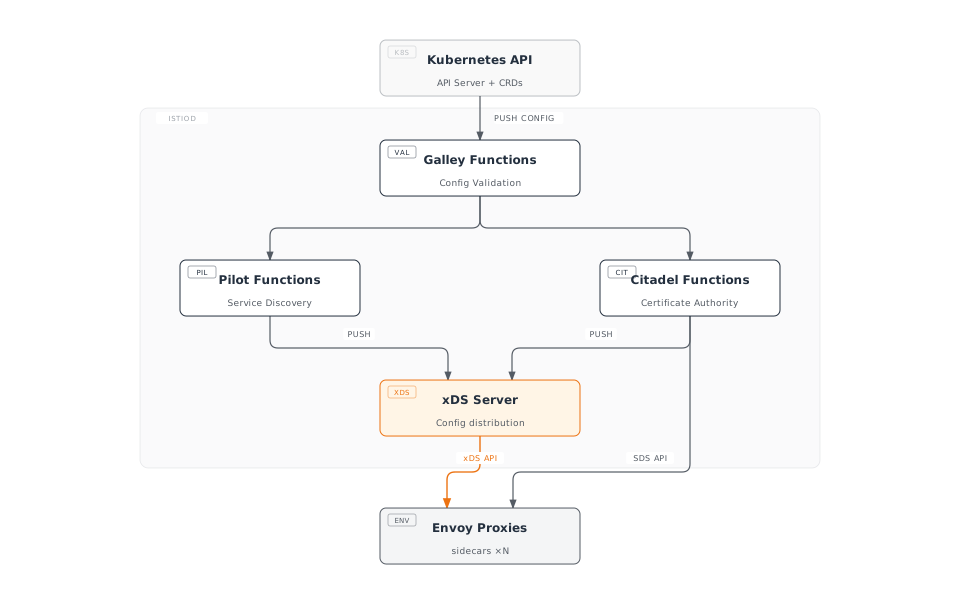
Istiod の主な機能
注記: 以下の機能は、Istio 1.28 では Istiod 内に統合されています。機能を説明するために、歴史的な名称(Pilot、Citadel、Galley)を使用しています。
1. Service Discovery(Pilot の機能)
# Kubernetes Service detection
apiVersion: v1
kind: Service
metadata:
  name: reviews
spec:
  selector:
    app: reviews
  ports:
  - port: 9080
Istiod は以下を追跡します:
- Kubernetes Service
- Endpoint(Pod IP)
- Pod の状態変更
- 外部 Service(ServiceEntry)
2. Traffic Management(Pilot の機能)
Istio CRD を Envoy 設定に変換します:
# VirtualService (user-defined)
apiVersion: networking.istio.io/v1
kind: VirtualService
metadata:
  name: reviews
spec:
  hosts:
  - reviews
  http:
  - route:
    - destination:
        host: reviews
        subset: v1
      weight: 90
    - destination:
        host: reviews
        subset: v2
      weight: 10
↓ Istiod が Envoy 設定に変換 ↓
{
  "route_config": {
    "weighted_clusters": {
      "clusters": [
        {"name": "outbound|9080|v1|reviews", "weight": 90},
        {"name": "outbound|9080|v2|reviews", "weight": 10}
      ]
    }
  }
}
3. Certificate Management(Citadel の機能)
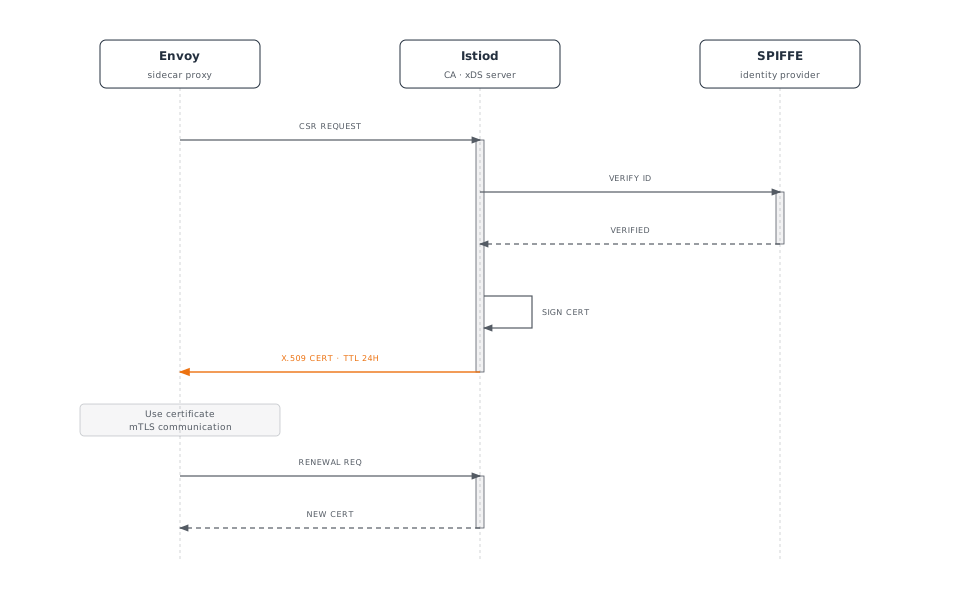
SPIFFE ID 形式:
spiffe://cluster.local/ns/default/sa/reviews4. Configuration Validation(Galley の機能)
# Invalid configuration
apiVersion: networking.istio.io/v1
kind: VirtualService
metadata:
  name: invalid
spec:
  hosts:
  - reviews
  http:
  - route:
    - destination:
        host: non-existent-service  # ❌ Non-existent service
Istiod は適用前に検証します:
$ kubectl apply -f invalid-vs.yaml
Error from server: admission webhook "validation.istio.io" denied the request:
configuration is invalid: host "non-existent-service" not found
Istiod のプロセス構造
Istio 1.28 における実際の実装:
# Processes inside Istiod pod
$ kubectl exec -n istio-system deploy/istiod -- ps aux
USER       PID  COMMAND
istio-p+     1  /usr/local/bin/pilot-discovery discovery

# Single binary 'pilot-discovery' performs all functions主なポイント:
- Istiod は
pilot-discoveryという単一の Go バイナリとして実行されます - Pilot、Citadel、Galley はコードレベルの package/moduleとして存在しますが、独立したプロセスではありません
- すべての機能は単一プロセス内で goroutine として実行されます
Istiod が提供する主なポート:
| ポート | プロトコル | 用途 | 機能 |
|---|---|---|---|
| 15010 | gRPC | xDS(legacy) | 後方互換性 |
| 15012 | gRPC | TLS 経由の xDS | 主な xDS API エンドポイント |
| 15014 | HTTP | Control Plane の監視 | Metrics とヘルスチェック |
| 15017 | HTTPS | Webhook | Sidecar インジェクション |
| 8080 | HTTP | Debug | デバッグインターフェース |
Istiod の Deployment
高可用性設定:
apiVersion: apps/v1
kind: Deployment
metadata:
  name: istiod
  namespace: istio-system
spec:
  replicas: 3  # 3 replicas for HA
  selector:
    matchLabels:
      app: istiod
  template:
    metadata:
      labels:
        app: istiod
    spec:
      containers:
      - name: discovery
        image: istio/pilot:1.28.0
        resources:
          requests:
            cpu: 500m
memory: 2Gi一般的なリソース使用量:
- CPU: 0.5~2 コア
- Memory: 2~4 GB
- 数千の Service と Pod を処理可能
Data Plane: Envoy Proxy
Envoy のアーキテクチャ
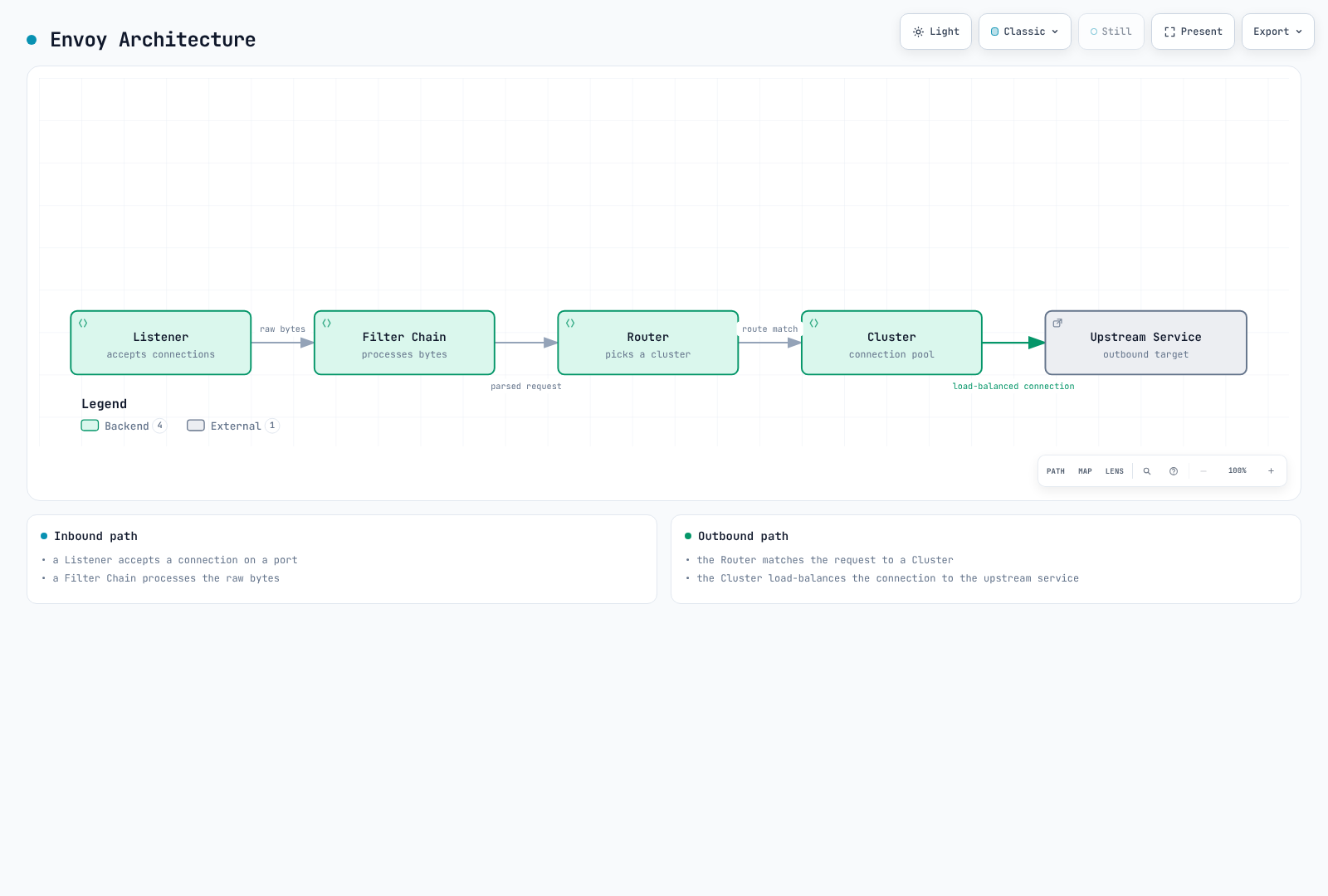
Envoy の主なコンポーネント
1. Listener
ポートで接続を受信します:
{
  "name": "0.0.0.0_15001",
  "address": {
    "socket_address": {
      "address": "0.0.0.0",
      "port_value": 15001
    }
  },
  "filter_chains": [...]
}
デフォルトの Istio Listener:
0.0.0.0:15001: すべての送信 TCP トラフィック0.0.0.0:15006: すべての受信 TCP トラフィック0.0.0.0:15021: ヘルスチェック0.0.0.0:15090: Prometheus metrics
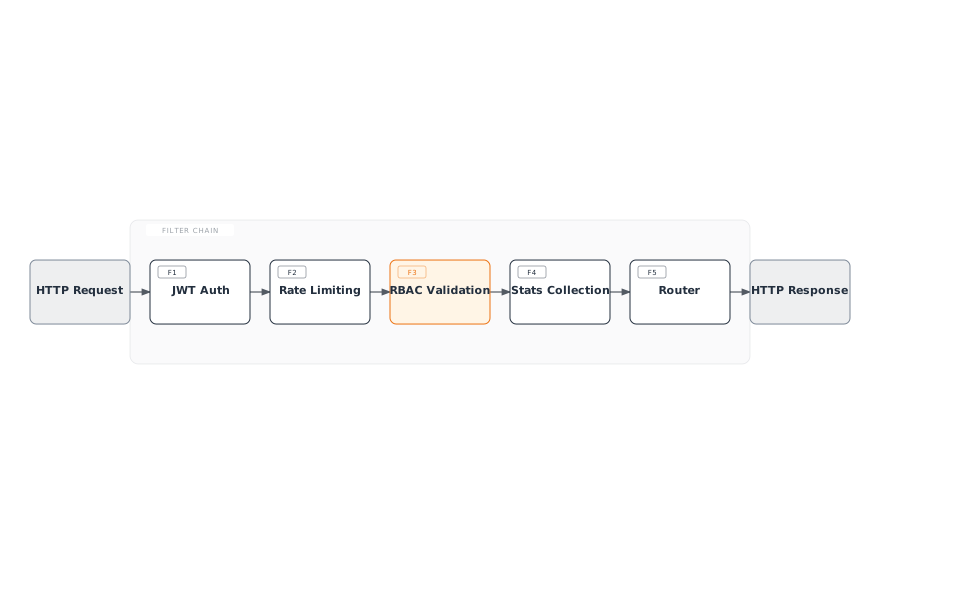
2. Filter
リクエスト/レスポンスを処理する plugin:
3. Cluster
upstream service の論理グループ:
{
  "name": "outbound|9080|v1|reviews.default.svc.cluster.local",
  "type": "EDS",
  "eds_cluster_config": {
    "service_name": "outbound|9080|v1|reviews.default.svc.cluster.local"
  },
  "circuit_breakers": {...},
  "outlier_detection": {...}
}
4. Endpoint
実際の Pod IP リスト:
{
  "cluster_name": "outbound|9080|v1|reviews",
  "endpoints": [
    {
      "lb_endpoints": [
        {"endpoint": {"address": {"socket_address": {"address": "10.244.1.5", "port_value": 9080}}}},
        {"endpoint": {"address": {"socket_address": {"address": "10.244.2.8", "port_value": 9080}}}}
      ]
    }
  ]
}
Envoy のパフォーマンス
ベンチマーク(一般的な環境):
- Throughput: コアあたり 10,000+ RPS
- 追加レイテンシ: < 1ms(P99)
- Memory: 50~100 MB(デフォルト設定)
- CPU: 0.1~0.5 コア(一般的な負荷)
Sidecar インジェクションの仕組み
インジェクションプロセス
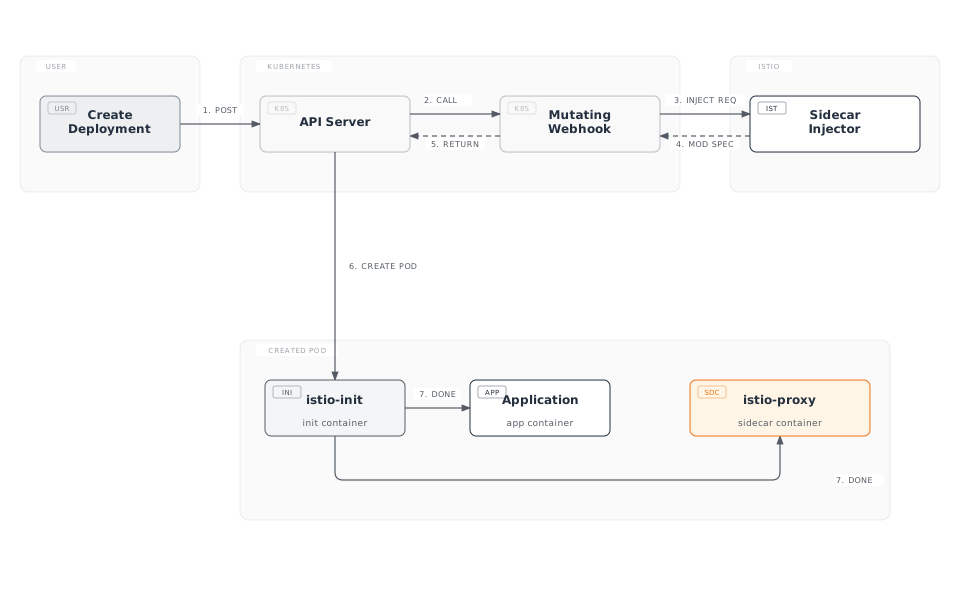
インジェクション前と後の比較
元の Deployment:
apiVersion: apps/v1
kind: Deployment
metadata:
  name: reviews
spec:
  template:
    spec:
      containers:
      - name: reviews
        image: reviews:v1
        ports:
- containerPort: 9080インジェクション後:
apiVersion: v1
kind: Pod
metadata:
  annotations:
    sidecar.istio.io/status: '{"initContainers":["istio-init"],"containers":["istio-proxy"]}'
spec:
  initContainers:
  - name: istio-init
    image: istio/proxyv2:1.28.0
    command: ['istio-iptables', ...]
    securityContext:
      capabilities:
        add: [NET_ADMIN, NET_RAW]
  containers:
  - name: reviews
    image: reviews:v1
    ports:
    - containerPort: 9080
  - name: istio-proxy
    image: istio/proxyv2:1.28.0
    args: ['proxy', 'sidecar', ...]
Sidecar インジェクションの有効化
自動インジェクション(推奨)
Namespace レベル:
# Add label to namespace
kubectl label namespace default istio-injection=enabled

# All pods deployed to this namespace will automatically have sidecar injected
kubectl apply -f deployment.yaml
Pod レベル(Annotation):
apiVersion: v1
kind: Pod
metadata:
  annotations:
    sidecar.istio.io/inject: "true"  # Enable injection per pod
spec:
  containers:
  - name: app
    image: myapp:v1
手動インジェクション
istioctl kube-inject コマンドを使用して、YAML ファイルに直接 sidecar をインジェクションします。
# Inject sidecar into YAML file and deploy
istioctl kube-inject -f deployment.yaml | kubectl apply -f -

# Or save to file
istioctl kube-inject -f deployment.yaml -o deployment-injected.yaml
kubectl apply -f deployment-injected.yaml手動インジェクションのシナリオ:
- 自動インジェクションを使用できない環境
- CI/CD pipeline で明示的な制御が必要な場合
- デバッグのためにインジェクションされた YAML を確認したい場合
iptables とトラフィックのインターセプト
istio-init Container
役割: Pod ネットワークトラフィックを Envoy Proxy にリダイレクトする iptables ルールを設定します
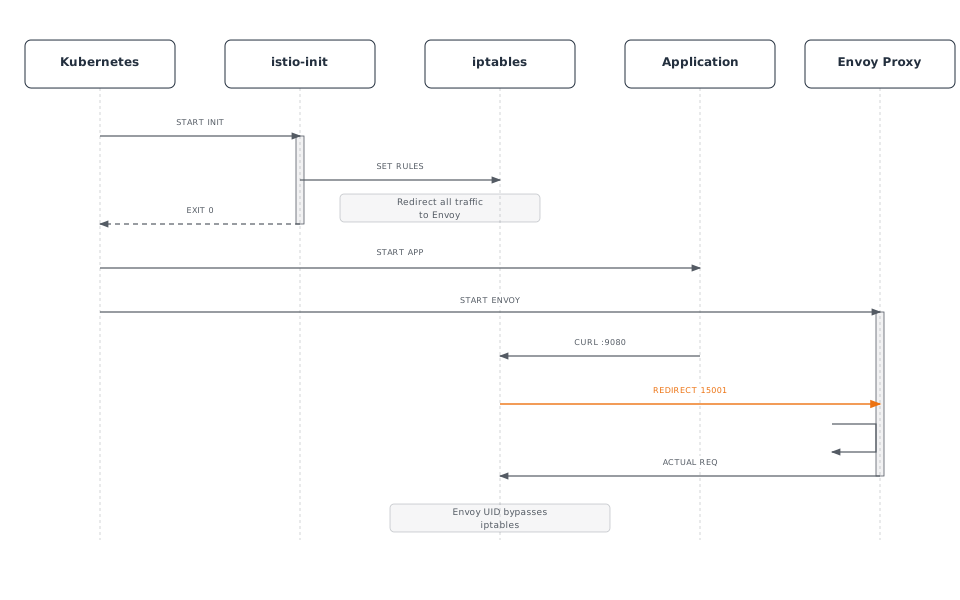
iptables ルールの詳細
istio-init が実行するコマンド:
#!/bin/bash
# istio-iptables script (simplified)

# 1. OUTPUT chain: Application outbound traffic
iptables -t nat -A OUTPUT -p tcp \
  -m owner ! --uid-owner 1337 \  # Exclude Envoy UID
  -j REDIRECT --to-port 15001     # Envoy outbound port

# 2. PREROUTING chain: Inbound traffic to pod
iptables -t nat -A PREROUTING -p tcp \
  -j REDIRECT --to-port 15006     # Envoy inbound port

# 3. Exclusion rules
# - localhost traffic
iptables -t nat -I OUTPUT -d 127.0.0.1/32 -j RETURN

# - Istiod communication (15012)
iptables -t nat -I OUTPUT -p tcp --dport 15012 -j RETURN

# - DNS (53)
iptables -t nat -I OUTPUT -p udp --dport 53 -j RETURN
トラフィックフロー(iptables 適用後)
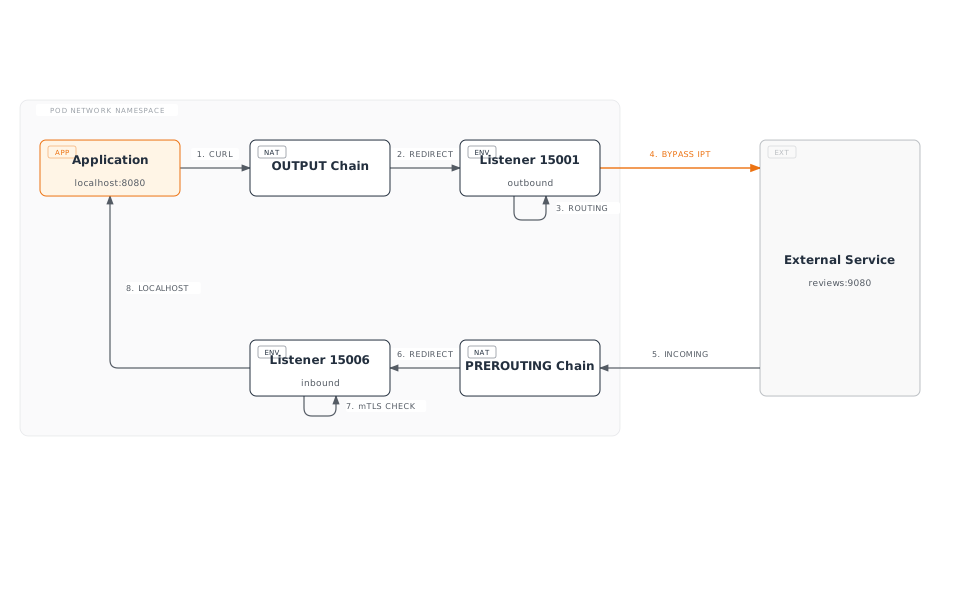
iptables ルールの確認
Pod 内から確認:
# Enter pod
kubectl exec -it <pod-name> -c istio-proxy -- /bin/bash

# Check iptables rules
iptables -t nat -L -n -v

# OUTPUT chain
Chain OUTPUT (policy ACCEPT)
target     prot opt source     destination
ISTIO_OUTPUT  tcp  --  0.0.0.0/0  0.0.0.0/0

# ISTIO_OUTPUT detail
Chain ISTIO_OUTPUT (1 references)
RETURN     all  --  0.0.0.0/0  127.0.0.1           # Exclude localhost
RETURN     all  --  0.0.0.0/0  0.0.0.0/0           owner UID match 1337  # Exclude Envoy
REDIRECT   tcp  --  0.0.0.0/0  0.0.0.0/0           redir ports 15001  # Redirect rest

# PREROUTING chain
Chain PREROUTING (policy ACCEPT)
ISTIO_INBOUND  tcp  --  0.0.0.0/0  0.0.0.0/0

# ISTIO_INBOUND detail
Chain ISTIO_INBOUND (1 references)
REDIRECT   tcp  --  0.0.0.0/0  0.0.0.0/0           redir ports 15006
iptables と eBPF(CNI Plugin)の比較
Istio は 2 つのトラフィックインターセプト方式をサポートしています:
| 方式 | 利点 | 欠点 | 使用シナリオ |
|---|---|---|---|
| iptables | シンプル、汎用的 | Init Container が必要 | デフォルト設定 |
| eBPF (CNI) | Init 不要、高速 | モダンな kernel が必要 | 高パフォーマンス、Ambient Mode |
DNS 処理の仕組み
Kubernetes DNS の基本動作
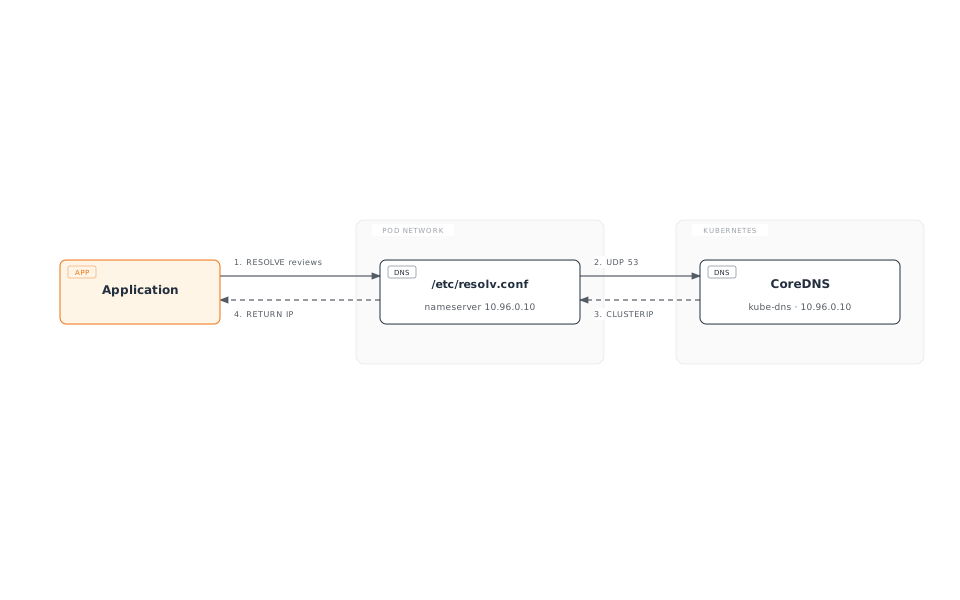
/etc/resolv.conf(Pod 内):
nameserver 10.96.0.10  # kube-dns ClusterIP
search default.svc.cluster.local svc.cluster.local cluster.local
options ndots:5
Envoy の DNS 処理
Istio では、Envoy が DNS を処理します:
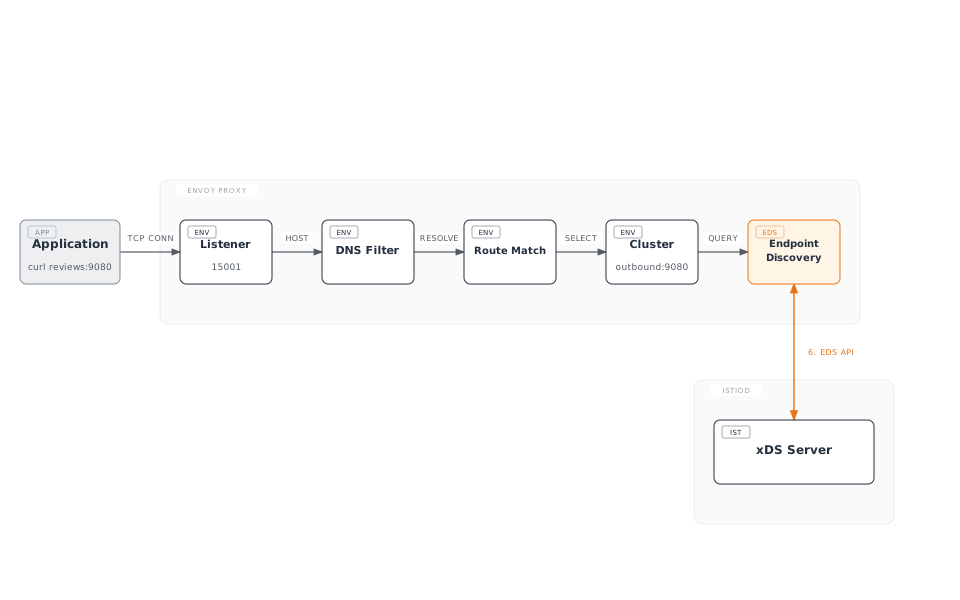
利点:
- CoreDNS 呼び出しが不要(パフォーマンス向上)
- 動的な Endpoint 更新
- 高度な routing(version、weight など)
DNS Proxy(オプション)
Istio 1.8+ で追加された DNS Proxy 機能:
apiVersion: install.istio.io/v1alpha1
kind: IstioOperator
spec:
  meshConfig:
    defaultConfig:
      proxyMetadata:
ISTIO_META_DNS_CAPTURE: "true" # Enable DNS Proxy動作:
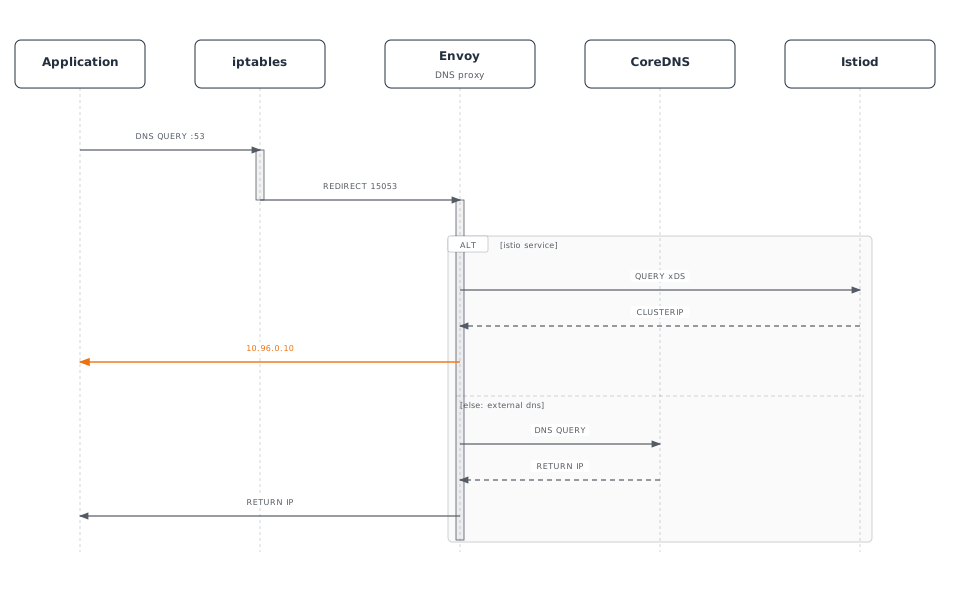
DNS Proxy の iptables ルール:
# Redirect UDP port 53 to Envoy DNS Proxy
iptables -t nat -A OUTPUT -p udp --dport 53 \
  -m owner ! --uid-owner 1337 \
  -j REDIRECT --to-port 15053
xDS API 通信
xDS Protocol の概要
xDS: Discovery Service の略であり、Envoy の動的設定 protocol です。
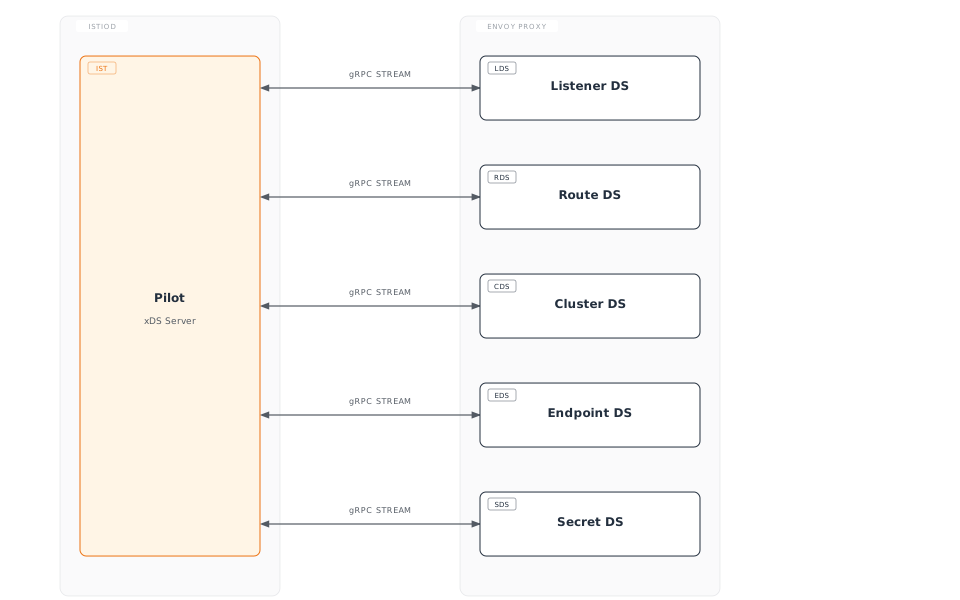
xDS API の種類
| API | 名前 | 役割 | 例 |
|---|---|---|---|
| LDS | Listener Discovery | ポート設定を受信 | 15001、15006 |
| RDS | Route Discovery | HTTP routing ルール | VirtualService |
| CDS | Cluster Discovery | upstream service | DestinationRule |
| EDS | Endpoint Discovery | Pod IP リスト | Service Endpoint |
| SDS | Secret Discovery | TLS 証明書 | mTLS 証明書 |
xDS 通信フロー
xDS 通信の検証
Envoy Admin API で確認:
# From inside pod
kubectl exec -it <pod-name> -c istio-proxy -- curl localhost:15000/config_dump

# LDS (Listeners)
kubectl exec -it <pod-name> -c istio-proxy -- \
  curl -s localhost:15000/config_dump | jq '.configs[0].dynamic_listeners'

# CDS (Clusters)
kubectl exec -it <pod-name> -c istio-proxy -- \
  curl -s localhost:15000/config_dump | jq '.configs[1].dynamic_active_clusters'

# EDS (Endpoints)
kubectl exec -it <pod-name> -c istio-proxy -- \
  curl -s localhost:15000/clusters | grep -A 5 "reviews"

# RDS (Routes)
kubectl exec -it <pod-name> -c istio-proxy -- \
  curl -s localhost:15000/config_dump | jq '.configs[2].dynamic_route_configs'
istioctl で確認:
# Listener configuration
istioctl proxy-config listeners <pod-name> -n default

# Cluster configuration
istioctl proxy-config clusters <pod-name> -n default

# Endpoint configuration
istioctl proxy-config endpoints <pod-name> -n default

# Route configuration
istioctl proxy-config routes <pod-name> -n default
Sidecar リソースによる最適化
問題: すべての Service 情報の受信
デフォルトでは、各 Envoy はmesh 全体のすべての Service に関する情報を受信します:
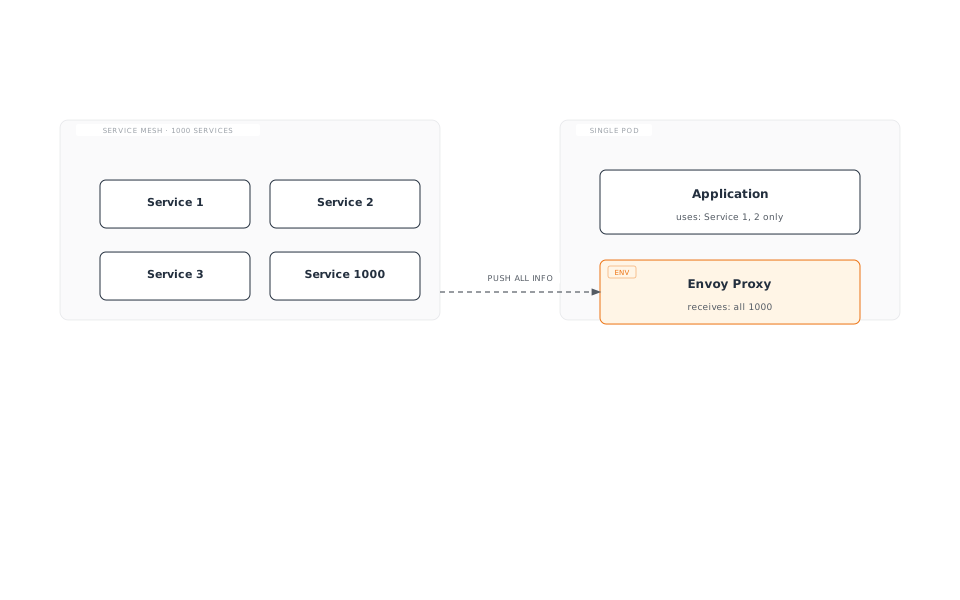
問題点:
- Memory 使用量の増加
- CPU 使用量の増加(設定処理)
- ネットワーク帯域幅の浪費
- Istiod の負荷増加
解決策: Sidecar リソース
Sidecar リソースを使用して、必要な Service のみを受信するように制限します:
apiVersion: networking.istio.io/v1
kind: Sidecar
metadata:
  name: default
  namespace: default
spec:
  egress:
  - hosts:
    - "./*"  # All services in same namespace
    - "istio-system/*"  # All services in istio-system
    - "production/reviews"  # Only reviews in production namespace
Sidecar リソースの例
1. Namespace の分離
apiVersion: networking.istio.io/v1
kind: Sidecar
metadata:
  name: default
  namespace: team-a
spec:
  egress:
  - hosts:
    - "team-a/*"  # Own namespace only
    - "istio-system/*"  # System services
    - "shared/*"  # Shared services
2. 特定の Service のみにアクセス
apiVersion: networking.istio.io/v1
kind: Sidecar
metadata:
  name: frontend
  namespace: default
spec:
  workloadSelector:
    labels:
      app: frontend
  egress:
  - hosts:
    - "default/reviews"
    - "default/ratings"
    - "default/details"
  - port:
      number: 443
      protocol: HTTPS
    hosts:
    - "external/*"
3. 外部 Service のみにアクセス
apiVersion: networking.istio.io/v1
kind: Sidecar
metadata:
  name: external-only
  namespace: default
spec:
  workloadSelector:
    labels:
      app: batch-job
  egress:
  - hosts:
    - "./*"  # Same namespace
  outboundTrafficPolicy:
    mode: REGISTRY_ONLY  # Only those registered in ServiceEntry
Sidecar リソースの効果
導入前(Sidecar なし):
- 1,000 Service → 1,000 Cluster 設定
- Envoy Memory: ~500 MB
- 設定の push 時間: 5~10 秒
導入後(Sidecar 適用済み):
- 10 Service → 10 Cluster 設定
- Envoy Memory: ~80 MB
- 設定の push 時間: < 1 秒
DNS と Sidecar の統合
apiVersion: networking.istio.io/v1
kind: Sidecar
metadata:
  name: dns-optimized
  namespace: default
spec:
  egress:
  - hosts:
    - "default/reviews"
    - "default/ratings"
  # Envoy only handles DNS for reviews, ratings
# Rest forwarded to CoreDNS結果:
- Envoy は
reviews、ratingsのみを解決 google.comなどの外部 domain は CoreDNS に転送- Memory と CPU を節約