架构
支持的版本: Istio 1.28+ API 版本:
networking.istio.io/v1,security.istio.io/v1最后更新: February 19, 2026
本文深入介绍 Istio 的内部架构和网络机制。
如需了解背景和历史,请参阅 基本概念 文档。
重要变更(Istio 1.5+):
- Pilot、Citadel、Galley 不再是独立组件
- 它们已整合为名为 Istiod(
pilot-discovery)的单个二进制文件 - Pilot/Citadel/Galley 术语是描述功能的历史名称
目录
Istio 架构概览
整体结构
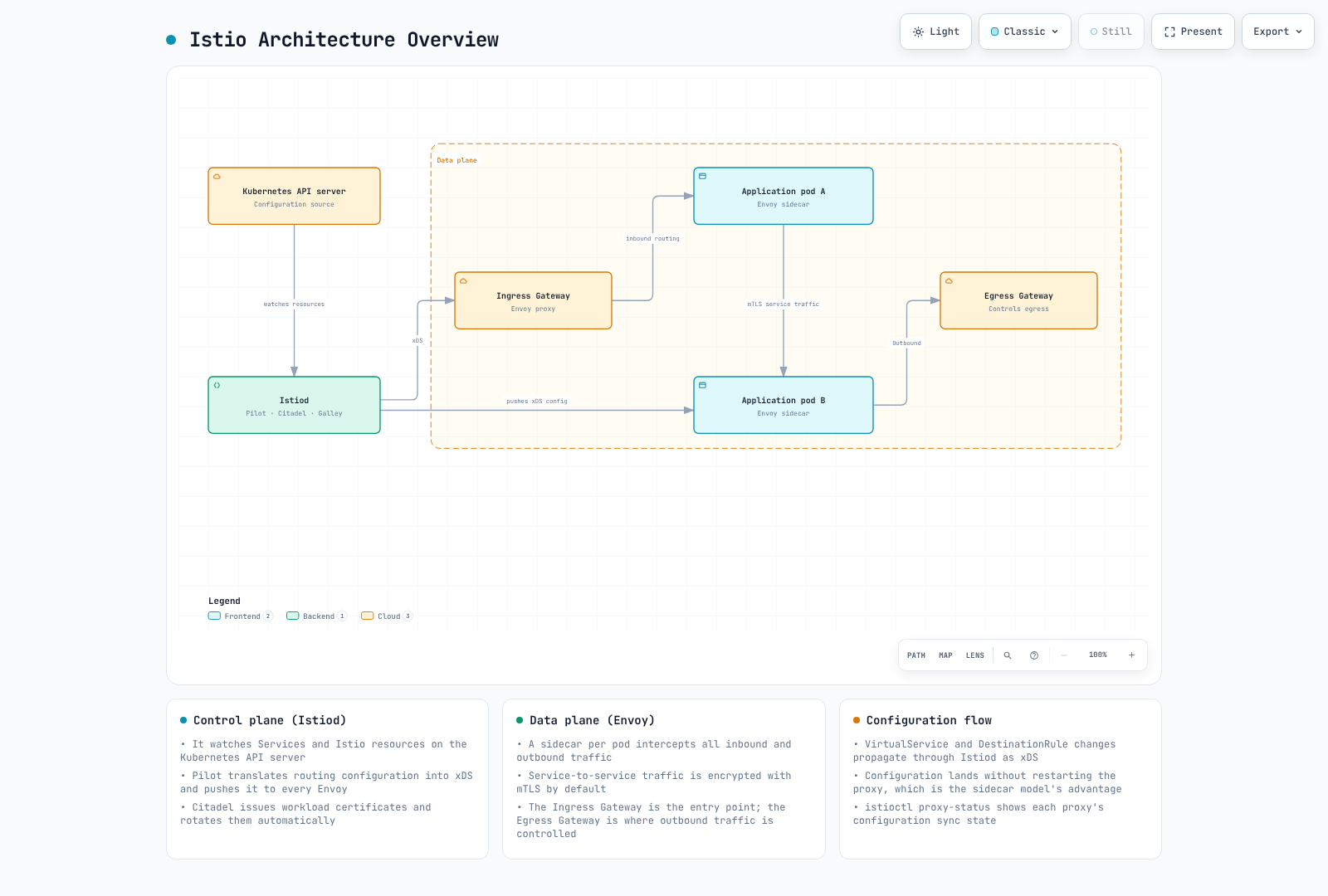
控制平面与数据平面
| 类别 | 控制平面(Istiod) | 数据平面(Envoy) |
|---|---|---|
| 角色 | 策略管理、配置分发 | 实际流量处理 |
| 位置 | 独立的 Pod(通常为 1-3 个) | 所有应用 Pod |
| 语言 | Go | C++ |
| 负载 | 低 | 高(所有流量) |
| 可扩展性 | 水平扩缩容(HA) | 自动(每个 Pod 1 个) |
控制平面:Istiod
Istiod 内部结构
重要:自 Istio 1.5 起,Pilot、Citadel 和 Galley 是 Istiod 的内部功能,而非独立组件。
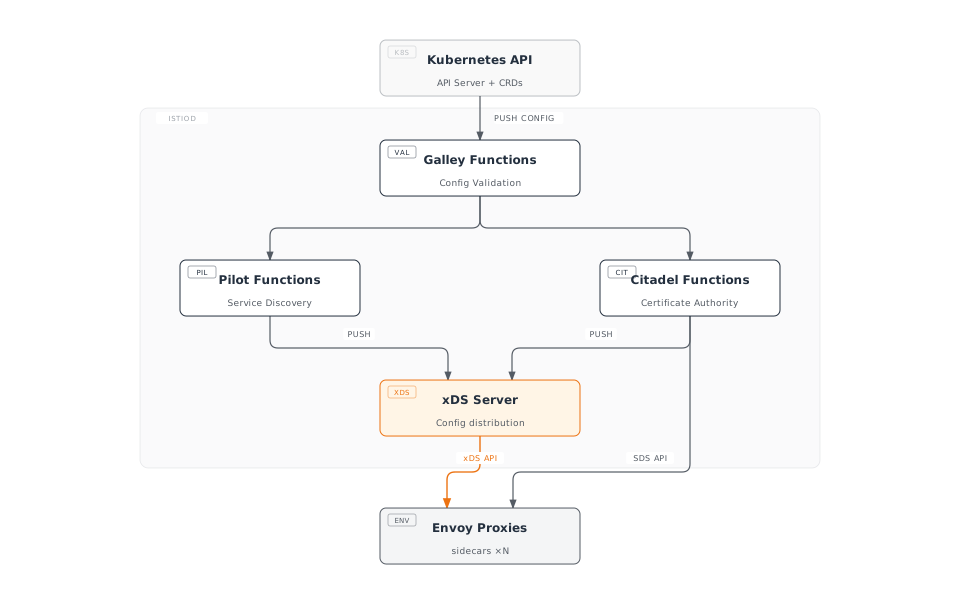
Istiod 主要功能
注意:在 Istio 1.28 中,下列功能已集成于 Istiod。使用历史名称(Pilot、Citadel、Galley)来描述相应功能。
1. Service Discovery(Pilot 功能)
# Kubernetes Service detection
apiVersion: v1
kind: Service
metadata:
  name: reviews
spec:
  selector:
    app: reviews
  ports:
  - port: 9080
Istiod 跟踪:
- Kubernetes Service
- Endpoint(Pod IP)
- Pod 状态变更
- 外部服务(ServiceEntry)
2. Traffic Management(Pilot 功能)
将 Istio CRD 转换为 Envoy 配置:
# VirtualService (user-defined)
apiVersion: networking.istio.io/v1
kind: VirtualService
metadata:
  name: reviews
spec:
  hosts:
  - reviews
  http:
  - route:
    - destination:
        host: reviews
        subset: v1
      weight: 90
    - destination:
        host: reviews
        subset: v2
      weight: 10
↓ Istiod 转换为 Envoy 配置 ↓
{
  "route_config": {
    "weighted_clusters": {
      "clusters": [
        {"name": "outbound|9080|v1|reviews", "weight": 90},
        {"name": "outbound|9080|v2|reviews", "weight": 10}
      ]
    }
  }
}
3. Certificate Management(Citadel 功能)
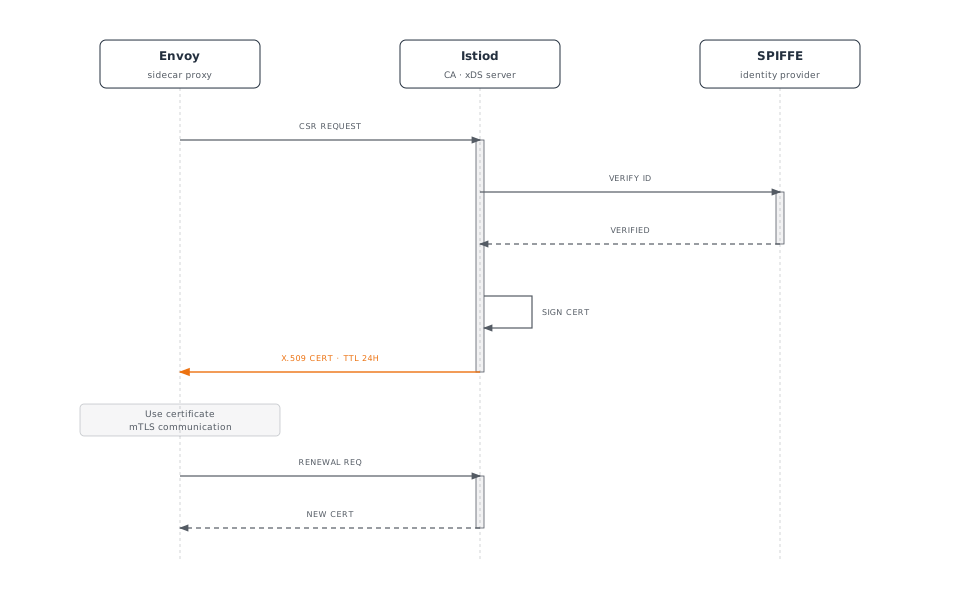
SPIFFE ID 格式:
spiffe://cluster.local/ns/default/sa/reviews4. Configuration Validation(Galley 功能)
# Invalid configuration
apiVersion: networking.istio.io/v1
kind: VirtualService
metadata:
  name: invalid
spec:
  hosts:
  - reviews
  http:
  - route:
    - destination:
        host: non-existent-service  # ❌ Non-existent service
Istiod 在应用前进行验证:
$ kubectl apply -f invalid-vs.yaml
Error from server: admission webhook "validation.istio.io" denied the request:
configuration is invalid: host "non-existent-service" not found
Istiod 进程结构
Istio 1.28 中的实际实现:
# Processes inside Istiod pod
$ kubectl exec -n istio-system deploy/istiod -- ps aux
USER       PID  COMMAND
istio-p+     1  /usr/local/bin/pilot-discovery discovery

# Single binary 'pilot-discovery' performs all functions要点:
- Istiod 以名为
pilot-discovery的单个 Go 二进制文件运行 - Pilot、Citadel、Galley 以代码级 package/module存在,但不是独立进程
- 所有功能均作为 goroutine 在单个进程中运行
Istiod 提供的主要端口:
| 端口 | 协议 | 用途 | 功能 |
|---|---|---|---|
| 15010 | gRPC | xDS(旧版) | 向后兼容 |
| 15012 | gRPC | TLS 上的 xDS | 主要 xDS API 端点 |
| 15014 | HTTP | 控制平面监控 | 指标和健康检查 |
| 15017 | HTTPS | Webhook | Sidecar 注入 |
| 8080 | HTTP | 调试 | 调试接口 |
Istiod 部署
高可用配置:
apiVersion: apps/v1
kind: Deployment
metadata:
  name: istiod
  namespace: istio-system
spec:
  replicas: 3  # 3 replicas for HA
  selector:
    matchLabels:
      app: istiod
  template:
    metadata:
      labels:
        app: istiod
    spec:
      containers:
      - name: discovery
        image: istio/pilot:1.28.0
        resources:
          requests:
            cpu: 500m
memory: 2Gi典型资源使用情况:
- CPU:0.5 - 2 个核心
- 内存:2 - 4 GB
- 可处理数千个 Service 和 Pod
数据平面:Envoy Proxy
Envoy 架构
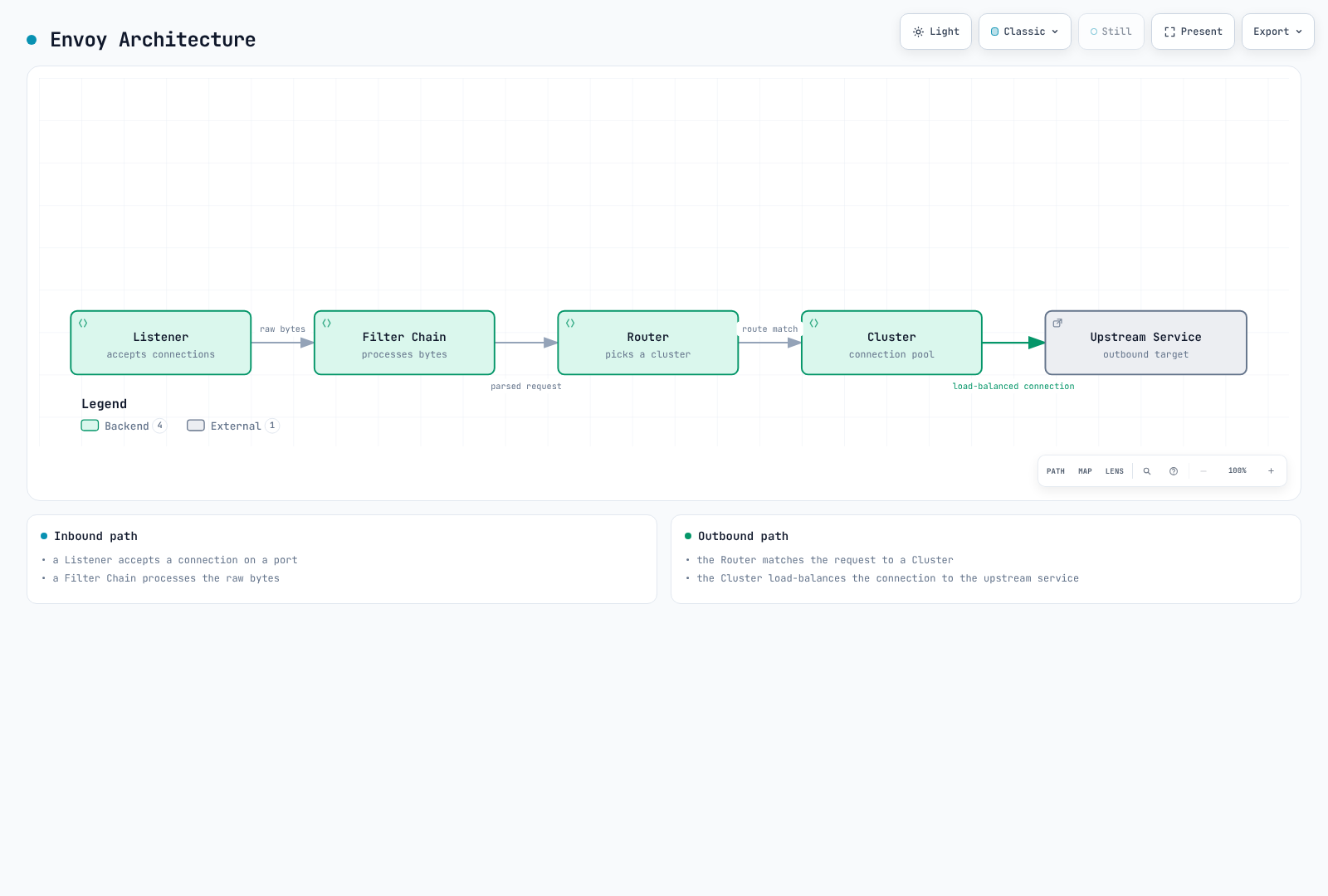
Envoy 主要组件
1. Listener
在端口上接收连接:
{
  "name": "0.0.0.0_15001",
  "address": {
    "socket_address": {
      "address": "0.0.0.0",
      "port_value": 15001
    }
  },
  "filter_chains": [...]
}
默认 Istio Listener:
0.0.0.0:15001:所有出站 TCP 流量0.0.0.0:15006:所有入站 TCP 流量0.0.0.0:15021:健康检查0.0.0.0:15090:Prometheus 指标
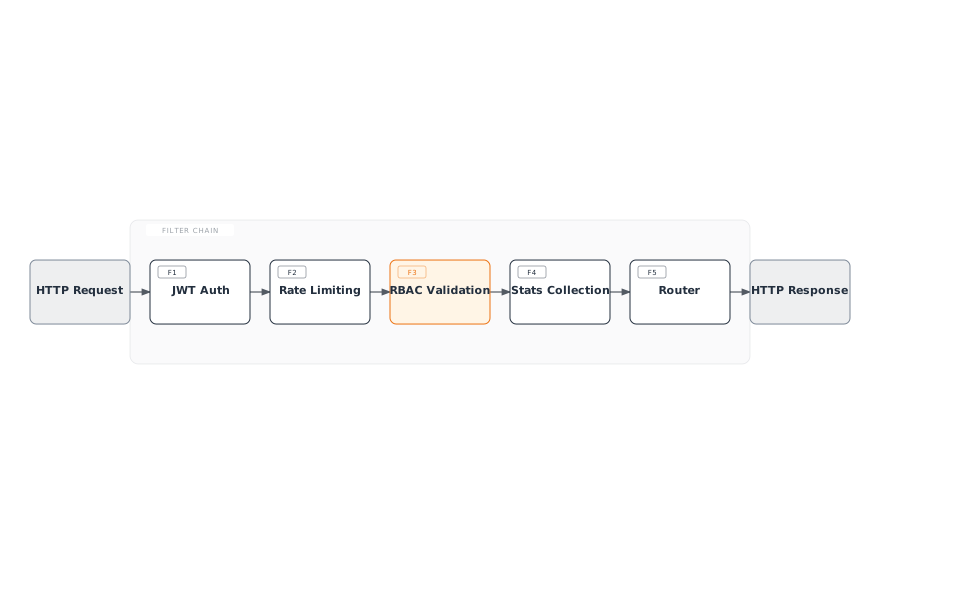
2. Filter
处理请求/响应的插件:
3. Cluster
上游服务的逻辑分组:
{
  "name": "outbound|9080|v1|reviews.default.svc.cluster.local",
  "type": "EDS",
  "eds_cluster_config": {
    "service_name": "outbound|9080|v1|reviews.default.svc.cluster.local"
  },
  "circuit_breakers": {...},
  "outlier_detection": {...}
}
4. Endpoint
实际 Pod IP 列表:
{
  "cluster_name": "outbound|9080|v1|reviews",
  "endpoints": [
    {
      "lb_endpoints": [
        {"endpoint": {"address": {"socket_address": {"address": "10.244.1.5", "port_value": 9080}}}},
        {"endpoint": {"address": {"socket_address": {"address": "10.244.2.8", "port_value": 9080}}}}
      ]
    }
  ]
}
Envoy 性能
基准测试(典型环境):
- 吞吐量:每个核心 10,000+ RPS
- 新增延迟:< 1ms(P99)
- 内存:50-100 MB(默认配置)
- CPU:0.1-0.5 个核心(典型负载)
Sidecar 注入机制
注入流程
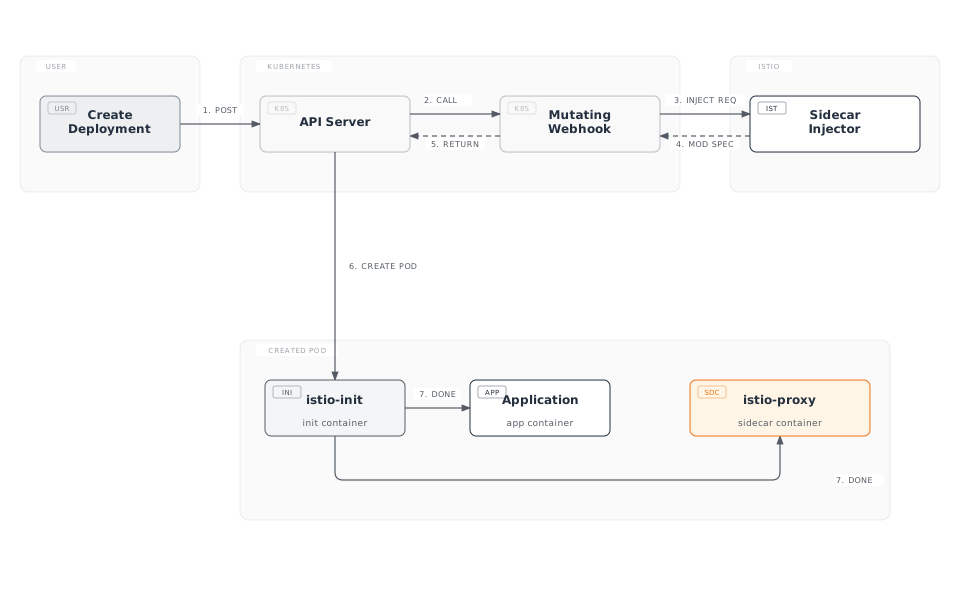
原始配置与注入后配置
原始 Deployment:
apiVersion: apps/v1
kind: Deployment
metadata:
  name: reviews
spec:
  template:
    spec:
      containers:
      - name: reviews
        image: reviews:v1
        ports:
- containerPort: 9080注入后:
apiVersion: v1
kind: Pod
metadata:
  annotations:
    sidecar.istio.io/status: '{"initContainers":["istio-init"],"containers":["istio-proxy"]}'
spec:
  initContainers:
  - name: istio-init
    image: istio/proxyv2:1.28.0
    command: ['istio-iptables', ...]
    securityContext:
      capabilities:
        add: [NET_ADMIN, NET_RAW]
  containers:
  - name: reviews
    image: reviews:v1
    ports:
    - containerPort: 9080
  - name: istio-proxy
    image: istio/proxyv2:1.28.0
    args: ['proxy', 'sidecar', ...]
启用 Sidecar 注入
自动注入(推荐)
Namespace 级别:
# Add label to namespace
kubectl label namespace default istio-injection=enabled

# All pods deployed to this namespace will automatically have sidecar injected
kubectl apply -f deployment.yaml
Pod 级别(Annotation):
apiVersion: v1
kind: Pod
metadata:
  annotations:
    sidecar.istio.io/inject: "true"  # Enable injection per pod
spec:
  containers:
  - name: app
    image: myapp:v1
手动注入
使用 istioctl kube-inject 命令将 sidecar 直接注入 YAML 文件。
# Inject sidecar into YAML file and deploy
istioctl kube-inject -f deployment.yaml | kubectl apply -f -

# Or save to file
istioctl kube-inject -f deployment.yaml -o deployment-injected.yaml
kubectl apply -f deployment-injected.yaml手动注入的适用场景:
- 无法使用自动注入的环境
- 在 CI/CD pipeline 中需要显式控制时
- 希望检查注入后的 YAML 以进行调试时
iptables 与流量拦截
istio-init Container
作用:设置 iptables 规则,将 Pod 网络流量重定向到 Envoy Proxy
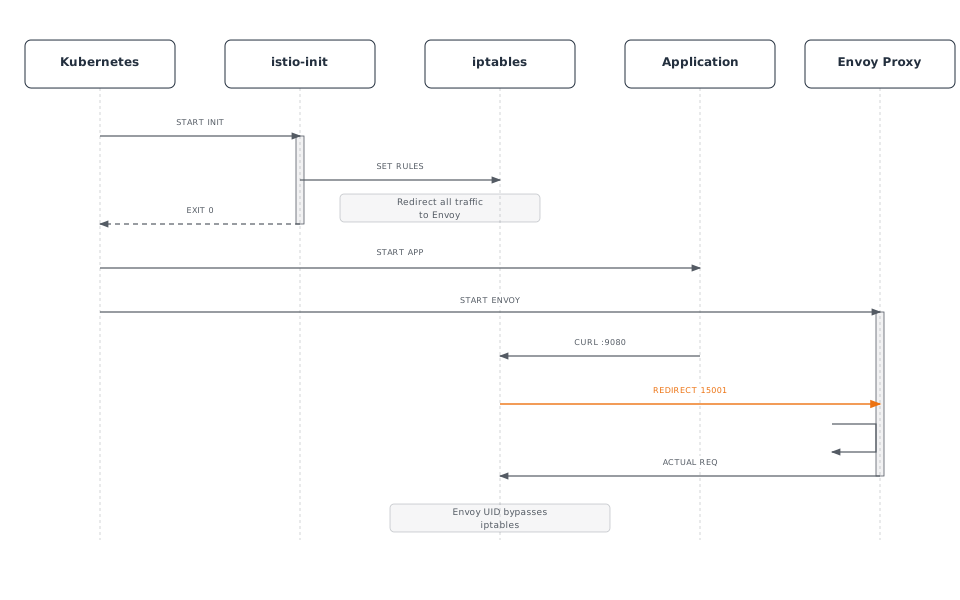
iptables 规则详情
istio-init 执行的命令:
#!/bin/bash
# istio-iptables script (simplified)

# 1. OUTPUT chain: Application outbound traffic
iptables -t nat -A OUTPUT -p tcp \
  -m owner ! --uid-owner 1337 \  # Exclude Envoy UID
  -j REDIRECT --to-port 15001     # Envoy outbound port

# 2. PREROUTING chain: Inbound traffic to pod
iptables -t nat -A PREROUTING -p tcp \
  -j REDIRECT --to-port 15006     # Envoy inbound port

# 3. Exclusion rules
# - localhost traffic
iptables -t nat -I OUTPUT -d 127.0.0.1/32 -j RETURN

# - Istiod communication (15012)
iptables -t nat -I OUTPUT -p tcp --dport 15012 -j RETURN

# - DNS (53)
iptables -t nat -I OUTPUT -p udp --dport 53 -j RETURN
流量流向(应用 iptables 后)
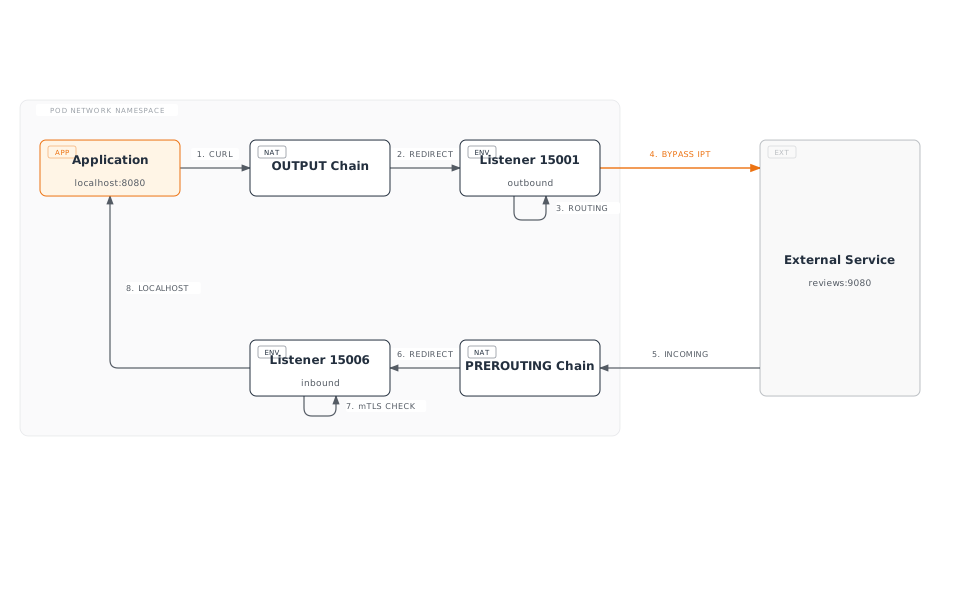
检查 iptables 规则
从 Pod 内部检查:
# Enter pod
kubectl exec -it <pod-name> -c istio-proxy -- /bin/bash

# Check iptables rules
iptables -t nat -L -n -v

# OUTPUT chain
Chain OUTPUT (policy ACCEPT)
target     prot opt source     destination
ISTIO_OUTPUT  tcp  --  0.0.0.0/0  0.0.0.0/0

# ISTIO_OUTPUT detail
Chain ISTIO_OUTPUT (1 references)
RETURN     all  --  0.0.0.0/0  127.0.0.1           # Exclude localhost
RETURN     all  --  0.0.0.0/0  0.0.0.0/0           owner UID match 1337  # Exclude Envoy
REDIRECT   tcp  --  0.0.0.0/0  0.0.0.0/0           redir ports 15001  # Redirect rest

# PREROUTING chain
Chain PREROUTING (policy ACCEPT)
ISTIO_INBOUND  tcp  --  0.0.0.0/0  0.0.0.0/0

# ISTIO_INBOUND detail
Chain ISTIO_INBOUND (1 references)
REDIRECT   tcp  --  0.0.0.0/0  0.0.0.0/0           redir ports 15006
iptables 与 eBPF(CNI Plugin)
Istio 支持两种流量拦截方式:
| 方法 | 优点 | 缺点 | 使用场景 |
|---|---|---|---|
| iptables | 简单、通用 | 需要 Init Container | 默认设置 |
| eBPF(CNI) | 无需 Init、速度快 | 需要现代内核 | 高性能、Ambient Mode |
DNS 处理机制
Kubernetes DNS 基本工作方式
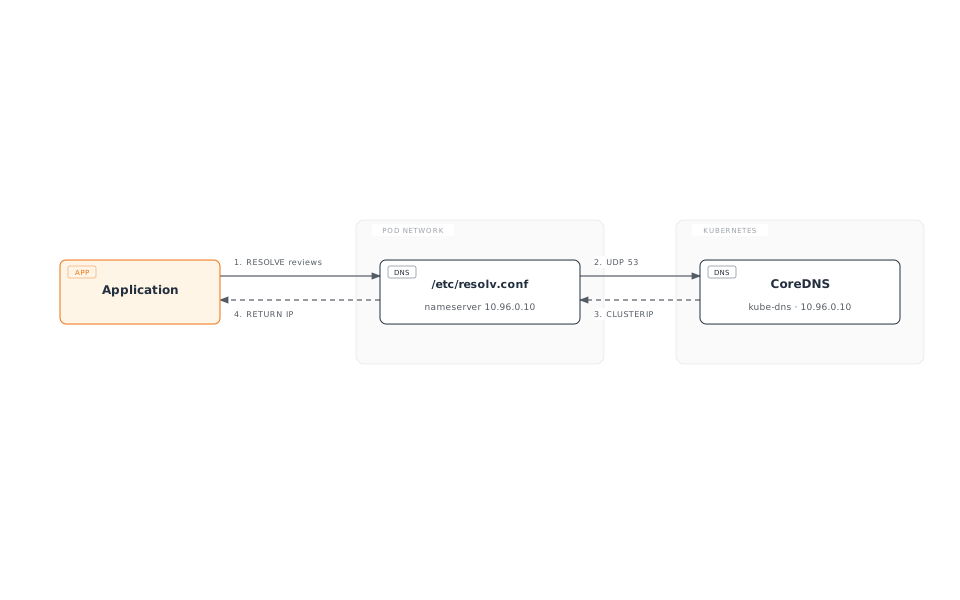
/etc/resolv.conf(Pod 内):
nameserver 10.96.0.10  # kube-dns ClusterIP
search default.svc.cluster.local svc.cluster.local cluster.local
options ndots:5
Envoy 的 DNS 处理
在 Istio 中,Envoy 处理 DNS:
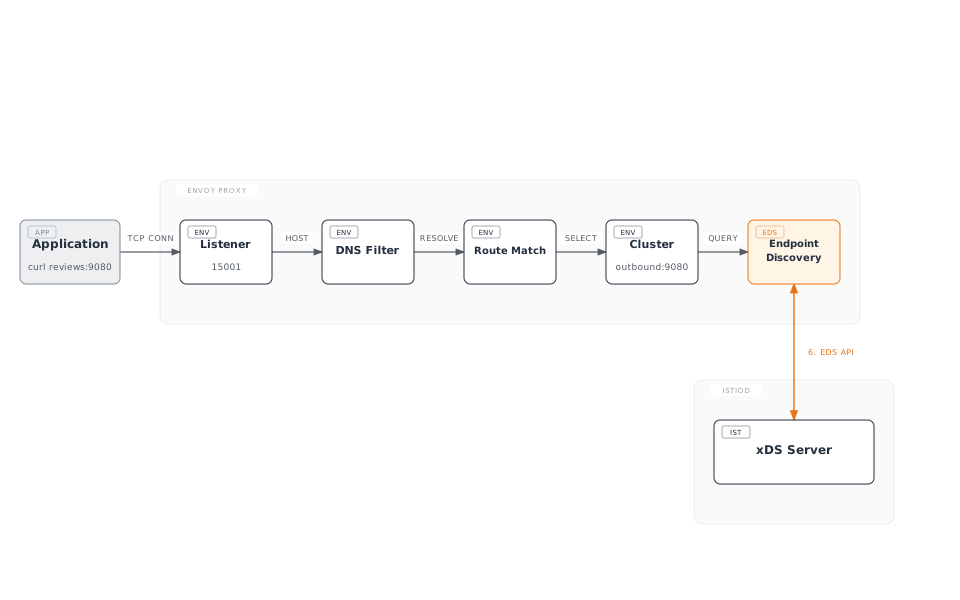
优点:
- 无需调用 CoreDNS(性能提升)
- 动态 Endpoint 更新
- 高级路由(版本、权重等)
DNS Proxy(可选)
DNS Proxy 功能在 Istio 1.8+ 中添加:
apiVersion: install.istio.io/v1alpha1
kind: IstioOperator
spec:
  meshConfig:
    defaultConfig:
      proxyMetadata:
ISTIO_META_DNS_CAPTURE: "true" # Enable DNS Proxy工作方式:
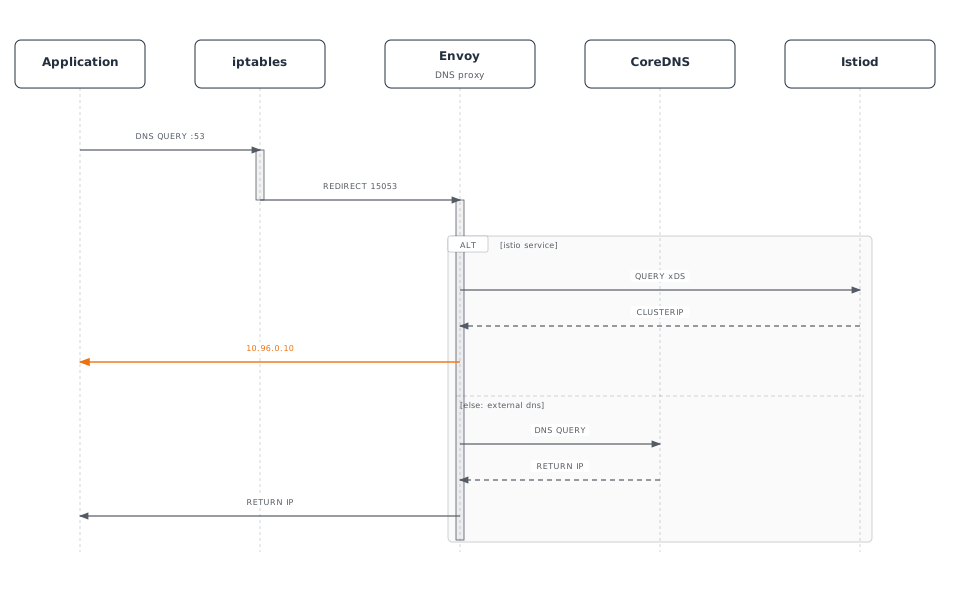
DNS Proxy iptables 规则:
# Redirect UDP port 53 to Envoy DNS Proxy
iptables -t nat -A OUTPUT -p udp --dport 53 \
  -m owner ! --uid-owner 1337 \
  -j REDIRECT --to-port 15053
xDS API 通信
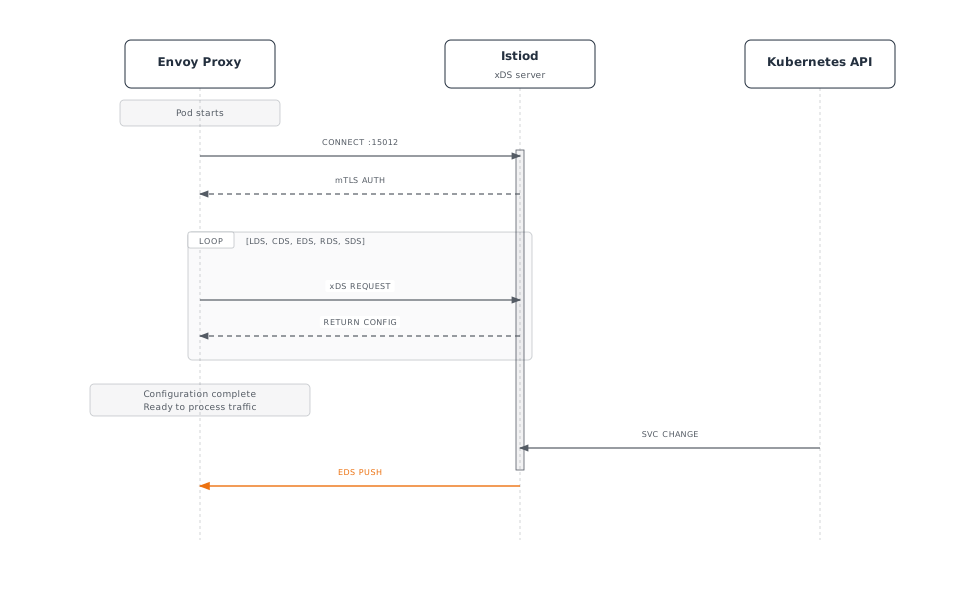
xDS 协议概览
xDS:Discovery Service 的缩写,是 Envoy 的动态配置协议。
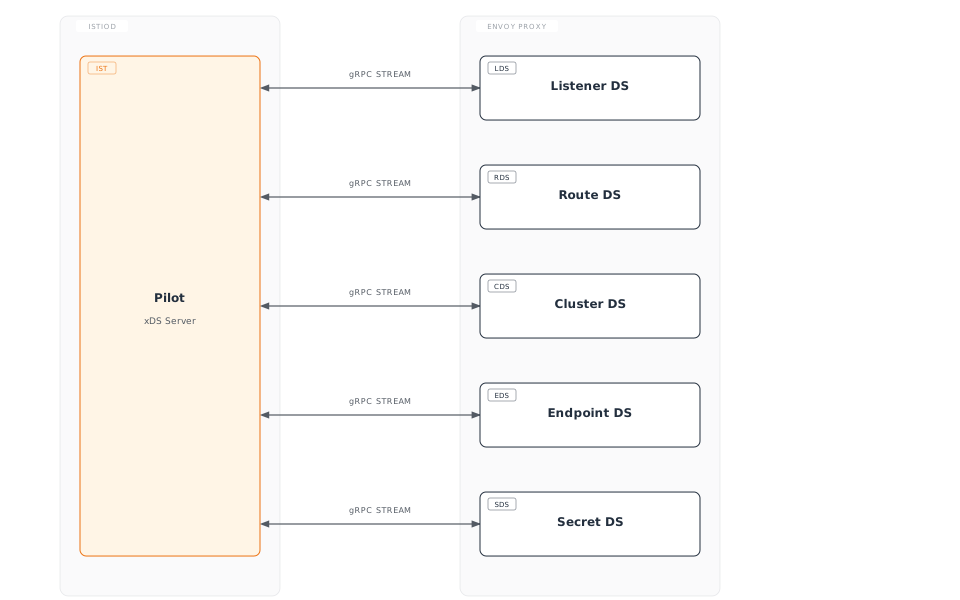
xDS API 类型
| API | 名称 | 作用 | 示例 |
|---|---|---|---|
| LDS | Listener Discovery | 接收端口配置 | 15001、15006 |
| RDS | Route Discovery | HTTP 路由规则 | VirtualService |
| CDS | Cluster Discovery | 上游服务 | DestinationRule |
| EDS | Endpoint Discovery | Pod IP 列表 | Service Endpoint |
| SDS | Secret Discovery | TLS 证书 | mTLS 证书 |
xDS 通信流程
验证 xDS 通信
使用 Envoy Admin API 检查:
# From inside pod
kubectl exec -it <pod-name> -c istio-proxy -- curl localhost:15000/config_dump

# LDS (Listeners)
kubectl exec -it <pod-name> -c istio-proxy -- \
  curl -s localhost:15000/config_dump | jq '.configs[0].dynamic_listeners'

# CDS (Clusters)
kubectl exec -it <pod-name> -c istio-proxy -- \
  curl -s localhost:15000/config_dump | jq '.configs[1].dynamic_active_clusters'

# EDS (Endpoints)
kubectl exec -it <pod-name> -c istio-proxy -- \
  curl -s localhost:15000/clusters | grep -A 5 "reviews"

# RDS (Routes)
kubectl exec -it <pod-name> -c istio-proxy -- \
  curl -s localhost:15000/config_dump | jq '.configs[2].dynamic_route_configs'
使用 istioctl 检查:
# Listener configuration
istioctl proxy-config listeners <pod-name> -n default

# Cluster configuration
istioctl proxy-config clusters <pod-name> -n default

# Endpoint configuration
istioctl proxy-config endpoints <pod-name> -n default

# Route configuration
istioctl proxy-config routes <pod-name> -n default
使用 Sidecar 资源进行优化
问题:接收所有 Service 信息
默认情况下,每个 Envoy 都会接收整个 mesh 中所有 Service 的信息:
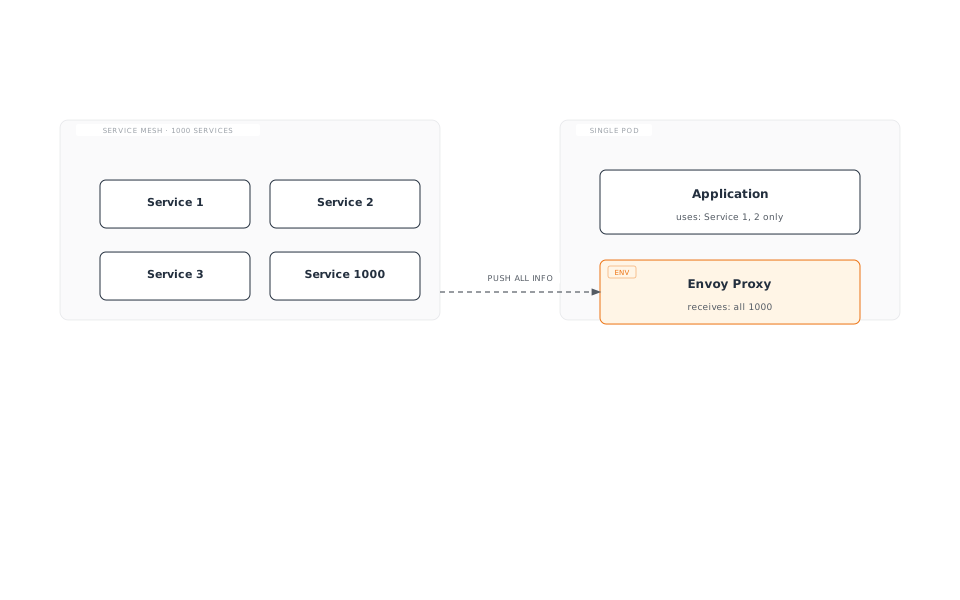
问题:
- 内存使用量增加
- CPU 使用量增加(配置处理)
- 网络带宽浪费
- Istiod 负载增加
解决方案:Sidecar 资源
使用 Sidecar 资源限制只接收必要的 Service:
apiVersion: networking.istio.io/v1
kind: Sidecar
metadata:
  name: default
  namespace: default
spec:
  egress:
  - hosts:
    - "./*"  # All services in same namespace
    - "istio-system/*"  # All services in istio-system
    - "production/reviews"  # Only reviews in production namespace
Sidecar 资源示例
1. Namespace 隔离
apiVersion: networking.istio.io/v1
kind: Sidecar
metadata:
  name: default
  namespace: team-a
spec:
  egress:
  - hosts:
    - "team-a/*"  # Own namespace only
    - "istio-system/*"  # System services
    - "shared/*"  # Shared services
2. 仅访问特定 Service
apiVersion: networking.istio.io/v1
kind: Sidecar
metadata:
  name: frontend
  namespace: default
spec:
  workloadSelector:
    labels:
      app: frontend
  egress:
  - hosts:
    - "default/reviews"
    - "default/ratings"
    - "default/details"
  - port:
      number: 443
      protocol: HTTPS
    hosts:
    - "external/*"
3. 仅访问外部服务
apiVersion: networking.istio.io/v1
kind: Sidecar
metadata:
  name: external-only
  namespace: default
spec:
  workloadSelector:
    labels:
      app: batch-job
  egress:
  - hosts:
    - "./*"  # Same namespace
  outboundTrafficPolicy:
    mode: REGISTRY_ONLY  # Only those registered in ServiceEntry
Sidecar 资源的效果
之前(无 Sidecar):
- 1000 个 Service → 1000 个 Cluster 配置
- Envoy 内存:~500 MB
- 配置推送时间:5-10 秒
之后(应用 Sidecar):
- 10 个 Service → 10 个 Cluster 配置
- Envoy 内存:~80 MB
- 配置推送时间:< 1 秒
DNS 与 Sidecar 集成
apiVersion: networking.istio.io/v1
kind: Sidecar
metadata:
  name: dns-optimized
  namespace: default
spec:
  egress:
  - hosts:
    - "default/reviews"
    - "default/ratings"
  # Envoy only handles DNS for reviews, ratings
# Rest forwarded to CoreDNS结果:
- Envoy 仅解析
reviews、ratings - 如
google.com等外部域名转发到 CoreDNS - 节省内存和 CPU