Kubernetes Gateway API
API 基线:Gateway API v1.6 Standard;请选择控制器支持的确切资源包。 最后更新:2026 年 9 月 12 日
概述
Gateway API 是 Kubernetes 的下一代入口 API,旨在克服现有 Ingress API 的局限,提供表达能力更强、可扩展性更好的网络路由能力。它由 SIG-Network 开发,得到 Istio、Cilium、Envoy Gateway 等多种实现支持。
Ingress API 的局限
| 问题 | 描述 |
|---|---|
| 表达能力有限 | 除 HTTP 路由外,对 TCP/UDP/gRPC 支持不足 |
| 职责混合 | RBAC/IngressClass 可以限制访问,但监听器与路由职责的分离不够明确 |
| 注解滥用 | 实现专属功能通过注解处理,降低可移植性 |
| 扩展性有限 | 难以添加新协议或功能 |
| 跨命名空间 | 跨命名空间路由复杂 |
Gateway API 的优势
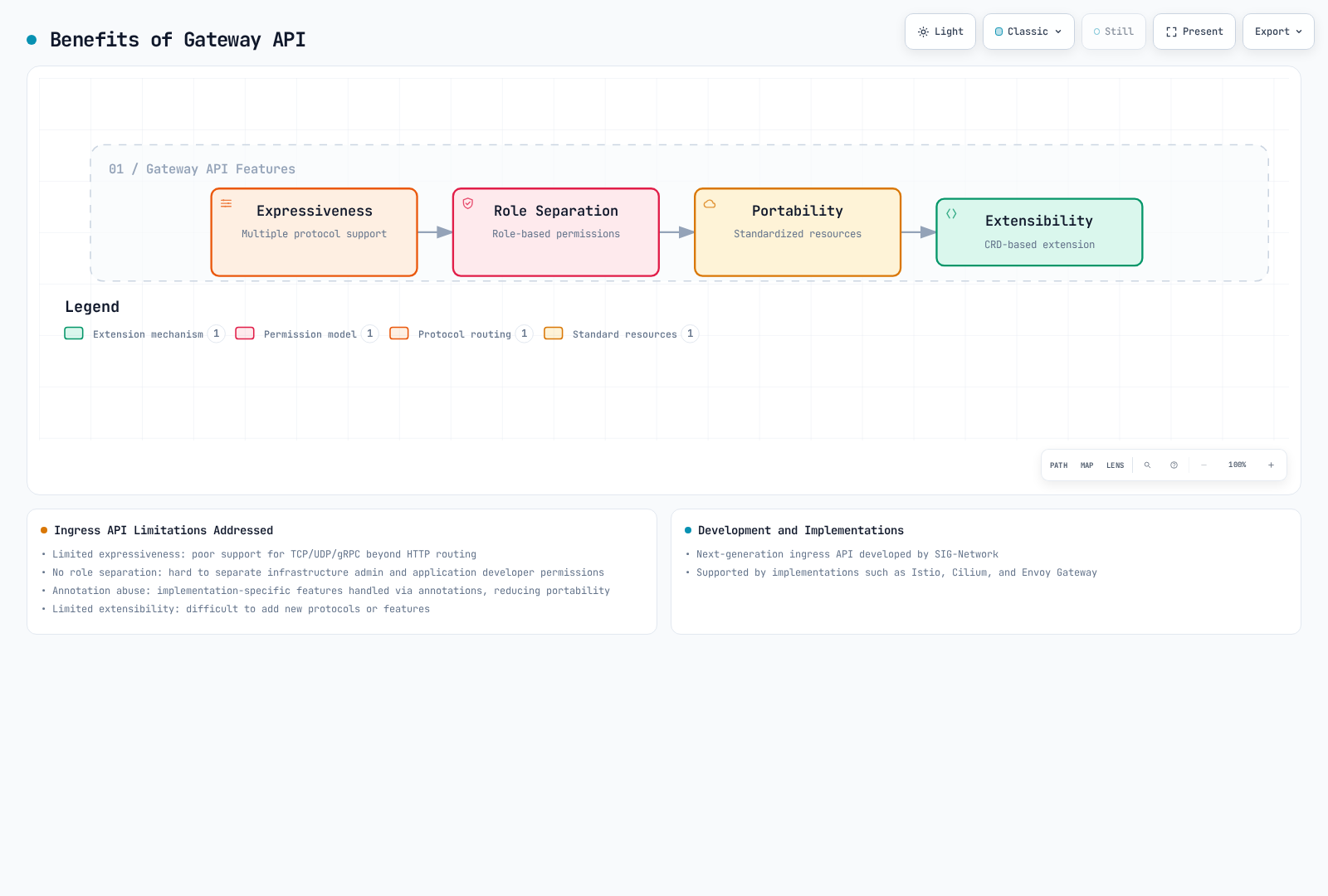
表达能力、职责分离、可移植性和可扩展性是独立的设计目标。实际功能支持取决于控制器和一致性配置文件;Kubernetes RBAC 和准入策略控制谁能更改各类资源。
资源模型
Gateway API 使用分层资源模型。
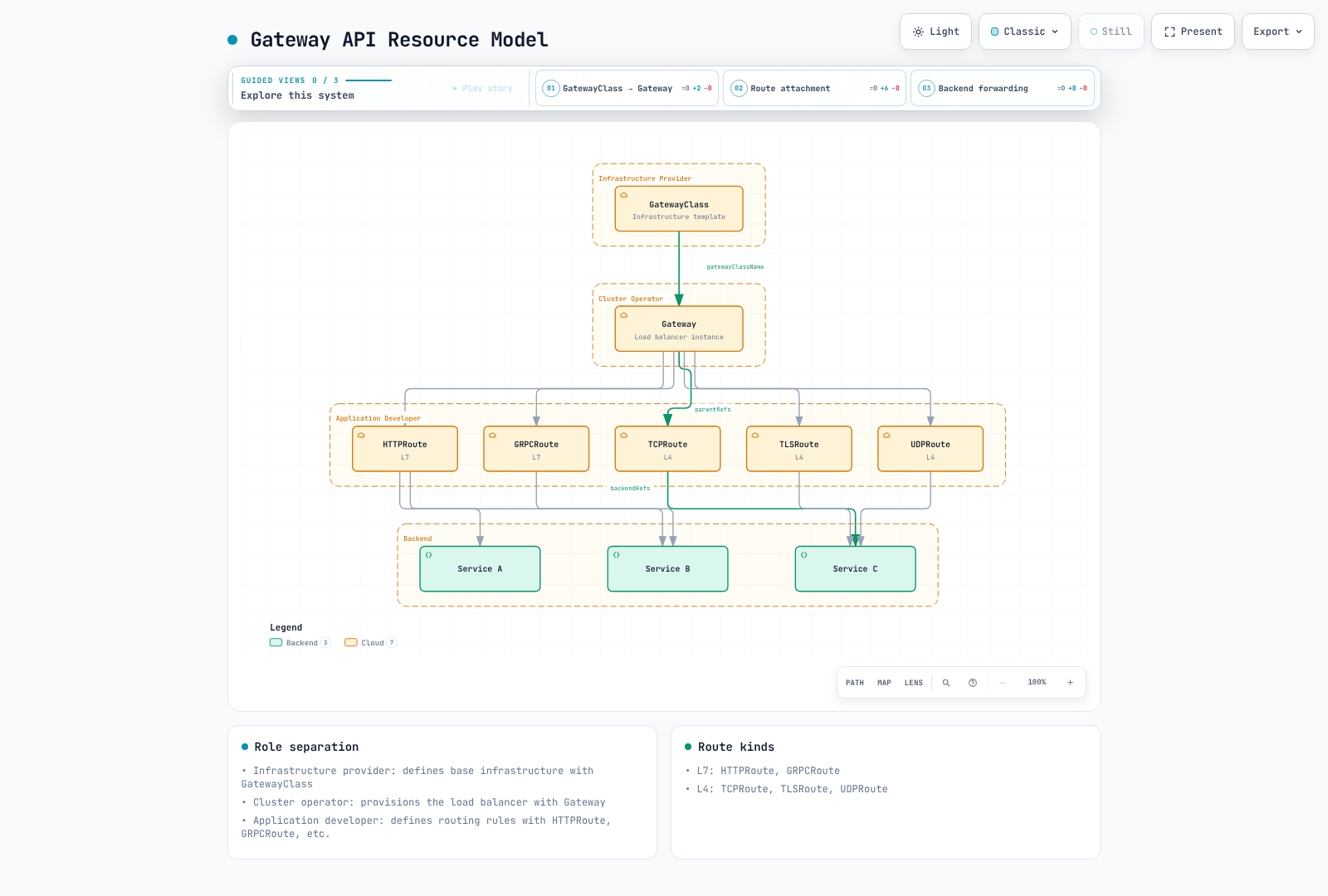
图中展示资源关系和常见网关部署模型。Gateway 并不总是对应一个云负载均衡器:Istio 可预置代理 Deployment/Service,而 VPC Lattice 将其映射为服务网络。被引用命名空间的所有者通过 ReferenceGrant 授予跨命名空间的后端/Secret 访问权限。
角色分离
| 角色 | 管理的资源 | 职责 |
|---|---|---|
| 基础设施提供方 | GatewayClass | 定义基本基础设施配置 |
| 集群操作员 | Gateway | 网关基础设施和 Route 附加策略 |
| 被引用命名空间所有者 | ReferenceGrant | 授权引用其拥有的后端/Secret |
| 应用开发者 | HTTPRoute、GRPCRoute 等 | 定义应用路由规则 |
GatewayClass
GatewayClass 定义创建 Gateway 时使用的控制器和配置。
apiVersion: gateway.networking.k8s.io/v1
kind: GatewayClass
metadata:
  name: istio
spec:
  controllerName: istio.io/gateway-controller
  description: Istio Gateway Controller for production workloads
GatewayClass 选择已经安装的控制器;创建类不会安装控制器。以下定义是备选方案。使用 Accepted 条件为 true 的类,并将示例类名替换为集群中已接受的名称。
parametersRef 支持及其 group/kind 取决于实现。对于 Istio 1.31,单个 Gateway 的 ConfigMap 位于 Gateway 命名空间,通过 Gateway.spec.infrastructure.parametersRef 引用。类范围默认值使用 Istio 根命名空间中带 gateway.istio.io/defaults-for-class 标签的 ConfigMap。下方 ALB→Istio 示例展示单 Gateway 形式。
各实现的 GatewayClass
# Istio
apiVersion: gateway.networking.k8s.io/v1
kind: GatewayClass
metadata:
  name: istio
spec:
  controllerName: istio.io/gateway-controller
---
# Cilium
apiVersion: gateway.networking.k8s.io/v1
kind: GatewayClass
metadata:
  name: cilium
spec:
  controllerName: io.cilium/gateway-controller
---
# AWS Gateway API Controller
apiVersion: gateway.networking.k8s.io/v1
kind: GatewayClass
metadata:
  name: amazon-vpc-lattice
spec:
  controllerName: application-networking.k8s.aws/gateway-api-controller
---
# Envoy Gateway
apiVersion: gateway.networking.k8s.io/v1
kind: GatewayClass
metadata:
  name: envoy-gateway
spec:
  controllerName: gateway.envoyproxy.io/gatewayclass-controller
---
# Contour
apiVersion: gateway.networking.k8s.io/v1
kind: GatewayClass
metadata:
  name: contour
spec:
  controllerName: projectcontour.io/gateway-controller
---
# NGINX Gateway Fabric
apiVersion: gateway.networking.k8s.io/v1
kind: GatewayClass
metadata:
  name: nginx
spec:
  controllerName: gateway.nginx.org/nginx-gateway-controller
Gateway
Gateway 描述流量处理基础设施和监听器。它如何映射到代理工作负载、托管负载均衡器或服务网络,取决于控制器。
基本 Gateway 配置
这些是独立配置场景,不是一组应同时应用的 Route。同一主机/监听器上的重叠 Route 可能改变优先顺序。先安装所选控制器及兼容 CRD,创建 gateway-system,并提供指定的 Service、就绪端点和 TLS Secret。证书必须覆盖配置的 DNS 名称。针对平台配置数据平面 Service 暴露、DNS 和网络控制;GatewayClass 或请求的 IP 地址本身不会预留外部地址。
HTTP/gRPC/TCP/TLS 示例使用 Istio 1.31。UDP 示例使用独立 Envoy Gateway 实例,因为 Istio 1.31 明确拒绝 UDP 监听器。Envoy Gateway 1.9 要求 Gateway API 1.6.1 及其公布的 Kubernetes 版本组合。更改共享 CRD 的版本/渠道前应先审核。
基本示例中的 Namespace 具有 gateway-access: "true"。这是 Namespace 标签,其修改权限应由控制 Gateway 访问的管理员保有。allowedRoutes 不验证应用客户端身份。
apiVersion: v1
kind: Namespace
metadata:
  name: production
  labels:
    gateway-access: 'true'
---
apiVersion: gateway.networking.k8s.io/v1
kind: Gateway
metadata:
  name: production-gateway
  namespace: gateway-system
spec:
  gatewayClassName: istio
  listeners:
  - name: http
    protocol: HTTP
    port: 80
    allowedRoutes:
      namespaces:
        from: Selector
        selector:
          matchLabels:
            gateway-access: 'true'
  - name: https
    protocol: HTTPS
    port: 443
    tls:
      mode: Terminate
      certificateRefs:
      - kind: Secret
        name: tls-cert
        namespace: gateway-system
    allowedRoutes:
      namespaces:
        from: Selector
        selector:
          matchLabels:
            gateway-access: 'true'
高级 Gateway 配置
以下是名为 multi-protocol-gateway 的独立 Gateway。下方 gRPC、TLS 和 TCP Route 附加到其匹配名称的监听器。数据库及其他 TCP 示例使用不同监听器,因此可以同时使用,不会争用同一个 L4 监听器。
apiVersion: gateway.networking.k8s.io/v1
kind: Gateway
metadata:
  name: multi-protocol-gateway
  namespace: gateway-system
spec:
  gatewayClassName: istio
  listeners:
  - name: http
    protocol: HTTP
    port: 80
    allowedRoutes:
      namespaces:
        from: Selector
        selector:
          matchLabels:
            gateway-access: 'true'
  - name: https-wildcard
    protocol: HTTPS
    port: 443
    hostname: '*.example.com'
    tls:
      mode: Terminate
      certificateRefs:
      - kind: Secret
        name: wildcard-cert
    allowedRoutes:
      namespaces:
        from: Selector
        selector:
          matchLabels:
            gateway-access: 'true'
      kinds:
      - kind: HTTPRoute
  - name: grpc
    protocol: HTTPS
    port: 443
    hostname: grpc.example.com
    tls:
      mode: Terminate
      certificateRefs:
      - kind: Secret
        name: grpc-cert
    allowedRoutes:
      namespaces:
        from: Selector
        selector:
          matchLabels:
            gateway-access: 'true'
      kinds:
      - kind: GRPCRoute
  - name: tcp-passthrough
    protocol: TLS
    port: 8443
    tls:
      mode: Passthrough
    allowedRoutes:
      namespaces:
        from: Selector
        selector:
          matchLabels:
            gateway-access: 'true'
      kinds:
      - kind: TLSRoute
  - name: tcp
    protocol: TCP
    port: 9000
    allowedRoutes:
      namespaces:
        from: Selector
        selector:
          matchLabels:
            gateway-access: 'true'
      kinds:
      - kind: TCPRoute
  - name: database
    protocol: TCP
    port: 5432
    allowedRoutes:
      namespaces:
        from: Selector
        selector:
          matchLabels:
            gateway-access: 'true'
      kinds:
      - kind: TCPRoute
TLS 模式
终止模式在网关结束下游 TLS 连接。后端连接单独配置,可使用 HTTP 或 TLS,例如通过受支持的 BackendTLSPolicy。透传使用设有 mode: Passthrough 的 TLS 监听器,由后端终止 TLS。不能仅通过更改 mode 将 HTTPS 监听器切换为透传。
| 模式 | 描述 | 使用场景 |
|---|---|---|
| Terminate | 在 Gateway 终止 TLS | 标准 HTTPS |
| Passthrough | 将 TLS 传递到后端 | 端到端加密 |
# TLS Terminate example
listeners:
  - name: https
    protocol: HTTPS
    port: 443
    tls:
      mode: Terminate
      certificateRefs:
        - kind: Secret
          name: server-cert
---
# TLS Passthrough example
listeners:
  - name: tls-passthrough
    protocol: TLS
    port: 443
    tls:
      mode: Passthrough
HTTPRoute
HTTPRoute 定义 HTTP/HTTPS 流量的路由规则。
基本 HTTPRoute
apiVersion: gateway.networking.k8s.io/v1
kind: HTTPRoute
metadata:
  name: basic-route
  namespace: production
spec:
  # Gateway to attach to
  parentRefs:
    - name: production-gateway
      namespace: gateway-system
      sectionName: https  # Target specific listener

  # Host matching
  hostnames:
    - "api.example.com"
    - "www.example.com"

  # Routing rules
  rules:
    - matches:
        - path:
            type: PathPrefix
            value: /api/v1
      backendRefs:
        - name: api-v1-service
          port: 80

    - matches:
        - path:
            type: PathPrefix
            value: /api/v2
      backendRefs:
        - name: api-v2-service
          port: 80

    # Default path
    - backendRefs:
        - name: default-service
          port: 80
高级匹配规则
一个 matches 项内的字段按 AND 组合;多个项按 OR 组合。PathPrefix 匹配路径元素,而非任意字符串前缀。RegularExpression 的支持和语法取决于实现。下方演示租户标头是任意客户端都可提供的路由选择器,不是管理应用的身份验证。
apiVersion: gateway.networking.k8s.io/v1
kind: HTTPRoute
metadata:
  name: advanced-matching
  namespace: production
spec:
  parentRefs:
  - name: production-gateway
    namespace: gateway-system
    sectionName: https
  hostnames:
  - api.example.com
  rules:
  - matches:
    - path:
        type: Exact
        value: /health
    backendRefs:
    - name: health-service
      port: 80
  - matches:
    - path:
        type: RegularExpression
        value: /users/[0-9]+
    backendRefs:
    - name: user-service
      port: 80
  - matches:
    - headers:
      - name: X-Version
        value: v2
    backendRefs:
    - name: api-v2-service
      port: 80
  - matches:
    - queryParams:
      - name: debug
        value: 'true'
    backendRefs:
    - name: debug-service
      port: 80
  - matches:
    - method: POST
      path:
        type: PathPrefix
        value: /api/data
    backendRefs:
    - name: write-service
      port: 80
  - matches:
    - method: GET
      path:
        type: PathPrefix
        value: /api/data
    backendRefs:
    - name: read-service
      port: 80
  - matches:
    - path:
        type: PathPrefix
        value: /admin
      headers:
      - name: X-Demo-Tenant
        type: Exact
        value: operations
    backendRefs:
    - name: admin-service
      port: 80
  - matches:
    - path:
        type: PathPrefix
        value: /api
    - path:
        type: PathPrefix
        value: /v1
    backendRefs:
    - name: api-service
      port: 80
过滤器
标头修改器设置字面值。X-Example-Source: gateway-demo 是静态标记,不是生成的唯一请求 ID;应使用代理/应用的追踪能力生成 ID。镜像示例使用自己的 /mirror 路径,避免被前面的 /api 规则遮蔽。它将 GET 请求复制到影子后端,并忽略该后端响应。隔离副作用,并审核复制到影子服务的数据/凭证。公有缓存标头仅适合确实可安全公有缓存的内容。
过滤器允许修改请求/响应。
apiVersion: gateway.networking.k8s.io/v1
kind: HTTPRoute
metadata:
  name: filtered-route
  namespace: production
spec:
  parentRefs:
  - name: production-gateway
    namespace: gateway-system
    sectionName: https
  rules:
  - matches:
    - path:
        type: PathPrefix
        value: /api
    filters:
    - type: RequestHeaderModifier
      requestHeaderModifier:
        add:
        - name: X-Example-Source
          value: gateway-demo
        set:
        - name: X-Api-Version
          value: v1
        remove:
        - X-Internal-Header
    backendRefs:
    - name: api-service
      port: 80
  - matches:
    - path:
        type: PathPrefix
        value: /public
    filters:
    - type: ResponseHeaderModifier
      responseHeaderModifier:
        add:
        - name: Cache-Control
          value: public, max-age=3600
        set:
        - name: X-Content-Type-Options
          value: nosniff
    backendRefs:
    - name: public-service
      port: 80
  - matches:
    - path:
        type: PathPrefix
        value: /old-api
    filters:
    - type: URLRewrite
      urlRewrite:
        path:
          type: ReplacePrefixMatch
          replacePrefixMatch: /new-api
        hostname: new-api.example.com
    backendRefs:
    - name: new-api-service
      port: 80
  - matches:
    - path:
        type: PathPrefix
        value: /legacy
    filters:
    - type: RequestRedirect
      requestRedirect:
        scheme: https
        hostname: new.example.com
        port: 443
        statusCode: 301
        path:
          type: ReplacePrefixMatch
          replacePrefixMatch: /modern
  - matches:
    - method: GET
      path:
        type: PathPrefix
        value: /mirror
    filters:
    - type: RequestMirror
      requestMirror:
        backendRef:
          name: shadow-service
          port: 80
    backendRefs:
    - name: main-service
      port: 80
流量拆分(权重)
apiVersion: gateway.networking.k8s.io/v1
kind: HTTPRoute
metadata:
  name: canary-route
  namespace: production
spec:
  parentRefs:
  - name: production-gateway
    namespace: gateway-system
    sectionName: https
  hostnames:
  - app.example.com
  rules:
  - matches:
    - path:
        type: PathPrefix
        value: /
    backendRefs:
    - name: app-stable
      port: 80
      weight: 90
    - name: app-canary
      port: 80
      weight: 10
超时和重试
v1.6 Standard 模式包含 timeouts,但不包含 HTTPRoute.rules.retry。Experimental 模式添加重试字段,并具有独立的准入/实现要求。下方示例仅为 GET 请求设置预算:backendRequest 不得超过非零的总 request 预算。
省略重试字段不能证明客户端、网关、网格代理或 SDK 永不重试。应配置并验证每个适用层,尤其针对非幂等写入。将重试次数设为零不是禁用实验性 v1.6 retry.attempts 字段的有效方式,该字段最小值为一。请使用实现文档规定的控制方式及应用幂等行为。
apiVersion: gateway.networking.k8s.io/v1
kind: HTTPRoute
metadata:
  name: resilient-route
  namespace: production
spec:
  parentRefs:
  - name: production-gateway
    namespace: gateway-system
    sectionName: https
  rules:
  - matches:
    - path:
        type: PathPrefix
        value: /api
      method: GET
    timeouts:
      request: 30s
      backendRequest: 25s
    backendRefs:
    - name: api-service
      port: 80
GRPCRoute
后端必须提供预期的 gRPC/HTTP2 传输及适当的 TLS 配置。仅有端口号不会配置这些行为。
定义 gRPC 流量的路由规则。
apiVersion: gateway.networking.k8s.io/v1
kind: GRPCRoute
metadata:
  name: grpc-route
  namespace: production
spec:
  parentRefs:
  - name: multi-protocol-gateway
    namespace: gateway-system
    sectionName: grpc
  hostnames:
  - grpc.example.com
  rules:
  - matches:
    - method:
        service: myapp.UserService
    backendRefs:
    - name: user-grpc-service
      port: 50051
  - matches:
    - method:
        service: myapp.OrderService
        method: CreateOrder
    backendRefs:
    - name: order-grpc-service
      port: 50052
  - matches:
    - headers:
      - name: x-environment
        value: staging
    backendRefs:
    - name: staging-grpc-service
      port: 50051
  - backendRefs:
    - name: default-grpc-service
      port: 50051
TCPRoute
定义 TCP 流量路由。
apiVersion: gateway.networking.k8s.io/v1
kind: TCPRoute
metadata:
  name: database-route
  namespace: production
spec:
  parentRefs:
  - name: multi-protocol-gateway
    namespace: gateway-system
    sectionName: database
  rules:
  - backendRefs:
    - name: database-service
      port: 5432
---
apiVersion: gateway.networking.k8s.io/v1
kind: TCPRoute
metadata:
  name: tcp-loadbalance
  namespace: production
spec:
  parentRefs:
  - name: multi-protocol-gateway
    namespace: gateway-system
    sectionName: tcp
  rules:
  - backendRefs:
    - name: tcp-backend-1
      port: 9000
      weight: 50
    - name: tcp-backend-2
      port: 9000
      weight: 50
TLSRoute
定义 TLS 透传流量路由。
apiVersion: gateway.networking.k8s.io/v1
kind: TLSRoute
metadata:
  name: tls-passthrough-route
  namespace: production
spec:
  parentRefs:
  - name: multi-protocol-gateway
    namespace: gateway-system
    sectionName: tcp-passthrough
  hostnames:
  - secure.example.com
  rules:
  - backendRefs:
    - name: secure-backend
      port: 8443
UDPRoute
此场景需要已安装的 Envoy Gateway 控制器、已接受的 envoy-gateway 类、兼容的 Gateway API 资源包,以及 dns-service UDP 后端。它暴露 UDP 端口 5300,并路由到后端端口 53。Envoy 的 UDP 代理是非透明的:后端看到网关的源 IP/端口。确保平台负载均衡器/Service 支持此 UDP 暴露方式。
定义 UDP 流量路由。
apiVersion: gateway.networking.k8s.io/v1
kind: Gateway
metadata:
  name: udp-gateway
  namespace: gateway-system
spec:
  gatewayClassName: envoy-gateway
  listeners:
  - name: udp
    protocol: UDP
    port: 5300
    allowedRoutes:
      namespaces:
        from: Selector
        selector:
          matchLabels:
            gateway-access: 'true'
      kinds:
      - kind: UDPRoute
---
apiVersion: gateway.networking.k8s.io/v1
kind: UDPRoute
metadata:
  name: dns-route
  namespace: production
spec:
  parentRefs:
  - name: udp-gateway
    namespace: gateway-system
    sectionName: udp
  rules:
  - backendRefs:
    - name: dns-service
      port: 53
ReferenceGrant
ReferenceGrant 由包含被引用 Service 或 Secret 的命名空间所有者在该命名空间中创建。from 选择源 group/kind/namespace;to.name 可限制目标名称。授权可叠加,授权的是引用,不是应用调用方。
跨命名空间的 Route→Gateway 附加使用 parentRefs 与 Gateway 监听器 allowedRoutes 的双向许可,而非 ReferenceGrant。后端和证书引用使用 ReferenceGrant,如下所示。指定的 shared-api Service 和 shared-tls Secret 必须存在;仅有授权不会创建它们。
ReferenceGrant 允许跨命名空间引用。
apiVersion: gateway.networking.k8s.io/v1beta1
kind: ReferenceGrant
metadata:
  name: allow-routes-to-backend
  namespace: backend-services
spec:
  from:
  - group: gateway.networking.k8s.io
    kind: HTTPRoute
    namespace: production
  - group: gateway.networking.k8s.io
    kind: HTTPRoute
    namespace: staging
  to:
  - group: ''
    kind: Service
    name: shared-api
---
apiVersion: gateway.networking.k8s.io/v1beta1
kind: ReferenceGrant
metadata:
  name: allow-gateway-to-secrets
  namespace: cert-management
spec:
  from:
  - group: gateway.networking.k8s.io
    kind: Gateway
    namespace: gateway-system
  to:
  - group: ''
    kind: Secret
    name: shared-tls
实现比较
主要实现
| 实现 | 控制器 | 功能 |
|---|---|---|
| Istio | istio.io/gateway-controller | 服务网格集成、高级流量管理 |
| Cilium | io.cilium/gateway-controller | Cilium 网络与 Envoy L7 处理 |
| Envoy Gateway | gateway.envoyproxy.io/gatewayclass-controller | 基于 Envoy,符合标准 |
| AWS Gateway API Controller | application-networking.k8s.aws/gateway-api-controller | VPC Lattice 集成 |
| Contour | projectcontour.io/gateway-controller | 基于 Envoy,配置简单 |
| NGINX Gateway Fabric | gateway.nginx.org/nginx-gateway-controller | 基于 NGINX |
| Traefik | traefik.io/gateway-controller | 动态配置 |
带版本的实现说明
API 的发布渠道、功能的 Core/Extended/实现专属支持级别,以及控制器的一致性配置文件,是不同概念。CRD 接受某字段不能证明控制器实现了该字段。检查公布的一致性结果及资源条件,包括适用时的 Accepted、ResolvedRefs 和 Programmed。
| 已检查实现 | 已验证范围及重要限制 |
|---|---|
| Istio 1.31.0 | HTTP/gRPC 和 v1 TCP/TLS 路由;明确不支持 UDP 监听器。可配置的 Envoy 数据平面不保证支持每项 Gateway API 扩展 |
| Cilium 1.20.1 | Gateway API 1.6.1,包括 TCPRoute/UDPRoute;结合 Cilium 网络和 Envoy L7 处理 |
| Envoy Gateway 1.9.1 | Gateway API 1.6.1;公布的 Kubernetes 矩阵为 1.33–1.36。支持 UDP 路由和 TLS 透传,遵循其文档规定的传输行为 |
| AWS Load Balancer Controller 3.5.0 | Gateway API 1.6.0;ALB 处理 HTTP/gRPC,NLB 处理 L4 路由。每个 NLB 监听器仅最早附加的 L4 Route 符合条件;每个监听器使用一个 Route |
| AWS Gateway API Controller 2.1.3 | VPC Lattice 集成;v2.1 要求 Gateway API 1.5+。支持 HTTPRoute、GRPCRoute 和 TLSRoute。TCP 资源访问是独立的 Lattice 资源配置模型,并非通用 TCPRoute/UDPRoute 支持 |
| Contour 1.33.7 | 使用 Gateway API 1.3.0 构建,发布测试覆盖 Kubernetes 1.32–1.34。文档介绍 HTTP/gRPC/TCP/TLS 路由;使用匹配的渠道/预置配置,不要盲目应用较新资源包 |
| NGINX Gateway Fabric 2.7.0 | Gateway API 1.6.1,公布的最低 Kubernetes 版本为 1.32;新增 v1 TCPRoute/UDPRoute 支持。它与已退役的社区 ingress-nginx 是不同产品 |
这些说明替代了不带版本的是/否功能表。关于具体过滤器、TLS 策略、扩展、支持版本和运维要求,请查阅各实现文档。Contour 附带的兼容性页面没有 1.33.7 专属行;以上 API 依赖和 Kubernetes 范围来自该确切版本的模块文件及发布说明。
AWS Load Balancer Controller 的 Gateway API 支持
Gateway API 在 2026-01-23 发布的 LBC v3.0.0 中达到正式可用。现有 Ingress 和 Service API 仍受支持,因此 Gateway 迁移可与控制器升级分开规划。当前 v3.5.0 需要 LBC 安装指南介绍的兼容 Gateway API 和 LBC Gateway CRD。EKS Auto Mode 具有独立的托管实现;自主管理 LBC 的功能不会自动适用于 Auto Mode。
已退役的控制器是 Kubernetes 社区 ingress-nginx 项目,其维护于 2026 年 3 月结束。这不意味着 Kubernetes Ingress API 或 F5 的其他 NGINX 产品已退役。
v3.0 发布说明中的 keepTLSSecret=false 临时方案适用于继续使用旧版本且受 cert-manager 所有权缺陷影响的用户。升级到 v3.0 的用户无需额外操作即可获得修复。应遵循当前 chart 的证书管理选项,不要将历史缓解措施应用于每次升级。
LBC v3.4.0 迁移工具
2026-06-03 发布版本引入了真实可用的 lbc-migrate CLI 和 Migration Console。它们针对正常工作的 LBC Ingress 资源;不是所有 Ingress 实现的通用转换器。
lbc-migrate读取文件,或使用--from-cluster列出/获取集群资源。它转换受支持的注解,并输出 Gateway API 资源。默认输出带有 LBC Gateway 试运行注解。- Migration Console 比较控制器生成的资源计划。它需要适当的计划注解、功能配置和读取权限。应将计划视为可能需要访问限制及脱敏的配置数据。
- 应用已审核的正式 Gateway 清单会在现有 ALB 旁创建新 ALB。应先验证,再单独切换前端流量。一个 HTTPRoute 内的后端权重不能执行此前端迁移。
对于从所选 LBC 版本构建的二进制程序,基于文件的转换可从以下命令开始:
lbc-migrate -f ingress.yaml --output-dir ./gateway-output/转换器不会生成现有 Deployment/Service,也不会重新验证所有 Ingress 注解。审核不受支持的注解、Service/IngressClassParams 覆盖设置、跨命名空间 IngressGroup 成员关系、规则优先级和 TLS 设置。已经与旧 ALB 关联的外部目标组不能简单地同时附加到新 ALB;应规划兼容的复制/切换策略。
这些工具提供迁移流程,不保证零停机。参阅带版本的迁移指南和 CLI 参考。
从 Ingress 迁移到 Gateway API
分步迁移指南
步骤 1:分析现有 Ingress
以下是用于说明手动转换为 Istio Gateway API 配置的历史社区 ingress-nginx 输入。它不是全新安装 ingress-nginx 的建议,也不是上方 LBC 专属转换器的输入。应保留实际请求行为,而不只是设置名称。
apiVersion: networking.k8s.io/v1
kind: Ingress
metadata:
  name: my-ingress
  annotations:
    kubernetes.io/ingress.class: nginx
    nginx.ingress.kubernetes.io/rewrite-target: /
    nginx.ingress.kubernetes.io/ssl-redirect: 'true'
  namespace: default
spec:
  tls:
  - hosts:
    - api.example.com
    secretName: api-tls
  rules:
  - host: api.example.com
    http:
      paths:
      - path: /api/v1
        pathType: Prefix
        backend:
          service:
            name: api-v1
            port:
              number: 80
      - path: /api/v2
        pathType: Prefix
        backend:
          service:
            name: api-v2
            port:
              number: 80
步骤 2:创建 Gateway 和 GatewayClass
新 Gateway 名为 migration-gateway。现有 api-tls Secret 保留在 default 中;该命名空间中的 ReferenceGrant 显式允许此 Gateway 命名空间引用它。提供对 api.example.com 有效的证书。default Namespace 的内置名称标签提供路由附加选择器。
apiVersion: gateway.networking.k8s.io/v1
kind: GatewayClass
metadata:
  name: production
spec:
  controllerName: istio.io/gateway-controller
---
apiVersion: gateway.networking.k8s.io/v1beta1
kind: ReferenceGrant
metadata:
  name: migration-tls
  namespace: default
spec:
  from:
  - group: gateway.networking.k8s.io
    kind: Gateway
    namespace: gateway-system
  to:
  - group: ''
    kind: Secret
    name: api-tls
---
apiVersion: gateway.networking.k8s.io/v1
kind: Gateway
metadata:
  name: migration-gateway
  namespace: gateway-system
spec:
  gatewayClassName: production
  listeners:
  - name: http
    protocol: HTTP
    port: 80
    allowedRoutes:
      namespaces:
        from: Selector
        selector:
          matchLabels:
            kubernetes.io/metadata.name: default
    hostname: api.example.com
  - name: https
    protocol: HTTPS
    port: 443
    tls:
      mode: Terminate
      certificateRefs:
      - kind: Secret
        name: api-tls
        namespace: default
    allowedRoutes:
      namespaces:
        from: Selector
        selector:
          matchLabels:
            kubernetes.io/metadata.name: default
    hostname: api.example.com
步骤 3:创建 HTTPRoute
重定向 Route 仅附加到 HTTP 监听器。HTTPS Route 转发应用请求。旧 rewrite-target: / 示例将整个匹配请求路径替换为 /,因此转换后的示例使用 ReplaceFullPath。ReplacePrefixMatch 会保留后缀(/api/v1/users → /users),从而改变行为。切换前,应对照旧应用测试根路径、子路径、查询字符串和重定向。
下方重定向假定使用 ingress-nginx 默认的 308,保留请求方法/正文;请检查是否有 http-redirect-code 覆盖设置。其重写注解还会为该主机启用不区分大小写的正则表达式位置匹配,而 Gateway API PathPrefix 区分大小写并匹配路径元素。因此,/API/V1 或 /api/v10 的行为可能不同。此示例展示更严格的 PathPrefix 策略,并非完全等效的匹配。如果客户端依赖旧行为,应在切换前设计并测试受支持的正则匹配或其他显式兼容规则。
apiVersion: gateway.networking.k8s.io/v1
kind: HTTPRoute
metadata:
  name: api-route
  namespace: default
spec:
  parentRefs:
  - name: migration-gateway
    namespace: gateway-system
    sectionName: http
  hostnames:
  - api.example.com
  rules:
  - matches:
    - path:
        type: PathPrefix
        value: /
    filters:
    - type: RequestRedirect
      requestRedirect:
        scheme: https
        statusCode: 308
---
apiVersion: gateway.networking.k8s.io/v1
kind: HTTPRoute
metadata:
  name: api-route-https
  namespace: default
spec:
  parentRefs:
  - name: migration-gateway
    namespace: gateway-system
    sectionName: https
  hostnames:
  - api.example.com
  rules:
  - matches:
    - path:
        type: PathPrefix
        value: /api/v1
    filters:
    - type: URLRewrite
      urlRewrite:
        path:
          type: ReplaceFullPath
          replaceFullPath: /
    backendRefs:
    - name: api-v1
      port: 80
  - matches:
    - path:
        type: PathPrefix
        value: /api/v2
    filters:
    - type: URLRewrite
      urlRewrite:
        path:
          type: ReplaceFullPath
          replaceFullPath: /
    backendRefs:
    - name: api-v2
      port: 80
步骤 4:切换前端流量
迁移客户端前,验证新 Gateway 的地址、证书、HTTP 重定向、路由匹配、后端行为和可观测性。使用适合前端的机制切换流量,例如已审核的 DNS/负载均衡器路由,再监控故障和延迟。考虑 DNS 缓存、持久连接和会话。保留经过测试的流量回退到旧前端的方法。
HTTPRoute 后端权重控制所选 Gateway 内部的流量;专门的流量拆分章节介绍该操作。前端迁移时,应保留旧 Ingress/控制器,直到客户端迁移完成且所需排空/回滚检查结束。
迁移检查清单
- [ ] 分析现有 Ingress 注解
- [ ] 选择实现并创建 GatewayClass
- [ ] 创建 Gateway 资源并配置监听器
- [ ] 将路由规则转换为 HTTPRoute
- [ ] 配置用于附加的 allowedRoutes 和用于后端/Secret 引用的 ReferenceGrant
- [ ] 迁移 TLS 证书
- [ ] 验证并切换前端流量,保留经过测试的回滚路径
- [ ] 设置监控和日志
- [ ] 仅在切换及排空/回滚检查后移除旧 Ingress 资源
EKS 模式
AWS Gateway API Controller(VPC Lattice)
使用 VPC Lattice 指南中的已安装控制器、带已审核 AWS_IAM 策略的 my-network 服务网络、调用方权限及 service-stable:8080 后端。Gateway 名称选择网络,不创建网络。此独立 Route 具有自己的 Lattice 服务和域名。下方 IAMAuthPolicy 保护该服务;协调期间保留网络级策略。获取分配的 Route 域名,并使用指南中的签名 HTTPS 客户端。unused 证书引用遵循此控制器文档中的 AWS 托管证书行为,而非通用的 Kubernetes Secret 加载方式。
apiVersion: gateway.networking.k8s.io/v1
kind: GatewayClass
metadata:
  name: amazon-vpc-lattice
spec:
  controllerName: application-networking.k8s.aws/gateway-api-controller
---
apiVersion: gateway.networking.k8s.io/v1
kind: Gateway
metadata:
  name: my-network
  namespace: lattice-demo
spec:
  gatewayClassName: amazon-vpc-lattice
  listeners:
  - name: https
    protocol: HTTPS
    port: 443
    tls:
      mode: Terminate
      certificateRefs:
      - name: unused
---
apiVersion: gateway.networking.k8s.io/v1
kind: HTTPRoute
metadata:
  name: lattice-route
  namespace: lattice-demo
spec:
  parentRefs:
  - name: my-network
    sectionName: https
  rules:
  - matches:
    - path:
        type: PathPrefix
        value: /api
    backendRefs:
    - name: service-stable
      port: 8080
---
apiVersion: application-networking.k8s.aws/v1alpha1
kind: IAMAuthPolicy
metadata:
  name: lattice-route-auth
  namespace: lattice-demo
spec:
  targetRef:
    group: gateway.networking.k8s.io
    kind: HTTPRoute
    name: lattice-route
  policy: '{"Version":"2012-10-17","Statement":[{"Effect":"Allow","Principal":{"AWS":"arn:aws:iam::123456789012:role/MyAppRole"},"Action":"vpc-lattice-svcs:Invoke","Resource":"*","Condition":{"StringLike":{"vpc-lattice-svcs:RequestPath":["/api","/api/*"]}}}]}'
与 ALB Controller 配合使用
当应用需要 Istio 网关行为时,此拓扑在 Istio 网关前放置 ALB。ConfigMap 通过 Istio 文档规定的基础设施参数将生成的 Service 设为 ClusterIP。ALB Ingress 与该 Service 位于同一命名空间,并引用其生成名称 internal-gateway-istio。
应用 HTTPRoute 位于带标签的 production 命名空间,指向该处现有的 api-service:80。替换 ACM ARN,并配置 LBC/网络前提条件。本示例在 ALB 终止 TLS;其到 Istio 的连接为 HTTP。通过安全控制允许实际网关流量和健康检查端口。15021 上的 /healthz/ready 检查网关就绪状态,不检查每个应用的健康状况。单独验证 Route 条件和应用响应。
apiVersion: v1
kind: ConfigMap
metadata:
  name: internal-gateway-options
  namespace: istio-system
data:
  service: |
    spec:
      type: ClusterIP
---
apiVersion: gateway.networking.k8s.io/v1
kind: Gateway
metadata:
  name: internal-gateway
  namespace: istio-system
spec:
  gatewayClassName: istio
  listeners:
  - name: http
    protocol: HTTP
    port: 80
    allowedRoutes:
      namespaces:
        from: Selector
        selector:
          matchLabels:
            gateway-access: 'true'
  infrastructure:
    parametersRef:
      group: ''
      kind: ConfigMap
      name: internal-gateway-options
---
apiVersion: gateway.networking.k8s.io/v1
kind: HTTPRoute
metadata:
  name: alb-internal-route
  namespace: production
spec:
  parentRefs:
  - name: internal-gateway
    namespace: istio-system
    sectionName: http
  hostnames:
  - api.example.com
  rules:
  - backendRefs:
    - name: api-service
      port: 80
---
apiVersion: networking.k8s.io/v1
kind: Ingress
metadata:
  name: alb-to-gateway
  annotations:
    alb.ingress.kubernetes.io/scheme: internet-facing
    alb.ingress.kubernetes.io/target-type: ip
    alb.ingress.kubernetes.io/listen-ports: '[{"HTTP":80},{"HTTPS":443}]'
    alb.ingress.kubernetes.io/ssl-redirect: '443'
    alb.ingress.kubernetes.io/certificate-arn: arn:aws:acm:us-east-1:123456789012:certificate/12345678-1234-1234-1234-123456789012
    alb.ingress.kubernetes.io/healthcheck-port: '15021'
    alb.ingress.kubernetes.io/healthcheck-path: /healthz/ready
  namespace: istio-system
spec:
  ingressClassName: alb
  rules:
  - host: api.example.com
    http:
      paths:
      - path: /
        pathType: Prefix
        backend:
          service:
            name: internal-gateway-istio
            port:
              number: 80
API 渠道与成熟度
渠道和 API 版本相互独立
| Gateway API v1.6.0 资源包 | 包含的资源/字段 |
|---|---|
| Standard | GatewayClass、Gateway、HTTPRoute、GRPCRoute、TLSRoute、TCPRoute、UDPRoute、ReferenceGrant、BackendTLSPolicy 和 ListenerSet |
| Experimental | Standard 内容加实验字段,如 HTTPRoute 重试/会话持久性,以及 XBackend、XBackendTrafficPolicy 和 XMesh |
当前 Standard 示例对 Route 类型使用 v1。v1.6.0 Standard 资源包不再提供较旧的 TLSRoute/TCPRoute/UDPRoute alpha 版本。Experimental 资源包仍提供部分已弃用版本,因此清单在那里可用不能证明它也适用于 Standard。
ReferenceGrant 是“Standard 总是仅指 v1”的有用反例:v1.6.0 资源包同时提供 v1 和 v1beta1,并以 v1beta1 为存储版本。本文 ReferenceGrant 示例保留仍提供服务的 beta 版本。
新的实验性 X 资源使用 gateway.networking.x-k8s.io。既有资源上的实验字段仍可位于 gateway.networking.k8s.io;并非整个 Experimental 渠道都迁移到另一组。其兼容性保证不同于 Standard,准入策略保护渠道/字段边界。应审核公布的升级流程,不要通过删除共享 CRD 或准入策略强行更改。
v1.6 发布背景
Gateway API v1.6.0 于 2026-06-29 UTC / 2026-06-30 KST 发布。TCPRoute 和 UDPRoute 晋升为 Standard v1。GRPCRoute 和 TLSRoute 也在当前 Standard 资源包中。应选择所选实现支持的资源包/渠道,不要将目录中的最新版本等同于兼容。
与 Ingress API 比较
| 方面 | Ingress | Gateway API |
|---|---|---|
| 资源模型 | Ingress 和 IngressClass;监听器/路由职责大体混合 | GatewayClass、Gateway 和独立 Route 类型 |
| 授权 | Kubernetes RBAC/准入可限制所有权 | RBAC/准入加显式附加与引用双向许可 |
| HTTP 路由 | 标准 HTTP 路由 | 标准 HTTPRoute 字段,各功能具有不同支持级别 |
| TCP/UDP/gRPC | Ingress API 之外的控制器专属扩展 | 专用 API 类型;实际支持取决于控制器/版本 |
| TLS 透传 / 流量拆分 / 重写 | 控制器专属配置 | 相关 Route/过滤器字段及实现支持要求 |
| 跨命名空间引用 | 实现专属行为 | 后端/Secret 使用 ReferenceGrant;Gateway 附加使用 allowedRoutes |
| 可移植性 | 因注解语义不同而降低 | 标准字段和一致性提高可移植性,但扩展仍有差异 |
最佳实践
1. 遵循角色分离
# Infrastructure team: Manage GatewayClass
# Platform team: Manage Gateway
# App team: Manage HTTPRoute
2. 最小权限 ReferenceGrant
# Explicitly allow only required namespaces
apiVersion: gateway.networking.k8s.io/v1beta1
kind: ReferenceGrant
metadata:
  name: minimal-access
  namespace: backend
spec:
  from:
    - group: gateway.networking.k8s.io
      kind: HTTPRoute
      namespace: frontend  # Specific namespace only
  to:
    - group: ""
      kind: Service
      name: specific-service  # Specific service only
3. Gateway 分离
# Separate Gateway by environment
# production-gateway, staging-gateway

# Separate Gateway by protocol
# http-gateway, grpc-gateway
4. 监控配置
# Prometheus metrics collection (varies by implementation)
# - Request count, latency, error rate
# - Backend status
# - TLS certificate expiry