ArgoCD 最佳实践
审查基线:Argo CD 3.5.2 / Helm Chart 10.8.4 / Kustomize 5.8.1;在审查发布说明后,将清单示例更新至补丁版本 3.5.4(仍捆绑 Kustomize 5.8.1)(示例未重新运行) 最后更新:October 12, 2026
目录
仓库结构
Monorepo 模式
为所有应用程序和环境使用单个仓库:
gitops-repo/
├── apps/
│   ├── app-a/
│   │   ├── base/
│   │   │   ├── deployment.yaml
│   │   │   ├── service.yaml
│   │   │   └── kustomization.yaml
│   │   └── overlays/
│   │       ├── dev/
│   │       │   ├── kustomization.yaml
│   │       │   └── patch.yaml
│   │       ├── staging/
│   │       │   ├── kustomization.yaml
│   │       │   └── patch.yaml
│   │       └── production/
│   │           ├── kustomization.yaml
│   │           └── patch.yaml
│   └── app-b/
│       └── ...
├── platform/
│   ├── argocd/
│   ├── monitoring/
│   └── ingress/
└── clusters/
    ├── dev/
    ├── staging/
    └── production/
优点:
- 单一事实来源
- 易于进行跨应用程序更改
- 简化的 CI/CD
- 一次原子 Git commit 可以描述多个应用程序;其集群部署不是一个原子事务
缺点:
- 可能变得庞大
- 访问控制复杂
- 单点故障
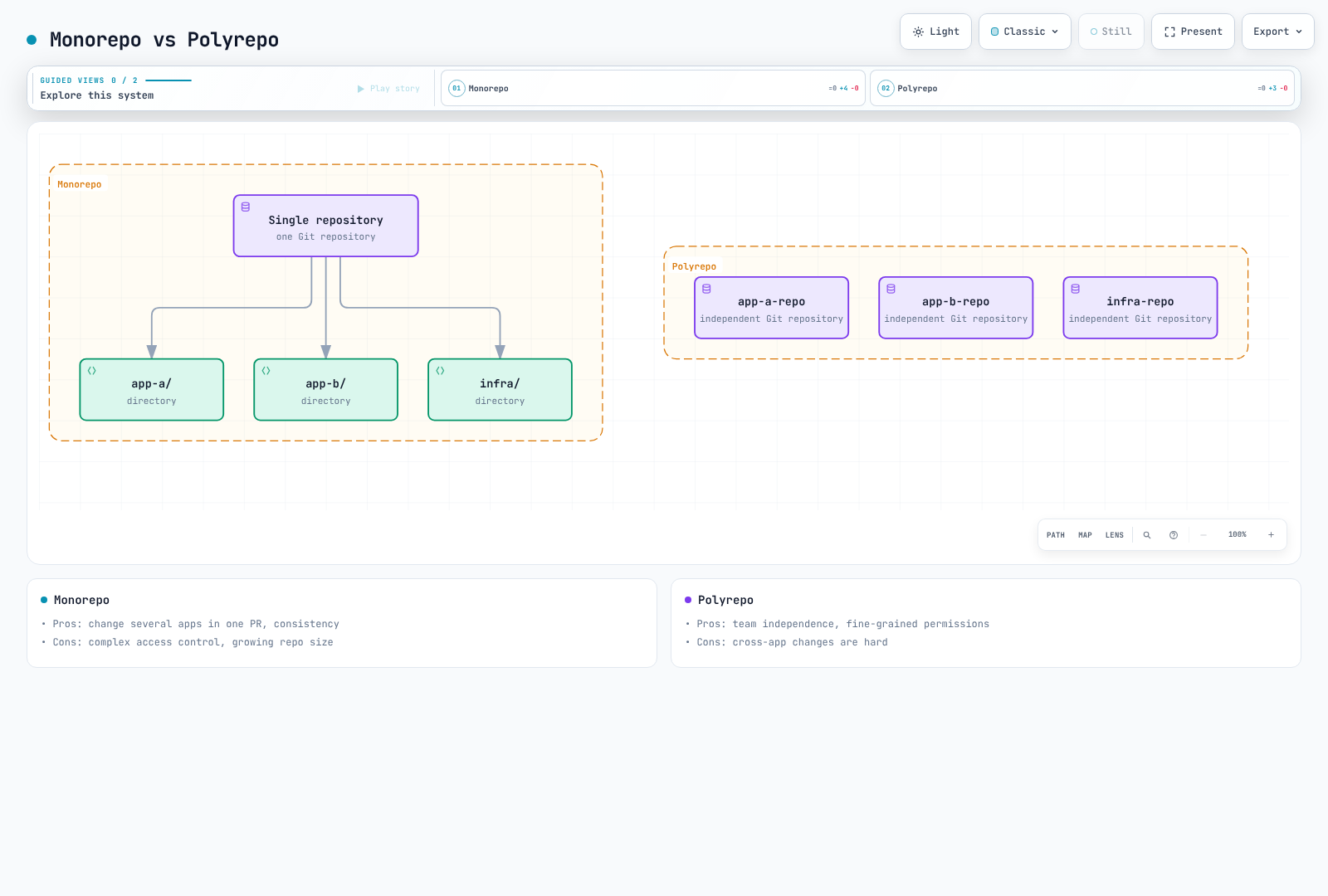
Polyrepo 模式
每个应用程序或团队使用单独的仓库:
Organization:
├── gitops-platform/          # Platform team
│   ├── argocd/
│   ├── monitoring/
│   └── ingress/
├── gitops-team-a/            # Team A applications
│   ├── app-a/
│   └── app-b/
├── gitops-team-b/            # Team B applications
│   ├── app-c/
│   └── app-d/
└── gitops-infra/             # Infrastructure
    ├── terraform/
    └── clusters/
优点:
- 所有权清晰
- 独立部署
- 细粒度访问控制
- 仓库规模较小
缺点:
- 更难协调变更
- 要管理更多仓库
- 可能发生漂移
App of Apps 仓库结构
gitops-root/
├── argocd-apps/
│   ├── Chart.yaml
│   ├── values.yaml
│   ├── values-dev.yaml
│   ├── values-staging.yaml
│   ├── values-production.yaml
│   └── templates/
│       ├── _helpers.tpl
│       ├── namespace.yaml
│       ├── project.yaml
│       ├── app-a.yaml
│       ├── app-b.yaml
│       └── platform-apps.yaml
└── bootstrap/
    └── root-app.yaml
推荐的命名约定
| 类型 | 模式 | 示例 |
|---|---|---|
| 应用程序 | {app}-{env} | frontend-production |
| 项目 | {team} 或 {env} | platform, production |
| Namespace | {app} 或 {app}-{env} | frontend, frontend-prod |
| 仓库 | gitops-{scope} | gitops-platform |
环境晋级
Git 分支策略
长期存在的环境分支是一种选择;共享 main 分支上的基于目录的 overlay 通常可以减少分支分歧。App of Apps 是一种管理功能:请限制对根仓库和子 Application 创建的访问权限。手动生产同步是与经过审查的 Git 更改不同的一道关卡。
基于目录的晋级
在不为每个环境重新构建的前提下,晋级同一个经过测试的制品。这些示例假定已有 base 且镜像仓库强制执行不可变 tag;无法保证 tag 不可变时,应优先使用 digest。更改可变 tag 的内容本身不会更新 Git 或 Deployment Pod 模板。基础镜像名称为 my-app;在 overlay 中同时应用名称/tag 转换。与旧名称匹配的 overlay 不会更新已被 base 重命名的镜像。
# overlays/dev/kustomization.yaml
apiVersion: kustomize.config.k8s.io/v1beta1
kind: Kustomization
resources:
  - ../../base
images:
  - name: my-app
    newName: my-registry/my-app
    newTag: v1.2.3

---
# overlays/staging/kustomization.yaml
apiVersion: kustomize.config.k8s.io/v1beta1
kind: Kustomization
resources:
  - ../../base
images:
  - name: my-app
    newName: my-registry/my-app
    newTag: v1.2.3

---
# overlays/production/kustomization.yaml
apiVersion: kustomize.config.k8s.io/v1beta1
kind: Kustomization
resources:
  - ../../base
images:
  - name: my-app
    newName: my-registry/my-app
    newTag: v1.2.3
自动化晋级流水线
此工作流会为已经测试过的 digest创建 PR。请调整示例镜像仓库和 overlay 路径。使用具有目标仓库 contents/pull requests 写入权限的 GitHub App token 或范围限定 token 提供 GITOPS_PR_TOKEN。使用默认 GITHUB_TOKEN 所做的更改会受到后续工作流触发限制;请验证所需检查可以运行。通过仓库 ruleset/分支保护强制执行审查、测试和制品策略。
name: Promote tested image to production
on:
  workflow_dispatch:
    inputs:
      digest:
        description: 'Tested image digest (sha256: followed by 64 hex characters)'
        required: true
        type: string
permissions:
  contents: read
concurrency:
  group: promote-production
  cancel-in-progress: false
jobs:
  promote:
    runs-on: ubuntu-24.04
    steps:
      - uses: actions/checkout@3d3c42e5aac5ba805825da76410c181273ba90b1 # v7.0.1
        with:
          persist-credentials: false
      - name: Install verified Kustomize
        shell: bash
        run: |
          set -euo pipefail
          tool_dir="$RUNNER_TEMP/kustomize-bin"
          mkdir -p "$tool_dir"
          cd "$tool_dir"
          curl -fsSL -o kustomize.tar.gz \
            https://github.com/kubernetes-sigs/kustomize/releases/download/kustomize/v5.8.1/kustomize_v5.8.1_linux_amd64.tar.gz
          echo "029a7f0f4e1932c52a0476cf02a0fd855c0bb85694b82c338fc648dcb53a819d  kustomize.tar.gz" | sha256sum -c -
          tar -xzf kustomize.tar.gz kustomize
          echo "$tool_dir" >> "$GITHUB_PATH"
      - name: Update production overlay
        env:
          IMAGE_DIGEST: ${{ inputs.digest }}
        shell: bash
        run: |
          set -euo pipefail
          [[ "$IMAGE_DIGEST" =~ ^sha256:[a-f0-9]{64}$ ]] || exit 1
          cd overlays/production
          kustomize edit set image "my-app=my-registry/my-app@${IMAGE_DIGEST}"
          kustomize build . > /dev/null
      - name: Create reviewed promotion PR
        uses: peter-evans/create-pull-request@5f6978faf089d4d20b00c7766989d076bb2fc7f1 # v8.1.1
        with:
          token: ${{ secrets.GITOPS_PR_TOKEN }}
          branch: promote-production
          title: 'Promote tested image to production'
          commit-message: 'chore: promote tested image digest'
          add-paths: overlays/production/kustomization.yaml
          body: |
            Promote the already tested image digest: ${{ inputs.digest }}
            Require the repository's validation and approval checks before merging.
资源管理
组件资源
这些 Chart 10.8.4 values 是测量起点,并非有保证的容量规格表。请将它们合并到现有 values 中,并保留一个部署所有者。Chart 提供正确的 container 名称和工作负载类型;避免使用会意外添加 container 的不完整 Deployment patch。
fullnameOverride: argocd
controller:
  replicas: 1
  resources:
    requests:
      cpu: 500m
      memory: 1Gi
    limits:
      cpu: '2'
      memory: 4Gi
server:
  replicas: 2
  resources:
    requests:
      cpu: 100m
      memory: 256Mi
    limits:
      cpu: 500m
      memory: 512Mi
repoServer:
  replicas: 2
  resources:
    requests:
      cpu: 200m
      memory: 512Mi
    limits:
      cpu: '1'
memory: 2Gi| 测量项 | 调优方向 |
|---|---|
| 清单耗时、并发请求、仓库大小 | repo-server CPU/内存、并行度、磁盘 |
| 每个集群的资源数量以及 watch/cache 内存 | Controller 内存和集群分布 |
| 协调/同步队列延迟和 API 限流 | 处理器并发度与目标 API 容量共同调优 |
| CPU 限流、OOM 和重启 | requests/limits 与并发执行共同调优 |
仅凭 Application 数量无法确定 100/500 个应用程序的分片阈值。Redis 是可重建缓存,但缓存丢失可能导致重新计算负载和延迟。请应用 HA 安装部分中的节点/反亲和性/PDB 前提条件。不要盲目复制每个组件。
可选的 repo-server HPA
这需要 Metrics Server 和 CPU requests。启用 HPA 后,它拥有 replica count 的控制权。CPU 扩缩容无法解释每一个清单生成瓶颈;仅根据持续的缓存内存扩缩容可能会使不必要的 replica 持续运行。
repoServer:
  autoscaling:
    enabled: true
    minReplicas: 2
    maxReplicas: 5
    targetCPUUtilizationPercentage: 70
    targetMemoryUtilizationPercentage: null
    behavior:
      scaleDown:
        stabilizationWindowSeconds: 300
性能调优
配置位置和含义
请将这些内容合并到同一 Helm values 中。configs.params 会生成 argocd-cmd-params-cm;configs.cm 会生成 argocd-cm。通过命令行/环境设置使用的 values 要求受影响的 controller/repo-server/server rollout;请验证渲染后的 Pod 和启动日志。
configs:
  params:
    controller.status.processors: '20'
    controller.operation.processors: '10'
    controller.repo.server.timeout.seconds: '180'
    server.repo.server.timeout.seconds: '180'
    reposerver.parallelism.limit: '2'
    reposerver.repo.cache.expiration: 24h
    reposerver.git.request.timeout: 30s
    reposerver.git.lsremote.parallelism.limit: '5'
  cm:
    timeout.reconciliation: 300s
    timeout.reconciliation.jitter: 60s
    application.resourceTrackingMethod: annotation
repoServer:
  env:
  - name: ARGOCD_EXEC_TIMEOUT
value: 2m- 状态/操作处理器控制并发度,而非轮询频率;20/10 是默认并发值。
- 180 秒 repo-server RPC 超时、两分钟工具执行超时和 30 秒 Git 请求超时是不同限制。增加前请识别缓慢阶段和取消行为。
reposerver.parallelism.limit限制并发清单生成,并不限制缓存 TTL。请针对内存/进程限制进行负载测试。- 默认定期协调为 120 秒加最多 60 秒抖动。示例使用 300 + 60 秒(五至六分钟);webhook 和其他刷新原因是独立的。
application.resourceTrackingMethod设置资源跟踪,而非刷新频率。更改现有跟踪方法前请审查迁移影响。
对多个目标集群进行分片
默认分片单元是目标集群。增加 replica 并不会均匀分布所有以一个集群为目标的 Application。Chart 通过 ARGOCD_CONTROLLER_REPLICAS 协调 StatefulSet replica。轮询/一致性哈希和动态集群分布在此版本中属于实验性功能;不要将其表述为通用的生产默认值。
controller:
  replicas: 3
configs:
  params:
    controller.sharding.algorithm: legacy
Application 边界和 HPA
请按所有权和生命周期边界拆分大型 Application。随意按资源种类拆分会使 Secret/Service/Deployment 依赖关系和删除顺序变得复杂。App of Apps 中的子 Application 不是单个原子部署。
本示例假定已有 workloads 项目、目标 namespace,以及控制 Deployment my-app 的 HPA。应优先从 Git 中省略 replicas;必要时,请将差异/应用排除范围限定为该资源。使 ignoreDifferences.name 与任何 Kustomize 前缀/后缀后的最终名称匹配。ApplyOutOfSyncOnly 优化应用目标;它不改变同步频率。
apiVersion: argoproj.io/v1alpha1
kind: Application
metadata:
  name: large-app
  namespace: argocd
spec:
  project: workloads
  source:
    repoURL: https://github.com/myorg/gitops.git
    targetRevision: main
    path: overlays/production
  destination:
    server: https://kubernetes.default.svc
    namespace: my-app-production
  syncPolicy:
    automated:
      enabled: true
      prune: true
      selfHeal: true
    syncOptions:
    - ApplyOutOfSyncOnly=true
    - RespectIgnoreDifferences=true
  ignoreDifferences:
  - group: apps
    kind: Deployment
    name: my-app
    namespace: my-app-production
    jsonPointers:
    - /spec/replicas
灾难恢复
备份范围
argocd admin export 会导出 Applications/AppProjects/ApplicationSets、四个核心 ConfigMaps 和选定的 Argo CD Secrets。它不是完整的 namespace 备份。不要假定 cmd-params、Notifications/CMP 配置以及单独管理的 TLS/notification Secrets 都被包含在内。还应检查配置的额外 Application/ApplicationSet namespaces。
请使用匹配的 CLI 版本、已验证的 kubecontext、age 工具和经批准的公钥接收者。请单独保管私有 identity 并测试解密/恢复。补充快照会加密所有 namespace ConfigMaps/Secrets,可能包括 Helm release Secrets。恢复时选择所需对象;不要盲目应用整个补充快照。
#!/usr/bin/env bash
set -euo pipefail
umask 077
: "${ARGO_BACKUP_RECIPIENT:?Set the approved age public recipient}"
ARGO_BACKUP_DIR="./argocd-backup-$(date -u +%Y%m%dT%H%M%SZ)"
mkdir -m 700 "$ARGO_BACKUP_DIR"
kubectl config current-context
kubectl get configmap argocd-cm -n argocd -o name

argocd admin export -n argocd |
  age --recipient "$ARGO_BACKUP_RECIPIENT" --output "$ARGO_BACKUP_DIR/data.yaml.age.tmp"
mv "$ARGO_BACKUP_DIR/data.yaml.age.tmp" "$ARGO_BACKUP_DIR/data.yaml.age"

# Supplement: all namespace ConfigMaps/Secrets, including custom configuration.
kubectl get configmaps,secrets -n argocd -o yaml |
  age --recipient "$ARGO_BACKUP_RECIPIENT" --output "$ARGO_BACKUP_DIR/namespace-config.yaml.age.tmp"
mv "$ARGO_BACKUP_DIR/namespace-config.yaml.age.tmp" "$ARGO_BACKUP_DIR/namespace-config.yaml.age"
还应保留固定版本的安装清单/Helm values、CRD 和扩展 controller,以及外部 secrets/KMS、SSO、DNS 和证书的恢复过程。应用程序数据库/PV 需要单独备份。请根据 RPO/RTO 和访问策略选择备份频率与保留期。
Velero 配置备份替代方案
此 Schedule 假定已安装 Velero 且有可用的 aws-s3 BackupStorageLocation。请验证调度时区、加密和访问控制。part-of 标签选择器可能会遗漏用户创建的 Applications,因此示例不包含此类过滤器。CRD/安装/PV 恢复仍然是 DR 的独立部分。
apiVersion: velero.io/v1
kind: Schedule
metadata:
  name: argocd-config-backup
  namespace: velero
spec:
  schedule: 0 2 * * *
  template:
    includedNamespaces:
    - argocd
    includedResources:
    - applications.argoproj.io
    - applicationsets.argoproj.io
    - appprojects.argoproj.io
    - secrets
    - configmaps
    includeClusterResources: false
    storageLocation: aws-s3
    ttl: 720h0m0s
分阶段恢复
首先使用原始版本和安装方式准备一个隔离的恢复安装。建立一个活动管理器,使主实例和恢复实例不会同时变更同一工作负载。对于默认 StatefulSet 布局,在检查导入更改时停止 Application 和 ApplicationSet controller。针对动态分布调整工作负载类型。
set -euo pipefail
umask 077
: "${ARGO_BACKUP_FILE:?Set the encrypted data.yaml.age path}"
: "${ARGO_BACKUP_IDENTITY:?Set the protected age identity file}"

# Fresh, isolated recovery installation: default StatefulSet controller layout.
kubectl config current-context
kubectl scale statefulset/argocd-application-controller -n argocd --replicas=0
kubectl scale deployment/argocd-applicationset-controller -n argocd --replicas=0

ARGO_RESTORE_DIR="$(mktemp -d)"
trap 'rm -rf "$ARGO_RESTORE_DIR"' EXIT
age --decrypt --identity "$ARGO_BACKUP_IDENTITY" "$ARGO_BACKUP_FILE" \
  > "$ARGO_RESTORE_DIR/data.yaml"
argocd admin import -n argocd --dry-run "$ARGO_RESTORE_DIR/data.yaml"
# Keep controllers stopped while reviewing the recovery copy and destinations.
在同一 shell 中审查受保护的恢复文件:目标集群/namespaces、仓库/集群凭据、删除 finalizers、自动同步策略和存储的 operation 字段。若要暂停自动同步,请同时更新 Applications 和 ApplicationSet templates,并从恢复副本中移除待处理操作。重启 controller 前检查 Git/Helm 源是否会还原这些暂停设置。
argocd admin import -n argocd "$ARGO_RESTORE_DIR/data.yaml"恢复所需的补充 ConfigMaps/Secrets 和外部依赖项,然后从已审查的安装配置中恢复 controller replicas。在分别恢复部署之前,检查有代表性的 Application 差异/健康状态。全应用同步、导入 --prune 或删除 namespace 不是默认恢复步骤。
升级策略
版本和安装所有权
该示例针对已审查的 3.5.x 补丁更新至 3.5.4,而不是从 2.x 或更早 minor 版本无条件跳转。请在非生产环境中审查每个中间 minor/major 迁移说明、已测试的 Kubernetes 组合以及 CRD/RBAC/SSO/CMP 变更。保留现有的 manifest/Helm/GitOps 所有者。不要将此自行管理的过程应用于 EKS 托管的 Argo CD 功能。
# Example: reviewed 3.5.x patch upgrade to 3.5.4, manifest-managed non-HA install.
kubectl config current-context
argocd version
kubectl apply --server-side -n argocd \
  -f https://raw.githubusercontent.com/argoproj/argo-cd/v3.5.4/manifests/install.yaml
kubectl rollout status deployment/argocd-server -n argocd --timeout=5m
kubectl rollout status deployment/argocd-repo-server -n argocd --timeout=5m
kubectl rollout status statefulset/argocd-application-controller -n argocd --timeout=5m
kubectl rollout status deployment/argocd-applicationset-controller -n argocd --timeout=5m
kubectl rollout status deployment/argocd-notifications-controller -n argocd --timeout=5m
argocd version
argocd app list
对于 HA manifest 安装,请使用 manifests/ha/install.yaml;对于自定义 overlay,请更新并渲染固定的 base。服务端应用可处理大型 CRD。首先检查字段所有权冲突;仅在有意转移所有权时使用官方指南中的 --force-conflicts。成功的 Pod rollout 并不表示迁移、SSO、差异和同步验证已经完成。
Helm 管理安装的替代方案
经审查的 Chart 10.8.4 部署 Argo CD v3.5.2,因此此 Helm 路径无法达到上面使用的 3.5.4 补丁。Argo CD 3.5.4 首次随 Chart 10.9.7 发布,这是此处未审查的 Chart minor 更新。
helm repo add argo https://argoproj.github.io/argo-helm
helm repo update argo
helm upgrade argocd argo/argo-cd --version 10.8.4 \
  --namespace argocd -f reviewed-values.yaml --dry-run=server --hide-secret
# After reviewing the dry run and the version-specific migration notes:
helm upgrade argocd argo/argo-cd --version 10.8.4 \
  --namespace argocd -f reviewed-values.yaml --wait --timeout 10m
--hide-secret 会在 dry-run 输出中抑制 Secret manifest;还请检查嵌入在其他位置的敏感 values。CRD、持久化数据和集成变更可能无法通过镜像回滚来撤销,因此请保留经过测试的备份/恢复计划。
并行验证的限制
一个集群上的两个 namespace 仍共享 CRD 和其他集群范围资源。仅更改安装 namespace 不会重写 ClusterRoleBinding subject。Kubernetes 没有 kubectl rename namespace 命令。应优先在单独的集群中验证,并明确规划凭据、跟踪/instance ID、活动 controller 和流量切换。删除旧 namespace 可能会通过 Application finalizers 级联到受管理工作负载。
故障排除
检查同步和差异
argocd app get my-app
argocd app diff my-app
argocd app history my-app
argocd app resources my-app
kubectl describe application my-app -n argocd
kubectl logs -n argocd -l app.kubernetes.io/name=argocd-application-controller --tail=100

# Re-check desired state after identifying the cause; this does not apply resources.
argocd app get my-app --refresh
# Invalidates the cached target manifests for this Application; use sparingly.
argocd app get my-app --hard-refresh
--force 不是通用的故障排除选项,且可能重新创建资源。硬刷新不会应用或回滚工作负载,但会重新生成清单;避免在所有应用程序中反复运行它。
仓库和 Webhook
argocd repo list
argocd repo get https://github.com/myorg/myrepo.git
kubectl logs -n argocd deployment/argocd-repo-server --tail=100
kubectl get secrets -n argocd -l argocd.argoproj.io/secret-type=repository
kubectl logs -n argocd deployment/argocd-server --tail=100 | grep -i webhook
检查 TLS/SSH 信任、凭据范围、DNS/egress 以及提供商 webhook 签名、URL 和交付日志。列出 Secret 名称不需要输出凭据值。argocd repo update --repo-cache-expiration 不是有效的缓存配置命令。
OOM 和处理缓慢
kubectl top pods -n argocd
kubectl get pods -n argocd
kubectl describe pods -n argocd -l app.kubernetes.io/name=argocd-repo-server
argocd app get my-app -o json |
  jq '.status.operationState | {phase, startedAt, finishedAt}'
区分 OOMKilled 与 CPU 限流、clone 磁盘压力、大型清单、Git 超时和 API 限流。通过 Helm/Git 所有者调整资源/并发度。删除所有 repo-server Pods 不会清除 Redis 清单缓存,反而会增加中断/clone 负载。
其他检查
argocd app manifests my-app
argocd app list -o wide
argocd cluster list
argocd cluster get https://my-target-cluster.example.com
kubectl logs -n argocd statefulset/argocd-application-controller --tail=100
kubectl logs -n argocd deployment/argocd-server --tail=100
kubectl logs -n argocd deployment/argocd-repo-server --tail=100
渲染的清单可能包含生成的 Secrets;请不要将其放入共享日志。默认 controller 是 StatefulSet;如果启用了动态分布,请检查实际的 Deployment。将临时调试日志限定在受影响组件,并管理其 rollout 和移除。
EKS 最佳实践
AWS 凭据
仅有 ServiceAccount role ARN 并不能完成目标 EKS 访问。请配置 controller/server EKS 身份验证、assume-role 权限、目标 EKS access entries 或旧版 auth mapping,以及 Kubernetes RBAC。仅在 S3/OCI/CMP 访问需要时,为 repo-server 提供单独的最小权限 role。还需要 IRSA OIDC 信任或 Pod Identity association;这与镜像拉取授权不同。实际的目标和 service accounts 请遵循 EKS 安装部分。
使用 HTTPS 的内部 ALB
这需要 AWS Load Balancer Controller、到 VPC 的管理员连接、匹配的 DNS/ACM certificate、受限的 security groups 和 SSO。请替换 certificate ARN 和 hostname。后端保持 HTTPS,并设置 server.insecure=false;通过这个单一 HTTP target group 的 CLI 访问使用 --grpc-web。
apiVersion: networking.k8s.io/v1
kind: Ingress
metadata:
  name: argocd
  namespace: argocd
  annotations:
    alb.ingress.kubernetes.io/scheme: internal
    alb.ingress.kubernetes.io/target-type: ip
    alb.ingress.kubernetes.io/backend-protocol: HTTPS
    alb.ingress.kubernetes.io/healthcheck-protocol: HTTPS
    alb.ingress.kubernetes.io/healthcheck-path: /healthz
    alb.ingress.kubernetes.io/listen-ports: '[{"HTTPS":443}]'
    alb.ingress.kubernetes.io/certificate-arn: arn:aws:acm:ap-northeast-2:123456789012:certificate/REPLACE_WITH_CERTIFICATE_ID
    alb.ingress.kubernetes.io/ssl-policy: ELBSecurityPolicy-TLS13-1-2-2021-06
spec:
  ingressClassName: alb
  rules:
  - host: argocd.example.com
    http:
      paths:
      - path: /
        pathType: Prefix
        backend:
          service:
            name: argocd-server
            port:
              number: 443
通过单独的 annotation 附加位于同一区域、经审查的区域 WAF Web ACL。请验证 ALB access-log bucket policy 和区域。不要默认启用 Shield Advanced 等订阅/成本型选项。
EKS 版本升级
检查已测试的当前/目标 EKS 和 Argo CD 组合、add-on/CRD/node/kubelet 兼容性以及已移除 API。每次将 EKS control plane 升级一个 minor 版本;node/add-on 更新是独立的。就地版本更新不要求更改现有 API endpoint。替换集群确实需要更新 endpoint/CA/access。
如需暂停自动同步,请记录原始设置并更改其 Git/ApplicationSet 所有者。仅通过 CLI 更改子 Application 可能被其父级还原。在验证连接、差异和示例同步后,恢复原始 prune/selfHeal/automated 策略,而不是无条件启用自动化。
生产检查清单
- [ ] 在禁用默认 admin 前验证 SSO/RBAC/TLS 和恢复访问
- [ ] 加密/外部化 secrets,并限定仓库/集群凭据范围
- [ ] 测量资源、并发度,以及是否需要集群分片
- [ ] 验证 HA nodes/反亲和性/PDBs 和组件专属 replicas/leader election
- [ ] 验证 metrics/ServiceMonitor 选择和告警交付;收集 JSON 日志和 Kubernetes audit/events
- [ ] 强制执行 AppProject source/destination、同步窗口和经审查的晋级 PR
- [ ] 测试加密备份解密、补充配置恢复和单管理器 DR
- [ ] 维护特定版本的升级、故障排除和配置恢复 runbook
参考资料
测验
试试最佳实践测验。