ExampleCorp 订单系统:ACK + kro 集成
最后更新: September 12, 2026 · kro 0.9.4 / AWS Load Balancer Controller 3.5.0
场景与验证范围
ExampleCorp 是虚构的。本指南定义了一份集成契约,用于将 kro 应用图(application graph)与由 ACK 管理的基础设施连接起来。它并不是一个端到端实验,不提供可用的 Order API 或公开的应用镜像。此前那个虚构的 ECR 镜像并不作为可运行镜像提供。
ACK 管理 NLB、TargetGroup、Listener、Route 53 记录以及 Aurora。kro 创建 Service、ConfigMap、TargetGroupBinding(TGB)和 Deployment 资源。由一个独立的 AWS Load Balancer Controller(LBC)协调(reconcile)TGB,并注册/注销 Pod IP 目标。 仅安装 ACK 和 kro 并不会实现这一连接。
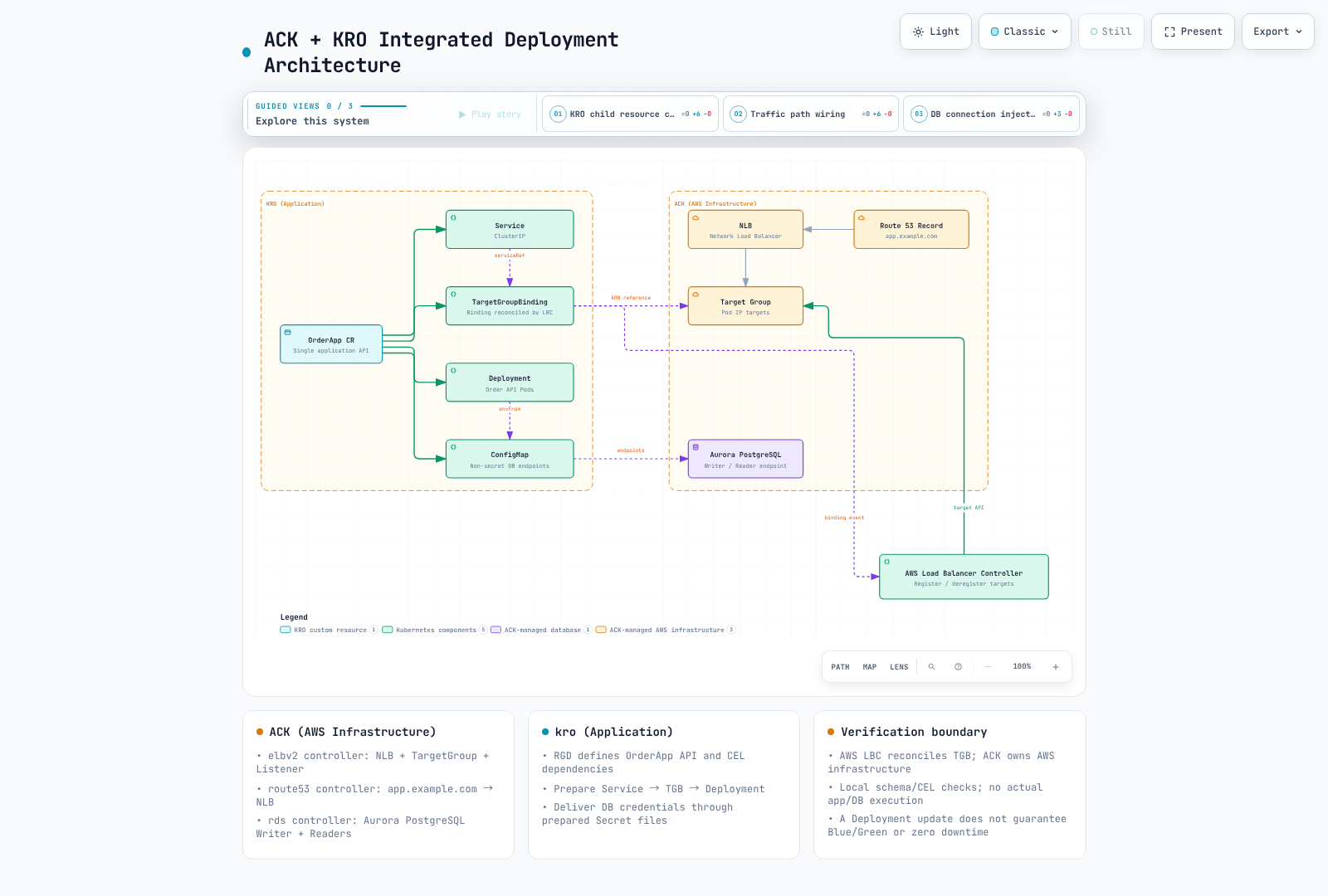
基础设施与应用前置条件
请先查看 ACK 资源示例 中当前的 schema 与生命周期指引。准备好已批准的 VPC/私有子网/安全组、一个内部 NLB/Listener、一个 ip 类型的 TargetGroup、DNS 以及 Aurora 集群/实例。请从 .status.ackResourceMetadata.arn 读取 TargetGroup ARN,而不是此前的 .status.targetGroupARN。
请单独准备 AWS LBC 及其 CRD、IAM/ServiceAccount 和 webhook。本指南检查的是 OSS LBC 3.5.0 的 elbv2.k8s.aws/v1beta1 TGB,而不是 EKS Auto Mode 中另一套不同的负载均衡 API。TGB 的编写者可以引用 controller IAM 权限范围内的 TargetGroup,因此请约束允许的 ARN、namespace 以及写入权限。
运维方必须提供满足以下契约的 Order API 镜像:
- 在配置的端口上提供 HTTP 服务,readiness 路径为
/readyz。 - 从 ConfigMap 配置中读取 DB_WRITER_HOST、DB_READER_HOST、DB_PORT 和 DB_NAME。
- 读取并轮换 DB_CREDENTIALS_DIR 下的凭证文件。不要把密码放在环境变量、ConfigMap 或 status 中。
- 能以 UID 10001、只读根文件系统、受限资源以及可写的 /tmp 卷运行。如果实际镜像有差异,请在安全策略下调整该契约。
请通过已批准的 provider/ESO 流程准备 production 和 order-db-credentials。由 RDS 管理的 Secrets Manager 凭证不会自动创建 Kubernetes Secret。应用数据库/用户、最小化的数据库权限、TLS 校验和连接池是相互独立的要求。在 CR 中指定数据库名称并不会创建该数据库。
就绪门控与创建顺序
对于 LBC Pod readiness gate,请在创建 Pod 之前为 namespace 打上 elbv2.k8s.aws/pod-readiness-gate-inject=enabled 标签。匹配的 Service 及其 ip 类型 TGB 必须已经存在。该图通过 CEL 强制执行 Service → TGB → Deployment 的顺序;Deployment 注解引用 TGB 名称以建立该依赖关系。
TGB 没有用于等待目标健康的 readyWhen。让 Pod 创建等待目标健康可能导致死锁,因为此时并不存在可以成为健康目标的 Pod。TGB 的存在、LBC 的协调、目标健康和 Pod readiness 是不同的状态。请验证 webhook failurePolicy/注入、滚动发布、关闭宽限期以及注销延迟。
ResourceGraphDefinition
这些文件同样位于 examples/platform/examplecorp 中。请审阅并为 OrderApp/status/finalizers 以及 Service、ConfigMap、Deployment 和 TGB 资源添加聚合 RBAC。创建 RGD 的权限相当于委派了 controller 权限的使用。
apiVersion: kro.run/v1alpha1
kind: ResourceGraphDefinition
metadata:
  name: examplecorp-webapps
spec:
  schema:
    apiVersion: v1alpha1
    group: platform.example.com
    kind: OrderApp
    scope: Namespaced
    spec:
      replicas: integer | default=3 minimum=1 maximum=10
      image: string | required=true
      port: integer | default=8080 minimum=1 maximum=65535
      targetGroupARN: string | required=true
      vpcID: string | required=true
      credentialsSecretName: string | required=true
      aurora:
        writerEndpoint: string | required=true
        readerEndpoint: string | required=true
        port: integer | default=5432
        dbName: string | required=true
    status:
      availableReplicas: ${deployment.status.availableReplicas}
      serviceIP: ${service.spec.clusterIP}
  resources:
  - id: service
    template:
      apiVersion: v1
      kind: Service
      metadata:
        name: ${schema.metadata.name}
        namespace: ${schema.metadata.namespace}
        labels:
          app.kubernetes.io/name: ${schema.metadata.name}
      spec:
        type: ClusterIP
        selector:
          app.kubernetes.io/name: ${schema.metadata.name}
        ports:
        - name: http
          port: ${schema.spec.port}
          targetPort: http
  - id: dbConfig
    template:
      apiVersion: v1
      kind: ConfigMap
      metadata:
        name: ${schema.metadata.name + "-db"}
        namespace: ${schema.metadata.namespace}
        labels:
          app.kubernetes.io/name: ${schema.metadata.name}
      data:
        DB_WRITER_HOST: ${schema.spec.aurora.writerEndpoint}
        DB_READER_HOST: ${schema.spec.aurora.readerEndpoint}
        DB_PORT: ${string(schema.spec.aurora.port)}
        DB_NAME: ${schema.spec.aurora.dbName}
  - id: targetGroupBinding
    template:
      apiVersion: elbv2.k8s.aws/v1beta1
      kind: TargetGroupBinding
      metadata:
        name: ${schema.metadata.name + "-tgb"}
        namespace: ${schema.metadata.namespace}
        labels:
          app.kubernetes.io/name: ${schema.metadata.name}
      spec:
        targetGroupARN: ${schema.spec.targetGroupARN}
        targetType: ip
        vpcID: ${schema.spec.vpcID}
        serviceRef:
          name: ${service.metadata.name}
          port: ${schema.spec.port}
  - id: deployment
    readyWhen:
    - ${deployment.status.availableReplicas >= deployment.spec.replicas}
    - ${deployment.status.observedGeneration >= deployment.metadata.generation}
    template:
      apiVersion: apps/v1
      kind: Deployment
      metadata:
        name: ${schema.metadata.name}
        namespace: ${schema.metadata.namespace}
        labels:
          app.kubernetes.io/name: ${schema.metadata.name}
      spec:
        replicas: ${schema.spec.replicas}
        selector:
          matchLabels:
            app.kubernetes.io/name: ${schema.metadata.name}
        template:
          metadata:
            labels:
              app.kubernetes.io/name: ${schema.metadata.name}
            annotations:
              platform.example.com/target-group-binding: ${targetGroupBinding.metadata.name}
          spec:
            automountServiceAccountToken: false
            securityContext:
              runAsNonRoot: true
              runAsUser: 10001
              runAsGroup: 10001
              fsGroup: 10001
              seccompProfile:
                type: RuntimeDefault
            containers:
            - name: order-api
              image: ${schema.spec.image}
              ports:
              - name: http
                containerPort: ${schema.spec.port}
              securityContext:
                allowPrivilegeEscalation: false
                readOnlyRootFilesystem: true
                capabilities:
                  drop:
                  - ALL
              resources:
                requests:
                  cpu: 100m
                  memory: 64Mi
                limits:
                  cpu: 500m
                  memory: 128Mi
              readinessProbe:
                httpGet:
                  path: /readyz
                  port: http
              volumeMounts:
              - name: tmp
                mountPath: /tmp
              - name: db-credentials
                mountPath: /var/run/order-db
                readOnly: true
              envFrom:
              - configMapRef:
                  name: ${dbConfig.metadata.name}
              env:
              - name: DB_CREDENTIALS_DIR
                value: /var/run/order-db
            volumes:
            - name: tmp
              emptyDir:
                sizeLimit: 64Mi
            - name: db-credentials
              secret:
                secretName: ${schema.spec.credentialsSecretName}
实例输入
下面的 example.invalid 地址/镜像以及 ARN/VPC ID 都是占位符。请读取实际的 ACK endpoint/ARN,并在使用前验证应用镜像的 digest 和 Secret。手工复制的 endpoint 不会自动跟随 ACK 的变更;请提供一条已批准的 GitOps 输入更新路径。
apiVersion: platform.example.com/v1alpha1
kind: OrderApp
metadata:
  name: order-api
  namespace: production
spec:
  replicas: 3
  image: example.invalid/order-api:replace-with-reviewed-image
  port: 8080
  targetGroupARN: arn:aws:elasticloadbalancing:us-west-2:123456789012:targetgroup/replace-with-approved-tg/0123456789abcdef
  vpcID: vpc-0123456789abcdef0
  credentialsSecretName: order-db-credentials
  aurora:
    writerEndpoint: replace-with-writer-endpoint.example.invalid
    readerEndpoint: replace-with-reader-endpoint.example.invalid
    port: 5432
    dbName: orders
验证与运维
kubectl get orderapps.platform.example.com order-api -n production -o yaml
kubectl get deploy,svc,targetgroupbindings.elbv2.k8s.aws,configmap \
  -n production -l app.kubernetes.io/name=order-api
kubectl get pods -n production -l app.kubernetes.io/name=order-api -o wide
请结合 Pod readiness gate、EndpointSlice、TGB 状态、AWS 目标健康、DNS/HTTP 以及数据库 TLS 连通性,一起检查 CR 的 conditions 和 Deployment 状态。readiness 是否检查数据库取决于实际的应用。所有生成的资源元数据都带有相同的查询标签。
一个新的支付服务需要经过审阅的镜像、独立的 TargetGroup/Listener 路由方案以及数据库用户/权限/schema 契约。共享 Aurora 并不保证数据、性能或成本隔离。在多个 TGB/集群之间共享同一个 TargetGroup 需要刻意处理 multiClusterTargetGroup 的生命周期;忽略默认的所有权模型可能会注销其他目标。
通过 ACK DBInstance 添加 Aurora 副本时,请使用受支持的实例类型/区域组合;名称/标签并不能确定 writer 角色。请遵循 RDS 示例 中关于 promotionTier、endpoint 和故障转移的指引,然后测试实际负载与恢复过程。
更新 Deployment 镜像通常执行的是 RollingUpdate,而不是自动的 Blue/Green,也不保证零停机。Blue/Green 需要独立的应用版本、目标/路由切换、验证指标、回滚条件以及数据库兼容性。删除/替换 CR 可能会清理子 TGB/Deployment 以及目标关联;这并不是一次无害的版本切换。
已执行的检查
两份原始指南和所有示例都已通读,并与当前的 RGD/TGB schema 进行了对比。cel-go 编译/求值了 21 个唯一表达式,用于检查四个资源、Service/Pod 选择器、ConfigMap/Service 引用、TGB 先于 Deployment 的依赖关系以及 status。这些都是使用合成输入的本地检查。没有执行任何 AWS 资源、应用镜像、数据库、目标健康、Pod 变更或流量相关操作。