韧性
最后更新:2026 年 9 月 11 日 · Istio 1.31。这些是
default中使用端口 8080 HTTPmyapp的独立 Sidecar 示例。不要同时应用每个同主机示例。验证实际代理配置和容量;示例未部署或负载测试。Ambient L7 行为需要 waypoint 及受支持策略附加。
Istio 韧性功能在按应用语义和容量配置后,可帮助限制故障影响。
目录
其他韧性模式
本文也涵盖以下模式:
- 断路器:通过连接池实现断路
- 重试:重试策略
- 超时:请求时间限制
- 故障注入:故障注入测试
概述
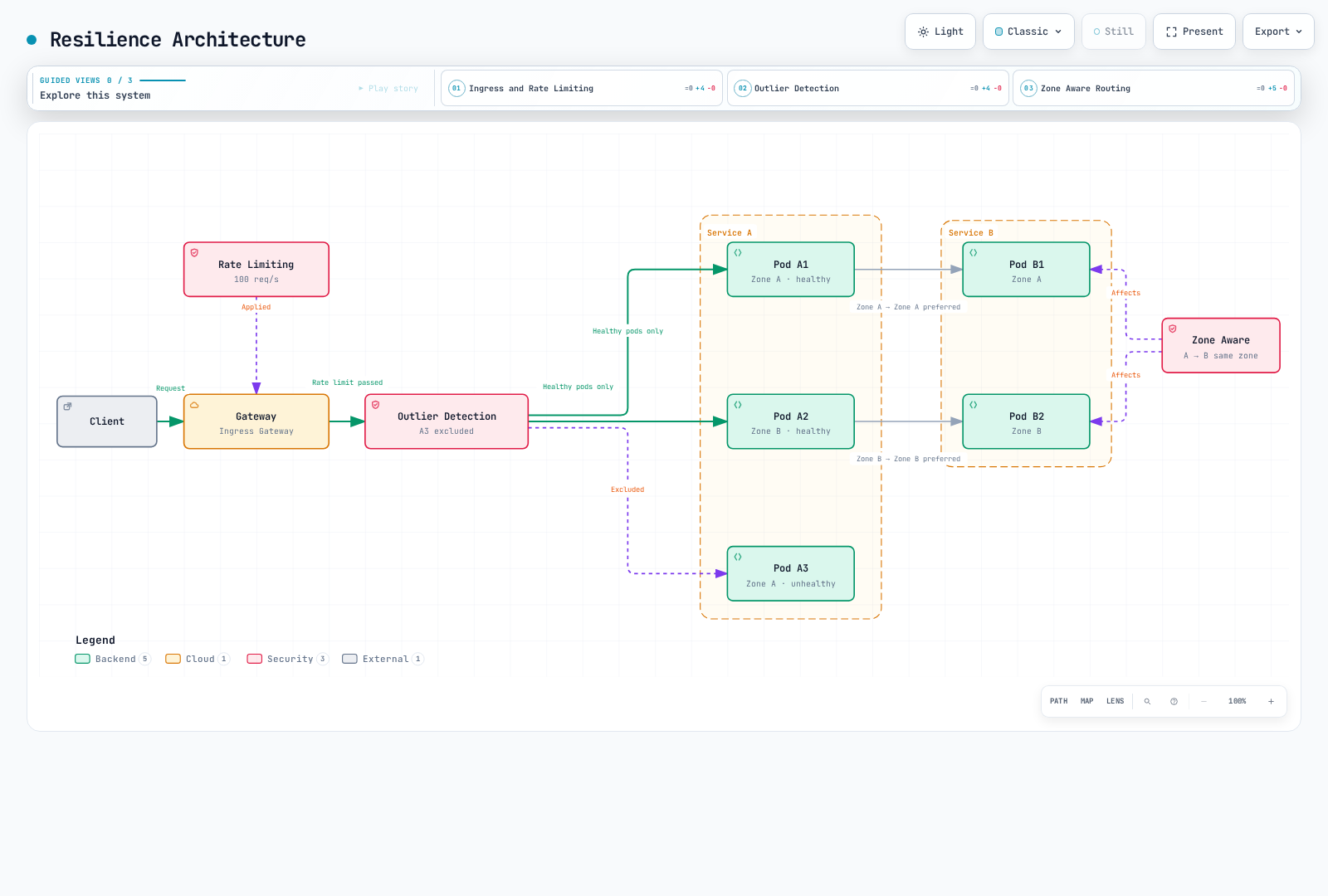
韧性是分布式系统的重要特征。Istio 可自动实现多种韧性模式。
核心韧性模式
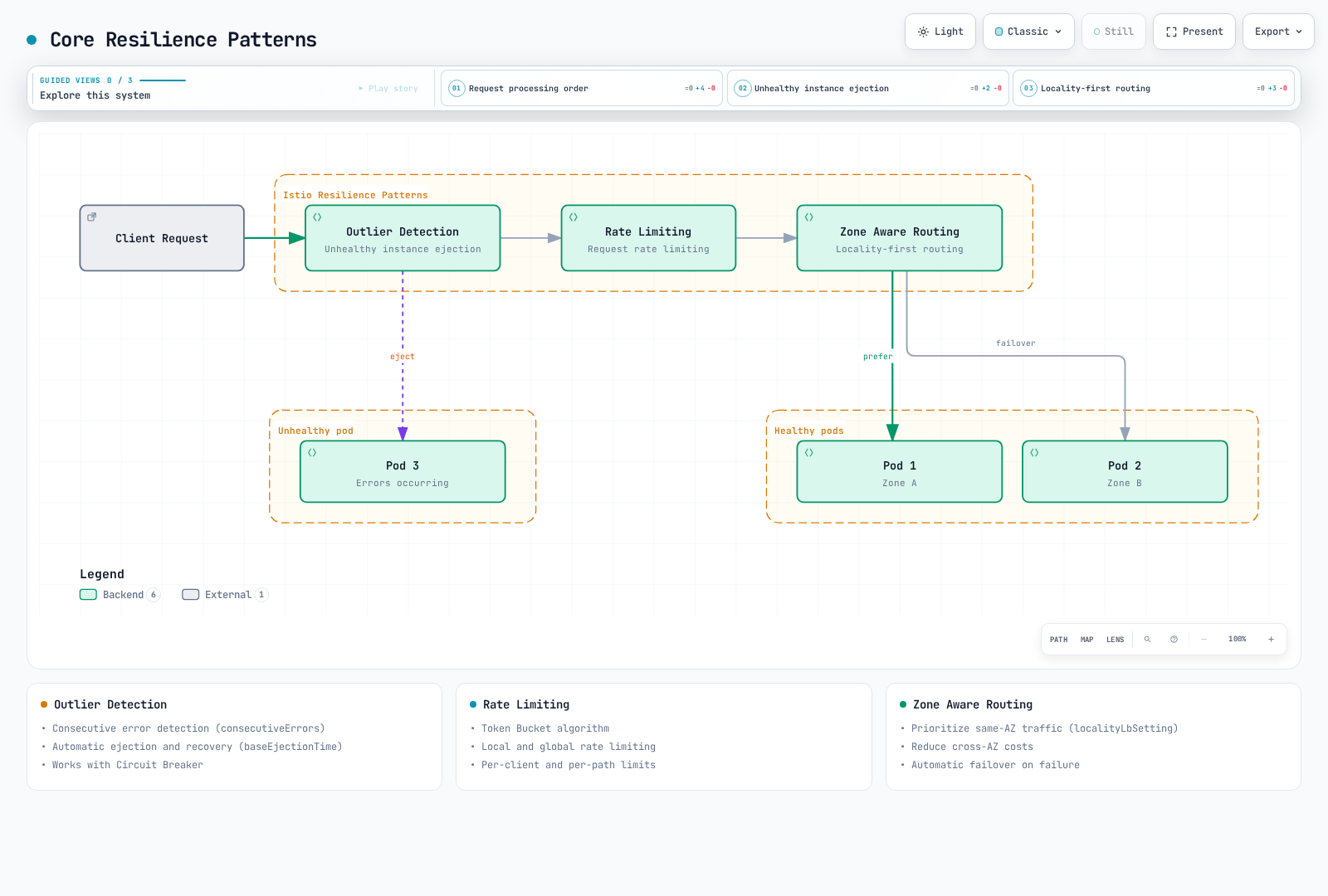
图表概括概念,不是固定网络服务序列。异常检测和局部性选择是代理负载均衡决策;配置的 HTTP 限速过滤器在选定监听器/路由运行。
1. 异常检测
自动检测行为异常的服务实例并将其排除出流量池。
apiVersion: networking.istio.io/v1
kind: DestinationRule
metadata:
  name: myapp
  namespace: default
spec:
  host: myapp
  trafficPolicy:
    outlierDetection:
      consecutive5xxErrors: 5
      interval: 30s
      baseEjectionTime: 30s
maxEjectionPercent: 50主要功能:
- 连续错误检测
- 临时剔除并重新获得后续流量资格
- 配合断路器工作
剔除局限于各观测代理,不删除 Pod,也不是网格范围健康裁决。连续失败可立即触发检测;interval 是扫描周期。剔除会到期并可重复;不证明恢复。
2. 限速
限制请求速率以保护服务免于过载。
apiVersion: networking.istio.io/v1alpha3
kind: EnvoyFilter
metadata:
  name: ratelimit
  namespace: default
spec:
  configPatches:
  - applyTo: HTTP_FILTER
    match:
      context: SIDECAR_INBOUND
      listener:
        portNumber: 8080
        filterChain:
          filter:
            name: envoy.filters.network.http_connection_manager
            subFilter:
              name: envoy.filters.http.router
    patch:
      operation: INSERT_BEFORE
      value:
        name: envoy.filters.http.local_ratelimit
        typed_config:
          '@type': type.googleapis.com/envoy.extensions.filters.http.local_ratelimit.v3.LocalRateLimit
          stat_prefix: http_local_rate_limiter
          token_bucket:
            max_tokens: 100
            tokens_per_fill: 10
            fill_interval: 1s
          filter_enabled:
            default_value:
              numerator: 100
              denominator: HUNDRED
          filter_enforced:
            default_value:
              numerator: 100
              denominator: HUNDRED
  workloadSelector:
    labels:
app: myapp主要功能:
- 令牌桶算法
- 本地和全局限速
- 按客户端和路径限制
示例为匹配 HTTP 监听器在每 Envoy 进程执行本地令牌桶:初始 100 个令牌,随后每秒 10 个。不是服务范围配额;副本数和流量分布影响总吞吐量。全局配额需要限速服务和匹配描述符。客户端/路径限制需要额外可信分类;调用方提供的标头不是经过验证的身份。
3. 可用区感知路由
优化可用区间流量,降低延迟并节省成本。
apiVersion: networking.istio.io/v1
kind: DestinationRule
metadata:
  name: myapp
  namespace: default
spec:
  host: myapp
  trafficPolicy:
    loadBalancer:
      localityLbSetting:
        enabled: true
        distribute:
        - from: us-east-1/us-east-1a/*
          to:
            us-east-1/us-east-1a/*: 80
            us-east-1/us-east-1b/*: 20
    outlierDetection:
      consecutive5xxErrors: 5
      interval: 10s
      baseEjectionTime: 30s
      maxEjectionPercent: 50
minHealthPercent: 0主要功能:
- 优先同可用区流量
- 减少跨可用区成本
- 需要时配置独立局部性故障转移策略
局部性路径为 region/zone/subzone。此示例在两个可用区健康时有意按 80/20 分配;20% 是普通跨可用区流量,不是备用故障转移。同可用区优先并溢出应使用独立局部性故障转移模式,不要将 distribute 与 failover/failoverPriority 组合。异常检测、就绪端点和目标备用容量是前提;节省取决于实际计费流量。
4. 断路器
限制连接和请求数量以防服务过载。
apiVersion: networking.istio.io/v1
kind: DestinationRule
metadata:
  name: circuit-breaker
  namespace: default
spec:
  host: myapp
  trafficPolicy:
    connectionPool:
      tcp:
        maxConnections: 100
      http:
        http1MaxPendingRequests: 10
        http2MaxRequests: 100
        maxRequestsPerConnection: 2
    outlierDetection:
      consecutive5xxErrors: 5
      interval: 30s
baseEjectionTime: 30s工作原理: 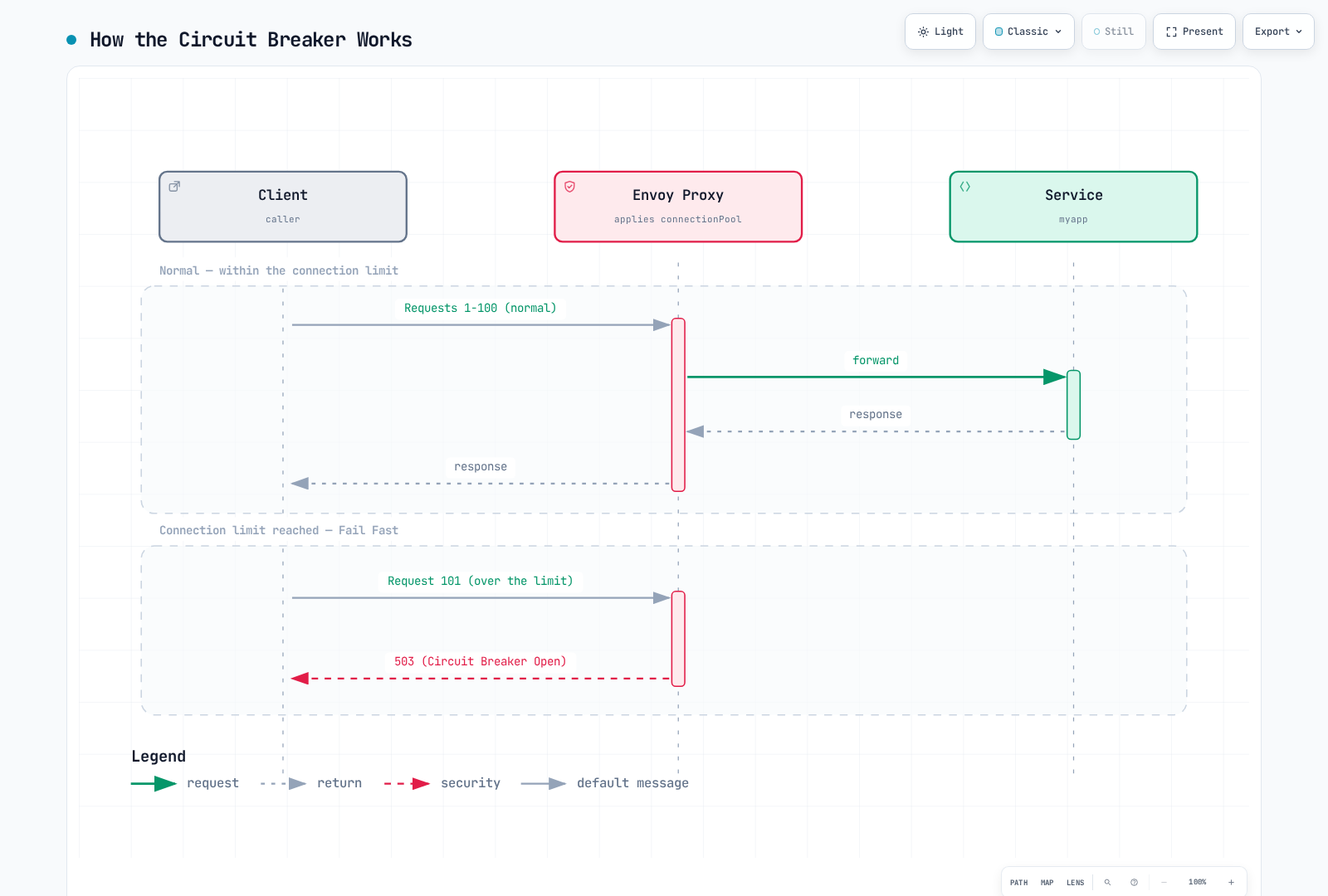
主要功能:
- TCP 连接限制
- HTTP 请求限制
- 待处理请求限制
- 溢出时快速失败
连接/请求断路器局限于各代理的上游集群和优先级,不是全局每服务器 Pod 容量限制。http2MaxRequests 也适用于 HTTP/1.1。命中连接限制时,请求可能排队,直到超过待处理/请求限制;图中展示 HTTP 溢出返回 503/UO,不代表每次连接达到阈值。TCP 溢出没有 HTTP 状态。
5. 重试
短暂失败时自动重试请求。
apiVersion: networking.istio.io/v1
kind: VirtualService
metadata:
  name: myapp
  namespace: default
spec:
  hosts:
  - myapp
  http:
  - name: writes-no-retry
    match:
    - method:
        regex: ^(POST|PUT|PATCH|DELETE)$
    route:
    - destination:
        host: myapp
    timeout: 10s
    retries:
      attempts: 0
  - route:
    - destination:
        host: myapp
    retries:
      attempts: 3
      perTryTimeout: 2s
      retryOn: gateway-error,connect-failure,refused-stream
    timeout: 10s
    name: idempotent-reads
    match:
    - method:
        regex: ^(GET|HEAD|OPTIONS)$
  - name: other-methods-no-retry
    route:
    - destination:
        host: myapp
    timeout: 10s
    retries:
attempts: 0重试条件(retryOn):
5xx:服务器错误(500、502、503、504)reset:TCP 连接重置connect-failure:连接失败refused-stream:HTTP/2 流被拒绝retriable-4xx:在此 Envoy 策略下仅 HTTP 409gateway-error:网关错误(502、503、504)
退避和局部性(上方匹配读取路由的片段):
retries:
  attempts: 5
  perTryTimeout: 2s
  retryOn: gateway-error,connect-failure,refused-stream
  backoff: 25ms
retryRemoteLocalities: true工作原理: 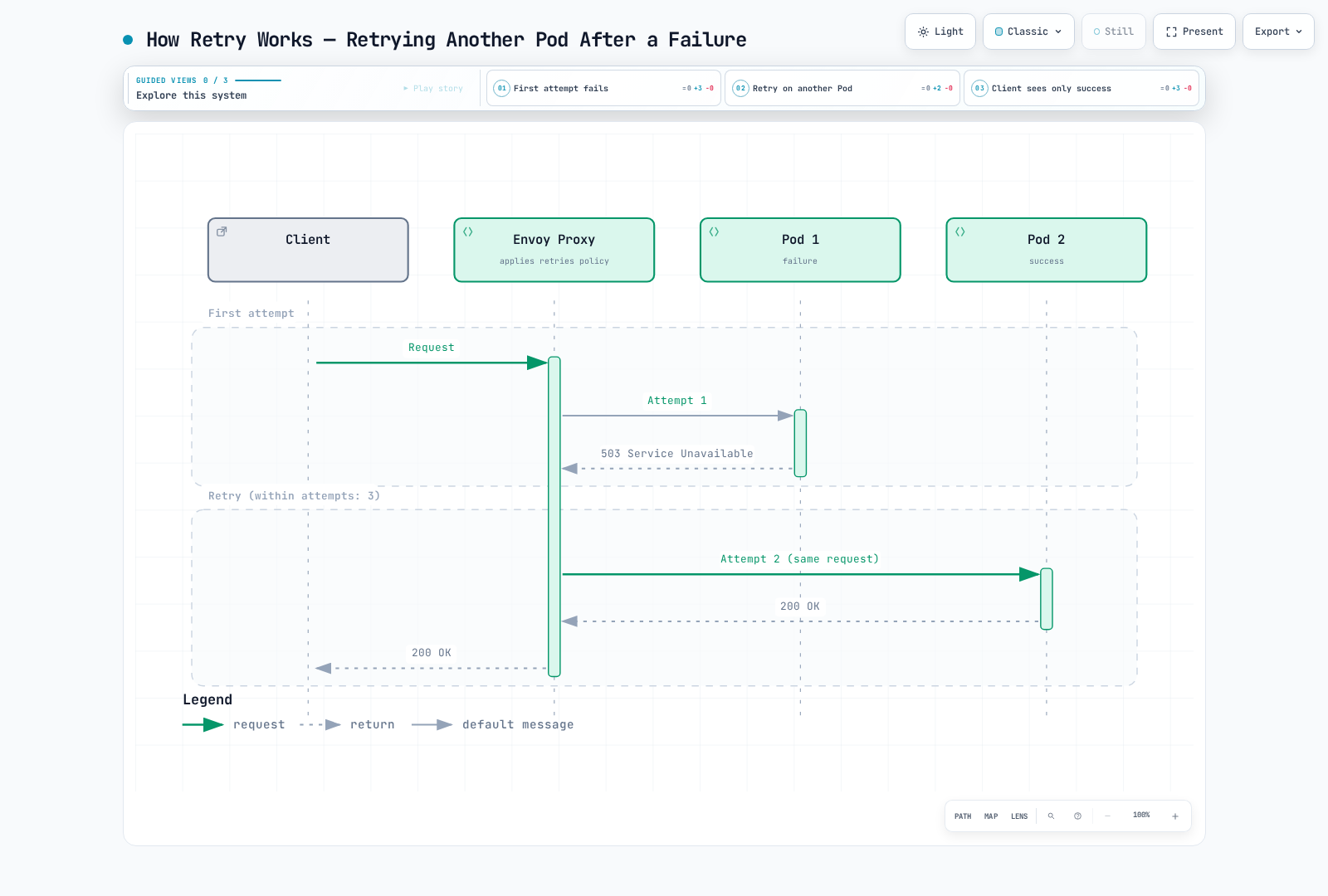
attempts: 3 允许初始尝试后最多三次重试。路由超时可能更早停止。读取方法匹配假定应用幂等;启用 PUT/DELETE 重试前,仍需验证其语义和应用幂等键。省略可能继承网格重试,因此写入/回退路由显式使用 attempts: 0。重试可再次访问同一主机,不保证成功。退避为带抖动的指数退避;允许远程局部性不会设置退避。
6. 超时
设置时间限制,防止请求无限等待。
apiVersion: networking.istio.io/v1
kind: VirtualService
metadata:
  name: myapp
  namespace: default
spec:
  hosts:
  - myapp
  http:
  - name: writes-no-retry
    match:
    - method:
        regex: ^(POST|PUT|PATCH|DELETE)$
    route:
    - destination:
        host: myapp
    timeout: 5s
    retries:
      attempts: 0
  - route:
    - destination:
        host: myapp
    timeout: 5s
    retries:
      attempts: 3
      perTryTimeout: 2s
      retryOn: gateway-error,connect-failure,refused-stream
    name: idempotent-reads
    match:
    - method:
        regex: ^(GET|HEAD|OPTIONS)$
  - name: other-methods-no-retry
    route:
    - destination:
        host: myapp
    timeout: 5s
    retries:
attempts: 0超时层次(要求 default 中单独配置 my-gateway):
apiVersion: networking.istio.io/v1
kind: VirtualService
metadata:
  name: gateway-timeout
  namespace: default
spec:
  gateways:
  - my-gateway
  hosts:
  - example.com
  http:
  - route:
    - destination:
        host: frontend
    timeout: 30s
    retries:
      attempts: 0
---
apiVersion: networking.istio.io/v1
kind: VirtualService
metadata:
  name: service-timeout
  namespace: default
spec:
  hosts:
  - backend
  http:
  - route:
    - destination:
        host: backend
    timeout: 5s
    retries:
      attempts: 0
示意预算范围(实际值按 SLO 和依赖推导):
- Gateway -> Frontend:30-60 秒(面向用户)
- Service -> Service:5-10 秒(内部通信)
- 数据库查询:2-5 秒
- 外部 API:10-30 秒
HTTP 路由超时不配置数据库客户端/查询超时,也不保证取消下游工作。传播应用期限;更短总超时有意允许更少重试。
7. 故障注入
为混沌工程有意注入故障。
apiVersion: networking.istio.io/v1
kind: VirtualService
metadata:
  name: fault-injection
  namespace: default
spec:
  hosts:
  - myapp
  http:
  - fault:
      delay:
        percentage:
          value: 10.0
        fixedDelay: 5s
      abort:
        percentage:
          value: 5.0
        httpStatus: 503
    route:
    - destination:
host: myapp使用场景:
- 模拟网络延迟:
fault:
  delay:
    percentage:
      value: 100.0
fixedDelay: 7s- 间歇性失败测试:
fault:
  abort:
    percentage:
      value: 20.0
httpStatus: 500- 仅为特定用户注入故障:
apiVersion: networking.istio.io/v1
kind: VirtualService
metadata:
  name: fault-injection-user
  namespace: default
spec:
  hosts:
  - myapp
  http:
  - match:
    - headers:
        end-user:
          exact: test-user
    fault:
      abort:
        percentage:
          value: 100.0
        httpStatus: 503
    route:
    - destination:
        host: myapp
  - name: ordinary-traffic
    route:
    - destination:
        host: myapp
    retries:
      attempts: 0
故障注入是受控实验操作。带 fault 的客户端路由上,Istio 不启用该路由的重试/超时。测试重试行为应在独立下游跳点注入故障。测试用户标头仅限定流量;应限制谁可提供它。普通流量回退防止其他请求无法匹配。
韧性模式组合
异常检测 + 断路器
apiVersion: networking.istio.io/v1
kind: DestinationRule
metadata:
  name: myapp-resilient
  namespace: default
spec:
  host: myapp
  trafficPolicy:
    connectionPool:
      tcp:
        maxConnections: 100
      http:
        http1MaxPendingRequests: 50
        maxRequestsPerConnection: 2
    outlierDetection:
      consecutive5xxErrors: 5
      interval: 30s
      baseEjectionTime: 30s
      maxEjectionPercent: 50
      minHealthPercent: 0
限速 + 重试
apiVersion: networking.istio.io/v1
kind: VirtualService
metadata:
  name: myapp
  namespace: default
spec:
  hosts:
  - myapp
  http:
  - name: writes-no-retry
    match:
    - method:
        regex: ^(POST|PUT|PATCH|DELETE)$
    route:
    - destination:
        host: myapp
    timeout: 10s
    retries:
      attempts: 0
  - route:
    - destination:
        host: myapp
    retries:
      attempts: 3
      perTryTimeout: 2s
      retryOn: gateway-error,connect-failure,refused-stream
    timeout: 10s
    name: idempotent-reads
    match:
    - method:
        regex: ^(GET|HEAD|OPTIONS)$
  - name: other-methods-no-retry
    route:
    - destination:
        host: myapp
    timeout: 10s
    retries:
      attempts: 0
---
apiVersion: networking.istio.io/v1alpha3
kind: EnvoyFilter
metadata:
  name: ratelimit
  namespace: default
spec:
  workloadSelector:
    labels:
      app: myapp
  configPatches:
  - applyTo: HTTP_FILTER
    match:
      context: SIDECAR_INBOUND
      listener:
        portNumber: 8080
        filterChain:
          filter:
            name: envoy.filters.network.http_connection_manager
            subFilter:
              name: envoy.filters.http.router
    patch:
      operation: INSERT_BEFORE
      value:
        name: envoy.filters.http.local_ratelimit
        typed_config:
          '@type': type.googleapis.com/envoy.extensions.filters.http.local_ratelimit.v3.LocalRateLimit
          stat_prefix: http_local_rate_limiter
          token_bucket:
            max_tokens: 1000
            tokens_per_fill: 100
            fill_interval: 1s
          filter_enabled:
            default_value:
              numerator: 100
              denominator: HUNDRED
          filter_enforced:
            default_value:
              numerator: 100
              denominator: HUNDRED
韧性架构
韧性指标
按指标章节,每 Pod 抓取一个预期代理端点。Envoy 默认不导出每个可选统计。将此注解合并到相关 Pod 模板并滚动发布新代理,再检查实际名称/标签:
spec:
  template:
    metadata:
      annotations:
        proxy.istio.io/config: |
          proxyStatsMatcher:
            inclusionRegexps:
            - ".*outlier_detection.*"
            - ".*circuit_breakers.*"
            - ".*upstream_rq_retry.*"
            - ".*upstream_rq_timeout.*"
            - ".*upstream_rq_.*overflow.*"
            - ".*http_local_rate_limit.*"
            - ".*fault.*"
Prometheus 查询
速率为每秒;_open 是 0/1 容量状态 gauge,ejections_active 是当前主机数。单集群示例假定抓取标签 namespace/pod;特定依赖应缩小目标集群范围。本地限速前缀取决于 stat_prefix 和输出统计名。rate_limited 即使不执行限制也统计令牌不足;enforced 统计实际限制。活动请求溢出计数器因 Envoy 版本而异:如暴露 upstream_rq_active_overflow 应检查它,不要假定每次溢出都增加 pending 计数器。
# Active ejections per observed cluster
 envoy_cluster_outlier_detection_ejections_active{namespace="default"}

# Locally rate-limited requests per second, retaining Pod identity
sum by (namespace, pod) (rate({__name__=~"envoy_.*http_local_rate_limit_enforced",namespace="default"}[5m]))

# Request circuit breaker currently at capacity (not a cumulative count)
envoy_cluster_circuit_breakers_default_rq_open{namespace="default"}

# Pending-queue circuit-breaker overflows per second
sum(rate(envoy_cluster_upstream_rq_pending_overflow{namespace="default"}[5m]))

# Retry attempts and retry-success events per second (different event counters)
sum(rate(envoy_cluster_upstream_rq_retry{namespace="default"}[5m]))
sum(rate(envoy_cluster_upstream_rq_retry_success{namespace="default"}[5m]))

# Upstream request timeouts per second
sum(rate(envoy_cluster_upstream_rq_timeout{namespace="default"}[5m]))

# Observed destination HTTP 2xx/3xx fraction; define your own SLI for 4xx/gRPC
sum(rate(istio_requests_total{reporter="destination",destination_service_namespace="default",response_code=~"[23].."}[5m])) /
sum(rate(istio_requests_total{reporter="destination",destination_service_namespace="default"}[5m]))
source_zone 和 destination_zone 不是标准 Istio 标签。可用区报告需要已验证拓扑数据补充或其他可用区流量来源;集群 ID 不是可用区 ID。目标指标排除未到达服务的请求,因此也应检查源侧失败信号。
Grafana 仪表板面板
分别展示活动连接、打开/关闭状态和溢出速率。没有标准 envoy_cluster_circuit_breakers_default_cx_max 容量 gauge 或 ...rq_overflow 断路器 gauge。计算容量使用生效集群阈值,绝不除以 0/1 打开标志。
envoy_cluster_upstream_cx_active{namespace="default"}
envoy_cluster_circuit_breakers_default_cx_open{namespace="default"}

# Source-side observed final HTTP 5xx fraction, not hypothetical no-retry errors
sum(rate(istio_requests_total{reporter="source",destination_service_namespace="default",response_code=~"5.."}[5m])) /
sum(rate(istio_requests_total{reporter="source",destination_service_namespace="default"}[5m]))
重试计数器无法重建反事实“没有重试时的错误率”。使用限定范围测量关联尝试、最终结果、延迟和负载;无流量/缺失序列需单独处理。
最佳实践
1. 异常检测阈值调优
# Adjust according to service characteristics
outlierDetection:
  consecutive5xxErrors: 5          # 5 consecutive failures
  interval: 30s                 # Evaluate every 30 seconds
  baseEjectionTime: 30s         # 30 second ejection
  maxEjectionPercent: 50        # Maximum 50% ejected
  minHealthPercent: 0           # Disable unhealthy-pool fail-open threshold
minHealthPercent 不保证健康容量:低于非零阈值时,异常检测禁用,代理可使用健康和不健康主机。0 禁用该阈值。重复剔除可能长于 baseEjectionTime;监控实际剔除主机和剩余容量。
2. 分阶段限速
# Apply limits at Gateway -> Service stages
# Gateway: Overall traffic limit
# Service: Individual service limit
3. 可用区感知路由优先级
同可用区优先并故障转移应使用局部性优先级,而非 80/20 分配。确认节点区域/可用区标签和可用端点。可用区感知章节将分配与故障转移作为不同模式介绍。
4. 断路器配置
根据实测并发和目标容量,为各调用方代理规划目标集群限制。调用方数量、HTTP 复用、负载分布和发布激增都重要;Pod 数乘任意因子不是全局准入限制。大队列可能掩盖过载。
# DestinationRule trafficPolicy fragment; example values require load tests
connectionPool:
  tcp:
    maxConnections: 100
  http:
    http1MaxPendingRequests: 10
    http2MaxRequests: 100
    maxRequestsPerConnection: 0
    maxRetries: 10
maxRequestsPerConnection: 0 允许不受此请求数上限限制的复用;1 禁用 keep-alive。1–5 不是通用优化值。maxRetries 限制每上游集群并发未完成重试,不是每请求重试数。
5. 重试策略
使用上方完整示例中的显式写入保护和读取方法匹配。写着“仅 GET”的 YAML 注释不限制匹配。仅重试应用语义可安全重复的操作,设置有界尝试/退避及总期限。不要自动重试 429 或过载响应:重试可抵消限速并加重故障。组合示例使用更大本地桶(初始 1000 令牌,每秒补充 100),不是全局配额。
6. 超时配置
为整个调用图规划预算,包括首次尝试、重试、退避和应用处理。如果希望所有尝试都容纳在内:
route budget >= (1 + attempts) × perTryTimeout + backoff + other overheadattempts: 3 和 perTryTimeout: 2s 下,四次完整尝试在退避/其他开销前已用 8 秒。timeout: 10s 是示例预算,不是保证;timeout: 5s 有意无法容纳四次完整两秒尝试。应用期限还必须覆盖请求上传/流式传输语义,并适当传播取消。
7. 故障注入测试
使用上方完整的标头匹配路由和普通流量回退。将制造故障的跳点与被测试重试/超时策略分开。从可销毁测试环境开始,再在预发布使用有界工作负载组和中止标准。任何生产实验需要工作负载专属授权、可观测性和回滚阈值;固定 1%→5%→10% 时间表不普遍安全。
故障排除
异常检测不工作
# 1. Check DestinationRule
kubectl get destinationrule -A

# 2. Check Envoy cluster status
istioctl proxy-config clusters <pod-name> -n <namespace>

# 3. Check Outlier Detection metrics
istioctl x envoy-stats <pod-name> -n <namespace> --output prom | grep outlier
限速未应用
# 1. Check EnvoyFilter
kubectl get envoyfilter -A

# 2. Check Envoy configuration
istioctl proxy-config listener <pod-name> -n <namespace> -o json

# 3. Check Rate Limit metrics
istioctl x envoy-stats <pod-name> -n <namespace> --output prom | grep rate_limit
可用区感知路由不工作
# 1. Check DestinationRule
kubectl get destinationrule -A

# 2. Map Pods to node topology; Pod zone labels are not added automatically
kubectl get pods -n <namespace> -o wide
kubectl get nodes -L topology.kubernetes.io/region,topology.kubernetes.io/zone

# 3. Check Locality information
istioctl proxy-config endpoints <pod-name> -n <namespace>
断路器未打开
# 1. Check DestinationRule connectionPool settings
kubectl get destinationrule <name> -o yaml

# 2. Check Circuit Breaker metrics
istioctl x envoy-stats <pod-name> -n <namespace> --output prom | grep circuit_breakers

# 3. Check for overflow
istioctl x envoy-stats <pod-name> -n <namespace> --output prom | grep overflow

# 4. Check active connection count
istioctl x envoy-stats <pod-name> -n <namespace> --output prom | grep upstream_cx_active
重试不工作
# 1. Check VirtualService
kubectl get virtualservice <name> -o yaml

# 2. Check Retry metrics
istioctl x envoy-stats <pod-name> -n <namespace> --output prom | grep retry

# 3. Inspect enabled access/debug logs; default logs need not contain each retry
kubectl logs -n <namespace> <pod-name> -c istio-proxy | grep retry

# 4. Check retry conditions
istioctl proxy-config routes <pod-name> -n <namespace> -o json | \
  jq '.[] | .virtualHosts[]? | {name, domains, routes: [.routes[]? | {name, match, retryPolicy: .route.retryPolicy}]}'
超时未应用
# 1. Check VirtualService timeout
kubectl get virtualservice <name> -o yaml | grep timeout

# 2. Check Timeout metrics
istioctl x envoy-stats <pod-name> -n <namespace> --output prom | grep timeout

# 3. Check request duration
istioctl x envoy-stats <pod-name> -n <namespace> --output prom | grep request_duration

# 4. Check Envoy route configuration
istioctl proxy-config routes <pod-name> -n <namespace> -o json | \
  jq '.[] | .virtualHosts[].routes[].route.timeout'
故障注入不工作
# 1. Check VirtualService fault configuration
kubectl get virtualservice <name> -o yaml | grep -A 10 fault

# 2. Check request headers (if match conditions exist)
curl -H "end-user: test-user" http://your-service/api

# 3. Check Envoy filters
istioctl proxy-config routes <pod-name> -n <namespace> -o json | \
  jq '.[] | .virtualHosts[]?.routes[]? | select(.typedPerFilterConfig["envoy.filters.http.fault"] != null) | {name, fault: .typedPerFilterConfig["envoy.filters.http.fault"]}'

# 4. Check Fault metrics
istioctl x envoy-stats <pod-name> -n <namespace> --output prom | grep fault
后续步骤
参考资料
官方文档
AWS 相关资源
模式和架构
测验
要测试本章知识,请尝试 Istio 韧性测验。