耐障害性
最終更新: September 11, 2026 · Istio 1.31。
defaultのport 8080のHTTPmyappを使う独立サイドカー例です。同じhostへの例をすべて一緒に適用しないでください。実プロキシ設定と容量を検証します。デプロイ/負荷テストはしていません。Ambient L7にはwaypointと対応ポリシー接続が必要です。
Istioの耐障害性機能は、アプリの意味と容量に合わせて設定することで障害を封じ込める助けになります。
目次
その他の耐障害性パターン
以下も扱います。
- サーキットブレーカー: 接続プールによる遮断
- 再試行: 再試行ポリシー
- タイムアウト: 要求時間上限
- 障害注入: 障害注入テスト
概要
耐障害性は分散システムの重要特性です。Istioは多様なパターンを自動実装できます。
中核パターン
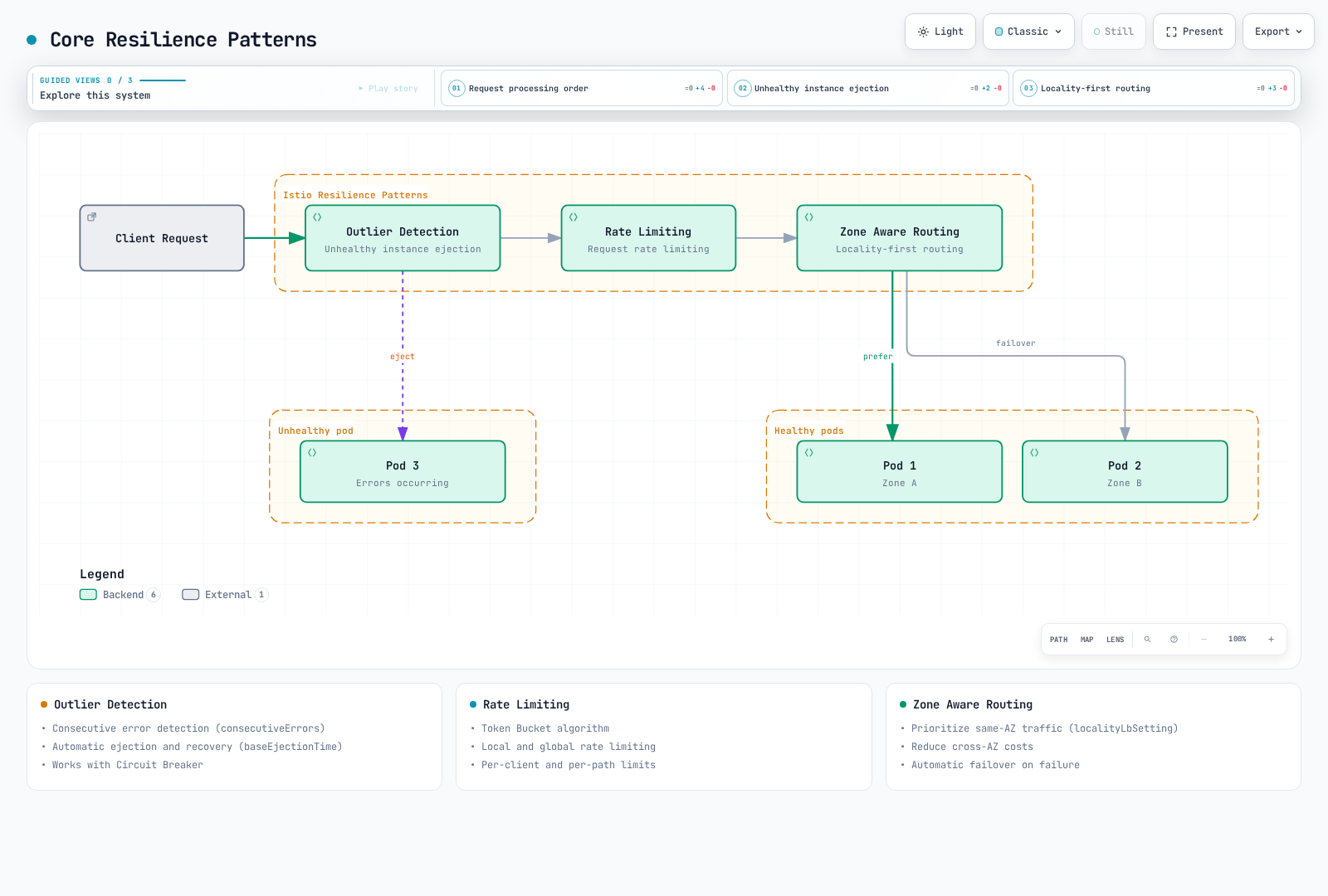
図は概念の要約で、ネットワークサービスの固定順序ではありません。外れ値検出とlocality選択はプロキシの負荷分散判断で、設定HTTPレート制限フィルターは選択listener/routeで実行されます。
1. 外れ値検出
異常なサービスインスタンスを自動検出し、通信プールから除外します。
apiVersion: networking.istio.io/v1
kind: DestinationRule
metadata:
  name: myapp
  namespace: default
spec:
  host: myapp
  trafficPolicy:
    outlierDetection:
      consecutive5xxErrors: 5
      interval: 30s
      baseEjectionTime: 30s
maxEjectionPercent: 50主な機能:
- 連続エラー検出
- 一時除外と後続通信への再選択資格
- サーキットブレーカーとの連携
除外は観測プロキシごとのローカル状態で、Pod削除やメッシュ全体の健全性判定ではありません。連続失敗は即検出でき、intervalは走査期間です。除外は期限切れ後に再発もあり、復旧証明ではありません。
2. レート制限
要求レートを制限し過負荷から保護します。
apiVersion: networking.istio.io/v1alpha3
kind: EnvoyFilter
metadata:
  name: ratelimit
  namespace: default
spec:
  configPatches:
  - applyTo: HTTP_FILTER
    match:
      context: SIDECAR_INBOUND
      listener:
        portNumber: 8080
        filterChain:
          filter:
            name: envoy.filters.network.http_connection_manager
            subFilter:
              name: envoy.filters.http.router
    patch:
      operation: INSERT_BEFORE
      value:
        name: envoy.filters.http.local_ratelimit
        typed_config:
          '@type': type.googleapis.com/envoy.extensions.filters.http.local_ratelimit.v3.LocalRateLimit
          stat_prefix: http_local_rate_limiter
          token_bucket:
            max_tokens: 100
            tokens_per_fill: 10
            fill_interval: 1s
          filter_enabled:
            default_value:
              numerator: 100
              denominator: HUNDRED
          filter_enforced:
            default_value:
              numerator: 100
              denominator: HUNDRED
  workloadSelector:
    labels:
app: myapp主な機能:
- トークンバケット
- ローカル/グローバル制限
- クライアント別/パス別制限
例は一致HTTPリスナーでEnvoyプロセスごとのローカルバケットを適用します。初期100トークン、毎秒10補充です。サービス全体クォータではなく、レプリカ数と分散が総スループットに影響します。全体クォータにはレート制限サービスと一致descriptorが必要です。クライアント/パス制限には追加の信頼できる分類が必要で、呼び出し元ヘッダーは認証済みIDではありません。
3. ゾーンを考慮したルーティング
AZ間通信を最適化して遅延と費用を減らします。
apiVersion: networking.istio.io/v1
kind: DestinationRule
metadata:
  name: myapp
  namespace: default
spec:
  host: myapp
  trafficPolicy:
    loadBalancer:
      localityLbSetting:
        enabled: true
        distribute:
        - from: us-east-1/us-east-1a/*
          to:
            us-east-1/us-east-1a/*: 80
            us-east-1/us-east-1b/*: 20
    outlierDetection:
      consecutive5xxErrors: 5
      interval: 10s
      baseEjectionTime: 30s
      maxEjectionPercent: 50
minHealthPercent: 0主な機能:
- 同一AZ通信を優先
- AZ間費用削減
- 必要時に別localityフェイルオーバーを設定
localityパスはregion/zone/subzoneです。例は両ゾーン正常時に意図的に80/20分配し、20%は通常AZ間通信で待機切り替えではありません。同一ゾーン優先と流出には別パターンを使い、distributeとfailover/failoverPriorityは混ぜません。外れ値検出、準備済みendpoint、予備宛先容量が前提で、節約は実課金通信に依存します。
4. サーキットブレーカー
接続/要求数を制限して過負荷を防ぎます。
apiVersion: networking.istio.io/v1
kind: DestinationRule
metadata:
  name: circuit-breaker
  namespace: default
spec:
  host: myapp
  trafficPolicy:
    connectionPool:
      tcp:
        maxConnections: 100
      http:
        http1MaxPendingRequests: 10
        http2MaxRequests: 100
        maxRequestsPerConnection: 2
    outlierDetection:
      consecutive5xxErrors: 5
      interval: 30s
baseEjectionTime: 30s動作: 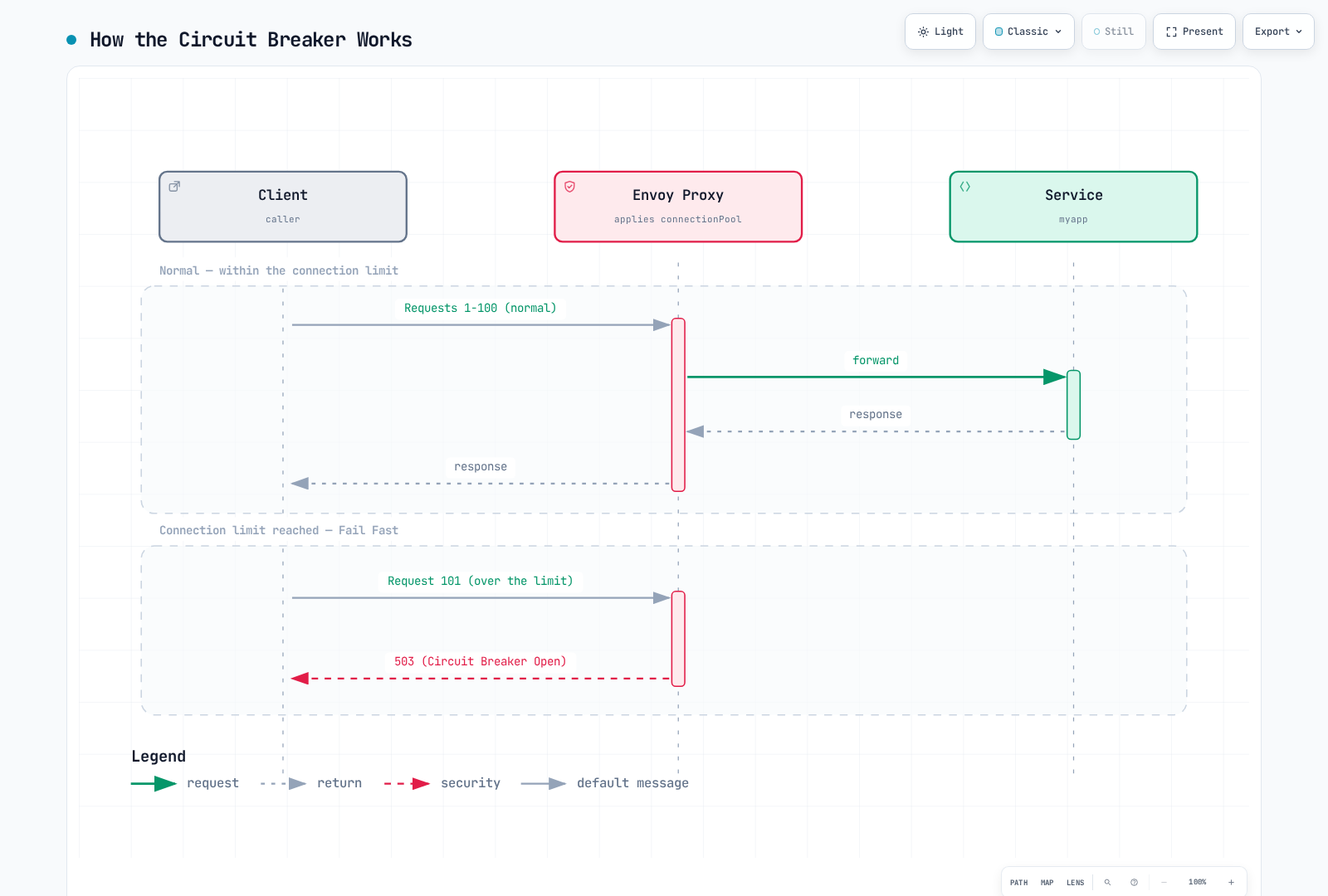
主な機能:
- TCP接続上限
- HTTP要求上限
- 保留要求上限
- 超過時の早期失敗
接続/要求ブレーカーはプロキシのupstream clusterとpriorityごとで、server Pod全体の容量上限ではありません。http2MaxRequestsはHTTP/1.1にも適用します。接続上限到達で要求が待ち行列に入り、pending/request上限超過まで待つ場合があります。図はHTTP超過503/UOで、接続がしきい値に達する全状況ではありません。TCP超過にHTTP状態はありません。
5. 再試行
一時失敗時に要求を自動再試行します。
apiVersion: networking.istio.io/v1
kind: VirtualService
metadata:
  name: myapp
  namespace: default
spec:
  hosts:
  - myapp
  http:
  - name: writes-no-retry
    match:
    - method:
        regex: ^(POST|PUT|PATCH|DELETE)$
    route:
    - destination:
        host: myapp
    timeout: 10s
    retries:
      attempts: 0
  - route:
    - destination:
        host: myapp
    retries:
      attempts: 3
      perTryTimeout: 2s
      retryOn: gateway-error,connect-failure,refused-stream
    timeout: 10s
    name: idempotent-reads
    match:
    - method:
        regex: ^(GET|HEAD|OPTIONS)$
  - name: other-methods-no-retry
    route:
    - destination:
        host: myapp
    timeout: 10s
    retries:
attempts: 0再試行条件(retryOn):
5xx: サーバーエラー(500、502、503、504)reset: TCP接続リセットconnect-failure: 接続失敗refused-stream: HTTP/2ストリーム拒否retriable-4xx: このEnvoyポリシーではHTTP 409のみgateway-error: ゲートウェイエラー(502、503、504)
バックオフとlocality(上の一致readルート用断片):
retries:
  attempts: 5
  perTryTimeout: 2s
  retryOn: gateway-error,connect-failure,refused-stream
  backoff: 25ms
retryRemoteLocalities: true動作: 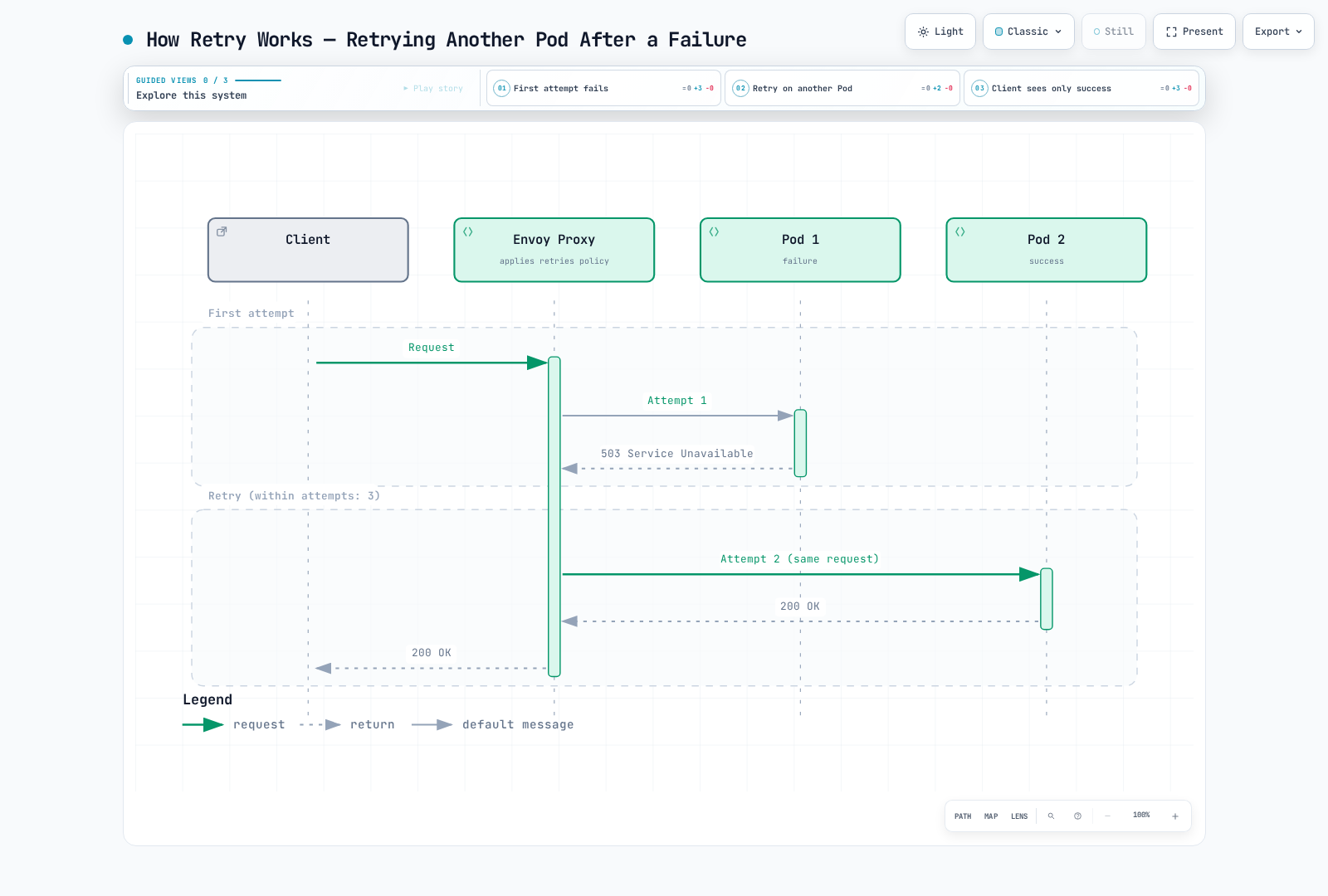
attempts: 3は初回後に最大3再試行を許可し、route timeoutで早く止まる場合があります。readメソッド一致はアプリ冪等性が前提です。PUT/DELETEの意味や冪等キーは有効化前に確認が必要です。省略はメッシュ再試行を継承し得るためwrite/fallbackはattempts: 0を明示します。再試行は同じホストへ戻る場合もあり成功を保証しません。バックオフはジッター付き指数的で、遠隔localityを許すことはバックオフ設定ではありません。
6. タイムアウト
要求が無期限に待たないよう時間上限を設定します。
apiVersion: networking.istio.io/v1
kind: VirtualService
metadata:
  name: myapp
  namespace: default
spec:
  hosts:
  - myapp
  http:
  - name: writes-no-retry
    match:
    - method:
        regex: ^(POST|PUT|PATCH|DELETE)$
    route:
    - destination:
        host: myapp
    timeout: 5s
    retries:
      attempts: 0
  - route:
    - destination:
        host: myapp
    timeout: 5s
    retries:
      attempts: 3
      perTryTimeout: 2s
      retryOn: gateway-error,connect-failure,refused-stream
    name: idempotent-reads
    match:
    - method:
        regex: ^(GET|HEAD|OPTIONS)$
  - name: other-methods-no-retry
    route:
    - destination:
        host: myapp
    timeout: 5s
    retries:
attempts: 0タイムアウト階層(defaultの別途設定済みmy-gatewayが必要):
apiVersion: networking.istio.io/v1
kind: VirtualService
metadata:
  name: gateway-timeout
  namespace: default
spec:
  gateways:
  - my-gateway
  hosts:
  - example.com
  http:
  - route:
    - destination:
        host: frontend
    timeout: 30s
    retries:
      attempts: 0
---
apiVersion: networking.istio.io/v1
kind: VirtualService
metadata:
  name: service-timeout
  namespace: default
spec:
  hosts:
  - backend
  http:
  - route:
    - destination:
        host: backend
    timeout: 5s
    retries:
attempts: 0予算範囲例(実値はSLOと依存から導出):
- Gateway -> Frontend: 30-60秒(利用者向け)
- Service -> Service: 5-10秒(内部通信)
- DBクエリ: 2-5秒
- 外部API: 10-30秒
HTTP route timeoutはDB client/query timeoutを設定せず、下流処理のキャンセルも保証しません。アプリ期限を伝播します。短い合計timeoutは意図的に再試行回数を減らします。
7. 障害注入
カオスエンジニアリングのため意図的に障害を注入します。
apiVersion: networking.istio.io/v1
kind: VirtualService
metadata:
  name: fault-injection
  namespace: default
spec:
  hosts:
  - myapp
  http:
  - fault:
      delay:
        percentage:
          value: 10.0
        fixedDelay: 5s
      abort:
        percentage:
          value: 5.0
        httpStatus: 503
    route:
    - destination:
host: myapp使用シナリオ:
- ネットワーク遅延の模擬:
fault:
  delay:
    percentage:
      value: 100.0
fixedDelay: 7s- 断続的障害テスト:
fault:
  abort:
    percentage:
      value: 20.0
httpStatus: 500- 特定ユーザーだけに障害注入:
apiVersion: networking.istio.io/v1
kind: VirtualService
metadata:
  name: fault-injection-user
  namespace: default
spec:
  hosts:
  - myapp
  http:
  - match:
    - headers:
        end-user:
          exact: test-user
    fault:
      abort:
        percentage:
          value: 100.0
        httpStatus: 503
    route:
    - destination:
        host: myapp
  - name: ordinary-traffic
    route:
    - destination:
        host: myapp
    retries:
attempts: 0障害注入は管理された演習操作です。client側routeにfaultがあると、そのrouteの再試行/timeoutをIstioは有効にしません。別の下流ホップで障害を発生させて再試行をテストします。test-userヘッダーは範囲選択だけなので、誰が送れるかを制御します。通常通信fallbackで他要求が不一致になるのを防ぎます。
耐障害性パターンの組み合わせ
外れ値検出 + サーキットブレーカー
apiVersion: networking.istio.io/v1
kind: DestinationRule
metadata:
  name: myapp-resilient
  namespace: default
spec:
  host: myapp
  trafficPolicy:
    connectionPool:
      tcp:
        maxConnections: 100
      http:
        http1MaxPendingRequests: 50
        maxRequestsPerConnection: 2
    outlierDetection:
      consecutive5xxErrors: 5
      interval: 30s
      baseEjectionTime: 30s
      maxEjectionPercent: 50
      minHealthPercent: 0
レート制限 + 再試行
apiVersion: networking.istio.io/v1
kind: VirtualService
metadata:
  name: myapp
  namespace: default
spec:
  hosts:
  - myapp
  http:
  - name: writes-no-retry
    match:
    - method:
        regex: ^(POST|PUT|PATCH|DELETE)$
    route:
    - destination:
        host: myapp
    timeout: 10s
    retries:
      attempts: 0
  - route:
    - destination:
        host: myapp
    retries:
      attempts: 3
      perTryTimeout: 2s
      retryOn: gateway-error,connect-failure,refused-stream
    timeout: 10s
    name: idempotent-reads
    match:
    - method:
        regex: ^(GET|HEAD|OPTIONS)$
  - name: other-methods-no-retry
    route:
    - destination:
        host: myapp
    timeout: 10s
    retries:
      attempts: 0
---
apiVersion: networking.istio.io/v1alpha3
kind: EnvoyFilter
metadata:
  name: ratelimit
  namespace: default
spec:
  workloadSelector:
    labels:
      app: myapp
  configPatches:
  - applyTo: HTTP_FILTER
    match:
      context: SIDECAR_INBOUND
      listener:
        portNumber: 8080
        filterChain:
          filter:
            name: envoy.filters.network.http_connection_manager
            subFilter:
              name: envoy.filters.http.router
    patch:
      operation: INSERT_BEFORE
      value:
        name: envoy.filters.http.local_ratelimit
        typed_config:
          '@type': type.googleapis.com/envoy.extensions.filters.http.local_ratelimit.v3.LocalRateLimit
          stat_prefix: http_local_rate_limiter
          token_bucket:
            max_tokens: 1000
            tokens_per_fill: 100
            fill_interval: 1s
          filter_enabled:
            default_value:
              numerator: 100
              denominator: HUNDRED
          filter_enforced:
            default_value:
              numerator: 100
              denominator: HUNDRED
耐障害性アーキテクチャ
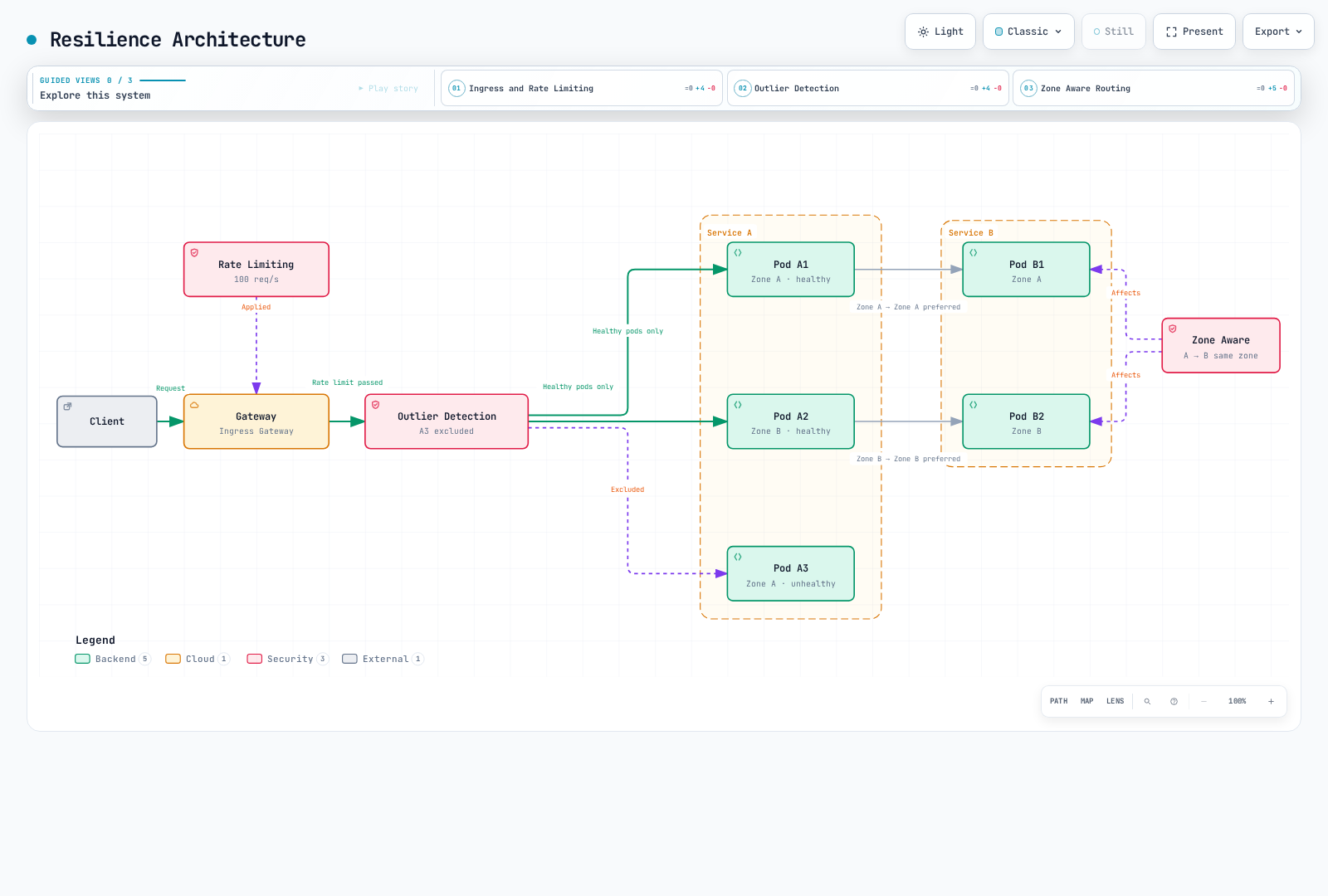
耐障害性メトリクス
メトリクスのようにPodごとに意図した1プロキシendpointを収集します。Envoyは全任意統計をデフォルト公開しません。関連Podテンプレートへアノテーションをマージし、新プロキシをロールアウトして実名/ラベルを確認します。
spec:
  template:
    metadata:
      annotations:
        proxy.istio.io/config: |
          proxyStatsMatcher:
            inclusionRegexps:
            - ".*outlier_detection.*"
            - ".*circuit_breakers.*"
            - ".*upstream_rq_retry.*"
            - ".*upstream_rq_timeout.*"
            - ".*upstream_rq_.*overflow.*"
            - ".*http_local_rate_limit.*"
            - ".*fault.*"
Prometheusクエリ
rateは毎秒、_openは0/1容量状態ゲージ、ejections_activeは現在ホスト数です。単一クラスター例はnamespace/podを前提とし、特定依存には宛先clusterを絞ります。ローカルレート制限接頭辞はstat_prefixと実統計名によります。rate_limitedは非適用時もトークン不足を計数し、enforcedは適用数です。active要求超過カウンターはEnvoy版で異なり、すべてpendingを増やすと考えず、公開されるならupstream_rq_active_overflowを確認します。
# Active ejections per observed cluster
 envoy_cluster_outlier_detection_ejections_active{namespace="default"}

# Locally rate-limited requests per second, retaining Pod identity
sum by (namespace, pod) (rate({__name__=~"envoy_.*http_local_rate_limit_enforced",namespace="default"}[5m]))

# Request circuit breaker currently at capacity (not a cumulative count)
envoy_cluster_circuit_breakers_default_rq_open{namespace="default"}

# Pending-queue circuit-breaker overflows per second
sum(rate(envoy_cluster_upstream_rq_pending_overflow{namespace="default"}[5m]))

# Retry attempts and retry-success events per second (different event counters)
sum(rate(envoy_cluster_upstream_rq_retry{namespace="default"}[5m]))
sum(rate(envoy_cluster_upstream_rq_retry_success{namespace="default"}[5m]))

# Upstream request timeouts per second
sum(rate(envoy_cluster_upstream_rq_timeout{namespace="default"}[5m]))

# Observed destination HTTP 2xx/3xx fraction; define your own SLI for 4xx/gRPC
sum(rate(istio_requests_total{reporter="destination",destination_service_namespace="default",response_code=~"[23].."}[5m])) /
sum(rate(istio_requests_total{reporter="destination",destination_service_namespace="default"}[5m]))source_zoneとdestination_zoneは標準ラベルではありません。AZ報告には検証済みtopology付加か他のゾーンフローデータが必要で、cluster IDはAZ IDではありません。destinationは未到着要求を除くため、source失敗信号も確認します。
Grafanaパネル
active接続、開/閉状態、超過rateを分けて表示します。標準envoy_cluster_circuit_breakers_default_cx_max容量ゲージや...rq_overflowブレーカーゲージはありません。容量計算は実効clusterしきい値を使い、0/1 openフラグで割らないでください。
envoy_cluster_upstream_cx_active{namespace="default"}
envoy_cluster_circuit_breakers_default_cx_open{namespace="default"}

# Source-side observed final HTTP 5xx fraction, not hypothetical no-retry errors
sum(rate(istio_requests_total{reporter="source",destination_service_namespace="default",response_code=~"5.."}[5m])) /
sum(rate(istio_requests_total{reporter="source",destination_service_namespace="default"}[5m]))
再試行カウンターから反実仮想の「再試行なしエラー率」は再構成できません。範囲を絞った測定で試行、最終結果、遅延、負荷を関連付けます。無通信/欠損系列には別処理が必要です。
ベストプラクティス
1. 外れ値検出しきい値の調整
# Adjust according to service characteristics
outlierDetection:
  consecutive5xxErrors: 5          # 5 consecutive failures
  interval: 30s                 # Evaluate every 30 seconds
  baseEjectionTime: 30s         # 30 second ejection
  maxEjectionPercent: 50        # Maximum 50% ejected
minHealthPercent: 0 # Disable unhealthy-pool fail-open thresholdminHealthPercentは正常容量保証ではありません。非ゼロしきい値未満では検出が無効となり、正常/異常ホストの両方を使えます。0はそのしきい値を無効にします。再除外はbaseEjectionTimeより長くなり得るため、実除外ホストと残存容量を監視します。
2. 段階的レート制限
# Apply limits at Gateway -> Service stages
# Gateway: Overall traffic limit
# Service: Individual service limit
3. ゾーン対応ルーティングの優先順位
同一ゾーン優先と切り替えには80/20分配でなくlocality優先を使います。Nodeのregion/zoneと利用可能先を確認します。ゾーン対応の章は分配と切り替えを別モードで扱います。
4. サーキットブレーカー設定
各呼び出し元プロキシの宛先cluster上限を、実同時処理と宛先容量に合わせます。呼び出し元数、HTTP多重化、負荷分散、rollout増加すべてが関係します。Pod数×任意係数は全体受け入れ上限ではありません。大きなキューは過負荷を隠し得ます。
# DestinationRule trafficPolicy fragment; example values require load tests
connectionPool:
  tcp:
    maxConnections: 100
  http:
    http1MaxPendingRequests: 10
    http2MaxRequests: 100
    maxRequestsPerConnection: 0
    maxRetries: 10
maxRequestsPerConnection: 0は要求数上限なしで再利用を許し、1はkeep-aliveを無効にします。1–5は一般最適化ではありません。maxRetriesは上流clusterごとの同時未完了再試行を制限し、要求別回数ではありません。
5. 再試行ポリシー
上の完全例の明示writeガードとreadメソッド一致を使います。「GET only」というYAMLコメントでは制限されません。安全に繰り返せる操作だけを、回数/バックオフ/総期限を限定して再試行します。429や過負荷応答を自動再試行しないでください。制限を無効化し障害を悪化させ得ます。組み合わせ例は大きなローカルバケット(初期1000、100/s補充)で、グローバルクォータではありません。
6. タイムアウト設定
初回、再試行、バックオフ、アプリ処理を含む呼び出し全体の時間を予算化します。全試行を収めるなら次のとおりです。
route budget >= (1 + attempts) × perTryTimeout + backoff + other overheadattempts: 3とperTryTimeout: 2sでは全4試行がバックオフ/他負荷前に8秒を使います。timeout: 10sは予算例で保証ではなく、timeout: 5sは全4回2秒を意図的に収めません。アプリ期限は要求アップロード/ストリーミングの意味も含め、適切にキャンセルを伝播します。
7. 障害注入テスト
上の完全ヘッダー一致ルートと通常fallbackを使います。障害発生ホップとテストする再試行/timeoutを分離します。使い捨て環境から始め、stagingでは限定対象と中止基準を使います。本番実験には固有の許可、観測、ロールバックしきい値が必要で、固定1%→5%→10%予定は普遍的に安全ではありません。
トラブルシューティング
外れ値検出が動かない
# 1. Check DestinationRule
kubectl get destinationrule -A

# 2. Check Envoy cluster status
istioctl proxy-config clusters <pod-name> -n <namespace>

# 3. Check Outlier Detection metrics
istioctl x envoy-stats <pod-name> -n <namespace> --output prom | grep outlier
レート制限が適用されない
# 1. Check EnvoyFilter
kubectl get envoyfilter -A

# 2. Check Envoy configuration
istioctl proxy-config listener <pod-name> -n <namespace> -o json

# 3. Check Rate Limit metrics
istioctl x envoy-stats <pod-name> -n <namespace> --output prom | grep rate_limit
ゾーン対応ルーティングが動かない
# 1. Check DestinationRule
kubectl get destinationrule -A

# 2. Map Pods to node topology; Pod zone labels are not added automatically
kubectl get pods -n <namespace> -o wide
kubectl get nodes -L topology.kubernetes.io/region,topology.kubernetes.io/zone

# 3. Check Locality information
istioctl proxy-config endpoints <pod-name> -n <namespace>
サーキットブレーカーが開かない
# 1. Check DestinationRule connectionPool settings
kubectl get destinationrule <name> -o yaml

# 2. Check Circuit Breaker metrics
istioctl x envoy-stats <pod-name> -n <namespace> --output prom | grep circuit_breakers

# 3. Check for overflow
istioctl x envoy-stats <pod-name> -n <namespace> --output prom | grep overflow

# 4. Check active connection count
istioctl x envoy-stats <pod-name> -n <namespace> --output prom | grep upstream_cx_active
再試行が動かない
# 1. Check VirtualService
kubectl get virtualservice <name> -o yaml

# 2. Check Retry metrics
istioctl x envoy-stats <pod-name> -n <namespace> --output prom | grep retry

# 3. Inspect enabled access/debug logs; default logs need not contain each retry
kubectl logs -n <namespace> <pod-name> -c istio-proxy | grep retry

# 4. Check retry conditions
istioctl proxy-config routes <pod-name> -n <namespace> -o json | \
  jq '.[] | .virtualHosts[]? | {name, domains, routes: [.routes[]? | {name, match, retryPolicy: .route.retryPolicy}]}'
タイムアウトが適用されない
# 1. Check VirtualService timeout
kubectl get virtualservice <name> -o yaml | grep timeout

# 2. Check Timeout metrics
istioctl x envoy-stats <pod-name> -n <namespace> --output prom | grep timeout

# 3. Check request duration
istioctl x envoy-stats <pod-name> -n <namespace> --output prom | grep request_duration

# 4. Check Envoy route configuration
istioctl proxy-config routes <pod-name> -n <namespace> -o json | \
  jq '.[] | .virtualHosts[].routes[].route.timeout'
障害注入が動かない
# 1. Check VirtualService fault configuration
kubectl get virtualservice <name> -o yaml | grep -A 10 fault

# 2. Check request headers (if match conditions exist)
curl -H "end-user: test-user" http://your-service/api

# 3. Check Envoy filters
istioctl proxy-config routes <pod-name> -n <namespace> -o json | \
  jq '.[] | .virtualHosts[]?.routes[]? | select(.typedPerFilterConfig["envoy.filters.http.fault"] != null) | {name, fault: .typedPerFilterConfig["envoy.filters.http.fault"]}'

# 4. Check Fault metrics
istioctl x envoy-stats <pod-name> -n <namespace> --output prom | grep fault
次のステップ
- 外れ値検出: 異常インスタンスの自動検出
- レート制限: 要求レート制御
- ゾーン対応ルーティング: localityを考慮したルーティング
参考資料
公式ドキュメント
AWS関連資料
パターンとアーキテクチャ
クイズ
この章の知識を確認するには、Istio耐障害性クイズに挑戦してください。