ArgoCD Notifications
確認バージョン: Argo CD 3.5.2(バンドルされた Notifications Engine 0cff13b8a717)。リリースノートのレビュー後、同じ Notifications Engine コミットを固定するパッチ 3.5.4 に更新(例は再実行していません) 最終更新: October 12, 2026
目次
概要
ArgoCD Notifications は、ArgoCD アプリケーションを監視し、特定の条件が満たされたときに通知を送信するコンポーネントです。複数の通知サービスをサポートし、柔軟なテンプレート機能を提供します。
主な機能
| 機能 | 説明 |
|---|---|
| 複数サービス | Slack、Teams、Email、Webhook、GitHub など |
| 柔軟なトリガー | 条件ベースの通知トリガー |
| Go Templates | メッセージ書式設定のための豊富なテンプレート構文 |
| サブスクリプションモデル | アプリケーションごとの通知サブスクリプション |
| サンプルカタログ | 設定にマージできるオプションのトリガー/テンプレート定義 |
アーキテクチャ
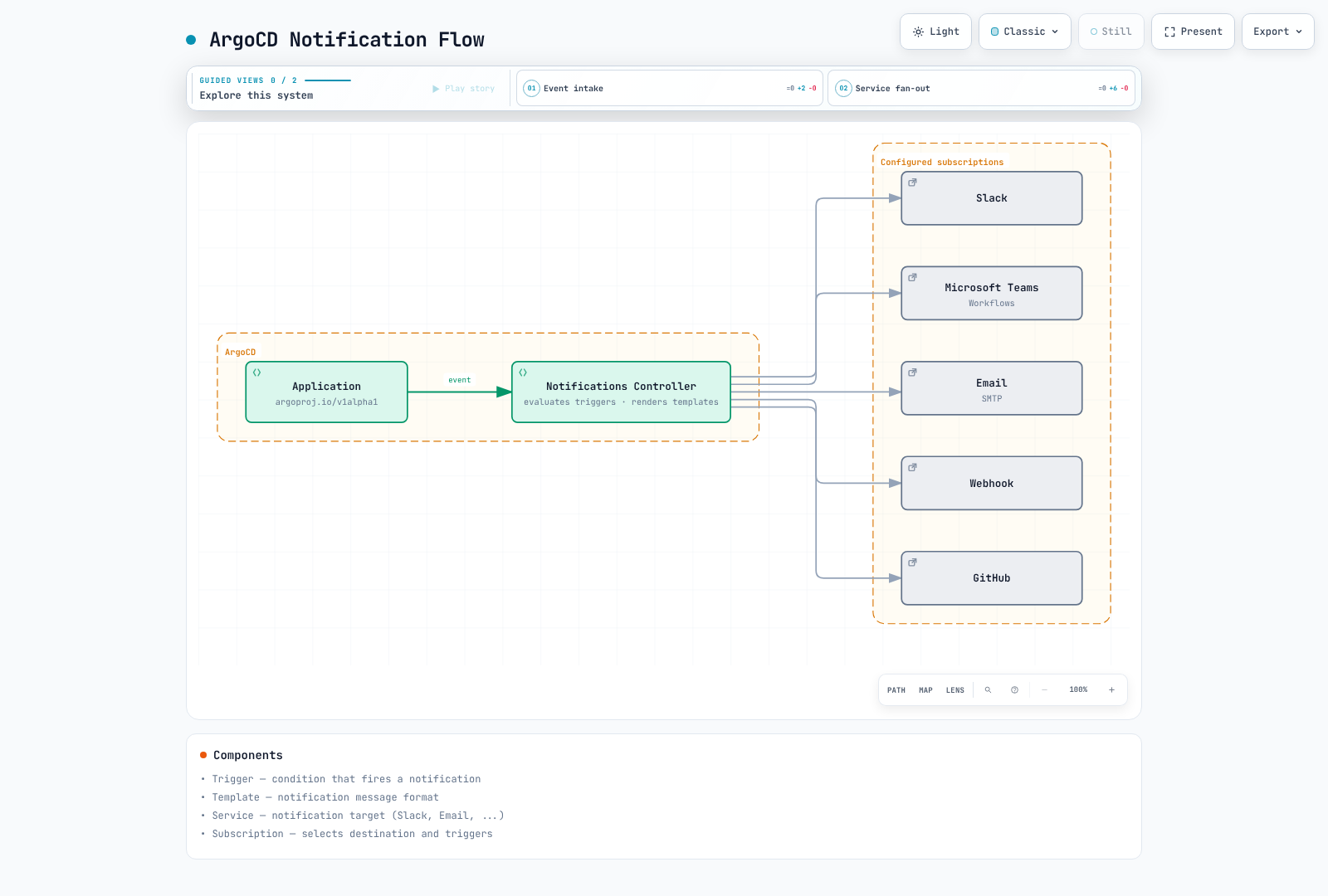
Controller と設定
完全な Argo CD 3.5.4 インストールには Notifications Controller が含まれます。インストール/Helm values で有効になっていることを確認してください。notifications_catalog/install.yaml ファイルには設定例が含まれています。これは不足している Controller のインストーラーではありません。選択したカタログエントリを既存の ConfigMap と Secret にマージしてください。
kubectl get deployment argocd-notifications-controller -n argocd通知サービス
これらのデータフラグメントを 1 つの argocd-notifications-cm 設定にまとめてください。個々のスニペットごとに同じ ConfigMap/Secret を置き換えないでください。トークン、署名付き Webhook URL、秘密鍵は、Git 外の保護された argocd-notifications-secret 値に保存してください。サービス、テンプレート、トリガー、サブスクリプションの名前はすべて一致している必要があります。
Slack
chat:write を設定し、対象チャンネルにボットを招待してください。chat:write.public は、ボットが参加していないパブリックチャンネルに投稿する場合にのみ必要です。signingSecret は Incoming Webhook URL の代替ではありません。
apiVersion: v1
kind: ConfigMap
metadata:
  name: argocd-notifications-cm
  namespace: argocd
data:
  service.slack: |
    token: $slack-token
---
apiVersion: v1
kind: Secret
metadata:
  name: argocd-notifications-secret
  namespace: argocd
type: Opaque
stringData:
  slack-token: xoxb-your-bot-token
Slack ボットのセットアップ:
- https://api.slack.com/apps で Slack App を作成します
chat:writeを追加します。記載のユースケースで必要な場合にのみchat:write.publicを使用します- ワークスペースにアプリをインストールします
- Bot User OAuth Token をコピーします
Microsoft Teams Workflows
レガシー Office365 Connectors ではなく、teams-workflows を使用する Workflows エンドポイントを使用してください。実際のエンドポイント認証とフロー所有者/共同所有者のライフサイクルを確認してください。署名付き URL は Secret に保存し、レガシーの MessageCard エンドポイントと互換であると想定しないでください。
apiVersion: v1
kind: ConfigMap
metadata:
  name: argocd-notifications-cm
  namespace: argocd
data:
  service.teams-workflows: |
    recipientUrls:
      deployments: $teams-webhook-deployments
      alerts: $teams-webhook-alerts
---
apiVersion: v1
kind: Secret
metadata:
  name: argocd-notifications-secret
  namespace: argocd
type: Opaque
stringData:
  teams-webhook-deployments: REPLACE_WITH_TEAMS_WORKFLOWS_URL
  teams-webhook-alerts: REPLACE_WITH_TEAMS_WORKFLOWS_URL
Email (SMTP)
apiVersion: v1
kind: ConfigMap
metadata:
  name: argocd-notifications-cm
  namespace: argocd
data:
  service.email: |
    host: smtp.example.com
    port: 587
    username: $email-username
    password: $email-password
    from: argocd@example.com
    html: true
---
apiVersion: v1
kind: Secret
metadata:
  name: argocd-notifications-secret
  namespace: argocd
type: Opaque
stringData:
  email-username: argocd@example.com
  email-password: your-smtp-password
Webhook
apiVersion: v1
kind: ConfigMap
metadata:
  name: argocd-notifications-cm
  namespace: argocd
data:
  service.webhook.custom: |
    url: https://api.example.com/webhooks/argocd
    headers:
    - name: Authorization
      value: $webhook-authorization
    - name: Content-Type
      value: application/json
---
apiVersion: v1
kind: Secret
metadata:
  name: argocd-notifications-secret
  namespace: argocd
type: Opaque
stringData:
  webhook-authorization: Bearer REPLACE_WITH_RECEIVER_TOKEN
GitHub(Commit Status)
GitHub App を対象リポジトリにインストールし、Commit statuses への書き込みアクセスを付与してください。例の ID と秘密鍵を、そのインストールの値に置き換えてください。
apiVersion: v1
kind: ConfigMap
metadata:
  name: argocd-notifications-cm
  namespace: argocd
data:
  service.github: |
    appID: 123456
    installationID: 12345678
    privateKey: $github-privateKey
---
apiVersion: v1
kind: Secret
metadata:
  name: argocd-notifications-secret
  namespace: argocd
type: Opaque
stringData:
  github-privateKey: |
    -----BEGIN RSA PRIVATE KEY-----
    ...
    -----END RSA PRIVATE KEY-----
Grafana
必要な annotation-write 権限を持つ service-account トークンを使用してください。このエンジンは /api を含む apiUrl を想定し、annotations を追加します。administrator トークンや不必要に長い有効期間をデフォルトにしないでください。
apiVersion: v1
kind: ConfigMap
metadata:
  name: argocd-notifications-cm
  namespace: argocd
data:
  service.grafana: |
    apiUrl: https://grafana.example.com/api
    apiKey: $grafana-api-key
PagerDuty Events API v2
apiVersion: v1
kind: ConfigMap
metadata:
  name: argocd-notifications-cm
  namespace: argocd
data:
  service.pagerdutyv2: |
    serviceKeys:
      production: $pagerduty-key-prod
      staging: $pagerduty-key-staging
トリガー
これらは明示的に定義した例であり、自動的にインストールされるカタログに関する前提ではありません。send エントリは以下の template.app-status を参照します。選択したサービス設定とともに、フラグメントを 1 つの ConfigMap にマージしてください。
apiVersion: v1
kind: ConfigMap
metadata:
  name: argocd-notifications-cm
  namespace: argocd
data:
  context: |
    argocdUrl: https://argocd.example.com
  trigger.on-sync-succeeded: |
    - when: app.status?.operationState?.phase == 'Succeeded'
      oncePer: app.status.operationState.startedAt
      send:
      - app-status
  trigger.on-sync-failed: |
    - when: app.status?.operationState?.phase in ['Failed', 'Error']
      oncePer: app.status.operationState.startedAt
      send:
      - app-status
  trigger.on-sync-running: |
    - when: app.status?.operationState?.phase == 'Running'
      oncePer: app.status.operationState.startedAt
      send:
      - app-status
  trigger.on-sync-status-unknown: |
    - when: app.status?.sync?.status == 'Unknown'
      send:
      - app-status
  trigger.on-health-degraded: |
    - when: app.status?.health?.status == 'Degraded'
      send:
      - app-status
  trigger.on-deployed: |
    - when: app.status?.operationState?.phase == 'Succeeded' && app.status?.sync?.status == 'Synced' && app.status?.health?.status
        == 'Healthy'
      oncePer: app.status.operationState.startedAt
      send:
      - app-status
?. は、まだ status または operationState を持たない Application を処理します。Sync の成功だけでは、アプリケーションの準備完了を意味しません。on-deployed には、成功した operation と現在の Synced + Healthyステータスが必要であり、より古い成功済み operation に新しい OutOfSync 変更が加わった状態を除外します。
カスタム条件
apiVersion: v1
kind: ConfigMap
metadata:
  name: argocd-notifications-cm
  namespace: argocd
data:
  trigger.on-production-deployed: |
    - when: app.metadata?.labels?.environment == 'production' && app.status?.operationState?.phase == 'Succeeded' &&
        app.status?.sync?.status == 'Synced' && app.status?.health?.status == 'Healthy'
      oncePer: app.status.operationState.startedAt
      send:
      - app-status
  trigger.on-resource-failed: |
    - when: app.status?.resources != nil && any(app.status.resources, {#.health?.status == 'Degraded'})
      send:
      - app-status
  trigger.on-many-images: |
    - when: app.status?.summary?.images != nil && len(app.status.summary.images) > 5
      oncePer: app.metadata.generation
      send:
      - app-status
  trigger.on-long-sync: |
    - when: app.status?.operationState?.phase == 'Running' && app.status.operationState.startedAt != nil && time.Now().Sub(time.Parse(app.status.operationState.startedAt)).Minutes()
        > 10
      oncePer: app.status.operationState.startedAt
      send:
      - app-status
  trigger.on-declared-rollback: |
    - when: 'app.status?.operationState?.phase == ''Succeeded'' && app.status.operationState.operation?.info != nil
        && any(app.status.operationState.operation.info, {#.name == ''release-action'' && #.value == ''rollback''})'
      oncePer: app.status.operationState.startedAt
      send:
      - app-status
  trigger.on-critical-failure: |
    - when: app.status?.operationState?.phase in ['Failed', 'Error'] && app.metadata?.labels?.tier == 'critical'
      oncePer: app.status.operationState.startedAt
      send:
      - app-status
  trigger.on-production-namespace-failure: |
    - when: app.status?.operationState?.phase in ['Failed', 'Error'] && app.spec?.destination?.namespace != nil && app.spec.destination.namespace
        matches '^prod-.*$'
      oncePer: app.status.operationState.startedAt
      send:
      - app-status
  trigger.on-utc-window: |
    - when: app.status?.operationState?.phase == 'Succeeded' && time.Now().UTC().Hour() >= 9 && time.Now().UTC().Hour()
        < 18
      oncePer: app.status.operationState.startedAt
      send:
- app-statussummary.imagesは replicas ではなく images を数えます。リソース配列にはany(...)を、正規表現にはmatchesを使用してください。- 時間条件は Application が評価されるときに実行されます。厳密な 10 分タイマーではなく、次の UTC 営業時間帯まで通知をキューに入れることもありません。
- revision の差異は rollback の証明にはなりません。
on-declared-rollbackは明示的な operation 情報を読み取ります。Git で復旧変更をレビューした後、手動 Sync ワークフローではargocd app sync my-app --info release-action=rollbackを使用できます。自動 Sync では、このマーカーは自動的に追加されません。
継続的な OutOfSync 監視
最後の operation の finishedAt は、OutOfSync が始まった時刻ではありません。30 分間継続する条件には、Prometheus で Argo CD metrics をスクレイプし、このようなルールを使用してください。Prometheus Operator と、Prometheus の ruleSelector 設定に一致する labels/namespaces が必要です。
apiVersion: monitoring.coreos.com/v1
kind: PrometheusRule
metadata:
  name: argocd-sync-alerts
  namespace: monitoring
spec:
  groups:
  - name: argocd-sync
    rules:
    - alert: ArgoCDApplicationOutOfSync
      expr: argocd_app_info{sync_status="OutOfSync"} == 1
      for: 30m
      labels:
        severity: warning
      annotations:
        summary: Application {{ $labels.name }} has remained OutOfSync for 30 minutes
テンプレート
この共通テンプレートは、Slack、Teams Workflows、HTML email、webhook、incident 形式を定義します。サブスクリプションが宛先を選択します。サービス形式を含めても、すべてのプロバイダーにブロードキャストされるわけではありません。PagerDuty/Opsgenie は failure または Degraded トリガーにのみサブスクライブしてください。この例では incidents は自動解決されません。
このエンジンバージョンは、Sprig 関数を備えた Go text/template を使用します。JSON 値は toJson で、HTML 値は html でエスケープしてください。フィールドは個別にレンダリングされるため、ローカル変数は各フィールドで宣言します。このテンプレートは、欠落した status、単一の operation revision、複数ソースの revisions を処理します。生の operation エラーメッセージを外部チャネルに転送しません。
apiVersion: v1
kind: ConfigMap
metadata:
  name: argocd-notifications-cm
  namespace: argocd
data:
  template.app-status: |
    message: |
      {{- $status := default (dict) .app.status -}}
      {{- $sync := default (dict) $status.sync -}}
      {{- $health := default (dict) $status.health -}}
      {{- $op := default (dict) $status.operationState -}}
      {{- $result := default (dict) $op.syncResult -}}
      {{- $applied := default (list) $result.revisions -}}
      {{- if and (not $applied) $result.revision -}}{{- $applied = list $result.revision -}}{{- end -}}
      {{- $url := printf "%s/applications/%s/%s" (trimSuffix "/" .context.argocdUrl) .app.metadata.namespace .app.metadata.name -}}
      Application {{.app.metadata.namespace}}/{{.app.metadata.name}}: phase={{default "None" $op.phase}}, sync={{default "Unknown" $sync.status}}, health={{default "Unknown" $health.status}}.
      Details: {{$url}}
    slack:
      attachments: |
        {{- $status := default (dict) .app.status -}}
        {{- $sync := default (dict) $status.sync -}}
        {{- $health := default (dict) $status.health -}}
        {{- $op := default (dict) $status.operationState -}}
        {{- $result := default (dict) $op.syncResult -}}
        {{- $applied := default (list) $result.revisions -}}
        {{- if and (not $applied) $result.revision -}}{{- $applied = list $result.revision -}}{{- end -}}
        {{- $url := printf "%s/applications/%s/%s" (trimSuffix "/" .context.argocdUrl) .app.metadata.namespace .app.metadata.name -}}
        [{
          "color": "#f4c030",
          "title": {{.app.metadata.name | toJson}},
          "title_link": {{$url | toJson}},
          "fields": [
            {"title":"Sync","value":{{default "Unknown" $sync.status | toJson}},"short":true},
            {"title":"Health","value":{{default "Unknown" $health.status | toJson}},"short":true},
            {"title":"Operation revision(s)","value":{{join ", " $applied | toJson}},"short":false}
          ]
        }]
    teams-workflows:
      title: 'Application status changed: {{.app.metadata.name}}'
      text: |-
        {{- $status := default (dict) .app.status -}}
        {{- $sync := default (dict) $status.sync -}}
        {{- $health := default (dict) $status.health -}}
        {{- $op := default (dict) $status.operationState -}}
        {{- $result := default (dict) $op.syncResult -}}
        {{- $applied := default (list) $result.revisions -}}
        {{- if and (not $applied) $result.revision -}}{{- $applied = list $result.revision -}}{{- end -}}
        {{- $url := printf "%s/applications/%s/%s" (trimSuffix "/" .context.argocdUrl) .app.metadata.namespace .app.metadata.name -}}
        Application {{.app.metadata.namespace}}/{{.app.metadata.name}}
        {{$url}}
      themeColor: Accent
      facts: |-
        {{- $status := default (dict) .app.status -}}
        {{- $sync := default (dict) $status.sync -}}
        {{- $health := default (dict) $status.health -}}
        {{- $op := default (dict) $status.operationState -}}
        {{- $result := default (dict) $op.syncResult -}}
        {{- $applied := default (list) $result.revisions -}}
        {{- if and (not $applied) $result.revision -}}{{- $applied = list $result.revision -}}{{- end -}}
        {{- $url := printf "%s/applications/%s/%s" (trimSuffix "/" .context.argocdUrl) .app.metadata.namespace .app.metadata.name -}}
        [{"name":"Sync","value":{{default "Unknown" $sync.status | toJson}}},{"name":"Health","value":{{default "Unknown" $health.status | toJson}}}]
    email:
      subject: '[Argo CD] Application status changed: {{.app.metadata.name}}'
      body: |-
        {{- $status := default (dict) .app.status -}}
        {{- $sync := default (dict) $status.sync -}}
        {{- $health := default (dict) $status.health -}}
        {{- $op := default (dict) $status.operationState -}}
        {{- $result := default (dict) $op.syncResult -}}
        {{- $applied := default (list) $result.revisions -}}
        {{- if and (not $applied) $result.revision -}}{{- $applied = list $result.revision -}}{{- end -}}
        {{- $url := printf "%s/applications/%s/%s" (trimSuffix "/" .context.argocdUrl) .app.metadata.namespace .app.metadata.name -}}
        <h2>Application status changed</h2><p>Application: {{.app.metadata.namespace | html}}/{{.app.metadata.name | html}}</p><p>Sync: {{default "Unknown" $sync.status | html}}; health: {{default "Unknown" $health.status | html}}</p><a href="{{$url | html}}">View in Argo CD</a>
    webhook:
      custom:
        method: POST
        body: |
          {{- $status := default (dict) .app.status -}}
          {{- $sync := default (dict) $status.sync -}}
          {{- $health := default (dict) $status.health -}}
          {{- $op := default (dict) $status.operationState -}}
          {{- $result := default (dict) $op.syncResult -}}
          {{- $applied := default (list) $result.revisions -}}
          {{- if and (not $applied) $result.revision -}}{{- $applied = list $result.revision -}}{{- end -}}
          {{- $url := printf "%s/applications/%s/%s" (trimSuffix "/" .context.argocdUrl) .app.metadata.namespace .app.metadata.name -}}
          {{ dict "event" "application-status" "application" .app.metadata.name "namespace" .app.metadata.namespace "uid" (default "" .app.metadata.uid) "project" (default "default" .app.spec.project) "phase" (default "" $op.phase) "syncStatus" (default "Unknown" $sync.status) "healthStatus" (default "Unknown" $health.status) "appliedRevisions" $applied "operationStartedAt" (default "" $op.startedAt) "url" $url | toJson }}
    pagerdutyv2:
      summary: 'Application status changed: {{.app.metadata.namespace}}/{{.app.metadata.name}}'
      severity: error
      source: argocd
      dedupKey: argocd/{{.app.metadata.namespace}}/{{.app.metadata.name}}/application-status
    opsgenie:
      description: 'Application status changed: {{.app.metadata.namespace}}/{{.app.metadata.name}}'
      priority: P2
      alias: argocd/{{.app.metadata.namespace}}/{{.app.metadata.name}}/application-status
service.email.html: true は HTML body を有効にします。Teams は teams-workflows フィールドと Adaptive Card の色名を使用します。service.webhook.custom のサービス名は custom で、その body は webhook.custom 配下にあります。POST を明示的に設定してください。Grafana は annotation に共通の message を使用します。
| 関数 | 用途 |
|---|---|
upper, lower | 文字の大文字/小文字を変更 |
default, dict, list | デフォルト値とコレクション |
join, splitList | リストの結合/分割 |
toJson | JSON 値をエンコード |
html | HTML 特殊文字をエスケープ |
GitHub Commit Status
Commit status には別々のトリガー/テンプレートを使用してください。この例は 1 つの HTTPS GitHub source に限定され、operation result がそのリポジトリと revision を識別した場合にのみ公開します。複数ソース、Helm/OCI、SSH source には明示的なマッピングが必要です。result revision が記録される前の failures は公開されません。status.label は GitHub status context を提供します。context と description はこのテンプレートスキーマのフィールドではありません。
apiVersion: v1
kind: ConfigMap
metadata:
  name: argocd-notifications-cm
  namespace: argocd
data:
  trigger.on-github-deployed: |
    - when: app.spec?.source?.repoURL != nil && app.spec.source.repoURL startsWith 'https://github.com/' && app.spec?.sources
        == nil && app.status?.operationState?.syncResult?.revision != nil && app.status.operationState.syncResult?.source?.repoURL
        == app.spec.source.repoURL && app.status?.operationState?.phase == 'Succeeded' && app.status?.sync?.status ==
        'Synced' && app.status?.health?.status == 'Healthy'
      oncePer: app.status.operationState.startedAt
      send:
      - github-deployed
  trigger.on-github-failed: |
    - when: app.spec?.source?.repoURL != nil && app.spec.source.repoURL startsWith 'https://github.com/' && app.spec?.sources
        == nil && app.status?.operationState?.syncResult?.revision != nil && app.status.operationState.syncResult?.source?.repoURL
        == app.spec.source.repoURL && app.status?.operationState?.phase in ['Failed', 'Error']
      oncePer: app.status.operationState.startedAt
      send:
      - github-failed
  template.github-deployed: |
    github:
      repoURLPath: '{{.app.status.operationState.syncResult.source.repoURL}}'
      revisionPath: '{{.app.status.operationState.syncResult.revision}}'
      status:
        state: success
        label: argocd/{{.app.metadata.namespace}}/{{.app.metadata.name}}
        targetURL: '{{.context.argocdUrl}}/applications/{{.app.metadata.namespace}}/{{.app.metadata.name}}'
  template.github-failed: |
    github:
      repoURLPath: '{{.app.status.operationState.syncResult.source.repoURL}}'
      revisionPath: '{{.app.status.operationState.syncResult.revision}}'
      status:
        state: failure
        label: argocd/{{.app.metadata.namespace}}/{{.app.metadata.name}}
        targetURL: '{{.context.argocdUrl}}/applications/{{.app.metadata.namespace}}/{{.app.metadata.name}}'
サブスクリプション
Application Annotations
このmetadata フラグメントを既存の Application にマージしてください。これは単独の Application manifest ではありません。各サービスに設定した recipient 名に一致させ、必要なサブスクリプションを選択してください。複数の recipient はカンマではなくセミコロンで区切ります。
metadata:
  name: my-app
  namespace: argocd
  annotations:
    notifications.argoproj.io/subscribe.on-sync-succeeded.slack: deployments
    notifications.argoproj.io/subscribe.on-sync-failed.slack: deployments;alerts
    notifications.argoproj.io/subscribe.on-health-degraded.slack: alerts
    notifications.argoproj.io/subscribe.on-deployed.teams-workflows: deployments
    notifications.argoproj.io/subscribe.on-sync-failed.email: ops@example.com
    notifications.argoproj.io/subscribe.on-deployed.custom: ''
    notifications.argoproj.io/subscribe.on-github-deployed.github: ''
    notifications.argoproj.io/subscribe.on-github-failed.github: ''
デフォルトトリガーとグローバルサブスクリプション
defaultTriggers は、notifications.argoproj.io/subscribe.slack: alerts などの annotations にトリガー名を提供します。すべての Application にサブスクリプションを作成するものではありません。中央管理する recipient には subscriptions を使用してください。selector はApplication labelsに一致します。
apiVersion: v1
kind: ConfigMap
metadata:
  name: argocd-notifications-cm
  namespace: argocd
data:
  defaultTriggers: |
    - on-sync-failed
    - on-health-degraded
  subscriptions: |
    - recipients:
      - slack:alerts
      triggers:
      - on-sync-failed
      - on-health-degraded
    - recipients:
      - email:ops@example.com
      triggers:
      - on-sync-failed
      selector: environment=production
AppProject サブスクリプション
この metadata フラグメントを既存の AppProject にマージして、その Applications を対象にしてください。前章の source/destination/RBAC policies を保持します。
metadata:
  name: production
  namespace: argocd
  annotations:
    notifications.argoproj.io/subscribe.on-sync-failed.slack: production-alerts
    notifications.argoproj.io/subscribe.on-health-degraded.pagerdutyv2: production
高度な設定
oncePer と重複処理
oncePer は、式の値を使用して条件に対する重複通知を減らします。これは 1 秒あたりのリクエスト数制限でも、厳密に 1 回だけの配信保証でもありません。ここでの operation トリガーは、同じ revision での新しい Sync 試行を区別するために operationState.startedAt を使用します。レート制限は受信側のサービス/bridge で処理し、webhook/SQS consumers を冪等にしてください。
Console 検証
構成した ConfigMap を notifications.yaml として保存します。これらのコマンドは、現在の kubeconfig を通じて Application/AppProject を読み取り、console:stdout に明示的にレンダリングします。実際の Slack/Teams/GitHub/SQS 権限と配信には、別途統合テストが必要です。
kubectl get application my-app -n argocd -o yaml > sample-application.yaml
argocd admin notifications trigger run on-deployed ./sample-application.yaml \
  --config-map ./notifications.yaml --secret :empty
argocd admin notifications template notify app-status ./sample-application.yaml \
  --config-map ./notifications.yaml --secret :empty --recipient console:stdout
AWS 統合
ネイティブ SQS サービス
このバージョンは awssqs サービスを提供します。AWS API URL または generic webhook 内の静的な Authorization: AWS4-HMAC-SHA256 ... 文字列では、SigV4 リクエストには署名されません。IRSA/Pod Identity credentials だけでは、generic webhook が signer-aware になるわけではありません。
まず、同じ account/region に argocd-notifications という名前のStandard queueをプロビジョニングし、Notifications Controller service account を IRSA または EKS Pod Identity に関連付けてください。SDK のデフォルト credential chain により、ここでは static access keys を回避できます。account/region/queue の値を置き換え、上記の context 設定をマージしてください。
apiVersion: v1
kind: ConfigMap
metadata:
  name: argocd-notifications-cm
  namespace: argocd
data:
  service.awssqs: |
    queue: argocd-notifications
    region: ap-northeast-2
    account: '123456789012'
  trigger.on-aws-sync-completed: |
    - when: app.status?.operationState?.phase in ['Succeeded', 'Failed', 'Error']
      oncePer: app.status.operationState.startedAt
      send:
      - aws-app-event
  template.aws-app-event: |
    message: |
      {{- $status := default (dict) .app.status -}}
      {{- $sync := default (dict) $status.sync -}}
      {{- $health := default (dict) $status.health -}}
      {{- $op := default (dict) $status.operationState -}}
      {{- $result := default (dict) $op.syncResult -}}
      {{- $applied := default (list) $result.revisions -}}
      {{- if and (not $applied) $result.revision -}}{{- $applied = list $result.revision -}}{{- end -}}
      {{- $url := printf "%s/applications/%s/%s" (trimSuffix "/" .context.argocdUrl) .app.metadata.namespace .app.metadata.name -}}
      {{ dict "event" "sync-completed" "application" .app.metadata.name "namespace" .app.metadata.namespace "uid" (default "" .app.metadata.uid) "project" (default "default" .app.spec.project) "phase" (default "" $op.phase) "syncStatus" (default "Unknown" $sync.status) "healthStatus" (default "Unknown" $health.status) "appliedRevisions" $applied "operationStartedAt" (default "" $op.startedAt) "url" $url | toJson }}
SQS 管理の暗号化を前提とした Controller role の送信者権限の例です。customer-managed KMS key には、適切な key policy と KMS permissions も追加で必要です。
{
  "Version": "2012-10-17",
  "Statement": [
    {
      "Effect": "Allow",
      "Action": [
        "sqs:GetQueueUrl",
        "sqs:SendMessage"
      ],
      "Resource": "arn:aws:sqs:ap-northeast-2:123456789012:argocd-notifications"
    }
  ]
}
このエントリを既存の Application の annotations に追加してください。recipient は queue 名であり、サービスのデフォルト queue を上書きします。
metadata:
  annotations:
notifications.argoproj.io/subscribe.on-aws-sync-completed.awssqs: argocd-notificationsバンドルされたエンジンは、SendMessage に 10 秒の delay を設定します。FIFO queues はメッセージ単位の delay をサポートしないため、この例で FIFO queue に置き換えないでください。設定した messageAttributes が送信されると想定しないでください。必要な metadata は JSON message body に含めてください。
Lambda、SNS、EventBridge 統合
サポートされる統合パスは、Notifications → SQS → Lambda → SNS または EventBridgeです。下流リソースは個別に実装・デプロイしてください。ConfigMap はそれらを作成しません。
| ホップ | 必要な設定 |
|---|---|
| SQS → Lambda | 同一リージョンの event source mapping、receive/delete/queue-attribute 権限、処理に合わせた visibility timeout、retries/DLQ |
| Lambda → SNS | 対象 topic に対する実行 role の sns:Publish 権限、署名付き AWS SDK call |
| Lambda → EventBridge | 対象 bus の events:PutEvents、FailedEntryCount と個々のエラーを検査 |
| Consumer | JSON 検証、Application UID、event、operationStartedAt、現在の status を考慮した idempotency key、SQS partial batch failure response 設定 |
API Gateway webhook が必要な場合は、個別に認証された bridge を構築してください。API key/usage plan だけでは認証になりません。この章のレビューでは、AWS リソースのプロビジョニングや実際のメッセージ送信は行っていません。
参考資料
クイズ
notifications クイズで理解度を確認してください。