イベント容量計画プレイブック
最終更新: September 12, 2026。KEDA 2.20.2と自己管理Karpenter AWS provider 1.14.1に照らして確認しました。 数値は明示した前提からの計算であり、本番ベンチマーク結果ではありません。
PM/企画担当者は需要、時間、レイテンシー、障害時の目標を提供します。運用担当者はアプリ、 ノード、DB、ネットワーク、キューのスループット、クォータ、準備時間を検証します。 イベント種別だけではトラフィック倍率や固定ウォームアップ時間は保証できません。 必要に応じてレート制限、待合室、バックプレッシャーを使います。スケーリングだけが過負荷制御ではありません。
1. 入力と単位
| 入力 | 確認事項 |
|---|---|
| ピークRPM/RPS | 単位、ユーザー動作、キャッシュヒット、再試行の増幅、APIごとの需要 |
| Podあたりスループット | 代表的入力、リクエスト、同時実行数で実測したSLOを満たす容量 |
| ノード容量 | 実allocatableからDaemonSetを除いた値。CPU、メモリ、Podスロット制約 |
| 障害目標 | Pod/ノード/AZ喪失中のトラフィック目標を定義 |
| 時間 | IANAゾーン、明示UTCオフセット、実際のノード/予約の有効期間 |
| 費用 | 価格日付、リージョン、OS、テナンシー、未使用予約、他サービス/税 |
計算ツールは丸め、単位、予約の二重計上、AZ喪失を確認します。 均一なPodプロファイル1種類を前提とします。他ワークロードを集計し、トポロジー、ボリューム、ポート制約を別途検証します。 30%容量を追加することと、容量の30%を未使用に保つことは異なります。 AZ喪失テストは基準ピーク需要を対象とし、同時の追加需要は対象外です。
scenario.json
{
  "description": "Illustrative inputs; replace throughput and allocatable values with measured evidence.",
  "peak_rpm": 600000,
  "pod_rpm_at_slo": 3000,
  "extra_capacity_fraction": "0.30",
  "pod_cpu_milli": 1500,
  "pod_memory_mib": 2048,
  "allocatable_cpu_milli": 15500,
  "daemon_cpu_milli": 500,
  "allocatable_memory_mib": 29696,
  "daemon_memory_mib": 1024,
  "max_pods": 58,
  "daemon_pods": 7,
  "nodes_by_az": {"az-a": 15, "az-b": 11},
  "reserved_nodes_by_az": {"az-a": 15, "az-b": 11},
  "node_start": "2026-11-27T11:00:00+09:00",
  "node_end": "2026-11-27T15:00:00+09:00",
  "reservation_start": "2026-11-27T11:00:00+09:00",
  "reservation_end": "2026-11-27T15:00:00+09:00",
  "usd_per_instance_hour": "0.768",
  "price_region": "ap-northeast-2",
  "price_instance_type": "c5.4xlarge",
  "price_observed_date": "2026-09-12",
  "hpa_max_replicas": 300,
  "node_budget": 40,
  "require_one_az_loss": true,
  "other_services_budget_usd": null
}# capacity.py
"""Deterministic planning arithmetic, not a benchmark or AWS provisioning tool."""
import argparse
import json
from datetime import datetime, timezone
from decimal import Decimal, ROUND_CEILING, ROUND_HALF_UP
def number(value, name, minimum=Decimal(0), positive=False):
if isinstance(value, bool):
raise ValueError(f"{name}: boolean is not a number")
result = Decimal(str(value))
if not result.is_finite() or result < minimum or (positive and result == minimum):
raise ValueError(f"{name}: invalid finite range")
return result
def integer(value, name, positive=False):
result = number(value, name, positive=positive)
if result != result.to_integral_value():
raise ValueError(f"{name}: integer required")
return int(result)
def instant(value):
result = datetime.fromisoformat(value.replace("Z", "+00:00"))
if result.tzinfo is None or result.utcoffset() is None:
raise ValueError("Use timestamps with an explicit UTC offset")
return result.astimezone(timezone.utc)
def seconds_between(start, end):
delta = end-start
return Decimal(delta.days*86400 + delta.seconds) + Decimal(delta.microseconds)/Decimal(1_000_000)
def hours(start, end):
seconds = seconds_between(start,end)
if seconds < 60:
raise ValueError("Planning intervals must be at least 60 seconds")
return seconds/Decimal(3600)
def ceiling(value):
return int(value.to_integral_value(rounding=ROUND_CEILING))
def calculate(config):
if type(config.get("require_one_az_loss",False)) is not bool:
raise ValueError("require_one_az_loss must be a boolean")
demand = number(config["peak_rpm"], "peak_rpm", positive=True)
pod_rate = number(config["pod_rpm_at_slo"], "pod_rpm_at_slo", positive=True)
margin = number(config["extra_capacity_fraction"], "extra_capacity_fraction")
pod_cpu = number(config["pod_cpu_milli"], "pod_cpu_milli", positive=True)
pod_mem = number(config["pod_memory_mib"], "pod_memory_mib", positive=True)
cpu = number(config["allocatable_cpu_milli"], "allocatable_cpu_milli", positive=True) - number(config["daemon_cpu_milli"], "daemon_cpu_milli")
memory = number(config["allocatable_memory_mib"], "allocatable_memory_mib", positive=True) - number(config["daemon_memory_mib"], "daemon_memory_mib")
slots = integer(config["max_pods"], "max_pods", positive=True) - integer(config["daemon_pods"], "daemon_pods")
if cpu <= 0 or memory <= 0 or slots <= 0:
raise ValueError("No allocatable application capacity after DaemonSet overhead")
per_node = min(int(cpu//pod_cpu), int(memory//pod_mem), slots)
if per_node < 1:
raise ValueError("The workload cannot fit this node profile")
base_pods = ceiling(demand/pod_rate)
planned_pods = ceiling(demand*(Decimal(1)+margin)/pod_rate)
needed_nodes = ceiling(Decimal(planned_pods)/Decimal(per_node))
placements = {zone:integer(count, "nodes_by_az") for zone,count in config["nodes_by_az"].items()}
reservations = {zone:integer(count, "reserved_nodes_by_az") for zone,count in config["reserved_nodes_by_az"].items()}
if not placements or sum(placements.values()) < 1:
raise ValueError("Provide at least one planned node")
nodes = sum(placements.values())
survivors = nodes-max(placements.values())
surviving_rpm = Decimal(survivors*per_node)*pod_rate
start, end = instant(config["node_start"]), instant(config["node_end"])
reserve_start, reserve_end = instant(config["reservation_start"]), instant(config["reservation_end"])
node_hours = hours(start,end)
reservation_hours = hours(reserve_start,reserve_end)
overlap_start, overlap_end = max(start,reserve_start), min(end,reserve_end)
overlap = (seconds_between(overlap_start,overlap_end)/Decimal(3600)
if overlap_end > overlap_start else Decimal(0))
price = number(config["usd_per_instance_hour"], "usd_per_instance_hour", positive=True)
# Pay for running instances and unused reserved slots, without double-counting
# a matching instance occupying a reservation. Assume one instance profile/type.
running_cost = Decimal(nodes)*node_hours*price
unused_cost = Decimal(0)
for zone,reserved in reservations.items():
used = min(reserved,placements.get(zone,0))
unused_slot_hours = Decimal(reserved)*reservation_hours-Decimal(used)*overlap
unused_cost += unused_slot_hours*price
compute_cost = running_cost+unused_cost
other = config.get("other_services_budget_usd")
total = None if other is None else compute_cost+number(other,"other_services_budget_usd")
findings = []
if nodes < needed_nodes:
findings.append("Planned nodes do not satisfy the capacity target")
if planned_pods > integer(config["hpa_max_replicas"],"hpa_max_replicas",positive=True):
findings.append("Planned Pod target exceeds the approved HPA maximum")
if nodes > integer(config["node_budget"],"node_budget",positive=True):
findings.append("Planned nodes exceed the approved node budget")
if config.get("require_one_az_loss") and surviving_rpm < demand:
findings.append("Losing the largest AZ leaves less than the baseline peak demand capacity")
money = lambda value: format(value.quantize(Decimal("0.01"),rounding=ROUND_HALF_UP),"f")
return {
"base_pods":base_pods, "planned_pods_with_extra_capacity":planned_pods,
"pods_per_node_from_inputs":per_node, "minimum_nodes_for_capacity":needed_nodes,
"planned_nodes":nodes, "surviving_nodes_after_largest_az_loss":survivors,
"surviving_rpm":str(surviving_rpm), "node_hours_per_instance":str(node_hours),
"reservation_hours_per_slot":str(reservation_hours),
"running_instances_usd":money(running_cost), "unused_reservations_usd":money(unused_cost),
"ec2_compute_subtotal_usd":money(compute_cost),
"total_budget_estimate_usd":None if total is None else money(total),
"findings":findings,
"assumptions":[
"Input throughput/allocatable values require workload-specific measurement.",
"Extra capacity is added once; it is not the same as leaving that fraction unused.",
"Constant node counts over the interval; matching reservations consumed first within each AZ.",
"All instances/reservations have the same type/platform/tenancy and supplied hourly rate.",
"Current public pricing is an estimate for a future event, not a guaranteed charge.",
"EC2 subtotal excludes EBS, EKS/Auto Mode, networking, load balancers, databases, telemetry and tax.",
"Capacity and AZ arithmetic do not prove scheduling, recovery or application SLO."
]
}
if __name__ == "__main__":
parser = argparse.ArgumentParser()
parser.add_argument("input")
args = parser.parse_args()
try:
with open(args.input,encoding="utf-8") as stream:
result = calculate(json.load(stream))
except (ValueError, KeyError, ArithmeticError) as error:
parser.error(str(error))
print(json.dumps(result,indent=2))python3 capacity.py scenario.json例の計算は基準200 Pod、追加容量込み260 Pod、最小26ノードです。 ただし15/11ノードのAZのうち大きい方を失うと、残る11ノードは330,000 RPMで、 基準ピーク600,000 RPMを下回ります。指摘を無視して計画を承認しないでください。 3 AZに各10ノードという別計算は同じプロファイルの基準ピークを満たしますが、 配置と復旧テストは引き続き必要です。
予約を実際に消費するインスタンスと未使用スロットを区別します。 ハードウェア一致だけでは、既存インスタンスが対象指定予約に自動的に結び付くわけではありません。 実際のCapacityReservationId/使用可能数を確認します。計算ツールの消費前提は検証が必要です。 他サービス費用が不明なら総予算はnullのままです。EC2小計はイベント全体の費用ではありません。
価格の根拠
2026-09-12にAWS Price List APIは、プリインストールソフトウェアなしのソウルLinux/共有テナンシーの オンデマンド時間料金を次のように返しました。契約割引、Spot、税は含みません。
| タイプ | vCPU | メモリ | USD/時間 |
|---|---|---|---|
| c5.2xlarge | 8 | 16 GiB | 0.384 |
| c5.4xlarge | 16 | 32 GiB | 0.768 |
| c6i.4xlarge | 16 | 32 GiB | 0.768 |
| m5.4xlarge | 16 | 64 GiB | 0.944 |
例のc5.4xlarge・26ノード/4時間の小計は$79.87です。 元の$70.72見積もりは、ソウル料金を誤って$0.68/時間としていました。 同じ予約がノードの30日前に有効になると、未使用スロットを含む例の小計は$14,456.83です。 実請求でなく計算です。イベント前に料金と有効化時刻を再確認してください。 EBS、EKS/Auto Mode、LB、NAT/転送、DB、テレメトリー、基準費用と追加費用の違いも含めます。
2. 責任と前提条件
EC2NodeClass/NodePool例は自己管理Karpenterを使います。 Auto Modeはeks.amazonaws.com NodeClassを使うため、同じYAMLをコピーしないでください。 現在のAuto Mode NodeClassもcapacityReservationSelectorTermsをサポートします。予約非対応と想定しないでください。 そのサービスのセレクター、権限、対応範囲を別途確認します。
基本インストールとOperator IRSAはスケーリングの章を参照します。 先にアプリケーションDeployment、ecommerce名前空間、Prometheus、メトリクス契約を準備します。 この認証はOperatorのIDを使い、IAMロールは作成しません。
# trigger-auth.yaml
apiVersion: keda.sh/v1alpha1
kind: TriggerAuthentication
metadata:
  name: event-aws
  namespace: ecommerce
spec:
  podIdentity:
    provider: aws
    identityOwner: keda
operator-read-policy.json
{
  "Version": "2012-10-17",
  "Statement": [
    {
      "Effect": "Allow",
      "Action": ["sqs:GetQueueAttributes"],
      "Resource": "arn:aws:sqs:ap-northeast-2:123456789012:order-processing"
    },
    {
      "Effect": "Allow",
      "Action": ["cloudwatch:GetMetricData"],
      "Resource": "*",
      "Condition": {
        "StringEquals": {
          "aws:RequestedRegion": "ap-northeast-2"
        }
      }
    }
  ]
}
アカウント/キューARN値を置き換え、必要な読み取り権限をOperatorロールに付けます。 CloudWatch GetMetricDataはリソース単位の制限でなく、要求リージョン条件を使います。 このポリシーはワーカーのReceiveMessage/DeleteMessage権限を付与しません。 共有インストールではScaledObjectとTriggerAuthenticationを作成できる主体も制御します。
3. KEDA: ワークロードごとに所有者1つ
1つのDeploymentに複数のScaledObject/HPAを付けないでください。 例は別々の3ワークロード、order-api、order-worker、frontendを対象とします。 基本のメトリクス自動スケーリングを保持し、イベントCronを後で削除/更新します。
完了注文だけでAPIをスケーリングしないでください。飽和すると完了数が頭打ちや減少となり、 誤って縮小を示唆する場合があります。受信リクエスト、バックログ、待ち時間を実容量に結び付けます。 以下はアプリケーションのhttp_requests_totalカウンターとnamespace/serviceスクレイプラベルを前提とします。 標準NGINXエクスポーターが自動でパス/ページビューのメトリクスを提供すると想定しないでください。 このPrometheusはクラスターごとです。共有バックエンドではクラスター範囲を追加します。
# prometheus-rule.yaml
apiVersion: monitoring.coreos.com/v1
kind: PrometheusRule
metadata:
  name: event-demand
  namespace: observability
  labels:
    release: prometheus
spec:
  groups:
  - name: event-demand
    rules:
    - record: event:incoming_requests_per_minute:rate1m
      expr: sum by (namespace, service) (rate(http_requests_total{namespace="ecommerce",service="order-api"}[1m]))
        * 60
    - record: event:order_api_error_ratio:rate5m
      expr: (sum by (namespace, service) (rate(http_requests_total{namespace="ecommerce",service="order-api",status=~"5.."}[5m]))
        or 0 * sum by (namespace, service) (rate(http_requests_total{namespace="ecommerce",service="order-api"}[5m])))
        / (sum by (namespace, service) (rate(http_requests_total{namespace="ecommerce",service="order-api"}[5m]))
> 0)# order-api-scaledobject.yaml
apiVersion: keda.sh/v1alpha1
kind: ScaledObject
metadata:
name: order-api
namespace: ecommerce
labels:
event: flash-sale-2026-11
spec:
scaleTargetRef:
name: order-api
minReplicaCount: 5
maxReplicaCount: 300
pollingInterval: 15
advanced:
horizontalPodAutoscalerConfig:
behavior:
scaleUp:
stabilizationWindowSeconds: 0
policies:
- type: Percent
value: 100
periodSeconds: 15
scaleDown:
stabilizationWindowSeconds: 600
policies:
- type: Percent
value: 10
periodSeconds: 120
triggers:
- type: cron
metricType: AverageValue
metadata:
timezone: Asia/Seoul
start: 0 11 27 11 *
end: 0 15 27 11 *
desiredReplicas: '260'
- type: prometheus
metricType: AverageValue
metadata:
serverAddress: http://prometheus-kube-prometheus-prometheus.observability.svc:9090
query: event:incoming_requests_per_minute:rate1m{namespace="ecommerce",service="order-api"}
threshold: '3000'
ignoreNullValues: 'false'しきい値3,000はPodあたり毎分リクエスト数で、例のスループット単位に一致します。 負荷テストの証拠で置き換えてください。クエリは1つの値に解決される必要があります。 ignoreNullValues=falseは観測欠損を需要ゼロとして隠すのを避けます。 本番外でHPAのエラー/欠損データ動作と手動対応をテストします。
CronはLinuxの5フィールドで、年フィールドはありません。11月27日の例をインストールしたままにすると 翌年も繰り返します。単発イベント後はGitから設定を削除します。 IANAタイムゾーンは夏時間に従います。5月のニューヨークはESTでなくEDTです。 境界、重複時間帯、曖昧な夏時間時刻をテストします。
HPAは各メトリクスの推奨値の最大を取り、最小/最大と動作制約を適用します。 Cronは需要の下限を提供し、Ready Podを保証しません。 上限はmaxReplicaCountなどの制限から決まり、他メトリクスからではありません。 ポリシーや容量制約で目標到達が遅れる場合があります。
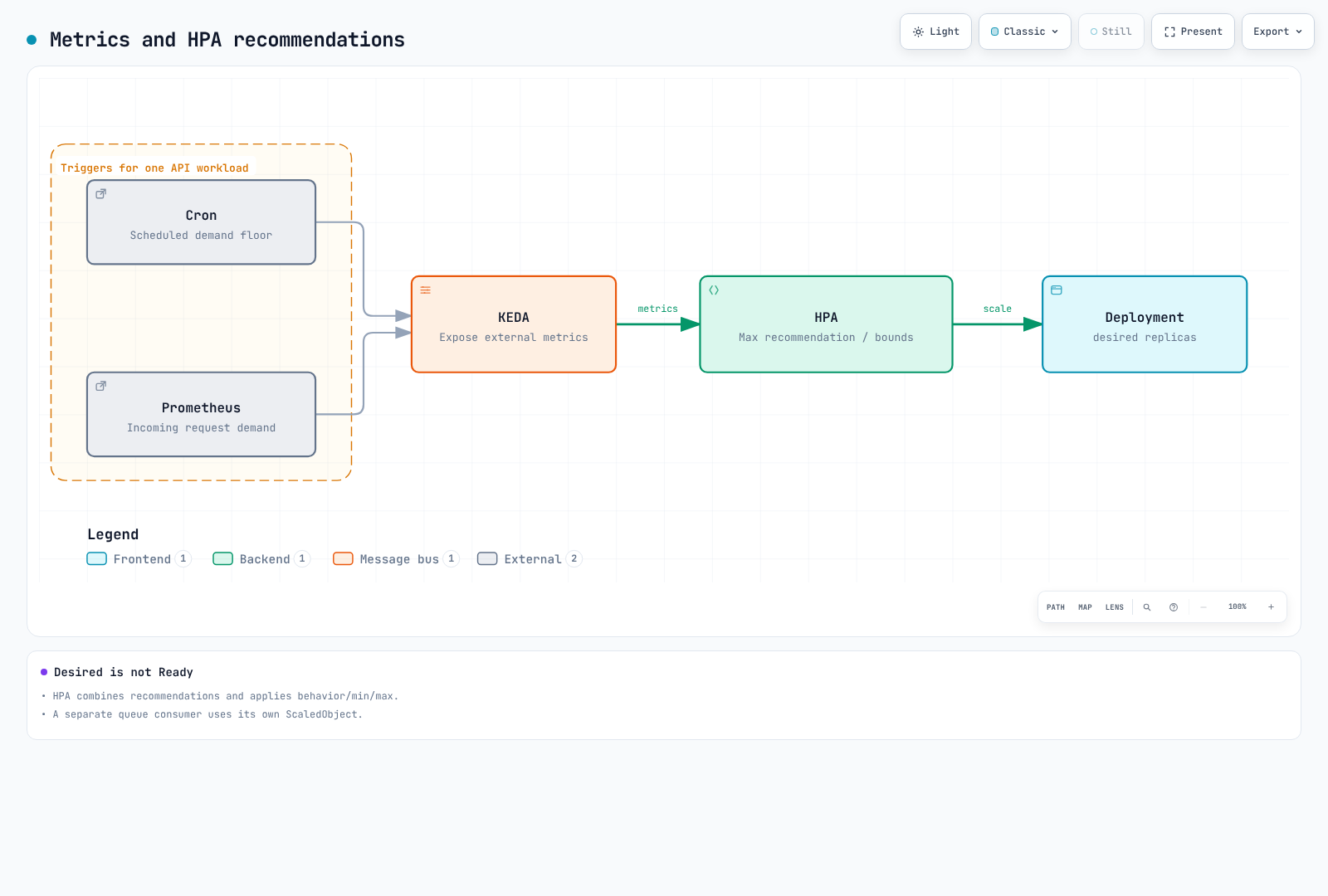
minReplicaCountが0超の場合、cooldownPeriodは基準値に戻る前の汎用遅延ではありません。 KEDAの有効化/ゼロへの縮小とHPAの1→Nループ、それぞれのポーリング/同期/キャッシュ間隔を区別します。 Percent/periodSecondsはローリング期間内の変更上限で、正確に繰り返すタイマーではありません。 安定化は単なる固定待機後の1操作ではありません。
SQSワーカー
queueLengthはPodあたりの目標バックログで、各Podが正確に10メッセージを処理する約束ではありません。 処理時間、同時実行数、許容待ち時間から選び、最古メッセージの経過時間、DLQ、再試行を監視します。 例は可視と処理中のメッセージを含み、遅延メッセージを除外します。数は概算です。 可視性タイムアウト、冪等性、終了/確認応答動作は別途実装します。
# worker-scaledobject.yaml
apiVersion: keda.sh/v1alpha1
kind: ScaledObject
metadata:
  name: order-worker
  namespace: ecommerce
  labels:
    event: flash-sale-2026-11
spec:
  scaleTargetRef:
    name: order-worker
  minReplicaCount: 2
  maxReplicaCount: 100
  pollingInterval: 15
  advanced:
    horizontalPodAutoscalerConfig:
      behavior:
        scaleUp:
          stabilizationWindowSeconds: 0
          policies:
          - type: Percent
            value: 100
            periodSeconds: 15
        scaleDown:
          stabilizationWindowSeconds: 600
          policies:
          - type: Percent
            value: 10
            periodSeconds: 120
  triggers:
  - type: aws-sqs-queue
    metricType: AverageValue
    metadata:
      queueURL: https://sqs.ap-northeast-2.amazonaws.com/123456789012/order-processing
      awsRegion: ap-northeast-2
      queueLength: '10'
      activationQueueLength: '1'
      scaleOnInFlight: 'true'
      scaleOnDelayed: 'false'
    authenticationRef:
      name: event-aws
CloudWatchフロントエンド
RequestCountはアプリケーションが公開するリクエスト数/差分です。60秒のSumはその期間のリクエスト数になります。 繰り返し公開される毎分レートのゲージや累積カウンターを合計しないでください。 KEDA 2.20.2はmetricStatTypeでなくmetricStatを使います。 minMetricValueはNoData時のフォールバックで、有効化しきい値ではありません。 ignoreNullValues=falseが優先されます。収集時間、終了オフセット、公開遅延を検証します。
# frontend-scaledobject.yaml
apiVersion: keda.sh/v1alpha1
kind: ScaledObject
metadata:
  name: frontend
  namespace: ecommerce
  labels:
    event: flash-sale-2026-11
spec:
  scaleTargetRef:
    name: frontend
  minReplicaCount: 3
  maxReplicaCount: 100
  triggers:
  - type: aws-cloudwatch
    metricType: AverageValue
    metadata:
      namespace: ECommerce/Frontend
      dimensionName: Service
      dimensionValue: frontend
      metricName: RequestCount
      metricStat: Sum
      metricStatPeriod: '60'
      metricCollectionTime: '180'
      metricEndTimeOffset: '60'
      metricUnit: Count
      targetMetricValue: '3000'
      activationTargetMetricValue: '0'
      minMetricValue: '0'
      ignoreNullValues: 'false'
      awsRegion: ap-northeast-2
    authenticationRef:
      name: event-aws
4. 動的と静的な事前プロビジョニング
NodePoolのweightとlimitsだけではウォームノードは作成されません。動的プールはPodスケジュール需要に反応します。 実アプリを事前スケールし初期化を検証するのが基本です。 自己管理Karpenterはspec.replicasで静的NodePoolもサポートします。 EC2 Auto Scalingの停止インスタンスWarm Poolとは異なります。
このNodeClassは自己管理Karpenter用です。実IAMロール、サブネット/SGタグ、クラスター版を設定します。 エイリアスはソウルEKS 1.36 AL2023 x86_64の公開SSMパラメーターで確認したリリースに固定します。 他のKubernetes版/アーキテクチャでは互換性を再確認してください。 予約がない/枯渇した場合にフォールバックを許すか、明示的に決めます。
# nodeclass.yaml
apiVersion: karpenter.k8s.aws/v1
kind: EC2NodeClass
metadata:
  name: event-nodes
spec:
  role: KarpenterNodeRole-my-cluster
  amiSelectorTerms:
  - alias: al2023@v20260903
  subnetSelectorTerms:
  - tags:
      karpenter.sh/discovery: my-cluster
  securityGroupSelectorTerms:
  - tags:
      karpenter.sh/discovery: my-cluster
  capacityReservationSelectorTerms:
  - tags:
      event: flash-sale-2026-11
  blockDeviceMappings:
  - deviceName: /dev/xvda
    ebs:
      volumeSize: 100Gi
      volumeType: gp3
      encrypted: true
  tags:
    event: flash-sale-2026-11
選択肢A: 実アプリの事前スケーリングを使う動的プール
reservedはODCR/キャパシティブロック容量を意味し、Reserved Instance割引ではありません。 Karpenterは許可タイプ内でreservedを優先し、その後許可された代替へフォールバックします。 例はSpotを除外しますが、On-Demandもサービス稼働継続や新容量の確保を保証しません。 weightは互換動的プール間のプロビジョニング優先度で、既存ノードへの強制配置ではありません。
# dynamic-nodepool.yaml
apiVersion: karpenter.sh/v1
kind: NodePool
metadata:
  name: event-dynamic
spec:
  template:
    metadata:
      labels:
        event: flash-sale-2026-11
    spec:
      nodeClassRef:
        group: karpenter.k8s.aws
        kind: EC2NodeClass
        name: event-nodes
      taints:
      - key: event
        value: flash-sale-2026-11
        effect: NoSchedule
      requirements:
      - key: kubernetes.io/arch
        operator: In
        values:
        - amd64
      - key: karpenter.sh/capacity-type
        operator: In
        values:
        - reserved
        - on-demand
      - key: node.kubernetes.io/instance-type
        operator: In
        values:
        - c5.4xlarge
  limits:
    cpu: '640'
  weight: 100
  disruption:
    consolidationPolicy: WhenEmptyOrUnderutilized
    consolidateAfter: 10m
ノード/Podのイベントラベル、セレクター、Taint、Tolerationを合わせます。 これは既存Deploymentの配置パッチで、完全な単独マニフェストではありません。 名前空間ラベルはPodラベルやEC2課金タグを自動作成しません。 稼働ワークロードのセレクター変更はロールアウト/配置を変えます。先に準備済み容量とPDBを確認してください。
# workload-placement-patch.yaml
spec:
  template:
    metadata:
      labels:
        event: flash-sale-2026-11
    spec:
      nodeSelector:
        event: flash-sale-2026-11
      tolerations:
      - key: event
        operator: Equal
        value: flash-sale-2026-11
        effect: NoSchedule
選択肢B: 静的プール
選択肢Aへの意図しない追加ではなく、代替です。 replicas=0はノードなしで静的プールを定義します。承認時刻に数を増やします。 一度設定したspec.replicasを削除して動的モードへ切り替えることはできません。 静的プールはweightを使えず、limits.nodesだけをサポートします。 統合されず、スケール操作はNodePool中断予算を迂回しますがPDBは尊重します。 複数AZを許す1プールでは均等配置が保証されないため、例ではAZを分けます。
# static-nodepools.yaml
apiVersion: karpenter.sh/v1
kind: NodePool
metadata:
  name: event-static-a
spec:
  replicas: 0
  template:
    metadata:
      labels:
        event: flash-sale-2026-11
    spec:
      nodeClassRef:
        group: karpenter.k8s.aws
        kind: EC2NodeClass
        name: event-nodes
      taints:
      - key: event
        value: flash-sale-2026-11
        effect: NoSchedule
      requirements:
      - key: kubernetes.io/arch
        operator: In
        values:
        - amd64
      - key: karpenter.sh/capacity-type
        operator: In
        values:
        - reserved
        - on-demand
      - key: node.kubernetes.io/instance-type
        operator: In
        values:
        - c5.4xlarge
      - key: topology.kubernetes.io/zone
        operator: In
        values:
        - ap-northeast-2a
  limits:
    nodes: 12
---
apiVersion: karpenter.sh/v1
kind: NodePool
metadata:
  name: event-static-b
spec:
  replicas: 0
  template:
    metadata:
      labels:
        event: flash-sale-2026-11
    spec:
      nodeClassRef:
        group: karpenter.k8s.aws
        kind: EC2NodeClass
        name: event-nodes
      taints:
      - key: event
        value: flash-sale-2026-11
        effect: NoSchedule
      requirements:
      - key: kubernetes.io/arch
        operator: In
        values:
        - amd64
      - key: karpenter.sh/capacity-type
        operator: In
        values:
        - reserved
        - on-demand
      - key: node.kubernetes.io/instance-type
        operator: In
        values:
        - c5.4xlarge
      - key: topology.kubernetes.io/zone
        operator: In
        values:
        - ap-northeast-2b
  limits:
    nodes: 12
---
apiVersion: karpenter.sh/v1
kind: NodePool
metadata:
  name: event-static-c
spec:
  replicas: 0
  template:
    metadata:
      labels:
        event: flash-sale-2026-11
    spec:
      nodeClassRef:
        group: karpenter.k8s.aws
        kind: EC2NodeClass
        name: event-nodes
      taints:
      - key: event
        value: flash-sale-2026-11
        effect: NoSchedule
      requirements:
      - key: kubernetes.io/arch
        operator: In
        values:
        - amd64
      - key: karpenter.sh/capacity-type
        operator: In
        values:
        - reserved
        - on-demand
      - key: node.kubernetes.io/instance-type
        operator: In
        values:
        - c5.4xlarge
      - key: topology.kubernetes.io/zone
        operator: In
        values:
        - ap-northeast-2c
  limits:
nodes: 12# Example only after approval of matching capacity and cost:
DOCS_CONTEXT="my-event-cluster"
kubectl --context "$DOCS_CONTEXT" scale nodepool event-static-a --replicas=10
kubectl --context "$DOCS_CONTEXT" scale nodepool event-static-b --replicas=10
kubectl --context "$DOCS_CONTEXT" scale nodepool event-static-c --replicas=10GitOpsがreplicasを管理するなら期待状態も更新します。 配置とイベントスケーリングを有効にする前に静的NodeのReadyを確認します。 0レプリカ容量に稼働ワークロードを移したり、準備前にCronを有効にしたりしないでください。 早めの準備時間もnode_start/reservation_start費用入力に含めます。
プレースホルダーを使う場合
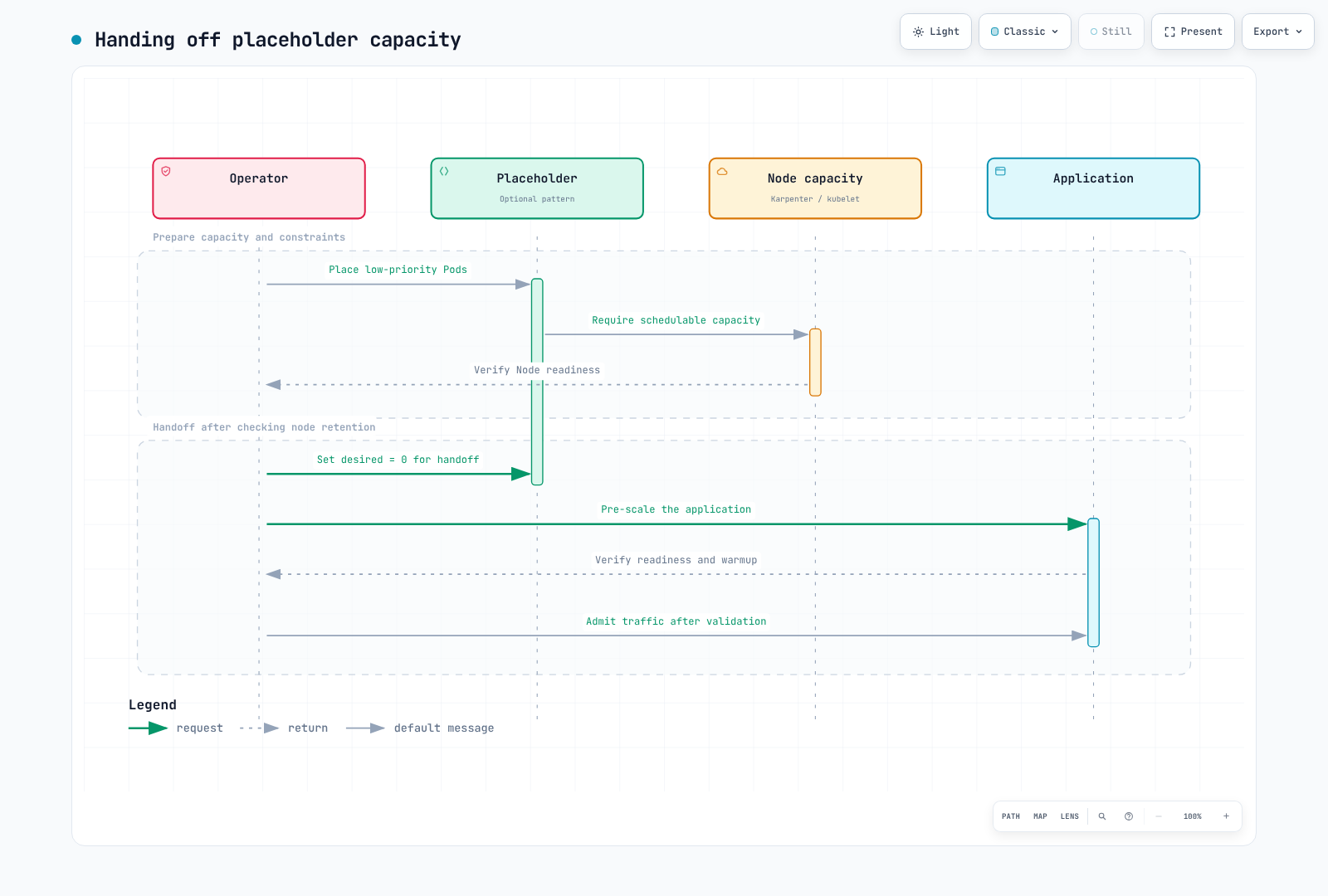
低優先度Podはプリエンプション候補になれますが、即時配置/準備完了を保証しません。 Deploymentの希望数を変えないと、プリエンプトされたプレースホルダーが再作成され、追加ノードが プロビジョニングされる場合があります。ノード保持/有効期限と引き継ぎを確認し、プレースホルダー需要を除去してから アプリ準備状態を検証します。大きすぎるrequests、セレクター欠損、基本オートスケーラーとの競合を確認します。
5. Capacity Reservations: 容量と課金
targetedには明示的な予約指定が必要で、1つのNodePoolに限定するセキュリティACLではありません。 アカウント/共有権限、AZ、タイプ、プラットフォーム、テナンシー、有効化成功を確認します。 セレクター、status.capacityReservations、実インスタンスのCapacityReservationIdを確認します。 予約容量はアプリ準備完了、SLO、無障害実行を保証しません。
以下のTerraformは即時予約を作成します。将来のend_dateは将来の開始を意味しません。 D-30で適用するとイベント前の未使用料金が発生し得ます。 将来日付の予約には別の適格条件、コミットメント、開始時刻規則があります。 az_countsは承認済み容量/予算計画から設定します。
# reservations/main.tf
terraform {
  required_version = ">= 1.15.0, < 2.0.0"
  required_providers {
    aws = {
      source  = "hashicorp/aws"
      version = "6.64.0"
    }
  }
}

provider "aws" {
  region = var.region
}

variable "region" {
  type    = string
  default = "ap-northeast-2"
}

variable "event" {
  type    = string
  default = "flash-sale-2026-11"
}

variable "instance_type" {
  type    = string
  default = "c5.4xlarge"
}

variable "az_counts" {
  type        = map(number)
  description = "Approved matching capacity per Availability Zone in this AWS account."
  validation {
    condition = length(var.az_counts) > 0 && alltrue([
      for count in values(var.az_counts) : count > 0 && floor(count) == count
    ])
    error_message = "Provide positive integer reservation counts."
  }
}

variable "reservation_end_utc" {
  type        = string
  description = "RFC3339 expiration. This resource creates an immediate reservation, not a future-dated request."
  validation {
    condition     = can(timecmp(var.reservation_end_utc, plantimestamp())) && try(timecmp(var.reservation_end_utc, plantimestamp()) > 0, false)
    error_message = "The expiration must be a valid future RFC3339 timestamp."
  }
}

resource "aws_ec2_capacity_reservation" "event" {
  for_each                = var.az_counts
  instance_type           = var.instance_type
  instance_platform       = "Linux/UNIX"
  tenancy                 = "default"
  availability_zone       = each.key
  instance_count          = each.value
  instance_match_criteria = "targeted"
  end_date_type           = "limited"
  end_date                = var.reservation_end_utc
  tags = {
    Name  = "${var.event}-${each.key}"
    event = var.event
  }
}

output "reservation_ids" {
  value = { for zone, reservation in aws_ec2_capacity_reservation.event : zone => reservation.id }
}{
"az_counts": {
"ap-northeast-2a": 10,
"ap-northeast-2b": 10,
"ap-northeast-2c": 10
},
"reservation_end_utc": "2026-11-27T06:00:00Z"
}これらは入力例です。reservations/approved-event.tfvars.jsonを保存する前に、 アカウントのAZ、容量、有効期限を確認します。15:00 KSTは06:00 UTCです。 過去の有効期限やオフセットなしのタイムスタンプを使わないでください。 計画レビューと実際の作成時刻を分けて扱います。
terraform -chdir=reservations init
terraform -chdir=reservations plan -var-file=approved-event.tfvars.json -out=event.tfplan
terraform -chdir=reservations show event.tfplan
使用中の予約スロットをインスタンスに加えて二重計上しないでください。 未使用スロットは同等のOn-Demand料金で課金される場合があります。 即時/将来予約の課金開始、最小課金単位、対象割引を確認します。 キャンセル/期限切れで稼働EC2インスタンスは自動終了しません。 クリーンアップ時はノード、ボリューム、予約を別々に検証します。
6. 起動時間とイメージ
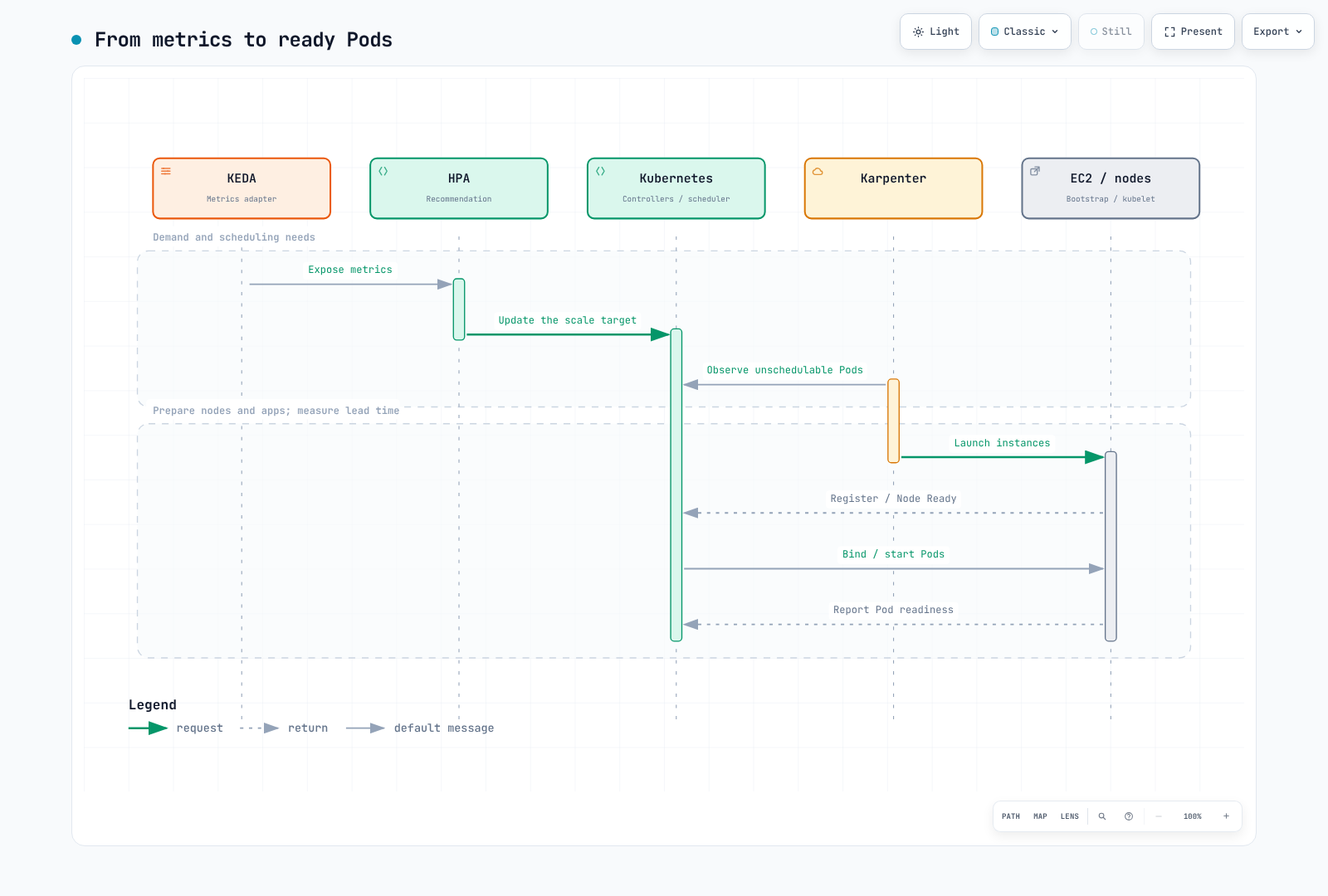
KEDAポーリング、HPA同期、コントローラー調整、EC2容量/ブートストラップ、CNI、 ボリューム接続、イメージ取得、アプリウォームアップを別々に測定します。 以下のフローで希望数とReady数を区別します。 ノード数が常にPod数を10で割った値とは限りません。
実アプリの事前スケールはイメージ取得だけでなく初期化と依存先負荷を検証します。 任意のアプリイメージ内でsh -c echo cachedを実行する汎用キャッシュDaemonSetは、 distrolessなどシェルのないイメージでは失敗します。キャッシュツールを使うなら、対応する無害なコマンド、 レジストリ権限、アーキテクチャ、一致ダイジェスト、ノードセレクターを確認します。 イメージGC、ノード置換、pullポリシーがあるため、キャッシュは永続保持や全pullの排除を保証しません。 コールドスタートゼロを約束しないでください。
7. ランブック
| 段階 | 完了基準 |
|---|---|
| 計画 | 需要、SLO、障害目標、依存関係、予算、クォータ、予約の実現可能性 |
| 非本番テスト | 代表的負荷、障害/復旧、起動時間分布、欠損メトリクス |
| 準備 | 固定設定のレンダリング/検証、GitOps所有権と基準値への復元設定を記録 |
| 有効化 | 承認課金期間内に容量を準備し、ノード、配置、アプリ準備状態、SLOを確認 |
| イベント | 希望/利用可能数、エラー、レイテンシー、バックログ経過時間、制約、費用を観察 |
| 完了 | Cron/下限を復元し、バックログ/セッション/Jobを処理し終え、実ノード/予約を確認 |
レンダリング、スキーマ、サーバーdry-runは実EC2提供状況やアプリウォームアップをテストしません。 実際の事前スケールテストはリソースと料金を発生させ得るため、別の非本番テストで行います。 変更前に実コンテキストとリージョンを設定・確認します。
DOCS_CONTEXT="my-event-cluster"
DOCS_REGION="ap-northeast-2"
kubectl --context "$DOCS_CONTEXT" -n ecommerce get scaledobjects
kubectl --context "$DOCS_CONTEXT" get nodes -l event=flash-sale-2026-11 -o wide
kubectl --context "$DOCS_CONTEXT" -n ecommerce get deployment order-api
DOCS_HPA=$(kubectl --context "$DOCS_CONTEXT" -n ecommerce get scaledobject order-api \
  -o jsonpath='{.status.hpaName}')
test -n "$DOCS_HPA" || exit 1
kubectl --context "$DOCS_CONTEXT" -n ecommerce get hpa "$DOCS_HPA"
Deployment直接スケールやKEDA所有HPAへのパッチは、調整時に上書きされる場合があります。 HPA名がDeployment名と同じと想定しないでください。 必要なら承認最大値内でScaledObject minReplicaCountを一時的に上げ、元値を記録して復元し、 GitOps管理ならGitも更新します。 無条件でプールを作ったり上限を上げたりする緊急スクリプトをデフォルトにしないでください。
# Example only after checking the current maximum and change ownership:
kubectl --context "$DOCS_CONTEXT" -n ecommerce patch scaledobject order-api \
  --type merge -p '{"spec":{"minReplicaCount":260}}'
イベント後は基本メトリクストリガーを保持してCron/一時下限を復元します。 ScaledObject削除で元レプリカ数が自動復元されるわけではありません。 NodePool削除は関連ノードを終了させ得ます。時刻指定削除やterraform destroy -targetでクリーンアップを自動化しないでください。 静的プールはワークロードを安全に移し、希望数を0に下げ、実際の終了を確認します。 PDB、長時間Job、セッション、予約、ボリューム、料金を別々に確認します。
8. 観察とイベント後分析
同じワークロード範囲で需要、Deployment希望/利用可能数、HPA推奨、エラー率、レイテンシーを比較します。 目標メトリクスは目標Pod数ではなく、Runningフェーズのゲージ系列を数えることはReady Podを数えることではありません。
max(kube_deployment_spec_replicas{namespace="ecommerce",deployment="order-api"})max(kube_deployment_status_replicas_available{namespace="ecommerce",deployment="order-api"})event:incoming_requests_per_minute:rate1m{namespace="ecommerce",service="order-api"} / 60event:order_api_error_ratio:rate5m{namespace="ecommerce",service="order-api"}複数クラスター収集時はclusterラベルを含めます。 SQS、CloudWatch、費用データの実エクスポーターメトリクス/ラベル名を確認します。 node_cost_hourlyのような未定義メトリクスが存在すると想定しないでください。 OpenCost/Kubecost APIと費用範囲はFinOpsの章を参照します。 GET APIにcurl -Gと--data-urlencodeが必要か確認します。 APIラッパーや部分パネルでなく、完全なダッシュボードJSON本体をプロビジョニングします。
予測/実測値、時間帯/サンプル数、リクエスト対完了注文、希望数対利用可能数、依存先のボトルネック、 実ノード/予約期間、費用範囲を記録します。 仮定の売上/費用を測定結果として示さないでください。 On-DemandはSpotのリソース回収にさらされることを避けますが、全障害をなくすわけではありません。 Spotの中断、通知の制限、再試行、復旧をテストし、固定節約率やイベント期間だけで決めないでください。
検証はDecimal計算、固定スキーマ/メタデータ、Cron境界/タイムゾーン、Terraformモック、図を使いました。 実イベント負荷、EC2提供状況、SQS処理、課金はテストしていません。
公式参考資料
- KEDA Cron
- KEDA ScaledObject
- KEDA CloudWatch
- KEDA SQS
- Karpenter NodePool
- Karpenter NodeClass
- Auto Mode NodeClass
- Capacity Reservations
- 予約の課金
- AWS Price List API
< 前: EKSアップグレード | 目次 | 次: FinOps >