ArgoCD ApplicationSets
検証対象: Argo CD 3.5.2(同梱の ApplicationSet controller を含む)。リリースノートの確認後、パッチ 3.5.4 に更新(例は再実行していません) 最終更新: October 12, 2026
目次
ApplicationSet の概要
ApplicationSet は、テンプレートから ArgoCD Application を生成する機能を追加する Kubernetes controller です。クラスター、環境、またはリポジトリをまたいで、類似した設定を持つ複数のアプリケーションを管理できます。
ApplicationSet を使用する場面
| シナリオ | ApplicationSet を使用するか? |
|---|---|
| 複数クラスターにまたがる同一アプリ | はい |
| 複数環境(dev/staging/prod) | はい |
| 多数のサービスを含むモノレポ | はい |
| PR から生成される動的環境 | はい |
| 単一アプリケーションのデプロイ | いいえ(Application を使用) |
以下の myorg、example.com、クラスター URL、およびプライベート chart はプレースホルダーです。適用する前に、実際のリポジトリパス、chart、values ファイル、登録済みクラスター、AppProject の権限、および認証情報を指定してください。ApplicationSet はクラスターを登録せず、AppProject も作成しません。CreateNamespace=true は、認可済みの宛先 Namespace のみを作成します。完全な例ではすべて Go テンプレートを明示的に有効化しています。
ApplicationSet の作成と Generator の入力は、信頼できる管理者に限定してください。project、source、または destination を制御する Git/PR 入力はデプロイ権限を拡大し得るため、固定されスコープが限定された AppProject とレビュー済みの入力を使用してください。
基本構造
apiVersion: argoproj.io/v1alpha1
kind: ApplicationSet
metadata:
  name: my-appset
  namespace: argocd
spec:
  generators:
  - list:
      elements:
      - cluster: dev
        url: https://dev.k8s.local
      - cluster: prod
        url: https://prod.k8s.local
  template:
    metadata:
      name: '{{ .cluster }}-myapp'
    spec:
      project: default
      source:
        repoURL: https://github.com/myorg/myrepo.git
        targetRevision: HEAD
        path: overlays/{{ .cluster }}
      destination:
        server: '{{ .url }}'
        namespace: myapp
      syncPolicy:
        syncOptions:
        - CreateNamespace=true
  goTemplate: true
  goTemplateOptions:
  - missingkey=error
Generator
Generator は、Application を作成するためにテンプレートへ代入されるパラメータを生成します。
1. List Generator
最も単純な Generator で、静的な値のリストを定義します。
apiVersion: argoproj.io/v1alpha1
kind: ApplicationSet
metadata:
  name: list-example
  namespace: argocd
spec:
  generators:
  - list:
      elements:
      - cluster: dev
        url: https://kubernetes.default.svc
        namespace: dev
        values:
          replicas: '1'
          logLevel: debug
      - cluster: staging
        url: https://staging.k8s.local
        namespace: staging
        values:
          replicas: '2'
          logLevel: info
      - cluster: production
        url: https://production.k8s.local
        namespace: production
        values:
          replicas: '5'
          logLevel: warn
  template:
    metadata:
      name: myapp-{{ .cluster }}
      labels:
        environment: '{{ .cluster }}'
    spec:
      project: default
      source:
        repoURL: https://github.com/myorg/myapp.git
        targetRevision: HEAD
        path: charts/myapp
        helm:
          parameters:
          - name: replicaCount
            value: '{{ .values.replicas }}'
          - name: logging.level
            value: '{{ .values.logLevel }}'
      destination:
        server: '{{ .url }}'
        namespace: '{{ .namespace }}'
      syncPolicy:
        automated:
          prune: true
          selfHeal: true
        syncOptions:
        - CreateNamespace=true
  goTemplate: true
  goTemplateOptions:
  - missingkey=error
2. Cluster Generator
登録済みの ArgoCD クラスターを自動的に対象にします。
apiVersion: argoproj.io/v1alpha1
kind: ApplicationSet
metadata:
  name: cluster-example
  namespace: argocd
spec:
  generators:
  - clusters:
      selector: {}
      values:
        clusterName: '{{ .name }}'
  template:
    metadata:
      name: '{{ .nameNormalized }}-guestbook'
    spec:
      project: default
      source:
        repoURL: https://github.com/argoproj/argocd-example-apps.git
        targetRevision: HEAD
        path: guestbook
      destination:
        server: '{{ .server }}'
        namespace: guestbook
      syncPolicy:
        syncOptions:
        - CreateNamespace=true
  goTemplate: true
  goTemplateOptions:
  - missingkey=error
ターゲティング用の Cluster Label
まず、クラスター Secret に Label を追加します。
apiVersion: v1
kind: Secret
metadata:
  name: production-cluster
  namespace: argocd
  labels:
    argocd.argoproj.io/secret-type: cluster
    environment: production
    region: us-west-2
    tier: critical
type: Opaque
stringData:
  name: production
  server: https://production.k8s.local
  config: |
    {
      "tlsClientConfig": {
        "insecure": false,
        "caData": "..."
      }
    }
次に、Label でクラスターを選択します。
generators:
  - clusters:
      selector:
        matchLabels:
          environment: production
        matchExpressions:
          - key: tier
            operator: In
            values:
              - critical
              - high
空の Cluster selector にはローカルクラスターが含まれる場合があります。デフォルトのローカルクラスターには Secret がないため、Label selector に一致しないことがあります。Label 選択が必要な場合は、クラスター Secret を作成・設定してください。Application 名には nameNormalized を使用し、Namespace/Label の制限にも個別に従ってください。Secret のスニペットは形状のみを示しています。... は有効な CA または認証情報ではありません。
3. Git Generator - ディレクトリ
Git リポジトリ内のディレクトリをスキャンします。
apiVersion: argoproj.io/v1alpha1
kind: ApplicationSet
metadata:
  name: git-directories
  namespace: argocd
spec:
  generators:
  - git:
      repoURL: https://github.com/myorg/gitops-repo.git
      revision: HEAD
      directories:
      - path: apps/*
      - path: apps/excluded-app
        exclude: true
  template:
    metadata:
      name: '{{ .path.basename }}'
    spec:
      project: default
      source:
        repoURL: https://github.com/myorg/gitops-repo.git
        targetRevision: HEAD
        path: '{{ .path.path }}'
      destination:
        server: https://kubernetes.default.svc
        namespace: '{{ .path.basename }}'
      syncPolicy:
        syncOptions:
        - CreateNamespace=true
  goTemplate: true
  goTemplateOptions:
  - missingkey=error
Directory Generator 用のリポジトリ構造
gitops-repo/
├── apps/
│   ├── frontend/
│   │   ├── deployment.yaml
│   │   └── service.yaml
│   ├── backend/
│   │   ├── deployment.yaml
│   │   └── service.yaml
│   ├── database/
│   │   ├── statefulset.yaml
│   │   └── service.yaml
│   └── excluded-app/    # Excluded via generator
│       └── ...
4. Git Generator - ファイル
Git 内の JSON/YAML ファイルから設定を読み取ります。
apiVersion: argoproj.io/v1alpha1
kind: ApplicationSet
metadata:
  name: git-files
  namespace: argocd
spec:
  generators:
  - git:
      repoURL: https://github.com/myorg/gitops-repo.git
      revision: HEAD
      files:
      - path: config/**/config.json
  template:
    metadata:
      name: '{{ .cluster.name }}-{{ .app.name }}'
      labels:
        environment: '{{ .cluster.environment }}'
    spec:
      project: default
      source:
        repoURL: '{{ .app.repoURL }}'
        targetRevision: '{{ .app.revision }}'
        path: '{{ .app.path }}'
        helm:
          valueFiles:
          - values.yaml
          - values-{{ .cluster.environment }}.yaml
      destination:
        server: '{{ .cluster.server }}'
        namespace: '{{ .app.namespace }}'
      syncPolicy:
        syncOptions:
        - CreateNamespace=true
  goTemplate: true
  goTemplateOptions:
  - missingkey=error
設定ファイルの例
{
  "cluster": {
    "name": "prod-us-west-2",
    "server": "https://prod-usw2.k8s.local",
    "environment": "production"
  },
  "app": {
    "name": "myapp",
    "repoURL": "https://github.com/myorg/myapp.git",
    "revision": "v1.2.3",
    "path": "charts/myapp",
    "namespace": "myapp-prod"
  }
}
5. Matrix Generator
2 つの Generator を組み合わせ、直積を作成します。
apiVersion: argoproj.io/v1alpha1
kind: ApplicationSet
metadata:
  name: matrix-example
  namespace: argocd
spec:
  generators:
  - matrix:
      generators:
      - clusters:
          selector:
            matchLabels:
              environment: production
      - git:
          repoURL: https://github.com/myorg/apps.git
          revision: HEAD
          directories:
          - path: apps/*
  template:
    metadata:
      name: '{{ .nameNormalized }}-{{ .path.basename }}'
    spec:
      project: default
      source:
        repoURL: https://github.com/myorg/apps.git
        targetRevision: HEAD
        path: '{{ .path.path }}'
      destination:
        server: '{{ .server }}'
        namespace: '{{ .path.basename }}'
      syncPolicy:
        syncOptions:
        - CreateNamespace=true
  goTemplate: true
  goTemplateOptions:
  - missingkey=error
Matrix の可視化
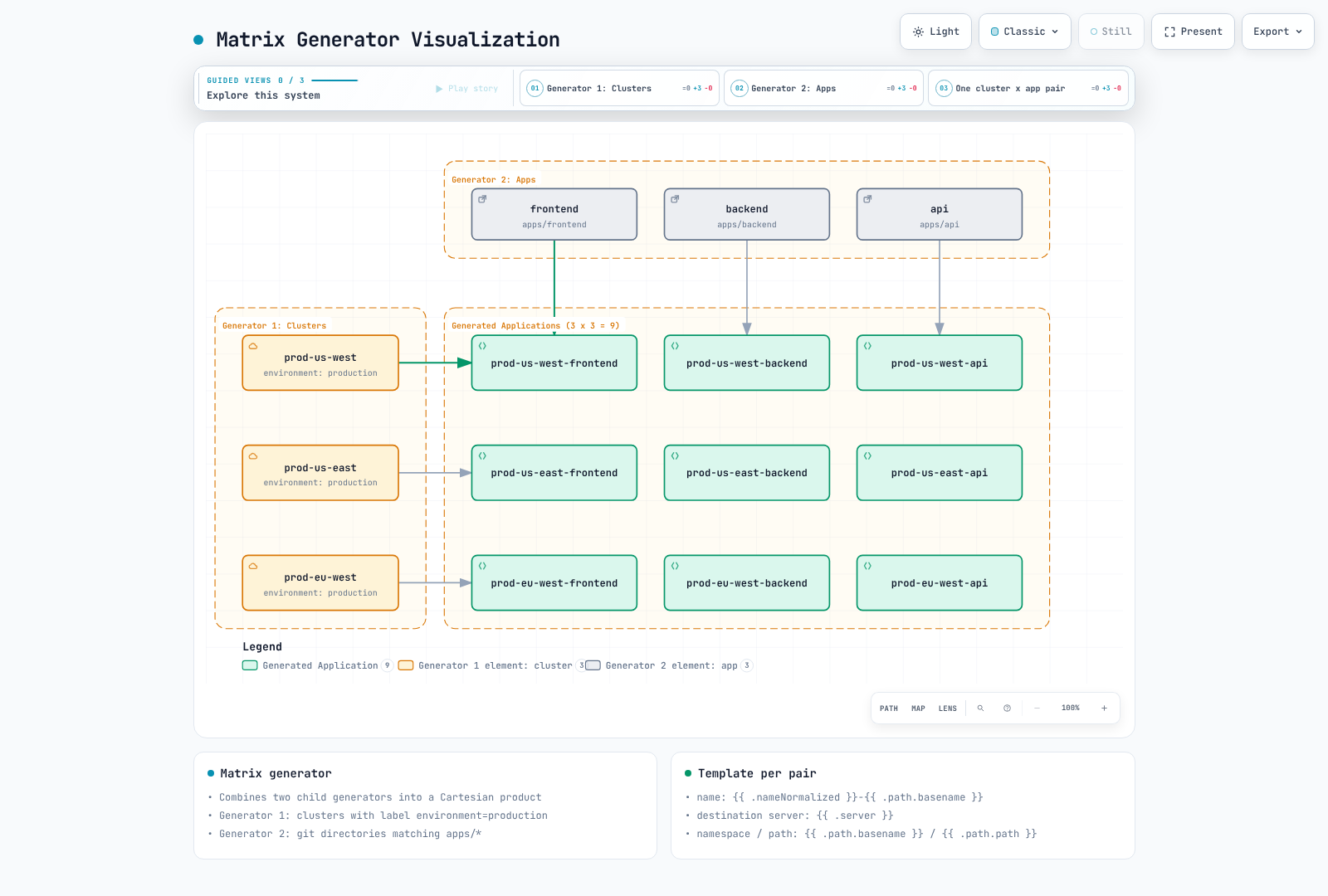
Matrix は子 Generator をちょうど 2 つ組み合わせます。組み合わせ Generator はネストを 1 レベルのみサポートします。2 つの Git Generator が競合する path パラメータを生成する場合は pathParamPrefix を使用してください。
6. Merge Generator
複数の Generator からの出力をマージし、パラメータを結合します。
apiVersion: argoproj.io/v1alpha1
kind: ApplicationSet
metadata:
  name: merge-example
  namespace: argocd
spec:
  generators:
  - merge:
      mergeKeys:
      - cluster
      generators:
      - list:
          elements:
          - cluster: dev
            replicas: '1'
            enableHA: 'false'
          - cluster: staging
            replicas: '2'
            enableHA: 'false'
          - cluster: production
            replicas: '5'
            enableHA: 'false'
      - list:
          elements:
          - cluster: production
            replicas: '10'
            enableHA: 'true'
  template:
    metadata:
      name: myapp-{{ .cluster }}
    spec:
      project: default
      source:
        repoURL: https://github.com/myorg/myapp.git
        targetRevision: HEAD
        path: charts/myapp
        helm:
          parameters:
          - name: replicas
            value: '{{ .replicas }}'
          - name: highAvailability
            value: '{{ .enableHA }}'
      destination:
        server: https://kubernetes.default.svc
        namespace: '{{ .cluster }}'
      syncPolicy:
        syncOptions:
        - CreateNamespace=true
  goTemplate: true
  goTemplateOptions:
  - missingkey=error
Merge は基本 Generator のエントリを保持し、mergeKeys によって一致するオーバーライドを適用します。後続の Generator が優先され、一致しないオーバーライドエントリは破棄されます。Go テンプレートではネストした merge key はサポートされません。
7. SCM Provider Generator
GitHub/GitLab organization のリポジトリをスキャンします。
GitHub
apiVersion: argoproj.io/v1alpha1
kind: ApplicationSet
metadata:
  name: github-org-apps
  namespace: argocd
spec:
  generators:
  - scmProvider:
      github:
        organization: myorg
      filters:
      - repositoryMatch: ^service-.*
        pathsExist:
        - kubernetes/
        labelMatch: ^deploy-to-k8s$
  template:
    metadata:
      name: '{{ .repository }}'
    spec:
      project: default
      source:
        repoURL: '{{ .url }}'
        targetRevision: '{{ .branch }}'
        path: kubernetes
      destination:
        server: https://kubernetes.default.svc
        namespace: '{{ .repository }}'
      syncPolicy:
        syncOptions:
        - CreateNamespace=true
  goTemplate: true
  goTemplateOptions:
  - missingkey=error
GitLab
apiVersion: argoproj.io/v1alpha1
kind: ApplicationSet
metadata:
  name: gitlab-group-apps
  namespace: argocd
spec:
  generators:
  - scmProvider:
      gitlab:
        group: mygroup
        includeSubgroups: true
      filters:
      - pathsExist:
        - deploy/
  template:
    metadata:
      name: '{{ .repository }}'
    spec:
      project: default
      source:
        repoURL: '{{ .url }}'
        targetRevision: '{{ .branch }}'
        path: deploy
      destination:
        server: https://kubernetes.default.svc
        namespace: '{{ .repository }}'
      syncPolicy:
        syncOptions:
        - CreateNamespace=true
  goTemplate: true
  goTemplateOptions:
  - missingkey=error
scmProvider.filters は provider object と同じ階層に置きます。1 つの filter 内の条件は AND、別々の filter エントリは OR です。この例では、名前、パス、Label の要件を 1 つの filter に組み合わせています。プライベートリポジトリと API レート制限には、適切なスコープの token または GitHub App が必要です。
8. Pull Request Generator
Pull Request 用の環境を作成します。
apiVersion: argoproj.io/v1alpha1
kind: ApplicationSet
metadata:
  name: pr-environments
  namespace: argocd
spec:
  generators:
  - pullRequest:
      github:
        owner: myorg
        repo: myapp
        tokenRef:
          secretName: github-token
          key: token
        labels:
        - preview
      requeueAfterSeconds: 180
  template:
    metadata:
      name: pr-{{ .number }}-{{ .branch_slug }}
      labels:
        preview: 'true'
        pr-number: '{{ .number }}'
    spec:
      project: previews
      source:
        repoURL: https://github.com/myorg/myapp.git
        targetRevision: '{{ .head_sha }}'
        path: kubernetes
        kustomize:
          nameSuffix: -pr-{{ .number }}
          images:
          - myapp:pr-{{ .number }}
      destination:
        server: https://kubernetes.default.svc
        namespace: preview-{{ .number }}
      syncPolicy:
        automated:
          prune: true
          selfHeal: true
        syncOptions:
        - CreateNamespace=true
  goTemplate: true
  goTemplateOptions:
  - missingkey=error
PR の例は、プレビュー用クラスター/Namespace を制限する previews AppProject を事前に作成している場合にのみ使用してください。GitHub では列挙されたすべての Label が必要です。Label があっても、信頼できない PR コードが安全になるわけではありません。本番用 Secret や cluster-admin 認証情報をプレビュー workload に公開しないでください。デフォルトの削除ポリシーでは、クローズ済みまたは不一致の PR Application は reconciliation 時に削除されます。リソースのクリーンアップは finalizer/preservation 設定に従います。また、CreateNamespace=true のみによって作成された Namespace は、自動的に追跡対象のクリーンアップ対象にはなりません。
9. Cluster Decision Resource Generator
クラスターの選択を外部リソースに委譲します。
apiVersion: argoproj.io/v1alpha1
kind: ApplicationSet
metadata:
  name: cluster-decision
  namespace: argocd
spec:
  generators:
  - clusterDecisionResource:
      configMapRef: cluster-decisions
      labelSelector:
        matchLabels:
          cluster.open-cluster-management.io/placement: production
      requeueAfterSeconds: 180
  template:
    metadata:
      name: '{{ normalize .name }}-addon'
    spec:
      project: default
      source:
        repoURL: https://github.com/myorg/myapp.git
        targetRevision: HEAD
        path: manifests
      destination:
        server: '{{ .server }}'
        namespace: myapp
      syncPolicy:
        syncOptions:
        - CreateNamespace=true
  goTemplate: true
  goTemplateOptions:
  - missingkey=error
Decision resource の設定:
apiVersion: v1
kind: ConfigMap
metadata:
  name: cluster-decisions
  namespace: argocd
data:
  apiVersion: cluster.open-cluster-management.io/v1beta1
  kind: placementdecisions
  statusListKey: decisions
  matchKey: clusterName
これには既存の Open Cluster Management インストールと、PlacementDecision object を生成する production Placement が必要です。argocd Namespace のそれらの object に対する読み取りアクセスを ApplicationSet controller に付与してください。各 status.decisions[].clusterName は Argo CD に登録済みのクラスターと一致する必要があります。API endpoint には生成された server 値を使用してください。decision は名前または labelSelector で選択します。
10. Plugin Generator
ConfigMap を介してカスタム Generator ロジックを実行します。
apiVersion: argoproj.io/v1alpha1
kind: ApplicationSet
metadata:
  name: plugin-example
  namespace: argocd
spec:
  generators:
  - plugin:
      configMapRef:
        name: my-plugin
      input:
        parameters:
          environment: production
          region: us-west-2
      requeueAfterSeconds: 300
  template:
    metadata:
      name: '{{ .name }}'
    spec:
      project: default
      source:
        repoURL: '{{ .repoURL }}'
        targetRevision: '{{ .revision }}'
        path: '{{ .path }}'
      destination:
        server: '{{ .server }}'
        namespace: '{{ .namespace }}'
      syncPolicy:
        syncOptions:
        - CreateNamespace=true
  goTemplate: true
  goTemplateOptions:
  - missingkey=error
Plugin 接続の設定:
apiVersion: v1
kind: ConfigMap
metadata:
  name: my-plugin
  namespace: argocd
data:
  token: "$appset-plugin-token:token"
  baseUrl: "https://appset-plugin.example.com"
  requestTimeout: "30"
ConfigMap はコードを実行しません。別途デプロイされた HTTP service が POST /api/v1/getparams.execute を処理し、output.parameters array を返す必要があります。例の domain は TLS 検証済みの endpoint に置き換えてください。key token と Label app.kubernetes.io/part-of: argocd を持つ Secret appset-plugin-token を argocd にプロビジョニングし、その値を Git に含めないでください。接続する前に、認証、入力検証、および文書化された response schema を実装してください。
Go テンプレート
Go テンプレートを使用するには spec.goTemplate: true を設定します。3.5.4 のデフォルト engine は引き続き fasttemplate です。このページの例では、missingkey=error を指定して Go テンプレートを明示的に有効化しています。各 string field は独立してレンダリングされます。control statement を YAML field にまたがらせることはできず、boolean/object/list には templatePatch が必要です。存在しない key への直接アクセスは default の実行前に失敗するため、任意 key には dig を使用してください。
基本構文
template:
  metadata:
    name: '{{ .cluster }}-{{ .app }}'           # Simple substitution
    labels:
      env: '{{ .values.environment }}'       # Nested values
関数
template:
  metadata:
    # Normalize strings
    name: '{{normalize .cluster}}'

    # String manipulation
    labels:
      lower: '{{.cluster | lower}}'
      upper: '{{.cluster | upper}}'
      trimmed: '{{.cluster | trim}}'

    annotations:
      # Conditional
      tier: '{{if eq .env "prod"}}critical{{ else }}standard{{ end }}'
高度なテンプレート化
apiVersion: argoproj.io/v1alpha1
kind: ApplicationSet
metadata:
  name: advanced-template
  namespace: argocd
spec:
  goTemplate: true
  goTemplateOptions:
  - missingkey=error
  generators:
  - list:
      elements:
      - name: app1
        env: prod
        regions:
        - us-west-2
        - us-east-1
  template:
    metadata:
      name: '{{.name}}-{{.env}}'
      annotations:
        regions: '{{range $i, $r := .regions}}{{if $i}},{{ end }}{{$r}}{{ end }}'
    spec:
      project: default
      source:
        repoURL: https://github.com/myorg/myapp.git
        targetRevision: main
        path: manifests
      destination:
        server: https://kubernetes.default.svc
        namespace: '{{ .name }}'
      syncPolicy:
        syncOptions:
        - CreateNamespace=true
段階的同期
Progressive Syncs は 3.3 から Beta であり、3.5.4 でも明示的に有効化する必要があります。既存の argocd-cmd-params-cm.data に applicationsetcontroller.enable.progressive.syncs: "true" をマージしてから、ApplicationSet controller を再起動します。Helm の場合は、configs.params 配下の対応する key を管理します。
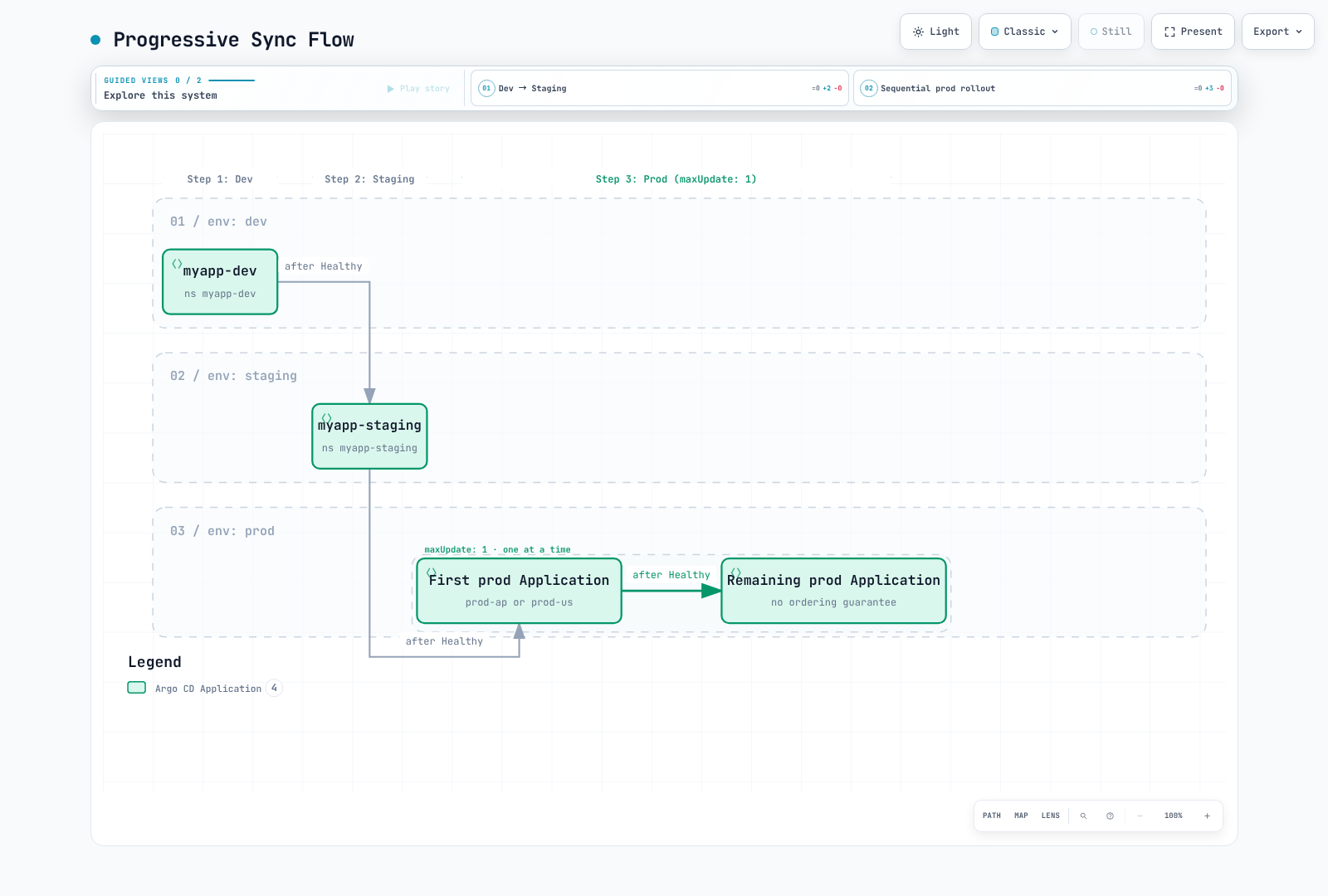
RollingSync は生成された Application の Labelを選択し、各グループ内のすべての Application が Healthy になるまで待機してから続行します。child autosync を無効にし、sync window と Application retry 設定を尊重して、ApplicationSet controller を介して sync をリクエストします。どの step にも一致しない Application は手動 sync が必要です。
maxUpdate: 0 はそのグループの自動 sync を一時停止します。承認を付与したり、重複するグループへ進めたりするものではありません。一時停止したグループを手動で sync するか、レビュー済みの strategy 変更を適用してください。正のパーセンテージは切り捨てられ、最小値は 1 です。グループ内の順序は保証されません。以下の例では 1 つのクラスター内の Namespace を使用しています。region はクラスタの destination ではなく、グループ化メタデータです。
RollingSync でアプリケーション全体のロールアウトを制御します。
RollingSync Strategy
apiVersion: argoproj.io/v1alpha1
kind: ApplicationSet
metadata:
  name: progressive-rollout
  namespace: argocd
spec:
  generators:
  - list:
      elements:
      - name: dev
        env: dev
      - name: staging
        env: staging
      - name: prod-ap
        env: prod
        region: ap-northeast-2
      - name: prod-us
        env: prod
        region: us-west-2
  strategy:
    type: RollingSync
    rollingSync:
      steps:
      - matchExpressions:
        - key: env
          operator: In
          values:
          - dev
        maxUpdate: 100%
      - matchExpressions:
        - key: env
          operator: In
          values:
          - staging
        maxUpdate: 100%
      - matchExpressions:
        - key: env
          operator: In
          values:
          - prod
        maxUpdate: 1
  template:
    metadata:
      name: myapp-{{ .name }}
      labels:
        env: '{{ .env }}'
        region: '{{ dig "region" "global" . }}'
    spec:
      project: default
      source:
        repoURL: https://github.com/myorg/myapp.git
        targetRevision: HEAD
        path: envs/{{ .env }}
      destination:
        server: https://kubernetes.default.svc
        namespace: myapp-{{ .name }}
      syncPolicy:
        syncOptions:
        - CreateNamespace=true
  goTemplate: true
  goTemplateOptions:
  - missingkey=error
段階的同期フロー
マルチクラスターのパターン
Hub-and-Spoke パターン
複数クラスターを管理する中央の ArgoCD:
apiVersion: argoproj.io/v1alpha1
kind: ApplicationSet
metadata:
  name: hub-spoke-platform
  namespace: argocd
spec:
  generators:
  - matrix:
      generators:
      - clusters:
          selector:
            matchLabels:
              managed-by: hub
      - list:
          elements:
          - app: monitoring
            chart: kube-prometheus-stack
            repo: https://prometheus-community.github.io/helm-charts
            version: 90.0.0
          - app: logging
            chart: loki
            repo: https://grafana-community.github.io/helm-charts
            version: 18.12.1
          - app: gateway
            chart: gateway-helm
            repo: docker.io/envoyproxy
            version: v1.9.1
  template:
    metadata:
      name: '{{ .nameNormalized }}-{{ .app }}'
    spec:
      project: platform
      destination:
        server: '{{ .server }}'
        namespace: '{{ .app }}'
      syncPolicy:
        automated:
          prune: true
          selfHeal: true
        syncOptions:
        - CreateNamespace=true
      sources:
      - repoURL: '{{ .repo }}'
        chart: '{{ .chart }}'
        targetRevision: '{{ .version }}'
        helm:
          valueFiles:
          - $values/platform/{{ .nameNormalized }}/{{ .app }}/values.yaml
      - repoURL: https://github.com/myorg/platform-config.git
        targetRevision: main
        ref: values
  goTemplate: true
  goTemplateOptions:
  - missingkey=error
hub-and-spoke の例では、すべてのクラスター/アプリの組み合わせに対してレビュー済みの values ファイルが必要です。その設定リポジトリで、Loki の object storage/schema/deployment-mode 設定、Grafana の認証情報、永続化、および Gateway API の前提条件を準備してください。インストールの章で説明されているとおり、OCI を有効にして docker.io/envoyproxy を Helm リポジトリとして登録してください。$values ファイルがない場合、意図的にレンダリングは失敗します。空の values に置き換えないでください。Loki は廃止された loki-stack bundle に、Envoy Gateway は廃止された community ingress-nginx の例に置き換わるものです。これは route/value の変更を必要とする移行であり、ドロップインアップグレードではありません。
環境昇格パターン
apiVersion: argoproj.io/v1alpha1
kind: ApplicationSet
metadata:
  name: environment-promotion
  namespace: argocd
spec:
  generators:
  - git:
      repoURL: https://github.com/myorg/env-config.git
      revision: HEAD
      files:
      - path: environments/*/config.yaml
  template:
    metadata:
      name: myapp-{{ .environment }}
    spec:
      project: default
      source:
        repoURL: https://github.com/myorg/myapp.git
        targetRevision: '{{ .gitRevision }}'
        path: kubernetes
        kustomize:
          images:
          - myapp:{{ .imageTag }}
      destination:
        server: '{{ .clusterUrl }}'
        namespace: '{{ .namespace }}'
      syncPolicy:
        syncOptions:
        - CreateNamespace=true
  goTemplate: true
  goTemplateOptions:
  - missingkey=error
以下の各 YAML document は、個別に名前付けしたファイルとして保存してください。separator はファイル境界を示します。レビュー済みで不変の artifact version を Git 経由で昇格してください。sync-wave などの Application annotation だけでは、独立して reconciliation される Application の順序付けはできません。協調したロールアウトが必要な場合は、RollingSync と Label を使用してください。
設定ファイル:
# environments/dev/config.yaml
environment: dev
namespace: myapp-dev
clusterUrl: https://dev.k8s.local
gitRevision: HEAD
imageTag: git-8c9f1a2
---

# environments/staging/config.yaml
environment: staging
namespace: myapp-staging
clusterUrl: https://staging.k8s.local
gitRevision: release-candidate
imageTag: rc-1.2.3
---

# environments/production/config.yaml
environment: production
namespace: myapp-prod
clusterUrl: https://production.k8s.local
gitRevision: v1.2.3
imageTag: v1.2.3
テンプレートパッチ
Generator の出力に基づいてテンプレート field をオーバーライドします。
基本パッチ
apiVersion: argoproj.io/v1alpha1
kind: ApplicationSet
metadata:
  name: patched-apps
  namespace: argocd
spec:
  generators:
  - list:
      elements:
      - name: app1
        env: dev
      - name: app2
        env: prod
  template:
    metadata:
      name: '{{ .name }}'
    spec:
      project: default
      source:
        repoURL: https://github.com/myorg/apps.git
        targetRevision: HEAD
        path: '{{ .name }}'
      destination:
        server: https://kubernetes.default.svc
        namespace: '{{ .name }}'
      syncPolicy:
        syncOptions:
        - CreateNamespace=true
  templatePatch: |
    {{- if eq .env "prod" }}
    spec:
      syncPolicy:
        automated:
          prune: true
          selfHeal: true
    {{- end }}
  goTemplate: true
  goTemplateOptions:
  - missingkey=error
条件付き Strategic Merge Patch
apiVersion: argoproj.io/v1alpha1
kind: ApplicationSet
metadata:
  name: strategic-patch
  namespace: argocd
spec:
  generators:
  - list:
      elements:
      - cluster: dev
        autoSync: 'false'
      - cluster: prod
        autoSync: 'true'
  template:
    metadata:
      name: app-{{ .cluster }}
    spec:
      project: default
      source:
        repoURL: https://github.com/myorg/apps.git
        targetRevision: HEAD
        path: app
      destination:
        server: https://kubernetes.default.svc
        namespace: app-{{ .cluster }}
      syncPolicy:
        syncOptions:
        - CreateNamespace=true
  templatePatch: |
    spec:
      {{- if eq .autoSync "true" }}
      syncPolicy:
        automated:
          prune: true
          selfHeal: true
      {{- else }}
      syncPolicy: {}
      {{- end }}
  goTemplate: true
  goTemplateOptions:
  - missingkey=error
削除と保持
ApplicationSet を削除すると、通常は ownerReferences を通じて生成された Application が garbage-collect されます。preserveResourcesOnDeletion: true は、リソース削除用 finalizer が Application に追加されることを防ぎ、デプロイ済みリソースを保持します。ただし、Application object 自体は保持しません。ライフサイクル設定を変更する前に、既存 Application の finalizer を確認してください。
親のみを削除するには、kubectl delete applicationset NAME -n argocd --cascade=orphan を使用します。orphan になった Application は autosync と既存の finalizer を保持します。後で 1 つを削除した場合でも、デプロイ済みリソースが削除される可能性があります。applicationsSync: create-update は reconciliation による削除を制限するものであり、親を削除した場合の owner-reference garbage collection を制限するものではありません。
templatePatch には goTemplate: true が必要です。3.5.4 では Application type を使用した Kubernetes strategic merge patch を使用します。Helm valueFiles など、Application spec 内で merge tag がない array は置換されます。Pod container で使用される名前ベースのマージを想定しないでください。既存設定をクリアする値なしの spec:(null)は避け、spec.project をパッチせず、信頼できない挿入 string は toJson などの関数でエスケープしてください。
参照
- ApplicationSet generators (3.5.4)
- Go template rules
- Progressive Syncs
- Application deletion
- Template patch implementation
クイズ
学習内容を確認するには、ArgoCD ApplicationSets クイズを試してください。