Kubernetes Gateway API
API基準: Gateway API v1.6 Standard。コントローラーがサポートする正確なバンドルを選択してください。 最終更新: September 12, 2026
概要
Gateway APIはKubernetesの次世代Ingress APIです。既存Ingress APIの制限を克服し、より表現力と拡張性のあるネットワークルーティング機能を提供するために設計されています。SIG-Networkが開発し、Istio、Cilium、Envoy Gatewayなど多様な実装でサポートされています。
Ingress APIの制限
| 問題 | 説明 |
|---|---|
| 表現力の制限 | HTTPルーティング以外のTCP/UDP/gRPCサポートが乏しい |
| 責務の混在 | RBAC/IngressClassでアクセスを制限できるが、リスナーとルートの関心事の分離が明確でない |
| アノテーションの多用 | 実装固有の機能をアノテーションで扱うため移植性が低下 |
| 拡張性の制限 | 新しいプロトコルや機能を追加しにくい |
| 名前空間間の連携 | 名前空間をまたぐルーティングが複雑 |
Gateway APIの利点
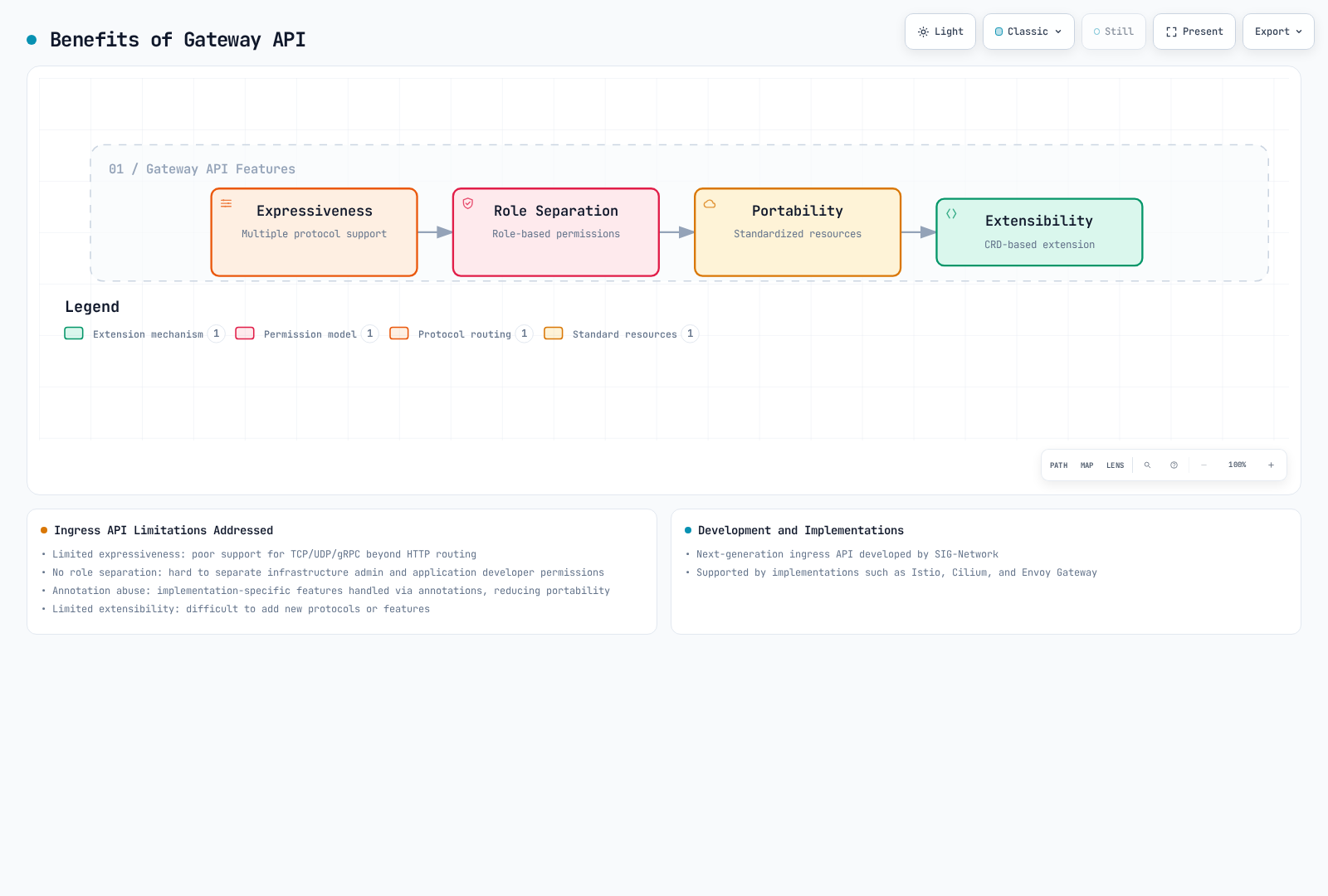
表現力、責務の分離、移植性、拡張性は独立した設計目標です。実際の機能サポートはコントローラーと適合プロファイルに依存します。各リソースを変更できる主体はKubernetes RBACとアドミッションポリシーが制御します。
リソースモデル
Gateway APIは階層的なリソースモデルを使用します。
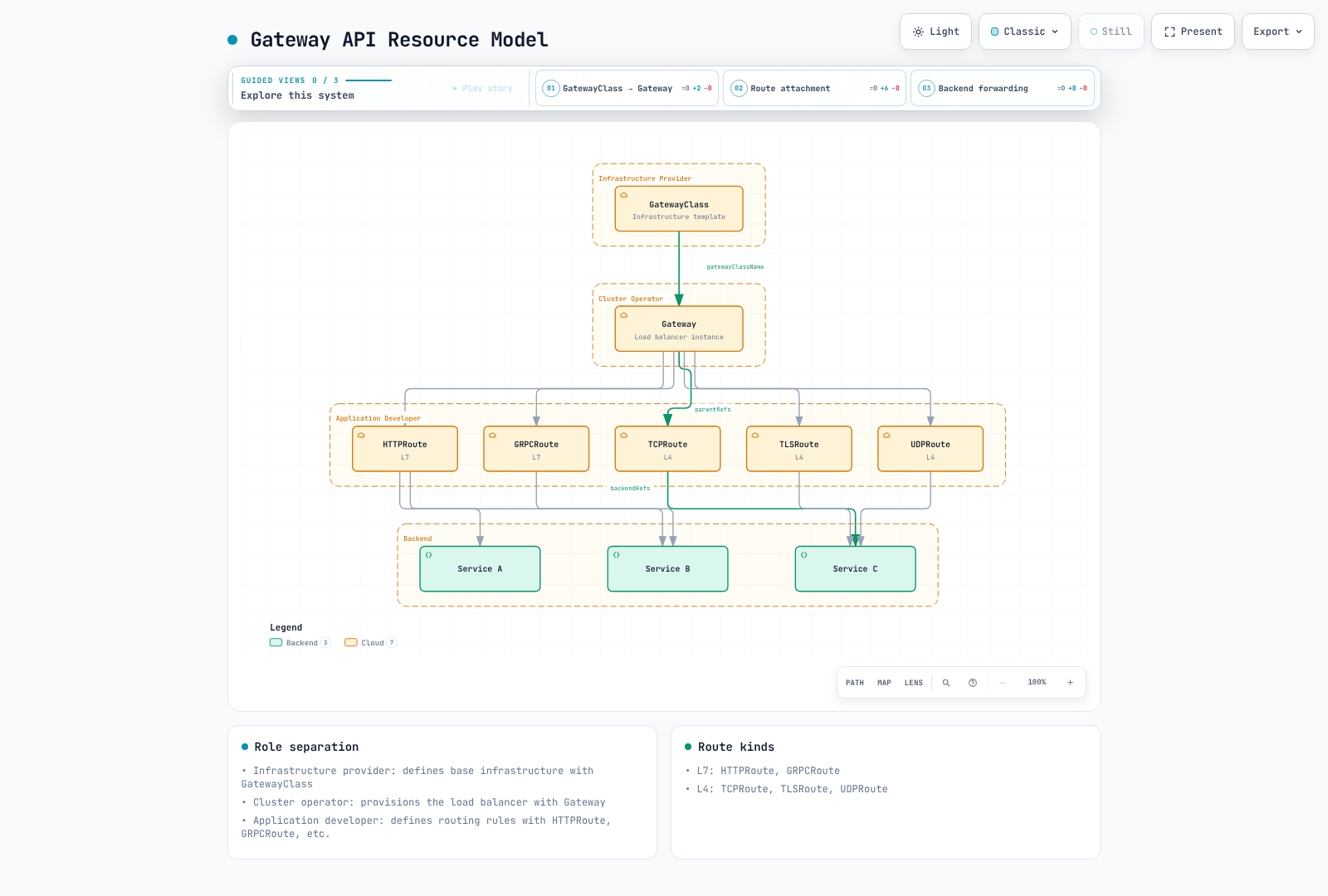
図はリソースの関係と一般的なゲートウェイのデプロイモデルを示します。Gatewayが常に1つのクラウドロードバランサーであるとは限りません。IstioはプロキシのDeployment/Serviceをプロビジョニングでき、VPC Latticeはサービスネットワークに対応付けます。参照先の名前空間の所有者が、ReferenceGrantで名前空間をまたぐバックエンド/Secretアクセスを許可します。
ロールの分離
| ロール | 管理リソース | 責務 |
|---|---|---|
| インフラ提供者 | GatewayClass | 基本的なインフラ設定を定義 |
| クラスター運用者 | Gateway | GatewayインフラとRouteの接続ポリシー |
| 参照先名前空間の所有者 | ReferenceGrant | 所有するバックエンド/Secretへの参照を認可 |
| アプリケーション開発者 | HTTPRoute、GRPCRouteなど | アプリケーションのルーティングルールを定義 |
GatewayClass
GatewayClassは、Gateway作成時に使用するコントローラーと設定を定義します。
apiVersion: gateway.networking.k8s.io/v1
kind: GatewayClass
metadata:
  name: istio
spec:
  controllerName: istio.io/gateway-controller
description: Istio Gateway Controller for production workloadsGatewayClassはインストール済みコントローラーを選択します。クラスを作成してもコントローラーはインストールされません。以下の定義は選択肢です。Accepted条件がtrueのクラスを使い、例のクラス名をクラスターで受け入れられた名前に置き換えてください。
parametersRefのサポートとgroup/kindは実装に依存します。Istio 1.31では、GatewayごとのConfigMapをGatewayの名前空間に置き、Gateway.spec.infrastructure.parametersRefで指定します。クラス全体のデフォルトは、Istioのルート名前空間でgateway.istio.io/defaults-for-classラベル付きConfigMapを使います。下のALB→Istio例はGatewayごとの形式を示します。
実装ごとのGatewayClass
# Istio
apiVersion: gateway.networking.k8s.io/v1
kind: GatewayClass
metadata:
  name: istio
spec:
  controllerName: istio.io/gateway-controller
---
# Cilium
apiVersion: gateway.networking.k8s.io/v1
kind: GatewayClass
metadata:
  name: cilium
spec:
  controllerName: io.cilium/gateway-controller
---
# AWS Gateway API Controller
apiVersion: gateway.networking.k8s.io/v1
kind: GatewayClass
metadata:
  name: amazon-vpc-lattice
spec:
  controllerName: application-networking.k8s.aws/gateway-api-controller
---
# Envoy Gateway
apiVersion: gateway.networking.k8s.io/v1
kind: GatewayClass
metadata:
  name: envoy-gateway
spec:
  controllerName: gateway.envoyproxy.io/gatewayclass-controller
---
# Contour
apiVersion: gateway.networking.k8s.io/v1
kind: GatewayClass
metadata:
  name: contour
spec:
  controllerName: projectcontour.io/gateway-controller
---
# NGINX Gateway Fabric
apiVersion: gateway.networking.k8s.io/v1
kind: GatewayClass
metadata:
  name: nginx
spec:
  controllerName: gateway.nginx.org/nginx-gateway-controller
Gateway
Gatewayはトラフィック処理インフラとリスナーを記述します。プロキシワークロード、マネージドロードバランサー、サービスネットワークのどれに対応するかはコントローラーによります。
基本的なGateway設定
これらは別々の設定シナリオで、一括適用するRouteの集合ではありません。同じホスト/リスナーでRouteが重なると優先順位が変わる場合があります。選択したコントローラーと互換CRDを先にインストールし、gateway-systemを作成して、指定されたService、準備済みエンドポイント、TLS Secretを用意してください。証明書は設定したDNS名をカバーする必要があります。プラットフォームに応じてデータプレーンServiceの公開、DNS、ネットワーク制御を設定します。GatewayClassや要求したIPアドレスだけでは外部アドレスは予約されません。
HTTP/gRPC/TCP/TLSの例はIstio 1.31を使用します。Istio 1.31はUDPリスナーを明示的に拒否するため、UDPの例は別のEnvoy Gatewayインスタンスを使用します。Envoy Gateway 1.9にはGateway API 1.6.1と公表されたKubernetesバージョンの組み合わせが必要です。バージョン/チャネル変更前に共有CRDを確認してください。
基本例のNamespaceにはgateway-access: "true"があります。これはNamespaceラベルであり、変更権限はGatewayアクセスを制御する管理者が持つべきです。allowedRoutesはアプリケーションクライアントを認証しません。
apiVersion: v1
kind: Namespace
metadata:
  name: production
  labels:
    gateway-access: 'true'
---
apiVersion: gateway.networking.k8s.io/v1
kind: Gateway
metadata:
  name: production-gateway
  namespace: gateway-system
spec:
  gatewayClassName: istio
  listeners:
  - name: http
    protocol: HTTP
    port: 80
    allowedRoutes:
      namespaces:
        from: Selector
        selector:
          matchLabels:
            gateway-access: 'true'
  - name: https
    protocol: HTTPS
    port: 443
    tls:
      mode: Terminate
      certificateRefs:
      - kind: Secret
        name: tls-cert
        namespace: gateway-system
    allowedRoutes:
      namespaces:
        from: Selector
        selector:
          matchLabels:
            gateway-access: 'true'
高度なGateway設定
以下はmulti-protocol-gatewayという別のGatewayです。後のgRPC、TLS、TCP Routeは、一致するリスナー名に接続します。データベースと他のTCPの例は別々のリスナーを持つため、1つのL4リスナーを競合せず両方を使用できます。
apiVersion: gateway.networking.k8s.io/v1
kind: Gateway
metadata:
  name: multi-protocol-gateway
  namespace: gateway-system
spec:
  gatewayClassName: istio
  listeners:
  - name: http
    protocol: HTTP
    port: 80
    allowedRoutes:
      namespaces:
        from: Selector
        selector:
          matchLabels:
            gateway-access: 'true'
  - name: https-wildcard
    protocol: HTTPS
    port: 443
    hostname: '*.example.com'
    tls:
      mode: Terminate
      certificateRefs:
      - kind: Secret
        name: wildcard-cert
    allowedRoutes:
      namespaces:
        from: Selector
        selector:
          matchLabels:
            gateway-access: 'true'
      kinds:
      - kind: HTTPRoute
  - name: grpc
    protocol: HTTPS
    port: 443
    hostname: grpc.example.com
    tls:
      mode: Terminate
      certificateRefs:
      - kind: Secret
        name: grpc-cert
    allowedRoutes:
      namespaces:
        from: Selector
        selector:
          matchLabels:
            gateway-access: 'true'
      kinds:
      - kind: GRPCRoute
  - name: tcp-passthrough
    protocol: TLS
    port: 8443
    tls:
      mode: Passthrough
    allowedRoutes:
      namespaces:
        from: Selector
        selector:
          matchLabels:
            gateway-access: 'true'
      kinds:
      - kind: TLSRoute
  - name: tcp
    protocol: TCP
    port: 9000
    allowedRoutes:
      namespaces:
        from: Selector
        selector:
          matchLabels:
            gateway-access: 'true'
      kinds:
      - kind: TCPRoute
  - name: database
    protocol: TCP
    port: 5432
    allowedRoutes:
      namespaces:
        from: Selector
        selector:
          matchLabels:
            gateway-access: 'true'
      kinds:
      - kind: TCPRoute
TLSモード
終端モードはゲートウェイで下流TLS接続を終端します。バックエンド接続は別に設定し、例えばサポートされるBackendTLSPolicyを通じてHTTPまたはTLSを使用できます。パススルーはmode: Passthroughを設定したTLSリスナーを使い、バックエンドがTLSを終端します。HTTPSリスナーはmodeだけを変更してもパススルーには切り替えられません。
| モード | 説明 | 用途 |
|---|---|---|
| Terminate | GatewayでTLS終端 | 標準的なHTTPS |
| Passthrough | バックエンドへTLSを転送 | エンドツーエンド暗号化 |
# TLS Terminate example
listeners:
  - name: https
    protocol: HTTPS
    port: 443
    tls:
      mode: Terminate
      certificateRefs:
        - kind: Secret
          name: server-cert
---
# TLS Passthrough example
listeners:
  - name: tls-passthrough
    protocol: TLS
    port: 443
    tls:
      mode: Passthrough
HTTPRoute
HTTPRouteはHTTP/HTTPSトラフィックのルーティングルールを定義します。
基本的なHTTPRoute
apiVersion: gateway.networking.k8s.io/v1
kind: HTTPRoute
metadata:
  name: basic-route
  namespace: production
spec:
  # Gateway to attach to
  parentRefs:
    - name: production-gateway
      namespace: gateway-system
      sectionName: https  # Target specific listener

  # Host matching
  hostnames:
    - "api.example.com"
    - "www.example.com"

  # Routing rules
  rules:
    - matches:
        - path:
            type: PathPrefix
            value: /api/v1
      backendRefs:
        - name: api-v1-service
          port: 80

    - matches:
        - path:
            type: PathPrefix
            value: /api/v2
      backendRefs:
        - name: api-v2-service
          port: 80

    # Default path
    - backendRefs:
        - name: default-service
          port: 80
高度な一致ルール
1つのmatches項目内のフィールドはAND、複数の項目はORで結合されます。PathPrefixは任意の文字列プレフィックスではなくパス要素に一致します。RegularExpressionのサポートと構文は実装固有です。下のデモ用テナントヘッダーは、どのクライアントでも送れるルーティングセレクターであり、管理アプリケーションの認証ではありません。
apiVersion: gateway.networking.k8s.io/v1
kind: HTTPRoute
metadata:
  name: advanced-matching
  namespace: production
spec:
  parentRefs:
  - name: production-gateway
    namespace: gateway-system
    sectionName: https
  hostnames:
  - api.example.com
  rules:
  - matches:
    - path:
        type: Exact
        value: /health
    backendRefs:
    - name: health-service
      port: 80
  - matches:
    - path:
        type: RegularExpression
        value: /users/[0-9]+
    backendRefs:
    - name: user-service
      port: 80
  - matches:
    - headers:
      - name: X-Version
        value: v2
    backendRefs:
    - name: api-v2-service
      port: 80
  - matches:
    - queryParams:
      - name: debug
        value: 'true'
    backendRefs:
    - name: debug-service
      port: 80
  - matches:
    - method: POST
      path:
        type: PathPrefix
        value: /api/data
    backendRefs:
    - name: write-service
      port: 80
  - matches:
    - method: GET
      path:
        type: PathPrefix
        value: /api/data
    backendRefs:
    - name: read-service
      port: 80
  - matches:
    - path:
        type: PathPrefix
        value: /admin
      headers:
      - name: X-Demo-Tenant
        type: Exact
        value: operations
    backendRefs:
    - name: admin-service
      port: 80
  - matches:
    - path:
        type: PathPrefix
        value: /api
    - path:
        type: PathPrefix
        value: /v1
    backendRefs:
    - name: api-service
      port: 80
フィルター
ヘッダー修飾子はリテラル値を設定します。X-Example-Source: gateway-demoは静的マーカーで、生成された一意なリクエストIDではありません。IDにはプロキシ/アプリケーションのトレース機能を使ってください。ミラー例は独自の/mirrorパスを使うため、前の/apiルールに隠されません。GETリクエストをシャドーバックエンドへコピーし、その応答は無視します。副作用を分離し、シャドーサービスにコピーするデータ/認証情報を確認してください。公開キャッシュヘッダーは、公開キャッシュが実際に安全なコンテンツにのみ適しています。
フィルターでリクエスト/レスポンスを変更できます。
apiVersion: gateway.networking.k8s.io/v1
kind: HTTPRoute
metadata:
  name: filtered-route
  namespace: production
spec:
  parentRefs:
  - name: production-gateway
    namespace: gateway-system
    sectionName: https
  rules:
  - matches:
    - path:
        type: PathPrefix
        value: /api
    filters:
    - type: RequestHeaderModifier
      requestHeaderModifier:
        add:
        - name: X-Example-Source
          value: gateway-demo
        set:
        - name: X-Api-Version
          value: v1
        remove:
        - X-Internal-Header
    backendRefs:
    - name: api-service
      port: 80
  - matches:
    - path:
        type: PathPrefix
        value: /public
    filters:
    - type: ResponseHeaderModifier
      responseHeaderModifier:
        add:
        - name: Cache-Control
          value: public, max-age=3600
        set:
        - name: X-Content-Type-Options
          value: nosniff
    backendRefs:
    - name: public-service
      port: 80
  - matches:
    - path:
        type: PathPrefix
        value: /old-api
    filters:
    - type: URLRewrite
      urlRewrite:
        path:
          type: ReplacePrefixMatch
          replacePrefixMatch: /new-api
        hostname: new-api.example.com
    backendRefs:
    - name: new-api-service
      port: 80
  - matches:
    - path:
        type: PathPrefix
        value: /legacy
    filters:
    - type: RequestRedirect
      requestRedirect:
        scheme: https
        hostname: new.example.com
        port: 443
        statusCode: 301
        path:
          type: ReplacePrefixMatch
          replacePrefixMatch: /modern
  - matches:
    - method: GET
      path:
        type: PathPrefix
        value: /mirror
    filters:
    - type: RequestMirror
      requestMirror:
        backendRef:
          name: shadow-service
          port: 80
    backendRefs:
    - name: main-service
      port: 80
トラフィック分割(重み)
apiVersion: gateway.networking.k8s.io/v1
kind: HTTPRoute
metadata:
  name: canary-route
  namespace: production
spec:
  parentRefs:
  - name: production-gateway
    namespace: gateway-system
    sectionName: https
  hostnames:
  - app.example.com
  rules:
  - matches:
    - path:
        type: PathPrefix
        value: /
    backendRefs:
    - name: app-stable
      port: 80
      weight: 90
    - name: app-canary
      port: 80
      weight: 10
タイムアウトと再試行
v1.6 Standardスキーマにはtimeoutsがありますが、HTTPRoute.rules.retryはありません。Experimentalスキーマは再試行フィールドを追加し、別のアドミッション/実装要件があります。以下の例はGETリクエストの時間上限だけを設定します。backendRequestは、ゼロでない合計request上限を超えてはいけません。
再試行フィールドを省略しても、クライアント、ゲートウェイ、メッシュプロキシ、SDKが一切再試行しない証明にはなりません。特に非冪等な書き込みでは、該当する各レイヤーを設定して確認してください。Experimental v1.6のretry.attemptsは最小値が1のため、再試行回数0は無効化する有効な方法ではありません。実装の文書化された制御とアプリケーションの冪等性動作を使用します。
apiVersion: gateway.networking.k8s.io/v1
kind: HTTPRoute
metadata:
  name: resilient-route
  namespace: production
spec:
  parentRefs:
  - name: production-gateway
    namespace: gateway-system
    sectionName: https
  rules:
  - matches:
    - path:
        type: PathPrefix
        value: /api
      method: GET
    timeouts:
      request: 30s
      backendRequest: 25s
    backendRefs:
    - name: api-service
      port: 80
GRPCRoute
バックエンドは想定するgRPC/HTTP2トランスポートを提供し、適切なTLS設定を持つ必要があります。ポート番号だけでは、その動作は設定されません。
gRPCトラフィックのルーティングルールを定義します。
apiVersion: gateway.networking.k8s.io/v1
kind: GRPCRoute
metadata:
  name: grpc-route
  namespace: production
spec:
  parentRefs:
  - name: multi-protocol-gateway
    namespace: gateway-system
    sectionName: grpc
  hostnames:
  - grpc.example.com
  rules:
  - matches:
    - method:
        service: myapp.UserService
    backendRefs:
    - name: user-grpc-service
      port: 50051
  - matches:
    - method:
        service: myapp.OrderService
        method: CreateOrder
    backendRefs:
    - name: order-grpc-service
      port: 50052
  - matches:
    - headers:
      - name: x-environment
        value: staging
    backendRefs:
    - name: staging-grpc-service
      port: 50051
  - backendRefs:
    - name: default-grpc-service
      port: 50051
TCPRoute
TCPトラフィックのルーティングを定義します。
apiVersion: gateway.networking.k8s.io/v1
kind: TCPRoute
metadata:
  name: database-route
  namespace: production
spec:
  parentRefs:
  - name: multi-protocol-gateway
    namespace: gateway-system
    sectionName: database
  rules:
  - backendRefs:
    - name: database-service
      port: 5432
---
apiVersion: gateway.networking.k8s.io/v1
kind: TCPRoute
metadata:
  name: tcp-loadbalance
  namespace: production
spec:
  parentRefs:
  - name: multi-protocol-gateway
    namespace: gateway-system
    sectionName: tcp
  rules:
  - backendRefs:
    - name: tcp-backend-1
      port: 9000
      weight: 50
    - name: tcp-backend-2
      port: 9000
      weight: 50
TLSRoute
TLSパススルートラフィックのルーティングを定義します。
apiVersion: gateway.networking.k8s.io/v1
kind: TLSRoute
metadata:
  name: tls-passthrough-route
  namespace: production
spec:
  parentRefs:
  - name: multi-protocol-gateway
    namespace: gateway-system
    sectionName: tcp-passthrough
  hostnames:
  - secure.example.com
  rules:
  - backendRefs:
    - name: secure-backend
      port: 8443
UDPRoute
このシナリオには、受け入れられたenvoy-gatewayクラスを持つインストール済みEnvoy Gatewayコントローラー、互換Gateway APIバンドル、dns-service UDPバックエンドが必要です。UDPポート5300を公開し、バックエンドポート53へルーティングします。EnvoyのUDPプロキシは透過的ではなく、バックエンドにはゲートウェイの送信元IP/ポートが見えます。プラットフォームのロードバランサー/ServiceがこのUDP公開をサポートすることを確認してください。
UDPトラフィックのルーティングを定義します。
apiVersion: gateway.networking.k8s.io/v1
kind: Gateway
metadata:
  name: udp-gateway
  namespace: gateway-system
spec:
  gatewayClassName: envoy-gateway
  listeners:
  - name: udp
    protocol: UDP
    port: 5300
    allowedRoutes:
      namespaces:
        from: Selector
        selector:
          matchLabels:
            gateway-access: 'true'
      kinds:
      - kind: UDPRoute
---
apiVersion: gateway.networking.k8s.io/v1
kind: UDPRoute
metadata:
  name: dns-route
  namespace: production
spec:
  parentRefs:
  - name: udp-gateway
    namespace: gateway-system
    sectionName: udp
  rules:
  - backendRefs:
    - name: dns-service
      port: 53
ReferenceGrant
ReferenceGrantは、参照されるServiceまたはSecretが存在する名前空間に、その所有者が作成します。fromは参照元のgroup/kind/namespaceを選択し、to.nameで参照先名を制限できます。許可は加算的で、参照を認可するものであり、アプリケーション呼び出し元を認可するものではありません。
名前空間をまたぐRoute→Gateway接続はReferenceGrantではなく、parentRefsとGatewayリスナーのallowedRoutesによる合意を使用します。バックエンドと証明書の参照は下記のReferenceGrantを使います。指定したshared-api Serviceとshared-tls Secretは存在する必要があり、許可だけでは作成されません。
ReferenceGrantは名前空間をまたぐ参照を許可します。
apiVersion: gateway.networking.k8s.io/v1beta1
kind: ReferenceGrant
metadata:
  name: allow-routes-to-backend
  namespace: backend-services
spec:
  from:
  - group: gateway.networking.k8s.io
    kind: HTTPRoute
    namespace: production
  - group: gateway.networking.k8s.io
    kind: HTTPRoute
    namespace: staging
  to:
  - group: ''
    kind: Service
    name: shared-api
---
apiVersion: gateway.networking.k8s.io/v1beta1
kind: ReferenceGrant
metadata:
  name: allow-gateway-to-secrets
  namespace: cert-management
spec:
  from:
  - group: gateway.networking.k8s.io
    kind: Gateway
    namespace: gateway-system
  to:
  - group: ''
    kind: Secret
    name: shared-tls
実装の比較
主な実装
| 実装 | コントローラー | 機能 |
|---|---|---|
| Istio | istio.io/gateway-controller | サービスメッシュ統合、高度なトラフィック管理 |
| Cilium | io.cilium/gateway-controller | EnvoyのL7処理を組み合わせたCiliumネットワーキング |
| Envoy Gateway | gateway.envoyproxy.io/gatewayclass-controller | Envoyベース、標準準拠 |
| AWS Gateway API Controller | application-networking.k8s.aws/gateway-api-controller | VPC Lattice統合 |
| Contour | projectcontour.io/gateway-controller | Envoyベース、簡単な設定 |
| NGINX Gateway Fabric | gateway.nginx.org/nginx-gateway-controller | NGINXベース |
| Traefik | traefik.io/gateway-controller | 動的設定 |
バージョンを指定した実装の注意点
APIのリリースチャネル、機能のCore/Extended/実装固有というサポートレベル、コントローラーの適合プロファイルは異なる概念です。CRDがフィールドを受け入れても、コントローラーが実装している証明にはなりません。公表された適合結果と、該当するAccepted、ResolvedRefs、Programmedを含むリソース条件を確認してください。
| 確認した実装 | 検証範囲と重要な制限 |
|---|---|
| Istio 1.31.0 | HTTP/gRPCとv1 TCP/TLSルート。UDPリスナーは明示的に未対応。設定可能なEnvoyデータプレーンであり、Gateway APIの全拡張のサポート保証ではない |
| Cilium 1.20.1 | TCPRoute/UDPRouteを含むGateway API 1.6.1。CiliumネットワーキングとL7処理用Envoyを組み合わせる |
| Envoy Gateway 1.9.1 | Gateway API 1.6.1。公表Kubernetesマトリックスは1.33–1.36。文書化されたトランスポート動作でUDPルーティングとTLSパススルーをサポート |
| AWS Load Balancer Controller 3.5.0 | Gateway API 1.6.0。ALBはHTTP/gRPC、NLBはL4ルートを処理。NLBリスナーごとに最古の接続済みL4 Routeだけが対象となるため、リスナーにつきRouteは1つにする |
| AWS Gateway API Controller 2.1.3 | VPC Lattice統合。v2.1にはGateway API 1.5+ が必要。HTTPRoute、GRPCRoute、TLSRouteをサポート。TCPリソースアクセスは別のLatticeリソース設定モデルであり、汎用TCPRoute/UDPRouteサポートではない |
| Contour 1.33.7 | Gateway API 1.3.0でビルドされ、Kubernetes 1.32–1.34でリリーステスト済み。HTTP/gRPC/TCP/TLSルートを文書化。新しいバンドルを盲目的に適用せず、対応するチャネル/プロビジョニング設定を使用 |
| NGINX Gateway Fabric 2.7.0 | Gateway API 1.6.1、公表Kubernetes最小バージョン1.32。v1 TCPRoute/UDPRouteサポートを追加。終了したコミュニティのingress-nginxとは別製品 |
これらの注意点は、バージョンのない機能の有無一覧を置き換えます。個々のフィルター、TLSポリシー、拡張、対応バージョン、運用要件は各実装の文書を確認してください。Contourに同梱された互換性ページには1.33.7専用の行がありません。上のAPI依存関係とKubernetes範囲は、その正確なリリースのモジュールファイルとリリースノートに基づきます。
AWS Load Balancer ControllerのGateway APIサポート
Gateway APIは2026-01-23のLBC v3.0.0でGAになりました。既存のIngressとService APIは引き続きサポートされるため、Gateway移行はコントローラーのアップグレードと独立して計画できます。現在のv3.5.0には、LBCインストールガイドで説明する互換Gateway APIとLBC Gateway CRDが必要です。EKS Auto Modeには別のマネージド実装があり、自己管理LBCの機能が自動的にAuto Modeにも当てはまるわけではありません。
終了したコントローラーはKubernetesコミュニティのingress-nginxプロジェクトで、メンテナンスは2026年3月に終了しました。Kubernetes Ingress APIやF5の他のNGINX製品が終了したという意味ではありません。
v3.0リリースノートのkeepTLSSecret=false回避策は、cert-managerの所有権バグの影響を受ける古いバージョンに留まる利用者向けでした。v3.0へアップグレードする利用者は、追加操作なしで修正を受け取りました。過去の回避策をすべてのアップグレードに適用せず、現在のチャートの証明書管理オプションに従ってください。
LBC v3.4.0の移行ツール
2026-06-03のリリースで、実際のlbc-migrate CLIとMigration Consoleが導入されました。対象は動作中のLBC Ingressリソースであり、あらゆるIngress実装向けの汎用変換ツールではありません。
lbc-migrateはファイルを読み取るか、--from-clusterでクラスターリソースを一覧/取得します。サポートされるアノテーションを変換し、Gateway APIリソースを出力します。デフォルト出力にはLBC Gatewayのdry-runアノテーションが付きます。- Migration Consoleはコントローラーが生成したリソース計画を比較します。適切な計画アノテーション、機能設定、読み取りアクセスが必要です。計画はアクセス制限や機密情報の削除が必要になり得る設定データとして扱います。
- レビュー済みの実稼働Gatewayマニフェストを適用すると、既存ALBと並行して新しいALBが作成されます。それらを検証し、フロントエンドトラフィックを別途移します。1つのHTTPRoute内のバックエンド重みでは、このフロントエンド移行は行えません。
選択したLBCリリースからビルドしたバイナリでは、ファイルベースの変換を次から始められます。
lbc-migrate -f ingress.yaml --output-dir ./gateway-output/変換ツールは既存Deployment/Serviceを生成せず、すべてのIngressアノテーションを再検証するわけでもありません。未対応アノテーション、Service/IngressClassParamsのオーバーライド、名前空間をまたぐIngressGroup所属、ルール優先順位、TLS設定を確認します。旧ALBにすでに関連付いた外部ターゲットグループは、そのまま新ALBにも同時接続できません。互換性のある複製/切り替え戦略を計画してください。
ツールは移行手順を提供しますが、無停止を保証しません。バージョン付き移行ガイドとCLIリファレンスを参照してください。
IngressからGateway APIへの移行
段階的な移行ガイド
ステップ1: 既存Ingressの分析
以下はIstio Gateway APIへの手動設定変換を説明するための、過去のコミュニティingress-nginx入力です。新規ingress-nginxインストールの推奨でも、上のLBC固有変換ツールへの入力でもありません。設定名だけでなく、実際のリクエスト動作を保持してください。
apiVersion: networking.k8s.io/v1
kind: Ingress
metadata:
  name: my-ingress
  annotations:
    kubernetes.io/ingress.class: nginx
    nginx.ingress.kubernetes.io/rewrite-target: /
    nginx.ingress.kubernetes.io/ssl-redirect: 'true'
  namespace: default
spec:
  tls:
  - hosts:
    - api.example.com
    secretName: api-tls
  rules:
  - host: api.example.com
    http:
      paths:
      - path: /api/v1
        pathType: Prefix
        backend:
          service:
            name: api-v1
            port:
              number: 80
      - path: /api/v2
        pathType: Prefix
        backend:
          service:
            name: api-v2
            port:
              number: 80
ステップ2: GatewayとGatewayClassの作成
新Gatewayの名前はmigration-gatewayです。既存のapi-tls Secretはdefaultに残し、その名前空間のReferenceGrantでこのGateway名前空間からの参照を明示的に許可します。api.example.comに有効な証明書を用意してください。default Namespaceの組み込み名前ラベルを、ルート接続のセレクターに使用します。
apiVersion: gateway.networking.k8s.io/v1
kind: GatewayClass
metadata:
  name: production
spec:
  controllerName: istio.io/gateway-controller
---
apiVersion: gateway.networking.k8s.io/v1beta1
kind: ReferenceGrant
metadata:
  name: migration-tls
  namespace: default
spec:
  from:
  - group: gateway.networking.k8s.io
    kind: Gateway
    namespace: gateway-system
  to:
  - group: ''
    kind: Secret
    name: api-tls
---
apiVersion: gateway.networking.k8s.io/v1
kind: Gateway
metadata:
  name: migration-gateway
  namespace: gateway-system
spec:
  gatewayClassName: production
  listeners:
  - name: http
    protocol: HTTP
    port: 80
    allowedRoutes:
      namespaces:
        from: Selector
        selector:
          matchLabels:
            kubernetes.io/metadata.name: default
    hostname: api.example.com
  - name: https
    protocol: HTTPS
    port: 443
    tls:
      mode: Terminate
      certificateRefs:
      - kind: Secret
        name: api-tls
        namespace: default
    allowedRoutes:
      namespaces:
        from: Selector
        selector:
          matchLabels:
            kubernetes.io/metadata.name: default
    hostname: api.example.com
ステップ3: HTTPRouteの作成
リダイレクトRouteはHTTPリスナーだけに接続します。HTTPS Routeはアプリケーションリクエストを転送します。旧rewrite-target: /例は一致したリクエストパス全体を/で置き換えるため、変換例はReplaceFullPathを使います。ReplacePrefixMatchではサフィックスが保持され(/api/v1/users → /users)、動作が変わります。切り替え前にルートパス、サブパス、クエリ文字列、リダイレクトを旧アプリケーションと比較テストしてください。
以下のリダイレクトは、リクエストメソッド/本文を保持するingress-nginxのデフォルト308を前提とします。http-redirect-codeのオーバーライドを確認してください。旧書き換えアノテーションはそのホストの大文字小文字を区別しない正規表現locationも有効にしますが、Gateway API PathPrefixは大文字小文字を区別してパス要素に一致します。そのため/API/V1や/api/v10では動作が異なる場合があります。この例はより厳格なPathPrefix方針を示し、完全な一致動作の同等性は示しません。旧動作に依存するクライアントがある場合、切り替え前にサポートされる正規表現一致や別の明示的な互換ルールを設計し、テストしてください。
apiVersion: gateway.networking.k8s.io/v1
kind: HTTPRoute
metadata:
  name: api-route
  namespace: default
spec:
  parentRefs:
  - name: migration-gateway
    namespace: gateway-system
    sectionName: http
  hostnames:
  - api.example.com
  rules:
  - matches:
    - path:
        type: PathPrefix
        value: /
    filters:
    - type: RequestRedirect
      requestRedirect:
        scheme: https
        statusCode: 308
---
apiVersion: gateway.networking.k8s.io/v1
kind: HTTPRoute
metadata:
  name: api-route-https
  namespace: default
spec:
  parentRefs:
  - name: migration-gateway
    namespace: gateway-system
    sectionName: https
  hostnames:
  - api.example.com
  rules:
  - matches:
    - path:
        type: PathPrefix
        value: /api/v1
    filters:
    - type: URLRewrite
      urlRewrite:
        path:
          type: ReplaceFullPath
          replaceFullPath: /
    backendRefs:
    - name: api-v1
      port: 80
  - matches:
    - path:
        type: PathPrefix
        value: /api/v2
    filters:
    - type: URLRewrite
      urlRewrite:
        path:
          type: ReplaceFullPath
          replaceFullPath: /
    backendRefs:
    - name: api-v2
      port: 80
ステップ4: フロントエンドトラフィックの移行
クライアントを移す前に、新Gatewayのアドレス、証明書、HTTPリダイレクト、ルート一致、バックエンド動作、可観測性を検証します。レビュー済みDNS/ロードバランサールーティングなど、フロントエンドに適した方法で移行し、障害とレイテンシーを監視します。DNSキャッシュ、永続接続、セッションを考慮してください。旧フロントエンドへ戻す検証済みの方法を保持します。
HTTPRouteのバックエンド重みは選択したGatewayの内部のトラフィックを制御します。その操作は専用のトラフィック分割セクションで説明します。フロントエンド移行では、クライアントの移動と必要なドレイン/ロールバック確認が完了するまで、旧Ingress/コントローラーを保持してください。
移行チェックリスト
- [ ] 既存Ingressのアノテーションを分析
- [ ] 実装を選択しGatewayClassを作成
- [ ] Gatewayリソースを作成しリスナーを設定
- [ ] ルーティングルールをHTTPRouteへ変換
- [ ] 接続用allowedRoutesとバックエンド/Secret参照用ReferenceGrantを設定
- [ ] TLS証明書を移行
- [ ] 検証済みロールバック経路を用意してフロントエンドトラフィックを検証・移行
- [ ] 監視とログ記録を設定
- [ ] 切り替えとドレイン/ロールバック確認後にのみ旧Ingressリソースを削除
EKSのパターン
AWS Gateway API Controller(VPC Lattice)
VPC Latticeガイドのインストール済みコントローラー、レビュー済みAWS_IAMポリシー付きmy-networkサービスネットワーク、呼び出し元権限、service-stable:8080バックエンドを使用します。Gateway名はネットワークを選択し、作成はしません。この別のRouteには独自のLatticeサービスとドメインがあります。以下のIAMAuthPolicyがそのサービスを保護します。調整中はネットワークレベルのポリシーを保持してください。割り当てられたRouteドメインを取得し、ガイドの署名付きHTTPSクライアントを使います。unused証明書参照はこのコントローラーの文書化されたAWS管理証明書の動作に従い、汎用のKubernetes Secret読み込みではありません。
apiVersion: gateway.networking.k8s.io/v1
kind: GatewayClass
metadata:
  name: amazon-vpc-lattice
spec:
  controllerName: application-networking.k8s.aws/gateway-api-controller
---
apiVersion: gateway.networking.k8s.io/v1
kind: Gateway
metadata:
  name: my-network
  namespace: lattice-demo
spec:
  gatewayClassName: amazon-vpc-lattice
  listeners:
  - name: https
    protocol: HTTPS
    port: 443
    tls:
      mode: Terminate
      certificateRefs:
      - name: unused
---
apiVersion: gateway.networking.k8s.io/v1
kind: HTTPRoute
metadata:
  name: lattice-route
  namespace: lattice-demo
spec:
  parentRefs:
  - name: my-network
    sectionName: https
  rules:
  - matches:
    - path:
        type: PathPrefix
        value: /api
    backendRefs:
    - name: service-stable
      port: 8080
---
apiVersion: application-networking.k8s.aws/v1alpha1
kind: IAMAuthPolicy
metadata:
  name: lattice-route-auth
  namespace: lattice-demo
spec:
  targetRef:
    group: gateway.networking.k8s.io
    kind: HTTPRoute
    name: lattice-route
  policy: '{"Version":"2012-10-17","Statement":[{"Effect":"Allow","Principal":{"AWS":"arn:aws:iam::123456789012:role/MyAppRole"},"Action":"vpc-lattice-svcs:Invoke","Resource":"*","Condition":{"StringLike":{"vpc-lattice-svcs:RequestPath":["/api","/api/*"]}}}]}'
ALB Controllerとの併用
アプリケーションがIstioのゲートウェイ動作を必要とする場合、この構成はIstioゲートウェイの前にALBを置きます。ConfigMapはIstioの文書化されたインフラパラメーターを通じて、生成ServiceをClusterIPに設定します。ALB IngressはそのServiceと同じ名前空間にあり、生成名internal-gateway-istioを参照します。
アプリケーションHTTPRouteはラベル付きproduction名前空間にあり、そこにある既存api-service:80を指します。ACM ARNを置き換え、LBC/ネットワークの前提条件を設定します。この例ではTLSをALBで終端し、Istioへの接続はHTTPです。実際のゲートウェイトラフィックとヘルスポートをセキュリティ制御で許可してください。15021の/healthz/readyはゲートウェイの準備状態を確認し、全アプリケーションの健全性は確認しません。Route条件とアプリケーション応答を別途検証します。
apiVersion: v1
kind: ConfigMap
metadata:
  name: internal-gateway-options
  namespace: istio-system
data:
  service: |
    spec:
      type: ClusterIP
---
apiVersion: gateway.networking.k8s.io/v1
kind: Gateway
metadata:
  name: internal-gateway
  namespace: istio-system
spec:
  gatewayClassName: istio
  listeners:
  - name: http
    protocol: HTTP
    port: 80
    allowedRoutes:
      namespaces:
        from: Selector
        selector:
          matchLabels:
            gateway-access: 'true'
  infrastructure:
    parametersRef:
      group: ''
      kind: ConfigMap
      name: internal-gateway-options
---
apiVersion: gateway.networking.k8s.io/v1
kind: HTTPRoute
metadata:
  name: alb-internal-route
  namespace: production
spec:
  parentRefs:
  - name: internal-gateway
    namespace: istio-system
    sectionName: http
  hostnames:
  - api.example.com
  rules:
  - backendRefs:
    - name: api-service
      port: 80
---
apiVersion: networking.k8s.io/v1
kind: Ingress
metadata:
  name: alb-to-gateway
  annotations:
    alb.ingress.kubernetes.io/scheme: internet-facing
    alb.ingress.kubernetes.io/target-type: ip
    alb.ingress.kubernetes.io/listen-ports: '[{"HTTP":80},{"HTTPS":443}]'
    alb.ingress.kubernetes.io/ssl-redirect: '443'
    alb.ingress.kubernetes.io/certificate-arn: arn:aws:acm:us-east-1:123456789012:certificate/12345678-1234-1234-1234-123456789012
    alb.ingress.kubernetes.io/healthcheck-port: '15021'
    alb.ingress.kubernetes.io/healthcheck-path: /healthz/ready
  namespace: istio-system
spec:
  ingressClassName: alb
  rules:
  - host: api.example.com
    http:
      paths:
      - path: /
        pathType: Prefix
        backend:
          service:
            name: internal-gateway-istio
            port:
              number: 80
APIチャネルと成熟度
チャネルとAPIバージョンは別
| Gateway API v1.6.0バンドル | 含まれるリソース/フィールド |
|---|---|
| Standard | GatewayClass、Gateway、HTTPRoute、GRPCRoute、TLSRoute、TCPRoute、UDPRoute、ReferenceGrant、BackendTLSPolicy、ListenerSet |
| Experimental | Standardの内容に加え、HTTPRouteの再試行/セッション永続化などの実験的フィールドとXBackend、XBackendTrafficPolicy、XMesh |
現在のStandard例はRouteタイプにv1を使用します。v1.6.0 Standardバンドルは、旧TLSRoute/TCPRoute/UDPRouteアルファ版をもう提供しません。Experimentalバンドルは一部の非推奨バージョンをまだ提供するため、そこで動くマニフェストがStandardでも動く証明にはなりません。
ReferenceGrantは「Standardは常にv1のみ」という見方への有用な反例です。v1.6.0バンドルはv1とv1beta1を両方提供し、ストレージバージョンはv1beta1です。ここでのReferenceGrant例は、提供されているベータ版を維持します。
新しい実験的Xリソースはgateway.networking.x-k8s.ioを使用します。既存リソースの実験的フィールドは引き続きgateway.networking.k8s.ioに存在し得ます。Experimentalチャネル全体が別グループへ移動したわけではありません。互換性保証はStandardと異なり、アドミッションポリシーがチャネル/フィールド境界を保護します。変更を強制するために共有CRDやアドミッションポリシーを削除せず、公表されたアップグレード手順を確認してください。
v1.6リリースの背景
Gateway API v1.6.0は2026-06-29 UTC / 2026-06-30 KSTに公開されました。TCPRouteとUDPRouteはStandardのv1へ昇格しました。GRPCRouteとTLSRouteも現在のStandardバンドルに含まれます。最新カタログバージョンを互換性と同一視せず、選択した実装がサポートするバンドル/チャネルを選んでください。
Ingress APIとの比較
| 観点 | Ingress | Gateway API |
|---|---|---|
| リソースモデル | IngressとIngressClass。リスナー/ルーティングの関心事は大部分が一体 | GatewayClass、Gateway、独立したRouteタイプ |
| 認可 | Kubernetes RBAC/アドミッションで所有権を制限可能 | RBAC/アドミッションに加え、明示的な接続と参照の合意 |
| HTTPルーティング | 標準HTTPルーティング | 個別機能のサポートレベルを持つ標準HTTPRouteフィールド |
| TCP/UDP/gRPC | Ingress APIの範囲外のコントローラー固有拡張 | 専用APIタイプ。実際のサポートはコントローラー/バージョンに依存 |
| TLSパススルー / トラフィック分割 / 書き換え | コントローラー固有設定 | 対応するRoute/フィルターフィールドと実装サポート要件 |
| 名前空間をまたぐ参照 | 実装固有の動作 | バックエンド/SecretにReferenceGrant、Gateway接続にallowedRoutes |
| 移植性 | アノテーションの意味の違いで低下 | 標準フィールドと適合性で向上するが、拡張は引き続き異なる |
ベストプラクティス
1. ロール分離の遵守
# Infrastructure team: Manage GatewayClass
# Platform team: Manage Gateway
# App team: Manage HTTPRoute
2. 最小権限のReferenceGrant
# Explicitly allow only required namespaces
apiVersion: gateway.networking.k8s.io/v1beta1
kind: ReferenceGrant
metadata:
  name: minimal-access
  namespace: backend
spec:
  from:
    - group: gateway.networking.k8s.io
      kind: HTTPRoute
      namespace: frontend  # Specific namespace only
  to:
    - group: ""
      kind: Service
      name: specific-service  # Specific service only
3. Gatewayの分離
# Separate Gateway by environment
# production-gateway, staging-gateway

# Separate Gateway by protocol
# http-gateway, grpc-gateway
4. 監視設定
# Prometheus metrics collection (varies by implementation)
# - Request count, latency, error rate
# - Backend status
# - TLS certificate expiry