パート 4: Ray Serve
検証基準: Ray 2.58.0 · KubeRay 1.7.0 · 2026-09-12
環境と検証範囲
小規模な CPU 応答例を、Python 3.12 と ray[serve]==2.58.0 で確認しました。この環境では、追加インストールで提供されていなかったにもかかわらず HAProxy モジュールが Jinja2 を import しました。Jinja2==3.1.6 を明示的に追加すると import が修正されました。別の環境では、他の依存関係を通じて既に含まれている場合があります。
ray[llm] extra は vLLM などの大規模な推論依存関係を追加します。ここではインストールせず、モデルの重み、GPU、EKS workload も実行していません。以下の検証対象は Serve 設定、HTTP 応答、および DeploymentHandle 呼び出しです。
Deployment、Application、リクエストパス
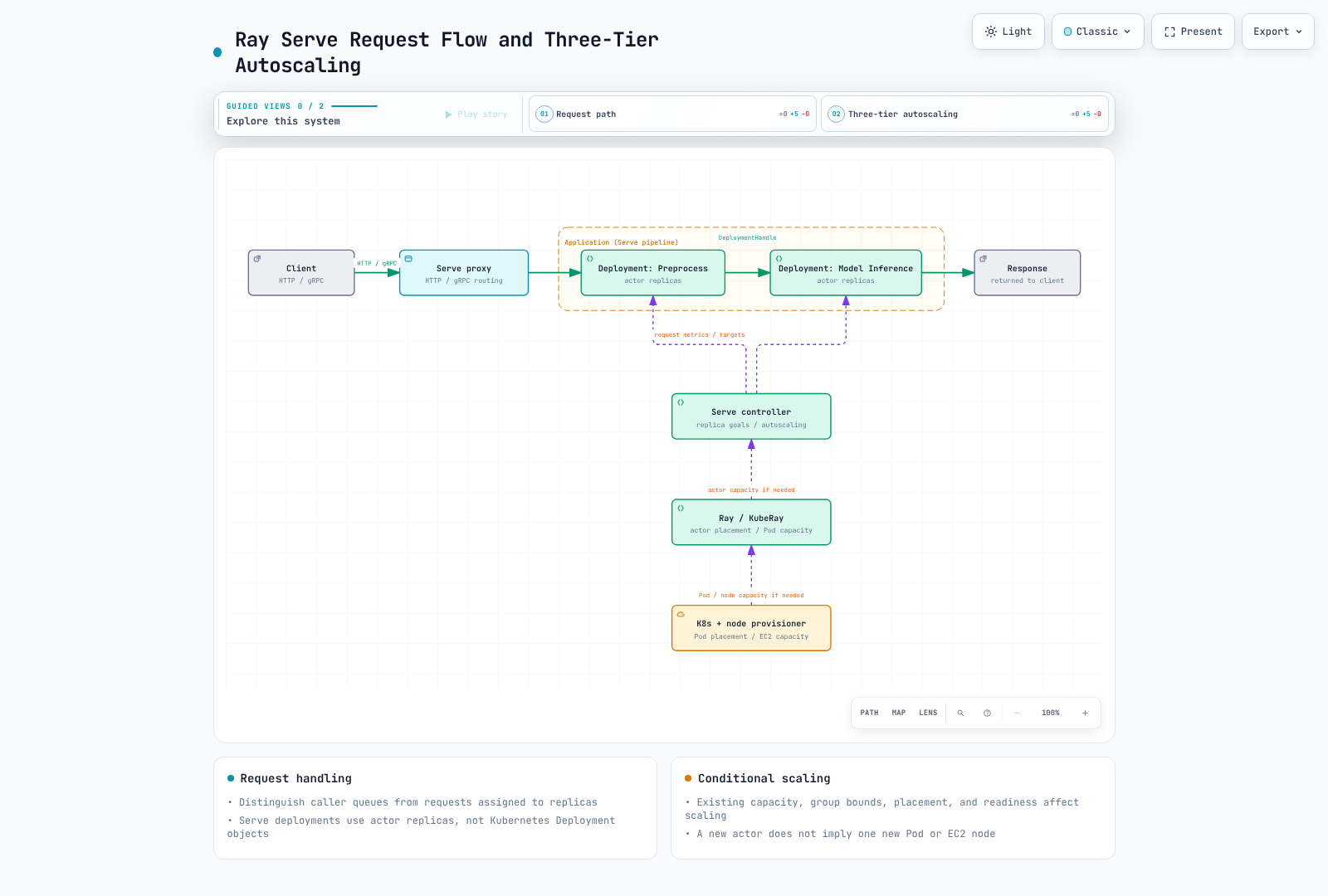
Serve の Deployment は actor replica を管理し、Kubernetes Deployment とは異なります。複数の replica actor が 1 つの Ray Pod に収まる場合があるため、replica 数と Pod 数を同一視することはできません。
Application は 1 つ以上の deployment と ingress deployment を含みます。DeploymentHandle は、すべての内部呼び出しを HTTP 経由にしたり、deployment ごとに Kubernetes Service を作成したりせずに、前処理と推論を接続できます。
Controller は Serve の control state と actor lifecycle を管理します。Proxy は HTTP/gRPC traffic を受信して deployment に転送します。2.58.0 のデフォルトの proxy location は、replica をホストする node 上の EveryNode です。HeadOnly と Disabled は明示的に選択できます。旧来のアーキテクチャページにある head-only のデフォルトで、現在の API contract を上書きすべきではありません。
proxy/handle 上の caller queue と、replica に割り当てられた進行中のリクエストを区別してください。Application 内の同期/asynchronous handler、blocking work、timeout、cancellation behavior を確認します。
小規模なローカル HTTP/Handle の例
これはモデル推論ではなく、response API を検証します。実際の確認では利用可能な private-loopback port を使用し、HTTP 200 と double(4) == 8 を確認しました。
import requests
import ray
from ray import serve

try:
    ray.init(address="local", num_cpus=2, include_dashboard=False,
             object_store_memory=80 * 1024 * 1024)
    serve.start(proxy_location="HeadOnly",
                http_options={"host": "127.0.0.1", "port": 18080})

    @serve.deployment(num_replicas=1,
                      ray_actor_options={"num_cpus": 1},
                      max_ongoing_requests=2, max_queued_requests=4)
    class Echo:
        async def __call__(self, request):
            return {"echo": request.query_params.get("value", "")}
        def double(self, value):
            return value * 2

    handle = serve.run(Echo.bind(), name="echo", route_prefix="/echo")
    response = requests.get("http://127.0.0.1:18080/echo",
                            params={"value": "fixture"}, timeout=15)
    assert response.status_code == 200
    assert response.json() == {"echo": "fixture"}
    assert handle.double.remote(4).result(timeout_s=15) == 8
finally:
    serve.shutdown()
    ray.shutdown()
port 18080 を利用可能にした別の exercise process で実行してください。Ray logical resource と object-store size は、プロセス全体の OS memory/CPU limit ではありません。serve.shutdown() は接続中の Serve instance を停止します。この例の cleanup を共有 production cluster に対して使用しないでください。
Replica、Autoscaling、Backpressure
以下の検証済みの 2.58.0 デフォルトを区別してください。
| 設定 | 値または意味 |
|---|---|
| デフォルトの deployment | replica は 1 つ、autoscaling は未設定 |
num_replicas="auto" | min 1、max 100、target ongoing 2 を適用 |
直接の AutoscalingConfig() | min 1、max 1。max を省略すると拡張が制限される |
max_ongoing_requests | 応答がないまま replica に送信されたリクエスト。デフォルトは 5 |
max_queued_requests | 各 caller(proxy/handle)における queue bound。デフォルトは -1、無制限 |
| Scaling delay | デフォルトは upscale 30 秒/downscale 600 秒。実際の readiness latency ではない |
Autoscaling target は request load を観測します。これは max ongoing や global queue bound とは異なります。queue limit を超過すると、handle では BackPressureError が発生するか、デフォルトで HTTP 503 が返される可能性があります。Backpressure 設定では HTTP response をカスタマイズできます。
min/max、measurement window/delay、cold start、model loading、batching、実際の processing time をまとめて調整してください。min_replicas=0 で zero に scaling しても restart latency はなくなりません。目標 replica 数が、すべての replica の readiness を保証するわけではありません。
EKS 上の制御レイヤー
- Serve は request load と policy に基づいて deployment replica target を調整します。
- Ray は actor/bundle を配置します。有効化された Ray autoscaling と KubeRay は worker Pod capacity を調整できます。
- Kubernetes は Pod を配置し、Karpenter などの provisioner が必要に応じて node capacity を提供します。
pending actor が自動的に 1 つの Pending Pod または 1 つの EC2 node になるわけではありません。 既存の Ray Pod に空き capacity が生じる場合もあれば、group bound、placement、quota により進行が妨げられる場合もあります。各レイヤーで demand と readiness を確認してください。
GPU 推論と Ray Serve LLM
通常の GPU replica は、ray_actor_options などの Ray resource setting を使用します。device、driver、Pod limit、Ray の structured-resource/rayStartParams precedence を整合させてください。パート 2 で説明されているように、Pod limit が常に唯一の設定値とは限りません。
LLMConfig や build_openai_app などの API は、別個の LLM configuration layer を提供します。2.58.0 の documentation と package は、vLLM および SGLang backend を示しています。検証済みの ray[llm] dependency には vllm[audio]==0.26.0 と NIXL package が含まれますが、すべての SGLang dependency もインストールされることを意味するわけではありません。
model_loading_config、deployment_config、engine_kwargs、server_cls を区別してください。すべての vllm serve CLI option がそのまま移行されると想定するのではなく、engine 固有の field とサポートされる組み合わせを確認してください。backend により tensor-parallel option 名と worker placement は異なる場合があります。一部の API は beta であり、旧来の LLMServer/LLMRouter path には deprecation notice があります。
model access、revision、weight download、engine/CUDA/driver compatibility、KV cache、tensor/pipeline-parallel resource を個別に検証してください。OpenAI-compatible request format は authentication、security、または同一の feature coverage を保証しません。CPU Echo の確認は LLM performance や compatibility を証明するものではありません。
RayService と運用上の更新
RayService は、Serve Application と EKS 上の RayCluster の declarative lifecycle management の選択肢であり、すべての production deployment に必須ではありません。Application configuration change と cluster change、そして NewCluster と Gateway ベースの incremental upgrade strategy を区別してください。
KubeRay 1.7 の有効化された incremental feature gate には、依然として Gateway API/implementation、spare capacity、readiness、draining condition が必要です。streaming と long-running request を shutdown bound に対してテストしてください。すべての upgrade を request loss がゼロであることが保証されるものとして説明しないでください。
HTTP option などの cluster-scoped startup setting には dynamic-update limit があります。Deployment change は軽量な reconfiguration の場合も actor replacement の場合もあります。restart/replacement された replica には model initialization と state-recovery の cost が発生します。
アクセス制御と制限
API/dashboard/client entry point、model-artifact access、application-user access をそれぞれ個別に制限してください。Ray cluster token と ClusterIP は、すべての Serve endpoint に対する authentication/authorization を自動的に実装するわけではありません。sensitive input、response、prompt、log を確認し、queue、timeout、resource bound を設定してください。
ここでの確認対象は、native configuration/decorator と小規模な single-node HTTP/Handle Application です。Autoscaling load test、GPU/LLM execution、multi-node failover、RayService rollout は実施していません。