Istio
最終更新: October 12, 2026 · Istio 1.31 guidance
この概要では、以前の章の URL を引き続き使用できます。詳細な手順および互換性マトリクスは、保守されている Istio documentation index と installation guide で管理されています。現在のセットアップについては、そちらを使用してください。
目次
はじめに
Istio は、マイクロサービスアプリケーション向けのオープンソースの service mesh プラットフォームです。service mesh は、サービス間通信を処理するインフラストラクチャ層であり、サービス通信をインフラストラクチャレベルで制御および観測できます。アプリケーションの trace-context 伝播、グレースフルシャットダウン、ビジネス上の冪等性には、引き続きアプリケーション側の対応が必要です。
Service Mesh とは?
service mesh は、次の中核的な機能を提供します。
- Traffic Management: サービス間のトラフィックフローを制御
- Security: サービス間通信の暗号化と認証
- Observability: サービス間通信の可視化
Istio の主な利点
- Platform Independence: さまざまな環境(Kubernetes、VM など)で動作
- Transparent Integration: アプリケーションのビジネスロジックを変更せずに、多くのネットワーク制御を追加可能
- Workload mTLS: mesh に参加したパスでの管理されたアイデンティティとトランスポート保護。強制適用と例外を確認してください
- Advanced Traffic Management: ルーティング、load balancing、fault injection など
- Detailed Metrics: サービス間通信に関する詳細なメトリクス
- Policy Enforcement: アクセス制御と、明示的に構成されたローカル/グローバルの rate limiting
主な機能
1. Traffic Management
Istio は強力な Traffic Management 機能を提供します。
- Gateways: 外部トラフィックをルーティング。Istio Gateway リソースと Kubernetes Gateway API を区別します
- VirtualService / HTTPRoute: 選択した data plane および controller でサポートされる API を使用してルーティングを構成
- DestinationRule: load balancing と connection pool を構成
- Traffic Splitting: Canary deployment と A/B testing をサポート
- Argo Rollouts Integration: 個別に構成された分析および障害処理による progressive delivery
2. Security
包括的な Security 機能:
- mTLS: 参加済み workload のトランスポートに対するアイデンティティ認証と暗号化
- Authorization Policy: きめ細かなアクセス制御
- Request Authentication: JWT 検証。JWT が必須の場合は AuthorizationPolicy を使用
- Peer Authentication: inbound workload の mTLS ポリシー
3. Observability
選択したモード用に構成された Telemetry および backend 統合:
- Metrics: Prometheus 統合
- Distributed Tracing: Jaeger を備えた OpenTelemetry など、構成済みの trace provider/backend。アプリケーションが context を伝播します
- Logging: access log と structured logging
- Visualization: Kiali dashboard
4. Resilience
サービスの Resilience パターン:
- Circuit Breaker: connection/request-pool の上限。overload を防ぐ保証ではありません
- Retry: retry-safe 操作に対する明示的な予算。あいまいな write retry は無効化
- Timeout: request timeout の構成
- Outlier Detection: 正常でない instance を除外
- Rate Limiting: 構成済みのローカル token bucket またはグローバル rate-limit service
アーキテクチャの概要
Istio は Control Plane と Data Plane で構成されます。次の図は sidecar 形式を示しており、ambient トポロジーではありません。
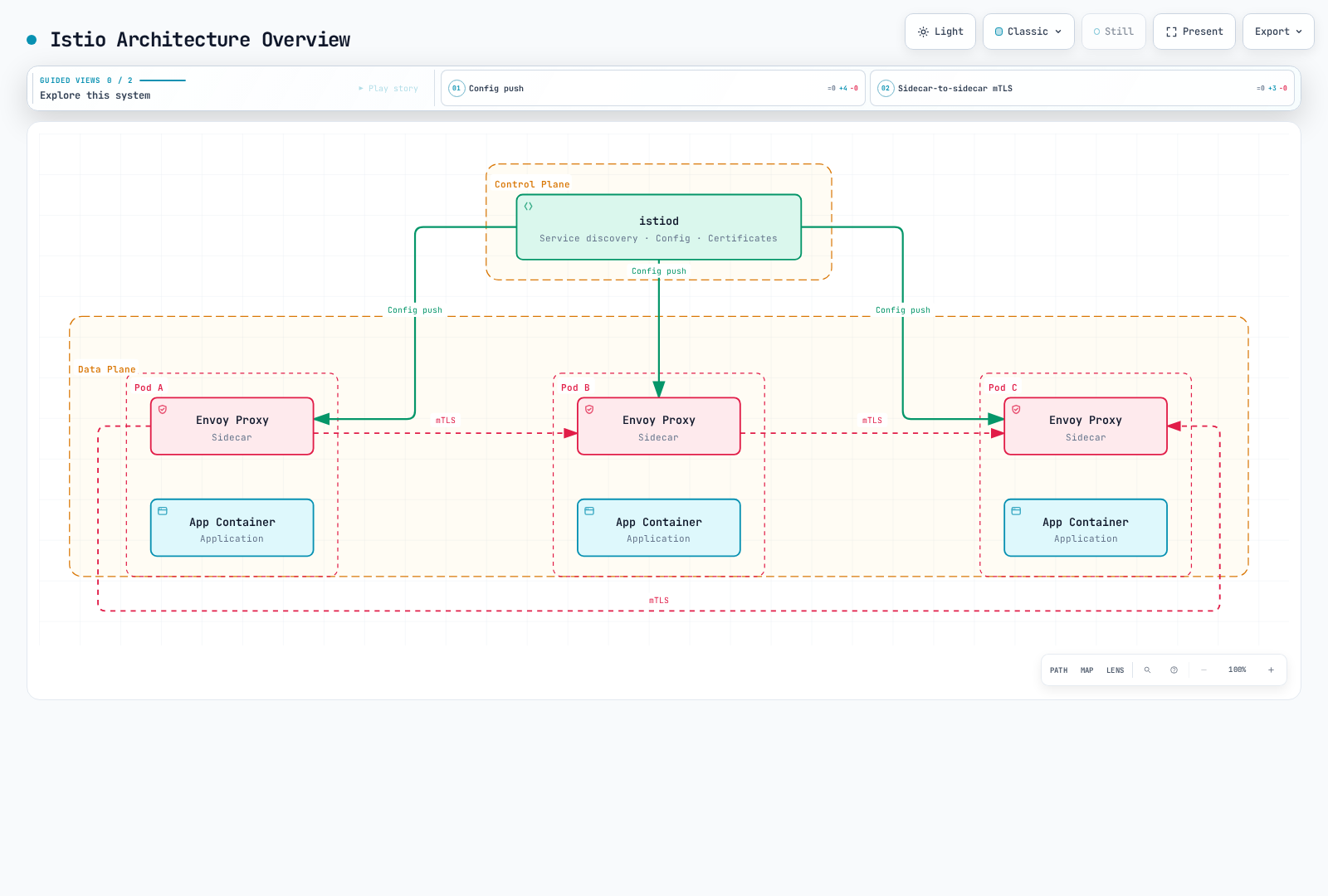
Control Plane (istiod)
istiod は Istio の中央 Control コンポーネントで、次を提供します。
- Service Discovery: mesh の service registry を維持
- Configuration Management: 構成を監視し、変換して proxy 設定を配布。Kubernetes は API リソースを永続化します
- Certificate Management: 構成済みの CA を使用して workload certificate のリクエストとローテーションを管理
Data Plane: Sidecar と Ambient
sidecar モードでは、Envoy は参加済みの各 application Pod とともに実行されます。
- Traffic Routing: サービス間のトラフィックを制御
- Load Balancing: service instance 間でトラフィックを分散
- Security: mTLS の暗号化と認証
- Observability: metrics、logs、traces を収集
Ambient は、L4 トランスポートに node レベルの ztunnel を使用し、サポートされる L7 機能には任意で Envoy waypoint を使用します。すべての application Pod に Envoy を inject するわけではありません。機能サポート、policy のアタッチ、リソース使用量はモードによって異なります。このトポロジーから、固定的なリソース削減率や普遍的なパフォーマンス優位性が導かれるわけではありません。Ambient Mode を参照してください。
詳細ドキュメント
以下のリンクは、保守されているサブツリーを学ぶためのマップです。その index には、追加および新規トピックが含まれます。
📚 基本ドキュメント
| ドキュメント | 説明 |
|---|---|
| Installation Guide | Istio のインストールと初期セットアップ |
| Core Concepts | Istio の基本概念と用語 |
| Components | Istio のアーキテクチャとコンポーネント |
🚦 Traffic Management
| ドキュメント | 説明 |
|---|---|
| Gateway & VirtualService | Ingress/Egress Gateway の構成 |
| Routing | VirtualService の routing rules |
| DestinationRule | service traffic policy |
| Traffic Splitting | Canary deployment と A/B testing |
| Timeout and Retry | timeout と retry policy |
| Load Balancing | さまざまな load balancing strategy |
| Circuit Breaker | Circuit Breaker パターンの実装 |
| Fault Injection | chaos engineering |
| Traffic Mirroring | traffic mirroring と shadow testing |
| Session Affinity | session affinity の構成 |
🔐 Security
| ドキュメント | 説明 |
|---|---|
| mTLS | サービス間 mTLS の構成 |
| Authorization Policy | access control policy |
| Request Authentication | JWT ベースの認証 |
| Peer Authentication | サービス間認証 |
📊 Observability
| ドキュメント | 説明 |
|---|---|
| Metrics | Prometheus metrics の収集 |
| Distributed Tracing | Jaeger/Zipkin 統合 |
| Logging | access log と structured logging |
| Visualization | Kiali、Grafana dashboard |
💪 Resilience
| ドキュメント | 説明 |
|---|---|
| Outlier Detection | 正常でない instance の検出 |
| Rate Limiting | ローカルおよびグローバルの rate limiting |
| Zone Aware Routing | locality-aware routing |
🚀 高度なトピック
| ドキュメント | 説明 |
|---|---|
| Ambient Mode | sidecar を使用しない service mesh |
| Multi-cluster | multi-cluster mesh の構成 |
| EnvoyFilter | Envoy のカスタマイズ |
| DNS Capture and Caching | DNS capture、resolution、および測定済み cache の動作 |
| gRPC | gRPC protocol のサポート |
| WebSocket | WebSocket connection のサポート |
| Sidecar Injection | sidecar injection mechanism |
| Argo Rollouts | progressive delivery 統合 |
✅ ベストプラクティス
| ドキュメント | 説明 |
|---|---|
| Best Practices | 本番運用のチェックリストと推奨事項 |
クイックスタート
- installation guide で、正確な Istio/Kubernetes/EKS の互換性の共通範囲を確認してください。一般的な「Kubernetes 1.28+」という前提条件だけでは、現在の Istio release に対して十分ではありません。
- sidecar または ambient を選択し、その guide の固定された CLI/chart、分離された namespace、およびプラットフォームの前提条件に従ってください。指定されていない latest CLI をダウンロードしてから、古い version directory に移動しないでください。
- 保守されている guide にある、対応 version の Bookinfo 手順および Gateway 手順を使用してください。default profile は ingress gateway Deployment を自動的に提供せず、Gateway configuration object だけで各インストールに必要な gateway/LoadBalancer がすべて作成されるわけではありません。
- 実際の gateway address、Service port、route status、および HTTP response を確認してください。load balancer は IP または hostname を公開する場合があります。AWS 専用の hostname field や特定の port name を想定しないでください。
- dashboard command を使用する前に、選択した observability backends をインストール/構成してください。Prometheus、Grafana、Kiali、および tracing storage は、デフォルトの Istio profile では自動的にインストールされません。
その手順を完了した後の基本的な検証:
istioctl version
istioctl analyze -A
istioctl proxy-status
Proxy status は診断入力の一つにすぎません。Ambient enrollment と ztunnel には独自の確認が必要であり、analyzer の結果が正常であっても end-to-end traffic test ではありません。
学習リソース
公式ドキュメント
AWS とコミュニティ
- Istio on Amazon EKS
- Maintained AWS integration guide
- AWS App Mesh lifecycle notice: AWS は September 30, 2026 にサポートを終了しました。移行要件を評価してください。これは新規デプロイメントの推奨ではありません。
- Istio community, channels and working groups
追加リソース
クイズ
Istio の理解度を確認するには、Istio Quiz に挑戦してください。
このクイズでは、次のトピックを扱います。
- service mesh の基本概念
- Istio アーキテクチャ
- Traffic Management(Canary deployment)
- Security(mTLS)
- Gateway と Ingress
- Observability ツール
- sidecar および ambient モード
- Rate Limiting
- locality routing
- Amazon EKS 統合
次のステップ: Installation Guide を参照して Istio をインストールし、Core Concepts で基本概念を学んでください。